If you want one keyboard, mouse, and dual-display setup to control more than one computer, the right KVM switch can tidy your desk fast.
This roundup covers the best dual monitor KVM switches for desktop PCs in 2026, with a focus on display quality, USB expansion, and everyday usability.
Best 10 Dual Monitor Kvm Switches for Desktop PCs Picks for 2026
Best for High-Refresh Dual Displays
DisplayPort KVM Switch 2 Monitors 2 PCs

- 4K@144Hz support for crisp, fast dual-screen output
- Shares two PCs and four USB 3.0 devices
- Desktop controller included for easy switching
Best For: Users who want a high-refresh DisplayPort KVM for dual-monitor desktop setups.
Best for Laptop + Desktop Sharing
USB-C HDMI Dual KVM for 2 Monitors

- Supports one laptop and one desktop on two monitors.
- 4K@60Hz video with USB 3.0 peripheral sharing.
- Includes 80W USB-C charging and wired remote switching.
Best For: People who want to share two monitors between a USB-C laptop and a desktop PC.
Best for High-Refresh Dual-Display Setups
4K@144Hz Dual Monitor KVM Switch

- Up to 4K@144Hz and 8K@60Hz support
- Extended and Mirror modes for two screens
- USB 3.0 sharing for four devices
Best For: Desktop PC users with fully DisplayPort-based dual-monitor setups who want high refresh rates.
Best for Laptop-Desktop Dual Screens
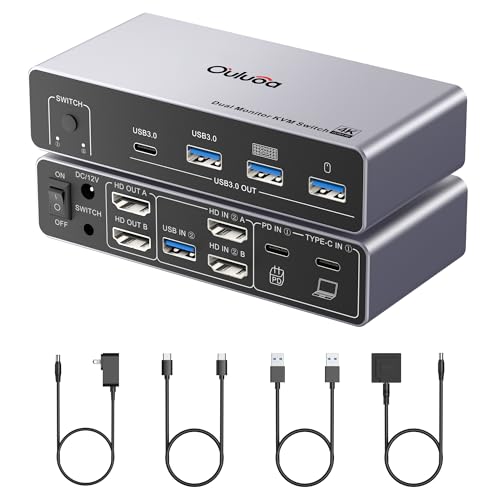
- Dual 4K@60Hz HDMI output
- 3x USB 3.0 plus USB-C sharing
- 80W PD charging for laptops
Best For: Desktop and laptop users who want dual monitors, shared USB peripherals, and charging in one switch.
Best for Laptop + Desktop Workstations

- 4K@60Hz dual-monitor support
- USB-C switching for desktop + laptop
- PD charging helps power a connected laptop
Best For: Hybrid users who want one dual-monitor setup for a desktop and a USB-C laptop.
Best for Dual-Display Docking
KVM Switch 2 Monitors 2 Computers Docking Station

- Two-monitor sharing with HDMI and DisplayPort output
- 100W PD pass-through charging plus 120W adapter
- 13-in-1 dock with USB, SD, and microSD expansion
Best For: People who want a dual-monitor KVM plus docking station in one compact unit.
Best for USB-C Laptops + 8K Dual-Monitor Workstations

- Dual-monitor support for a USB-C laptop and HDMI desktop
- Up to 8K@60Hz and 4K@144Hz/60Hz video support
- 4 USB 3.0 ports plus 100W PD charging
Best For: Mixed-device desks that need high-resolution dual-monitor switching and laptop charging.
Best for High-Refresh Dual Displays – DisplayPort KVM Switch 2 Monitors 2 PCs
If you need one of the more capable dual monitor kvm switches for desktop pcs, this DisplayPort model stands out for 4K@144Hz support, dual-screen switching, and four USB 3.0 ports. It’s a practical fit for productivity setups that need clean cable management, stable performance, and room for multiple peripherals.
Best For: Desktop users who want a high-refresh dual-monitor KVM for two PCs, especially with DisplayPort-only workstations.
Pros:
- Supports dual 4K displays up to 144Hz for sharp, smooth visuals
- Handles two computers plus 4 USB 3.0 peripherals on one switch
- Includes both panel and wired desktop controller switching
- External power helps keep connected devices stable
Cons:
- Requires two DisplayPort outputs per computer for full dual-screen use
- No hotkey switching support
- DisplayPort cables are not included
For buyers comparing dual monitor kvm switches for desktop pcs, this is a strong pick when refresh rate and DisplayPort connectivity matter more than convenience features like hotkeys.
Best for Laptop + Desktop Sharing – USB-C HDMI Dual KVM for 2 Monitors
This dual-monitor KVM is a practical pick for anyone comparing dual monitor kvm switches for desktop pcs and a laptop in the same workspace. It supports one USB-C laptop and one HDMI desktop, lets you share two 4K@60Hz displays plus USB peripherals, and includes wired and button switching for straightforward daily use.
Best For: Users who want one switch for a desktop PC and a USB-C laptop with dual displays, USB 3.0 peripherals, and charging support.
Pros:
- Handles one laptop and one desktop with dual-monitor sharing.
- Supports crisp 4K@60Hz output and flexible mirror/extend modes.
- Includes 4 USB 3.0 ports for keyboard, mouse, printer, and more.
- 80W USB-C power delivery helps keep a compatible laptop charged.
Cons:
- Mac M1/M2 does not support MST for true extended dual displays.
- Requires the right cables and adapter setup for best results.
For mixed desktop-and-laptop setups, this is a convenient all-in-one option among dual monitor kvm switches for desktop pcs, especially if you want charging, USB hub features, and simple physical switching without extra software.
Best for High-Refresh Dual-Display Setups – 4K@144Hz Dual Monitor KVM Switch
If you’re comparing dual monitor kvm switches for desktop pcs and want high refresh support, this DisplayPort model is built for serious desktop setups. It handles two PCs sharing two monitors plus four USB devices, with support for both Extended and Mirror modes.
Best For: Desktop PC users who need dual 4K monitors, fast USB sharing, and a switch built around DisplayPort-only workstations.
Pros:
- Supports up to 4K@144Hz and 8K@60Hz for demanding multi-monitor rigs
- Works with Extended Mode and Mirror Mode for productivity or presentations
- Includes USB 3.0 sharing for up to four peripherals with external power
- Desktop controller gives you a simple one-touch switching option
Cons:
- Requires two DP outputs per computer and DP inputs on both monitors
- Does not support HDMI adapters or conversion cables in the setup
- Mac compatibility is not recommended
For buyers focused on dual monitor kvm switches for desktop pcs, this is a strong fit if your hardware is fully DisplayPort-based and you want high-refresh output without software headaches. The strict connection requirements make it less flexible, but they also help keep the signal path straightforward for capable PC builds.
Best for Docking-Style Workstations – AV Access Dual Monitor KVM Dock
If you want dual monitor kvm switches for desktop pcs that also clean up your desk, this AV Access model is built more like a docking station than a basic switch. It handles 2 computers and 2 monitors, adds USB, Ethernet, card reader, and audio ports, and aims to make one-button switching feel smooth for work or gaming.
Best For: Hybrid home-office setups that need dual displays, wired networking, and extra dock-style connectivity in one unit.
Pros:
- Supports 2 monitors and 2 computers with fast 2-3 second switching
- Includes 11-in-1 docking features: USB ports, 1G Ethernet, SD card slot, and audio
- Delivers up to 100W USB-C charging for compatible laptops
- Good fit for 4K@60Hz work setups and high-refresh gaming at lower resolutions
Cons:
- macOS only supports mirrored mode
- Desktop use requires three connected cables: USB-B, HDMI, and DP
- Ethernet is for the laptop side only, not both computers
For buyers comparing dual monitor kvm switches for desktop pcs, this is a strong choice if you want more than switching alone. The added docking features make it especially useful when you want a single hub for displays, peripherals, and charging.
Best for Laptop-Desktop Dual Screens – USB-C KVM for 2 Monitors 4K60
If you want one switch that can handle a desktop and a laptop on two displays, this Ouluoa model is a practical pick among dual monitor kvm switches for desktop pcs. It supports extended or mirrored HDMI output, adds a built-in USB-C docking-style layout, and includes enough peripheral ports for a tidy shared workstation.
Best For: Users who want to share two monitors, keyboard/mouse, and USB devices between a desktop and a laptop with minimal desk clutter.
Pros:
- Supports dual 4K@60Hz HDMI output for sharp everyday use
- Includes 3 USB 3.0 ports plus 1 USB-C port for shared peripherals
- Built-in 80W PD charging helps keep a laptop powered while connected
- Wired remote and cables are included for easier setup
Cons:
- macOS USB-C display support is limited to SST mode, not MST
- HDMI cable length needs to stay under 6.56 feet
- More complex than a basic single-monitor KVM
This is a strong fit if your priority is an all-in-one desktop-and-laptop workflow with dual displays and USB expansion. For buyers comparing dual monitor kvm switches for desktop pcs, it stands out more for docking convenience and charging support than for bare-bones simplicity.
Best for Laptop + Desktop Workstations – 2-Monitor USB-C KVM with PD
If you want one box that can handle both a desktop and a laptop, this dual-monitor USB-C KVM is a practical pick for dual monitor kvm switches for desktop pcs. It’s aimed at mixed work setups where you need two displays, USB peripheral sharing, and a cleaner desk without constantly swapping cables.
Best For: Office users, work-from-home setups, programmers, and AI workers who switch between a desktop and a laptop on dual monitors.
Pros:
- Supports two monitors at up to 4K@60Hz for a sharp dual-display setup.
- USB-C design makes it a strong fit for laptop + desktop workflows.
- PD power function helps keep a connected laptop charged during use.
- Good match for productivity-heavy desks with keyboard, mouse, and display sharing.
Cons:
- Not the simplest choice if you only need basic single-monitor switching.
- Dual-monitor KVM setups can require careful compatibility checks.
- Best results depend on matching cables, ports, and display support.
For buyers comparing dual monitor kvm switches for desktop pcs, this model stands out most when the real need is combining a desktop and a USB-C laptop into one efficient two-screen station. It’s less about low cost and more about reducing desk clutter while keeping a flexible hybrid workflow.
Best for Dual-Display Docking – KVM Switch 2 Monitors 2 Computers Docking Station
If you want one dock to handle both sharing and charging, this is a strong fit among dual monitor kvm switches for desktop pcs. It lets two computers share two monitors plus common peripherals, with USB-C, HDMI, and DisplayPort input options that make it more flexible than basic KVM boxes.
Best For: Users who want a KVM-style dual-monitor setup with docking, 100W laptop charging, and lots of shared USB ports in one aluminum unit.
Pros:
- Supports two monitors with HDMI and DisplayPort output, including up to 4K60 on HDMI and 4K120 on DisplayPort
- Includes 100W PD pass-through charging and a 120W power adapter for cleaner cable management
- 13-in-1 docking layout adds USB 3.0, 10Gbps USB, SD, and microSD expansion
- Plug-and-play design with no drivers required
Cons:
- MacBook and macOS users are limited to mirror mode
- Full resolution support depends on compatible computers, monitors, and cables
- Requires Thunderbolt 3/4/5 for USB-C laptop use
This is a good match if you want a compact, all-in-one option for dual monitor kvm switches for desktop pcs and a laptop workflow. It stands out more for its dock-like feature set than for being a barebones KVM.
Best for Laptop + Desktop Setups – Dual Monitor KVM for Laptop and PC
If you need one switch for a laptop-and-desktop workflow, this is a practical pick among dual monitor kvm switches for desktop pcs. It’s built for a USB-C laptop plus HDMI desktop, supports dual displays at up to 4K/60Hz, and adds PD charging so your laptop can stay powered while you work.
Best For: Office, work-from-home, and programmer setups that combine a USB-C laptop with a dual-monitor desktop station.
Pros:
- Supports a laptop + desktop combination with dual monitors
- 4K@60Hz output with extend and mirror modes on Windows
- 60W PD charging helps reduce cable clutter for laptops
- Includes button and wired switching for easy desk placement
Cons:
- Requires a USB-C port with video output support on the laptop
- Not compatible with HDMI-to-USB-C adapter setups
- macOS support is limited to mirrored output
For users building dual monitor kvm switches for desktop pcs around a laptop-plus-PC workflow, this model stands out for its simple wiring, decent charging, and broad everyday productivity fit. It’s not the most universal option, but it is well-matched to mixed device desks.
Best for USB-C Laptops + 8K Dual-Monitor Workstations – USB-C+HDMI KVM Switch
If you want one of the more flexible dual monitor kvm switches for desktop pcs, this model stands out for mixing a USB-C laptop input with an HDMI desktop input while still driving two displays. It’s a strong fit for mixed-device desks where you need fast switching, high-resolution output, and fewer cables without giving up modern connectivity.
Best For: Users who need to share two monitors and USB peripherals between a USB-C laptop and an HDMI desktop, especially in mixed work/home setups.
Pros:
- Supports dual-monitor output with very high-end resolution options, including 8K@60Hz and 4K@144Hz/60Hz
- Includes 4 USB 3.0 ports for sharing keyboard, mouse, storage, and other peripherals
- 100W PD charging helps keep a connected laptop powered during long work sessions
- Wired remote and front button make switching simple and desk-friendly
Cons:
- Best results depend on a USB-C laptop that supports video output and power delivery
- Requires the included power adapter for stable USB peripheral performance
- Feature-rich setup may be more than casual users need
For buyers comparing dual monitor kvm switches for desktop pcs, this one is a good match when you want high resolution, laptop charging, and shared peripherals in a single switch. It’s especially useful if your desk rotates between a desktop and a USB-C laptop and you want both screens to stay in play.
Best for Laptop + Desktop Workflows – TobenONE Dual HDMI KVM Docking Station
If you want one of the more capable dual monitor kvm switches for desktop pcs and a laptop, this TobenONE model stands out for combining dual HDMI switching, a built-in USB dock, and fast charging in one hub. It’s designed to cut desk clutter, keep two displays active, and make swapping between work and play feel almost instant.
Best For: Hybrid users who move between a laptop and desktop, want dual 4K monitor support, and need a cleaner all-in-one desk setup with shared peripherals.
Pros:
- Supports dual HDMI output up to 4K@60Hz for sharp dual-screen use
- EDID emulation helps keep windows and monitor layout stable after switching
- Built-in USB hub with 10Gbps ports, audio, and peripheral sharing
- 100W PD pass-through helps keep a connected laptop charged while in use
Cons:
- macOS support is limited to mirrored second display output
- Requires compatible HDMI and USB-C/USB4 connections for full functionality
For buyers comparing dual monitor kvm switches for desktop pcs, this is a strong fit if you value docking features as much as video switching. It’s especially appealing for home offices and gaming desks where you want fewer cables, better organization, and a smoother daily handoff between systems.
How We Picked the Best Dual Monitor Kvm Switches for Desktop PCs
We focused on Dual Monitor Kvm Switches for Desktop PCs that balance stable video output, straightforward switching, and practical USB sharing. Priority went to models with clear resolution support, enough ports for a real work setup, and features that reduce frustration such as EDID emulation, fast USB passthrough, and reliable power delivery where needed.
Quick Comparison
The main tradeoff is usually between higher refresh-rate support and broader docking-style convenience. If you mainly use two desktops, a straightforward DisplayPort or HDMI KVM with strong refresh-rate support is often the best fit. If one side is a laptop, a KVM docking station with USB-C and charging can replace extra hubs and simplify cable management.
Key Buying Factors for Dual Monitor Kvm Switches for Desktop PCs
Video Inputs and Outputs
Match the switch to your monitors and computers first. Confirm whether you need HDMI, DisplayPort, or mixed USB-C plus video inputs. Also check the exact maximum resolution and refresh rate at your target monitor count; some units support 4K at 60Hz, while others are built for higher-refresh gaming or creator workflows.
USB Sharing and Device Support
Look at how many USB peripherals you need to share. Basic setups may only need keyboard and mouse support, but many buyers also want webcams, headsets, printers, or external drives. More USB ports and higher-speed USB 3.0 or better can make a noticeable difference in daily use.
Switching Behavior and EDID
EDID support helps keep windows arranged correctly when you change inputs, which matters on dual-monitor desks. If you switch often during work, choose a model known for stable detection so your monitors wake quickly and your layout stays consistent.
Power Delivery and Dock Features
For laptop-plus-desktop setups, USB-C charging and docking features can reduce cable clutter. For desktop-only users, these extras are less important than rock-solid video and USB performance. Choose the feature set that matches your actual setup instead of paying for unused extras.
Who Should Buy Which Dual Monitor Kvm Switches for Desktop PCs?
Choose a high-refresh DisplayPort model if you game or need smooth motion on both screens. Pick a USB-C docking KVM if you regularly swap between a desktop and a laptop and want charging built in. If your priority is office productivity, the best Dual Monitor Kvm Switches for Desktop PCs are usually the ones that offer the simplest connections, dependable switching, and enough USB ports for your everyday peripherals.