If you need a compact way to run two M.2 drives from one USB-C or Thunderbolt port, a dual slot NVMe enclosure is a smart upgrade. It can simplify backups, speed up transfers, and even make drive cloning easier.
In this roundup, we focus on the most useful options for everyday storage, high-speed workflows, and advanced setups like RAID and duplication.
Best 10 Dual Slot Nvme Enclosure Picks for 2026
Best for Fast Dual-Drive Transfers
Vantec NexStar SX Dual NVMe Enclosure

- Holds two NVMe drives as separate volumes
- USB 3.2 Gen2x2 for up to 20Gbps
- Aux power port supports demanding drives
Best For: Backup, cloning, and fast dual-drive NVMe management.
Best for Tool-Free Setup
ORICO Dual M.2 NVMe Aluminum Dock

- Two independent NVMe slots for dual-drive use
- Tool-free installation with plug-and-play setup
- Aluminum cooling design helps control SSD heat
Best For: People who want an easy dual-bay NVMe enclosure for quick installs, swaps, and everyday storage tasks.
Best for RAID & Cloning

- RAID 0, RAID 1, JBOD, and clone mode
- Tool-free SSD installation and swapping
- 20Gbps speed with optional external power
Best For: Users who want a versatile dual-bay enclosure for cloning, backup protection, and high-speed NVMe storage.
Best for Thunderbolt Speed
ACASIS 40Gbps M.2 NVMe Enclosure

- 40Gbps USB4/Thunderbolt performance
- Built-in fan for better heat control
- Fits M.2 2280/2260/2242/2230 drives
Best For: Mac and PC users who want a fast, cooled enclosure for large file transfers.
Best for Offline Cloning
ORICO 20Gbps Dual Bay NVMe Enclosure

- 20Gbps USB 3.2 Gen 2x2 performance
- Standalone offline NVMe/SATA cloning
- Tool-free dual-bay aluminum design
Best For: IT users, creators, and power users who want a fast dual-bay dock with offline clone capability.
Best Heavy-Duty Pick
WAVLINK Dual NVMe 40Gbps Cloner
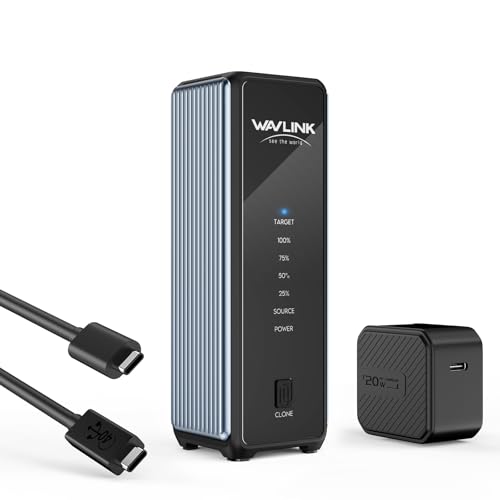
- Dual M.2 slots with one-click offline cloning
- 40Gbps USB4 speeds with Thunderbolt support
- Active cooling and tool-free NVMe installation
Best For: Users who want an easy-to-use dual-drive enclosure with offline cloning for quick SSD migrations and portable high-speed transfers.
Best for High-Speed RAID

- 20Gbps USB-C with strong single-drive speeds
- Tool-free dual-slot design with active cooling
- RAID 0 support and up to 16TB total capacity
Best For: Creators and power users who want fast dual-drive NVMe storage with RAID support.
Best for Easy Two-Drive Access – ORICO Dual M.2 NVMe SSD Enclosure
If you want a dual slot nvme enclosure that can handle two independent drives without needing a power adapter, the ORICO BM2-2N is a practical pick. It supports tool-free installation, USB 3.2 Gen2 speeds, and broad NVMe M-Key compatibility, making it a straightforward option for quick drive access and portable transfers.
Best For: Users who need a simple, no-tools enclosure for reading or moving data between two NVMe SSDs at once.
Pros:
- Two independent NVMe bays for reading or using two SSDs simultaneously
- Tool-free, plug-and-play setup with hot-swap support
- USB 3.2 Gen2 with UASP and Trim for fast, stable performance
- All-aluminum body with included thermal pads and heatsinks
Cons:
- Designed for NVMe M-Key drives only, not SATA M.2 SSDs
- Best speeds depend on a capable USB-C host and quality cables
- Bulkier than a single-drive portable enclosure
This dual slot nvme enclosure stands out most for convenience rather than cutting-edge throughput, especially if you regularly swap or compare two drives. It’s a solid fit for users who value easy setup, decent cooling, and true two-bay flexibility in a portable design.
Best for Fast Dual-Drive Transfers – Vantec NexStar SX Dual NVMe EnclosureIf you need a dual slot nvme enclosure for backup, cloning, or keeping two M.2 NVMe drives in one portable unit, the Vantec NexStar SX is built for that job. It supports two individual NVMe modules, uses USB 3.2 Gen2x2 for up to 20Gbps, and includes native USB-C plus an auxiliary power input for higher-demand drives.
Best For: Users who want a fast, enclosure-only solution for managing two NVMe drives separately, especially for backups, recovery, and drive-to-drive cloning.
Pros:
- Supports two M.2 NVMe drives as separate storage volumes
- USB 3.2 Gen2x2 and native USB-C help maximize transfer speed
- Auxiliary power port helps with higher-power NVMe setups
- Aluminum build doubles as a heatsink for better thermal handling
Cons:
- NVMe only, so it will not work with M.2 SATA drives
- Full speed depends on a compatible USB 3.2 Gen2x2 host port
- Enclosure only; storage drives must be purchased separately
Overall, this dual slot nvme enclosure makes the most sense for power users who want two-drive portability without giving up cloning or separate drive access. It is a practical fit if speed, cooling, and USB-C convenience matter more than a simple single-bay design.
Best for Tool-Free Setup – ORICO Dual M.2 NVMe Aluminum Dock
If you want a practical dual slot nvme enclosure for quick SSD cloning, swaps, or direct-to-device storage expansion, ORICO’s aluminum USB 3.2 Gen2 dock is a straightforward pick. It supports two independent M.2 NVMe drives, uses tool-free installation, and pairs well with laptops, desktops, and other USB-C devices.
Best For: Users who want an easy-to-use dual-bay NVMe enclosure with solid cooling and simple plug-and-play operation.
Pros:
- Dual independent slots let you run two NVMe drives at once
- Tool-free design makes drive installs and swaps fast
- Aluminum body, heat sinks, and pads help manage heat
- Up to 10Gbps USB 3.2 Gen2 performance with UASP/TRIM support
Cons:
- Only one cable is included, so connecting both bays may require an extra cable
- 10Gbps speed is good, but not as fast as newer 20Gbps enclosures
- Best suited to NVMe M-Key drives, not SATA SSDs
This dual slot nvme enclosure stands out for convenience more than raw speed, making it a solid choice for everyday storage tasks and fast drive access. If you want simple setup and dual-drive flexibility without extra complexity, it fits the bill well.
Best for RAID & Cloning – Dual Bay RAID SSD Enclosure
If you need a dual slot nvme enclosure that can do more than basic storage expansion, this dual-bay model stands out for its RAID, JBOD, and offline clone support. It’s a practical pick for users who want faster transfers, drive redundancy, or an easy way to duplicate an SSD without a computer.
Best For: Users who want a versatile dual-bay enclosure for cloning, backup protection, and high-speed NVMe storage.
Pros:
- RAID 0, RAID 1, JBOD, and clone mode cover multiple workflows
- Tool-free design makes SSD swaps and cloning setup quick
- 20Gbps transfer support suits large files and demanding backups
- Aluminum housing helps with heat dissipation and portability
Cons:
- Best performance depends on a compatible high-speed USB port
- May need external power for larger or power-hungry SSDs
- Not the simplest choice if you only want basic single-drive storage
Overall, this dual slot nvme enclosure is strongest when you want flexibility: fast RAID 0 performance, mirrored RAID 1 protection, or standalone offline cloning. It makes sense for power users, creators, and anyone managing multiple NVMe drives.
Best for Thunderbolt Speed – ACASIS 40Gbps M.2 NVMe Enclosure
If you want a fast, well-cooled dual slot nvme enclosure style solution for a single high-performance drive, the ACASIS TBU405 Pro is built for serious transfer speeds and stable sustained workloads. Its 40Gbps USB4/Thunderbolt compatibility, active fan cooling, and compact aluminum body make it a practical pick for creators and power users who move large files often.
Best For: Mac and PC users who need a high-speed NVMe enclosure for editing, backups, and heavy file transfers.
Pros:
- 40Gbps USB4/Thunderbolt 3/4 support for very fast NVMe performance
- Built-in cooling fan helps reduce throttling during long transfers
- Broad compatibility with M1/M2/M3 Macs, Windows, Linux, and multiple M.2 sizes
- Compact aluminum design is easy to carry in a laptop bag
Cons:
- Fan must be switched on manually
- Only supports one NVMe SSD, not dual-drive RAID use
- Best speeds depend on a Thunderbolt 3/4 or USB4 host
The ACASIS TBU405 Pro stands out if speed and heat control matter more than multi-drive flexibility. For shoppers comparing a dual slot nvme enclosure against a single-bay premium model, this one is a strong choice when you want maximum performance from one drive.
Best for Offline Cloning – ORICO 20Gbps Dual Bay NVMe Enclosure
If you want a dual slot nvme enclosure that can do more than basic storage expansion, this ORICO model stands out for its 20Gbps USB 3.2 Gen 2×2 connection, tool-free access, and standalone cloning support. It is a strong fit for users who regularly move large files, swap SSDs, or need a simple way to duplicate drives without relying on a PC.
Best For: IT users, creators, and power users who want a fast dual-bay dock with offline clone capability.
Pros:
- 20Gbps USB 3.2 Gen 2×2 speeds are faster than typical 10Gbps enclosures
- Standalone one-key offline clone mode works without a computer
- Tool-free, dual-bay design makes SSD swaps quick and easy
- Aluminum, fanless body supports quiet passive cooling
Cons:
- Same-protocol cloning only, so NVMe-to-NVMe or SATA-to-SATA
- Top speed requires a compatible 20Gbps host port
- Bulkier than a simple single-drive enclosure
This is a practical pick if cloning is as important as portability, since the ORICO combines fast transfer speeds with an offline duplicator function in one dual slot nvme enclosure. If you need a quiet, no-fuss dock for upgrades and large-file workflows, it delivers a lot of utility for the desk.
Best Docking Pick – ACASIS 40Gbps Dual-Bay NVMe Enclosure Dock
If you need a dual slot nvme enclosure that doubles as a desktop dock, this ACASIS model stands out with dual 40Gbps USB-C ports, HDMI, USB-A, and 100W power delivery in one aluminum unit. It’s designed for Thunderbolt 4/3 and USB4 systems, and the built-in fan helps keep speeds steadier during long transfers or RAID use.
Best For: Creators, Mac mini users, and power users who want storage expansion plus a compact docking hub.
Pros:
- Dual-bay NVMe design with support for RAID 0 software acceleration
- 40Gbps connection plus HDMI, USB-A, dual USB-C, and 100W PD
- Active cooling and aluminum construction for better thermal control
- Tool-free access makes drive swaps simpler
Cons:
- Requires a true 40Gbps host device to work properly
- Bulkier than a simple pocket enclosure because it includes docking features
For buyers who want more than basic storage, this dual slot nvme enclosure is appealing because it blends expansion, display output, and cooling into a single workstation-friendly package. Just make sure your laptop or desktop supports 40Gbps USB4 or Thunderbolt speeds to get the most out of it.
Best with Extra Features – ICY BOX Dual M.2 NVMe Enclosure
If you want a dual slot nvme enclosure that can handle two drives at once without a complicated setup, this ICY BOX model is built for exactly that. It supports M.2 NVMe SSDs in 2230, 2242, 2260, and 2280 sizes, and its 20Gbps USB 3.2 Gen 2×2 connection makes it a strong pick for fast backups, drive cloning, and working across multiple operating systems.
Best For: Users who want a tool-free, dual-drive enclosure for fast file transfers and simple day-to-day SSD management.
Pros:
- Supports two NVMe SSDs at the same time for more flexible storage workflows
- Tool-free design makes installation and swaps quick and easy
- 20Gbps performance is ideal for large file transfers on compatible systems
- Works with a wide range of M.2 sizes, from 2230 to 2280
Cons:
- Needs a USB 3.2 Gen 2×2 host to reach maximum speed
- Bulkier than single-drive enclosures because of the dual-bay layout
- Best performance depends on SSD quality and device compatibility
This is a practical dual slot nvme enclosure for buyers who value convenience, wide SSD compatibility, and fast transfer speeds over a minimalist one-drive design. It is especially appealing if you regularly move data between systems or want two NVMe drives available in one enclosure.
Best Heavy-Duty Pick – WAVLINK Dual NVMe 40Gbps Cloner
If you want a dual slot nvme enclosure that does more than just mount drives, this WAVLINK model stands out for its built-in one-click offline cloning and 40Gbps USB4 performance. It’s a practical fit for fast SSD swaps, laptop upgrades, and portable high-speed storage when you need two NVMe drives in one compact unit.
Best For: Users who want an easy-to-use dual-drive enclosure with offline cloning for quick SSD migrations and portable high-speed transfers.
Pros:
- Dual M.2 slots with one-click offline cloning for simple drive-to-drive migrations
- 40Gbps USB4 support with broad compatibility for Thunderbolt and USB hosts
- Active cooling, aluminum housing, and venting help maintain stable performance
- Works with M-key and B+M-key NVMe drives in 2230/2242/2260/2280 sizes
Cons:
- Offline cloning requires the target SSD to be at least as large as the source
- Designed for NVMe drives only, so it won’t suit SATA SSDs
- Performance depends on a compatible 40Gbps USB4 or Thunderbolt system
For buyers prioritizing migration convenience, this dual slot nvme enclosure is a strong all-in-one option because it combines fast external storage with a built-in cloning workflow. If you regularly move data between drives or refresh laptop storage, the extra cooling and tool-free design make it easier to use day to day.
Best for High-Speed RAID – WAVLINK Dual NVMe Enclosure
If you want a dual slot nvme enclosure that can handle two drives at once, this WAVLINK model stands out for its 20Gbps USB-C connection, tool-free design, and support for RAID 0. It is a practical choice for users who need fast external storage for editing, backups, or moving large project files.
Best For: Creators, power users, and backup workflows that benefit from dual-drive NVMe storage with fast transfers and easy installation.
Pros:
- 20Gbps USB 3.2 Gen 2×2 performance with up to about 1800MB/s on a single SSD
- Supports two NVMe drives with up to 8TB per slot and RAID 0 option
- Tool-free setup plus active cooling helps keep installation and thermals manageable
- Works with Windows, macOS, Android, and OTG devices
Cons:
- NVMe-only, so SATA M.2 drives are not compatible
- Two drives share the enclosure’s full 20Gbps bandwidth
- USB-A compatibility tops out at 10Gbps via the included adapter
Overall, this dual slot nvme enclosure is a strong fit if you care more about flexibility and fast dual-drive workflows than universal drive support. The combination of RAID 0, active cooling, and broad device compatibility makes it especially appealing for high-throughput portable storage.
How We Picked the Best Dual Slot Nvme Enclosure
For this Dual Slot Nvme Enclosure roundup, we prioritized real-world compatibility, interface speed, thermal design, tool-free access, and extra features such as cloning or RAID support. We also looked at whether each enclosure supports common M.2 lengths, uses a sturdy aluminum body, and offers practical setup for typical laptop and desktop users.
Quick Comparison
At a glance, the main split is between 10Gbps, 20Gbps, and 40Gbps models. 10Gbps units are better for basic storage and lighter backups. 20Gbps options offer a strong balance of value and performance for most buyers. 40Gbps models are the best fit for users who want the fastest transfer speeds and have a USB4 or Thunderbolt 3/4 system to match.
Key Buying Factors for a Dual Slot Nvme Enclosure
Interface Speed and Host Support
The enclosure is only as fast as the port you connect it to. A 40Gbps model needs a compatible USB4 or Thunderbolt connection to reach its potential. If your computer tops out at USB 3.2 Gen 2×2, a 20Gbps Dual Slot Nvme Enclosure is usually the better match.
Drive Compatibility
Check support for M.2 NVMe drives, not just M.2 in general. Many enclosures support 2230, 2242, 2260, and 2280 lengths, but some also accept B+M key modules while others are limited to M key SSDs only.
Thermals and Build Quality
Dual-drive designs can run warm under sustained transfers. Look for aluminum housings, heat pads, and active cooling if you plan to copy large files or use the enclosure for long sessions.
Cloning, RAID, and Operating Modes
If you want to duplicate a drive or build a mirrored/striped setup, choose a model with clone mode, RAID 0, RAID 1, or JBOD support. If you only need portable storage, those extras are convenient but not essential.
Who Should Buy Which Dual Slot Nvme Enclosure?
If you want the best value, a 20Gbps Dual Slot Nvme Enclosure is the sweet spot for most users. If speed matters most and your computer supports it, go 40Gbps. If you need easy drive duplication or a backup workflow, prioritize models with built-in cloning. For long transfers or heavier workloads, cooling fan designs are worth the premium.
In short, pick the enclosure that matches your host port, the SSDs you already own, and the tasks you’ll actually do most often.