If you’re looking to boost your internet experience in 2025, investing in a dual WAN router could be your best move. These routers offer features like intelligent load balancing and multiple WAN ports, ensuring seamless connectivity for all your devices. With options suited for both home and office setups, you’ll want to know which routers stand out. Let’s explore the top contenders that might just transform how you connect online.
TP-Link ER605 V2 Wired Gigabit VPN Router

If you’re a small business owner or someone managing a home network that relies on multiple internet connections, the TP-Link ER605 V2 Wired Gigabit VPN Router is an excellent choice. This router features one Gigabit WAN, two Gigabit WAN/LAN, and two Gigabit LAN ports, plus a USB WAN for mobile broadband backup. With robust security features like SPI Firewall and support for various VPN connections, you’ll enjoy peace of mind. Users appreciate its stable performance and efficient load balancing, making it perfect for enhancing your internet experience. Just be prepared for a bit of a learning curve with its GUI.
Best For: Small business owners and home network managers requiring multiple internet connections and strong security features.
Pros:
- Easy user interface for basic functions.
- Multiple WAN connections for failover and load balancing.
- Compact design suitable for various environments.
Cons:
- Confusing option placements in the Omada controller.
- Some settings require hard reboots to apply.
- WAN connection polling time cannot be set in standalone mode.
ASUS ExpertWiFi EBG15 Gigabit VPN Wired Router

The ASUS ExpertWiFi EBG15 Gigabit VPN Wired Router is an ideal choice for small businesses and home offices that require robust security and reliable internet connectivity. With up to three WAN Ethernet ports and a USB WAN for backup, you can optimize your multi-line broadband usage effortlessly. Its commercial-grade security features, including IPS Intrusion Prevention and ASUS AiProtection Pro, guarantee safe browsing. Setting it up is a breeze through the web browser or mobile app. While it excels in speed and security, be aware of its limited logging capabilities and somewhat confusing app interface. Overall, it’s a solid, cost-effective option.
Best For: Small businesses and home offices seeking reliable internet connectivity with robust security features.
Pros:
- Fast speeds and advanced features for efficient internet usage.
- Simple setup process via web browser or mobile app.
- Effective commercial-grade security with IPS Intrusion Prevention and ASUS AiProtection Pro.
Cons:
- Limited logging capabilities may not meet advanced business needs.
- The mobile app interface can be confusing and has limitations.
- Wired-only design lacks wireless features, which may not suit all users.
Cudy Gigabit Multi-WAN VPN Router

For those seeking robust internet reliability in a multi-ISP environment, the Cudy Gigabit Multi-WAN VPN Router stands out with its impressive load balancing and failover capabilities. With up to four Gigabit WAN ports and data transfer rates of 1 Gbps, it guarantees smooth connectivity. You’ll appreciate its support for various VPN protocols, enhancing your security. While setup is generally straightforward, some users find failover configuration a bit tricky. However, customer feedback highlights its reliability and solid performance for home networks. Weighing only 0.46 kg and featuring a compact design, it’s a great choice for your multi-WAN needs.
Best For: Those seeking reliable internet connectivity with multiple ISPs and robust security features for home or small office networks.
Pros:
- Supports multiple VPN protocols for enhanced security.
- Intelligent load balancing and failover capabilities ensure minimal downtime.
- Compact and lightweight design makes it suitable for various environments.
Cons:
- Some users find the failover configuration challenging.
- Documentation could be clearer for advanced setups.
- Limited firmware updates reported by some users.
ASUS RT-AX88U PRO AX6000 Dual Band WiFi 6 Router
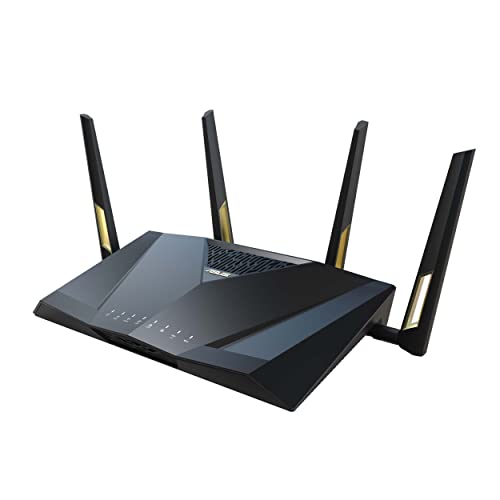
Offering cutting-edge performance, the ASUS RT-AX88U PRO AX6000 Dual Band WiFi 6 Router is perfect for gamers and heavy internet users who demand high-speed connectivity. With speeds up to 6000 Mbps, it utilizes WiFi 6 technology for superior performance. Dual 2.5G ports allow for flexible WAN/LAN configurations, enhancing your network setup. You’ll appreciate the improved coverage from ASUS RangeBoost Plus and the security features like AiProtection Pro. While installation is user-friendly, some users report issues with the admin menu. Overall, this router combines speed and reliability, making it a top choice for enhancing your internet experience.
Best For: Gamers and heavy internet users who require high-speed connectivity and advanced security features.
Pros:
- High-speed performance with speeds up to 6000 Mbps, ideal for bandwidth-intensive activities.
- Advanced security features such as AiProtection Pro for enhanced network protection.
- Flexible WAN/LAN configurations with dual 2.5G ports for versatile network setups.
Cons:
- Reported issues with Wi-Fi range and stability in some user experiences.
- Difficulty accessing the admin menu, leading to frustration for certain users.
- Mixed reviews on customer support, with some users experiencing delays in service.
D-Link Gigabit VPN Router (DSR-250V2)

Ideal for small businesses and remote teams, the D-Link Gigabit VPN Router (DSR-250V2) delivers an all-in-one solution that seamlessly extends corporate networks to homes or remote offices. With enterprise-grade security, it protects your data using advanced encryption protocols like IPSec and OpenVPN. The dual WAN failover feature guarantees continuous connectivity by automatically switching to a backup source. You can manage the router easily through web-based tools, although some users find the DHCP capabilities tricky. While reviews are mixed, many appreciate its performance and flexibility, backed by D-Link’s extensive experience and a limited lifetime warranty.
Best For: Small businesses, remote teams, and entrepreneurs looking for a robust VPN solution to extend corporate networks.
Pros:
- Enterprise-grade security with advanced encryption protocols like IPSec and OpenVPN for data protection.
- Dual WAN failover feature ensures continuous connectivity by automatically switching to a backup internet source.
- Easy management through web-based tools, simplifying configuration and control.
Cons:
- Some users report challenges with DHCP capabilities, making setup complex.
- Mixed customer reviews indicate occasional connectivity issues that may require reboots.
- Limited customer support from D-Link can be a drawback for troubleshooting.
TRENDnet AX1800 Dual-Band WiFi 6 Gigabit Router (TEW-929DRU)

The TRENDnet AX1800 Dual-Band WiFi 6 Gigabit Router (TEW-929DRU) stands out with its dual-WAN capability, making it a perfect fit for users who demand reliable internet connectivity without interruptions. With speeds up to 1201Mbps on 5GHz and 574Mbps on 2.4GHz, it delivers solid performance. You’ll appreciate its 2.5GBASE-T LAN port, capable of 2.5Gbps speeds, along with multiple Gigabit ports for extensive connectivity. Security features like WPA3 and VPN support guarantee your network remains protected. While some users note weak radio performance, the ease of setup and dual-WAN functionality make it a strong contender for your networking needs.
Best For: Users requiring reliable internet connectivity with dual-WAN support for enhanced performance and stability.
Pros:
- Dual-WAN functionality allows for load balancing or fail-over, ensuring uninterrupted internet access.
- High-speed performance with up to 1201Mbps on 5GHz and 574Mbps on 2.4GHz bands.
- Strong security features including WPA3 encryption and multiple VPN protocols for secure remote access.
Cons:
- Reports of weak radio performance may affect overall wireless connectivity.
- Limited management interface may not meet the needs of advanced users.
- Compatibility issues with IPSEC VPN on non-TRENDnet devices have been noted by some users.
TP-Link AX1800 WiFi 6 Router (Archer AX21)

For tech-savvy users who seek robust performance and reliable connectivity, the TP-Link AX1800 WiFi 6 Router (Archer AX21) stands out as a top choice. This dual-band router offers impressive speeds of up to 1.8 Gbps, guaranteeing smooth streaming and gaming. With support for multiple devices through OFDMA technology, your connection remains strong even during high usage. Its Beamforming technology and four high-gain antennas enhance coverage, while built-in cybersecurity features keep your network safe. Setup is simple via the app, and 24/7 technical support assures you’re never left in the dark. Upgrade your internet experience with this reliable router.
Best For: Tech-savvy users seeking robust performance and reliable connectivity for streaming and gaming.
Pros:
- High-speed performance with up to 1.8 Gbps for seamless internet usage.
- Supports multiple devices simultaneously with OFDMA technology, reducing congestion.
- User-friendly setup process via app and 24/7 technical support available.
Cons:
- Initial setup conflicts may occur with dual-band devices for some users.
- Coverage issues may arise depending on home size and ISP quality.
- Speed may vary with distance and obstacles, affecting performance in larger spaces.
ASUS RT-BE58U WiFi 7 Extendable Router

Offering a robust solution for tech-savvy users, the ASUS RT-BE58U WiFi 7 Extendable Router excels with its Multi-Link Operation (MLO) feature, allowing you to connect multiple bands simultaneously for a stable and efficient internet experience. With speeds up to 3600 Mbps and support for 12-18 devices, you’ll enjoy seamless streaming and gaming. Its user-friendly setup via the ASUS app simplifies installation, while robust security features, including AiProtection Pro, keep your network safe. Plus, with expandability through AiMesh compatibility, this router is perfect for anyone ready to upgrade their home network to WiFi 7.
Best For: Tech-savvy users looking to upgrade their home network to WiFi 7 with robust performance and security features.
Pros:
- Multi-Link Operation (MLO) enables simultaneous connection across multiple bands for stable internet.
- Supports up to 18 devices simultaneously, making it ideal for households with multiple users and devices.
- User-friendly setup via the ASUS app, making installation quick and straightforward.
Cons:
- Some users report that the unit runs warm, which may be a concern for long-term use.
- SSID naming options could be improved for better user experience.
- Initial setup may be overwhelming for less tech-savvy individuals despite the user-friendly app.
GL.iNet GL-BE3600 Portable Travel Router

Traveling can often mean managing unreliable Wi-Fi, but the GL.iNet GL-BE3600 Portable Travel Router guarantees you stay connected wherever you go. This compact device boasts pocket-sized convenience with dual-band Wi-Fi 7 speeds of up to 2882 Mbps. Its touchscreen interface simplifies network management, allowing you to monitor speeds and toggle VPNs effortlessly. With support for OpenVPN and WireGuard, your online security is a breeze. Ideal for hotels and public spaces, it functions as a Wi-Fi extender or Ethernet adapter. At just 10.6 ounces, it fits easily in your bag, ensuring reliable internet access on your adventures.
Best For: Travelers seeking a reliable and portable solution for secure internet access on the go.
Pros:
- Compact and lightweight design makes it easy to carry in bags or pockets.
- Dual-band Wi-Fi 7 speeds ensure fast and stable connections for streaming and multiple devices.
- Touchscreen interface simplifies network management and VPN toggling.
Cons:
- Initial setup may be complex for some users.
- Fewer Ethernet ports compared to previous models.
- Some users may find the price point higher than basic routers.
TP-Link Archer BE6500 Dual-Band Wi-Fi 7 Router (Archer BE400)

The TP-Link Archer BE6500 (Archer BE400) stands out as an exceptional choice for tech-savvy users seeking blazing-fast internet speeds and robust connectivity. With Wi-Fi 7 technology, it offers a total bandwidth of up to 6.5 Gbps—perfect for 4K streaming and gaming. You’ll enjoy expansive coverage of up to 2,400 sq. ft., supporting up to 90 devices simultaneously. Its advanced security features, including WPA3 encryption and parental controls, keep your network safe. Plus, the TP-Link Tether app makes setup and management a breeze. Experience zero buffering and reliable connections, making it a top contender in dual WAN routers for 2025.
Best For: Tech-savvy users looking for high-speed internet and extensive coverage for multiple devices.
Pros:
- Exceptional performance with total bandwidth up to 6.5 Gbps, ideal for 4K streaming and gaming.
- Advanced security features including WPA3 encryption and parental controls ensure a safe network environment.
- Easy management via the TP-Link Tether app simplifies setup and ongoing network monitoring.
Cons:
- Higher price point compared to standard routers may not suit budget-conscious consumers.
- Limited availability, as it is only set to be available from February 11, 2025.
- May require compatible devices to fully utilize Wi-Fi 7 features for optimal performance.
Factors to Consider When Choosing Dual WAN Routers for PC
When you’re picking a dual WAN router for your PC, you should consider several key factors. Think about the types of connections available, how well it can balance loads, and the security features it offers. You’ll also want to evaluate the setup complexity and the performance metrics that matter most to your needs.
Connection Types Available
Choosing a dual WAN router for your PC involves understanding the various connection types available, as they directly impact your internet experience. Most dual WAN routers come with Ethernet WAN ports, perfect for traditional broadband connections, and USB WAN ports for mobile broadband backup. This flexibility guarantees you stay connected even during outages. You’ll also find features like automatic failover, which switches to a backup connection if your primary WAN fails, keeping your internet uninterrupted. Additionally, support for different VPN protocols can enhance your security, while assigning multiple VLAN IDs to each Ethernet port can help segment traffic for better network management. These options allow you to customize your setup for peak performance and security.
Load Balancing Capabilities
Load balancing capabilities are essential for maximizing your dual WAN router‘s performance, especially if you rely on multiple internet connections. These features distribute internet traffic across your WAN connections, enhancing overall network performance and reducing congestion. Intelligent algorithms dynamically allocate bandwidth based on current traffic demands, ensuring you get peak resource utilization. Many routers also offer failover functionality, redirecting traffic seamlessly to another active connection if one fails, keeping your connection stable. Additionally, some models let you set bandwidth limits or priorities for specific applications or devices, allowing customized load balancing for critical tasks. Remember, the effectiveness of these capabilities depends on the number of WAN ports, the router’s processing power, and the algorithms used for traffic distribution.
Security Features Offered
While optimizing load balancing is essential for performance, ensuring your network’s security is equally important in a dual WAN router. Look for routers that support advanced security protocols like IPSec, PPTP, L2TP, and OpenVPN, which protect your data across multiple connections. Many models come equipped with built-in firewalls and intrusion prevention systems (IPS) to fend off external threats. If remote access is a priority, choose a router that supports VPN connections for secure, encrypted communication. Some options even offer commercial-grade security subscriptions, providing deep packet inspection and real-time threat detection. Finally, user-friendly interfaces can simplify the configuration of these security features, making it easier for you to maintain a robust and secure network.
Setup Complexity Levels
When you’re considering a dual WAN router for your PC, the setup complexity can vary widely based on the model and its features. Some routers boast user-friendly interfaces that allow for quick installation, while others may require advanced networking knowledge. Configuring multiple WAN connections often involves selecting load balancing or failover settings, which can get intricate depending on the router’s capabilities. Look for models with streamlined setup processes through mobile apps or web interfaces, as these can make the experience smoother. Familiarizing yourself with key features like VLAN support, DHCP settings, and VPN configurations can also simplify the installation. Finally, check the documentation quality and customer support; thorough guides can greatly ease your setup challenges.
Performance Metrics to Consider
After you’ve navigated the setup complexities of a dual WAN router, it’s time to evaluate performance metrics that will impact your network experience. First, consider the data throughput; many models support speeds up to 1 Gbps on each WAN connection, which is essential during high-traffic times. Look for load balancing features that distribute traffic intelligently across multiple WAN ports, enhancing efficiency and reducing congestion. Ascertain the router has failover functionality to switch seamlessly to a backup WAN if the primary fails, minimizing downtime. Also, assess the number of concurrent VPN connections supported, as this is crucial for secure remote access. Finally, evaluate the security protocols offered, like IPSec and L2TP, to protect against external threats effectively.
Compatibility With Devices
Choosing a dual WAN router that’s compatible with your devices is vital for guaranteeing a seamless network experience. First, make certain the router supports network standards like Wi-Fi 5 (802.11ac) or Wi-Fi 6 (802.11ax) to achieve peak speed and performance. Check for enough Gigabit Ethernet ports to connect multiple devices directly, enhancing your connectivity. It’s also important to verify that the router’s firmware can be updated, keeping it compatible with the latest protocols and security features. In addition, consider whether it supports various VPN protocols for secure remote access. Finally, evaluate its ability to handle multiple simultaneous connections without performance degradation, especially in environments with numerous devices. This guarantees everyone enjoys a reliable internet connection.
Price and Warranty Options
Finding the right dual WAN router involves more than just compatibility with your devices; price and warranty options play a notable role in your decision-making process. When selecting a router, consider the price range, as it can vary considerably based on features, capabilities, and brand reputation. Look for warranty options, typically lasting from one to three years, which provide peace of mind regarding durability and support. A satisfaction guarantee or return policy is also valuable, allowing you to test the product before fully committing. Make certain the warranty covers essential components like power adapters or antennas, as this can affect longevity. Finally, evaluate the cost-effectiveness of the router’s features to guarantee you get the best value for your investment.