A good editing desktop should keep timelines responsive, previews smooth, and exports moving—without forcing you to build a PC yourself. But gaming-focused prebuilts can hide important trade-offs in memory, storage, and processor age.
These 10 options span entry-level machines and more capable systems. The right pick depends on your editing software, footage, and willingness to upgrade components later.
Best 10 Editing Prebuilt PCs Picks for 2026
Budget Editing Starter

- 8-core Ryzen 7 4700LE
- RTX 3050 with 8GB VRAM
- 16GB RAM and 512GB NVMe SSD
Best For: Beginner editing and 1080p gaming
Heavy-Workflow Pick
iBUYPOWER Ryzen 9 RTX 5070 Desktop

- Ryzen 9 7900X and RTX 5070 12GB
- 32GB DDR5 memory
- 1TB NVMe SSD; Windows 11 Home
Best For: Demanding projects and heavier multitasking
Everyday Creative Tower

- 8th-gen Core i7 and RTX 3050 6GB
- 16GB RAM and 512GB SSD
- Windows 11; keyboard and mouse
Best For: Casual editing and everyday home use
Radeon Creator Option
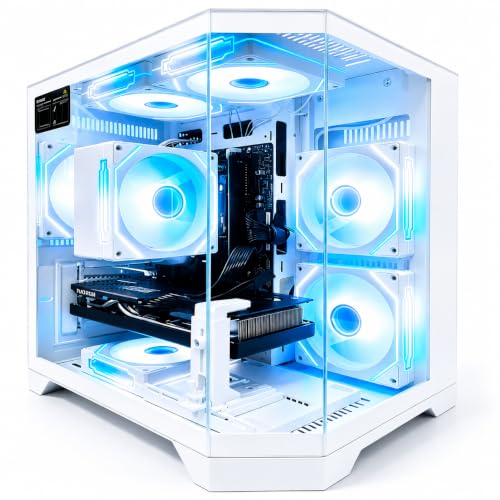
- RX 9060 XT with 8GB VRAM
- 8-core Ryzen 7 4700LE
- DOS listed; verify OS needs
Best For: Radeon gaming and occasional editing
Entry-Level Editing Pick
STGAubron Ryzen 5 2600 and RTX 2060

- Ryzen 5 2600 and RTX 2060 6GB
- 16GB DDR4 RAM and 512GB SSD
- Wi-Fi 6 and included keyboard and mouse
Best For: Lighter editing, gaming, and everyday work
Stronger Editing Hardware
Olialia Ryzen 7 5700X and RTX 3060 Ti

- Eight-core Ryzen 7 5700X
- RTX 3060 Ti with 8GB graphics memory
- 1TB NVMe SSD; 16GB RAM installed
Best For: Editing and gaming with room for a RAM upgrade
More RAM Included

- 32GB RAM installed
- RX 580 with 8GB graphics memory
- 4th-generation Core i7 and 512GB SSD
Best For: RAM-heavy multitasking and lighter editing
GPU-Forward Pick
YAWYORE Ryzen 7 5700X and RTX 5060

- 8-core, 16-thread Ryzen 7 5700X
- RTX 5060 with 8GB GDDR7
- 32GB DDR4 RAM and 1TB NVMe SSD
Best For: Editors seeking 32GB RAM and an RTX 5060
Memory-First Pick
SKYESEV Ryzen 5 5600 and RTX 3050

- 32GB DDR4-3200 RAM installed
- Ryzen 5 5600 and RTX 3050 6GB
- 1TB NVMe SSD and Wi-Fi
Best For: Editors prioritizing 32GB of installed RAM
16GB Starter Pick
ZYNEEX Ryzen 5 5500 and RTX 3050

- 6-core, 12-thread Ryzen 5 5500
- RTX 3050 6GB and 1TB NVMe SSD
- 16GB RAM; listed 64GB maximum
Best For: Editors starting with 16GB RAM and planning ahead
Budget Editing Starter – LXZ Ryzen 7 RTX 3050 Desktop
Among editing prebuilt pcs, this LXZ tower is a practical starting point for everyday video and photo work. Its eight-core Ryzen 7 4700LE, RTX 3050 with 8GB of graphics memory, and 16GB of DDR4 give you a capable baseline without stepping up to a higher-end configuration.
Best For: Beginners who also want a desktop for 1080p gaming and daily multitasking.
Pros:
- Eight-core, 16-thread CPU supports multitasking.
- RTX 3050 has 8GB of dedicated graphics memory for creative applications.
- Wi-Fi 6, seven RGB fans, and an NVMe SSD are included.
Cons:
- 512GB of storage may fill quickly with video projects.
- 16GB of RAM leaves less room for demanding multitasking.
The balanced CPU and GPU make this a sensible entry-level choice. Budget for more storage if you plan to keep large media libraries on the PC.
Heavy-Workflow Pick – iBUYPOWER Ryzen 9 RTX 5070 Desktop
If you’re comparing editing prebuilt pcs for more demanding projects, this iBUYPOWER Element offers a substantial step up in hardware. It pairs a Ryzen 9 7900X with an RTX 5070 12GB, 32GB of DDR5 memory, and a 1TB NVMe SSD.
Best For: Editors who want more memory, graphics capacity, and processor headroom for demanding work.
Pros:
- Ryzen 9 7900X and RTX 5070 12GB provide strong hardware for creative workloads.
- 32GB of DDR5 offers more room for multitasking than the 16GB systems here.
- 1TB NVMe SSD, Windows 11 Home, keyboard, and mouse are included.
Cons:
- Large 20 x 9.1 x 17.4-inch tower needs desk or floor space.
- 1TB may still require additional storage for extensive footage archives.
This is the most generously equipped option in the group for CPU, GPU, and memory. It makes the most sense if your projects can use that extra capacity rather than just basic editing.
Everyday Creative Tower – STGAubron Core i7 RTX 3050 PC
For shoppers considering editing prebuilt pcs that also serve as home or gaming machines, this STGAubron combines an eighth-generation Core i7, RTX 3050 6GB, 16GB DDR4, and a 512GB SSD. It arrives with Windows 11 Home plus a keyboard and mouse.
Best For: Casual photo and video editing alongside gaming, schoolwork, or office tasks.
Pros:
- Dedicated RTX 3050 graphics with 6GB of video memory.
- Wi-Fi 6 and Bluetooth 5.2 add wireless connectivity options.
- Includes Windows 11 Home, RGB keyboard, and mouse.
Cons:
- Eighth-generation Core i7 is an older processor platform.
- 512GB SSD offers limited space for sizable media projects.
Its included peripherals and operating system make setup straightforward. Choose it for lighter creative work, keeping the older CPU and modest storage in mind.
Radeon Creator Option – Ryzen 7 RX 9060 XT Desktop
This Ryzen 7 tower gives buyers comparing editing prebuilt pcs an AMD graphics option: the Radeon RX 9060 XT with 8GB of dedicated memory. Its eight-core Ryzen 7 4700LE, 16GB DDR4, and 512GB NVMe SSD suit light creative work as well as gaming.
Best For: Buyers who want a Radeon-equipped desktop for gaming and occasional editing.
Pros:
- RX 9060 XT supplies 8GB of dedicated graphics memory.
- Eight-core, 16-thread Ryzen 7 supports simultaneous tasks.
- Wi-Fi 6 and seven built-in RGB fans are included.
Cons:
- Listed operating system is DOS, so confirm your software setup needs before buying.
- 16GB RAM and 512GB storage may need upgrading for larger projects.
The Radeon GPU distinguishes it from the RTX-based alternatives. Check the operating-system listing carefully: unlike a Windows-equipped prebuilt, it may require additional setup before you can edit.
Entry-Level Editing Pick – STGAubron Ryzen 5 2600 and RTX 2060
Among editing prebuilt pcs, this STGAubron tower offers a Ryzen 5 2600, RTX 2060 6GB, and 16GB of DDR4 memory for photo editing and modest video projects alongside gaming. Its 512GB SSD provides a starting point for storage, though media files may fill it quickly.
Best For: Buyers who want a ready-to-use PC for lighter editing, gaming, and everyday work.
Pros:
- Dedicated RTX 2060 with 6GB of graphics memory.
- Includes Wi-Fi 6, Bluetooth 5.0, and HDMI and DisplayPort outputs.
- Comes with Windows 11 Home and an RGB keyboard and mouse.
Cons:
- 512GB SSD leaves limited room for larger video libraries.
- 16GB installed RAM may be restrictive for heavier multitasking.
This is a practical starter configuration if your edits are relatively light; plan for additional storage if you keep substantial footage on the PC.
Stronger Editing Hardware – Olialia Ryzen 7 5700X and RTX 3060 Ti
For shoppers comparing editing prebuilt pcs, this Olialia configuration pairs an eight-core Ryzen 7 5700X with an RTX 3060 Ti 8GB. Its 16GB of DDR4 memory and 1TB NVMe SSD give video projects more storage headroom than the 512GB systems in this roundup.
Best For: Editors who also want a gaming PC with a stronger CPU, dedicated graphics, and a 1TB SSD.
Pros:
- Eight-core Ryzen 7 5700X and RTX 3060 Ti with 8GB of graphics memory.
- 1TB NVMe SSD offers space for applications and active projects.
- Supports up to 64GB of RAM, according to the supplied specifications.
Cons:
- Ships with 16GB of RAM, so memory-intensive workflows may call for an upgrade.
- The supplied notes do not specify a bundled keyboard or mouse.
Its CPU, GPU, and larger SSD make it the most capable editing-oriented configuration of these three on paper, with RAM being the main specification to revisit for demanding projects.
More RAM Included – STGAubron Core i7 and RX 580
If memory capacity tops your list when shopping for editing prebuilt pcs, this STGAubron includes 32GB of RAM, a Radeon RX 580 8GB, and a 512GB SSD. Check the processor details carefully: the supplied specifications identify its Core i7 as a 4th-generation model.
Best For: Buyers prioritizing 32GB of installed RAM for multitasking and lighter photo or video editing.
Pros:
- 32GB of RAM is installed out of the box.
- Dedicated RX 580 has 8GB of graphics memory.
- Includes Wi-Fi 6, Bluetooth 5.0, Windows 11 Home, and an RGB keyboard and mouse.
Cons:
- 4th-generation Core i7 is an older processor platform.
- 512GB SSD may fill quickly with video files.
The extra RAM is useful if you keep several applications open, but weigh that advantage against the older CPU and modest storage before choosing it for editing work.
GPU-Forward Pick – YAWYORE Ryzen 7 5700X and RTX 5060
Among editing prebuilt pcs, this YAWYORE tower pairs an eight-core, 16-thread Ryzen 7 5700X with 32GB of RAM and a GeForce RTX 5060 8GB. It is a practical choice if you want CPU capacity for multitasking alongside a dedicated GPU for graphics-accelerated work.
Best For: Editors who want 32GB of memory and an RTX 5060 in a ready-built desktop.
Pros:
- Ryzen 7 5700X offers eight cores and 16 threads.
- 32GB DDR4-3200 RAM and a 1TB NVMe SSD come installed.
- RTX 5060 has 8GB of GDDR7 memory; Wi-Fi and Bluetooth are built in.
Cons:
- The RTX 5060 card brand may vary.
- The listed maximum RAM capacity is 32GB, so confirm upgrade options before buying.
This is the strongest GPU-and-memory combination in this group on paper. Check your editing software’s requirements and remove the included shipping foam before powering on the PC.
Memory-First Pick – SKYESEV Ryzen 5 5600 and RTX 3050
If your search for editing prebuilt pcs puts multitasking memory high on the list, this SKYESEV desktop starts with 32GB DDR4-3200 RAM. Its Ryzen 5 5600, GeForce RTX 3050 6GB, and 1TB NVMe SSD round out a ready-to-set-up editing and gaming tower.
Best For: Editors who want 32GB of installed RAM with an RTX 3050-class GPU.
Pros:
- 32GB RAM is installed as two 16GB modules.
- Ryzen 5 5600 boosts up to 4.4GHz.
- Includes a 1TB NVMe SSD, Wi-Fi, and ARGB air cooling.
Cons:
- The RTX 3050 has 6GB of video memory, less than the YAWYORE model’s listed 8GB.
- The listed maximum RAM capacity is 32GB; verify expansion options if your projects may need more.
Choose this one when installed memory matters more to you than stepping up to the RTX 5060 in the YAWYORE system. Confirm that its display connections suit your monitor setup.
16GB Starter Pick – ZYNEEX Ryzen 5 5500 and RTX 3050
For shoppers comparing editing prebuilt pcs with a more modest starting memory configuration, this ZYNEEX tower combines a six-core, 12-thread Ryzen 5 5500, RTX 3050 6GB, 16GB DDR4-3200 RAM, and a 1TB NVMe SSD. It also lists Windows 11 Home and built-in Wi-Fi.
Best For: Editors starting with 16GB RAM who want a dedicated GPU and multiple display-output types.
Pros:
- Ryzen 5 5500 provides six cores and 12 threads.
- 1TB NVMe SSD and GeForce RTX 3050 6GB are included.
- Lists HDMI, DisplayPort, and DVI outputs, plus Wi-Fi and Bluetooth.
Cons:
- 16GB installed RAM is less than the 32GB in the other two systems.
- The RTX 3050 has 6GB of VRAM, which may be a constraint for GPU-heavy projects.
This is a sensible starting configuration if 16GB meets your current needs. The listing specifies a 64GB maximum RAM capacity, but check the installed module layout before planning an upgrade.
How We Picked These Editing Prebuilt PCs
We considered the listed CPU, GPU, memory, and storage in terms of common photo and video editing workloads. We gave weight to 32GB of RAM for larger projects, modern processors for exports and multitasking, and graphics cards that can help with supported effects and hardware encoding. Because listings do not establish real-world performance, build quality, or upgrade access, check current specifications and independent testing before buying.
Quick Comparison
The iBUYPOWER Element with a Ryzen 9 7900X, RTX 5070, and 32GB of DDR5 has the strongest listed combination for demanding work. The Ryzen 7 5700X systems with RTX 5060 or RTX 3060 Ti graphics offer a middle ground on paper, though the RTX 3060 Ti configuration lists only 16GB of RAM. For lighter workloads, the SKYESEV Ryzen 5 5600/RTX 3050 stands out for its listed 32GB of RAM and 1TB SSD. Older-CPU systems can still be worth considering at the right price, but compare their complete specifications rather than relying on an “i7” or “Ryzen 7” label alone.
Key Buying Factors for Editing Prebuilt PCs
Match the CPU and GPU to Your Software
A capable CPU matters for decoding footage, generating previews, and exporting. GPU acceleration varies by application, effects, and codec; check your editor’s current requirements before paying extra for graphics power. If you use GPU-heavy effects, compare VRAM as well as the GPU name: cards in this list range from 6GB to 12GB.
Budget for RAM and Storage
16GB can work for basic photo editing and lighter video projects, while 32GB gives more headroom for high-resolution footage, large images, and multitasking. A 512GB drive can fill quickly once you add applications, cache files, and source media. A 1TB SSD is a more comfortable starting point, but you may still need separate storage for project files and backups.
Check the Details the Listing Leaves Out
Before checkout, confirm the exact CPU generation, installed RAM configuration, available memory slots, SSD expansion options, ports, and monitor outputs. Ask about the power supply and cooling if you plan to upgrade. For older or refurbished-style configurations, verify the condition, warranty, and included Windows license. Prices change, so judge value against the specifications actually shipped.
Who Should Buy Which Editing Prebuilt PCs?
Choose the Ryzen 9 7900X/RTX 5070 iBUYPOWER if your budget allows and you regularly tackle complex projects. Consider a Ryzen 7 5700X build for a more balanced editing setup, ideally with a plan to reach 32GB of RAM if it ships with 16GB. For lighter editing, prioritize enough memory and SSD space over flashy lighting; the SKYESEV’s listed 32GB/1TB configuration is one example. Treat the older Ryzen 5 2600, eighth-generation Core i7, and RX 580 options as price-sensitive buys, and check software compatibility before committing.