If you’re looking to boost your gaming performance, investing in an eGPU enclosure with a 1000W power supply could be the key. These enclosures not only support the latest NVIDIA and AMD graphics cards but also offer efficient cooling and fast data transfer speeds. With so many options available, it’s important to find the right fit for your needs. Let’s explore the top contenders that can elevate your gaming experience.
Razer Core X V2 External Graphics Enclosure (eGPU)

If you’re a gamer looking to supercharge your laptop’s performance, the Razer Core X V2 External Graphics Enclosure (eGPU) is a standout choice. With its compatibility for Windows 11 Thunderbolt 4/5 and USB 4 devices, it easily integrates into your setup. This eGPU accommodates PCIe desktop graphics cards up to four slots wide, ensuring you can run the latest titles smoothly. The Thunderbolt 5 connection provides an ultra-fast bandwidth of up to 80 Gbps, optimizing performance. Plus, the adjustable 120 mm cooling fan keeps your GPU running at peak efficiency. It’s a game-changer for any serious gamer.
Best For: Serious gamers and creative professionals looking to enhance their laptop’s graphics performance with an external GPU solution.
Pros:
- High Compatibility: Supports a wide range of PCIe desktop graphics cards, making it versatile for various setups.
- Fast Connectivity: Thunderbolt 5 connection offers ultra-fast 80 Gbps bandwidth for optimal performance in demanding applications.
- Easy Installation: Tool-free setup allows for quick GPU and power supply swaps without the need for restarts.
Cons:
- Weight: At 5.06 kg, it may be cumbersome for some users to move around.
- Limited Port Options: Only one USB port may be insufficient for users needing multiple connections.
- Price Point: As an external graphics enclosure, it can be a significant investment, especially when factoring in the cost of a compatible GPU.
Thunderbolt 3/4 eGPU Enclosure for NVIDIA/AMD Graphics Cards

For gamers and developers seeking a powerful upgrade for their laptops or compact devices, the Thunderbolt 3/4 eGPU enclosure (VK-Y900) is a standout choice. It’s compatible with a range of NVIDIA and AMD graphics cards, including the latest models. This enclosure supports Thunderbolt 3/4 or USB4, making it perfect for your laptop or NUC. With features like dual Thunderbolt ports and 85W pass-through charging, you’ll enjoy stable performance and efficient power delivery. Plus, it’s optimized for ROG Ally X, ensuring exceptional gaming or development experiences. Customer support is responsive, ready to help with any connectivity issues.
Best For: Developers and professionals looking to enhance their workflow with AI deep learning applications using powerful NVIDIA or AMD graphics cards on laptops or compact devices.
Pros:
- Supports a wide range of NVIDIA and AMD graphics cards, ensuring compatibility with the latest models.
- Dual Thunderbolt ports allow for efficient power delivery and stable performance.
- Optimized for AI development, specifically designed for running LLM models via TinyGPU application.
Cons:
- Not intended for gaming or 3D rendering, limiting its use for recreational gaming.
- Higher restocking fees apply for damaged or tampered products, which may deter returns.
- 30-day return policy may be restrictive for some customers who need more time to test the product.
TREBLEET eGPU Enclosure Compatible with Thunderbolt 5 & USB4 v2

The TREBLEET eGPU Enclosure stands out for gamers and content creators seeking top-tier performance, thanks to its compatibility with Thunderbolt 5 and USB4 v2. With a blazing 80Gbps speed, it offers double the performance of Thunderbolt 4, ensuring minimal latency for gaming, 3D rendering, and video editing. Its built-in 600W SFX PSU delivers up to 450W to your GPU, while providing 140W USB Power Delivery for fast laptop charging. The compact 5.5L aluminum chassis accommodates high-end graphics cards and includes multiple connectivity options, making it a powerful docking station for your organized workspace. Enjoy seamless performance and versatility!
Best For: Gamers and content creators looking for high-performance graphics processing and fast data transfer speeds.
Pros:
- Next-gen 80Gbps speed offers double the performance of Thunderbolt 4, ensuring minimal latency for demanding applications.
- Built-in 600W power supply provides ample power for high-end GPUs and fast laptop charging via USB Power Delivery.
- Compact and durable design allows for easy integration into any workspace while accommodating a variety of modern GPUs.
Cons:
- Limited compatibility with only certain AMD GPUs on macOS, excluding NVIDIA GPUs and Bootcamp.
- May require additional setup for daisy chaining multiple peripherals or monitors.
- Size constraints for GPU compatibility, as it only accommodates cards up to 340 x 154 x 57mm.
Plugable Thunderbolt 5 AI eGPU Enclosure & Dock (TBT5-AI)

Designed specifically for power users, the Plugable Thunderbolt 5 AI eGPU Enclosure & Dock (TBT5-AI) stands out with its impressive 80Gbps Thunderbolt 5 speeds, making it ideal for gamers and AI enthusiasts seeking top-tier performance. With an 850W ATX 3.1 PSU, it dedicates 600W to your GPU, ensuring peak functionality. The enclosure supports custom GPUs up to 346mm and features multiple connectivity options, including 2.5Gbps Ethernet and 10Gbps USB ports. While designed for Windows 11 and Thunderbolt systems, it’s not compatible with macOS or Linux. Enjoy lifetime support and a 2-year warranty for peace of mind.
Best For: The Plugable Thunderbolt 5 AI eGPU Enclosure & Dock (TBT5-AI) is best for gamers and AI enthusiasts looking for high-performance graphics and processing capabilities on Windows systems.
Pros:
- High-speed connectivity with 80Gbps Thunderbolt 5 and multiple USB ports for versatile performance.
- Robust power supply with 850W ATX 3.1, dedicating 600W to the GPU for peak performance.
- Lifetime support and a 2-year warranty provide assurance and reliability for users.
Cons:
- Incompatibility with macOS, Linux, and ChromeOS limits user options for operating systems.
- No GPU included, requiring additional investment for a compatible graphics card.
- Large dimensions may not be suitable for all setups or desk spaces.
G-Dock EGPU Dock with 800W PSU

A standout feature of the G-Dock EGPU Dock is its robust 800W power supply, making it an ideal choice for gamers and content creators seeking high-performance graphics solutions. This dock supports external GPUs with up to 600W, ensuring powerful graphics capabilities. It features an innovative OCuLink interface that delivers 64Gbps bandwidth through PCIe 4.0 x4 lanes, perfect for fast data transfer. The sleek open metal design is not only stylish but also functional, while compatibility with most external graphics boards allows versatility. With a weight of just 1.5 kg, it’s portable too, making it a solid addition to your gaming setup.
Best For: Gamers and content creators looking for a high-performance graphics solution with a robust power supply and fast data transfer capabilities.
Pros:
- Powerful 800W PSU supports external GPUs up to 600W, ensuring excellent graphics performance.
- OCuLink interface provides a high bandwidth of 64Gbps through PCIe 4.0 x4 lanes for fast data transfer.
- Lightweight and portable design (1.5 kg) makes it easy to integrate into various setups.
Cons:
- Not compatible with the 5090 and 5090D models, limiting options for some users.
- OCuLink interface does not support hot-plugging, requiring power to be off during cable changes.
- GPU is not included in the package, necessitating an additional purchase.
UGREEN External Graphics Dock with 850W Power Supply
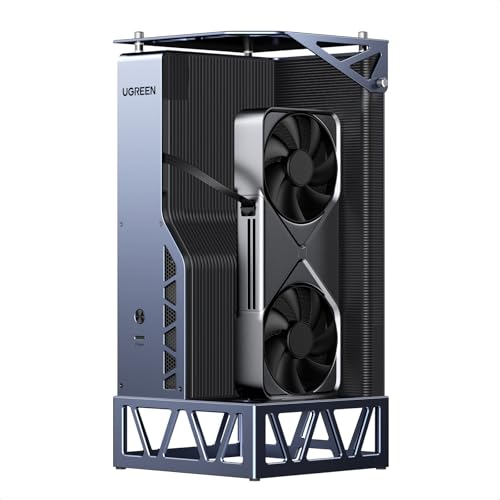
For gamers and creative professionals seeking a powerful upgrade, the UGREEN External Graphics Dock with its robust 850W power supply stands out as an excellent choice. This dock supports high-performance NVIDIA, AMD, and Intel graphics cards, boosting performance by up to 30% for gaming and content creation. With OCuLink and USB4 connectivity, you’ll enjoy low latency and fast data transfer speeds. Plus, its quiet design and efficient cooling keep your workspace tidy and focused. Compatible with oversized GPUs and designed for easy installation, this dock transforms laptops and Mini PCs into desktop powerhouses, ensuring a seamless gaming experience.
Best For: Gamers and creative professionals looking for a powerful external graphics solution to enhance their laptops or Mini PCs.
Pros:
- Supports a wide range of high-performance graphics cards, maximizing gaming and content creation capabilities.
- Low latency and fast data transfer speeds with OCuLink (64Gbps) and USB4 (40Gbps) connectivity.
- Quiet operation and efficient cooling design ensure a tidy workspace without disruptive noise.
Cons:
- May require additional setup for oversized GPUs, which could be complex for some users.
- Limited to systems with compatible connections, potentially excluding some older devices.
- The price point may be higher compared to simpler external GPU solutions.
PCIe 4.0 x4 eGPU Dock with OCuLink Cable

The PCIe 4.0 x4 eGPU Dock with OCuLink Cable stands out for gamers seeking exceptional performance without the hassle of lengthy setups. This dock supports a blazing-fast transfer speed of 64Gbps, ensuring your GPU operates at its peak. Its detachable design enhances portability, while the ultra-thin SFF-8611 cable minimizes port damage risks. You’ll appreciate the multi-status LED indicators for real-time device monitoring. Compatible with various high-end graphics cards, it requires a standard ATX power supply for stability. Just remember, the OCuLink interface isn’t hot-pluggable, so power down your system before unplugging. Enjoy seamless gaming performance!
Best For: Gamers and professionals seeking high-performance graphics solutions without the complexity of extensive setups.
Pros:
- Supports ultra-fast transfer speeds of 64Gbps with PCIe 4.0 x4 compatibility.
- Detachable design and ultra-thin SFF-8611 cable enhance portability and minimize port damage risks.
- Multi-status LED indicators provide real-time monitoring of device performance.
Cons:
- OCuLink interface does not support hot plugging, requiring a system shutdown to unplug.
- GPU and power supply are not included, necessitating additional purchases.
- Compatibility is limited to standard ATX power supplies, which may restrict options for some users.
eGPU Enclosure Thunderbolt 3/4 Dock for NVIDIA/AMD Graphics Cards

If you’re searching for a powerful solution to boost your gaming experience, the Maskedfish eGPU Enclosure MK-L18 stands out with its compatibility for both NVIDIA and AMD graphics cards. This Thunderbolt 3/4 dock offers universal connectivity for NUCs, laptops, and handhelds, providing an impressive 32Gbps bandwidth. It supports next-gen RTX 50 Series and RX 7000 series GPUs, ensuring top-tier performance. The open-frame design promotes airflow while the 85W PD fast charging keeps your devices powered. Weighing just 369 grams, it’s lightweight yet robust, making it a great addition to your gaming setup. Enjoy stability and efficiency with this premium enclosure.
Best For: Gamers and professionals seeking a high-performance external GPU solution compatible with NVIDIA and AMD graphics cards for enhanced graphics performance and AI applications.
Pros:
- Supports next-gen graphics cards with high bandwidth for superior performance.
- Lightweight and compact design promotes easy portability without sacrificing durability.
- Fast charging capability ensures devices remain powered during intensive tasks.
Cons:
- Limited to specific models of macOS, which may restrict compatibility for some users.
- Only one expansion slot may limit future upgrades for users seeking additional connectivity options.
- Air cooling might not be sufficient for extremely high-performance GPU workloads in hot environments.
ORARA eGPU Enclosure Compatible with Thunderbolt 3/4/USB4

Designed specifically for gamers and content creators who demand high performance, the ORARA eGPU Enclosure shines with its compatibility for Thunderbolt 3, 4, and USB4 devices. It supports NVIDIA and AMD PCIe graphics cards, delivering a stable expansion through its JHL7440 controller. With 32Gbps data transfer using PCIe 3.0 x4, your gaming experience will be seamless. The enclosure accommodates graphics cards up to 13.7 inches in length and offers a robust 750W PSU. Remember, it requires the latest Windows 11 version and isn’t compatible with older Thunderbolt versions or M1/M2/M3/M4 MacBooks. Enjoy enhanced performance with ORARA!
Best For: Gamers and content creators looking for high-performance graphics expansion with compatibility for Thunderbolt 3/4/USB4 devices.
Pros:
- High Compatibility: Supports both NVIDIA and AMD PCIe graphics cards, ensuring a wide range of options for users.
- Fast Data Transfer: Features a JHL7440 controller for stable expansion and 32Gbps data transfer with PCIe 3.0 x4.
- Robust Power Supply: Comes with a powerful 750W PSU, providing ample power for demanding graphics cards.
Cons:
- Limited Compatibility: Not compatible with older Thunderbolt versions or M1/M2/M3/M4 MacBooks, which may limit usability for some users.
- Windows Requirement: Requires the latest version of Windows 11 for detection, excluding users with older operating systems.
- Weight Limitations: Supports graphics cards up to a max width of 2.3 inches (59mm), which may not accommodate larger, triple-slot cards.
Sonnet eGPU Breakaway Box 750ex – External GPU Chassis

For gamers and creative professionals seeking a significant boost in graphics performance, the Sonnet eGPU Breakaway Box 750ex stands out as an excellent choice. This external GPU chassis connects via Thunderbolt 3, providing enhanced graphics acceleration for editing, rendering, and special effects. With a robust 750W power supply, it supports the latest GPU cards, including AMD and NVIDIA models. You’ll appreciate the four USB Type A ports for peripherals and the RJ45 Ethernet port for reliable network connectivity. Its compact design and impressive specs make it a solid investment for both current and future graphics needs.
Best For: Gamers and creative professionals looking for a significant boost in graphics performance with a flexible, future-proof external GPU solution.
Pros:
- High-performance support: Compatible with the latest AMD and NVIDIA GPU cards for enhanced graphics capabilities.
- Multiple connectivity options: Four USB Type A ports and an RJ45 Ethernet port for additional peripherals and reliable network access.
- Robust power supply: 750W power supply ensures compatibility with future GPU power requirements.
Cons:
- Limited compatibility: Not suitable for M1 Macs when using GPUs.
- Size and portability: The chassis may be bulky for users seeking a more compact solution.
- Mixed customer reviews: Averaging 3.9 out of 5 stars, indicating some users may have experienced issues.
Factors to Consider When Choosing eGPU Enclosures With 1000W PSU
When choosing an eGPU enclosure with a 1000W PSU, you’ve got to evaluate several key factors. Think about the power delivery requirements, GPU compatibility, and the efficiency of the cooling system. Also, don’t overlook size limitations and the connectivity options that suit your setup.
Power Delivery Requirements
Choosing the right eGPU enclosure with a 1000W PSU is vital for maximizing your gaming performance. Look for enclosures that can support high-performance graphics cards, as these often demand substantial power. Make sure the enclosure offers solid Power Delivery (PD) capabilities—many provide up to 140W PD, allowing you to charge your laptop while powering the GPU. It’s important to select a PSU that exceeds the combined power needs of your GPU and any peripherals to avoid shortages during intense gaming sessions. Also, pay attention to the PSU’s efficiency rating. An 80 Plus certification not only guarantees energy savings but also minimizes heat output, enhancing the longevity of your setup during prolonged use.
GPU Compatibility Range
Finding the right eGPU enclosure means guaranteeing GPU compatibility is at the forefront of your decision-making process. Start by checking that the enclosure supports a wide range of graphics cards, including popular NVIDIA and AMD models. Make sure it can accommodate various card sizes, including dual-slot and oversized GPUs, to fit different configurations. Look for enclosures that explicitly mention support for the latest GPU architectures, as this guarantees compatibility with cutting-edge performance features. Verify the power supply specifications to guarantee it can handle high-end graphics cards under load. Finally, consider enclosures with modular support for easy GPU swapping, allowing you to upgrade or change graphics cards without complications when you’re ready to enhance your gaming experience.
Cooling System Efficiency
After ensuring GPU compatibility, another key factor to contemplate is the cooling system efficiency in eGPU enclosures equipped with 1000W power supplies. An efficient cooling system is crucial to prevent overheating, which can cause performance throttling and hardware damage. Look for enclosures with high-performance cooling solutions, featuring multiple fans that adjust speed based on the load to maintain ideal temperatures. Effective airflow design, such as open-frame structures or strategically placed vents, enhances heat dissipation during intense operations. Additionally, some enclosures use advanced thermal materials like aluminum or copper for better heat transfer. Don’t forget regular maintenance, like cleaning dust filters and ensuring unobstructed airflow paths, to sustain cooling efficiency over time in your eGPU setup.
Size and Weight Limitations
When it comes to selecting an eGPU enclosure with a 1000W PSU, size and weight limitations play an essential role in your decision-making process. First, check the maximum dimensions allowed for graphics cards, as many enclosures have specific width, length, and height limits. Heavier models can require more robust support, impacting portability if you plan to move it often. Additionally, compact enclosures may restrict airflow, risking overheating for larger GPUs. Make sure the design allows for easy GPU installation and removal, as some layouts can complicate upgrades. Finally, consider the overall footprint; larger enclosures take up more desk space, which could clutter your workspace and affect organization.
Connectivity Options Available
Choosing an eGPU enclosure with a 1000W PSU means considering the range of connectivity options available to maximize your gaming experience. Look for enclosures that feature multiple high-speed connections like Thunderbolt 3/4 or USB4, which enhance data transfer rates and device compatibility. Supporting OCuLink connections is also essential, as they provide up to 64Gbps of effective bandwidth, ideal for high-performance GPUs. Dual Thunderbolt ports add functionality, letting you daisy chain peripherals or connect several devices at once. Additionally, enclosures with USB-A and USB-C ports offer flexibility for various peripherals, ensuring a versatile workspace. Finally, make sure the enclosure supports the latest PCIe standards, like PCIe 4.0, to guarantee compatibility with modern graphics cards.
Build Quality and Materials
The build quality and materials of an eGPU enclosure greatly impact its performance and longevity. Look for enclosures made from aluminum or alloy steel, as these provide excellent heat dissipation and structural integrity. A robust design often includes high-grade PCBs and gold-plated contacts, enhancing conductivity and resisting oxidation over time. Additionally, a well-constructed enclosure typically features a cooling system, whether air or liquid, to maintain ideal temperatures during high-intensity gaming sessions. Consider the size and layout, ensuring it accommodates various GPU sizes and configurations, with modular designs for easy upgrades. Finally, premium enclosures utilize advanced manufacturing techniques to minimize electromagnetic interference, ensuring stable performance and reliable data transfer.
Warranty and Support Terms
Understanding warranty and support terms is vital, especially for eGPU enclosures equipped with a 1000W PSU. Warranty periods typically range from one to two years, covering parts and labor, so check the specifics based on the manufacturer. Most brands offer a 30-day return policy for defective items, ensuring you’re satisfied upon receipt. However, be aware that some may charge restocking fees if items aren’t in their original condition. Reliable customer support is essential; look for manufacturers with dedicated teams ready to help you tackle connectivity and driver issues. Finally, don’t overlook customer feedback ratings, as they can provide valuable insights into the quality of warranty and support services you can expect.