When you spend hours typing on a tablet, comfort is key to maintaining productivity. Ergonomic keyboards can make a significant difference in reducing strain and enhancing your typing experience. From customizable shortcuts to designs that promote natural wrist alignment, the right keyboard can transform your workflow. Curious about which options stand out as the best for tablet work? Let’s explore the top choices that balance comfort and efficiency.
Logitech Wave Keys Wireless Ergonomic Keyboard

The Logitech Wave Keys Wireless Ergonomic Keyboard is an ideal choice for anyone who spends long hours typing on a tablet. Its compact design lets you position your mouse closer, promoting a natural shoulder position. The wavy layout keeps your hands, wrists, and forearms in a comfortable typing stance. You’ll appreciate the cushioned palm rest with memory foam, which reduces wrist pressure during your workday. Plus, connect effortlessly via Bluetooth or the Logi Bolt Receiver, and switch between devices with ease. Customize your shortcuts using the Logi Options+ App, all while enjoying a sustainable design with impressive battery life.
Best For: Those who spend long hours typing and require an ergonomic solution to ensure comfort and reduce wrist strain.
Pros:
- Cushioned palm rest with memory foam provides all-day support and comfort.
- Compact design promotes a natural shoulder position by allowing closer mouse positioning.
- Easy-Switch feature enables seamless connectivity between multiple devices.
Cons:
- May take time to adjust to the wavy design if users are accustomed to traditional keyboards.
- Limited customization options outside of the Logi Options+ App.
- Battery replacement is necessary after up to 3 years, which may not be as convenient for some users.
Sablute Ergonomic Wireless Keyboard and Mouse Combo
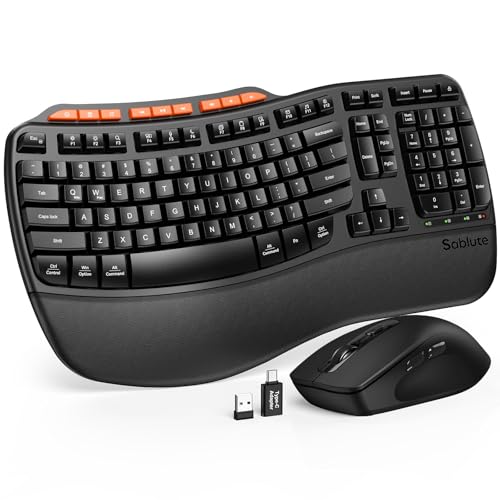
Looking for a comfortable typing solution that enhances your tablet work? The Sablute Ergonomic Wireless Keyboard and Mouse Combo could be your perfect match. With a cushioned palm rest and wave-shaped keys, it promotes healthy wrist posture, reducing typing errors. You’ll appreciate the durable, sweat-proof leatherette and the keyboard’s impressive lifespan of 10 million keystrokes. The ergonomic mouse features three adjustable DPI settings and nine shortcut keys to streamline your workflow. Plus, its 2.4GHz USB receiver connects effortlessly to almost any device. Elevate your productivity while enjoying a sleek design that fits beautifully in any workspace.
Best For: Individuals seeking a comfortable and ergonomic typing solution for prolonged use on tablets, laptops, or desktops.
Pros:
- Promotes healthy wrist posture with cushioned palm rest and wave-shaped keys.
- Durable design with a lifespan of 10 million keystrokes and sweat-proof leatherette.
- Ergonomic mouse with adjustable DPI settings and shortcut keys to enhance productivity.
Cons:
- Single device connection may limit multi-device users.
- The 33ft range may not be sufficient for larger workspaces.
- May take time to adjust to the wave-shaped key layout for new users.
Logitech ERGO K860 Wireless Ergonomic Keyboard

For those who spend long hours typing on tablets, the Logitech ERGO K860 Wireless Ergonomic Keyboard is an excellent choice due to its unique curved, split keyframe design. This keyboard promotes a natural typing posture, reducing muscle strain on your wrists and forearms. With adjustable palm lift and tilt legs, you can customize your comfort whether seated or standing. The curved wrist rest, made of memory foam, offers superior support while the Perfect Stroke keys enhance your typing fluidity. Plus, you can connect via USB or Bluetooth and enjoy sustainable design, constructed from 71% recycled materials.
Best For: Those who spend long hours typing and seek to reduce muscle strain while maintaining comfort and typing efficiency.
Pros:
- Ergonomic curved, split design promotes natural typing posture, reducing wrist strain.
- Adjustable palm lift and tilt legs enhance comfort for both seated and standing positions.
- Made from 71% recycled materials, contributing to sustainability efforts.
Cons:
- May require an adjustment period for users not accustomed to split keyboard designs.
- Limited key customization options compared to some gaming keyboards.
- The price point may be higher than standard keyboards.
SABLUTE Wireless Ergonomic Wave Keyboard

Designed with comfort in mind, the SABLUTE Wireless Ergonomic Wave Keyboard is perfect for anyone who spends long hours typing on a tablet or computer. Its ergonomic wave design and cushioned memory foam wrist rest greatly reduce wrist strain, helping you avoid carpal tunnel syndrome. The curved key layout aligns with your fingers, minimizing errors while promoting relaxation. You’ll appreciate the adjustable tilt legs for your preferred typing angle. Compatible with multiple operating systems, it connects wirelessly up to 33 feet away. With extra shortcut keys for quick access, it enhances your productivity, making it a smart choice for work or home.
Best For: Individuals who spend extended periods typing and seek a comfortable, ergonomic solution to reduce wrist strain and enhance productivity.
Pros:
- Ergonomic wave design and cushioned wrist rest minimize wrist strain and promote comfort during long typing sessions.
- Compatible with multiple operating systems, allowing for easy connectivity with various devices.
- Includes extra shortcut keys for quick access to frequently used functions, increasing efficiency.
Cons:
- Requires a single AA battery (not included), which may add to ongoing costs.
- Wireless connection range is limited to 33 feet, which may not suit all work environments.
- Some users may find the wave design unconventional and take time to adapt to the key layout.
Nulea RT07B Wireless Ergonomic Keyboard
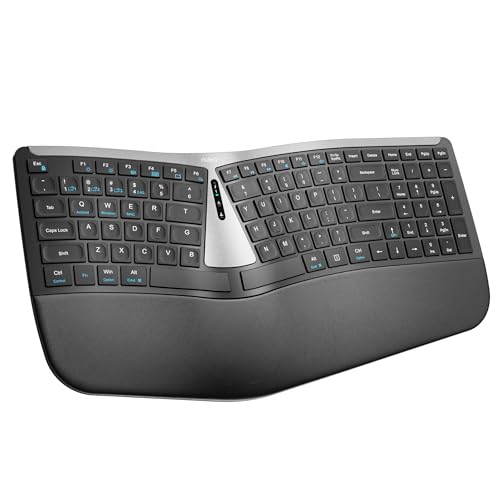
The Nulea RT07B Wireless Ergonomic Keyboard stands out as an ideal choice for anyone who spends long hours typing on tablets or laptops, especially if you experience discomfort in your wrists or forearms. Its split layout promotes a natural typing position, reducing muscle twisting and alleviating pain. The thorough palm rest offers excellent support during extended use. With a rechargeable battery lasting up to 200 hours and USB-C charging, you won’t constantly replace batteries. Plus, its scissor-switch keys guarantee smooth typing, while dual-mode connectivity allows pairing with up to three devices, making multitasking effortless across Windows and Mac systems.
Best For: Individuals who experience wrist or forearm discomfort while typing for extended periods, seeking an ergonomic solution.
Pros:
- Ergonomic design reduces forearm muscle twisting and alleviates pain associated with carpal tunnel syndrome.
- Long battery life of up to 200 hours with convenient USB-C charging eliminates the hassle of frequent battery replacements.
- Dual-mode connectivity allows seamless pairing with multiple devices, enhancing multitasking capabilities across different platforms.
Cons:
- The split layout may require an adjustment period for users accustomed to traditional keyboards.
- Limited customization options for key functions compared to some high-end gaming keyboards.
- The palm rest may not suit everyone’s preferences, as comfort can be subjective.
Logitech Wave Keys Wireless Ergonomic Keyboard

If you often find yourself typing on a tablet for extended periods, the Logitech Wave Keys Wireless Ergonomic Keyboard is ideal for you. Its compact design brings the mouse closer, promoting a natural shoulder position. The wavy shape encourages comfortable hand and wrist posture, while the cushioned memory foam palm rest reduces pressure during long sessions. With Bluetooth and Logi Bolt Receiver connectivity, you can easily switch between devices like laptops and tablets. Plus, you can customize shortcuts through the Logi Options+ App, enhancing your productivity. This keyboard’s battery life of up to three years guarantees you stay powered for the long haul.
Best For: Those who frequently type on tablets and need an ergonomic solution to enhance comfort and productivity during extended use.
Pros:
- Ergonomic design promotes a natural shoulder position and comfortable typing posture.
- Cushioned palm rest made of memory foam reduces pressure during long typing sessions.
- Long battery life of up to three years ensures minimal disruptions.
Cons:
- Compact design may not be suitable for users who prefer a full-sized keyboard.
- Customization options might require initial setup through the Logi Options+ App.
- Price point may be higher compared to standard keyboards without ergonomic features.
VEILZOR Ergonomic Backlit Keyboard with Wrist Rest

For those who spend long hours typing on tablets, the VEILZOR Ergonomic Backlit Keyboard with Wrist Rest is a game-changer. With its wave-shaped key layout, it aligns perfectly with your hands, reducing strain during extended sessions. Customize your typing experience with 7 RGB colors and multiple brightness levels, easily switching modes using FN keys. The wired connection guarantees stable performance without the hassle of charging. Plus, the included leather wrist rest adds comfort, while the built-in device stand keeps your setup organized. Whether you’re on Windows or Mac, this keyboard enhances both productivity and comfort seamlessly.
Best For: Those who spend long hours typing and seek an ergonomic design for enhanced comfort and productivity.
Pros:
- Customizable RGB backlighting with 7 colors and multiple brightness levels for a personalized typing experience.
- Ergonomic design with a wave-shaped key layout and included wrist rest to reduce strain and fatigue.
- Stable wired connection eliminates the need for charging and provides lag-free performance.
Cons:
- Wired connection may limit mobility compared to wireless keyboards.
- Dual system switching requires verification to prevent reversed functions, which may confuse some users.
- Limited portability due to the 5.2 ft braided cable and built-in device stand design.
Arteck Ergonomic USB Wired Keyboard with Backlit Colors

Crafted for individuals who prioritize comfort during long typing sessions, the Arteck Ergonomic USB Wired Keyboard boasts a split design that naturally aligns your wrists and forearms. Its cushioned wrist and palm rest enhances your typing experience, making it easier to work for hours. With seven backlit colors and three adjustable brightness levels, you can customize your workspace to fit your mood and environment. Setup is a breeze with a 1.8M USB wire, allowing you to plug and play instantly. Plus, it comes with a 24-month warranty and friendly customer support, ensuring peace of mind with your purchase.
Best For: Individuals who spend long hours typing and seek comfort and ergonomic support.
Pros:
- Ergonomic Design: Split layout and cushioned wrist rest provide natural wrist and forearm positioning.
- Customizable Backlighting: Seven LED colors and three brightness levels enhance the typing experience and workspace aesthetics.
- Easy Setup: Plug-and-play functionality with a 1.8M USB wire for immediate use.
Cons:
- Limited Compatibility: Primarily designed for Windows computers, may not fully support other operating systems.
- Wired Connection: Lacks wireless functionality, which may limit mobility and desk arrangement options.
- Backlight Brightness: Some users may find the highest brightness level insufficient for bright environments.
Arteck Split Ergonomic Wireless Keyboard

The Arteck Split Ergonomic Wireless Keyboard is an ideal choice for those who spend long hours typing on their tablets or computers. Its split design promotes natural wrist and forearm alignment, reducing strain during extended use. You’ll appreciate the soft cushioned wrist rest that enhances comfort while you type. Setting it up is a breeze with the nano USB receiver, conveniently stored at the back. Plus, the rechargeable lithium battery lasts up to six months on a single charge, perfect for daily use. The package includes everything you need: the keyboard, USB receiver, charging cable, and a 24-month warranty.
Best For: Individuals who spend long hours typing and seek a comfortable ergonomic solution to reduce wrist and forearm strain.
Pros:
- Split design promotes natural wrist and forearm alignment for better posture.
- Soft cushioned wrist rest enhances comfort during extended typing sessions.
- Long battery life of up to six months on a single charge, making it convenient for daily use.
Cons:
- May take time to adjust for users transitioning from traditional keyboards.
- Limited compatibility with non-Windows operating systems.
- The split design might not be suitable for all users’ preferences.
Full-Size Ergonomic Wireless Keyboard and Mouse Combo

Designed for professionals who juggle multiple devices, the Full-Size Ergonomic Wireless Keyboard and Mouse Combo enhances productivity with its seamless device compatibility. Its extra-large keyboard features a wrist rest and foldable stand, reducing strain while you type. The scientifically designed mouse promotes a neutral wrist position, making movements smoother and more comfortable. With an adjustable volume knob, you can easily control sound levels without interrupting your workflow. Plus, its quiet operation minimizes distractions, allowing you to focus. Enjoy hassle-free wireless connectivity with a stable 2.4GHz connection, compatible with a variety of devices, ensuring you’re always ready to work efficiently.
Best For: Professionals who work across multiple devices and prioritize ergonomic design for comfort and efficiency.
Pros:
- Ergonomic design reduces strain on wrists and arms, promoting healthier typing posture.
- Seamless device compatibility allows for easy switching between computers and mobile devices for multitasking.
- Quiet operation minimizes distractions, making it ideal for quiet work environments.
Cons:
- Multimedia keys may not be fully compatible with Mac OS systems, limiting functionality for Mac users.
- Wireless connectivity may have a limited range of up to 10m, which could be a drawback for larger workspaces.
- Adjustable volume knob may take time to get used to for users accustomed to traditional volume controls.
Factors to Consider When Choosing an Ergonomic Keyboard for Tablet Work
When choosing an ergonomic keyboard for tablet work, you’ll want to think about several key factors. Consider the connectivity options, ergonomic design features, and how well it’s compatible with your devices. Don’t forget to weigh portability and customization features to find the best fit for your needs.
Connectivity Options Available
How do you choose the right connectivity options for your ergonomic keyboard when working with a tablet? Start by considering Bluetooth and USB receivers for versatile compatibility with your devices. Look for easy-switch features, allowing you to shift seamlessly between multiple devices, which is especially handy for multitasking. Verify the keyboard is compatible with various operating systems like Windows, macOS, iPadOS, and ChromeOS to enhance your user experience across platforms. Check the connection range; a reliable wireless connection should ideally support distances up to 33 feet (10 meters) without lag. Finally, consider keyboards that offer both USB-A and USB-C options, as these ports are commonly found on modern tablets and laptops, guaranteeing you stay connected without hassle.
Ergonomic Design Features
Choosing an ergonomic keyboard for tablet work means prioritizing design features that enhance your comfort and productivity. Look for a split or curved design that promotes a natural typing posture, reducing wrist strain during long sessions. Adjustable tilt legs are essential, allowing you to customize the keyboard angle for maximum comfort, whether you’re seated or standing. A cushioned palm rest, preferably made from memory foam, offers added support and minimizes pressure on your wrists while typing. Additionally, consider key layouts that align with the natural shape of your fingers, as this can help reduce typing errors and improve hand relaxation. These design features make a significant difference in your overall typing experience and well-being.
Compatibility With Devices
To guarantee a seamless typing experience, it’s crucial to take into account the compatibility of the ergonomic keyboard with your tablet’s operating system. Whether you’re using iPadOS or Android, make sure the keyboard you choose supports your device. Look for keyboards that offer both USB-A and USB-C connectivity options to simplify the connection process across various tablet models. Consider devices with Bluetooth connectivity for a wireless experience, eliminating the need for extra adapters. Additionally, check if the keyboard includes customizable function keys that allow you to tailor shortcuts for your tablet applications. Finally, verify the keyboard’s wireless range is suitable for your workspace, ideally around 33 feet, giving you the flexibility to position your tablet comfortably.
Portability and Weight
When selecting an ergonomic keyboard for tablet work, portability and weight play an essential role in your overall experience. Lighter models are easier to transport and ideal for on-the-go use. Look for compact designs that allow for closer mouse positioning and fit into smaller bags or cases. Many ergonomic keyboards feature foldable or detachable components, making them convenient for travel and storage. Wireless operation minimizes cable clutter, enhancing your mobility while working with a tablet. Finally, prioritize battery life; choosing keyboards with long-lasting performance means you won’t have to recharge frequently during your travels. By considering these factors, you’ll find a keyboard that seamlessly fits into your mobile lifestyle.
Customization and Shortcuts
With the right ergonomic keyboard, you’ll reveal a new level of efficiency for your tablet work through customization and shortcuts. These keyboards let you create shortcuts for frequently used functions, boosting your productivity. Software applications like Logi Options+ help you personalize key assignments and set up macros, making repetitive tasks a breeze. Look for ergonomic keyboards with dedicated shortcut keys, giving you quick access to apps, media controls, and system functions, which saves time maneuvering through menus. You can also customize device-switching features for seamless multitasking across your tablet and other devices. Plus, many ergonomic keyboards support FN key combinations, making it easy to switch between different operating systems or modes, enhancing your overall experience.