The right studio chair can make long editing, production, design, and mixing sessions more comfortable while helping you maintain a healthier working posture. The best options combine meaningful adjustability with stable support and a fit that matches your desk or workstation.
We compared 10 ergonomic studio chairs for professionals across lumbar support, seat comfort, armrest design, height range, weight capacity, recline features, and suitability for standard or standing desks.
Best 10 Ergonomic Studio Chairs for Professionals Picks for 2026
Best All-Around Support
GABRYLLY High-Back Ergonomic Chair

- Wide mesh seat and back
- Headrest, lumbar support, and recline
- 300-pound capacity
Best For: Long work sessions and shared offices
Best for Elevated Workstations
Tall Drafting Chair with Foot Ring

- Built for standing desks
- Adjustable foot ring and height
- 500-pound capacity
Best For: Drafting, drawing, and high workstations
Best Compact Value
NEO CHAIR Mid-Back Mesh Desk Chair

- Breathable mesh lumbar support
- Height, tilt, and swivel adjustments
- Compact mid-back design
Best For: Home offices and standard computer desks
Best Advanced Lumbar Adjustment

- Auto-following lumbar backrest
- 4D arms and adjustable seat depth
- Footrest and 96°–136° recline
Best For: Highly customized long-session seating
Heavy-Duty Comfort Pick

- Eight-level lumbar and adjustable head support
- Cooling mesh seat and high back
- 400-pound capacity with 5-year parts coverage
Best For: Long desk sessions and larger users
Studio Drafting Pick
Walnut-Back PU Leather Drafting Chair
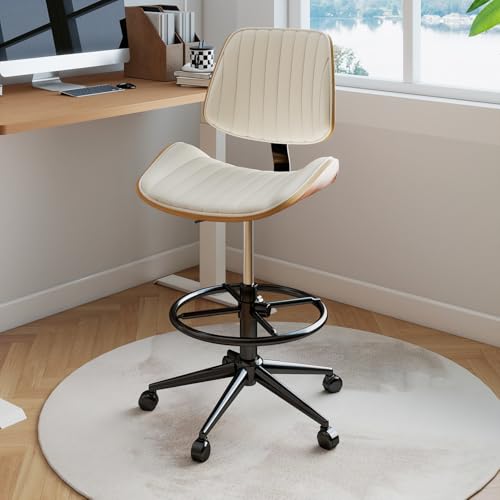
- 21.5–29.5-inch adjustable seat height
- Built-in 9-inch footrest for tall work surfaces
- Curved wood back and thick foam cushion
Best For: Drafting tables and creative studios
Reclining Workstation Pick
GABRYLLY Mesh Chair with Footrest

- Two-way lumbar and 3D arm adjustments
- 135° recline with retractable steel footrest
- All-mesh design and 300-pound capacity
Best For: Workstations that double as rest areas
Best Value Lumbar Support

- Depth-adjustable lumbar support and breathable mesh
- High-resilience foam seat with 330-pound capacity
- Reinforced base and BIFMA-certified gas cylinder
Best For: Professionals seeking durable ergonomic support at a moderate price
Most Adjustable
Marsail Ergonomic Mesh Office Chair

- Lumbar support adjusts vertically and front to back
- 90-120-degree recline, 2D headrest, and 3D armrests
- 330-pound capacity with foam seat and breathable mesh
Best For: Professionals who frequently switch work and reclining positions
Best for Standing Desks

- Adjustable height and foot ring for elevated workstations
- Flip-up arms help save space
- Lumbar support, breathable mesh, and thick foam cushion
Best For: Professionals using standing desks, drafting tables, or counters
Best All-Around Support – GABRYLLY High-Back Ergonomic Chair
For professionals comparing ergonomic studio chairs for professionals, the GABRYLLY is a versatile choice with a wide mesh seat, headrest, lumbar support, and several adjustment points. Its recline range and flip-up arms make it practical for extended computer work and space-conscious setups.
Best For: Long work sessions, shared offices, and users who want a roomy, adjustable chair with head and lumbar support.
Pros:
- Adjustable seat height, headrest, backrest, and flip-up armrests.
- Wide breathable mesh seat and back support users for extended sitting.
- 90–120° recline range with tilt locking and a 300-pound capacity.
- Recommended for users approximately 5’2″ to 6’1″.
Cons:
- Its large footprint may not suit compact work areas.
- The recommended height range may exclude some users.
- Assembly is required.
Choose this model when you want a feature-rich professional task chair without moving to a specialized drafting design. Its wide seat and broad adjustment range are especially useful for varied users.
Best for Elevated Workstations – Tall Drafting Chair with Foot Ring
Among ergonomic studio chairs for professionals, this drafting chair stands out for elevated desks and creative workstations. Its tall adjustable design, foot ring, thick curved cushion, and mesh back support drawing, drafting, and other focused tasks performed above standard desk height.
Best For: Designers, artists, and professionals using standing desks, drafting tables, or other high work surfaces.
Pros:
- Designed specifically for standing desks and elevated workstations.
- Height-adjustable foot ring helps support the legs during extended sessions.
- Thick 5.12-inch curved cushion with a 19.69-inch-wide seat.
- Supports up to 500 pounds and includes flip-up armrests.
Cons:
- Its tall 46.06-inch seat height is not intended for standard desks.
- Listed for hard-floor use, which may limit placement options.
- It offers one listed reclining position.
This is the most workstation-specific option in the group. Verify your desk height and available floor space before buying, since its elevated format is the main reason to choose it.
Best Compact Value – NEO CHAIR Mid-Back Mesh Desk Chair
The NEO CHAIR offers a straightforward option for professionals seeking ergonomic studio chairs for professionals in a compact office or study area. It combines a breathable mesh back, integrated lumbar support, height adjustment, tilt, and swivel functionality in a lighter mid-back design.
Best For: Home offices, classrooms, reception areas, and users who prefer a simple mid-back chair for computer work.
Pros:
- Breathable mesh back with integrated lumbar support.
- Adjustable height, tilt, seat lock, and 360-degree swivel.
- Metal base and gas lift support up to 250 pounds.
- Compact 22.8-by-22.44-inch footprint and 19.4-pound listed weight.
Cons:
- Mid-back design lacks a headrest for upper-body support.
- Fixed armrests provide less adjustment than fully adjustable models.
- Its 250-pound capacity is lower than the other full-size options here.
Consider this chair when footprint, simplicity, and everyday adjustability matter more than premium support features. It is best suited to standard desk heights and moderate-duty use.
Best Advanced Lumbar Adjustment – NEWTRAL Adaptive Office Chair
For professionals prioritizing personalized back support, the NEWTRAL is one of the more adjustable ergonomic studio chairs for professionals in this roundup. Its auto-following lumbar backrest, adjustable seat depth and height, 4D armrests, footrest, and multi-position recline are designed for varied postures and long sitting sessions.
Best For: Users who want extensive ergonomic customization, adaptive lumbar support, and a footrest for work or relaxation.
Pros:
- Lockable auto-following backrest is designed to track changing reclined and forward postures.
- Adjustable seat depth and height accommodate users approximately 5’3″ to 6’3″.
- 4D armrests, foldable footrest, and four recline positions from 96° to 136°.
- 300-pound capacity with BIFMA and EN1335 certifications listed.
Cons:
- At 65 pounds, it is substantially heavier than the mid-back option.
- Its extensive adjustment system may take longer to dial in.
- It has a higher-feature design than users seeking a basic task chair may need.
This model makes the most sense when lumbar positioning and adjustability are your priorities. Confirm the chair’s dimensions and available workspace, particularly if you plan to use the foldable footrest regularly.
Heavy-Duty Comfort Pick – CAPOT Ergonomic Mesh Chair
For professionals comparing ergonomic studio chairs for professionals, the CAPOT stands out as a cooling, highly adjustable option for extended desk work. Its mesh seat and back, micro-adjustable lumbar support, headrest, flip-up arms, and three-position recline provide a broad range of fit adjustments.
Best For: Long work sessions, larger users, and professionals who want extensive adjustability with a 400-pound capacity.
Pros:
- Eight-level lumbar adjustment with 2 inches of support range.
- Breathable Aerovith mesh seat and back help with airflow during long sits.
- Includes adjustable headrest, 4D-style flip-up arms, and 90°, 110°, and 125° backrest positions.
- Stainless-steel base, PU wheels, and a stated 5-year warranty with replacement parts.
Cons:
- Its extensive adjustment system may be more than casual users need.
- The 38-pound chair requires assembly, although instructions are included.
- Its stated user fit is most suitable for people between 5’5″ and 6’2″.
Overall, this is a practical choice when durability, cooling materials, and detailed lumbar and head support matter more than a minimalist design.
Studio Drafting Pick – Walnut-Back PU Leather Drafting Chair
Among ergonomic studio chairs for professionals, this drafting chair is designed for elevated work surfaces and creative studios rather than conventional desk setups. It combines a curved walnut backrest, thick foam cushion, wipe-friendly PU leather, adjustable height, and a built-in footrest.
Best For: Artists, designers, and professionals working at drafting tables, counters, bars, or other taller surfaces.
Pros:
- Seat height adjusts from 21.5 to 29.5 inches for drafting and counter-height work.
- Integrated 9-inch footrest adds lower-leg support at elevated desks.
- Curved walnut backrest and high-density foam cushion support comfortable seated work.
- Armless design can fit neatly beneath a work surface and takes approximately 10–15 minutes to assemble.
Cons:
- The armless design provides no dedicated arm or wrist support.
- Its fixed reclining position offers less posture customization than task chairs with multiple recline settings.
- PU leather may feel warmer than breathable mesh during extended sessions.
This chair makes the most sense for studio professionals who need height flexibility and a footrest, especially when working at a drafting table rather than a standard-height desk.
Reclining Workstation Pick – GABRYLLY Mesh Chair with Footrest
For professionals seeking ergonomic studio chairs for professionals that can support both focused work and breaks, the GABRYLLY adds a retractable footrest to a mesh office-chair design. Its two-way lumbar support, 3D armrests, adjustable headrest, and three locking recline positions make it versatile for long sessions.
Best For: Professionals who want an adjustable work chair that can also recline and provide foot support during breaks.
Pros:
- Two-way lumbar support adjusts vertically and horizontally for a more tailored fit.
- Three recline positions—90°, 110°, and 135°—support work, rest, and reclining.
- Retractable steel footrest extends up to 18.1 inches.
- 3D armrests, adjustable headrest, all-mesh construction, and a large steel base add flexibility and stability.
Cons:
- The 300-pound capacity is lower than the CAPOT in this roundup.
- The footrest and reclining mechanism may require more clearance beneath or behind the desk.
- Its stated fit range is approximately 5’3″ to 6′.
The GABRYLLY is a strong hybrid option for studios where one chair needs to handle computer work, reading, and occasional reclining without sacrificing airflow or adjustment options.
Best Value Lumbar Support – TRALT Ergonomic Office Chair
For professionals comparing ergonomic studio chairs for professionals, the TRALT focuses its budget on the features that matter during long desk sessions: adjustable lumbar support, a resilient foam seat, breathable mesh, and a reinforced base. Its midrange seat-height adjustment makes it a practical fit for many home-office setups.
Best For: Professionals who want durable, breathable ergonomic support without paying extra for a headrest.
Pros:
- Adjustable lumbar support changes in depth to better follow the spine’s natural curve.
- High-density molded foam is designed to resist flattening, while the mesh back promotes airflow.
- 330-pound capacity, a metal-core base, BIFMA-certified gas cylinder, and quiet casters support everyday durability.
- Wide 19.7-inch seat and 17.7- to 21.7-inch seat-height range suit a broad range of users.
Cons:
- It does not include a headrest, which may matter to users who want upper-back or neck support.
- The chair requires assembly, although the manufacturer says setup takes about 15 minutes.
The TRALT is a sensible professional work chair when reliable height retention and lower-back adjustability matter more than premium extras. Its two-year warranty and stated after-sales support add reassurance for a budget-conscious purchase.
Most Adjustable – Marsail Ergonomic Mesh Office Chair
The Marsail stands out among ergonomic studio chairs for professionals who need to change positions throughout the day. It combines a reclining backrest, adjustable headrest, 3D armrests, and a lumbar system with both vertical and forward-back adjustment.
Best For: Professionals who want highly customizable support for focused work, reading, and relaxed reclining.
Pros:
- Adjustable lumbar support moves 2.16 inches up and down and 1.18 inches forward and backward.
- Backrest reclines from 90 to 120 degrees, while the 2D headrest and 3D armrests support multiple postures.
- High-density foam seat, wider seating area, breathable mesh, and a 330-pound capacity support extended use.
- Armrests swivel, slide forward and back, and flip up for easier desk clearance.
Cons:
- The chair requires assembly, so buyers should allow time for setup.
- Its extensive adjustment options may take more time to dial in than a simpler task chair.
Choose the Marsail when adjustability is the priority. Its combination of head, arm, back, and lumbar adjustments gives professionals more ways to tailor the chair than the other options here, especially for mixed work and relaxation postures.
Best for Standing Desks – Primy Tall Drafting Chair
For professionals using a standing desk, drafting surface, or elevated workstation, the Primy offers a taller alternative to conventional ergonomic studio chairs for professionals. Its adjustable foot ring, flip-up arms, lumbar support, and tall design are intended to make alternating seated and standing work more convenient.
Best For: Professionals working at standing desks, drafting stations, counters, or other elevated surfaces.
Pros:
- Adjustable height and foot ring support elevated desks while helping reduce pressure behind the legs.
- Flip-up arms save space and make it easier to move closer to a desk or counter.
- Curved backrest, adjustable lumbar support, breathable mesh, and a three-inch foam cushion target long-session comfort.
- 360-degree swivel and rolling casters provide practical mobility around the workspace.
Cons:
- Its 250-pound maximum capacity is lower than the two standard office chairs in this roundup.
- The tall format is less suitable for a conventional desk unless the height range matches the workstation.
- The supplied details list a one-year warranty in the product notes and also reference a three-year manufacturer warranty, so buyers may want to confirm coverage.
The Primy is a specialized choice rather than an all-purpose office chair. Its tall profile and foot ring make it particularly useful for elevated workstations, but conventional desk users should verify the chair’s height compatibility before buying.
How We Picked the Best Ergonomic Studio Chairs for Professionals
We focused on features that matter during sustained professional use rather than relying on appearance alone. Our comparison considered lumbar-support adjustability, seat depth and cushion design, armrest movement, headrest and recline options, base stability, caster mobility, height range, and stated weight capacity. We also included both conventional office chairs and drafting-style models for studios with elevated work surfaces.
Because body proportions and workstation layouts vary, no single chair is ideal for everyone. The strongest choices offer enough adjustment to align your hips, elbows, back, and monitor without forcing you into one fixed posture.
Quick Comparison
| Best For | Look For | Most Relevant Options |
|---|---|---|
| All-day desk work | Adjustable lumbar support, seat depth, and armrests | Newtral, CAPOT, GABRYLLY |
| Standing desks and tall workstations | Extended height range, foot ring, stable base | Drafting Chair, Primy |
| Compact or budget setups | Smaller footprint, breathable mesh, simple controls | NEO CHAIR, TRALT |
| Reclining and break periods | Lockable tilt, headrest, footrest | GABRYLLY with Footrest, Newtral |
| Higher-weight users | Published capacity, wide seat, reinforced construction | CAPOT, Drafting Chair 500LBS, GABRYLLY Big and Tall |
Key Buying Factors for Ergonomic Studio Chairs for Professionals
Fit and Adjustability
Prioritize seat height, seat depth, lumbar position, and armrest adjustment. Your feet should rest securely on the floor or a foot ring, while your elbows remain close to desk height. A wide seat can improve comfort, but excessive depth may prevent shorter users from maintaining back contact.
Support for Long Sessions
Mesh can improve airflow in warm rooms, while thick foam or contoured cushions may feel better for extended seated work. Adjustable lumbar support is generally more useful than a rigid curve because it can be positioned to match your lower back.
Desk Height and Movement
Standard office chairs suit conventional desks. Drafting chairs are better for elevated surfaces but require a dependable foot ring and enough clearance beneath the desk. Check the chair’s minimum and maximum seat height before buying.
Recline, Arms, and Accessories
A tilt lock supports focused work, while deeper recline can help during listening, reading, or breaks. Flip-up arms are useful when you need to move close to equipment. Headrests and footrests are comfort additions, not substitutes for correct desk setup.
Who Should Buy Which Ergonomic Studio Chairs for Professionals?
Choose a highly adjustable model such as the Newtral or CAPOT if you spend most of the day editing, producing, or designing and need fine-tuned support. Consider the GABRYLLY models if a wide seat, headrest, recline, or footrest is a priority.
For standing desks and elevated studio consoles, a drafting model with a foot ring—such as the 500-pound-capacity option or Primy—makes more sense than a standard office chair. If you want a simpler, more compact setup, NEO CHAIR or TRALT can cover basic ergonomic needs without as many controls. Before ordering, verify dimensions, weight capacity, desk clearance, and return policies so the chair fits both your body and your workspace.