If you want dependable disc access for movies, backups, or archiving, the right external Blu-ray drive can make a big difference. Not every model handles 4K-era media, high-capacity discs, or modern laptops equally well.
This roundup focuses on practical picks for buyers who want straightforward performance, broad compatibility, and the features that matter most for external Blu-ray drives for 4K movie playback.
Best 10 External Blu Ray Drives for 4K Movie Playback Picks for 2026
Best for PC 4K Playback
Archgon Aluminum UHD Blu-Ray Writer

- UHD 4K Blu-ray playback on PC with compatible software
- Writes DVD, CD, and regular Blu-ray discs
- Sturdy CNC aluminum build with M-DISC support
Best For: PC users who want a durable external drive for UHD 4K playback and disc burning.
Best for 100GB Archives
Wbacon External Blu-ray Drive with HDMI
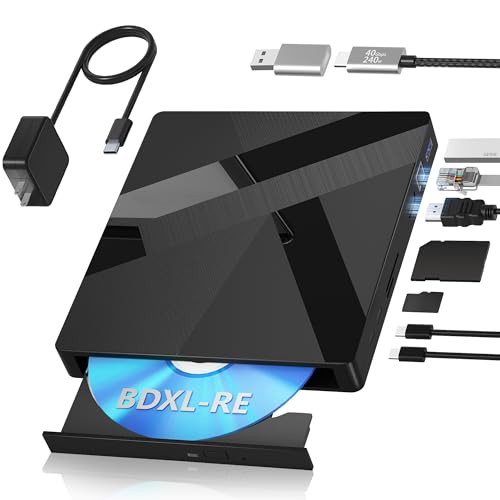
- 100GB BDXL-RE read/write support
- HDMI and Gigabit Ethernet ports
- Windows, macOS, and Linux compatible
Best For: Archive-focused buyers who also want a portable Blu-ray drive for movie playback with third-party software.
Best for BDXL Backup
ASUS External Blu-Ray 6X Writer

- Supports BDXL discs up to 128GB
- 6X Blu-ray writing with smart burn control
- Works vertically or horizontally
Best For: Users who want a compact external Blu-ray drive for large backups and occasional movie playback.
Best Multi-Function Pick
External 4K Blu Ray Drive with SD/TF Hub

- Blu-ray, DVD, and CD support in one portable unit
- Built-in USB, SD, and TF expansion adds real utility
- Simple USB 3.0/Type-C connection for modern laptops
Best For: Users who want a portable 4K-capable Blu-ray drive with extra ports and card slots.
Best for Archiving
Produplicator LG BP60NB10 6X UHD Blu-ray Drive

- Supports UHD Blu-ray, BDXL, M-DISC, and CD/DVD formats.
- Includes CyberLink software, USB cable, and 100GB M-DISC.
- Silent Play and Jamless Play help smooth out playback.
Best For: Buyers who want a portable external drive for 4K Blu-ray use plus dependable disc burning and archiving.
Best for Stable Power
Dainty USB 3.0 / Type-C Blu-ray Drive

- Dual USB power design for steadier operation
- USB 3.0 and Type-C connections for broad compatibility
- Reads/writes BD, DVD, and CD formats
Best For: Users who want a portable Blu-ray drive with extra power stability for Windows or Mac computers.
Best for Multi-Format Use
7-in-1 External 4K Blu-ray Drive
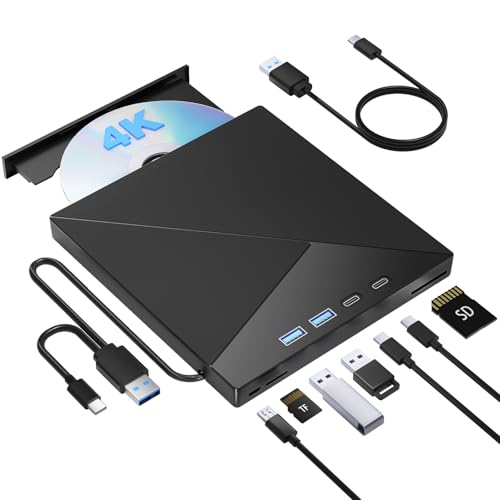
- Blu-ray, DVD, and CD support in one portable unit
- USB 3.0 and USB-C connections for wider compatibility
- SD/TF slots add extra everyday convenience
Best For: People who want a flexible external drive for 4K discs, legacy media, and card access.
Best with Extra Features
External Blu-ray Drive USB 3.0/Type-C

- Dual USB power design for steadier disc reading and burning
- USB 3.0 and Type-C connections for broad computer compatibility
- Reads and writes BD, DVD, and CD media
Best For: Laptop and desktop users who want a portable Blu-ray drive with steadier power for disc playback and burning.
Best Connectivity Pick
8-in-1 External Blu-ray Drive with Card Reader

- USB and USB-C support for broader compatibility
- Blu-ray, DVD, and CD support for media playback
- Adds SD/TF card reading in one compact unit
Best For: Users who want a versatile external drive with extra ports and card-reading convenience.
Best for Dual-Connection Compatibility
External Blu Ray Drive with USB 3.0 & Type-C

- USB 3.0 and Type-C support for flexible laptop and desktop use
- Reads/writes Blu-ray, DVD, and CD media including 50G discs
- Works with Windows and macOS for broad compatibility
Best For: People who want a portable Blu-ray drive with both USB-A and USB-C connectivity.
Best for PC 4K Playback – Archgon Aluminum UHD Blu-Ray Writer
archgon Premium Aluminum External USB 3.0 UHD 4K Blu-Ray Writer Super Drive for PC and Mac
Check Price On AmazonIf you want one of the more capable external blu ray drives for 4k movie playback, this Archgon model stands out for PC users who need UHD Blu-ray support plus writing features in a compact aluminum enclosure. It works with appropriate third-party software on Windows for full 4K disc playback, and it also handles regular Blu-ray, DVD, and CD tasks on Mac.
Best For: PC buyers who want a sturdy external drive for UHD 4K playback, disc burning, and everyday optical media use.
Pros:
- Supports UHD 4K Blu-ray playback on PC with compatible third-party software
- Reads and writes DVD and CD, plus regular Blu-ray on Mac
- Premium CNC aluminum body feels durable and compact
- Includes M-DISC BD-R support for long-term archiving
Cons:
- 4K Blu-ray playback depends on third-party software on Windows
- Mac users may not be able to play UHD 4K Blu-ray discs
- Not the simplest plug-and-play choice for beginners
For shoppers comparing external blu ray drives for 4k movie playback, this is a strong pick if you value build quality and broad disc support over ultra-simple setup. It makes the most sense for PC owners who want a drive that can both watch UHD discs and handle everyday burning tasks.
Best for 100GB Archives – Wbacon External Blu-ray Drive with HDMI
If you want external blu ray drives for 4k movie playback plus serious disc-writing flexibility, this Wbacon unit stands out for its 100GB BDXL-RE support, included USB-C cable, and extra HDMI/Ethernet connections. It is aimed at users who need a portable drive for both media and large-capacity archiving, with software support required for commercial Blu-ray playback.
Best For: Buyers who want a portable Blu-ray drive for 100GB disc backups, multi-platform use, and movie playback with third-party software.
Pros:
- Supports 100GB BDXL-RE discs for high-capacity reading and writing
- Includes HDMI and Gigabit Ethernet ports for added connectivity options
- Works with Windows, macOS, and Linux
- Portable design with USB-C cable and external power adapter included
Cons:
- Commercial Blu-ray movie playback needs separate third-party software
- HDMI function depends on compatible playback software and setup
- More feature-rich than many users need if they only want simple disc reading
For buyers comparing external blu ray drives for 4k movie playback, this is a feature-heavy option that makes more sense for archive-minded users than for basic plug-and-play viewing. It offers strong format support and connectivity, but the playback experience still depends on the right software stack.
Best for BDXL Backup – ASUS External Blu-Ray 6X Writer
If you want one of the more capable external blu ray drives for 4k movie playback setups that also handles large-disc archiving, this ASUS model is a practical pick. It focuses on reliable 6X Blu-ray writing, BDXL support, and a compact external design that works well for desktop or portable use.
Best For: Buyers who need an external Blu-ray drive for disc backup, BDXL media, and occasional movie use in a tidy, space-saving package.
Pros:
- BDXL support for higher-capacity discs up to 128GB
- 6X Blu-ray writing with ASUS smart burn management
- Vertical or horizontal placement saves desk space
- Disc Encryption II adds extra security for stored data
Cons:
- Not positioned as a dedicated premium 4K playback device
- Best known for burning and backup rather than advanced media features
For shoppers comparing external blu ray drives for 4k movie playback, this ASUS drive stands out more for its BDXL support and dependable burning than for a feature-heavy media suite. It makes the most sense if you want a simple external Blu-ray solution that can handle both storage jobs and basic disc use without taking up much room.
Best Multi-Function Pick – External 4K Blu Ray Drive with SD/TF Hub
If you want one of the more versatile external blu ray drives for 4k movie playback, this model stands out for combining UHD disc support with extra USB, SD, and TF connectivity. It’s a practical choice for laptop users who need more than simple disc reading and want a compact drive they can keep at a desk or pack in a bag.
Best For: Laptop and Mac users who want a portable Blu-ray drive with built-in hub-style convenience for discs, cards, and accessories.
Pros:
- Supports Blu-ray, DVD, and CD playback/burning in one compact unit
- Includes USB, SD, and TF ports for extra everyday convenience
- USB 3.0 and Type-C connectivity help keep setup simple on modern laptops
- Portable design makes it easy to move between home, office, and travel
Cons:
- 4K Blu-ray playback depends on compatible software and system support
- Not compatible with tablets, phones, projectors, or car systems
- Region-code limits may matter if you use discs from different markets
For buyers comparing external blu ray drives for 4k movie playback, this is a strong utility pick if you value extra ports as much as disc support. Just make sure your computer and playback software are ready for UHD Blu-ray before you buy.
Best for Archiving – Produplicator LG BP60NB10 6X UHD Blu-ray Drive
If you want one of the more practical external blu ray drives for 4k movie playback, this LG-based bundle is a solid pick for both disc handling and long-term storage. It’s a portable USB optical drive that supports UHD Blu-ray media, includes CyberLink software, and adds M-DISC and BDXL compatibility for users who also want backup capacity beyond movie watching.
Best For: Buyers who want a portable external drive for 4K Blu-ray use plus dependable disc burning and archiving.
Pros:
- Supports UHD Blu-ray, BDXL, M-DISC, and common CD/DVD formats.
- Includes CyberLink Media Suite, USB cable, and a 100GB M-DISC.
- Silent Play and Jamless Play help improve playback smoothness.
- Portable design makes it easy to use with a laptop or desktop.
Cons:
- It is a burner-focused drive, so playback software and setup matter.
- 4K disc support can depend on your computer, software, and region settings.
For shoppers comparing external blu ray drives for 4k movie playback, this model stands out more for its all-around versatility than for being a bare-bones player. If you also want reliable burning, archival media support, and a portable form factor, it’s an easy drive to justify.
Best for Stable Power – Dainty USB 3.0 / Type-C Blu-ray Drive
If you want one of the more practical external blu ray drives for 4k movie playback, this Dainty external Blu-ray drive stands out for its dual-USB power setup and broad disc support. It handles BD, DVD, and CD media, and the USB 3.0 plus Type-C connectivity makes it easy to use with newer laptops and desktop PCs.
Best For: Buyers who want a portable Blu-ray drive with extra power stability for reading and burning discs on Windows or Mac.
Pros:
- Dual USB power cable helps reduce playback or burning issues caused by low power
- USB 3.0 and Type-C support improves compatibility with modern computers
- Reads and writes BD, DVD, and CD formats, including dual-layer DVDs
- Compact design is easy to pack for travel or office use
Cons:
- Playback software is not included and must be purchased separately
- Not compatible with TVs, tablets, PS4, Chromebooks, iPads, or vehicles
- 4K disc playback depends on your computer, drive software, and disc format support
For shoppers comparing external blu ray drives for 4k movie playback, this is a solid utility-focused option rather than a flashy one. The main appeal is reliable disc handling with extra power support, which can matter more than gimmicks when you want smooth everyday use.
Best for Multi-Format Use – 7-in-1 External 4K Blu-ray Drive
If you want one of the more versatile external blu ray drives for 4k movie playback, this 7-in-1 model is built to cover more than just discs. It combines USB 3.0 and USB-C connectivity with BD/DVD/CD support plus SD/TF card slots, making it a practical pick for laptops and desktops that need a flexible optical drive solution.
Best For: Buyers who want a compact external drive that can handle 4K Blu-ray discs, older media formats, and memory cards in one device.
Pros:
- Supports Blu-ray, DVD, and CD playback/burning in a portable form factor
- USB 3.0 and USB-C options improve compatibility with modern computers
- SD and TF card slots add extra utility beyond disc playback
- Works with Windows and macOS systems for broad everyday use
Cons:
- 4K Blu-ray playback still depends on compatible software and system support
- Portable drives can be less ideal than desktop units for heavy-duty burning
As a do-it-all pick, this drive makes sense if you want external blu ray drives for 4k movie playback without giving up everyday disc burning or card-reader convenience. It’s more versatile than a bare-bones optical drive, which makes it a smart fit for mixed media libraries.
Best with Extra Features – External Blu-ray Drive USB 3.0/Type-C
If you want one of the more practical external blu ray drives for 4k movie playback, this model stands out for its dual USB power design and flexible USB-A/USB-C connectivity. It supports Blu-ray, DVD, and CD reading and writing, but you’ll need compatible playback software for Blu-ray discs, and it won’t work with TVs, tablets, or game consoles.
Best For: Laptop and desktop users who want a portable Blu-ray drive with steadier power for disc playback and burning.
Pros:
- Dual USB power setup helps reduce read/write failures from insufficient power.
- USB 3.0 and Type-C support makes it easy to connect to newer and older computers.
- Handles BD, DVD, and CD media, including dual-layer discs and larger BD capacity.
- Compact enough for travel and everyday use with Windows, macOS, and Linux.
Cons:
- Does not include Blu-ray playback software.
- Not compatible with TVs, tablets, Chromebooks, PS4, iPads, or projectors.
- Blu-ray movie playback depends on software and system compatibility.
For buyers comparing external blu ray drives for 4k movie playback, this one is a solid pick if power stability and simple laptop use matter more than bundled software or console compatibility. It is better suited to a computer-based media setup than a plug-and-play living-room solution.
Best Connectivity Pick – 8-in-1 External Blu-ray Drive with Card Reader
If you want one of the more flexible external blu ray drives for 4k movie playback, this 8-in-1 unit stands out for its mix of disc support, dual USB connections, USB-C compatibility, and built-in SD/TF card slots. It is a practical choice for buyers who need a drive that can handle movies, backups, and everyday file access from a single compact device.
Best For: Shoppers who want a multiport external Blu-ray drive for laptops and desktops, especially if they also need card reading and broad device compatibility.
Pros:
- Includes both USB and USB-C connections for wider laptop compatibility
- Supports Blu-ray, DVD, and CD use for movies and data discs
- Built-in SD/TF card reader adds extra utility beyond disc playback
- Compatible with Windows and Mac systems for flexible everyday use
Cons:
- Not all Mac setups support Blu-ray playback software out of the box
- 4K disc playback still depends on compatible software and DRM support
- More features can mean a slightly less streamlined setup than basic drives
Overall, this is a strong option if you want external blu ray drives for 4k movie playback and also value the convenience of extra ports and card-reading features. It is less of a no-frills pick and more of a versatile all-in-one accessory for mixed media use.
Best for Dual-Connection Compatibility – External Blu Ray Drive with USB 3.0 & Type-C
If you want one of the more flexible external blu ray drives for 4k movie playback setups, this Yaeonku model is worth a look for laptops, desktops, and Macs that need both USB-A and USB-C support. It handles Blu-ray, DVD, and CD read/write tasks, and its 3D playback support makes it a practical pick for users who want broad disc compatibility without a bulky desktop drive.
Best For: Buyers who want a portable Blu-ray drive with both USB 3.0 and Type-C connections for mixed computer setups.
Pros:
- Dual USB 3.0 and Type-C cabling makes it easy to use with newer and older computers.
- Supports Blu-ray, DVD, and CD read/write functions, including 50G discs.
- Wide OS compatibility across Windows and macOS gives it broad everyday utility.
Cons:
- Does not play 4K Ultra HD discs, so it is not a true UHD Blu-ray drive.
- Playback software is not included and must be installed separately.
- Not compatible with tablets, TVs, projectors, phones, or cars.
For shoppers comparing external blu ray drives for 4k movie playback, this is a strong convenience-first option if you need standard Blu-ray and 3D support rather than actual 4K UHD disc playback. Its main appeal is simple cross-platform compatibility and portable use.
How We Picked the Best External Blu Ray Drives for 4K Movie Playback
We focused on external Blu-ray drives for 4K movie playback that offer the most useful mix of read/write support, USB-C or USB 3.0 connectivity, and compatibility with Windows and Mac where applicable. We also favored models with BDXL or UHD-related support, since those features matter most if you plan to handle larger-capacity discs.
Other priorities included portable form factor, included software, and practical extras such as dual ports or card readers. For most buyers, reliability and compatibility matter more than flashy specs.
Quick Comparison
If you mainly watch discs, a simple reader may be enough. If you also burn media or archive files, choose a writer with BDXL support. Buyers with newer laptops should look closely at USB-C support, while desktop users may prefer a model with a standard USB-A connection and a stable cable setup.
Key Buying Factors for External Blu-Ray Drives for 4K Movie Playback
Disc Format Support
Look for support for BD, BD-R, BD-RE, and ideally BDXL if you need higher-capacity discs. Some listings mention UHD or 4K support, but make sure the drive’s actual playback and software compatibility match your needs.
Connection Type
USB 3.0 remains common, but USB-C is more convenient for modern laptops. A dual USB-A/USB-C design can make a drive easier to use across multiple devices.
Playback Software
Hardware support alone is not always enough for movie playback. Many buyers need compatible software for disc playback, especially on Windows systems. Check whether software is included or whether you’ll need to supply your own.
Power and Portability
Bus-powered drives are easier to travel with, but some higher-feature models may benefit from a stable power setup. If you plan to carry the drive often, keep size, weight, and cable storage in mind.
Operating System Compatibility
Make sure the drive works with your laptop or desktop OS version. Some models are better suited to Windows, while others are advertised for both Windows and Mac. Compatibility claims should always be checked before buying.
Who Should Buy Which External Blu Ray Drives for 4K Movie Playback?
Choose a basic external Blu-ray reader if your main goal is watching movies and you do not need burning support. Pick a Blu-ray writer if you plan to create discs, back up media, or use M-DISC or BDXL media. Frequent travelers should prioritize compact USB-C models, while home users may appreciate drives with extra ports or broader connectivity.
For buyers comparing external Blu-ray drives for 4K movie playback, the best option is usually the one that matches your disc format needs, software setup, and laptop or desktop ports—not just the longest feature list.