A fanless mini PC with four Ethernet ports can make a compact, quiet router or firewall without occupying a full-size server. The right choice depends less on its size than on port speed, processor, and whether memory and storage are included.
These seven listings span newer N100 hardware, older J-series processors, and a Core 6006U option. Here’s how to narrow them down before you buy.
Best 7 Fanless Mini PC with 4 Ethernet Ports Picks for 2026
Ready-to-Deploy Pick
N100 Firewall Mini PC with 4×2.5GbE

- Four Realtek 2.5GbE ports
- 8GB RAM and 128GB SSD included
- Fanless N100; no SR-IOV
Best For: Home labs needing a ready-equipped four-port gateway
Intel-NIC Starter
VNOPN J4125 Four-Port Firewall PC

- Four Intel i225 2.5GbE ports
- 4GB RAM and 64GB mSATA included
- Fanless with mounting bracket
Best For: Compact firewalls built around Intel NICs
Six-Port Alternative
Sharevdi Core 6006U Firewall PC

- Details list six Intel i226 ports
- 8GB RAM and 240GB SSD included
- Verify port count before buying
Best For: Firewalls needing more than four physical connections
Barebones Build
VNOPN J3710 Four-Port Firewall PC

- Four Intel i226 2.5GbE ports
- No RAM, SSD, or OS included
- Fanless; supports up to 8GB DDR3
Best For: DIY builders selecting their own firewall components
Low-Power Pick

- Four Intel i226-V 2.5GbE ports
- 8GB RAM and 128GB mSATA SSD included
- 6W fanless design; 8GB RAM maximum
Best For: Quiet home or small-office firewall setups
Upgrade-Friendly Pick
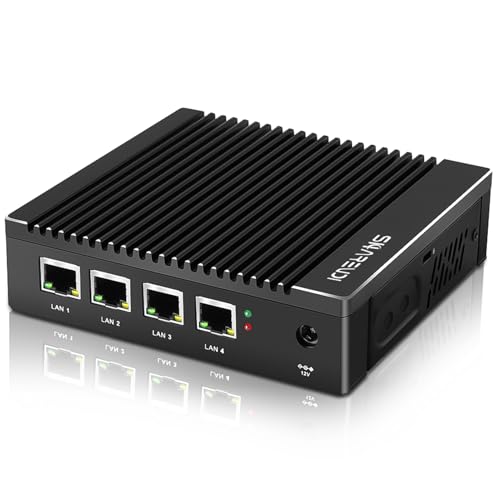
- Four Intel i226-V 2.5GbE ports
- 8GB DDR4 and 240GB mSATA SSD included
- Supports up to 16GB RAM
Best For: Firewall builds needing included hardware and RAM headroom
Barebones Pick
Sharevdi J4105 DIY Firewall Box
- Four Intel i226-V 2.5GbE ports
- No RAM, SSD, or OS included
- Supports up to 16GB DDR4
Best For: DIY firewall builds with separately purchased components
Ready-to-Deploy Pick – N100 Firewall Mini PC with 4×2.5GbE
If you want a fanless mini pc with 4 ethernet ports that arrives with memory and storage installed, this N100 model includes 8GB RAM, a 128GB SSD, and four RTL8125BG 2.5GbE ports. Its compact, passively cooled chassis suits a quiet home firewall or small-network gateway.
Best For: Home-lab builders who want a four-port firewall appliance without sourcing RAM or storage separately.
Pros:
- Four 2.5GbE ports support VLAN tagging and link aggregation.
- Includes 8GB RAM and a 128GB SSD, with an M.2 SSD slot for expansion.
- N100 processor, dual HDMI outputs, and fanless cooling make it flexible for network and light server duties.
Cons:
- Uses Realtek rather than Intel network adapters.
- SR-IOV is not available, limiting some virtualization setups.
The included components make this the simplest starting point here if you prefer to configure your firewall software rather than assemble the hardware first.
Intel-NIC Starter – VNOPN J4125 Four-Port Firewall PC
This fanless mini pc with 4 ethernet ports pairs a J4125 quad-core processor with four Intel i225 2.5GbE adapters. It ships with 4GB DDR4 RAM and a 64GB mSATA SSD, giving you a compact starting point for a dedicated router or firewall.
Best For: Buyers who prioritize Intel network adapters and want a small, preconfigured hardware base.
Pros:
- Four Intel i225 2.5GbE ports provide dedicated connections for network segmentation.
- Includes RAM and storage; supports up to 16GB RAM and a 512GB mSATA SSD.
- Fanless case and included mounting bracket help keep a gateway quiet and out of the way.
Cons:
- The included 4GB RAM and 64GB SSD may be modest for heavier applications.
- The J4125 is an older processor than the N100 in this roundup.
Choose this model when four Intel ports matter more to you than generous out-of-box memory and storage; check your intended firewall software’s requirements before deploying it.
Six-Port Alternative – Sharevdi Core 6006U Firewall PC
Although it appears alongside searches for a fanless mini pc with 4 ethernet ports, this Sharevdi appliance is listed with six Intel i226 2.5GbE ports. That extra pair is useful if your firewall needs more physical network segments, and the machine includes 8GB DDR4 RAM and a 240GB mSATA SSD.
Best For: Network builders who need six physical ports rather than exactly four.
Pros:
- Six Intel i226 ports provide two more connections than a four-port appliance.
- Includes 8GB RAM and a 240GB SSD; listed memory support reaches 32GB.
- Fanless aluminum-alloy chassis and AES-NI-capable Core 6006U processor suit dedicated firewall use.
Cons:
- Not a four-port model if an exact port count is important.
- The passive-cooling enclosure may become hot during operation.
- Optional Phoenix-terminal power requires a separately purchased cord and careful polarity.
The product title mentions four ports, but its detailed specifications say six; verify the listing and port layout before ordering. If six is what you need, the included RAM and SSD reduce the setup work.
Barebones Build – VNOPN J3710 Four-Port Firewall PC
If you want to choose your own components, this fanless mini pc with 4 ethernet ports is a barebones option with four Intel i226 2.5GbE ports and a J3710 quad-core processor. It arrives without RAM, storage, or an installed operating system, so budget for all three before deployment.
Best For: DIY firewall builders who already plan to install DDR3 memory, an mSATA SSD, and their preferred OS.
Pros:
- Four Intel i226 2.5GbE ports suit a dedicated multi-interface gateway.
- Fanless aluminum-alloy case includes a VESA mounting bracket.
- Supports up to 8GB DDR3 RAM and a 512GB mSATA SSD.
Cons:
- No RAM, SSD, or operating system is included.
- Does not support HDD expansion.
- Maximum RAM capacity is 8GB.
This is the hands-on choice of the group: its four Intel ports are appealing, but compare the total cost after adding compatible memory and storage.
Low-Power Pick – VNOPN J3710 Firewall Mini PC
If you need a fanless mini pc with 4 ethernet ports for a quiet home firewall, this VNOPN model pairs four Intel i226-V 2.5GbE ports with a 6W Intel Pentium J3710. It arrives with 8GB of DDR3 RAM and a 128GB mSATA SSD.
Best For: Home networks and small offices that want a compact, preconfigured-hardware firewall box.
Pros:
- Four 2.5GbE ports support separate network connections.
- Fanless aluminum chassis avoids fan noise.
- Includes RAM, storage, and a VESA mounting kit.
- Seller reports testing with pfSense, OPNsense, and Ubuntu.
Cons:
- 8GB RAM is also the stated maximum.
- Does not support an HDD.
The low-power design and included components make this a straightforward choice, but its fixed RAM ceiling limits upgrade flexibility.
Upgrade-Friendly Pick – Sharevdi J4105 with 8GB RAM
This fanless mini pc with 4 ethernet ports comes with four Intel i226-V 2.5GbE connections, an Intel J4105 quad-core processor, 8GB of DDR4 RAM, and a 240GB mSATA SSD. It offers more stated memory headroom than the J3710 configuration in this roundup.
Best For: Buyers who want a ready-equipped firewall appliance with room to expand RAM later.
Pros:
- Four 2.5GbE ports and AES-NI support suit firewall and VPN projects.
- Includes 8GB DDR4 RAM and a 240GB mSATA SSD.
- Supports up to 16GB RAM and includes a VESA bracket.
Cons:
- mSATA storage is stated to top out at 512GB; HDDs are not supported.
- OS testing is mentioned, but the supplied notes do not clearly identify a preinstalled OS.
Choose this version if you want memory and storage already fitted, while retaining the option to increase its DDR4 RAM capacity.
Barebones Pick – Sharevdi J4105 DIY Firewall Box
For a build-it-yourself fanless mini pc with 4 ethernet ports, this Sharevdi J4105 model supplies four Intel i226-V 2.5GbE connections but no RAM, SSD, or preinstalled operating system. You choose and install those components yourself.
Best For: Network hobbyists who already plan to select their own memory, mSATA storage, and firewall OS.
Pros:
- Four 2.5GbE ports and AES-NI support provide a foundation for a firewall build.
- Supports up to 16GB DDR4 RAM and 512GB mSATA storage.
- Fanless aluminum chassis includes a VESA mounting bracket.
Cons:
- Cannot be used as configured until RAM and storage are installed.
- No OS is preinstalled, and HDD storage is unsupported.
The barebones configuration offers control over the finished setup, but budget for compatible parts and installation time before buying.
How We Picked the Best Fanless Mini PC with 4 Ethernet Ports
We focused on the practical differences visible in the selected listings: processor family, advertised Ethernet ports and controllers, installed memory and storage, and barebone versus ready-to-configure packages. A listing alone cannot establish sustained throughput, thermal performance, software compatibility, or long-term reliability, so treat those as checks to make before ordering.
Quick Comparison
The N100 model pairs four advertised 2.5GbE ports with 8GB RAM and a 128GB SSD, making it the clearest starting point if you want included components and a newer processor. The J4125 listing includes 4GB RAM and a 64GB mSATA SSD, but its title does not establish whether its four Intel i225 ports operate at 2.5GbE; confirm the exact configuration. The Core 6006U listing specifies four i226-V 2.5GbE ports, 8GB RAM, and a 240GB SSD.
The J3710 and J4105 listings advertise four i226-V 2.5GbE ports. One J3710 option explicitly says it is barebone with no RAM; verify what else is included. Two J4105 entries have the same supplied name, so compare their seller pages, configurations, and prices rather than assuming they are distinct hardware revisions.
Key Buying Factors for a Fanless Mini PC with 4 Ethernet Ports
Ports and Network Plan
Check the speed of all four ports, not just the fastest port mentioned. Confirm the Ethernet controller model, port labeling, and whether your switches and clients support 2.5GbE. Four physical ports are useful for separating WAN, LAN, and other networks, but VLANs may be a simpler alternative if you already have a managed switch.
CPU, Memory, and Storage
Basic routing and firewall rules differ from workloads such as VPN encryption, intrusion detection, or multiple virtual machines. Choose headroom for the services you actually intend to run, and check memory capacity and upgradeability. Included RAM and an SSD reduce setup work; a barebone system gives you more control but requires compatible parts. Verify the storage type and any drive-size limits before purchasing.
Software and Installation
If you plan to install OPNsense, pfSense, or another router OS, check current processor and network-driver support for the exact hardware revision. Also confirm BIOS access, boot options, power adapter specifications, and the seller’s return policy. “Fanless” means no system fan, not guaranteed cool operation: allow ventilation around the case.
Who Should Buy Which Fanless Mini PC with 4 Ethernet Ports?
Start with the configured N100 listing if you want a straightforward four-port 2.5GbE build with memory and storage included. Consider the Core 6006U configuration if its larger listed SSD matters and the price is competitive, while checking its older platform against your workload. A J4125 system may suit a modest build if its port specifications meet your needs. Pick a J3710 or J4105 option when its exact configuration and price justify it; choose the barebone J3710 only if you are comfortable sourcing and installing components. For any listing, confirm the shipped specifications before treating it as the best fit.