If you’re a streamer or creator, having the right camera mount can make a significant difference in your setup. In 2026, you’ll find a range of mounts designed for stability and versatility. From adjustable heights to 360° rotation, these choices cater to various needs. Curious about which mounts stand out this year? Let’s explore the top ten options that can elevate your content creation experience.
SmallRig Adjustable Camera Desk Mount Table Stand

The SmallRig Adjustable Camera Desk Mount Table Stand is perfect for streamers who need versatility and stability in their setup. With a height range of 19-39 inches, you can easily customize it to suit your shooting needs. The 1/4 ball head allows for 360° rotation and front tilts, giving you the freedom to capture the perfect angle. Plus, it’s designed to fit tables up to 1.85 inches thick, making it a space-saving alternative to bulky tripods. Lightweight yet sturdy, this stand is made from durable aviation aluminum, ensuring it’s both portable and easy to clean for your streaming sessions.
Best For: Streamers and content creators seeking a versatile and stable camera mount for their shooting needs.
Pros:
- Adjustable height range of 19-39 inches for customizable shooting angles.
- 360° rotation and -90°/+45° tilt for capturing diverse perspectives.
- Lightweight and portable design made from durable aviation aluminum.
Cons:
- Maximum load capacity of 6.6 pounds may limit heavier camera setups.
- Compatibility limited to tables with a maximum thickness of 1.85 inches.
- Detachable ball head may require additional adapters for different devices.
NEEWER 22″ Magic Arm with Desk C Clamp for Cameras and Microphones

Looking for a versatile camera mount that adapts to your streaming needs? The NEEWER 22″ Magic Arm with Desk C Clamp is your perfect solution. Weighing just 14.1 ounces, this robust aluminum alloy arm supports up to 500g, making it ideal for various devices like DSLR cameras and microphones. Its two-section friction boom arm extends 22 inches, allowing for overhead photography and live streaming. The anti-twist mechanism guarantees stability, while non-slip pads protect your gear. Compatible with a range of surfaces, this mount easily secures to desks and tripods, enhancing your setup for videos, podcasts, and more.
Best For: Content creators, vloggers, and streamers looking for a stable and versatile camera mount for their setup.
Pros:
- Sturdy Construction: Made from robust aluminum alloy, ensuring durability and long-term use.
- Flexible Positioning: Features a two-section boom arm with a 22-inch extension and 360° dual ball head adapters for optimal positioning.
- Wide Compatibility: Works with a variety of devices including cameras, microphones, smartphones, and LED lights, making it adaptable for different setups.
Cons:
- Limited Load Capacity: Supports only up to 500g, which may not be sufficient for heavier equipment.
- Surface Limitations: Can only secure to flat surfaces up to 2 inches thick and cylindrical objects up to 1.6 inches in diameter, limiting placement options.
- Weight Consideration: At 14.1 ounces, it may not be the lightest option for portable setups.
NEEWER Extendable Camera Desk Mount (TL283)

For streamers who need a reliable and adjustable setup, the NEEWER Extendable Camera Desk Mount (TL283) stands out with its impressive height range of 17″ to 40″. Constructed from durable aluminum alloy, this telescopic stand features three sections with a twist lock mechanism for stability. It supports up to 6.6lbs, making it perfect for DSLRs, webcams, or ring lights. The adjustable desk C clamp fits desks up to 2″ thick, while rubber pads prevent scratches. With a multi-angle ball head offering 360° swivel and a U-shaped notch for tilting, you can easily switch between portrait and landscape orientations for any streaming scenario.
Best For: Streamers and content creators seeking a versatile and adjustable camera setup for various shooting angles and devices.
Pros:
- Durable construction with aluminum alloy ensures long-lasting use.
- Adjustable height from 17″ to 40″ provides flexibility for different shooting scenarios.
- Multi-angle ball head allows for easy switching between portrait and landscape orientations.
Cons:
- Maximum load capacity of 6.6lbs may limit the use of heavier equipment.
- C clamp may not fit all desk types, particularly thicker surfaces beyond 2″.
- Requires manual setup for adjustment, which might not be as quick as other automated options.
HumanCentric DSLR Monitor Mount for Desk
Designed specifically for content creators and streamers, the HumanCentric DSLR Monitor Mount offers a seamless solution for mounting cameras and microphones directly above your workstation. This durable aluminum shelf, measuring 17” W x 3.04” D, installs easily on monitors using 100x100mm VESA patterns. It’s perfect for remote workers, YouTubers, and anyone wanting professional online presentations. By supporting DSLR cameras, webcams, and lights with standard 1/4-20 screws, it replaces bulky tripods and boom arms, keeping your desk clutter-free. Plus, it enhances cable management, promoting a tidy setup that enhances your streaming or conferencing experience.
Best For: Content creators, streamers, and remote workers seeking a professional and organized workspace for video production.
Pros:
- Durable construction: Made from high-quality aluminum, ensuring stability and longevity.
- Space-efficient design: The shelf helps declutter your desk by replacing bulky tripods and boom arms.
- Easy installation: Installs directly onto monitors with 100x100mm VESA patterns, making setup quick and hassle-free.
Cons:
- Limited compatibility: Only compatible with monitors that have 100x100mm VESA mounting patterns.
- Weight capacity: May not support extremely heavy cameras or equipment beyond its intended design.
- Fixed position: Once installed, the shelf’s position may be less adjustable compared to a traditional tripod setup.
TARION Camera Arm Desk Mount for DSLR and Tablet

The TARION Camera Arm Desk Mount is an excellent choice for streamers and content creators who need versatility and stability for their equipment. Weighing just 3.15kg, it supports up to 8kg, making it perfect for DSLRs, tablets, and even ring lights. The 48cm articulating arm adjusts 360 degrees vertically and horizontally, ensuring you get the perfect angle every time. Its dual clamps and anti-slip pads provide superior stability, while the rust-resistant aluminum alloy guarantees durability. Setup is quick and easy, allowing you to focus on your content rather than worrying about your camera mount.
Best For: Streamers and content creators looking for a versatile and stable camera mount for DSLRs, tablets, and ring lights.
Pros:
- Heavy-duty design supports a maximum load of 8kg, accommodating various devices.
- Adjustable arm allows for precise positioning with 360-degree vertical and horizontal movement.
- Durable materials like rust-resistant aluminum ensure long-lasting performance.
Cons:
- Weight of 3.15kg may be considered heavy for some users who prefer lightweight options.
- Clamp design may not fit all desk thicknesses, limiting compatibility with certain setups.
- Initial setup may require some time and effort for optimal positioning and stability.
SMALLRIG 22″ Magic Arm Clamp for Overhead Phone Mount

Streamers looking for a reliable and flexible overhead solution will find the SMALLRIG 22″ Magic Arm Clamp to be an excellent choice. This sturdy arm supports a load of up to 600g, making it ideal for phones, webcams, and lights. Its double-ball clamps allow for independent angle adjustments, ensuring stability even if bumped. The versatile clamp opens to 63.5mm, fitting securely on desktops and round tubes. Constructed from aluminum alloy, this mount is both lightweight and durable. Just remember to adjust the arm length for heavier devices to prevent slippage, making your streaming experience smoother and more professional.
Best For: Streamers and content creators looking for a stable and flexible overhead camera mount solution.
Pros:
- High load capacity: Supports devices up to 600g, accommodating phones, webcams, and lights.
- Adjustable angles: Double-ball clamps allow for independent angle adjustments, maintaining stability.
- Versatile clamp design: Fits securely on various surfaces including desktops and round tubes.
Cons:
- Weight limitation: Recommended load capacity of 600g means heavier devices may require careful adjustment.
- Potential slippage: Users must adjust arm length for heavier devices to prevent slippage.
- Limited to certain devices: Compatibility is restricted to devices within the 5.5-8.5cm width range.
InnoGear Webcam Stand for Desk

If you’re looking for a reliable and versatile webcam mount, the InnoGear Webcam Stand for Desk is an excellent choice for content creators. It’s compatible with various Logitech models and devices, thanks to its standard 1/4″ screw hole. The compact, weighted all-metal base guarantees stability while being easily repositionable. With non-slip pads, you won’t have to worry about scratches or noise during your recordings. The adjustable height and flexible swivel ball head allow for precise angle adjustments, making it perfect for live streaming or video conferencing. Elevate your setup with this dependable webcam stand that adapts to your needs.
Best For: Content creators and professionals looking for a stable and adjustable webcam stand for live streaming and video conferencing.
Pros:
- Compact and weighted all-metal base ensures stability and portability, minimizing the risk of tipping.
- Adjustable height and flexible swivel ball head allow for precise angle positioning and a customizable shooting range.
- Non-slip pads prevent scratches on surfaces and reduce noise during recordings.
Cons:
- May not be suitable for webcams without a standard 1/4″ screw hole.
- Detaching the computer mounting clip for the Logitech BRIO may be inconvenient for some users.
- Height adjustment range may be limited for users needing taller configurations.
Webcam Stand Camera Mount with Phone Holder & Flexible Gooseneck Desk Mic

For those looking to elevate their streaming setup, the Webcam Stand Camera Mount with Phone Holder & Flexible Gooseneck Desk Mic perfectly blends versatility and stability. With a maximum height of 22 inches and a horizontal reach over 15.7 inches, you can easily adjust it to your ideal position. Its durable aluminum alloy construction supports up to 3.5 lbs, ensuring your gear stays secure. This mount is compatible with various webcams, action cameras, and microphones, plus it includes a universal phone holder. Easy to install and portable, it’s a fantastic addition to any creator’s workspace.
Best For: Content creators, streamers, and professionals who need a flexible and stable camera mount for their devices.
Pros:
- Versatile Compatibility: Works with a wide range of webcams, action cameras, and microphones.
- Flexible Adjustments: Offers height and angle adjustments for optimal positioning.
- Durable Construction: Made from reinforced aluminum alloy for stability and long-lasting use.
Cons:
- Weight Limit: Maximum load capacity of 3.5 lbs may not support heavier equipment.
- Clamp Size Limitation: The adjustable base opens only up to 2.2 inches, which may not fit thicker desks.
- Potential Stability Issues: The flexibility could lead to wobbling if not secured properly.
Heavy Duty Overhead Camera Desk Mount Stand

The Heavy Duty Overhead Camera Desk Mount Stand stands out as the ideal choice for content creators who need flexibility and stability in their setups. With a height range of 14.5″-41″, it easily adapts to your needs. Weighing just 2.2 lbs, it supports up to 6.6 lbs, making it perfect for webcams, DSLR cameras, or lights. Its detachable 3-section design and 360° rotatable arm let you find the perfect angle effortlessly. The rubber-padded C-clamp protects your surfaces while offering a space-saving solution. Whether for live streaming or overhead photography, this mount delivers exceptional performance and versatility.
Best For: Content creators, live streamers, and photographers seeking a versatile and adjustable overhead camera mount.
Pros:
- Detachable 3-section design allows for customizable height adjustments and easy storage.
- 360° rotatable arm provides flexibility in positioning for optimal angles.
- Lightweight aluminum construction enhances portability without compromising on strength.
Cons:
- Load capacity limited to 6.6 lbs, which may not support heavier equipment.
- C-clamp may not fit all desk thicknesses, limiting compatibility with certain surfaces.
- Requires assembly, which might be a drawback for users looking for a ready-to-use solution.
Overhead Camera Mount Desk Stand with Flexible Arm
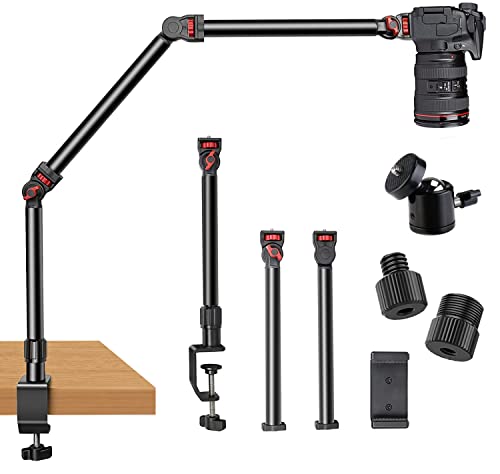
Streamers and content creators will find the Overhead Camera Mount Desk Stand with Flexible Arm an invaluable tool for elevating their production quality. This stand features a 3-section flexible arm that allows you to position your camera, webcam, or microphone at various angles. It’s designed to take up minimal desk space while providing stability for devices weighing up to 6lbs. With easy assembly and portability, you can set it up wherever you need. Plus, the padded desk clamp protects your surfaces. Ideal for vlogging, live streaming, or online lessons, this mount enhances your setup effortlessly.
Best For: Streamers, content creators, and educators looking to enhance their video production quality with a versatile and space-saving camera mount.
Pros:
- Flexible positioning with a 3-section articulating arm for various shooting angles.
- Stable and sturdy design supports devices up to 6lbs, ensuring reliable performance.
- Easy to assemble and portable, making it convenient for on-the-go setups.
Cons:
- May require additional counterweights for heavier setups to maintain stability.
- Limited to a maximum load capacity which might not accommodate larger equipment.
- The clamp design might not fit all desk thicknesses, limiting compatibility.
Factors to Consider When Choosing a Gaming Desk Camera Mount
When you’re choosing a gaming desk camera mount, consider several key factors to guarantee it meets your needs. Think about the load capacity limits, height adjustment options, and how flexible the angles are for ideal positioning. You’ll also want to check compatibility with your devices and assess the durability of the materials used.
Load Capacity Limits
Choosing the right gaming desk camera mount hinges on understanding its load capacity limits. This capacity indicates the maximum weight the mount can support without compromising stability or safety. Typically, desk camera mounts have a load capacity ranging from 3 to 17.6 pounds, influenced by their design and materials. Exceeding this limit can cause structural failure, risking damage to your camera and potential injury. To guarantee reliable performance, opt for a mount with a load capacity exceeding the combined weight of your camera and any additional accessories, like microphones or lights. Always double-check that the mount’s load capacity is compatible with your specific devices to avoid operational issues. Prioritize safety and stability for a worry-free streaming experience.
Height Adjustment Options
A solid gaming desk camera mount should offer a range of height adjustment options to suit your unique setup and preferences. Most mounts give you a height range from 17 to 40 inches, allowing for flexible positioning tailored to your needs. Many models feature multiple extending pole sections, enabling you to customize the height easily. Look for mounts with user-friendly locking mechanisms, like rubber ring wingnuts, for quick adjustments without fuss. This flexibility guarantees compatibility with various devices, from cameras to microphones and lighting equipment, enhancing your video quality. By effectively adjusting the height, you can achieve better angles for recording or streaming, ultimately elevating the production quality of your gaming content.
Angle Flexibility Features
Angle flexibility features play an essential role in capturing the perfect shot for your streams. When choosing a camera mount, look for options that offer 360° rotation and tilt adjustments ranging from -90° to +45°. This allows you to adapt to various setups easily. A multi-angle ball head enhances versatility, enabling smooth horizontal and vertical adjustments for dynamic content. Additionally, mounts with independently adjustable joints improve stability and help position your camera at multiple angles, guaranteeing ideal framing. Consider models with dual ball head adapters for even more flexibility, allowing you to capture creative shots. Finally, a well-designed mount should guarantee easy, secure adjustments to prevent slippage, maintaining the quality of your live streams.
Compatibility With Devices
When selecting a gaming desk camera mount, it’s important to confirm compatibility with your devices, whether you’re using a DSLR, webcam, smartphone, or microphone. Check for standard mounting options like 1/4″-20 screws to guarantee a secure fit across your gear. Also, consider the weight capacity of the mount, as different models support varying loads, which impacts stability and prevents damage. Look for mounts that accommodate additional accessories like lights or monitors, enhancing your setup’s versatility. Finally, assess the flexibility of the mounting arm or stand; articulated joints or adjustable heights help you position your camera perfectly for different recording or streaming scenarios. With these factors in mind, you’ll find a mount that meets your needs.
Material Durability Assessment
Durability plays an essential role in choosing a gaming desk camera mount, as it directly affects your setup’s stability and longevity. When evaluating options, consider aluminum alloy mounts; they’re lightweight yet sturdy, perfect for frequent adjustments. Check the load capacity, typically between 3kg to 8kg, as it indicates how securely the mount can hold your camera and accessories. A rust-resistant finish is vital, especially in humid environments, as it prevents corrosion. Look for mounts with anti-slip pads or rubber components that enhance stability and protect your desk’s surface. Finally, high-quality construction using CNC machining guarantees precise fittings and durability, minimizing wear and tear, so you can focus on creating without worrying about your gear.
Clamp Stability Design
Choosing the right gaming desk camera mount goes beyond just material durability; clamp stability design is another key factor that can greatly impact your streaming experience. A stable clamp design prevents equipment wobble, ensuring your camera and microphone stay securely in place. Look for clamps with non-slip pads to protect your desk from scratches while providing a firm grip. Consider the maximum thickness the clamp can accommodate—most support surfaces up to 2 inches. Some models include anti-twist mechanisms or pins for added stability, stopping any unintended movement. Finally, a well-designed clamp should allow for quick adjustments and easy repositioning without needing tools, balancing convenience with the stability you need for a smooth streaming session.