GMKtec has built a strong reputation for compact desktops that pack real performance into a small footprint. If you want a Windows 11 Pro-ready mini PC that can handle everyday work, streaming, multitasking, or even gaming, this roundup narrows the field to the most relevant picks.
Below, you’ll find 9 of the best GMKtec mini PCs for Windows 11 Pro, chosen for value, speed, connectivity, and the kind of user each system serves best.
Best 9 Gmktec Mini PCs for Windows 11 Pro Picks for 2026
Best for High-Speed Expansion
GMKtec M7 Ultra Ryzen 7 PRO Mini PC

- Ryzen 7 PRO 6850U with Radeon 680M graphics
- Dual USB4, HDMI 2.1, and four-display support
- OCuLink plus dual 2.5GbE LAN for expansion
Best For: Power users and gamers who want a compact Windows 11 Pro mini PC with strong connectivity.
Best for Balanced Office Performance

- Core i3-10110U is responsive for office and browsing tasks
- 16GB dual-channel RAM with 512GB SSD supports smooth multitasking
- Dual HDMI, WiFi 6, and 2.5GbE make it easy to wire into a workspace
Best For: Home offices, small business desks, and compact Windows 11 Pro productivity setups.
Best for Wired Office and Server Use
GMKtec Nucbox G3 Pro i3 Mini PC

- Core i3-10110U handles everyday Windows tasks well
- 2.5GbE Ethernet is ideal for wired work or server use
- Dual 4K HDMI outputs make multi-monitor setups easy
Best For: Home office users and compact desktop buyers who want fast wired networking and dual displays.
Best for OCuLink eGPU Power

- Ryzen 9 8945HS with Radeon 780M graphics
- OCuLink, dual USB4, and dual 2.5GbE LAN
- Quad-display support with 8K output
Best For: Gamers, creators, and power users who want a compact, upgradeable Windows 11 Pro mini PC.
Best for AI-Ready Connectivity
GMKtec K13 Mini PC (Ultra 7 256V)

- Intel Core Ultra 7 256V with Intel Arc 140V graphics
- Dual USB4, HDMI, and triple 4K display support
- 5GbE LAN plus WiFi 6E for fast connectivity
Best For: Buyers who want a compact Windows 11 Pro mini PC with strong AI-ready performance and expansion options.
Best for Triple-Display Productivity

- Ryzen 5 3500U with 16GB RAM for smooth daily multitasking
- Triple 4K display support suits multi-monitor office setups
- 2.5GbE LAN and USB-C/DP/HDMI improve connectivity
Best For: Office users who want a compact Windows mini PC for multi-monitor productivity and wired networking.
Best with Extra Features
GMKtec M7 Ultra Ryzen 7 PRO Mini PC

- Ryzen 7 PRO 6850U with Radeon 680M graphics
- Oculink, dual USB4, and dual 2.5GbE LAN
- Quad-display support with HDMI 2.1 and DP 2.0
Best For: Power users who want a compact Windows 11 Pro-ready mini PC with strong connectivity and eGPU potential.
Best for Dual 2.5GbE Networking
GMKtec M6 Ultra Ryzen 5 Mini PC
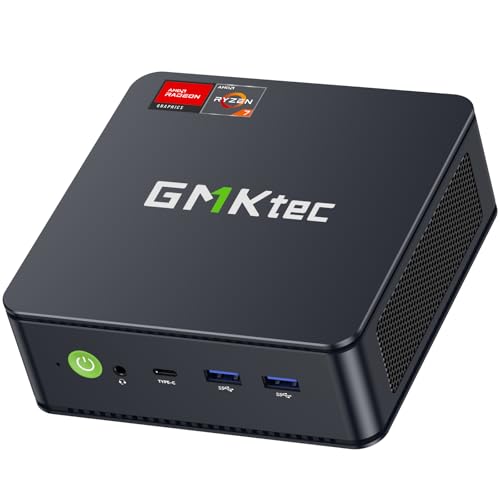
- Ryzen 5 7640HS with Radeon 760M graphics
- Dual 2.5GbE LAN for fast wired networking
- Triple-display support with HDMI, DP, and USB4
Best For: Users who want a compact Windows 11 Pro mini PC with strong networking and multitasking support.
Best for High-Speed Expansion – GMKtec M7 Ultra Ryzen 7 PRO Mini PC
If you want gmktec mini pcs for windows 11 pro that can do more than basic office work, the GMKtec M7 Ultra stands out for its Ryzen 7 PRO 6850U processor, Radeon 680M graphics, and unusually strong I/O for a small desktop. It is a practical pick for users who want a compact Windows 11 Pro machine that can handle multitasking, light gaming, and multi-monitor setups without taking up much space.
Best For: Power users, gamers, and home office buyers who want a compact Windows 11 Pro mini PC with dual LAN, USB4, and OCuLink expansion.
Pros:
- Ryzen 7 PRO 6850U and Radeon 680M deliver strong everyday and light gaming performance
- Dual USB4, HDMI 2.1, and four-display support make it easy to build a flexible workstation
- OCuLink and dual 2.5GbE LAN add rare upgrade and networking options in this size class
- 32GB DDR5 RAM and 1TB SSD provide a solid out-of-box configuration
Cons:
- Integrated graphics are good for casual gaming, not demanding AAA settings
- Higher-end features may be overkill if you only need a basic office PC
Overall, this is one of the more feature-rich gmktec mini pcs for windows 11 pro if you care about expansion, connectivity, and multi-display productivity. It offers a strong balance of performance and flexibility for buyers who want a mini PC that can grow with their setup.
Best for Balanced Office Performance – GMKtec G3 Pro Core i3 Mini PC
If you’re comparing gmktec mini pcs for windows 11 pro, the G3 Pro stands out as a practical workhorse: it pairs a Core i3-10110U with 16GB dual-channel RAM and a 512GB SSD for fast everyday responsiveness. It’s a sensible pick for office apps, web work, dual-monitor setups, and light multitasking without taking up much desk space.
Best For: Home offices, small business desktops, and users who want a compact Windows 11 Pro-ready mini PC for everyday productivity.
Pros:
- Core i3-10110U offers solid single-core speed for common productivity tasks
- 16GB DDR4 dual-channel RAM and 512GB SSD help keep multitasking snappy
- Dual HDMI, WiFi 6, Bluetooth 5.2, and 2.5GbE cover flexible modern connectivity
- Supports dual 4K displays, making it easy to build a tidy workstation
Cons:
- Not ideal for heavy gaming or demanding creative workloads
- Storage is fine for most users, but power users may want the extra expansion slot
- Older CPU platform trails newer chips in raw efficiency
This is a straightforward option if you want gmktec mini pcs for windows 11 pro that prioritize value, wired networking, and day-to-day office speed over premium performance extras.
Best for Dual 2.5GbE + OCuLink – GMKtec K16 Ryzen 7 Mini PC
The GMKtec K16 is a strong pick if you want gmktec mini pcs for windows 11 pro with serious connectivity and upgrade-friendly hardware. Its Ryzen 7 7735HS, 32GB LPDDR5 memory, 1TB SSD, dual 2.5GbE ports, and OCuLink support make it especially appealing for multitaskers who need more than a basic office box.
Best For: Power users who want a Windows 11 Pro-ready mini PC for multitasking, dual-network setups, and external GPU expansion.
Pros:
- Ryzen 7 7735HS delivers strong 8-core, 16-thread performance for work and light gaming
- Dual 2.5GbE LAN plus WiFi 6E makes it flexible for fast wired and wireless networking
- OCuLink support adds a path to external GPU upgrades for more graphics power
- Triple-display output is useful for productivity-focused setups
Cons:
- OCuLink is not hot-swappable, so connections must be made with the PC powered off
- More expensive than entry-level mini PCs
- Geared more toward enthusiasts than plug-and-play casual users
Overall, the K16 stands out among gmktec mini pcs for windows 11 pro because it balances strong CPU performance with uncommon networking and expansion features. If you want a compact PC that can handle demanding daily use now and grow with your setup later, it’s an easy model to shortlist.
Best for Wired Office and Server Use – GMKtec Nucbox G3 Pro i3 Mini PC
If you want one of the more practical gmktec mini pcs for windows 11 pro-style everyday use, this GMKtec Nucbox G3 Pro is built around a Core i3-10110U, 8GB RAM, and a 256GB SSD. It is a sensible fit for browsing, office apps, streaming, and light multitasking, with bonus value from 2.5GbE networking and dual 4K display support.
Best For: Home office users, small workstations, and anyone who wants a compact mini PC with fast wired networking and dual-monitor output.
Pros:
- Core i3-10110U offers solid single-core speed for daily Windows tasks
- 2.5GbE Ethernet is great for wired networking, NAS access, or server use
- Dual HDMI 2.0 outputs support two 4K@60Hz displays
- Wi‑Fi 6 and Bluetooth 5.2 add modern wireless connectivity
Cons:
- 8GB RAM is fine for basics, but power users may want an upgrade
- 256GB storage is modest for larger apps and media libraries
- Integrated graphics are limited for gaming or heavy creative work
This is a strong choice if you value dependable performance and network speed over raw power. For gmktec mini pcs for windows 11 pro buyers, it makes the most sense as a compact office PC, media box, or always-on wired system.
Best for OCuLink eGPU Power – GMKtec K11 Ryzen 9 Mini PC
If you want gmktec mini pcs for windows 11 pro that lean hard into performance and expandability, the GMKtec K11 is a strong fit. Its Ryzen 9 8945HS, dual 2.5GbE ports, USB4, and OCuLink make it a flexible mini desktop for gaming, creator work, and advanced networking setups.
Best For: Gamers, creators, and power users who want a compact Windows 11 Pro-ready mini PC with eGPU support and serious I/O.
Pros:
- Ryzen 9 8945HS and Radeon 780M deliver strong everyday and gaming performance
- OCuLink plus dual USB4 ports make it a standout for eGPU and high-bandwidth accessories
- Dual 2.5GbE LAN, WiFi 6E, and Bluetooth 5.2 add excellent connectivity
- Supports quad-display output, including 8K on a single screen
Cons:
- Higher-end features push it above basic office mini PC pricing
- Best performance may require BIOS tuning and stronger cooling mode selection
- Storage and memory are expandable, but upgrades add to the total cost
The K11 stands out in the gmktec mini pcs for windows 11 pro category because it focuses less on just being small and more on being genuinely upgradeable and performance-ready. If you need a compact machine that can grow with your workload, this one deserves a close look.
Best for AI-Ready Connectivity – GMKtec K13 Mini PC (Ultra 7 256V)
If you want one of the more future-facing gmktec mini pcs for windows 11 pro, the GMKtec K13 stands out with Intel Core Ultra 7 performance, fast LPDDR5 memory, and dual USB4 ports for serious expansion. It’s a strong fit for users who want a compact desktop that can handle office work, multitasking, light creative tasks, and multi-monitor setups without feeling cramped.
Best For: Buyers who want a compact Windows 11 Pro mini PC with strong AI-ready performance, fast networking, and flexible display output.
Pros:
- Intel Core Ultra 7 256V and Intel Arc 140V graphics deliver strong everyday and light creative performance.
- Dual USB4, HDMI, and triple 4K display support make it easy to build a productive multi-monitor desk.
- 5GbE LAN, WiFi 6E, and Bluetooth 5.2 provide excellent wired and wireless connectivity.
- Two M.2 slots give you room to expand storage later.
Cons:
- 16GB RAM is soldered, so memory upgrades are limited.
- It’s more performance-focused than a true budget option.
Overall, this is a smart pick if you want gmktec mini pcs for windows 11 pro with better-than-basic ports, fast SSD performance, and enough graphics muscle for smooth everyday use. It’s especially appealing for buyers who value connectivity and expansion in a very small footprint.
Best for Triple-Display Productivity – GMKtec G10 Ryzen 5 Mini PC
If you want gmktec mini pcs for windows 11 pro style productivity in a compact chassis, the GMKtec G10 is a practical pick for office work, study, and light business use. Its Ryzen 5 3500U, 16GB RAM, and 256GB SSD are a solid everyday combo, while triple 4K output and 2.5GbE make it especially useful for multi-monitor desks.
Best For: Users who want a small, affordable Windows mini PC for multitasking, triple displays, and wired networking.
Pros:
- Ryzen 5 3500U and 16GB RAM handle everyday multitasking smoothly
- Triple 4K display support is great for productivity setups
- 2.5GbE LAN adds faster wired networking than basic mini PCs
- USB-C, HDMI 2.1, and DP give it flexible connectivity
Cons:
- 256GB SSD is modest if you store lots of files locally
- Wi‑Fi 5 is older than newer Wi‑Fi 6/6E options
Overall, the G10 stands out as a workstation-friendly option among gmktec mini pcs for windows 11 pro, especially if your priority is multiple monitors, decent expansion, and a compact footprint rather than top-tier performance.
Best with Extra Features – GMKtec M7 Ultra Ryzen 7 PRO Mini PC
If you want gmktec mini pcs for windows 11 pro that go beyond basic office use, the GMKtec M7 Ultra stands out for its Ryzen 7 PRO 6850U chip, Oculink port, dual 2.5GbE LAN, and quad-display support. It’s a strong fit for users who need a compact machine that can handle multitasking, light gaming, media work, and network-heavy setups.
Best For: Power users who want a compact Windows 11 Pro-ready mini PC with strong connectivity, upgrade paths, and external GPU support.
Pros:
- Ryzen 7 PRO 6850U and Radeon 680M deliver solid everyday performance and light gaming capability
- Oculink, dual USB4, and dual 2.5GbE LAN make it unusually versatile for expansions and advanced networking
- Supports four displays with HDMI 2.1, DP 2.0, and USB4 for flexible workstation setups
- Quiet cooling modes help balance performance and noise for home or desk use
Cons:
- 16GB RAM and 512GB SSD are workable, but many buyers will want to upgrade sooner than later
- Overkill for simple web, email, or streaming-only use cases
This is a compelling pick if your shortlist of gmktec mini pcs for windows 11 pro includes expansion-friendly models that can scale with your needs. It’s especially appealing for buyers who value ports, networking, and eGPU potential as much as raw CPU speed.
Best for Dual 2.5GbE Networking – GMKtec M6 Ultra Ryzen 5 Mini PC
If you’re comparing gmktec mini pcs for windows 11 pro and want a compact machine that leans more toward performance and networking than bare-bones value, the GMKtec M6 Ultra is a strong pick. Its Ryzen 5 7640HS, DDR5 memory, 1TB SSD, and triple-display support make it versatile for work, light gaming, and multitasking.
Best For: Buyers who want a fast Windows 11 Pro-ready mini PC for office work, streaming, and dual-LAN networking.
Pros:
- Ryzen 5 7640HS and Radeon 760M deliver solid everyday and 1080p gaming performance
- Dual 2.5GbE ports are ideal for fast wired networking, router use, or home lab setups
- Supports triple displays through HDMI, DisplayPort, and USB4
- Includes 16GB DDR5 RAM and a 1TB SSD out of the box
Cons:
- Not a top choice for heavier AAA gaming at high settings
- Storage and RAM are upgrade-friendly, but the base config may still feel modest for power users
Overall, this GMKtec model stands out among gmktec mini pcs for windows 11 pro because it combines strong processor performance with unusual dual-LAN flexibility, making it especially appealing for productivity-first users who still want a little extra headroom.
How We Picked These Gmktec Mini PCs for Windows 11 Pro
We focused on Gmktec Mini PCs for Windows 11 Pro that offer a good mix of CPU performance, memory, storage, expansion, and modern I/O. That means prioritizing systems with enough headroom for Windows 11 Pro, strong multi-tasking performance, and practical features like dual LAN, USB4, Oculink, or multi-display support.
We also looked at real-world use cases: office work, home media, content creation, light-to-heavy gaming, and small-business deployments. The best choice is not always the fastest chip; it’s the one that fits your workload and budget.
Quick Comparison: What Matters Most
In this category, processor class is the biggest divider. Entry-level Intel Core i3 models are best for basic productivity and daily computing, while Ryzen 5 and Ryzen 7 options are better for heavier multitasking. Ryzen 9 and newer Intel Core Ultra models are aimed at users who want top-tier responsiveness, stronger integrated graphics, and more future-proof connectivity.
Also compare RAM and storage. For Windows 11 Pro, 16GB is the practical starting point, while 32GB is better for demanding multitasking. A 1TB SSD is ideal if you plan to store large apps, games, or media locally.
Key Buying Factors for Gmktec Mini PCs for Windows 11 Pro
Processor and Graphics
Choose the CPU based on workload. For office use and web apps, an Intel i3-class system can be enough. For creative work, virtualization, or gaming, look for Ryzen 7, Ryzen 9, or Intel Core Ultra models with stronger integrated graphics.
Memory and Storage
Windows 11 Pro runs best with plenty of RAM available. If you keep many browser tabs, run business software, or use remote desktop tools, 32GB offers a noticeable comfort boost. Storage should be fast NVMe SSD-based, with 512GB as a minimum and 1TB preferred for most buyers.
Connectivity and Expansion
Many Gmktec Mini PCs for Windows 11 Pro stand out because of their networking and display options. Dual 2.5GbE LAN is useful for advanced home labs, servers, or stable wired networking. USB4, HDMI 2.1, and Oculink add flexibility for docks, high-resolution monitors, and external GPU setups.
Noise, Size, and Power Use
One advantage of a mini PC is efficiency. Lower-power models are usually quieter and better for all-day office use, while performance-focused systems may run warmer but deliver much more speed under load.
Who Should Buy Which Gmktec Mini PCs for Windows 11 Pro?
If you need a simple desktop for email, documents, and browsing, an entry-level Intel i3 model is usually the most cost-effective choice. If you want a balanced system for work and entertainment, a Ryzen 5 or Ryzen 7 option is the sweet spot.
Power users, creators, and gamers should lean toward the higher-end Ryzen 9 or Intel Core Ultra systems for faster responsiveness and better headroom. If networking features, multi-monitor setups, or expansion are priorities, choose a model with dual LAN, USB4, or Oculink rather than chasing CPU specs alone.
In short, the best GMKtec mini PC for Windows 11 Pro is the one that matches your everyday workload, not just the one with the biggest numbers on paper.