The best golf launch monitors turn practice into measurable feedback, helping you understand distance, ball speed, club speed, carry, and shot shape instead of relying on guesswork.
We compare 10 popular options for different budgets and goals, from compact Doppler radar devices to advanced simulator-ready systems with detailed shot tracking.
Best 10 Golf Launch Monitors Picks for 2026
Premium Simulator Pick

- Three-camera system with detailed ball and club metrics
- 10-inch touchscreen with impact video and training modes
- Supports virtual rounds on 43,000+ courses with membership
Best For: Golfers wanting an all-in-one launch monitor and simulator
Software Bundle Pick

- Includes one year of Core Foresight software
- Portable package weighs 5 pounds
- Includes a lithium polymer battery
Best For: Golfers prioritizing included launch-monitor software
Portable Practice Pick

- Tracks swing and ball metrics through the Garmin Golf app
- Up to 10 hours of battery life
- Includes tripod, phone mount, and carry case
Best For: Phone-connected practice at home or the driving range
Camera Training Pick

- Dual cameras and Doppler radar track shots
- Captures 15 ball and club metrics
- Includes three Callaway RPT Chrome Soft X balls
Best For: Golfers seeking detailed data and swing-video feedback
Budget Speed Trainer

- Measures club speed with or without a ball
- Tracks speed, smash factor, and distance
- No phone, app, Wi-Fi, or Bluetooth required
Best For: Simple swing-speed training and range feedback
iOS Practice Companion

- Provides shot-by-shot club and ball data
- Adds video replay with shot tracer
- Designed for iPhone and iPad use
Best For: Apple-device users wanting portable visual feedback
Connected Practice System
- Tracks extensive metrics through the Garmin Golf app
- Includes training mode, dispersion charts, and swing clips
- Supports optional play on over 42,000 courses
Best For: Connected practice and virtual-course features
Best for Indoor Simulation
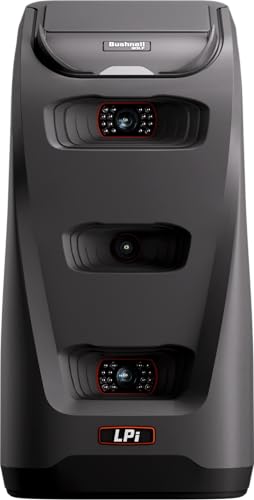
- Three-camera infrared impact measurement
- Detailed ball and club data
- Foresight+ simulation compatibility
Best For: Dedicated indoor simulator setups
Best Portable Swing Trainer

- Ball-free Swing Speed Mode
- Doppler radar shot tracking
- Stores club and distance data
Best For: Indoor and outdoor practice sessions
Best for Practice Modes

- Color TFT LCD with auto-adjusting visibility
- Practice and Target training modes
- Stores up to 1,000 shots
Best For: Structured range and indoor practice
Premium Simulator Pick – Garmin Approach R50
The Garmin Approach R50 is a premium choice among golf launch monitors for golfers who want detailed measurements, built-in practice tools, and simulator play without relying entirely on a phone. Its 10-inch touchscreen, three-camera system, impact videos, and indoor-or-outdoor setup make it suited to both practice sessions and home entertainment.
Best For: Golfers seeking an all-in-one launch monitor and simulator with a built-in display.
Pros:
- Three-camera system tracks metrics such as ball speed, launch angle, face to path, spin rate, and spin axis.
- Built-in 10-inch color touchscreen displays training data, impact videos, and shot dispersion charts.
- Supports virtual rounds, including putting, on more than 43,000 courses with an active Garmin Golf membership.
- HDMI connectivity, a carrying case, and up to four hours of battery life support flexible use.
Cons:
- Virtual rounds and courses require an active Garmin Golf membership.
- The 9-pound unit and premium feature set may be more than casual users need.
- Face-to-path tracking requires the included tracking sticker.
The Approach R50 stands out for its self-contained simulator experience and broad measurement set. It is a strong fit when on-device feedback and virtual play matter as much as range practice.
Software Bundle Pick – SkyTrak ST MAX
The SkyTrak ST MAX is a practical golf launch monitor option for buyers who want software included with the initial package. This bundle comes with one year of Core Foresight software, while its included lithium polymer battery helps support portable practice.
Best For: Golfers who want to start with a launch-monitor software package included.
Pros:
- Includes one year of Core Foresight software at no additional cost.
- Compact package dimensions make it relatively easy to store or transport.
- Includes a lithium polymer battery.
Cons:
- The supplied notes do not specify the monitor’s tracked metrics or simulator features.
- The supplied details do not identify battery runtime or connectivity options.
The ST MAX’s clearest advantage is the included year of Core Foresight software. Buyers who need specific measurements, display requirements, or battery-life details should confirm those specifications before choosing it.
Portable Practice Pick – Garmin Approach R10
The Garmin Approach R10 is a portable golf launch monitor designed for home, indoor, and driving-range practice. It sends data to a compatible smartphone through the Garmin Golf app, tracks key swing and ball metrics, and offers up to 10 hours of battery life for extended sessions.
Best For: Golfers who want an affordable, phone-connected monitor for practice at home or on the range.
Pros:
- Tracks club head speed, ball speed, swing tempo, spin, launch angle, and more through the Garmin Golf app.
- Training mode provides club-by-club statistics and estimated shot-dispersion charts.
- Automatically recorded swing videos can include the metrics from each shot.
- Up to 10 hours of battery life, a tripod, phone mount, and carry case support portable use.
Cons:
- Requires a compatible smartphone for viewing metrics, videos, and app features.
- Virtual rounds and weekly tournaments require an active subscription.
- Ball-flight results are estimated through the app rather than displayed on a built-in monitor.
The Approach R10 is a versatile training companion for golfers who already use a smartphone on the course or range. Its long battery life and compact design make it especially convenient for repeated practice sessions.
Camera Training Pick – Rapsodo MLM2PRO
The Rapsodo MLM2PRO combines Doppler radar with dual cameras to provide a detailed golf launch monitor and swing-training setup. It captures 15 metrics, includes three Callaway RPT Chrome Soft X golf balls, and supports indoor or outdoor practice with a 45-day premium trial.
Best For: Golfers who want shot data plus camera-based swing and impact feedback.
Pros:
- Dual cameras and Doppler radar support tour-level shot tracking accuracy.
- Captures 15 metrics, including spin rate, spin axis, carry distance, club speed, club path, and launch angle.
- Slow-motion impact views and swing capture help identify contact and swing patterns.
- Premium trial unlocks simulated courses, third-party app integration, target range, and training tools.
Cons:
- The premium trial lasts 45 days, and premium features may require continued membership afterward.
- The supplied notes do not specify the exact battery runtime.
- It is designed to work with a compatible smartphone rather than serving as a fully standalone display.
The MLM2PRO is compelling for golfers who value visual feedback alongside launch data. Its combination of 15 metrics, dual-camera swing capture, and simulator access makes it a well-rounded training-focused option.
Budget Speed Trainer – PRGR HS 130-A
The PRGR HS 130-A is a straightforward choice for golfers who want useful swing feedback without apps, Wi-Fi, or Bluetooth. This compact golf launch monitor measures club speed with or without a ball, along with ball speed, smash factor, and estimated carry and total distance.
Best For: Golfers focused on swing-speed training, simple range feedback, and multi-sport use.
Pros:
- Measures club head speed without requiring a ball.
- Tracks club speed, ball speed, smash factor, carry distance, and total distance.
- Stores up to 500 past swings and runs on AAA batteries.
- Compact, lightweight, and does not require a phone or app.
Cons:
- Does not offer Bluetooth, Wi-Fi, or app-based analysis.
- Its listed measuring range is 135 to 270 yards, so it is less focused on broader simulator features.
The PRGR is a practical golf launch monitor for feedback-driven practice, especially when club-speed training matters more than virtual courses or video replay.
IOS Practice Companion – Rapsodo MLM
The Rapsodo MLM turns a compatible iPhone or iPad into the display and analysis hub for a portable golf launch monitor. It provides shot-by-shot ball and club data, including launch angle, carry distance, and shot shape, while its video replay and tracer can help golfers review their swings.
Best For: iPhone and iPad users who want portable practice feedback with video replay at the range, indoors, or in the backyard.
Pros:
- Reports ball speed, club speed, launch angle, carry distance, and shot shape.
- Records swing video with an on-screen shot tracer.
- Works at the driving range, in a backyard, or with an indoor net.
- Includes a carrying case and charging cord.
Cons:
- Compatible with iPhone and iPad only.
- Simulator courses and game modes require the premium upgrade.
- Requires a compatible smartphone or tablet for the app-based experience.
Choose the Rapsodo MLM if visual feedback and mobile shot analysis are priorities. Its iOS limitation is important, but for Apple-device users it offers a convenient way to review practice sessions.
Connected Practice System – Garmin Approach R10
The renewed Garmin Approach R10 is a versatile golf launch monitor for practice at home, indoors, or on the driving range. When paired with a compatible smartphone and the Garmin Golf app, it tracks metrics such as club and ball speed, swing tempo, spin, and launch angle, while also supporting training tools and recorded swing clips.
Best For: Golfers who want connected training features, swing analysis, and optional virtual-course play.
Pros:
- Tracks club speed, ball speed, swing tempo, ball spin, launch angle, and more through the app.
- Training mode provides club-by-club stats and a shot dispersion chart.
- Automatically records swing video clips with the related metrics.
- Offers up to 10 hours of battery life and access to more than 42,000 courses with an active subscription.
Cons:
- Requires a compatible smartphone and Garmin Golf app for the full feature set.
- Virtual rounds and tournaments require an active subscription.
- This listing is renewed and includes a 90-day limited warranty.
The Approach R10 is the most feature-rich option of these three for connected practice and course simulation. Its app and subscription requirements, along with renewed condition, should be considered before buying.
Best for Indoor Simulation – Bushnell Launch Pro i
The Bushnell Golf Launch Pro i is a camera-based option for golfers who want highly detailed indoor launch-monitor data. Its three-camera infrared system measures performance at impact and provides ball and club metrics such as carry distance, spin, launch angle, and club-head speed.
Best For: Indoor golfers building a simulator setup and prioritizing camera-based measurement accuracy.
Pros:
- Three-camera infrared system is designed for Tour-level accuracy.
- Provides comprehensive ball and club data, including carry distance, spin, and smash factor.
- Works with Foresight+ for simulation, shot tracking, and performance insights.
- Includes essential setup accessories and a 30-day Foresight+ trial.
Cons:
- Designed specifically for indoor simulator use.
- Ball and club data require an active software subscription.
- Has a one-year limited warranty.
This is the most data-focused choice in the group, especially for a dedicated indoor setup. Factor the ongoing software subscription into the total cost if you want access to its complete data features.
Best Portable Swing Trainer – Voice Caddie SC200Plus
The Voice Caddie SC200Plus is a compact golf launch monitor and swing analyzer for practice at home or outdoors. Doppler radar tracks shot performance in real time, while the display, voice output, and stored club statistics make feedback easy to use during training.
Best For: Golfers wanting portable practice feedback, club-distance tracking, and swing-speed training.
Pros:
- Swing Speed Mode allows practice without hitting a ball.
- Doppler radar and atmospheric-pressure sensors support data collection.
- Provides instant feedback through an LCD display and voice output.
- Stores shot data and club statistics for reviewing average distances.
Cons:
- Its feature set is centered on practice and swing analysis rather than full simulator functionality.
- It uses a compact LCD display rather than a larger screen.
- The listed model year is 2019.
The SC200Plus is a practical training companion when portability and straightforward feedback matter more than an expansive simulator experience. Its ball-free speed mode is particularly useful for indoor swing work.
Best for Practice Modes – GOLFBUDDY Shot Mate
The GOLFBUDDY Shot Mate is a portable Doppler-radar golf launch monitor for golfers who want clear practice feedback without a complicated setup. Its TFT LCD displays club speed, ball speed, smash factor, and carry distance, while Practice and Target modes add structure to training.
Best For: Range and indoor practice where shot storage, visible feedback, and structured drills are useful.
Pros:
- Tracks key performance metrics including club speed, ball speed, smash factor, and carry distance.
- Full-color TFT LCD automatically adjusts for visibility in different lighting.
- Practice and Target modes support repetitive and accuracy-focused training.
- Stores up to 1,000 shots and keeps the last 10 swings available for review.
Cons:
- Its listed battery life is up to 10 hours, shorter than some extended-use options.
- The product notes do not specify software-update support.
- It is focused on measurement and practice rather than full golf simulation.
Shot Mate stands out for golfers who want an easy-to-read display and generous shot memory. The practice modes make it a useful choice for deliberate training at the range or in an indoor practice area.
How We Picked the Best Golf Launch Monitors
We focused on launch monitors that provide useful shot data for practice, fitting, or simulator play. Our comparison considers measurement capabilities, portability, indoor and outdoor usability, app or display support, included software, battery life, setup requirements, and overall value. Because accuracy can vary with lighting, space, alignment, ball type, and device placement, we also considered how practical each monitor is for typical home, garage, range, and backyard use.
The selection includes options for beginners, serious players, golfers building simulator rooms, and users who want a simple training aid without a large subscription commitment.
Quick Comparison of Golf Launch Monitors
| Best For | What to Prioritize | Typical Advantage |
|---|---|---|
| Home simulator setups | Indoor accuracy, software compatibility, and space requirements | More immersive practice and virtual-course play |
| Driving-range practice | Portability, battery life, and outdoor visibility | Immediate feedback without permanent installation |
| Shot and swing training | Core metrics such as carry, ball speed, club speed, and smash factor | Simple, repeatable feedback between lessons |
| Advanced analysis | Detailed data, camera or radar features, and broad software support | More ways to diagnose swing and ball flight |
Key Buying Factors for Golf Launch Monitors
Indoor Space and Placement
Measure the distance between the ball, monitor, and net or screen before buying. Some systems need several feet of ball flight or a specific placement angle, while others can work in tighter spaces. Left- and right-handed golfers should also confirm that the setup accommodates both players.
Metrics and Accuracy
Decide which numbers matter most. Basic practice may only require carry distance, total distance, ball speed, club speed, and smash factor. Players working on shot shape or gapping may want launch angle, spin, direction, or more detailed club and ball data. Treat every monitor as a training tool and use consistent setup conditions for more reliable comparisons.
Software, Subscriptions, and Compatibility
Check whether the monitor works with your phone, tablet, computer, or simulator platform. Confirm operating-system requirements, included software periods, and recurring subscription costs. A lower-priced unit may become more expensive if essential features require an ongoing plan.
Portability and Power
For range use, prioritize weight, battery life, screen visibility, and quick setup. Built-in displays are convenient, while app-based monitors may offer a richer interface but require a compatible mobile device and a stable connection.
Who Should Buy Which Golf Launch Monitors?
Choose a premium simulator-focused monitor if you want detailed practice, virtual courses, and a more permanent indoor setup. Choose a portable midrange model if you regularly move between home and the driving range and want a balance of useful data, battery life, and convenience.
Choose a budget launch monitor if your main goal is tracking distance, speed, and smash factor during practice. Choose a phone- or tablet-based system if you already own a compatible device and prefer app-driven analysis. Before purchasing, match the monitor’s data, software, space requirements, and ongoing costs to how you actually practice—not just to the longest list of advertised features.