A good screen protector can help keep everyday scratches off your Pixel 10 without making the display frustrating to use. Fit and installation matter as much as the glass itself, especially if you use a case or fingerprint unlock.
These seven options range from alignment-friendly kits to privacy glass and bundles with camera-lens protectors. Here’s what to check before choosing one.
Best 7 Google Pixel 10 Screen Protector Picks for 2026
Pixel 10-Only Pick

- Made specifically for the 6.3-inch Pixel 10
- 0.33 mm glass with 9H-rated hardness
- Two protectors; no alignment tray listed
Best For: Pixel 10 owners wanting a dedicated-fit spare
Easy-Install Pick

- Two protectors in alignment trays
- Designed for fingerprint-sensor compatibility
- Case-friendly clear glass
Best For: Buyers who want guided placement
Three-Pack Pick

- Three clear tempered-glass protectors
- 9H-rated hardness and rounded edges
- Coating aims to reduce fingerprints
Best For: Buyers who want two spares
Privacy Pick

- Darkens side-angle views
- Two protectors with EZ FIT trays
- Designed for in-display fingerprint use
Best For: Viewing sensitive content in public
Screen-and-Camera Bundle
Pixel 10 2+2 Tempered Glass Kit
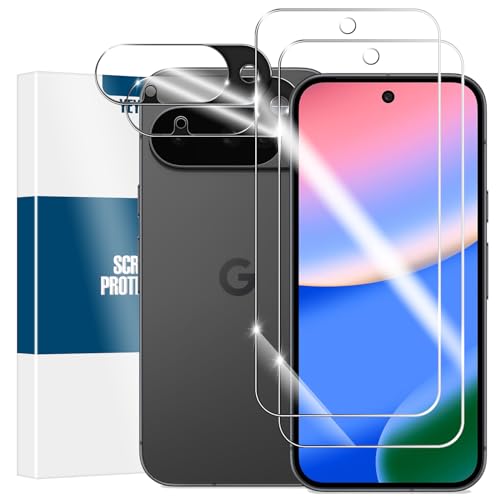
- Two screen and two lens protectors
- Slightly undersized for case compatibility
- Cleaning supplies included; no frame listed
Best For: Pixel 10 owners wanting spare glass and camera coverage
Extra Screen Spares
Pixel 10 3+2 Glass Protector Kit

- Three screen protectors, two lens protectors
- Mounting frame and cleaning kit included
- Conflicting screen-size detail warrants a fit check
Best For: Pixel 10 owners seeking extra screen spares and an alignment aid
Easy-Install Screen Glass
SMARTDEVIL Pixel 10/10 Pro 3-Pack

- Three screen protectors with cleaning kits
- SmartPull alignment box included
- No camera lens protectors listed
Best For: Pixel 10 or 10 Pro owners wanting easier alignment and spares
Pixel 10-Only Pick – Bencuku 2-Pack Tempered Glass
If you want a google pixel 10 screen protector made specifically for the 6.3-inch Pixel 10, this Bencuku two-pack keeps things straightforward. Its 0.33 mm tempered glass has 9H-rated scratch resistance and rounded edges.
Best For: Pixel 10 owners who want a dedicated-fit, clear glass protector with a spare.
Pros:
- Two protectors and screen-cleaning accessories included.
- Thin glass is designed to preserve touch sensitivity.
- Rounded edges and a glossy, anti-fingerprint finish.
Cons:
- Specified for the Pixel 10 only, not other Pixel models.
- No alignment tray is listed.
Choose this for a simple Pixel 10-specific option; if guided placement matters most, look for a kit that explicitly includes a tray.
Easy-Install Pick – Spigen GlasTR EZ FIT
For a google pixel 10 screen protector with help lining up the glass, Spigen’s GlasTR EZ FIT includes two protectors pre-assembled in installation trays. It fits the Pixel 10 and 10 Pro, as well as the Pixel 9 and 9 Pro.
Best For: Buyers who prioritize guided installation and a case-friendly fit.
Pros:
- EZ FIT trays simplify alignment; cleaning and bubble-removal tools are included.
- 9H-rated tempered glass and an oleophobic coating address scratches and smudges.
- Designed to work with the in-display fingerprint sensor and fit inside Spigen and most third-party cases.
Cons:
- Only two protectors are included, versus three in some packs.
- No privacy filter is listed for this clear version.
This is a practical choice when a guided install matters more than getting the highest protector count.
Three-Pack Pick – Supershieldz Tempered Glass
If you want extra replacements in a google pixel 10 screen protector pack, Supershieldz includes three tempered-glass protectors. The listing specifies compatibility with the 6.3-inch Pixel 10, Pixel 9 and Pixel 11.
Best For: Buyers who prefer a three-pack of clear glass protectors.
Pros:
- Three protectors provide two spares.
- 9H-rated glass and 2.5D rounded edges.
- Hydrophobic and oleophobic coating is intended to reduce sweat and fingerprints.
Cons:
- No installation tray is specified in the supplied details.
- Not intended as a privacy screen.
Its main appeal is the extra piece of glass; consider a tray-equipped option if alignment is your top concern.
Privacy Pick – Spigen GlasTR EZ FIT Privacy
For a google pixel 10 screen protector that limits side viewing, Spigen’s GlasTR EZ FIT Privacy pairs tempered glass with a privacy filter. It is listed for the Pixel 10 and 10 Pro, plus the Pixel 9 and 9 Pro.
Best For: People who check messages or sensitive information in shared spaces.
Pros:
- Privacy filter darkens the display when viewed from the sides.
- Two EZ FIT trays help align the included protectors.
- 9H-rated glass is designed for scratch resistance and fingerprint-sensor compatibility.
Cons:
- The privacy filter intentionally restricts off-angle viewing, including for someone beside you.
- Only two protectors are included.
Pick this when keeping side glances off your screen outweighs the convenience of sharing what’s on it.
Screen-and-Camera Bundle – Pixel 10 2+2 Tempered Glass Kit
If you want a google pixel 10 screen protector that also covers the camera lenses, this kit includes two tempered-glass screen protectors and two lens protectors. Its glass is sized slightly smaller than the display to accommodate most cases.
Best For: Pixel 10 owners who want spare screen glass and camera coverage in one pack.
Pros:
- Includes two screen protectors and two camera lens protectors.
- Case-friendly sizing and bubble-free adhesive are designed to simplify installation.
- Includes cleaning wipes, microfiber cloths, and dust stickers.
Cons:
- Slightly undersized glass will not cover every part of the display surface.
- No alignment frame is listed among the included accessories.
This is a practical pick if you want both types of protection and a spare. Take care when aligning the glass, since the kit does not list a positioning frame.
Extra Screen Spares – Pixel 10 3+2 Glass Protector Kit
This google pixel 10 screen protector bundle offers three tempered-glass screen protectors and two camera lens protectors. It also lists a mounting frame and cleaning kit, making it worth considering if you expect to replace your screen glass over time.
Best For: Pixel 10 owners who prioritize extra screen protectors and an alignment aid.
Pros:
- Three screen protectors provide two spares after the first installation.
- Two camera lens protectors add coverage for the camera area.
- Includes a mounting frame and cleaning kit for installation.
- Thin 0.19 mm glass is designed to preserve touch response.
Cons:
- Only two lens protectors are included for three screen protectors.
- The listing’s 7.1-inch screen-size detail conflicts with its Pixel 10 compatibility claim; confirm fit before ordering.
The extra screen glass and mounting frame distinguish this kit. Because its size details are inconsistent, check the seller’s fit information for your specific Pixel 10 before buying.
Easy-Install Screen Glass – SMARTDEVIL Pixel 10/10 Pro 3-Pack
If straightforward installation matters most, this google pixel 10 screen protector three-pack includes SMARTDEVIL’s SmartPull alignment box. The 0.33 mm tempered glass is listed for both the Pixel 10 and Pixel 10 Pro, with a case-friendly design.
Best For: Pixel 10 or Pixel 10 Pro owners who want an installation aid and spare screen glass.
Pros:
- Three tempered-glass screen protectors and three cleaning kits are included.
- SmartPull box is designed to help align the protector during installation.
- Listed as compatible with fingerprint unlock and cases.
- Includes a one-year manufacturer warranty.
Cons:
- No camera lens protectors are listed in the package.
- At 0.33 mm, the glass is thicker than the 0.19 mm option in this roundup.
Choose this one for its alignment tool and three screen protectors rather than camera coverage. Its stated compatibility with both 6.3-inch models may also be useful in a household with different Pixel phones.
How We Picked the Best Google Pixel 10 Screen Protector
We compared the seven selected listings by their stated device compatibility, pack contents, installation aids, privacy features, and fingerprint-unlock claims. We also considered practical trade-offs: whether a pack provides spares, whether it includes camera-lens protectors, and whether the glass is described as case-friendly. These are listing-based comparisons, not independent durability, drop, or fingerprint tests. Check the current product listing for the exact model and included accessories before ordering.
Quick Comparison
For a guided install, the Spigen GlasTR EZ FIT options are the clearest starting point: choose standard glass for an unobstructed view or privacy glass to limit side-angle viewing. Supershieldz and SMARTDEVIL offer three-packs for buyers who want spare screen protectors. The two generic bundles pair screen glass with camera-lens protectors, while the basic two-pack keeps the focus on the display. Pack counts and advertised features vary, so compare what is included rather than assuming similar-looking kits are interchangeable.
Key Buying Factors for a Google Pixel 10 Screen Protector
Confirm the Exact Fit
The Pixel 10 has a 6.3-inch display, but screen size alone does not guarantee that a protector fits its edges, camera cutout, and your case. Several listings also name the Pixel 10 Pro or earlier Pixel models. Verify that the specific variant you select lists the standard Pixel 10, not just a related phone, and check for a case-friendly design if your case has a raised lip.
Think About Installation and Extras
An alignment tray can make positioning easier; extra sheets give you another chance if dust gets trapped during application. Clean the screen carefully and follow the kit’s instructions to reduce bubbles. Camera-lens protectors may appeal if you want matching coverage, but confirm they fit your case and do not interfere with photos or flash.
Balance Privacy with Display Clarity
Privacy glass is useful on commutes or in shared spaces, but its side-angle filtering can also make the screen look dimmer. Standard clear glass is the simpler choice when brightness and easy sharing matter more. A “9H” or “military-grade” claim is not a guarantee against cracks or drops; a case still matters for impact protection.
Check Fingerprint Performance
Some listings advertise fingerprint unlock support, but results can depend on installation and device settings. After applying any glass, follow Google’s current guidance for screen-protector and fingerprint settings, and re-enroll your fingerprint if needed. Buy from a seller with a reasonable return policy if reliable unlocking is essential to you.
Who Should Buy Which Google Pixel 10 Screen Protector?
Choose a standard Spigen EZ FIT option if straightforward alignment is your priority; pick its privacy version if limiting side views matters more. Look at the Supershieldz or SMARTDEVIL three-packs if you prefer replacements on hand. Choose a screen-and-camera bundle if you want both types of coverage in one purchase, or the basic two-pack if you only need display glass and a spare. Whatever you choose, confirm Pixel 10 compatibility and the current pack contents at checkout.