If you need reliable multi-drive storage, a hardware RAID hard drive enclosure can deliver the speed, redundancy, and expansion a simple dock can’t match.
We focused on enclosures that balance bay count, cooling, interface speed, and real-world ease of use so you can choose the right setup with confidence.
Best 10 Hardware Raid Hard Drive Enclosure Picks for 2026
Best for Easy Drive Swaps
CENMATE 3-Bay SATA HDD/SSD Enclosure

- Supports three SATA drives up to 20TB each
- Tool-free, hot-swappable design
- USB A/C 3.0 works with Windows, Mac, and Linux
Best For: People who want a simple multi-bay enclosure for backups, media storage, and easy drive changes.
Best for RAID Flexibility

- RAID 0/1, JBOD, and PM modes
- Supports 2.5-inch and 3.5-inch SATA drives
- Aluminum body with built-in cooling fan
Best For: Users who want a flexible dual-bay enclosure for backup, mirroring, or speed-focused RAID setups.
Best Budget
Yottamaster 5-Bay RAID Enclosure

- RAID 0/1/5/10, JBOD, Clone, and normal mode support
- 5 bays with up to 120TB of total capacity
- Aluminum build with built-in fan for cooling
Best For: Creators and small teams who need flexible RAID modes and large direct-attached storage.
Best for Big-Capacity Desktop Storage

- 4-bay design supports up to 80TB total
- USB-C, USB 3.0, and eSATA included
- Cooling fan and aluminum body help manage heat
Best For: People who want simple, high-capacity multi-drive storage without RAID or NAS.
Best for Fast 2.5-Inch RAID
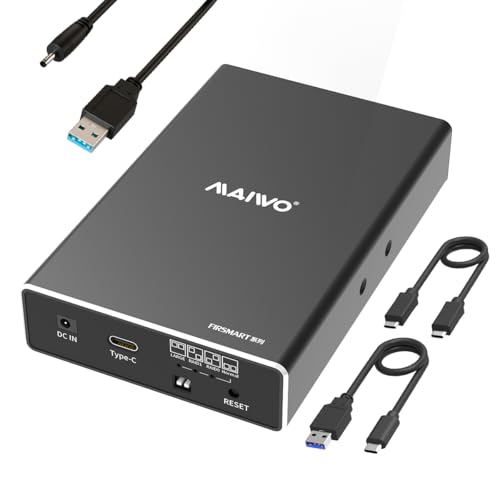
- RAID 0, RAID 1, JBOD, and PM support
- USB 3.1 Gen 2 with UASP for fast transfers
- Tool-free aluminum build with hot swapping
Best For: People who want a compact dual-bay RAID enclosure for 2.5-inch SSDs or HDDs.
Best for Large 8-Bay RAID Arrays
CENMATE 8-Bay Aluminum RAID Enclosure

- 8-bay capacity with multiple RAID modes
- Tool-free trays and active cooling
- USB 3.0 with stable 12V/20A power
Best For: Users building a high-capacity external RAID setup for backups, media, or workstation storage.
Best for Comfort

- 8 RAID modes including 0/1/3/5/10
- Supports 2.5" and 3.5" SATA drives
- USB 3.0, eSATA, and up to 80TB capacity
Best For: Users who want a configurable direct-attached RAID enclosure for desktop storage expansion.
Best with Extra Features
CENMATE 2-Bay Aluminum RAID Enclosure

- Four RAID modes for flexible storage setups
- Tool-free bays and wide SATA drive support
- Aluminum case with active cooling fan
Best For: Home office users and small teams that want configurable RAID in a simple dual-bay enclosure.
Best for Simple 4-Bay Storage
CENMATE Aluminum 4-Bay SATA Enclosure
- Supports up to four 2.5/3.5-inch SATA drives
- Tool-free, hot-swappable drive bays
- USB 3.0 with UASP for faster transfers
Best For: People who want a simple, high-capacity desktop DAS for backups and media storage.
Best for Fast Dual-Bay DAS
CENMATE 2-Bay 10Gbps Aluminum Enclosure

- 10Gbps USB 3.2 Gen 2 connection for fast transfers
- Supports 2.5-inch and 3.5-inch SATA HDDs and SSDs
- Tool-free hot-swap design with cooling fan
Best For: Users who want a fast, simple two-drive DAS enclosure for backups and file transfers.
Best for Easy Drive Swaps – CENMATE 3-Bay SATA HDD/SSD Enclosure
If you want a practical hardware raid hard drive enclosure alternative for simple multi-drive storage, the CENMATE 3-bay enclosure is built around convenience. It supports 2.5-inch and 3.5-inch SATA HDDs/SSDs, offers tool-free installation, and lets you hot-swap drives without shutting the system down.
Best For: Users who want a straightforward, plug-and-play multi-bay enclosure for backups, media drives, or desktop storage expansion.
Pros:
- Supports up to three SATA drives, with up to 20TB per bay
- Tool-free, hot-swappable design makes drive changes quick and easy
- USB A/C 3.0 connectivity keeps setup simple across Windows, Mac, and Linux
Cons:
- USB 3.0 speed is fine for storage, but not ideal for high-end performance needs
- Not a true RAID enclosure, so it won’t provide RAID redundancy or striping
For buyers comparing a hardware raid hard drive enclosure to a simpler external drive bay, this model stands out for ease of use rather than advanced storage management. It’s a solid pick if you value quick drive swaps, broad compatibility, and no-fuss expansion.
Best for RAID Flexibility – MAIWO Dual Bay RAID Enclosure
If you want a hardware raid hard drive enclosure that balances speed, backup options, and broad drive support, MAIWO’s dual-bay model is a practical pick. It works with 2.5-inch and 3.5-inch SATA drives, offers multiple RAID modes, and adds active cooling for better long-session reliability.
Best For: Users who need a versatile dual-bay enclosure for RAID 0/1, JBOD, or mirrored backup storage.
Pros:
- Supports RAID 0, RAID 1, JBOD/LARGE, and PM modes for flexible setups
- Compatible with 2.5-inch and 3.5-inch SATA SSDs/HDDs on Windows, Mac, and Linux
- Full aluminum body plus cooling fan helps manage heat during heavy use
- USB 3.0 with UASP support can deliver faster transfers on supported systems
Cons:
- 2.5-inch drives may need an additional mounting bracket
- USB 3.0 tops out below newer 10Gbps enclosures
- RAID setup requires careful initialization and a backup first
As a hardware raid hard drive enclosure, this MAIWO unit is a strong fit if you want configurable storage without jumping to a more expensive NAS. Its cooling, dual-bay design, and RAID support make it especially appealing for backup-minded users and small desktop workstations.
Best Budget – Yottamaster 5-Bay RAID Enclosure
If you need a hardware raid hard drive enclosure that can handle serious media storage, the Yottamaster FS5RU3 is built for multi-drive workflows with RAID 0/1/5/10, JBOD, and Clone support. It combines 5-bay capacity, up to 120TB of storage, and a USB 3.0 connection for direct-attached use across Windows, Mac, and Linux.
Best For: Video editors, backup-heavy creators, and small teams that want flexible RAID modes in a single desktop DAS enclosure.
Pros:
- Supports RAID 0/1/5/10, JBOD, Clone, and normal mode for flexible setups
- Fits both 2.5-inch and 3.5-inch SATA HDDs/SSDs with removable trays
- Aluminum body, built-in 80mm fan, and ventilation help manage heat
- Up to 120TB capacity makes it useful for large media and archive libraries
Cons:
- USB 3.0 speeds are good, but not as fast as newer high-end connectivity options
- RAID hardware enclosures add setup complexity compared with simple USB docks
Overall, this is a strong pick if you want a hardware raid hard drive enclosure that balances capacity, cooling, and RAID mode variety without moving into a more expensive NAS setup.
Best for Big-Capacity Desktop Storage – CENMATE 4-Bay HDD Enclosure
If you want a practical hardware raid hard drive enclosure alternative for large-capacity, non-RAID storage, this CENMATE 4-bay enclosure is built for straightforward desktop use. It supports 2.5-inch and 3.5-inch SATA HDDs and SSDs, offers up to 80TB total capacity, and includes USB 3.0, USB-C, and eSATA connectivity for flexible setups.
Best For: Users who need a simple multi-drive enclosure for backups, media libraries, or office storage without RAID or NAS features.
Pros:
- Supports up to 4 drives and 80TB total capacity
- USB 3.0, USB-C, and eSATA cables included
- Aluminum-alloy body plus cooling fan for better heat control
- Plug-and-play compatibility with Windows, Mac, and Linux
Cons:
- No RAID or NAS functionality
- Fan noise may bother very quiet workspaces
- USB 3.0 speeds are good, but not the fastest option available
For buyers who care more about simple, reliable storage expansion than advanced volume management, this enclosure makes a strong case. It is a good fit if you want a hardware raid hard drive enclosure-style setup without the complexity of actual RAID hardware.
Best for Fast 2.5-Inch RAID – MAIWO Dual Bay RAID Enclosure
If you need a compact hardware raid hard drive enclosure for 2.5-inch SATA SSDs or HDDs, the MAIWO dual-bay model is built for speed and flexible RAID setup. It supports RAID 0, RAID 1, JBOD, and normal/PM mode, uses USB 3.1 Gen 2 for up to 10Gbps performance, and includes tool-free access for quick drive swaps.
Best For: Users who want a portable dual-bay enclosure for fast 2.5-inch SSD/HDD storage with simple RAID mode switching.
Pros:
- Supports RAID 0, RAID 1, JBOD, and PM modes
- USB 3.1 Gen 2 and UASP help deliver faster transfers
- Tool-free, hot-swappable aluminum design
- Compact dual-bay layout for portable use
Cons:
- Requires additional power for operation
- Limited to 2.5-inch SATA drives only
- No drives included in the box
For buyers focused on speed and RAID flexibility rather than large desktop capacity, this hardware raid hard drive enclosure offers a practical middle ground. It is especially appealing if you want a small, easy-to-manage enclosure for mirrored backups or fast RAID 0 storage.
Best for Large 8-Bay RAID Arrays – CENMATE 8-Bay Aluminum RAID Enclosure
If you need a hardware raid hard drive enclosure with plenty of drive slots and flexible RAID options, the CENMATE 8-bay model is built for high-capacity local storage. It supports 2.5-inch and 3.5-inch SATA HDDs/SSDs, offers multiple RAID modes, and includes active cooling to help keep bigger arrays running steadily.
Best For: Users who want an 8-drive external RAID enclosure for backups, media libraries, or workstation storage and don’t mind a more involved setup process.
Pros:
- Supports 8 drives with multiple RAID modes, including RAID0, RAID5, RAID50, and clone
- Tool-free design makes drive installation and swaps more convenient
- Aluminum body and dual fans improve cooling for sustained use
- USB 3.0 with UASP and included 12V/20A power supply for stable performance
Cons:
- RAID setup can be confusing and data is erased when switching modes
- Fan noise may be noticeable for noise-sensitive users
- Some compatibility limitations apply, including certain 20TB WD drives
This is a strong fit if you want a hardware raid hard drive enclosure that prioritizes capacity, cooling, and RAID flexibility over simplicity. Just be prepared to follow the setup instructions carefully and back up data before changing RAID modes.
Best for Comfort – CENMATE 4-Bay RAID Enclosure
If you want a hardware raid hard drive enclosure that can do more than simple single-disk storage, the CENMATE 4-bay model is built for flexible DAS setups. It supports 2.5-inch and 3.5-inch SATA HDDs/SSDs, offers eight RAID modes, and includes USB 3.0 plus eSATA connectivity for straightforward desktop expansion.
Best For: Users who want a multi-bay external storage enclosure with hardware RAID options, solid capacity, and easy plug-and-play use on a desktop workstation.
Pros:
- Supports RAID 0/1/3/5/10 plus Clone, Large, and Normal modes
- Up to 80TB total capacity across four drives
- Aluminum body and cooling fan help manage drive temperatures
- USB A/C 3.0 and eSATA make it versatile for different systems
Cons:
- Fan noise may be noticeable for quiet environments
- RAID changes require careful reconfiguration and can cause data loss
- Not a NAS, so it is limited to DAS-style direct connection use
Overall, this hardware raid hard drive enclosure is a strong fit if you need configurable local storage with multiple RAID choices and don’t mind the extra setup required to switch modes. It’s more practical for hands-on users than for anyone looking for a silent or networked storage box.
Best with Extra Features – CENMATE 2-Bay Aluminum RAID Enclosure
If you want a practical hardware raid hard drive enclosure for backups, cloning, or shared storage, the CENMATE 2-bay model covers the basics well. It supports 2.5-inch and 3.5-inch SATA HDDs/SSDs, offers four RAID modes, and adds USB 3.0 connectivity for straightforward everyday use.
Best For: Home office users, small teams, and DIY storage builders who want configurable RAID options in a simple external enclosure.
Pros:
- Supports RAID 0, RAID 1, JBOD, and Normal modes
- Tool-free design makes drive swaps quick and easy
- Aluminum body and built-in fan help manage heat
- USB A/C 3.0 cable support improves compatibility
Cons:
- Fan noise may be noticeable in quiet spaces
- RAID setup can cause data loss if configured incorrectly
- Mac users do not get RAID software support
Overall, this hardware raid hard drive enclosure is a solid choice if you want a flexible two-bay setup without moving into more expensive pro storage gear. The tradeoff is that it prioritizes versatility and cooling over silence, so it fits best where dependable function matters more than a whisper-quiet desk setup.
Best for Simple 4-Bay Storage – CENMATE Aluminum 4-Bay SATA Enclosure
If you want a straightforward hardware raid hard drive enclosure alternative for adding lots of local storage, this CENMATE 4-bay DAS makes a practical case. It supports 2.5-inch and 3.5-inch SATA HDDs/SSDs, offers tool-free trays, and keeps things simple with USB 3.0 plug-and-play connectivity rather than complex RAID management.
Best For: Users who need an easy, high-capacity desktop enclosure for backups, media libraries, or small office storage without RAID features.
Pros:
- Fits up to four SATA drives with a claimed 80TB total capacity
- Tool-free, hot-swappable design keeps drive changes fast and convenient
- USB 3.0 with UASP helps deliver faster transfer speeds than USB 2.0
- Aluminum body and cooling fan help manage heat during long sessions
Cons:
- Not a RAID or NAS enclosure, so it will not provide redundancy or network sharing
- Fan noise may bother very quiet-office users
Overall, this is a solid pick if you mainly want simple multi-drive expansion instead of a full hardware raid hard drive enclosure. It is better suited to direct-attached storage workflows where ease of use, capacity, and cooling matter more than advanced storage management.
Best for Fast Dual-Bay DAS – CENMATE 2-Bay 10Gbps Aluminum Enclosure
If you want a practical hardware raid hard drive enclosure alternative for high-speed direct-attached storage, this CENMATE dual-bay model is built for fast transfers, easy drive swapping, and broad SATA HDD/SSD compatibility. It uses USB 3.2 Gen 2 with a claimed 10Gbps link, so it suits users who need quick access to large files without stepping up to a full NAS.
Best For: Creators, office users, and home backups that need a simple two-drive DAS with hot-swap convenience.
Pros:
- Dual-bay design supports 2.5-inch and 3.5-inch SATA HDDs and SSDs.
- Tool-free, hot-swappable setup makes drive changes fast and easy.
- Aluminum body plus cooling fan helps keep drives cooler under load.
- USB A/C Gen 2 support improves compatibility across modern systems.
Cons:
- This is a DAS enclosure, so it does not offer RAID or NAS features.
- Fan noise may bother users who want a very quiet desktop setup.
- Top speed depends on the drive, cable, and host computer.
For buyers who mainly want speed, simple expansion, and reliable everyday storage, this enclosure is a strong fit. Just note that if you specifically need a true hardware raid hard drive enclosure, this model is not the right choice because it is designed for DAS use only.
How We Picked the Best Hardware Raid Hard Drive Enclosure
We prioritized enclosures that support common SATA 2.5-inch and 3.5-inch drives, offer practical RAID options, and include features that matter in daily use: stable cooling, tool-free access, and modern USB or eSATA connectivity. We also favored models with clear capacity support, strong build materials, and enough bay flexibility for both simple mirrored storage and larger expansion plans.
Quick Comparison
Dual-bay models are the easiest entry point for backups, mirrored redundancy, or small creative workstations. Four-bay options are the sweet spot for users who want a better balance of capacity and fault tolerance. Five-bay and eight-bay units are better for larger archives, multi-drive media libraries, and more demanding RAID layouts, but they usually need more desk space, power, and cooling attention.
Key Buying Factors for Hardware Raid Hard Drive Enclosure
RAID Modes
Make sure the enclosure supports the RAID mode you actually need. RAID 1 is ideal for redundancy, RAID 0 for speed, JBOD for flexibility, and larger multi-bay arrays for more advanced storage planning. Not every Hardware Raid Hard Drive Enclosure supports the same modes, so check before buying.
Drive Compatibility
Confirm support for your drive type and size. Many enclosures handle both 2.5-inch SSDs and 3.5-inch HDDs, but capacity limits can vary by model. If you plan to mix drives, verify whether that is supported and whether performance will be affected.
Connection Speed
USB 3.0 is fine for general storage, but USB 3.1 Gen 2 or 10Gbps connections are better if you move large files often. Faster interfaces help more when using SSDs or multiple drives in RAID 0.
Cooling and Noise
Multi-drive setups generate heat, so active cooling is important. Look for built-in fans, aluminum construction, and airflow-friendly designs if the enclosure will run for long periods.
Ease of Setup
Tool-free trays, hot-swapping support, and straightforward RAID controls make a big difference. If you expect to change drives often or troubleshoot frequently, convenience features can save time and reduce mistakes.
Who Should Buy Which Hardware Raid Hard Drive Enclosure?
If you want a simple mirrored backup for a laptop or desktop, a dual-bay enclosure is usually enough. If you work with large photo, video, or project archives, a four-bay Hardware Raid Hard Drive Enclosure offers better capacity and flexibility. Users who need serious storage expansion, shared media libraries, or more complex RAID setups should look at five-bay or eight-bay models with stronger cooling and higher power output.
For the best long-term value, choose the smallest enclosure that still meets your current needs, then leave room for growth. That approach keeps costs, power use, and noise under control while still giving you the RAID protection or performance boost you want.