Need to send PC audio to speakers, a soundbar, or an older receiver without giving up your HDMI display connection? An HDMI audio extractor can split the signal into separate video and audio outputs.
The right choice depends on your monitor’s resolution and refresh rate, your audio inputs, and the formats your equipment supports. These 10 options cover everything from simple stereo connections to higher-bandwidth setups.
Best 10 Hdmi Audio Extractors for PC Picks for 2026
Best for Flexible Audio Outputs
Avedio Links 4K60 HDMI Audio Extractor

- 4K60 HDR video pass-through
- Optical and analog RCA outputs
- Included cable provides 3.5mm connection
Best For: 4K60 PC setups with optical or analog speakers
Best for PCM Stereo Setups
- 4K60 and high-refresh 1080p support
- Optical and 3.5mm outputs
- Analog audio requires PCM input
Best For: PC stereo speakers with a configurable PCM source
Best for High-Refresh Displays
8K eARC/ARC HDMI Audio Extractor

- Up to 8K60 or 4K120 support
- Optical, RCA, and 3.5mm outputs
- R/L mode downmixes to PCM stereo
Best For: 4K120 PC displays with separate audio gear
Best for 4K Home Theater
OREI HDA-912 HDMI Audio Extractor

- 4K60 HDR video pass-through
- Optical and 3.5mm outputs
- No ARC or 1440p120 support
Best For: 4K60 PC displays paired with external audio
High-Refresh Pick

- Passes up to 4K 120Hz or 8K 60Hz video
- Optical, coaxial, RCA, and 3.5mm outputs
- Eight selectable EDID modes
Best For: High-refresh PC displays with separate audio gear
ARC Versatility Pick
UGREEN 4K 60Hz HDMI Audio Extractor

- 4K 60Hz, HDR10+, and HDCP 2.3 passthrough
- Optical 5.1-compatible and 3.5mm stereo outputs
- Standard ARC and four selectable modes
Best For: PC and TV setups needing optical audio and standard ARC
Stereo Simplicity Pick
VPFET 4K 30Hz HDMI Audio Extractor

- 3.5mm and RCA L/R stereo connectivity
- Video passthrough up to 4K 30Hz
- USB cable included for supplemental power
Best For: Simple PC-to-stereo setups without high-refresh video needs
Best for 4K 60Hz
J-Tech Digital HDMI Audio Extractor
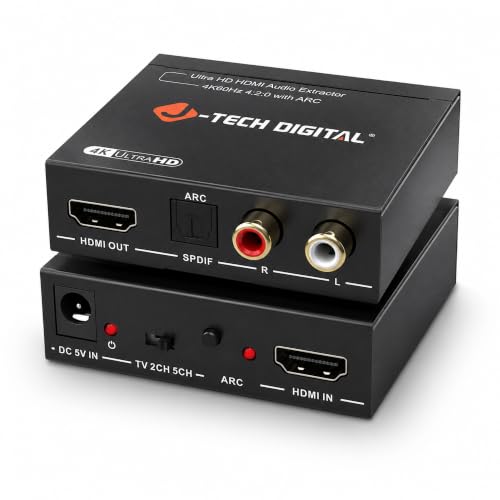
- 4K 60Hz video passthrough
- Optical and analog stereo outputs
- Three selectable EDID audio modes
Best For: 4K 60Hz PC setups with separate audio equipment
Best Basic 4K 30Hz Option
Amazon Basics HDMI Audio Extractor
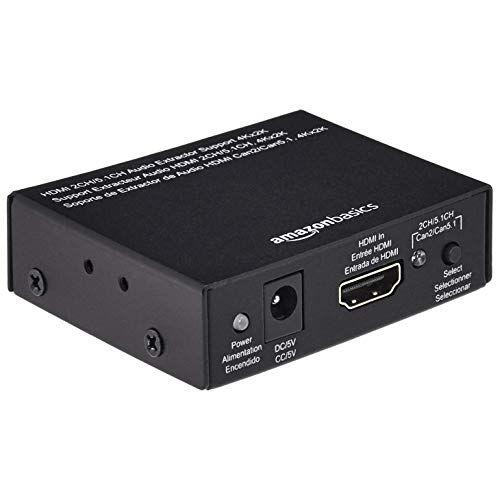
- 4K 30Hz video support
- Stereo and SPDIF optical outputs
- Metal housing; PC/laptop compatible
Best For: PC or laptop setups that do not need 4K 60Hz
Best for 3.5mm Speakers

- 3.5mm stereo and optical outputs
- Optical DTS 5.1 support
- 4K 30Hz; no ARC or eARC
Best For: PC sources connected to 3.5mm speakers or optical audio gear
Best for Flexible Audio Outputs – Avedio Links 4K60 HDMI Audio Extractor
Among HDMI audio extractors for PC setups, this Avedio Links model is a practical choice when your monitor needs HDMI video while speakers or a receiver need separate audio. It passes through up to 4K at 60Hz and offers optical and analog RCA outputs, with an included cable that provides a 3.5mm connection.
Best For: PC users pairing a 4K60 display with optical audio gear or analog speakers.
Pros:
- Supports 4K60 HDR pass-through and 1080p at 120Hz or 144Hz.
- Optical output supports PCM stereo, Dolby Digital 5.1, and DTS.
- Includes a power adapter and an RCA-to-3.5mm audio cable.
Cons:
- Does not support ARC.
- RCA analog output is limited to two-channel PCM.
Choose it for straightforward source-to-monitor extraction rather than TV-return audio. Set your PC’s audio format to suit the output you plan to use.
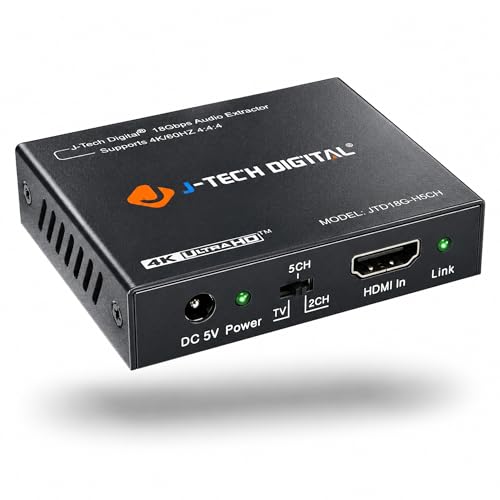
Best for PCM Stereo Setups – J-Tech Digital JTD18G-H5CH
If you are comparing HDMI audio extractors for PC use, the J-Tech Digital JTD18G-H5CH offers an optical output and a 3.5mm output alongside HDMI 2.0, HDCP 2.2, and up to 4K60 video support. Its key setup requirement is simple: select PCM audio at the source when using the analog jack.
Best For: PC users who want a 3.5mm stereo connection and can configure their source for PCM output.
Pros:
- Supports up to 4K60, plus 1080p at 120Hz or 144Hz.
- Offers both SPDIF optical and 3.5mm audio connections.
- Passes Dolby Digital and DTS audio without decoding them.
Cons:
- Analog output requires the HDMI source to be set to PCM; it does not decode Dolby Digital or DTS.
- Not compatible with HDMI 1.2 sources or monitors made before 2005.
This is a sensible option when you can control your PC’s audio settings. Check source compatibility before buying if you also plan to connect other HDMI devices.
Best for High-Refresh Displays – 8K eARC/ARC HDMI Audio Extractor
For HDMI audio extractors for PC builds with a newer display, this model stands out for stated support up to 8K60 or 4K120, along with optical, RCA, and 3.5mm audio outputs. It also has a separate eARC/ARC mode for routing audio from a compatible TV.
Best For: PC or console setups that need 4K120 video pass-through and a choice of digital or stereo audio connections.
Pros:
- Supports up to 8K60 or 4K120 when the source, display, and cables also support it.
- Provides optical, RCA stereo, and 3.5mm audio outputs.
- R/L mode downmixes supported incoming formats to PCM stereo.
- Offers TV eARC/ARC operation through its HDMI OUT port.
Cons:
- Requires a connected Type-C 5V power cable.
- Analog outputs in PASS or SPDIF mode require PCM input; other formats can cause noise.
- A TV cannot be used as the signal source through HDMI IN.
The mode switch makes this the most adaptable option here, but it also makes setup more important. Use R/L mode when you need stereo from a multichannel source, and connect a TV to HDMI OUT for ARC/eARC.
Best for 4K Home Theater – OREI HDA-912 HDMI Audio Extractor
The OREI HDA-912 is worth considering among HDMI audio extractors for PC setups connected to a 4K60 display and external sound system. It combines HDMI pass-through with optical and 3.5mm outputs in a metal housing, with HDCP 2.2 and HDR pass-through support.
Best For: PC users sending 4K60 video to a display while connecting optical or stereo audio equipment.
Pros:
- Supports 4K at 60Hz video pass-through with 18Gbps bandwidth and HDR.
- Optical output supports PCM stereo, Dolby Digital 5.1, and DTS.
- Supports HDMI high-bit-rate audio pass-through and CEC bypass.
Cons:
- Does not support ARC.
- Does not support 1440p at 120Hz.
This is a better match for a 4K60 display than for a high-refresh 1440p gaming monitor. Distinguish its HDMI audio pass-through capabilities from the more limited formats available through optical output.
High-Refresh Pick – 8K 60Hz HDMI Audio Extractor
Among HDMI audio extractors for PC setups, this model stands out if you need to pass a 4K 120Hz or 8K 60Hz signal while routing sound to separate equipment. It offers optical, coaxial, RCA L/R, and 3.5mm audio outputs.
Best For: PC gamers using a high-refresh display and a separate sound system.
Pros:
- Supports up to 4K 120Hz or 8K 60Hz HDMI video.
- Optical and coaxial outputs support DTS 5.1; analog outputs support PCM stereo.
- Eight EDID modes help accommodate different display configurations.
Cons:
- Does not support 7.1-channel audio.
- HDMI cables must be no longer than 2 meters, according to the supplied guidance.
Choose it for its video headroom and output flexibility, but plan your cable run carefully and use USB power if the HDMI connection proves unstable.
ARC Versatility Pick – UGREEN 4K 60Hz HDMI Audio Extractor
If you are comparing HDMI audio extractors for PC use alongside a TV or console, this UGREEN unit combines 4K 60Hz video passthrough with optical and 3.5mm audio outputs. Its selectable modes include standard ARC for compatible TV-audio setups.
Best For: Mixed PC and home-theater setups that need optical audio and standard ARC.
Pros:
- Supports 4K 60Hz passthrough with HDR10+ and HDCP 2.3.
- Optical output supports Dolby Digital and DTS; 3.5mm provides PCM/LPCM stereo.
- Four switchable modes include bypass, stereo, 5.1-channel, and ARC.
Cons:
- Does not support eARC.
- Requires power during use; the power cable is included, but a power adapter is not.
This is a practical choice when standard ARC matters as much as audio extraction. For 4K 60Hz, the supplied guidance recommends quality HDMI cables no longer than 3 meters.
Stereo Simplicity Pick – VPFET 4K 30Hz HDMI Audio Extractor
For shoppers seeking HDMI audio extractors for PC setups with basic stereo speakers or an amplifier, this VPFET adapter separates analog audio from an HDMI signal while passing video to a display. It includes a 3.5mm-to-RCA stereo cable.
Best For: PCs connected to stereo audio equipment and displays running at 1080p or up to 4K 30Hz.
Pros:
- Provides 3.5mm and RCA L/R stereo connection options.
- Supports video up to 4K 30Hz, plus 1080p and 3D formats.
- Normally operates without an external power adapter; a USB cable is included if extra power is needed.
Cons:
- Limited to 4K 30Hz rather than 4K 60Hz or higher.
- The source must be set to PCM audio.
It suits straightforward stereo connections rather than high-refresh displays or surround-sound systems. If the display shows no picture, the supplied instructions suggest trying 1080p or a lower input resolution.
Best for 4K 60Hz – J-Tech Digital HDMI Audio Extractor
Among HDMI audio extractors for PC setups, this J-Tech Digital model stands out when you need 4K at 60Hz video passthrough while sending audio to separate equipment. It offers optical output and analog stereo connections for soundbars, amplifiers, or older AV systems.
Best For: PC setups that need 4K 60Hz passthrough and a separate audio connection for existing sound equipment.
Pros:
- Supports 4K at 60Hz video passthrough.
- Provides SPDIF optical and analog stereo audio outputs.
- Three EDID modes let you select TV/pass, 2-channel stereo, or 5.1 surround sound.
- Includes a one-year replacement warranty and lifetime technical support.
Cons:
- Getting the desired audio format may require selecting the appropriate EDID mode.
Choose this model if keeping a 4K 60Hz display signal matters as much as connecting your PC source to separate audio gear. Check which output your speakers or receiver accepts before buying.
Best Basic 4K 30Hz Option – Amazon Basics HDMI Audio Extractor
If you are comparing HDMI audio extractors for PC use and 4K at 30Hz is sufficient, this Amazon Basics converter offers a straightforward way to separate audio from an HDMI source. Its metal housing has stereo and SPDIF optical output options.
Best For: PC or laptop connections that need separate audio output and do not require 4K at 60Hz.
Pros:
- Supports PC and laptop HDMI sources without a dedicated audio output.
- Offers left-right stereo and SPDIF optical audio outputs.
- Supports 4K at 30Hz video and 1080p at 60Hz.
- Comes in a durable metal housing.
Cons:
- 4K video support tops out at 30Hz, making it unsuitable when 4K 60Hz passthrough is required.
This is a sensible basic choice when its video limits match your display setup. If your PC outputs 4K at 60Hz, look for an extractor with a higher supported refresh rate.
Best for 3.5mm Speakers – VPFET HDMI Audio Extractor
For shoppers comparing HDMI audio extractors for PC setups with 3.5mm speakers or an optical-equipped receiver, this VPFET adapter provides both audio connections. It supports HDMI video passthrough up to 4K at 30Hz and uses a 5V USB connection for power.
Best For: PC HDMI sources needing 3.5mm stereo or optical audio, with no requirement for ARC or eARC.
Pros:
- Offers 3.5mm PCM 2.0 stereo and optical audio output.
- Optical output supports DTS 5.1.
- Provides 2.0CH, 5.1CH, and PASS modes.
- Supports up to 4K at 30Hz video passthrough.
Cons:
- Does not support ARC or eARC; a TV cannot be used as the HDMI input source.
- Does not support 7.1-channel audio or 4K at 60Hz.
Its output choices are useful for connecting a PC source to different audio gear, but the mode and video limits matter. Use 2.0CH for 3.5mm stereo or 5.1CH for optical, and consider another model if your setup relies on TV audio return.
How We Picked These Hdmi Audio Extractors for PC
We organized the 10 selected products around the specifications that most affect a PC setup: advertised HDMI video pass-through, audio output connections, audio-format support, and features such as EDID controls or ARC/eARC. A product name alone cannot establish real-world compatibility, so check the current listing and documentation against your exact graphics card, display, and audio equipment before buying.
Quick Comparison by Setup
For a 4K 60Hz display, the Avedio Links, OREI, UGREEN, J-Tech Digital, and the listed 4K 60Hz converter offer starting points to compare. If you need 4K 120Hz, look first at the two products advertised with 8K capabilities, then verify their supported input and output modes. The Amazon Basics model is listed for 4K 30Hz, making it a poorer fit for a 4K 60Hz monitor. The VPFET options target simpler connections; compare their stated video limits and audio jacks carefully rather than assuming both serve the same setup.
Key Buying Factors for Hdmi Audio Extractors for PC
Video Pass-Through Comes First
An extractor sits between the PC and display, so its supported resolution, refresh rate, and HDMI bandwidth must meet your video needs. A 4K 60Hz label does not promise 144Hz at your chosen resolution, variable refresh rate, HDR, or every color format. Check those features explicitly if you rely on them. Confirm HDCP support if you also plan to watch protected streaming content.
Match the Audio Output to Your Equipment
Optical S/PDIF suits receivers and soundbars with a Toslink input; a 3.5mm or RCA output suits analog stereo gear. Optical is not a universal path for every surround format: check whether the extractor passes the specific format you need, and whether your PC software and receiving device support it. For ordinary powered stereo speakers, a reliable analog output may be all you need.
Check EDID, ARC, and Power Requirements
EDID modes can help tell the PC which audio format to send when a display reports only stereo capability. ARC and eARC are different functions from extracting audio from a PC’s HDMI output; buy an ARC/eARC model only when its documented signal direction matches your wiring plan. Also check whether the unit needs USB or external power and whether the required cable or adapter is included.
Who Should Buy Which Hdmi Audio Extractors for PC?
Choose a verified 4K 120Hz-capable model for a high-refresh 4K monitor, or a 4K 60Hz model if that matches your display. Pick optical output for a compatible soundbar or older receiver, and 3.5mm or RCA for stereo speakers. Consider a model with selectable EDID modes when audio-format negotiation is a concern. If your PC and speakers already have suitable direct audio connections, you may not need an extractor at all.