High-performance document cameras make it easier to teach, present, and share detailed visuals in real time. Whether you need sharper image quality, smoother autofocus, or flexible connectivity, the right model can improve every demo.
Below, we focus on the best options for classrooms, remote instruction, and professional presentations so you can choose a camera that fits your workflow and budget.
Best 10 High-Performance Document Cameras Picks for 2026
Ultra-Portable Classroom Pick
IPEVO V4K Ultra HD 8MP USB Document Camera

- 8MP sensor captures up to 3264 x 2448.
- Up to 30 fps streaming at Full HD.
- Works with Mac, Windows, and Chromebook.
Best For: Teachers and presenters needing quick, reliable USB setup.
AI-Tracking Classroom Choice
OKIOCAM S2-4K USB Document Camera

- OKIOPoint AI-tracking follows your pointer.
- 8MP Sony sensor streams at 30 fps.
- Works with Mac, Windows, iOS, Chromebook, and displays.
Best For: Teachers who want interactive, software-driven presentations.
Wide-Angle Conferencing Pick
IPEVO V4K PRO 120 4K USB Document Camera

- 120-degree lens captures tabloid-size areas.
- 4K image quality with Sony CMOS autofocus.
- AI noise reduction helps in calls and meetings.
Best For: People presenting larger documents or using the camera as a webcam.
Premium 4K Teaching Option
OKIOCAM S2 Pro 13MP USB Document Camera

- 13MP sensor supports true 4K capture.
- OKIOPoint smart pointer supports interactive lessons.
- Built-in LED light and durable reinforced arm.
Best For: Presenters who want the sharpest image and interactive tools.
Wireless Classroom Workhorse
IPEVO VZ-X 8MP Wireless Document Camera

- Wi-Fi, HDMI, and USB connectivity
- 8MP sensor with near-4K USB mode
- 9-12 hour battery and 33-foot range
Best For: Teachers and presenters who need flexible connectivity and wireless mobility
Budget Demo Specialist
Kitchbai 4K 8MP USB Visualiser

- 8MP/2448P capture at 30fps
- 3-level LED lighting and image reversal
- Foldable USB-C design for easy setup
Best For: Educators and presenters who want a simple plug-and-play USB visualiser
High-Detail Imaging Pick
IPEVO V4K-13MP Ultra USB Camera

- 13MP sensor with up to 3840 x 3104 resolution
- Autofocus plus enhanced LED illumination
- Lightweight 1.27 lb portable design
Best For: Users who need sharp detail for text, graphics, and OCR
Premium Classroom 4K Pick
Elmo TT-12G Interactive Document Camera
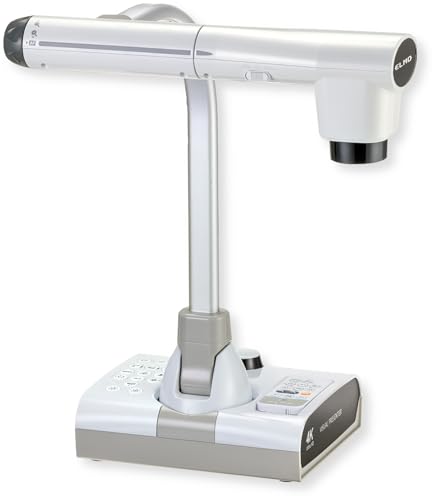
- 4K Ultra HD imaging with 12MP sensor
- 192x total zoom for detailed close-ups
- HDMI, USB, VGA, and Miracast support
Best For: Teachers and presenters who need premium classroom visuals
Compact USB Workhorse
INSWAN INS-1 Classic USB Document Camera

- 8MP Sony camera with 30 fps streaming
- Compact multi-joint design for small desks
- USB plug-and-play on Windows, Mac, iPad, and Chromebook
Best For: Compact classrooms, home offices, and simple USB setups
Dual-Mode Flex Pick
IPEVO VZ-R Ultra 13MP Document Camera

- 13MP sensor with up to 4K output
- HDMI and USB modes for flexible use
- Direct-connects to displays without a computer
Best For: Teachers and presenters using mixed HDMI and USB workflows
Ultra-Portable Classroom Pick – IPEVO V4K Ultra HD 8MP USB Document Camera
If you want high-performance document cameras for live demos, distance learning, or remote teaching, the IPEVO V4K focuses on speed, clarity, and broad compatibility. Its 8MP sensor captures up to 3264 x 2448 images, while the high frame rate helps keep streaming smooth during fast-paced presentations.
Best For: Teachers and presenters who need a compact, USB document camera that works across Mac, Windows, and Chromebook setups.
Pros:
- 8MP sensor captures up to 3264 x 2448 resolution.
- Streams up to 30 fps at Full HD for lag-free live use.
- Fast autofocus helps reduce interruptions when switching materials.
- Sony CMOS sensor is designed for strong color and lower noise in dimmer rooms.
Cons:
- Max shooting area is smaller than some large-format models.
- No zoom feature.
- Best performance depends on meeting the recommended system specs.
Overall, this is a practical all-around document camera for users who value speed and straightforward USB operation over extra bells and whistles. The multi-jointed stand and wide software support make it a sensible pick for everyday classroom and conferencing use.
AI-Tracking Classroom Choice – OKIOCAM S2-4K USB Document Camera
Among high-performance document cameras, the OKIOCAM S2-4K stands out for its AI tracking, strong low-light handling, and classroom-friendly workflow. It pairs an 8MP Sony Exmor R sensor with smooth 30 fps streaming, making it well suited for lessons, web conferencing, and interactive presentations.
Best For: Educators and presenters who want AI pointer tracking and a feature-rich software experience.
Pros:
- 8MP sensor records up to 3264 x 2448 with 30 fps streaming.
- OKIOPoint AI-tracking zooms in and follows your pointer in real time.
- Back-illuminated sensor improves low-light performance without extra lighting.
- Supports Mac, Windows, iOS via adapter, Chromebook, and interactive displays.
Cons:
- Feature-rich software may be more than casual users need.
- AI-tracking depends on using OKIOCAM Live software.
- Some functions are software-based rather than camera-only controls.
This model is a strong fit if you want a camera that does more than simply show a page. The combination of AI tracking, close-focus capture, and broad compatibility makes it especially useful for teaching and guided demonstrations.
Wide-Angle Conferencing Pick – IPEVO V4K PRO 120 4K USB Document Camera
If you need high-performance document cameras for larger materials, the IPEVO V4K PRO 120 brings a 120-degree lens and 4K capture to the table. It is built for tabloid-size documents, classroom demos, and webcam-style use, with plug-and-play USB convenience across major platforms.
Best For: Users who need a wide field of view for larger documents, objects, or hybrid conferencing.
Pros:
- 120-degree lens is designed for tabloid-size capture and wider scenes.
- 4K resolution with Sony CMOS sensor and swift autofocus.
- Built-in LED light helps in dimmer environments.
- AI noise reduction is useful for calls and presentations.
Cons:
- Wide-angle design may be more than needed for standard letter-size pages.
- Digital zoom is available, but not a substitute for optical reach in every use case.
- Bulkier framing can be less desk-friendly than smaller document cameras.
This is a smart option when coverage matters more than compact framing. The extra-wide lens, 4K detail, and broad software compatibility make it a versatile choice for presentations and video calls.
Premium 4K Teaching Option – OKIOCAM S2 Pro 13MP USB Document Camera
For buyers comparing high-performance document cameras, the OKIOCAM S2 Pro is the most resolution-focused option in this group. Its 13MP sensor supports true 4K capture, while the built-in LED light, fast autofocus, and OKIOPoint smart pointer make it well suited to polished live demos and remote teaching.
Best For: Users who want maximum image detail and interactive presentation tools.
Pros:
- 13MP sensor supports true 4K resolution up to 3840 x 2160.
- OKIOPoint smart pointer adds guided, interactive presenting.
- High frame rate at 30 fps keeps motion smooth.
- Built-in LED light and 10,000+ hinge rotation testing support daily use.
Cons:
- Feature set may be more advanced than basic users need.
- Best functions rely on OKIOCAM software for live presenting.
- It is geared more toward presentation work than simple point-and-shoot use.
When detail is the priority, this model is easy to recommend. It combines high-resolution imaging with classroom-ready software tools and durable hardware, making it a strong premium pick for teaching and conferencing.
Wireless Classroom Workhorse – IPEVO VZ-X 8MP Wireless Document Camera
If you want high-performance document cameras that can move easily between a desk, display, and presentation setup, the IPEVO VZ-X is built for flexible teaching and live demos. Its wireless, HDMI, and USB connectivity make it easy to adapt to classrooms, web conferencing, and projector-based setups without being tied to one workflow.
Best For: Teachers and presenters who need wireless freedom, multi-device compatibility, and solid HD capture.
Pros:
- 8MP sensor with HD output in Wi-Fi and HDMI mode, plus near-4K quality in USB mode
- Works with computers, iOS/Android devices, Apple TV, projectors, TVs, and monitors
- Built-in LED light, swivel head, and multi-jointed stand help with different angles and objects
- 9-12 hour battery life and up to 33 feet of wireless range support longer sessions
Cons:
- USB is required to reach the highest listed capture resolution
- Not designed for water resistance
- Manual focus may be less convenient for users who want fully automatic operation
The VZ-X stands out for portability and connection flexibility more than raw resolution alone. For users who need a dependable, classroom-ready document camera that can switch between wireless and wired use, it is a strong all-around option.
Budget Demo Specialist – Kitchbai 4K 8MP USB Visualiser
This high-performance document camera is aimed at teachers and remote presenters who want a simple USB setup with useful image controls. The Kitchbai visualiser combines 8MP capture, adjustable image reversal, and 3-level LED lighting to handle live demos, worksheets, and 2D or 3D objects in a compact foldable design.
Best For: Educators and remote workers who want an easy plug-and-play USB document camera with manual image and lighting controls.
Pros:
- 8MP/2448P capture with 30fps output for high-definition images and video
- Manual image reversal and 3-level brightness adjustment improve usability in different setups
- Foldable, multi-joint design saves space and supports flexible angles
- USB-C plug-and-play compatibility with Windows, macOS, and Chrome OS
Cons:
- USB-only connectivity limits placement compared with wireless or HDMI models
- Maximum cover area is geared to A3-size material rather than extra-large originals
- Focus is autofocus, but the notes emphasize manual control for some image adjustments
For buyers who prioritize straightforward setup and practical classroom features, this model covers the essentials well. It is especially appealing if brightness control and image inversion matter more than advanced connectivity.
High-Detail Imaging Pick – IPEVO V4K-13MP Ultra USB Camera
Among high-performance document cameras, the IPEVO V4K-13MP is built for users who care most about image clarity, OCR-friendly detail, and compact portability. Its 13MP sensor, 4K Ultra HD resolution, autofocus, and bright LED lighting make it well suited to teaching, visualization, and online learning.
Best For: Educators and professionals who need sharp image capture for small text, fine graphics, and OCR-focused workflows.
Pros:
- 13MP camera with up to 3840 x 3104 resolution for highly detailed live images
- Autofocus and enhanced LED illumination help maintain clarity in low light
- Lightweight 1.27 lb design makes it easy to carry between rooms or events
- Works with IPEVO Visualizer software and optional OCR/scanning upgrade tools
Cons:
- USB connectivity keeps it tied to a computer-based workflow
- No flash and no water resistance are listed
- It is compact, but not the most flexible option if you need wireless use
If fine detail matters more than wireless convenience, this is the strongest image-first choice in the group. It is especially compelling for users who want a portable document camera that can also support scanning and OCR-oriented tasks.
Premium Classroom 4K Pick – Elmo TT-12G Interactive Document Camera
If you need a high-performance document camera for lessons, demos, or distance learning, the Elmo TT-12G is built for sharp, flexible presentation work. Its 4K Ultra HD imaging, 192x total zoom, and multi-angle arm make it well suited for showing fine details clearly across classrooms and meeting spaces.
Best For: Teachers, trainers, and presenters who want 4K clarity, big zoom, and broad device compatibility.
Pros:
- 4K Ultra HD image quality with a 12MP sensor for crisp presentation visuals
- 192x total zoom helps reveal fine details in documents and objects
- Flexible multi-angle arm and large capture area support a wide range of materials
- HDMI, USB, VGA, and Miracast support make it easy to connect in mixed setups
Cons:
- More feature-rich than a basic USB document camera, so it may be more than some users need
- Best value is tied to classrooms or professional presentation environments
The TT-12G stands out when image quality and presentation flexibility matter most. It combines strong optical tools with modern connectivity, making it a solid choice for high-performance document camera workflows.
Compact USB Workhorse – INSWAN INS-1 Classic USB Document Camera
The INSWAN INS-1 Classic is a practical high-performance document camera for compact desks, online classes, and plug-and-play use. With an 8MP Sony camera, 30 fps streaming, LED lighting, and autofocus, it covers the everyday needs of a document camera without taking up much space.
Best For: Users who want a compact USB document camera for teaching, conferencing, and desktop use.
Pros:
- 8MP Sony sensor delivers sharp live images and smooth 30 fps streaming
- Compact multi-joint design fits small desktop setups
- Built-in LED, anti-glare sheet, autofocus, and macro support improve image clarity
- USB plug-and-play compatibility works with Windows, Mac, iPad, and Chromebook
Cons:
- Lower resolution and zoom capability than premium 4K alternatives
- Best suited to USB-based workflows rather than HDMI presentations
This model is a strong fit if you want dependable imaging in a simple, space-saving package. It balances useful software tools and broad compatibility with an easy setup that works well for daily teaching or meetings.
Dual-Mode Flex Pick – IPEVO VZ-R Ultra 13MP Document Camera
The IPEVO VZ-R Ultra is a versatile high-performance document camera for educators and presenters who want both HDMI and USB flexibility. Its 13MP sensor, 4K HDMI output, and direct connection to displays without a computer make it a strong option for classroom teaching and live presentations.
Best For: Educators and presenters who need dual-mode output and strong image quality across mixed display setups.
Pros:
- 13MP capture with up to 4K output delivers sharp, detailed images
- HDMI mode connects directly to TVs, monitors, projectors, or IFPs without a computer
- USB mode supports software-based online teaching and content sharing
- Built-in LED light, fast focusing, and tactile controls help with real-time adjustments
Cons:
- No zoom feature is listed in the supplied specifications
- More specialized than a basic USB-only camera if you only need simple webcam use
The VZ-R Ultra is especially compelling when you need one camera for both direct-display teaching and connected software workflows. Its durable build and adjustable imaging tools make it a well-rounded choice for demanding classroom environments.
How We Picked the Best High-Performance Document Cameras
We prioritized image quality, focus speed, illumination, compatibility, and ease of setup. For High-Performance Document Cameras, those factors matter more than marketing claims because they directly affect how clearly students, coworkers, or clients can see text, objects, and demonstrations.
We also looked for models that work well across common platforms, including Mac, Windows, Chromebook, and presentation hardware. Connectivity options such as USB, HDMI, and wireless support can make a major difference in real-world usability.
Quick Comparison: What Matters Most
If you want the simplest path to a strong choice, compare resolution, sensor size, frame coverage, and mounting flexibility first. A 4K or high-megapixel sensor helps preserve fine detail, while a wider field of view is useful for showing full pages or larger materials.
Then consider whether you need classroom-friendly features like built-in lighting, microphone support, image inversion, or AI tracking. These extras are not essential for everyone, but they can save time and improve consistency during lessons and live presentations.
Key Buying Factors for High-Performance Document Cameras
Image Quality and Focus
Look for a camera that balances resolution with reliable autofocus and low-light performance. A high resolution alone does not guarantee a better experience if the image is soft, laggy, or difficult to keep centered.
Connectivity and Compatibility
Choose the connection type that matches your setup. USB is usually the easiest for laptops and classrooms, HDMI is ideal for direct display use, and wireless models offer more flexibility when mobility matters.
Field of View and Capture Area
Consider what you’ll show most often. Larger capture areas are better for books, worksheets, and lab materials, while a tighter framing can be useful for product demos or focused instruction.
Lighting, Audio, and Convenience Features
Built-in LEDs, microphones, smart pointers, and one-touch controls can improve everyday use. These features are especially helpful for teachers and presenters who need dependable operation without extra setup.
Who Should Buy Which High-Performance Document Cameras?
Teachers and trainers should favor easy setup, strong low-light performance, and classroom-friendly tools like AI tracking or built-in lighting. Remote workers and presenters may value USB simplicity, webcam support, and clean image output for video calls.
If you need maximum flexibility, look at models with dual-mode or wireless connectivity. If your priority is a straightforward plug-and-play experience, a compact USB model may be the best fit. In short, the best High-Performance Document Cameras are the ones that match your display environment, content size, and day-to-day workflow.