If you’re looking to enhance your workspace, choosing the right monitor stand for your iMac 27-inch can make all the difference. These stands not only elevate your screen to eye level but also offer practical storage and cable management solutions. With a variety of designs available, you’ll find options that suit both your style and functional needs. Let’s explore the top contenders that can transform your workspace into a more organized and ergonomic environment.
Klearlook Foldable Height Adjustable Monitor Stand Riser

If you’re looking for a versatile solution to enhance your workspace, the Klearlook Foldable Height Adjustable Monitor Stand Riser is an excellent choice for iMac 27-inch users. Its ergonomic design elevates your monitor to the ideal height, reducing neck and back strain. You can adjust the width to fit your desk perfectly, and the hidden drawer keeps your essentials organized. Weighing just 2.87 pounds, it’s easy to move and supports up to 55 pounds, ensuring stability for your devices. Plus, its sleek matte finish adds a modern touch to your setup, making it a practical and stylish addition to any office.
Best For: This monitor stand is best for anyone seeking an ergonomic workspace solution, particularly iMac 27-inch users who need height adjustment and organization.
Pros:
- Ergonomic Design: Elevates monitor to reduce neck and back strain, promoting better posture.
- Adjustable Widths: Offers flexibility to fit various desk sizes with three width options.
- Built-in Storage: Features a hidden drawer for organizing office essentials and a tablet/phone holder for easy access.
Cons:
- Drawer Size: Some users may find the storage drawer to be smaller than expected.
- Stability Concerns: Heavier monitors may lead to stability issues for certain users.
- Limited Color Options: Available only in white, which may not suit all aesthetic preferences.
Mount-It! Aluminum Monitor Stand for iMac
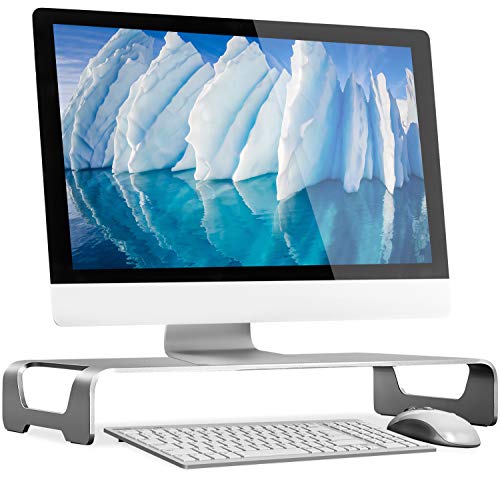
The Mount-It! Aluminum Monitor Stand for iMac elevates your workspace effortlessly. Its sleek, unibody design supports various devices, including iMacs and MacBooks, while raising them to a comfortable height for better posture. Weighing only 3.23 lbs, it holds up to 44 lbs, ensuring stability without wobbling. The space-saving design features cable management and allows you to store your keyboard and mouse underneath, keeping your desk organized. With a modern brushed aluminum finish, it complements your Apple products perfectly. Plus, it requires no assembly and is easy to clean, making it a practical and stylish addition to any setup.
Best For: Users looking to improve their workspace ergonomics while maintaining a modern aesthetic with their Apple devices.
Pros:
- Space-saving design with cable management for a clutter-free desk.
- Sturdy construction supports up to 44 lbs without wobble.
- No assembly required and easy to clean for user convenience.
Cons:
- Some users report minor issues with the branding/logo placement.
- A few wish for a longer design to accommodate full-size keyboards.
- Limited color options may not suit all personal styles.
Single Monitor Stand VESA Mount for 13-32 Inch Screens
For users looking to optimize their workspace, the Single Monitor Stand VESA Mount for 13-32 Inch Screens offers a perfect blend of functionality and ergonomic benefits. This free-standing design supports monitors up to 44 lbs and features VESA compatibility for easy installation. You can enjoy adjustable height, tilt, swivel, and 360° rotation, promoting better posture while reducing neck and shoulder strain. With integrated cable management and a sturdy tempered glass base, it keeps your workspace organized and professional. Assembly takes just five minutes, and US-based customer service is ready to assist you whenever needed.
Best For: Users seeking an ergonomic solution to enhance their workspace with a sturdy and adjustable monitor stand for screens between 13-32 inches.
Pros:
- Ergonomic design promotes good posture and reduces neck and shoulder strain.
- Easy assembly with all necessary accessories included, taking approximately 5 minutes to set up.
- Free-standing design allows for mobility without damaging the desktop.
Cons:
- May not be suitable for larger monitors over 32 inches.
- Limited height adjustment options with only five preset levels.
- Requires adequate desk space due to its free-standing nature.
BoYata Adjustable Monitor Stand (Compatible with TV, PC, Laptop, iMac)
With its adjustable height feature, the BoYata Adjustable Monitor Stand is perfect for anyone looking to enhance their workspace ergonomics. You can easily twist the knob to find your ideal height, aligning your monitor with eye level to alleviate neck and back pain. Weighing 5.9 pounds and supporting up to 33.1 pounds, this sturdy metal stand is compatible with various devices, including your iMac, TV, and laptop. Plus, its design saves space by allowing you to store office items underneath. Assembly is a breeze, and it’s earned an impressive 4.7-star rating from over 4,000 users.
Best For: Individuals seeking an ergonomic solution for their workspace to improve comfort and organization while using various display devices.
Pros:
- Adjustable Height: Easily customize the height to align your monitor with eye level, promoting better posture.
- Sturdy Construction: Supports up to 33.1 pounds, ensuring stability for a variety of devices.
- Space-Saving Design: Provides storage space underneath for office supplies, helping to keep your workspace organized.
Cons:
- Periodic Maintenance Required: Users may need to check screw stability over time to maintain sturdiness.
- Weight: At 5.9 pounds, it may be heavier than some other monitor stands, potentially impacting portability.
- Limited Color Options: Currently only available in black, which may not suit all aesthetic preferences.
Single LCD Computer Monitor Desk Stand Mount (HT05B-001)

Looking for a versatile monitor stand that elevates your viewing experience? The Single LCD Computer Monitor Desk Stand Mount (HT05B-001) is perfect for screens between 13 and 32 inches, supporting up to 77 lbs. It’s compatible with various LCD, LED, and Plasma screens thanks to its VESA mounting holes. You’ll appreciate the ergonomic benefits, as it elevates your monitor to improve posture during long hours. With adjustable tilt, swivel, rotation, and height options, you can customize your setup easily. Plus, it installs in under 15 minutes, making it a hassle-free addition to your workspace.
Best For: Those seeking an ergonomic and customizable monitor stand for screens ranging from 13 to 32 inches.
Pros:
- Ergonomic design improves posture for long hours of work.
- Adjustable features such as tilt, swivel, and height for personalized viewing angles.
- Easy installation in under 15 minutes with included tools and hardware.
Cons:
- Limited to supporting a single monitor, which may not suit multi-monitor setups.
- Maximum weight capacity of 77 lbs may not accommodate heavier screens.
- Height adjustment may not be sufficient for all desk setups or user preferences.
Rain Design mBase 27-Inch for iMac

The Rain Design mBase 27-Inch for iMac is an excellent choice for those seeking both style and functionality in their workspace. Crafted from high-quality aluminum that matches your iMac, it provides a sleek aesthetic. You’ll enjoy two height elevation options for ideal ergonomic positioning while working. Plus, the built-in drawer compartment helps keep your gadgets organized and reduces clutter. Its easy pull-out feature guarantees you access items without disturbing your keyboard. With back access for efficient cable management and air vents for heat dissipation, this stand enhances both your productivity and your iMac’s performance.
Best For: Users looking for an ergonomic and stylish solution to enhance their iMac workspace while maintaining organization and productivity.
Pros:
- High-quality aluminum design matches the iMac, providing a cohesive look.
- Offers two height elevation options for customizable ergonomic positioning.
- Features a drawer compartment for gadget storage and easy cable management.
Cons:
- The price point may be higher than basic stands without additional features.
- Limited to those who own a 27-inch iMac, reducing versatility for other models.
- Drawer space may be insufficient for larger gadgets or accessories.
WESTREE Dual Monitor Stand Riser for Computer and Laptop
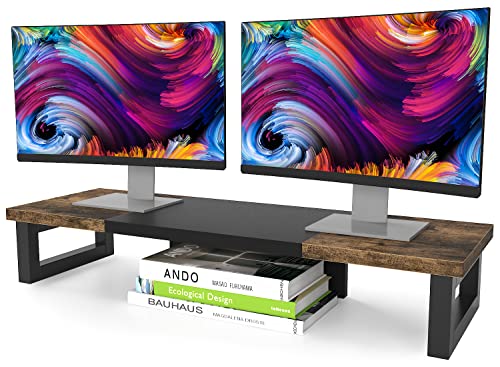
For those seeking a sturdy and stylish solution to elevate their workspace, the WESTREE Dual Monitor Stand Riser stands out as an excellent choice. Crafted from rustic brown wood and heavy-duty black steel, it supports up to 149.9 pounds without wobbling. Its ergonomic design raises your screens to eye level, reducing neck strain. Plus, the extra storage underneath keeps your desk organized. Assembly is straightforward, taking just 2 to 20 minutes with no power tools needed. With an impressive 4.6-star rating, users rave about its quality and functionality, making it a top pick for enhancing your workspace efficiency.
Best For: Those looking to improve their workspace ergonomics and organization with a stylish and sturdy dual monitor stand.
Pros:
- Sturdy construction supports up to 149.9 pounds, ensuring stability for dual monitors.
- Ergonomic design elevates screens to eye level, reducing neck and eye strain.
- Extra storage space underneath helps keep the workspace tidy and organized.
Cons:
- Some users report slight sagging over time, potentially affecting long-term durability.
- Assembly can take up to 20 minutes, which may be inconvenient for some.
- Requires assembly tools and instructions, which may not be ideal for those seeking a ready-to-use product.
VIVO Dual LED LCD Monitor Free-Standing Desk Stand for 2 Screens

If you need a sturdy and versatile solution for mounting two monitors, the VIVO Dual LED LCD Monitor Free-Standing Desk Stand is an excellent choice. This stand supports screens from 13” to 27” and holds up to 22 lbs each, ensuring stability with its heavy-duty design. You’ll appreciate the 90° tilt, 180° swivel, and height adjustment for customizable viewing angles. Installation is straightforward, and the detachable cable clips help keep your workspace organized. Users rave about its ease of assembly and the way it frees up desk space. Just remember to secure the base for added stability during use.
Best For: Those looking for a sturdy and adjustable dual monitor stand that enhances workspace organization and ergonomics.
Pros:
- Sturdy Construction: Heavy-duty design provides stability for monitors up to 22 lbs each.
- Flexible Viewing Options: Offers adjustable tilt, swivel, and height settings for personalized comfort.
- Space-Saving Design: Frees up desk space by eliminating bulky monitor bases.
Cons:
- Base Stability Caution: May require securing the base or assistance when attaching monitors to prevent tipping.
- Limited Screen Size Compatibility: Only supports monitors ranging from 13” to 27”.
- Potential Installation Difficulty: Some users may find setup challenging without prior experience.
Simple Trending Metal Monitor Stand Riser and Computer Desk Organizer

Searching for a practical solution to elevate your iMac while keeping your workspace organized? The Simple Trending Metal Monitor Stand Riser is perfect for you. Its ergonomic design raises your monitor to eye level, reducing strain on your neck and back, which boosts your work efficiency. With a two-tier layout, it accommodates everything from large gaming keyboards to cable boxes. The anti-slip suction cups guarantee stability during use, while the built-in drawer helps you keep office supplies neatly stored. Plus, the bottom flat tray doubles as a handy desk organizer. Make your workspace both functional and stylish!
Best For: Individuals seeking to enhance their workspace ergonomics and organization while using computers, monitors, or laptops.
Pros:
- Ergonomic design improves posture and reduces strain on neck and back.
- Two-tier layout offers ample storage for large items and accessories.
- Built-in drawer and flat tray promote a clutter-free workspace.
Cons:
- Limited color options may not match all office decors.
- Height may not be adjustable to suit all users’ preferences.
- Drawer space may be insufficient for larger office supplies.
WALI Single Monitor Stand for 13-32 Inch Screens (MF001)

The WALI Single Monitor Stand (MF001) is an ideal choice for those with monitors ranging from 13 to 32 inches, offering a robust solution for enhancing your workspace. This freestanding desk mount supports up to 22 lbs and features adjustable height, reaching up to 18 inches. You’ll enjoy a more ergonomic setup, reducing neck and eye strain with its 360-degree rotation, 45-degree tilt, and 90-degree swivel. Plus, it frees up desk space, boosting your productivity. The package includes mounting hardware and a user manual, with US-based customer support available seven days a week to assist you with any questions.
Best For: The WALI Single Monitor Stand is best for individuals looking to enhance their workspace ergonomics with a versatile and space-saving monitor mount.
Pros:
- Height adjustable up to 18 inches for customized viewing comfort.
- 360-degree rotation, 45-degree tilt, and 90-degree swivel for flexible screen positioning.
- Freestanding design that frees up desk space, improving overall productivity.
Cons:
- Limited to monitors and TVs up to 32 inches and 22 lbs, which may not accommodate larger screens.
- Requires some assembly, which may be challenging for non-technical users.
- The base size may take up additional desk space compared to clamp mounts.
Factors to Consider When Choosing an iMac 27 Inch Monitor Stand
When choosing an iMac 27-inch monitor stand, you should consider several key factors. Height adjustment options and ergonomic design features can greatly enhance your comfort while working. Additionally, think about the material durability, storage capabilities, and how well the stand matches your aesthetic preferences.
Height Adjustment Options
Finding the right height adjustment options for your iMac 27-inch monitor stand is essential for achieving an ergonomic workspace. Adjustable stands allow you to position your monitor at eye level, which helps reduce neck and back strain. Look for models that offer multiple height levels, typically ranging from 8.2 to 16.1 inches, to suit your preferences. Some stands come with twist knobs or adjustable brackets, making it easy to customize the height for your comfort. Additionally, these stands can optimize desk space by providing room for storage underneath while ensuring your monitor is at a comfortable height. Choosing a stand with height adjustment features can greatly boost your productivity by promoting better posture during long hours at your computer.
Material Durability
Choosing a durable material for your iMac 27-inch monitor stand is essential for ensuring longevity and stability. High-grade aluminum stands offer enhanced durability, supporting heavy devices without wobbling or bending. If you’re looking for impact resistance, consider stands made from Acrylonitrile Butadiene Styrene (ABS), which can withstand everyday wear and tear. Metal constructions typically provide superior weight capacity, with some stands supporting up to 77 lbs, perfect for larger monitors or multiple devices. Additionally, a scratch-resistant coating on aluminum maintains the stand’s aesthetic appeal over time, preventing visible damage. Ultimately, opting for high-quality materials means a longer-lasting product that requires less maintenance, giving you peace of mind in your workspace.
Ergonomic Design Features
High-quality materials contribute to a sturdy foundation, but an ergonomic design is what truly enhances your workspace experience. When choosing a monitor stand for your iMac 27-inch, look for features that elevate the screen to eye level, reducing neck and shoulder strain during long hours. Adjustable height options let you customize the monitor position for better posture and comfort. Many stands also offer tilt and swivel capabilities, allowing you to find the perfect viewing angle without straining your eyes. Stability is essential; ascertain the stand can support your monitor’s weight without wobbling. A well-designed ergonomic stand can make a significant difference in your daily comfort and productivity.
Storage Capabilities
When you’re on the hunt for an iMac 27-inch monitor stand, it’s crucial to evaluate how storage capabilities can enhance your workspace. Look for stands with built-in storage solutions like drawers or compartments to keep your office supplies organized and reduce clutter. Verify the height allows for items like keyboards or notebooks to fit underneath, maximizing vertical space. Some models even feature cable management channels, keeping cords tidy and out of sight for better efficiency. Choose a design that allows you to access storage easily without interfering with the monitor’s placement. Finally, check the weight capacity to verify it can support not only your monitor but also any additional items you plan to store on or beneath it.
Aesthetic Compatibility
Finding the right aesthetic compatibility for your iMac 27-inch monitor stand can greatly elevate your workspace’s overall look. Consider materials that match your iMac’s sleek aluminum finish, like brushed aluminum or minimalist designs, to create a cohesive appearance. Look for stands that not only enhance the ergonomic positioning of your iMac but also align with contemporary office aesthetics. Cable management features are essential too, as they help keep your workspace organized and reduce visible clutter. Pay attention to your color scheme—white or metallic stands typically harmonize better with the iMac’s palette compared to darker hues. By thoughtfully selecting your monitor stand, you’ll enhance both the functionality and beauty of your workspace.
Weight Capacity
One essential aspect to take into account when choosing an iMac 27-inch monitor stand is its weight capacity. Your iMac typically weighs around 21 pounds, so it’s important to select a stand that can support at least that much. Many stands specifically designed for iMacs offer a weight capacity of 44 pounds or more, which gives you extra room for accessories or peripherals. Stability is key, too; heavier stands made from robust materials like aluminum or steel tend to provide better support and minimize the risk of wobbling or tipping. Always check the manufacturer’s specifications and read user reviews regarding each stand’s stability and performance to make an informed choice. Your workspace deserves the best!
Cable Management Solutions
Effective cable management is essential for creating a tidy and efficient workspace. By organizing your power and AV cables, you can greatly reduce clutter and improve the overall aesthetic of your setup. Look for monitor stands that include integrated cable management channels or clips to help route cables along the stand, keeping them neatly hidden from view. Some models even provide back access for easy connectivity, making cable routing a breeze. When choosing your stand, consider options that offer adjustable heights and angles while still incorporating cable management solutions. This will guarantee you enjoy ergonomic benefits alongside a clean workspace. Plus, built-in cable management can enhance airflow around your devices, improving their performance and longevity.
Assembly Requirements
A well-organized workspace isn’t just about cable management; it also involves considering how easily you can set up your monitor stand. Many iMac 27-inch monitor stands come fully assembled, so you can start using them right away. If you opt for a stand that requires minimal assembly, look for one where attaching legs or support components takes less than 20 minutes. It’s essential to check if all necessary tools and hardware are included to avoid any hiccups during setup. Some designs even provide user-friendly instructions, making it accessible for everyone, regardless of technical skills. Finally, consider whether you need power tools for assembly or if the stand offers a tool-free setup for added convenience.