If you’re an iMac user looking to elevate your color grading game in 2025, you’ve got some impressive options at your fingertips. From high-resolution displays to portable models, the choices cater to various needs and preferences. Each monitor brings its own strengths, particularly in color accuracy and calibration features. But which ones truly stand out? Let’s explore the top picks and what makes them essential for your workflow.
BenQ PD3225U 32 Inch 4K IPS Thunderbolt Monitor

If you’re an iMac user seeking a professional-grade color grading monitor, the BenQ PD3225U 32 Inch 4K IPS Thunderbolt Monitor is an excellent choice. With a stunning 4K resolution and impressive color accuracy (Delta E ≤ 2), it covers 98% of P3 and 100% of sRGB, ensuring vibrant visuals. Its Thunderbolt 3 connectivity offers 40Gb/s bandwidth for seamless data transfer and charging. Plus, the adjustable stand allows for ideal positioning. Although it has limited USB ports, the built-in KVM switch simplifies your multi-computer setup. Enjoy a flicker-free display with minimal blue light emission, perfect for long editing sessions.
Best For: This monitor is best for iMac users and professionals in need of a high-quality color grading display for creative work.
Pros:
- Excellent color accuracy with Delta E ≤ 2 and wide color coverage (98% P3, 100% sRGB).
- Thunderbolt 3 connectivity allows for high-speed data transfer and charging, enhancing productivity.
- Adjustable stand with tilt, swivel, pivot, and height adjustment for optimal viewing comfort.
Cons:
- Limited to 4 USB ports, which may necessitate the use of a hub for users with multiple devices.
- Lack of a dedicated Ethernet port requires additional USB adapters for network connectivity.
- Internal speakers offer average sound quality, comparable to standard laptop speakers, which may not meet higher audio expectations.
ASUS ProArt Display 14” Portable Touchscreen Monitor (PA148CTV)

The ASUS ProArt Display 14” Portable Touchscreen Monitor (PA148CTV) is an exceptional choice for creative professionals who need accurate color representation on the go. With a 14-inch Full HD IPS anti-glare panel, it offers 100% sRGB and Rec. 709 color gamut coverage, ensuring vibrant visuals. The monitor’s excellent brightness of 300 cd/㎡ and a wide 178° viewing angle enhance your viewing experience. You’ll appreciate the intuitive OSD control via ASUS Dial and the included metal kickstand for easy adjustments. Plus, with multiple connectivity options, including USB Type-C and Micro HDMI, connecting your devices is a breeze.
Best For: Creative professionals seeking a portable monitor with accurate color representation and versatile connectivity options.
Pros:
- 100% sRGB and Rec. 709 color gamut coverage for vibrant visuals.
- Intuitive OSD control via ASUS Dial for easy adjustments.
- Multiple connectivity options including USB Type-C and Micro HDMI.
Cons:
- Limited screen size may not be suitable for all design tasks.
- Brightness may be insufficient for outdoor use in direct sunlight.
- Touchscreen functionality may not be necessary for all users.
Blackmagic Design UltraStudio Mini Monitor

For content creators seeking a reliable, low-cost solution for color grading on high-resolution displays, the Blackmagic Design UltraStudio Mini Monitor stands out. This ultra-small, portable device easily connects to your iMac via Thunderbolt, outputting video through HDMI or SDI. It supports a vast range of video formats and resolutions, making it versatile for various projects. Weighing just 5.4 ounces, you can use it standalone or rack-mounted. Users rave about its ease of setup and performance with color-calibrated monitors, making it perfect for grading films or streaming. With a 1-year warranty and positive reviews, it’s a solid choice.
Best For: Content creators and editors looking for a cost-effective solution for high-quality color grading and video output on external displays.
Pros:
- Easy setup and excellent performance with color-calibrated monitors.
- Compact and lightweight design allows for portability and rack mounting.
- Supports a wide range of video formats and resolutions, enhancing versatility.
Cons:
- Only supports either HDMI or SDI input at a time, limiting connectivity options.
- Does not function as a monitor extension for desktop use, restricting its application.
- Requires downloading the latest drivers for optimal performance, which may be inconvenient for some users.
Apple 2019 iMac with 27 inch Retina 5K Display (Renewed)
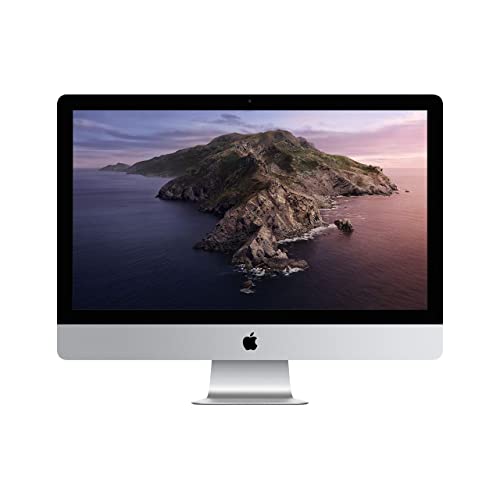
With its stunning 27-inch Retina 5K display, the Apple 2019 iMac offers an exceptional visual experience that makes it a top choice for creative professionals and color grading enthusiasts. The 5120-by-2880 resolution delivers incredible detail, ensuring your colors pop with accuracy. Equipped with a 6-Core 8th-Generation Intel Core i5 processor and options for Radeon Pro 570x, 575x, or 580x graphics, this iMac handles demanding tasks effortlessly. Plus, with two Thunderbolt 3 ports and 802.11AC Wi-Fi, connectivity is seamless. Running on macOS with user-friendly features, this renewed model is a fantastic investment for anyone serious about color grading.
Best For: Creative professionals and color grading enthusiasts seeking a high-performance desktop with exceptional display quality.
Pros:
- Stunning 27-inch Retina 5K display with 5120-by-2880 resolution for incredible detail and color accuracy.
- Powerful 6-Core 8th-Generation Intel Core i5 processor and options for high-performance Radeon Pro graphics.
- Seamless connectivity with two Thunderbolt 3 ports and 802.11AC Wi-Fi.
Cons:
- The renewed model may have minor cosmetic imperfections compared to brand new units.
- Limited upgrade options for RAM and storage after purchase.
- Higher price point compared to other desktop options with similar specifications.
Apple 2021 iMac with M1 Chip (Renewed)

Featuring a stunning 24-inch 4.5K Retina display, the Apple 2021 iMac with M1 Chip (Renewed) is an ideal choice for creative professionals seeking exceptional color accuracy. With its P3 wide color gamut and 500 nits brightness, your visuals will pop like never before. Powered by the Apple M1 chip, this iMac boasts an 8-core CPU and GPU, ensuring smooth performance for demanding tasks. Its sleek 11.5 mm profile and vibrant color options make it a stylish addition to any workspace. Plus, the 1080p FaceTime HD camera and studio-quality audio elevate your video calls and content creation to new heights.
Best For: Creative professionals and everyday users looking for a powerful, visually stunning all-in-one desktop computer.
Pros:
- Exceptional 24-inch 4.5K Retina display with P3 wide color gamut for accurate color representation.
- Powerful performance with Apple M1 chip, featuring an 8-core CPU and GPU for smooth multitasking.
- Sleek design available in vibrant colors, enhancing your workspace aesthetics.
Cons:
- Limited RAM options with only 8GB available, which may not be sufficient for heavy multitasking.
- Up to 512GB SSD storage may be restrictive for users with extensive file storage needs.
- As a renewed product, it may not come with the same warranty or support as a brand new device.
Apple iMac 27-Inch 5K Retina Display (Renewed)

The Apple iMac 27-Inch 5K Retina Display (Renewed) stands out as an ideal choice for creative professionals seeking exceptional visual clarity in their work. With a stunning resolution of 5120 x 2880, you’ll enjoy crisp images and vibrant colors. The powerful 3.3 GHz Quad-core Intel Core i5 processor and 8 GB of RAM guarantee smooth performance, while the 1 TB hard drive offers ample storage for your projects. Customers appreciate its reliability and easy setup, although some mention occasional functionality issues. If you’re looking for a renewed option that balances performance and quality, this iMac is a solid contender.
Best For: Creative professionals seeking exceptional visual clarity and performance in their work.
Pros:
- Reliable performance with a powerful 3.3 GHz Quad-core Intel Core i5 processor.
- Stunning 5K Retina display with a resolution of 5120 x 2880 for vibrant colors and crisp images.
- Ample 1 TB hard drive storage to accommodate large projects.
Cons:
- Some users report occasional functionality issues, such as the computer cutting off.
- The 8 GB of RAM may be insufficient for more intensive tasks.
- Mixed experiences with customer support and product functionality.
Apple Mid 2020 iMac 27 inch (Renewed)

For creative professionals who demand precision in color grading, the Apple Mid 2020 iMac 27 inch (Renewed) stands out with its stunning 27-inch Retina 5K display. Powered by a 3.3GHz 6-core Intel Core i5 processor and an AMD Radeon Pro 5300 graphics card, you’ll experience exceptional performance. With 8GB of RAM and a 512GB SSD, this iMac guarantees smooth multitasking and quick load times. Its two Thunderbolt 3 ports provide versatile connectivity. While the average rating is 4.1 stars, upgrading the keyboard and mouse can enhance your experience. This renewed model combines quality and value, perfect for your color grading needs.
Best For: Creative professionals and IT users who require a high-quality display and robust performance for tasks like color grading and data visibility.
Pros:
- Exceptional 27-inch Retina 5K display for stunning visuals and precise color accuracy.
- Powerful 3.3GHz 6-core Intel Core i5 processor combined with AMD Radeon Pro 5300 for high performance.
- Quick load times and smooth multitasking capabilities with 8GB of RAM and a 512GB SSD.
Cons:
- Issues reported with non-OEM keyboard and mouse affecting user experience.
- Occasional intermittent mouse functionality noted by some users.
- As a renewed product, there may be concerns about long-term durability compared to new models.
Apple Mid 2017 iMac 21.5 inch Retina 4K (Renewed)

If you’re an aspiring content creator or a professional looking to enhance your visual projects, the Apple Mid 2017 iMac 21.5 inch Retina 4K (Renewed) is an excellent choice. With its 3.0GHz Quad Core i5 processor and stunning 3840 x 2160 pixel resolution, your visuals will come to life. The 16GB RAM and 256GB SSD guarantee smooth performance, making it perfect for color grading tasks. Although it’s pre-owned, customer feedback remains positive, highlighting its value and performance. Plus, you can return it within 90 days if you’re not satisfied. Just remember to check vendor reliability for the best experience.
Best For: Aspiring content creators and professionals seeking a reliable and high-performing all-in-one computer for visual projects.
Pros:
- High-resolution display with stunning 3840 x 2160 pixels for vivid visuals.
- Strong performance powered by a 3.0GHz Quad Core i5 processor and 16GB RAM, ideal for demanding tasks.
- 90-day return policy offers peace of mind if the product does not meet expectations.
Cons:
- Pre-owned condition may come with risks, such as varying quality based on the supplier.
- Non-original accessories may be included, which could affect user experience.
- Potential issues reported by some customers, including cracked screens or incorrect OS versions.
Factors to Consider When Choosing an iMac External Color Grading Monitor
When you’re choosing an external color grading monitor for your iMac, several factors come into play. You need to take into account resolution and clarity, color accuracy standards, and the connectivity options available. Don’t forget to think about panel technology and the size that best fits your workspace.
Resolution and Clarity
Choosing an external color grading monitor for your iMac hinges greatly on resolution and clarity, as these factors directly impact your editing experience. You’ll want a monitor with at least 1080p resolution, but opting for 4K (3840 x 2160) or even 5K (5120 x 2880) will provide greater detail and accuracy in your color grading tasks. Higher pixel density enhances sharpness, especially when you zoom in to correct fine details. Look for monitors that support wide color gamuts, like 100% sRGB and P3, to guarantee colors are represented accurately at high resolutions. Finally, using proper calibration tools will help maintain color accuracy, making sure what you see matches your intended output across various media formats.
Color Accuracy Standards
To achieve precise color grading on your iMac, understanding color accuracy standards is essential. Look for monitors with a Delta E value of less than 2, which indicates high color fidelity important for professional work. Pay attention to the color gamut; monitors should ideally cover 100% sRGB and 98% P3 to display a wider spectrum of colors. Certifications like Calman Verified can assure you that the monitor meets industry standards for color accuracy. Consistent brightness levels of around 300 cd/㎡ or higher are crucial for accurate perception under various lighting conditions. Finally, don’t overlook the importance of calibration tools and software support, as they help you maintain accurate color reproduction over time.
Connectivity Options Available
Several key connectivity options can greatly enhance your iMac’s external color grading setup. Look for monitors that support multiple connections like HDMI and Thunderbolt to guarantee compatibility with various devices and facilitate efficient data transfer. USB-C ports are also a must; they streamline connections and provide power delivery, making your multi-device setup much more convenient. Additionally, consider monitors with daisy chaining capabilities, which simplify connecting multiple displays without hogging extra ports on your iMac. It’s essential to have dedicated input ports for external devices such as SDI and HDMI, commonly used in professional workflows. Finally, evaluate the presence of built-in KVM switches, allowing you to switch easily between multiple computers connected to the same monitor.
Panel Technology Choice
When selecting an external color grading monitor for your iMac, the type of panel technology plays a crucial role in achieving accurate color reproduction and consistency. IPS panels stand out for their wider color gamuts and superior viewing angles compared to traditional TN panels. Look for monitors with color coverage that supports 98% P3 or 100% sRGB to guarantee they can accurately represent the full spectrum of colors you need for precise grading. The contrast ratio is also important; a 2000:1 ratio can help you distinguish between dark and light tones effectively. Finally, aim for monitors with low Delta E values (≤ 2) to minimize color deviation, ensuring you achieve professional-grade results in your work.
Size and Ergonomics
Choosing the right size and ergonomic features for your external color grading monitor can greatly enhance your editing experience. Ideally, you’ll want a monitor that ranges from 27 to 32 inches, providing ample screen space for detailed work and multitasking. Look for ergonomic adjustments like tilt, swivel, pivot, and height options to accommodate various viewing positions, reducing strain during long sessions. A wide viewing angle of 178° H/V is essential for maintaining color accuracy from different positions. Don’t forget to take into account the weight of the monitor, around 29.5 pounds for larger models, ensuring stability on your workstation. Opt for a sleek design with a quick-release connection for easier assembly and disassembly, enhancing your overall workflow efficiency.
Calibration Capabilities
Calibration capabilities play an essential role in achieving precise color representation for your projects. Aim for a monitor with a Delta E value of 2 or lower, as this guarantees accurate color grading. Monitors that support hardware calibration let you adjust internal settings directly, maintaining consistent performance across sessions. Also, look for extensive color coverage—98% P3 and 100% sRGB are ideal for displaying a wider range of colors accurately. Integrated calibration tools and software can streamline the process, making it easier to keep your colors true over time. Finally, the ability to save calibration presets is a game changer, allowing you to switch between projects without needing to recalibrate each time.