If you’re looking to improve your workspace lighting, the right monitor light bar can make a significant difference. These devices not only enhance visibility but also help reduce eye strain during long hours at your iMac. With various options available, from adjustable brightness to customizable colors, you might wonder which ones are truly worth it. Let’s explore the top contenders that can transform your workspace into a more comfortable and productive environment.
BenQ ScreenBar Pro LED Monitor Light Bar

If you’re looking for a monitor light that enhances your iMac experience while minimizing eye strain, the BenQ ScreenBar Pro LED Monitor Light Bar is an excellent choice. It features ultrawide lighting and adjustable brightness with color temperature settings to suit your needs. Thanks to its Asym-Lighting Technology, you won’t experience glare or reflections, boosting productivity. The motion sensor automatically turns the light on and off, conserving energy. With a sleek, space-saving design, it fits various monitor thicknesses and curvatures. Easy touch controls allow for hassle-free adjustments, making it a top contender for your workspace lighting needs.
Best For: Those seeking a stylish and efficient lighting solution for their workspace, particularly for reducing eye strain while using monitors.
Pros:
- Adjustable brightness and color temperature for personalized lighting.
- Asym-Lighting Technology minimizes glare and reflections, enhancing productivity.
- Space-saving design that fits various monitor styles without cluttering the desk.
Cons:
- May not be suitable for monitors outside the specified thickness and curvature ranges.
- Requires a USB-C connection or adapter for power, which may limit compatibility with some setups.
- Pricier than standard desk lamps, which may not fit all budgets.
Monitor Light Bar for Computer Monitors
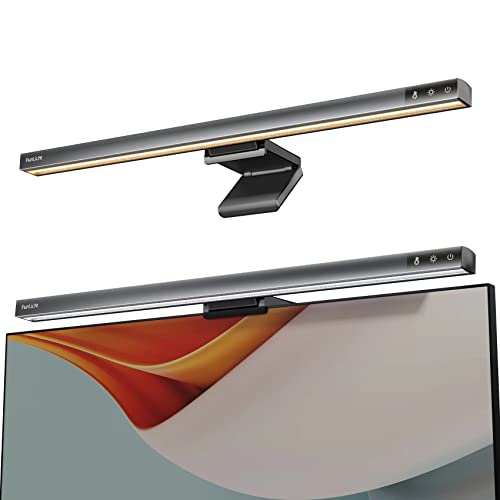
For anyone seeking a practical solution to enhance their workspace, the Funlicht Monitor Light Bar stands out with its USB-powered, dimmable design. Its sleek silver-gray finish and compact dimensions make it a perfect fit for 15-22 inch monitors. With stepless dimming and adjustable color temperatures ranging from 2700K to 6500K, you can tailor the lighting to your needs. The asymmetrical optical design reduces eye strain by illuminating only your desktop, ensuring a flicker-free experience. Easy to install with a clip-on feature, this light bar saves desk space while delivering bright, glare-free light for all your work, study, or gaming needs.
Best For: Individuals seeking an effective and space-saving lighting solution for their computer monitors, especially for office work, studying, or gaming.
Pros:
- Bright, adjustable lighting with stepless dimming and multiple color temperatures to suit various activities.
- Compact clip-on design that saves desk space and is easy to install.
- High-quality build with effective glare reduction and eye strain alleviation.
Cons:
- Not suitable for laptops or curved monitors, limiting compatibility.
- Requires a USB power source, which may be less convenient for some setups.
- Limited to a specific range of monitor sizes (15-22 inches), excluding larger monitors.
Quntis RGB Pro+ Monitor Light Bar with Remote

The Quntis RGB Pro+ Monitor Light Bar with Remote stands out as the ideal choice for professionals and gamers alike, thanks to its sleek design and extensive compatibility with large monitors, including ultrawide models. Made from elegant light-grey aluminum alloy, this 20-inch light bar features a patented sliding weighted clip for easy installation, saving valuable desk space. You’ll love the customizable remote, offering four color temperatures and 100 dimmable brightness levels. With eye care technology and an ergonomic design, it reduces fatigue while enhancing your visual experience. Plus, its energy-efficient LED beads guarantee long-lasting performance, making it a smart investment.
Best For: The Quntis RGB Pro+ Monitor Light Bar is best for professionals and gamers seeking an ergonomic and customizable lighting solution for large monitors.
Pros:
- Customizable lighting with 4 color temperatures and 100 brightness levels for various activities.
- Eye care technology reduces fatigue and glare, enhancing visual comfort during long usage.
- Sleek design with a space-saving installation method, compatible with large and ultrawide monitors.
Cons:
- Limited compatibility with some older monitor models that may not fit the sliding clip design.
- Requires USB-C power source, which may not be available on all setups without an adapter.
- Remote control may be misplaced easily due to its small size, affecting accessibility.
Quntis Monitor Light Bar with Remote, Eye-Care Desk Lamp

Designed specifically for those who value both functionality and aesthetics, the Quntis Monitor Light Bar with Remote is an ideal choice for anyone seeking to enhance their workspace. This chic, minimalist light bar saves desk space while improving productivity and eye comfort. With upgraded eye-care technology, it offers glare-free illumination and true color restoration, thanks to 84 high-quality LED beads. Easily attachable to any monitor, it includes a sleek remote for effortless adjustments of color temperature and brightness. Whether you’re working late or enjoying a movie, this light bar guarantees a comfortable experience tailored to your needs.
Best For: Individuals seeking a stylish, space-saving lighting solution that enhances productivity and eye comfort during work or leisure activities.
Pros:
- Glare-Free Lighting: Features advanced eye-care technology that minimizes glare and reflections for comfortable viewing.
- True Color Restoration: Equipped with 84 high-quality LED beads for even illumination and accurate color representation.
- Remote Control Convenience: Easily adjust brightness and color temperature with a user-friendly remote, enhancing versatility for different tasks.
Cons:
- Limited Compatibility: May not fit all monitor sizes or types, particularly those with unconventional designs.
- Dependent on Power Source: Requires a power outlet to function, which may limit placement options.
- Potential Over-Reliance on Remote: Users might find themselves frequently reaching for the remote for adjustments instead of using physical controls.
Quntis Curved Monitor Light Bar with RGB Backlight

Looking for a versatile lighting solution that fits your large or curved monitor seamlessly? The Quntis Curved Monitor Light Bar with RGB Backlight is designed just for you. Its foldable double-head design and 25.74-inch length make it perfect for 34-inch+ screens and curved monitors. With 15 RGB options and stepless dimming, you can create the ideal ambiance for gaming or movies. Plus, the asymmetric lighting reduces glare, ensuring comfort during long hours. Its USB-C elbow cable saves desk space while the intelligent lighting adjusts automatically to your environment. Enjoy enhanced lighting without cluttering your workspace!
Best For: Gamers and professionals who use large or curved monitors and seek a versatile, space-saving lighting solution.
Pros:
- Adjustable design accommodates various screen sizes and shapes, enhancing usability.
- RGB backlight options and stepless dimming provide customizable ambient lighting for different activities.
- Eye care features reduce glare and visual fatigue, promoting comfort during extended use.
Cons:
- Compatibility limitations may arise with very thick or irregularly shaped screens.
- Potential for desk clutter if additional devices are paired with the remote control.
- Price point may be higher than standard monitor lights, making it less accessible for budget-conscious users.
OOWOLF Monitor Light Bar with Remote for Home Office Desk

For those who spend long hours in front of their screens, the OOWOLF Monitor Light Bar with Remote stands out as an essential addition to any home office setup. This sleek, USB LED task lamp features dimmable, eye-caring lighting with a brightness of 300 lumens. Its adjustable color temperature, ranging from cool to warm white, adapts to your needs. The remote control lets you effortlessly adjust brightness and remembers your last setting. With its polished aluminum design, it saves space and offers effective ambient lighting without glare. Plus, the one-year warranty guarantees peace of mind with your purchase.
Best For: Individuals who spend extended hours working on screens and need an eye-friendly lighting solution for their home office.
Pros:
- Effective ambient lighting that reduces glare on screens.
- Intuitive remote control for easy brightness adjustment and last setting memory.
- Sleek, polished aluminum design that is space-saving and aesthetically pleasing.
Cons:
- The included cable may be too short for some desk setups.
- The cool blue light intensity might not suit everyone’s preferences.
- Touch controls can occasionally be unresponsive.
Quntis RGB Backlight Monitor Light Bar

The Quntis RGB Backlight Monitor Light Bar is perfect for gamers and professionals alike who want to enhance their workspace with customizable lighting. With 15 dimmable modes and three adjustable color temperatures, you can create the ideal ambiance for any task. Its front and back dual light sources minimize glare, ensuring eye comfort during long hours. The sleek design easily attaches to monitors, and the intuitive touch controls make adjustments a breeze. While it lacks a full monochrome spectrum, its RGB settings enhance your mood and productivity, delivering great value for its price. Enjoy a vibrant workspace without compromising your eye health!
Best For: Gamers and professionals seeking customizable lighting solutions to enhance their workspace and reduce eye strain.
Pros:
- Intuitive touch-sensitive controls allow for easy adjustments to brightness and color settings.
- Dual light sources minimize glare and enhance eye comfort, making it suitable for long hours of use.
- Sleek, minimalist design seamlessly blends with monitors and offers a secure attachment without damaging screens.
Cons:
- Lacks a full monochrome spectrum, missing the option for a solo orange light.
- Brightness adjustment only applies to the reading light, not the RGB backlight.
- Absence of remote control and customizable software may limit advanced users’ preferences.
Monitor Light Bar for Curved/Flat Monitors

If you’re searching for an effective way to enhance your workspace, the Colorpanda Monitor Light Bar stands out with its glare-reducing design. This LED task lamp fits both curved and flat monitors, providing a flicker-free experience that minimizes eye strain. With adjustable brightness and three color temperatures, you can tailor the lighting to your specific needs. Its innovative clip-on design saves desk space and makes installation a breeze. Plus, the memory function remembers your last settings for added convenience. Weighing just 1.43 pounds, this sleek black light bar is perfect for creating a more comfortable and efficient workspace.
Best For: Those seeking an efficient lighting solution that reduces eye strain and enhances workspace comfort, particularly for users of curved and flat monitors.
Pros:
- Easy installation with a patented clip-on design that saves desk space.
- Adjustable brightness and three color temperatures for personalized lighting.
- Glare-free and flicker-free operation, reducing eye strain and headaches.
Cons:
- Some users wish for more advanced app functionality for lighting customization.
- Limited to indoor use only.
- Requires USB power source, which may limit placement options.
Xiaomi Mi Computer Monitor Light Bar with Wireless Remote Control
Designed for those seeking an efficient lighting solution without cluttering their workspace, the Xiaomi Mi Computer Monitor Light Bar offers easy installation and effective illumination. You can effortlessly attach it to any monitor, including curved ones, ensuring stability without damaging your screen. With a sleek aluminum body and a flicker-free LED light source, it delivers 500 lumens of adjustable brightness and color temperature, perfect for reducing eye strain. The included wireless remote lets you control settings conveniently. Despite some concerns about the remote’s design, its functionality and value make this light bar a fantastic choice for enhancing your workspace.
Best For: Those seeking an efficient, space-saving lighting solution to enhance their computer workspace and reduce eye strain.
Pros:
- Easy installation on any monitor, including curved designs, without damaging the screen.
- Adjustable brightness and color temperature to suit personal preferences and needs.
- Sleek design with robust materials provides stability and a modern aesthetic.
Cons:
- Some users find the remote control design to be flimsy and less durable.
- Control dial sensitivity may be an issue for some, affecting ease of use.
- Limited color options available, as it only comes in black.
Quntis 1000R Curved Monitor Light Bar with Remote
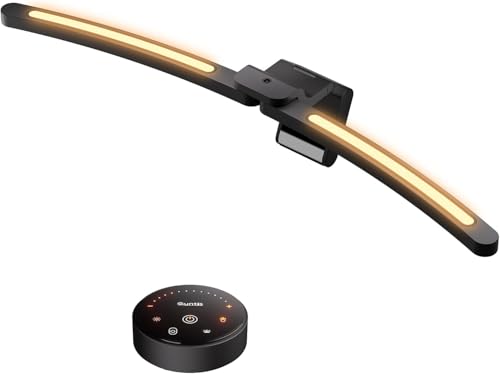
For those seeking an effective lighting solution that complements large curved screens, the Quntis 1000R Curved Monitor Light Bar with Remote stands out. Its dual adjustable LED light bars provide customizable lighting tailored to your tasks, minimizing glare and enhancing eye comfort. The sleek, space-saving design attaches securely to various monitors, elevating your workspace aesthetics. With a high RA98 CRI and 112 quality LED beads, you’ll experience true color accuracy for reading or gaming. Plus, the smart remote functionality allows effortless adjustments in brightness and color temperature, ensuring your lighting matches your mood, whether you’re working late or enjoying a movie.
Best For: Those who work or game on large curved monitors and seek customizable, eye-friendly lighting solutions.
Pros:
- Dual adjustable LED light bars provide customizable lighting for various tasks, minimizing glare and enhancing eye comfort.
- High color accuracy with a CRI of 98 ensures true color restoration, ideal for reading, gaming, or drawing.
- Smart remote functionality allows for effortless brightness and color temperature adjustments, catering to different moods and tasks.
Cons:
- May not be compatible with all monitor types, particularly very thick or unusual shapes.
- The remote control requires batteries, which may need replacement over time.
- Some users may find the initial setup and adjustment period challenging to achieve optimal lighting.
Factors to Consider When Choosing an iMac Monitor Light Bar
When choosing an iMac monitor light bar, you should consider several key factors. Light quality and brightness can greatly impact your workspace, while eye-care technology features can help reduce strain. Don’t forget to think about space-saving designs, installation compatibility, and how you’ll control and customize the lighting to suit your needs.
Light Quality and Brightness
While you might not think much about lighting when using your iMac, the quality and brightness of a monitor light bar can greatly impact your work experience. Look for light bars with a brightness level above 700 lux to guarantee you have enough illumination for reading and working without straining your eyes. Adjustable brightness settings are a must, allowing you to customize the light intensity for different tasks or times of day. A color rendering index (CRI) of 95 or higher guarantees true-to-life color representation, enhancing your visual experience. Additionally, choose light bars that offer a range of color temperatures, from warm light for relaxation to cool light for focus, and guarantee they feature flicker-free technology to reduce eye fatigue.
Eye-Care Technology Features
Choosing an iMac monitor light bar with eye-care technology features can greatly enhance your comfort during long work sessions. Look for flicker-free lighting to guarantee smooth illumination, reducing eye fatigue. An asymmetric optical design minimizes glare and reflections, creating a more pleasant viewing experience. Adjustable color temperatures, ranging from warm (around 2700K) to cool (up to 6500K), let you choose the best lighting for your tasks, promoting eye comfort. High Color Rendering Index (CRI) values above 90 guarantee accurate color representation, essential for graphic design or photo editing. Additionally, consider light bars with blue light hazard reduction technology to decrease eye strain from extended screen time, ultimately improving your visual health while you work.
Space-Saving Design Options
A well-designed iMac monitor light bar can transform your workspace by maximizing efficiency and minimizing clutter. Look for clip-on mechanisms that securely attach to your monitor’s top, freeing up valuable desk space. Many models come with a compact form factor, integrating all components into the design, so you won’t need bulky bases or stands. Innovations like sliding weighted clips or patented clamp systems guarantee compatibility with various monitor styles, including curved screens. Opt for sleek, minimalist designs that not only enhance your workspace’s aesthetics but also seamlessly blend with modern setups. Additionally, consider light bars with built-in touch controls or remote operation, further reducing the need for extra equipment on your desk.
Installation and Compatibility
When selecting an iMac monitor light bar, compatibility and installation ease are essential factors to confirm a seamless experience. First, verify the light bar fits your iMac’s thickness, typically ranging from 0.17 to 2.56 cm (0.43 to 6.5 cm). Look for a patented clip design that securely attaches to your iMac’s unique back without causing damage. Additionally, check whether the light bar accommodates flat and curved monitors, as some models are tailored for specific shapes. Choose light bars with easy installation, featuring straightforward assembly and clip-on mechanisms for quick setup. Finally, consider options with a sliding weighted clip for adjustable positioning, allowing you to customize the light bar to suit various monitor sizes and shapes effortlessly.
Control Methods and Customization
How do you prefer to control your lighting? Your choice of control method can greatly impact your experience. Options typically include touch controls, remote control, or manual adjustment knobs—each offering different levels of convenience. Customization is equally important; many light bars let you adjust brightness levels and color temperatures, letting you tailor the lighting to your tasks. Advanced models might even have RGB options for creating various atmospheres. Smart features, like automatic brightness adjustment based on ambient light, enhance comfort and reduce eye strain. Plus, memory functions in some designs remember your last settings, allowing quick access during future use. Choose a light bar that fits your control and customization needs for the best workspace experience.