A good mini PC can clear space on your desk without giving up the ports and performance you need. These Intel NUC models span basic office setups, everyday multitasking, and more demanding work.
Several listings describe similar hardware under different names, so focus on the processor, memory, storage, and connections—not just the product title.
Best 10 Intel Nuc Mini PCs Picks for 2026
Best for Demanding Workflows

- Core Ultra 7 255H with integrated NPU
- 32GB DDR5 RAM and 1TB SSD
- Dual Thunderbolt 4, 2.5GbE, Wi-Fi 7
Best For: Multitasking, creative work, and NPU-compatible apps
Best for Multi-Monitor Offices

- Core i5-13420H with 16GB RAM
- 512GB SSD with listed expansion options
- Thunderbolt 4, Wi-Fi 6E, and 2.5GbE
Best For: Everyday office work and multi-monitor desks
Best for Basic Office Tasks

- Intel N97 with 8GB DDR5 RAM
- 256GB SSD in a 0.56-liter chassis
- Three display outputs and 2.5GbE
Best For: Documents, browsing, education, and signage
Best for Low-Power Media Setups

- Intel N150 with listed 6W TDP
- AV1 decoding for compatible 4K media
- 8GB DDR5, 256GB SSD, and 2.5GbE
Best For: Media playback, light office work, and signage
Flexible Home Office Pick
Intel NUC 13 Pro i5-1340P, 16GB/512GB

- Core i5-1340P with Windows 11 Pro
- Extra 2.5-inch drive slot
- Up to four displays and two Thunderbolt 4 ports
Best For: Home offices needing compact, expandable storage
High-Spec Multitasking Pick
ASUS NUC 15 Pro Ultra 7, 32GB/1TB

- Core Ultra 7 255H and integrated Arc 140T
- 32GB RAM, 1TB SSD, and second M.2 slot
- Four 4K displays, Wi-Fi 7, and 2.5G Ethernet
Best For: Multi-monitor professional workspaces
Business Connectivity Pick
ASUS NUC 13 Pro i5-1340P, 16GB/512GB

- Core i5-1340P with Windows 11 Pro
- 2.5G Ethernet and Wi-Fi 6E
- Two Thunderbolt 4 and two HDMI 2.1 ports
Best For: Business desktops and digital-signage setups
Best for Everyday Office Use

- Intel N150, 8GB RAM, 256GB SSD
- Three 4K displays supported
- Wi-Fi 6E and 2.5G Ethernet
Best For: Everyday office work and compact multi-display setups
Best for Multitasking
Intel NUC 13 Pro Core i5-1340P

- 12-core Core i5-1340P
- 16GB RAM and 512GB SSD
- Four-display support
Best For: Multitasking and multi-monitor office work
Best for Signage and POS
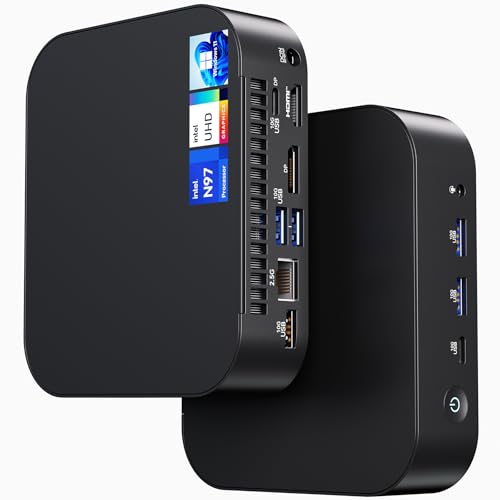
- Intel N97 and Windows 11 Pro
- Wi-Fi 6E and 2.5G Ethernet
- Confirm RAM: listing details conflict
Best For: Compact POS, signage, and classroom installations
Best for Demanding Workflows – ASUS NUC 15 Pro AI Ultra 7
Among intel nuc mini pcs, this ASUS NUC 15 Pro AI is the option to consider when compact size matters but your workload calls for more memory, fast storage, and modern connectivity. It pairs a Core Ultra 7 255H with 32GB of DDR5 RAM and a 1TB SSD.
Best For: Busy office setups, content creation, and users exploring applications that can use the processor’s integrated NPU.
Pros:
- 16-core Core Ultra 7 processor with integrated AI acceleration.
- 32GB RAM and 1TB SSD provide room for multitasking and files.
- Two Thunderbolt 4 ports, 2.5GbE, and Wi-Fi 7 support flexible setups.
Cons:
- AI acceleration benefits depend on whether your applications support the NPU.
- The listed rear connections include only one USB-A port.
Its 117 × 112 × 54 mm chassis and VESA compatibility help keep a capable workspace tidy. Choose it for the processor and I/O rather than assuming every AI task will automatically run faster.
Best for Multi-Monitor Offices – ASUS NUC 13 Pro Core i5
If you’re comparing intel nuc mini pcs for everyday productivity, this ASUS NUC 13 Pro balances an eight-core Core i5-13420H with 16GB RAM and a 512GB SSD. Its compact chassis suits a desk with limited space.
Best For: Office work, study, and multi-monitor productivity without a large desktop tower.
Pros:
- Core i5-13420H and 16GB RAM suit routine multitasking.
- Listed HDMI, DisplayPort, and Thunderbolt 4 outputs support flexible display arrangements.
- Wi-Fi 6E, 2.5GbE, and VESA mounting add setup options.
Cons:
- Intel UHD integrated graphics are a limitation for graphics-intensive work.
- The included 512GB SSD may require expansion for large media libraries.
This is a sensible pick when ports and workspace flexibility matter more than dedicated graphics. The listing describes support for up to four 4K displays, but check the connections your monitors require before buying.
Best for Basic Office Tasks – ASUS NUC 14 Essential N97
For shoppers considering intel nuc mini pcs for documents, browsing, or signage, the ASUS NUC 14 Essential N97 offers a modest configuration in a 0.56-liter chassis. It comes with 8GB DDR5 memory, a 256GB SSD, and Windows 11 Pro as listed.
Best For: Routine office and education tasks or a space-constrained digital-signage setup.
Pros:
- Compact 5.31 × 4.53 × 1.42-inch body saves desk space.
- HDMI, Mini DisplayPort, and USB-C provide three listed display outputs.
- Wi-Fi 6E and 2.5GbE offer wireless and wired networking choices.
Cons:
- 8GB of single-channel RAM is a modest starting point for heavier multitasking.
- The 256GB SSD may fill quickly if you keep many files locally.
The N97 makes more sense as a compact everyday machine than a demanding creative workstation. Its accessible chassis and listed SSD expansion option are useful if your storage needs change.
Best for Low-Power Media Setups – ASUS NUC 14 Essential N150
Among intel nuc mini pcs intended for light, continuous-use tasks, this ASUS NUC 14 Essential stands out for its listed 6W-TDP Intel N150 processor and AV1 hardware decoding. The 0.56-liter system includes 8GB DDR5 RAM and a 256GB SSD.
Best For: 4K media playback, basic office tasks, or digital signage where compact size and low processor power draw matter.
Pros:
- Intel N150 includes AV1 decoding for compatible video playback.
- HDMI, Mini DisplayPort, and USB-C are listed for three-display setups.
- Wi-Fi 6E, 2.5GbE, and tool-free chassis access add practical flexibility.
Cons:
- 8GB single-channel RAM and 256GB storage limit the out-of-box configuration.
- The four-core N150 is better suited to light work than demanding applications.
Pick this model for a small, straightforward media or signage station rather than heavy content creation. Its low processor TDP does not describe the power consumption of the entire PC.
Flexible Home Office Pick – Intel NUC 13 Pro i5-1340P, 16GB/512GB
Among intel nuc mini pcs, this NUC 13 Pro is a compact, ready-to-use option for everyday productivity. It pairs a Core i5-1340P with 16GB of RAM, a 512GB SSD, and preinstalled Windows 11 Pro.
Best For: Home offices that need a small PC with room to expand storage and connect multiple displays.
Pros:
- Supports up to 64GB of RAM and includes an additional 2.5-inch drive slot.
- Can drive up to four displays.
- Includes two Thunderbolt 4 ports, Wi-Fi, Bluetooth, and Gigabit Ethernet.
Cons:
- Its listed Gigabit Ethernet is slower than the 2.5G ports on the other two models.
- Integrated graphics make it a less compelling choice for demanding gaming.
The extra drive bay is the practical differentiator here: choose this configuration if you want a compact workstation with straightforward storage expansion.
High-Spec Multitasking Pick – ASUS NUC 15 Pro Ultra 7, 32GB/1TB
If you’re comparing intel nuc mini pcs for heavier multitasking, this ASUS NUC 15 Pro offers an Intel Core Ultra 7 255H, integrated Arc 140T graphics, 32GB of RAM, and a 1TB SSD. Windows 11 Pro comes preinstalled.
Best For: Professionals running multiple monitors, office applications, and content workflows from a compact desk setup.
Pros:
- Supports up to four 4K monitors via HDMI 2.1 and Thunderbolt 4.
- DDR5 memory supports upgrades up to 96GB, with a second M.2 slot for storage expansion.
- Wi-Fi 7, Bluetooth 5.4, and 2.5G Ethernet provide several networking options.
- Includes a VESA mount for placement behind a monitor.
Cons:
- Integrated graphics are not a substitute for a dedicated GPU in graphics-intensive work.
- Unlike the listed NUC 13 model with a 2.5-inch bay, its stated storage expansion uses M.2 slots.
This is the strongest fit of the three for buyers prioritizing higher listed memory capacity and current-generation connectivity over a 2.5-inch drive bay.
Business Connectivity Pick – ASUS NUC 13 Pro i5-1340P, 16GB/512GB
For businesses shopping intel nuc mini pcs, this ASUS NUC 13 Pro combines a Core i5-1340P, 16GB of DDR4 RAM, a 512GB NVMe SSD, and preinstalled Windows 11 Pro in a small chassis. Its listed ports and management features distinguish it from the other NUC 13 configuration here.
Best For: Office or digital-signage deployments that need wired networking and multiple display connections.
Pros:
- Includes 2.5G Ethernet, Wi-Fi 6E, and Bluetooth 5.3.
- Two Thunderbolt 4 ports and two HDMI 2.1 ports provide display-connection options.
- Supports up to 64GB of RAM and offers an M.2 2242 expansion slot.
- Listed NUC Pro Software Suite features target digital-signage continuity.
Cons:
- Ships with 16GB of RAM and 512GB of storage, so larger workloads may call for upgrades.
- The supplied specifications do not list a 2.5-inch drive bay.
Choose this NUC 13 configuration when 2.5G wired networking and business-oriented features matter more than a listed 2.5-inch storage bay.
Best for Everyday Office Use – ASUS NUC 14 Essential N150
Among intel nuc mini pcs, this ASUS NUC 14 Essential is a compact choice for routine office work, digital signage, and home setups. It pairs an Intel N150 processor with 8GB RAM, a 256GB SSD, and Windows 11 Pro.
Best For: Buyers who need a space-saving Windows desktop for everyday tasks and multiple displays.
Pros:
- Supports three 4K displays, with HDMI 2.1 and DisplayPort 1.4 among its connections.
- Includes Wi-Fi 6E, Bluetooth 5.3, and 2.5G Ethernet.
- Compact 135 × 115 × 36 mm chassis with accessible RAM and SSD.
Cons:
- Included 8GB RAM and 256GB storage may be limiting for larger workloads.
- Specified RAM support tops out at 16GB.
Choose this configuration when compact placement and strong connectivity matter more than generous preinstalled memory or storage.
Best for Multitasking – Intel NUC 13 Pro Core i5-1340P
If you’re comparing intel nuc mini pcs for heavier office multitasking, this NUC 13 Pro starts with a 12-core Core i5-1340P, 16GB DDR4 RAM, and a 512GB M.2 SSD. Its small chassis suits a crowded desk or a VESA-mounted monitor setup.
Best For: Multitab work, document editing, photo editing, and multi-monitor productivity.
Pros:
- Core i5-1340P and 16GB RAM provide a stronger starting configuration for multitasking.
- Supports up to four displays through two HDMI 2.1 and two Thunderbolt 4 ports.
- Offers Wi-Fi 6E, Bluetooth 5.3, 2.5Gbps Ethernet, and room for an additional 2.5-inch SSD.
Cons:
- Additional 2.5-inch SSD is not included.
- For service on the NUC barebone unit, the seller advises removing the RAM and SSD first.
This is the better fit here when you need more preinstalled memory and storage or want four-screen support, rather than just a basic desktop for routine tasks.
Best for Signage and POS – ASUS NUC 14 Essential N97
For buyers considering intel nuc mini pcs for a counter, classroom, or digital-signage installation, this ASUS NUC 14 Essential combines an Intel N97 processor with a compact chassis and Windows 11 Pro. The listing title specifies 8GB RAM and a 256GB SSD, although its detailed specifications also list 16GB installed RAM.
Best For: Space-constrained POS stations, signage, and routine business computing.
Pros:
- Includes Wi-Fi 6E, Bluetooth 5.3, and 2.5G Ethernet.
- Provides HDMI 2.1, DisplayPort 1.4, USB-C, and USB-A connections.
- RAM and M.2 SSD are accessible for upgrades.
Cons:
- The title and detailed specifications disagree on installed RAM; confirm the configuration before ordering.
- Listed 256GB storage may call for an upgrade if you keep substantial files locally.
Its ports and small footprint make it a practical fixed-location PC, but verify the installed RAM and upgrade limits with the seller because the supplied specifications conflict.
How We Picked These Intel Nuc Mini PCs
We compared the stated processors, RAM, storage, networking, and operating systems across the 10 selected listings. The lineup includes ASUS-branded NUC 13 Pro, NUC 14 Essential, and NUC 15 Pro models. Several listings appear to describe the same or closely related configurations, so treat them as offers to verify rather than 10 distinctly different computers. We did not assume that an unusually worded specification—such as a listing claiming a 512TB SSD—is accurate.
Quick Comparison
For basic tasks: NUC 14 Essential configurations with an Intel N97 or N150, 8GB RAM, and a 256GB SSD are the starting point for email, documents, and web browsing. For everyday productivity: NUC 13 Pro listings with a Core i5-1340P, 16GB RAM, and a 512GB SSD offer more room for multitasking. For heavier workloads: the listed NUC 15 Pro configurations pair an Ultra 7 255H with 32GB RAM and a 1TB SSD. They are the strongest specified options here, but check the final price before paying for performance you may not use.
Key Buying Factors for Intel Nuc Mini PCs
Processor and Memory
Start with your workload. An N97 or N150 is better suited to light office use than sustained, demanding applications. A Core i5-1340P or Ultra 7 255H gives you more headroom for multitasking. For a main work computer, 16GB RAM is a practical target; 8GB is more limiting if you keep many tabs and apps open. Check whether memory can be upgraded on the exact model you are buying rather than assuming it can.
Storage, Ports, and Displays
A 256GB SSD can fill quickly once applications and files are installed. Choose 512GB or 1TB if you expect to store large files locally, and confirm whether the SSD is replaceable if future upgrades matter. Count the USB ports you need, then check the exact video outputs against your monitors. A claim of support for three 4K displays does not tell you which cables or adapters your setup will require.
Networking and Listing Accuracy
If you rely on a wired connection, verify the Ethernet speed; some NUC 14 Essential listings specify 2.5G LAN. Confirm Wi-Fi, Bluetooth, the included Windows edition, and the power adapter as well. Near-duplicate titles can differ in seller, warranty, or included components. Match the full model number and specification sheet before checkout, especially where a title contains contradictory capacity claims.
Who Should Buy Which Intel Nuc Mini PCs?
Choose a NUC 14 Essential N97 or N150 configuration for a compact, basic desktop if its 8GB RAM and 256GB storage fit your needs. Pick a NUC 13 Pro Core i5-1340P model for a balanced work PC with 16GB RAM. Consider a NUC 15 Pro Ultra 7 255H configuration when you know you need 32GB RAM, more local storage, and greater processing headroom. Whichever tier you choose, compare total price and warranty between near-identical listings before ordering.