A good Mac mini dock can turn Apple’s compact desktop into a far more capable workstation. The right model adds extra ports, faster storage, and cleaner cable management without taking up much space.
Below, we focus on the best mac mini m4 pro dock options for users who want practical expansion, reliable performance, and a setup that stays tidy on the desk.
Best 9 Mac Mini M4 Pro Dock Picks for 2026
Best for Storage Expansion
Mac mini M4 Dock with SSD Enclosure

- Adds a built-in M.2 NVMe/SATA SSD bay up to 8TB
- Offers 4K@60Hz HDMI plus 10Gbps USB-A/USB-C
- Aluminum stand design keeps the Mac mini setup tidy
Best For: Mac mini M4 and M4 Pro users who want a dock with extra storage and a cleaner desktop.
Best for Media Offload
80Gbps Mac mini M4 Pro Dock with NVMe
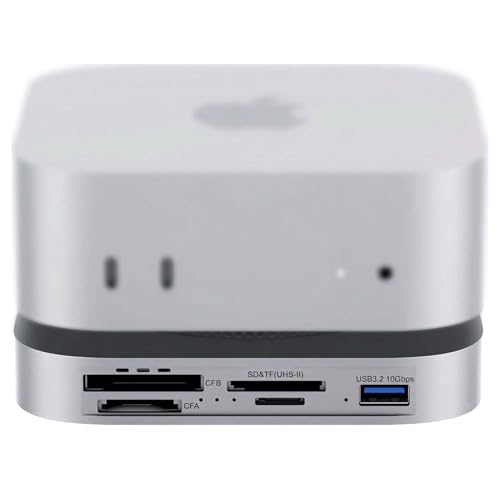
- 80Gbps USB4 2.0 with Thunderbolt 5/4 support
- Built-in PCIe 4.0 NVMe slot up to 7000MB/s
- CFexpress A/B and UHS-II card readers for creators
Best For: Photographers and videographers who need fast card offload and NVMe expansion in one dock.
Best Budget
Mac mini M4 Dock with 8TB SSD Enclosure

- Up to 4TB M.2 NVMe storage expansion
- 4K@60Hz HDMI plus SD/microSD and audio
- Low-interference design for wireless stability
Best For: Mac mini M4 and M4 Pro owners who want extra SSD capacity and a tidy all-in-one dock.
Best for Desk-Appeal
M5 Retro Dock Station for Mac mini M4 Pro

- 80Gbps NVMe enclosure with cooling fan
- Built-in 5-inch HD display adds useful status info
- Wide port selection, including 8K DisplayPort and card readers
Best For: Mac mini M4 Pro users who want a stylish all-in-one dock with built-in storage and display.
Best for Easy Setup
ACASIS Mac mini M4 Dock with Dual NVMe
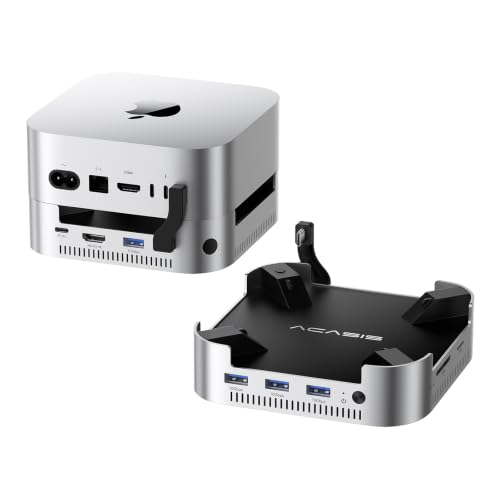
- Up to 16TB dual-NVMe expansion
- 4K60Hz HDMI with USB-A and SD/TF
- Aluminum stand with dual fans and 30W PD
Best For: Mac mini users who want a dock that adds storage, display output, and extra ports in one unit.
Best for Everyday Use
BENFEI Mac mini M4 Dock with NVMe Enclosure

- Adds an NVMe SSD enclosure for up to 8TB of extra storage
- Includes 10Gbps USB-C/USB-A, plus extra 5Gbps USB-A ports
- Offers 4K DisplayPort output and SD/TF card readers
Best For: Mac mini M4 and M4 Pro owners who want a dock, stand, and storage upgrade in one.
Best for All-in-One Expansion
Stouchi Mac mini M4 Dock Stand

- Adds up to 8TB SSD expansion with 10Gbps speeds
- Includes USB-A, HDMI, SD/TF, and 3.5mm audio
- Built-in power button and secure stand design
Best For: Mac mini M4 and M4 Pro users who want storage expansion and a cleaner, more convenient desk setup.
Best with Extra Features
IVANKY 13-in-1 Mac mini M4 Dock

- 13-in-1 hub with HDMI, USB, SD/TF, and audio ports
- Built-in M.2 NVMe enclosure supports up to 8TB
- 4K@144Hz output and included 20W PD adapter
Best For: Mac mini M4 and M4 Pro users who want a feature-packed dock with storage expansion.
Best for Built-In SSD Expansion
Minisopuru MINI4PRO Mac mini Dock

- M.2 NVMe enclosure supports up to 8TB
- 4K@60 HDMI and SD/microSD slots included
- Matches Mac mini styling with a stable stand
Best For: Mac mini users who want a dock with built-in SSD expansion and everyday front-access ports.
Best for Storage Expansion – Mac mini M4 Dock with SSD Enclosure
If you want a mac mini m4 pro dock that does more than add a few ports, this aluminum stand-hub is built around expansion. It combines a tidy desktop riser with HDMI, high-speed USB, SD/TF, audio, and a built-in M.2 SSD enclosure, making it a practical way to add both connectivity and storage in one piece.
Best For: Mac mini M4 and M4 Pro owners who want an all-in-one dock with extra storage and a cleaner desk setup.
Pros:
- Built-in M.2 NVMe/SATA enclosure supports up to 8TB for extra local storage
- 4K@60Hz HDMI plus 10Gbps USB-A/USB-C ports cover everyday peripherals and display output
- Aluminum stand design helps match the Mac mini’s look while saving desk space
- Includes SD/TF card slots and audio for flexible media and accessory use
Cons:
- Only one HDMI output, so it supports a single external monitor
- SSD enclosure may need extra USB-C power for stable operation with some drives
- Best suited to users who actually need the storage bay, since it adds bulk compared with simpler docks
As a mac mini m4 pro dock, this model stands out when storage expansion matters as much as ports. It is a strong fit for users who want a compact hub, SSD support, and a matching aluminum finish without juggling multiple accessories.
Best for Media Offload – 80Gbps Mac mini M4 Pro Dock with NVMe
If you want a mac mini m4 pro dock that does more than add a few ports, this 80Gbps model is built for fast storage expansion and pro media workflows. It combines an internal NVMe slot, CFexpress readers, and UHS-II card support with active cooling for sustained performance.
Best For: Photographers, videographers, and Mac mini M4 Pro users who need high-speed card offload plus local NVMe storage in one dock.
Pros:
- 80Gbps USB4 2.0 bandwidth with Thunderbolt 5/4 compatibility
- Built-in PCIe 4.0 NVMe slot rated up to 7000MB/s
- CFexpress Type A/B and UHS-II SD/microSD slots for pro camera workflows
- Dual PWM fans and auxiliary power support for heavier workloads
Cons:
- More specialized than a basic desktop hub
- NVMe performance depends on the SSD and host connection
- Likely overkill if you only need a few extra USB ports
This is a strong mac mini m4 pro dock for creators who regularly move large media files and want storage, readers, and cooling in a single enclosure. It makes the most sense when speed and workflow consolidation matter more than simplicity.
Best Budget – Mac mini M4 Dock with 8TB SSD Enclosure
If you want a mac mini m4 pro dock that adds fast storage and everyday ports in one compact stand, this PULWTOP hub is built around that use case. It combines an M.2 NVMe enclosure, 4K@60Hz HDMI, USB-A, SD/microSD, and audio access while keeping the Mac mini footprint tidy.
Best For: Mac mini M4 and M4 Pro users who need extra SSD storage plus a clean, all-in-one desktop hub.
Pros:
- Supports up to 4TB M.2 NVMe expansion for faster local storage
- Includes HDMI 4K@60Hz plus USB-A, SD/microSD, and 3.5mm audio
- Designed to minimize Wi‑Fi and Bluetooth interference
- Aluminum stand helps keep the Mac mini stable and organized
Cons:
- SSD is not included, so you’ll need to buy and install one separately
- USB-A ports are USB 2.0, so they’re fine for peripherals but not fast transfers
- Only works with Mac mini M4 and M4 Pro models
Overall, this mac mini m4 pro dock is a smart pick if storage expansion matters more than high-speed USB expansion. It’s especially useful for buyers who want a neater setup, dual-display support, and a single dock that covers the basics well.
Best for Desk-Appeal – M5 Retro Dock Station for Mac mini M4 Pro
If you want a mac mini m4 pro dock that does more than just add ports, the Wokyis M5 stands out with its retro-inspired design, built-in 5-inch display, and high-speed NVMe enclosure. It’s a practical choice for users who want a cleaner desktop setup with fast storage, extra connectivity, and a more distinctive look.
Best For: Mac mini M4 Pro owners who want an all-in-one dock, SSD enclosure, and eye-catching desktop hub in one compact unit.
Pros:
- Combines an 80Gbps M.2 NVMe enclosure with a dock, reducing clutter.
- Includes a built-in 5-inch HD display for quick status info and widgets.
- Offers broad connectivity, including USB-A, USB-C, SD/microSD, and DisplayPort 8K output.
Cons:
- Needs the included PD 36W power supply to run reliably.
- Full 80Gbps speeds require Thunderbolt 5 and compatible cables.
Overall, this mac mini m4 pro dock is a strong pick if you value style and consolidation as much as performance. It’s especially appealing for desk setups where you want your Mac mini to feel like a single, polished workstation instead of a stack of separate accessories.
Best for Easy Setup – ACASIS Mac mini M4 Dock with Dual NVMe
If you want a mac mini m4 pro dock that adds real storage and useful front-facing ports, this ACASIS unit is built for that job. It combines a dual-bay NVMe enclosure, 4K60Hz HDMI, USB-A expansion, and SD/TF card slots in one aluminum stand, making it a practical hub for a tidy desk setup.
Best For: Mac mini owners who want to expand capacity fast, keep cables organized, and add everyday ports without clutter.
Pros:
- Dual NVMe bays support up to 16TB of expandable storage
- 4K60Hz HDMI plus USB-A and SD/TF ports cover core connectivity needs
- Aluminum build with dual fans helps manage heat during longer workloads
- Includes a 30W PD adapter for stable, self-powered operation
Cons:
- NVMe drives are not included
- Not ideal if you only need a simple port hub
- SSD installation adds setup steps compared with plug-and-play docks
This is a strong choice if your priority is storage first and ports second, especially for a mac mini m4 pro dock that doubles as a stand. It is less minimal than a basic hub, but the extra bays and cooling make it more compelling for creators and power users who need room to grow.
Best for Everyday Use – BENFEI Mac mini M4 Dock with NVMe Enclosure
If you want a mac mini m4 pro dock that does more than just add ports, this BENFEI stand-out is built around practical expansion. It combines USB-A/C connectivity, SD/microSD access, 4K DisplayPort output, and an NVMe SSD enclosure, making it a strong all-in-one hub for a tidy Mac mini setup.
Best For: Mac mini M4 and M4 Pro users who want extra storage, front-facing ports, and a cleaner desktop layout in one accessory.
Pros:
- Built-in NVMe SSD enclosure supports up to 8TB of extra storage
- Useful mix of 10Gbps and 5Gbps USB ports for fast accessories and transfers
- 4K DisplayPort output plus SD/TF card readers for display and media workflows
- Acts as both a dock and a stand to reduce desk clutter
Cons:
- SSD is not included, so storage expansion adds another purchase
- DisplayPort tops out at 4K@30Hz, which is not ideal for high-refresh use
- More of a desk hub than a portable travel dock
For buyers searching for a mac mini m4 pro dock that adds real functionality, this BENFEI model is compelling because it covers storage, display, and peripherals in one compact unit. It is especially attractive if you want a cleaner setup without giving up fast access to external drives and memory cards.
Best for All-in-One Expansion – Stouchi Mac mini M4 Dock Stand
If you want a mac mini m4 pro dock that handles storage, ports, and everyday convenience in one place, this Stouchi stand is a practical all-in-one option. It adds an M.2 SSD enclosure, front-facing connectivity, and a built-in power button, so your Mac mini setup stays cleaner and easier to live with.
Best For: Mac mini M4 and M4 Pro owners who want a tidy desk hub with extra storage, faster ports, and easier power access.
Pros:
- Integrated SSD enclosure supports NVMe or SATA drives up to 8TB for fast local storage expansion.
- Useful mix of ports includes 10Gbps USB-A, SD/TF, 4K@60Hz HDMI, and a 3.5mm audio jack.
- Built-in power button and locking stand design make the Mac mini easier to use and keep stable.
- Shielding and lightweight construction are designed to help maintain strong Wi-Fi performance.
Cons:
- SSD is not included, so buyers need to supply their own drive.
- It is designed specifically for Mac mini M4/M4 Pro, so it is not a universal dock.
For buyers who want a mac mini m4 pro dock that feels more like a workstation base than a simple adapter, this is a strong fit. It is especially appealing if you value cleaner cable management and built-in storage over a bare-bones hub.
Best with Extra Features – IVANKY 13-in-1 Mac mini M4 Dock
If you want a mac mini m4 pro dock that replaces a cluttered desk with a single expansion hub, this iVANKY stand is built for high-port-count setups. It adds HDMI, fast USB, SD/TF, audio, and an internal NVMe enclosure, making it a practical pick for users who need both convenience and extra storage.
Best For: Mac mini M4 and M4 Pro owners who want a dock with built-in SSD expansion, multiple USB options, and cleaner desktop cable management.
Pros:
- 13-in-1 layout covers display, storage, USB, card reader, and audio needs
- Built-in M.2 NVMe enclosure supports up to 8TB for extra local storage
- 4K@144Hz HDMI is a strong fit for high-refresh monitors
- Includes a 20W PD adapter for more stable multi-device use
Cons:
- SSD is not included, so total cost can rise quickly
- Maximum speeds depend on host device, drive type, and port usage
- Some monitors may need additional settings enabled for full refresh rates
As a mac mini m4 pro dock, this one stands out for buyers who want more than basic ports: it combines display output, storage expansion, and desk-friendly design in a single unit. It’s especially appealing if you want one accessory to handle most of your everyday connections.
Best for Built-In SSD Expansion – Minisopuru MINI4PRO Mac mini Dock
If you want a mac mini m4 pro dock that does more than add ports, the Minisopuru MINI4PRO is built around storage expansion and desktop convenience. It combines a 4K@60 HDMI output, front-access USB-A, SD/microSD, and an M.2 NVMe enclosure in a matching aluminum stand that keeps your Mac mini tidy and stable.
Best For: Mac mini owners who want a hub, stand, and SSD enclosure in one compact desktop accessory.
Pros:
- Built-in M.2 NVMe enclosure supports up to 8TB for fast local storage and backups
- 4K@60 HDMI output plus SD/microSD access make it useful for creators and multitaskers
- Matches the Mac mini’s aluminum finish and includes a non-slip stand for a cleaner setup
- Front USB-A ports keep everyday peripherals easy to reach
Cons:
- SSD not included, so you’ll need to buy storage separately
- USB-A ports are limited to USB 2.0 speeds
- HDMI is helpful, but multi-display setups still depend on the Mac mini’s own video ports
For buyers who care most about storage expansion, this mac mini m4 pro dock stands out because it turns the Mac mini into a neater, more flexible workstation without adding much bulk. It’s especially appealing if you want one accessory to handle display output, card reading, and SSD storage at the same time.
How We Picked the Best Mac Mini M4 Pro Dock Options
We prioritized docks that combine useful everyday expansion with strong compatibility for Mac mini M4 and M4 Pro systems. That means a mix of NVMe SSD support, high-speed data ports, display output, and a stand design that keeps the machine accessible and cool.
We also favored models with clear speed ratings, multiple connection types, and features that matter in real use, such as SD card slots, USB-A and USB-C ports, HDMI or DisplayPort output, and room for external storage upgrades.
Quick Comparison
Some docks are best for users who want a simple port hub and stand, while others are better suited to power users who need fast SSD expansion, card readers, or higher-bandwidth connectivity. If storage is your priority, look for M.2 NVMe support and the highest enclosure speed rating. If display flexibility matters, pay attention to whether the dock uses HDMI or DisplayPort and what refresh rate it supports.
Key Buying Factors for a Mac Mini M4 Pro Dock
Storage Expansion
An integrated NVMe enclosure is one of the biggest reasons to buy a Mac Mini M4 Pro Dock. Check whether it supports one SSD or dual-bay storage, the maximum capacity, and whether the dock uses NVMe only or also supports SATA.
Port Selection and Speed
Think about your actual peripherals. USB 10Gbps ports are useful for fast drives and accessories, while SD and microSD card readers help creators move media quickly. If you use multiple accessories daily, a dock with several downstream ports is usually worth it.
Display Output
For most users, 4K at 60Hz is enough, but some setups benefit from higher refresh rates or DisplayPort instead of HDMI. Make sure the dock matches your monitor and cable setup.
Cooling and Build
Aluminum construction, stand-style designs, and active cooling can help with heat management, especially in storage-heavy docks. A secure fit and good access to the Mac mini’s power button also matter.
Who Should Buy Which Mac Mini M4 Pro Dock?
If you want the simplest desk upgrade, choose a dock that adds basic ports and stand functionality. If you need fast local storage for media, backups, or project files, prioritize an NVMe-based model with high transfer speeds. Creators and multi-device users should look for card readers, multiple USB ports, and stronger display support. For most buyers, the best choice is the dock that solves the exact bottleneck in their current setup rather than the one with the longest spec sheet.