If you’re looking to enhance your workspace, choosing the right 4K external monitor for your MacBook Air is essential. These monitors not only boost productivity but also elevate your visual experience with their stunning resolutions and color accuracy. With various options available, from portable displays to larger screens, you can find one that fits your needs perfectly. But what should you consider when selecting the ideal monitor? Let’s explore your options further.
BenQ MA270U 27” 4K Monitor for MacBook Pro/Air

The BenQ MA270U 27” 4K Monitor is an exceptional choice for MacBook Air users who demand vibrant colors and sharp images for tasks like photo editing and video watching. With a stunning 3840×2160 resolution and a P3 wide color gamut, it guarantees accurate color reproduction. You’ll appreciate the seamless single cable connection via USB-C, which provides both power and display capabilities. Plus, the adjustable stand allows you to customize your viewing angle for comfort. With advanced features and eye-care technology, this monitor enhances your productivity while minimizing eye strain, making it a fantastic addition to your workspace.
Best For: Creative professionals and MacBook users seeking a high-quality display for photo editing, video watching, and enhanced productivity.
Pros:
- Exceptional color accuracy and vibrant display with a P3 wide color gamut.
- Convenient single cable connection via USB-C for power and video transmission.
- Adjustable stand for customizable viewing angles and reduced eye strain.
Cons:
- Some users may experience initial setup challenges.
- Heavier weight at 30.5 pounds may require a sturdy desk or mount.
- Not as widely known as other brands, leading to potential doubts about long-term reliability.
Portable 15.6″ 4K UHD Monitor with HDMI and USB-C

For those constantly on the go, the Upperizon Portable Monitor 15.6″ 4K UHD is an ideal choice, seamlessly connecting to your MacBook Air via HDMI or USB-C. With a stunning resolution of 3840 x 2160, it delivers vivid colors and sharp images, perfect for gaming or content creation. Weighing just 1.57 lbs and measuring only 0.39 inches thick, it’s incredibly portable. You’ll appreciate its 100% sRGB color gamut and 350 nits brightness for clarity in any environment. Plus, the included cover case adds protection, making it a reliable companion for business trips or casual use.
Best For: Those seeking a lightweight, high-resolution portable monitor for gaming, content creation, or business use.
Pros:
- Vivid image quality with 4K UHD resolution and 100% sRGB color gamut.
- Highly portable design at only 1.57 lbs and 0.39 inches thick, perfect for travel.
- Easy connectivity with multiple ports (HDMI and USB-C) for various devices.
Cons:
- Potential flickering issues with HDR settings that may require a wall plug to resolve.
- Power requirements may necessitate using the original power adapter for optimal performance.
- Initial product defects reported by some users, though customer service is responsive.
Dell S2725HS 27 Inch FHD Monitor
Looking for a reliable monitor that balances quality and affordability? The Dell S2725HS 27 Inch FHD Monitor is an excellent choice. With a resolution of 1920×1080 and a 100Hz refresh rate, you’ll enjoy vibrant visuals and smooth performance. Its ComfortView Plus feature reduces blue light, making it easier on your eyes during long sessions. Plus, the integrated dual 5W speakers enhance your audio experience. You can easily adjust the height, tilt, and swivel for ideal comfort. With built-in dual HDMI ports, it seamlessly connects to your MacBook Air, elevating your workspace without breaking the bank.
Best For: Budget-conscious users seeking a reliable monitor with good visual and audio quality for everyday tasks and entertainment.
Pros:
- ComfortView Plus feature reduces blue light emissions for eye comfort during extended use.
- Integrated dual 5W speakers provide enhanced audio quality for movies and music.
- Flexible adjustability options (height, tilt, swivel, pivot) cater to various user preferences and ergonomic needs.
Cons:
- Some users have reported color calibration issues, which may affect accurate color representation.
- FHD resolution may not meet the needs of users requiring higher pixel density for professional graphic work.
- Integrated speakers, while decent, may not satisfy audiophiles looking for high-end sound quality.
True 4K Portable Monitor – 15.6inch UHD External Display
Experience stunning visuals with the True 4K Portable Monitor, a 15.6-inch UHD display that boasts a remarkable 3840×2160 resolution. With a 100% sRGB and Adobe RGB color space, you’ll enjoy accurate colors and sharp images, perfect for gamers, photographers, and multitaskers. Weighing just 1.8 lbs and featuring a sleek 0.3-inch thickness, it’s incredibly portable. The ultra-narrow bezel enhances your viewing experience, while the 400 nits peak brightness and 1200:1 contrast ratio deliver vivid visuals. Plus, with USB-C and Mini HDMI inputs, it’s compatible with various devices, ensuring seamless connectivity. Enjoy peace of mind with a 2-year warranty and lifetime support.
Best For: This portable monitor is best for gamers, photographers, programmers, and multitaskers seeking high-quality visuals on-the-go.
Pros:
- 4K UHD resolution provides stunning clarity and detail.
- Lightweight and slim design enhances portability.
- Versatile connectivity options with USB-C and Mini HDMI for easy compatibility with various devices.
Cons:
- Limited screen size may not be suitable for all users.
- Higher price point compared to standard portable monitors.
- Requires appropriate cables for optimal performance, which may not be included.
UPERFECT Portable 4K Monitor for Computers and Game Consoles

With a stunning brightness of 1200 nits, the UPERFECT Portable 4K Monitor stands out as an ideal choice for creative professionals and gamers who need vibrant visuals even in well-lit environments. Its impressive 3840 x 2400 UHD resolution and 2000:1 contrast ratio deliver vivid imagery, making it perfect for photo editing and gaming. Weighing just 4.4 pounds and featuring a compact design, it fits easily into your laptop sleeve. Setup is a breeze with plug-and-play functionality and multiple connectivity options, including USB-C and HDMI. Plus, its durable aluminum construction guarantees it withstands the rigors of travel without sacrificing style.
Best For: Creative professionals and gamers seeking a portable monitor with vibrant visuals and high brightness for use in bright environments.
Pros:
- Brightness of 1200 nits enhances visibility in well-lit spaces, ideal for outdoor or brightly lit settings.
- Compact and lightweight design makes it easy to carry, fitting into laptop sleeves for convenient travel.
- Plug-and-play setup with multiple connectivity options (USB-C and HDMI) simplifies use with various devices.
Cons:
- Some users report minor stability issues with the smart cover when used as a stand.
- Right-angle cable adapters are not included, which may lead to cluttered setups.
- The weight of 4.4 pounds may be considered slightly heavy compared to some ultra-portable monitors.
KYY 4K Portable Monitor 15.6 for Laptop

The KYY 4K Portable Monitor is an excellent choice for those who need a lightweight and versatile display for their MacBook Air. Weighing just 1.5 pounds, this 15.6-inch monitor offers stunning 3840 x 2160 resolution with vibrant colors, thanks to its 100% sRGB color gamut. Its ultra-thin design and premium PU leather cover make it perfect for travel. Plus, it features easy plug-and-play connectivity, supporting various devices. While its brightness may struggle in direct sunlight, it excels in gaming and content creation. With a 4.4-star rating from users, it’s a solid addition to any workspace.
Best For: The KYY 4K Portable Monitor is best for travelers, business professionals, and gamers looking for a high-resolution, lightweight display that is easy to set up and transport.
Pros:
- Lightweight design at just 1.5 pounds, perfect for portability.
- 100% sRGB color gamut and 4K resolution provide vibrant and detailed visuals.
- Plug-and-play setup with compatibility across various devices, including laptops and gaming consoles.
Cons:
- Colors may appear washed out in certain lighting conditions.
- Brightness can be insufficient when used in direct sunlight.
- USB-C connection is required for optimal performance.
Dell S2722QC 27 inch 4K USB-C Monitor
For MacBook Air users seeking a high-quality display, the Dell S2722QC 27 inch 4K USB-C Monitor stands out with its impressive 4K UHD resolution, delivering stunning visuals for everything from work tasks to entertainment. Its 27-inch IPS panel supports 99% sRGB color coverage, ensuring vibrant colors and sharp details. With a refresh rate of 60Hz and 8ms response time, you’ll enjoy smooth performance for casual gaming as well. The USB-C connectivity simplifies your setup, while integrated speakers enhance multimedia experiences. Although some users note minor concerns with the stand and speaker quality, the overall value makes it a top choice for enhancing your workspace.
Best For: MacBook Air users looking for a high-quality 4K display that enhances productivity and multimedia experiences.
Pros:
- Excellent 4K UHD resolution with vibrant colors and sharp details thanks to 99% sRGB color coverage.
- Convenient USB-C connectivity for power, video, audio, and data through a single cable.
- Adjustable stand allows for optimal viewing angles and comfort during extended use.
Cons:
- Integrated speakers are considered weak, leading users to prefer external headphones for better audio quality.
- Some users find the stand slightly wobbly, which may affect stability.
- Limited USB port accessibility due to placement, with requests for more ports on the sides.
4K Portable Monitor 24″ UHD External Screen (OS24-4K)

Looking for a high-quality display that enhances your MacBook Air experience? The K Portable Monitor 24″ UHD External Screen (OS24-4K) delivers stunning 4K resolution, making every detail crystal clear. With a wide color gamut of 120% sRGB, it’s perfect for graphic design and video editing. Its ultra-thin design and foldable stand make it highly portable, fitting easily in your backpack. Plus, plug-and-play connectivity via USB-C and HDMI guarantees hassle-free setup with multiple devices. You can even mount it for a streamlined multi-screen workstation. Enjoy reliable customer support for peace of mind while elevating your workspace.
Best For: Professionals in graphic design, video editing, and gamers seeking a high-quality, portable display.
Pros:
- 4K UHD resolution provides stunning detail and clarity for an immersive viewing experience.
- Wide color gamut of 120% sRGB ensures vibrant visuals, suitable for professional-grade color work.
- Portable design with a foldable stand allows for easy transport and setup in various environments.
Cons:
- Larger size may not be ideal for users with limited desk space.
- Requires access to compatible USB-C or HDMI ports on devices.
- May be priced higher than standard portable monitors.
UPERFECT 4K Portable Monitor (14.5 inch UHD)
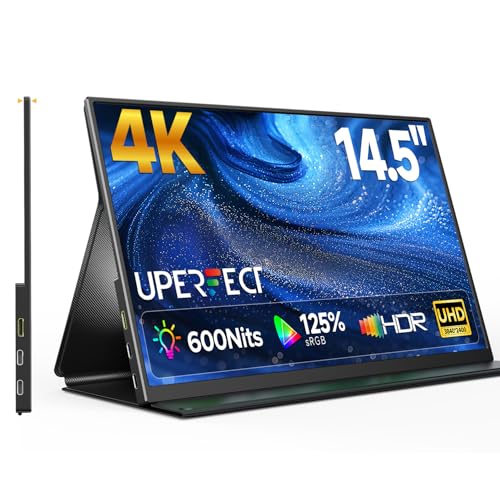
If you’re a content creator in need of a portable solution, the UPERFECT 4K Portable Monitor stands out with its stunning 14.5-inch UHD display. Boasting a resolution of 3840×2400 and a 16:10 aspect ratio, it enhances your vertical workspace. The ultra-vivid panel features 1.06 billion colors and 100% sRGB coverage, ensuring accurate color reproduction. Weighing just 1 lb and measuring only 0.2″ thick, it’s incredibly portable, with a durable aluminum frame and a smart cover that doubles as a stand. Dual USB-C and Mini HDMI ports offer versatile connectivity, making it perfect for all your devices during travel or multitasking sessions.
Best For: Content creators and professionals seeking a high-quality, portable display for multitasking and media viewing.
Pros:
- Ultra-high resolution of 3840×2400 offers exceptional clarity and detail.
- Lightweight and slim design makes it easy to transport for on-the-go use.
- Wide compatibility with various devices through dual USB-C and Mini HDMI ports.
Cons:
- Limited screen size may not satisfy users who prefer larger displays for extensive editing.
- Potentially high price point compared to standard monitors.
- Dependence on external power sources for prolonged use with some devices.
Innoview 23.8” 4K Portable Monitor

The Innoview 23.8” 4K Portable Monitor stands out for its exceptional portability, making it an ideal choice for professionals and gamers who need a high-quality display on the go. With a UHD resolution of 3840×2160, this monitor delivers stunning visuals and 100% sRGB color accuracy. Weighing just 7.58 pounds, it features a slim profile and an adjustable stand for flexible viewing. You’ll appreciate its wide compatibility with USB-C and HDMI connections, ensuring seamless use with your MacBook Air. Although the integrated speakers are average, the overall user experience makes this monitor a fantastic addition to your setup.
Best For: The Innoview 23.8” 4K Portable Monitor is best for professionals and gamers who require a high-quality, portable display for work and entertainment.
Pros:
- Stunning UHD resolution (3840×2160) with 100% sRGB color accuracy for vibrant visuals.
- Lightweight and ultraslim design with an adjustable stand for easy transport and optimal viewing angles.
- Wide compatibility with USB-C and HDMI connections, accommodating various devices including laptops, consoles, and tablets.
Cons:
- Integrated speakers offer average sound quality, necessitating external speakers for an enhanced audio experience.
- Initial display connection issues reported by some users, particularly with USB-C, while HDMI was more reliable.
- Default brightness may be low; requires dual USB-C connection to reach maximum brightness.
Factors to Consider When Choosing a Macbook Air External Monitor 4k
When choosing a 4K external monitor for your MacBook Air, you’ll want to take into account resolution and clarity to guarantee crisp visuals. Connectivity options are essential too, as they determine how easily you can connect your devices. Don’t forget about color accuracy, portability, and ergonomics; these factors can greatly enhance your overall experience.
Resolution and Clarity
Choosing a 4K external monitor for your MacBook Air involves understanding resolution and clarity, which are essential for delivering an outstanding visual experience. A 4K monitor boasts a resolution of 3840×2160, providing four times the pixel density of Full HD displays. This results in sharper images and clearer text, making it perfect for tasks like photo editing and graphic design. The high pixel density enhances detail visibility, while clarity improves across video streaming and gaming, with vibrant colors and finer details. Look for monitors that display a wider color gamut, like 99% sRGB or P3, for accurate color reproduction. Features such as HDR (High Dynamic Range) further enhance contrast and color accuracy, ensuring lifelike visuals.
Connectivity Options Available
While selecting a 4K external monitor for your MacBook Air, connectivity options play an essential role in ensuring a seamless experience. Look for monitors with USB-C ports, as they allow a single cable connection for both power and video, simplifying your setup and cutting down on cable clutter. Many modern monitors offer multiple USB-C ports, enabling power delivery to charge your MacBook Air while you work. HDMI ports are also common; use an adapter if your MacBook Air lacks a dedicated HDMI port. Additionally, consider monitors that support Thunderbolt 3 or 4 for higher data transfer speeds, enhancing performance for tasks like video editing. Finally, check compatibility with various devices to maximize versatility.
Color Accuracy Importance
Color accuracy is vital for achieving stunning visuals and maintaining consistency in your work, especially for tasks like photo editing and graphic design. When choosing a 4K external monitor for your MacBook Air, look for one that boasts a wide color gamut, such as 99% sRGB or P3. These monitors deliver vibrant and accurate colors, enhancing your creative output. Opt for a monitor with a color depth of 8-bit or higher to guarantee smoother gradients and richer displays. Many high-quality models are factory-calibrated, providing true-to-life colors right out of the box. Remember, poor color accuracy can lead to discrepancies between what you see on-screen and the final print, making precise color matching critical for your projects.
Portability and Weight
When selecting a 4K external monitor for your MacBook Air, portability and weight are essential factors to keep in mind. Lighter models, weighing around 1.5 to 2 lbs, make traveling or remote work hassle-free. Thickness matters too; monitors that are 0.4 inches or thinner fit easily into your laptop bag. It’s smart to look for options with a foldable or protective cover, which not only saves space but also safeguards the screen during transport. Opting for displays with USB-C connectivity simplifies your setup, cutting down on cable clutter. Finally, consider monitors with ultra-narrow bezels; they maximize screen real estate while remaining lightweight and manageable, making your overall experience more enjoyable.
Adjustability and Ergonomics
To guarantee a comfortable and productive workspace with your 4K external monitor, it’s essential to prioritize adjustability and ergonomics. Look for monitors with adjustable stands that allow you to change height, tilt, swivel, and pivot. This flexibility guarantees you can find the best viewing angle, reducing strain during long hours. A monitor size of 27 inches or larger is ideal for multitasking without sacrificing screen real estate. Also, consider displays with both portrait and landscape orientations to suit various tasks, like coding or document editing. Monitors that are TÜV Rheinland Eye Comfort certified or have built-in eye-care features help minimize blue light emissions, further reducing eye strain while keeping your posture aligned and preventing neck and back discomfort.