If you’re juggling multiple devices, finding the right MacBook charging station can make a significant difference. With so many options available, it’s essential to choose one that not only keeps your devices powered but also organized. From high-capacity chargers to versatile docking stations, each option has its unique features. Let’s explore some of the best choices out there that could enhance your workspace and streamline your charging routine.
300W Wireless Charging Station for Apple Devices

If you’re an Apple device user looking for a reliable charging solution, the 300W Wireless Charging Station is an excellent choice. This versatile 10-in-1 charger powers your iPhone, iWatch, and AirPods all at once. With a total output of 300W, it includes dual 65W USB-C ports for laptops, ensuring fast charging for multiple devices, both Apple and Android. Its compact design features a non-slip base and LED indicators for easy monitoring. Plus, safety is a priority, with protective technology preventing overcharging and overheating. Simplify your charging routine and keep your devices organized with this all-in-one solution.
Best For: Apple device users who need a convenient and efficient charging solution for multiple devices simultaneously.
Pros:
- Versatile: Charges iPhone, iWatch, and AirPods simultaneously, along with other devices via multiple USB ports.
- Fast Charging: Up to 300W total output with dual 65W USB-C ports ensures quick charging for laptops and other devices.
- Safety Features: Equipped with advanced protective technology to prevent overcharging, overheating, and over-voltage issues.
Cons:
- Price Point: May be more expensive compared to basic charging solutions.
- Limited Compatibility: Primarily designed for Apple devices, which might not cater to all users.
- Size: Although compact, the all-in-one design may still take up considerable desktop space.
95W Fast Charging Station for Multiple Devices (6-Port USB Charging Dock)

The 95W Fast Charging Station is ideal for busy professionals and students who need to power multiple devices simultaneously without the hassle of tangled cords. With two USB-C ports and four USB-A ports, you can charge everything from your MacBook to your smartphone quickly. It fully charges laptops like the MacBook Pro in about 90 minutes! The compact design keeps your workspace organized, while the included cables and stands for Apple Watch and AirPods make it versatile. Plus, the smart GaN chip guarantees safe charging, so you can power up without worry. It’s perfect for home or travel!
Best For: Busy professionals and students who need to charge multiple devices simultaneously and keep their workspace organized.
Pros:
- Fast charging capability with a maximum of 65W power, allowing laptops to be charged to 100% in about 90 minutes.
- Compact design with an included charging station organizer and various cables to reduce desk clutter.
- Smart GaN chip and safety features ensure reliable and safe charging for a wide range of devices.
Cons:
- The station may take up more desk space than individual chargers for each device.
- Limited to 6 ports, which may not be sufficient for users with numerous devices.
- Some users may prefer a more aesthetic design rather than a functional one.
300W Multi USB C Fast Charger Station for Multiple Devices

For busy households or professionals with multiple devices, the 300W Multi USB C Fast Charger Station stands out as an ideal solution. With eight ports, including five USB-C and two USB-A, it charges all your devices efficiently. Its dual 65W ports are perfect for laptops, like your MacBook Pro or Air, while additional ports cater to tablets and smartphones. Sturdy and portable, it reduces cable clutter and includes six mixed cables for convenience. Safety features guarantee worry-free charging. Users rave about its reliability and versatility, making it a must-have for anyone juggling multiple gadgets at home or on the go.
Best For: Families or professionals with multiple devices needing a centralized and efficient charging solution.
Pros:
- Versatile charging options: Eight ports including dual 65W for laptops, accommodating a wide range of devices.
- Safety features: Equipped with multiple protections against over-current, over-voltage, and short circuits for worry-free use.
- Portable design: Lightweight and compatible with both 110V and 240V, making it perfect for travel.
Cons:
- Cable requirements: Some users noted the need for additional cables for certain devices.
- Power cord durability: Mixed feedback on the longevity of the power cord over time.
- Visibility of power ratings: Minor concerns regarding the clarity of power ratings on the device.
OMOTON Vertical Laptop Stand (Fits Laptops Up to 17.3 inch)

Designed for tech enthusiasts and professionals alike, the OMOTON Vertical Laptop Stand is perfect for anyone needing a sleek and efficient way to organize their workspace. This updated double dock supports laptops up to 17.3 inches, allowing you to store two devices simultaneously. Its adjustable dividers accommodate various thicknesses, while the durable aluminum construction guarantees stability. Weighing just 1.52 pounds, it’s easy to move around. Users love its aesthetic appeal and sturdy design, which prevents wobbling. Just remember to avoid clamping down too hard to protect your devices, and you’ll enjoy a tidy, functional workspace in no time!
Best For: Tech enthusiasts and professionals looking for an efficient and stylish solution to organize their workspace with the ability to store multiple laptops.
Pros:
- Versatile Design: Accommodates laptops and tablets of varying thicknesses, fitting devices up to 17.3 inches.
- Sturdy Construction: Made from durable anodized aluminum alloy, ensuring stability and preventing wobbling.
- Aesthetic Appeal: Sleek design enhances workspace appearance while providing functionality.
Cons:
- Potential Device Damage: Users must be cautious not to clamp down too hard on laptops to avoid damage.
- Limited to Vertical Storage: Only supports vertical placement of laptops, which may not suit everyone’s preference.
- Weight: At 1.52 pounds, it may be less portable for users needing a lighter option for frequent relocation.
Great Useful Stuff Multi-Device Charging Station Dock & Organizer
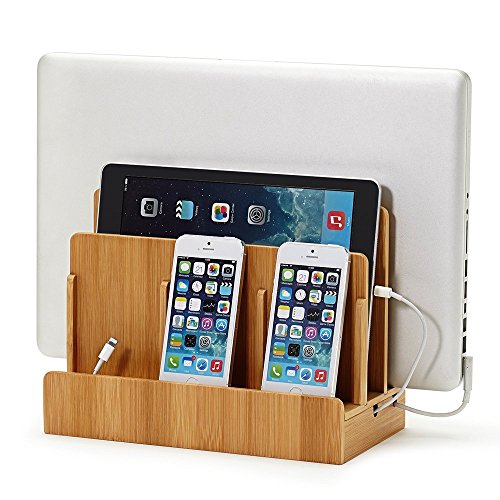
If you’re seeking a stylish solution to declutter your workspace, the Great Useful Stuff Multi-Device Charging Station Dock & Organizer fits the bill perfectly. Made from eco-friendly bamboo, it boasts a sleek design available in various finishes. Measuring 10 x 9 x 5.5 inches, it easily holds laptops, tablets, and smartphones, while eliminating tangled cords. Weighing just 2.67 pounds, it’s sturdy and efficient for both home and office use. Although it doesn’t include a power source, it’s compatible with various charging blocks. With high ratings and great value, it’s an ideal gift for anyone looking to organize their devices.
Best For: Individuals seeking a stylish and efficient way to organize multiple devices in home or office settings.
Pros:
- Sturdy construction ensures stability while holding multiple devices securely.
- Eco-friendly bamboo design adds aesthetic appeal to any workspace.
- Space-efficient layout eliminates tangled cords, promoting a neat environment.
Cons:
- Requires manual plugging of devices, which may be inconvenient for some users.
- Some concerns regarding cord management may arise due to the lack of built-in solutions.
- Does not include a power source, necessitating the use of external charging blocks.
Plugable Thunderbolt 4 Dock for MacBook Air & Pro

The Plugable Thunderbolt 4 Dock is the ultimate solution for M4 MacBook Air and Pro users seeking a powerful and versatile docking station. With 13 ports, including dual 4K HDMI outputs and multiple USB options, you can connect all your devices effortlessly. It delivers up to 100W charging, ensuring your MacBook stays powered during heavy use. The aluminum design is not only stylish but also manages heat efficiently. Plus, its plug-and-play functionality means you can set it up in seconds. With lifetime customer support and stellar user ratings, this dock is a must-have for any MacBook user.
Best For: M4 MacBook Air and Pro users looking for a multifunctional docking station to enhance connectivity and performance.
Pros:
- 13-in-1 port configuration allows for extensive connectivity options.
- Supports dual 4K displays at 60Hz for enhanced multitasking capabilities.
- Aluminum-clad design ensures durability while effectively managing heat.
Cons:
- Limited to Gigabit Ethernet, lacking support for faster 2.5Gb Ethernet.
- Not suitable for ultra-high refresh rate gaming monitors (no 4K@120Hz support).
- HDMI cables are not included for dual monitor setups.
Anker Prime Charger, 200W 6-Port GaN Charging Station

For anyone juggling multiple devices, the Anker Prime Charger, 200W 6-Port GaN Charging Station stands out as an ideal solution. With its compact design and impressive 200W output, you can charge up to six devices simultaneously, including your MacBook and smartphone. Each USB-C port delivers up to 100W, letting you power two 14-inch MacBook Pros to 50% in just 28 minutes. Safety features like temperature monitoring and surge protection guarantee reliable performance. Weighing just 1.24 pounds, it’s easy to transport, while the 24-month warranty provides peace of mind. Experience an organized, efficient charging setup with this powerhouse station.
Best For: Those who need to efficiently charge multiple devices simultaneously without sacrificing speed or safety.
Pros:
- Supports fast charging for a variety of devices with a powerful 200W output and USB-C PD compatibility.
- Compact and portable design makes it easy to carry around, perfect for travel or office use.
- Built-in safety features such as temperature monitoring and surge protection ensure reliable and safe operation.
Cons:
- Limited to USB-C ports, which may not accommodate devices that require traditional USB-A connections without additional adapters.
- Higher initial cost compared to standard chargers, though the performance justifies the investment.
- May not be suitable for charging higher wattage devices simultaneously, as power distribution could be affected.
Zobirez 10-Port USB C Fast Charger Station for Multiple Devices

With its powerful 320W output and 10-port design, the Zobirez 10-Port USB C Fast Charger Station is perfect for tech-savvy individuals juggling multiple devices. You can charge up to 10 devices simultaneously, thanks to its mix of 5 USB-C and 5 USB-A ports. The dual 65W GaN charging dock rapidly powers your MacBook and other gadgets, while the durable design guarantees longevity. Plus, with advanced safety features, you won’t have to worry about overcharging or overheating. It’s a practical solution for any environment, making it an ideal gift for friends and family who need to stay organized and powered up.
Best For: Tech-savvy individuals and families who need to charge multiple devices simultaneously in various settings.
Pros:
- Simultaneous Charging: Charges up to 10 devices at once with a combination of USB-C and USB-A ports.
- Fast Charging: Dual 65W GaN charging dock offers rapid charging for laptops and high-demand devices.
- Safety Features: Equipped with advanced protection against overcharging, overheating, and short circuits.
Cons:
- Size: The charging station may take up more desk space compared to single-port chargers.
- Cable Lengths: Short mixed charging cables may not be long enough for all charging scenarios.
- Limited Power Distribution: High power output may be limited if all ports are used simultaneously, potentially reducing charging speed for some devices.
Anker Desktop Fast Charging USB C Charger (112W Max, 6-Port)

Designed for busy professionals and tech enthusiasts, the Anker Desktop Fast Charging USB C Charger stands out with its impressive 112W max output and six-port capability. You can power multiple devices simultaneously, including your MacBook Air, which charges to 50% in just 1 hour and 40 minutes. With three USB-C and three USB-A ports, you’ll enjoy versatile charging options. Plus, the charger boosts your iPhone 16 Pro Max from 0 to 50% in just 30 minutes. The included silicone cable organizer helps keep your workspace tidy, while the 18-month warranty guarantees you’re covered for any issues.
Best For: Busy professionals and tech enthusiasts who need to charge multiple devices simultaneously.
Pros:
- Versatile Charging: Equipped with three USB-C and three USB-A ports, accommodating various devices.
- Fast Charging: Quickly charges MacBook Air to 50% in 1 hour and 40 minutes and iPhone 16 Pro Max to 50% in just 30 minutes.
- Clutter Reduction: Includes a silicone cable organizer to maintain a tidy workspace.
Cons:
- No Included Cables: Charging cables are not included, requiring separate purchases.
- Limited 30W Output for MacBook Air: The USB-C1 port is limited to 30W, which may not be sufficient for faster charging needs.
- Size: The desktop charger may take up more space than standard chargers, which can be inconvenient for smaller workspaces.
Anker 9-in-1 USB-C Charging Station (100W)

The Anker 9-in-1 USB-C Charging Station (100W) is an ideal choice for tech-savvy users who demand versatility and speed in their charging solutions. With four USB-C ports, three AC outlets, and two USB-A ports, it covers all your charging needs. Its maximum capacity of 100W guarantees that even your high-power devices charge quickly, especially when using an E-Marker certified cable. The sleek design promotes organization with AC outlets on three sides, keeping cords neat. Plus, you get an 18-month warranty and reliable customer support, making this station a smart addition to your home or office setup.
Best For: Tech-savvy users who demand fast and versatile charging solutions for multiple devices.
Pros:
- 9-in-1 configuration allows simultaneous charging of multiple devices.
- 100W charging capacity ensures quick charging for high-power devices.
- Sleek and compact design promotes organization and enhances aesthetics.
Cons:
- Requires an E-Marker certified cable to achieve full 100W capacity.
- The flat cable may not be as durable as traditional round cables.
- Limited AC outlets (3) may not be sufficient for users with many devices.
Factors to Consider When Choosing a Macbook Charging Station
When choosing a MacBook charging station, you’ll want to take into account several key factors. Think about your charging capacity needs, the variety of ports available, and how portable the design is for your lifestyle. Don’t forget to check the safety features and verify compatibility with your devices to avoid any issues.
Charging Capacity Requirements
Choosing the right charging station for your MacBook involves considering several key factors, with charging capacity being paramount. Aim for a charging capacity of at least 65W to effectively charge your MacBook Air or Pro in a reasonable time. If you need faster charging, look for stations with dual USB-C ports offering a combined output of 100W or more, allowing you to charge multiple high-power devices simultaneously. Confirm the station can support various devices like smartphones and tablets, meeting their collective charging needs. Opt for charging stations featuring advanced GaN technology, which maximizes power delivery while minimizing heat. Finally, evaluate the number and types of ports available to confirm compatibility and the ability to charge multiple devices at once.
Port Variety and Configuration
While selecting a MacBook charging station, consider the variety and configuration of ports it offers. Look for options with multiple USB-C and USB-A ports, so you can charge several devices at once. Higher wattage outputs, like 65W or more for USB-C ports, guarantee efficient charging for power-hungry devices like MacBook Pro models. A mix of USB-C and USB-A ports adds versatility, allowing you to connect different devices without needing multiple adapters. Stations featuring dedicated high-power ports, such as dual 65W or 100W, are perfect for quickly charging your laptop while other devices charge simultaneously. Finally, make certain the charging station is compatible with your MacBook model to maintain ideal performance.
Design and Portability
Considering the design and portability of a MacBook charging station can greatly enhance your workspace and travel experience. Look for compact options that minimize desk clutter while being easy to carry on the go. A lightweight design allows for effortless transport between home, office, and travel destinations. Opt for stations with non-slip bases to guarantee stability on smooth surfaces, preventing any accidental slips. Adjustable slots or dividers are excellent for accommodating thicker devices, keeping your setup versatile. Additionally, cable management features will keep your cords tidy and prevent tangling, contributing to a cleaner aesthetic. By prioritizing these aspects, you’ll find a charging station that not only looks good but also fits seamlessly into your lifestyle.
Safety Features Consideration
When it comes to selecting a MacBook charging station, prioritizing safety features is vital to protect your device and guarantee efficient charging. Look for stations with over-current, over-voltage, and over-temperature protection to prevent damage during charging. Additionally, charging stations made from flame-retardant materials can further enhance safety and reduce fire hazards. Built-in short circuit protection is important as it safeguards your devices from electrical faults and malfunctions. Consider options that utilize advanced technologies like GaN (Gallium Nitride) for safer, more efficient charging with less heat generation. Finally, verify the charging station has passed industry safety tests, like UL certifications, which confirm compliance with recognized safety standards. Your MacBook deserves the best protection while staying powered up.
Compatibility With Devices
Choosing the right MacBook charging station hinges on compatibility with your specific device and other gadgets you might use. Make sure the station clearly states compatibility with your MacBook model, especially for M1, M2, or M3 versions. If you’re planning to connect multiple monitors, check for dual display support, as limitations may arise based on the chipset. Look for stations offering various USB-C ports with adequate wattage, ideally over 60W, for efficient charging. Additionally, verify compatibility with other devices like iPads and iPhones to maximize versatility. Finally, consider the number of ports available to accommodate multiple devices, as some stations provide extra USB-A ports and AC outlets for added flexibility.