If you’re looking to keep your MacBook Pro cool and running smoothly, investing in a quality cooling pad is a smart move. With so many options available, it can be tough to choose the right one. From models with multiple fans to those designed for portability, there’s something for every need. Let’s explore the top contenders that can help optimize your laptop’s performance without breaking the bank.
Havit HV-F2056 Laptop Cooler Cooling Pad

If you’re using a 15.6 to 17-inch MacBook Pro and need a reliable cooling solution, the Havit HV-F2056 Laptop Cooler Cooling Pad is an excellent choice. This lightweight, slim design features three ultra-quiet fans, ensuring you can work without distractions. The high-quality metal mesh promotes effective airflow, keeping your laptop cool during intense tasks. Plus, it doubles as an ergonomic stand with two adjustable height settings for your comfort. With a built-in dual-USB hub and an extra port, you can easily connect additional devices. Its durable surface provides stable support while you’re on the go, making it a practical option.
Best For: Users with 15.6 to 17-inch laptops looking for a lightweight and ergonomic cooling solution.
Pros:
- Three ultra-quiet fans provide noise-free operation for an uninterrupted work experience.
- Ergonomic design with adjustable height settings enhances user comfort during extended use.
- Built-in dual-USB hub allows for easy connection of additional USB devices.
Cons:
- Requires a Type C to USB adapter for compatibility with Type C devices.
- May not provide sufficient cooling for high-performance laptops under extreme workloads.
- The slim design might not offer enough stability for heavier laptops during transport.
Kootek Laptop Cooling Pad with 5 Quiet Fans

The Kootek Laptop Cooling Pad with 5 Quiet Fans is ideal for users who demand high-performance cooling for their MacBook Pro while maintaining a serene workspace. With its five built-in fans—one large and four smaller ones—you’ll enjoy enhanced cooling that you can customize using dual On/Off switches. The whisper-quiet operation guarantees you stay focused during work or play. Plus, the built-in dual USB hub offers extra connectivity for your devices. Adjustable height settings let you find the perfect angle for comfort, and the included stoppers keep your laptop secure. It’s compatible with various 12-17 inch laptops, including your MacBook Pro.
Best For: Users seeking efficient cooling for their laptops while maintaining a quiet and comfortable workspace.
Pros:
- Enhanced cooling performance with five adjustable fans for optimal airflow.
- Whisper-quiet operation ensures minimal noise distraction during use.
- Adjustable height settings allow for personalized comfort during extended usage.
Cons:
- Requires USB-to-USB cable for connectivity; Type C devices need an additional adapter.
- Might be bulky for users with limited desk space.
- Limited to 12-17 inch laptops, which may exclude some devices.
Targus 17 Inch Dual Fan Lap Chill Mat for Laptops

For users seeking a reliable cooling solution, the Targus 17 Inch Dual Fan Lap Chill Mat stands out with its dual fans that actively combat overheating during intensive tasks. This lightweight mat is designed for laptops up to 17 inches and features a soft neoprene backing for cushioned comfort. Its ergonomic tilt promotes easy typing, while the open mesh top guarantees ideal airflow. With a built-in 4-port USB hub, you can easily connect peripherals. Users appreciate the adjustable height and stability provided by rubber stops, making it a top choice for effective cooling and comfort during prolonged use.
Best For: Users looking for an effective and comfortable cooling solution for laptops up to 17 inches during intensive tasks.
Pros:
- Ergonomic design promotes comfortable typing angles and reduces strain during prolonged use.
- Dual fans effectively lower laptop temperatures, enhancing performance during demanding activities.
- Built-in 4-port USB hub allows for easy peripheral connectivity, increasing versatility.
Cons:
- Some users report concerns regarding build quality and durability over time.
- Cord management can be challenging, with suggestions to use clips for better organization.
- Mixed experiences with used versions, making new products a more reliable choice for optimal performance.
Laptop Cooling Pad for 12-15.6 Inch Laptops

Designed specifically for laptops ranging from 12 to 15.6 inches, the AIMIUZI Laptop Cooling Pad is an excellent choice for users seeking enhanced cooling during intensive tasks. With its five fans—one small and four large—you’ll enjoy impressive airflow and adjustable speed for peak performance. Its ergonomic design features five height settings and a flip-up anti-slip pad, reducing strain on your wrists and neck. Plus, its quiet operation means you can focus without distraction. Weighing just 1.38 pounds, it’s portable and compatible with various brands, making it a versatile addition to your tech setup.
Best For: Users with laptops between 12 to 15.6 inches who need effective cooling during gaming or intensive work sessions.
Pros:
- Effective cooling with five fans to maintain optimal temperatures.
- Adjustable height settings and ergonomic design for comfort during use.
- Quiet operation allows for distraction-free work or gaming.
Cons:
- May not adequately support larger or heavier laptops.
- Some users found the phone stand less useful.
- Limited to laptops within the specified size range, reducing versatility for other devices.
ICE COOREL Laptop Cooling Pad with 8 Cooling Fans (2025 Version)
![ICE COOREL Laptop Cooling Pad with 8 Cooling Fans, Cooling Pad for Laptop Fan 13-15.6 Inch, Laptop Cooler Stand with 6 Height Adjustable, Notebook Cooler Pad with Two USB Port [2025 Version]](https://m.media-amazon.com/images/I/41W+-K64OiL._SL500_.jpg)
If you’re looking for a reliable cooling solution for your MacBook Pro, the ICE COOREL Laptop Cooling Pad with 8 Cooling Fans (2025 Version) stands out with its impressive eight-fan setup. Designed for laptops between 13 to 17 inches, this pad features four 70mm and four 60mm fans that operate quietly at 2400-2600 RPM. Its ergonomic design offers five adjustable height settings, ensuring ideal comfort while you work. Plus, the mesh surface enhances heat dissipation. With a user-friendly USB connection and two additional ports, you’ll find this cooling pad not only effective but also convenient for your setup.
Best For: Users seeking an effective cooling solution for laptops between 13 to 17 inches, particularly those who prioritize quiet operation and adjustable height settings.
Pros:
- Effective cooling with eight fans to enhance heat dissipation.
- Ergonomic design featuring five adjustable height settings for comfortable use.
- User-friendly with easy USB connectivity and additional ports for devices.
Cons:
- Mixed feedback on cooling effectiveness, with some users experiencing temperature increases.
- Reports of fan functionality issues and design flaws leading to dissatisfaction.
- Some users found the noise levels to be higher than expected despite claims of ultra-quiet operation.
TECKNET Portable Laptop Cooling Pad with LED Fans

The TECKNET Portable Laptop Cooling Pad with LED Fans stands out as an ideal choice for users seeking a lightweight and effective cooling solution for their MacBook Pro or other laptops between 12 to 17 inches. Weighing just 1.44 pounds, it features three powerful fans that operate quietly at 1200 RPM, efficiently pulling cool air to prevent overheating. Its ergonomic design includes adjustable levels for comfort and rubber grips to keep your laptop secure. Plus, it’s USB-powered with dual ports for added convenience. With a solid 4.5-star rating, many users appreciate its cooling performance and value for money.
Best For: Users looking for a lightweight, portable cooling solution for laptops between 12 to 17 inches that requires efficient cooling during extended use or gaming.
Pros:
- Effective cooling performance with three powerful, ultra-quiet fans operating at 1200 RPM.
- Ergonomic design with adjustable levels and rubber grips for enhanced comfort and stability.
- Convenient USB-powered operation with dual ports for powering the cooler and additional devices.
Cons:
- Some users report that the construction feels flimsy despite its lightweight design.
- The USB port is not USB-C compatible, which may require a workaround for modern laptops.
- Limited to laptops between 12 to 17 inches, potentially excluding some larger models.
Razer Laptop Cooling Pad with Intelligent Fan Control

For gamers and power users seeking peak thermal performance, the Razer Laptop Cooling Pad with Intelligent Fan Control stands out as a top choice. It fits most laptops and MacBooks from 14” to 18” and features an airtight pressure chamber that prevents cool air leakage. The powerful 140 mm fan spins up to 3000 RPM, while the smart cooling system adjusts fan speeds based on your device’s temperature. With customizable Razer Chroma RGB lighting and a 3-port USB hub, it enhances both functionality and aesthetics. Users rave about its cooling efficiency, making it a worthy investment for demanding tasks.
Best For: Gamers and power users seeking optimal thermal performance for laptops and MacBooks.
Pros:
- Enhanced Cooling: The intelligent fan control and airtight pressure chamber significantly reduce CPU and GPU temperatures during intensive tasks.
- Customizable Features: Users can personalize RGB lighting and fan curves through Razer Synapse for a tailored experience.
- Versatile Connectivity: The built-in 3-port USB hub adds convenience for connecting additional devices.
Cons:
- Noise Levels: The fan can be quite loud at high speeds, which may be distracting for some users.
- Build Quality Concerns: While the design is sturdy, some users express that the plastic frame could be improved.
- Higher Price Point: Compared to budget alternatives, this cooling pad is considered more expensive, which may deter some potential buyers.
KLIM Wind Laptop Cooling Pad with 4 Cooling Fans
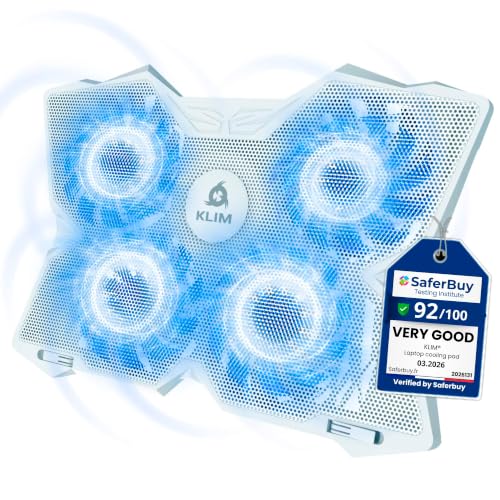
Looking for an efficient way to keep your MacBook Pro cool during intense gaming sessions or heavy editing? The KLIM Wind Laptop Cooling Pad is your answer, featuring four powerful fans that spin at 1200 RPM. It cools your laptop in under a minute, dropping temperatures by 3-5 degrees. Compatible with laptops from 11 to 19 inches, it’s lightweight and durable, backed by a 5-year warranty. Users rave about its effective cooling and quiet operation, although some mention the awkward placement of fan switches. With two USB ports and adjustable legs, it’s designed for peak performance and convenience.
Best For: Gamers and content creators looking for an efficient cooling solution to prevent overheating during intensive laptop use.
Pros:
- Effective cooling performance, reducing laptop temperatures by 3-5 degrees in under a minute.
- Lightweight and durable design with a 5-year warranty, ensuring longevity.
- Quiet operation and adjustable features for optimal user comfort and convenience.
Cons:
- Some users find the placement of fan switches and USB ports awkward.
- Minor concerns regarding the sturdiness of the front guards.
- LED brightness may vary based on laptop coverage, affecting aesthetic appeal.
Laptop Cooling Pad with 12 Quiet Fans for 12-17.3 Inch Laptops

If you’re a gamer or video editor using a laptop between 12 and 17.3 inches, this cooling pad with 12 quiet fans is an ideal choice. It boasts 360-degree dynamic cooling with a large metal mesh, dropping temperatures by 15-20 degrees during intense tasks. With five height adjustments and anti-slip baffles, you’ll enjoy stable and comfortable viewing angles. The colorful LED lights enhance your gaming atmosphere, but you can easily switch them off if needed. Plus, dual USB 2.0 ports and a side phone holder add convenience. Despite some concerns over build quality, users rave about its effective cooling and quiet operation.
Best For: Gamers and video editors seeking effective cooling solutions for laptops between 12 and 17.3 inches.
Pros:
- Effective Cooling: 12 high-speed silent fans provide significant temperature drops of 15-20 degrees.
- Ergonomic Design: Five height adjustments and anti-slip baffles ensure comfortable and stable viewing angles.
- Convenient Features: Dual USB 2.0 ports and a side phone holder enhance usability.
Cons:
- Build Quality Concerns: Some users report a need for a sturdier construction.
- Power Supply Requirements: Requires two USB power sources for optimal performance.
- Short USB Cable Length: The included USB cable may be inadequate for some setups.
Laptop Cooling Stand with Detachable Thermoelectric Cooler (for up to 15.6” Laptops)
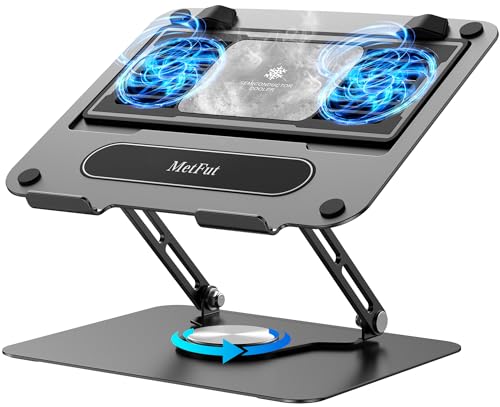
Gamers and professionals with laptops up to 15.6 inches will find the Laptop Cooling Stand with Detachable Thermoelectric Cooler an excellent choice due to its advanced thermoelectric cooling technology. This stand uses the Peltier effect to drop temperatures to an impressive 47℉ in just three seconds. With adjustable height and angle, it promotes ergonomic use, reducing neck and back strain. Its ultra-quiet operation keeps distractions at bay, even under heavy loads. While it requires a power source and is a bit heavier, its effective cooling performance makes it a must-have for those needing reliable thermal management.
Best For: Gamers and professionals using laptops up to 15.6 inches seeking effective cooling solutions and ergonomic benefits.
Pros:
- Effective thermoelectric cooling performance, rapidly lowering temperatures.
- Adjustable height and angle for improved ergonomic positioning.
- Ultra-quiet operation ensures minimal distractions during use.
Cons:
- Requires a power source, limiting mobility and portability.
- Heavier than some alternatives, which may impact travel convenience.
- Some users have noted insufficient fan speed for optimal cooling performance.
Factors to Consider When Choosing a Macbook Pro Cooling Pad
When you’re choosing a cooling pad for your MacBook Pro, several key factors come into play. Consider the size compatibility, cooling efficiency, and noise levels to guarantee it meets your needs. Don’t forget to think about portability and ergonomic design to enhance your overall experience.
Laptop Size Compatibility
Choosing the right cooling pad for your MacBook Pro involves verifying it fits perfectly with your device’s size, which typically ranges from 13 to 16 inches. Many cooling pads are designed for specific sizes, accommodating laptops from 12 to 17 inches, so check compatibility before purchasing. Adjustable height settings can also enhance your comfort and ergonomics, no matter your laptop size. Additionally, it’s vital to verify the weight limit of the cooling pad, especially for larger MacBook Pro models, to guarantee stability during use. Properly fitting your cooling pad is essential as it maximizes airflow and cooling efficiency; an improper fit can hinder performance, leaving your laptop susceptible to overheating. Make the right choice for best results!
Cooling Performance Efficiency
To keep your MacBook Pro running smoothly, it’s essential to take into account cooling performance efficiency when selecting a cooling pad. Start by looking at the number and size of fans; larger fans typically deliver better airflow and cooling. Pay attention to the RPM of the fans—those that spin up to 3000 RPM can provide more effective cooling during intensive tasks. Additionally, consider the design of the cooling pad; mesh surfaces and airflow channels enhance heat dissipation, which helps manage temperatures. Finally, adjustable fan speeds allow you to tailor cooling based on your usage scenarios, giving you control over performance. With these factors in mind, you’ll guarantee your MacBook Pro stays chill and efficient during operation.
Noise Level Considerations
Noise level is a crucial factor in selecting a cooling pad for your MacBook Pro, especially if you value a quiet workspace. Some models operate at whisper-quiet levels around 20-40 dB, ensuring you can focus without distractions. Look for cooling pads that use advanced fan technology for ultra-quiet operation, effectively cooling your laptop while keeping noise to a minimum. Consider options with adjustable fan speeds, so you can balance cooling efficiency with noise levels based on your tasks. It’s also essential to check user reviews regarding noise levels; firsthand experiences can reveal how quiet a model truly is. A low noise profile is particularly beneficial for activities requiring concentration, like gaming or video editing.
Portability and Weight
When it comes to selecting a cooling pad for your MacBook Pro, portability and weight play key roles in your decision. Lighter models typically weigh between 1 to 2.5 pounds, making them easy to carry in your laptop bag. Look for slim designs, ideally under 1.5 inches thick, which facilitate effortless storage and transport. Cooling pads with foldable or adjustable height features not only enhance ergonomics but also maintain a compact form for travel. Additionally, some options come with built-in USB hubs, simplifying connectivity on the go. Finally, verify the cooling pad’s dimensions fit your MacBook Pro model, usually ranging from 13 to 16 inches, to guarantee a snug and stable fit during transport.
Ergonomic Design Features
Choosing a cooling pad with ergonomic design features can greatly enhance your MacBook Pro experience. Look for adjustable height settings that let you customize the angle for comfortable viewing and typing during extended use. Many options provide multiple height adjustments, ranging from 2 to 6 levels, accommodating your preferences and tasks. Additionally, features like anti-slip baffles or pads guarantee your laptop stays stable while reducing strain on your wrists and neck. A well-designed cooling pad promotes good posture, lowering the risk of discomfort or injury from prolonged use. Lightweight and portable options often include built-in cable management, enhancing your workspace organization and convenience. Prioritize ergonomic design to make your work sessions more enjoyable and efficient.
Connectivity Options Available
While you’re considering a cooling pad for your MacBook Pro, it’s vital to evaluate its connectivity options. Look for models that come with built-in USB ports, ideally dual USB hubs, so you can connect additional devices without sacrificing your laptop’s ports. Verify compatibility with Type C devices, which may need an adapter for proper use. Multiple USB ports are fundamental for connecting various peripherals easily. Some cooling pads even offer adjustable fan settings, allowing you to control power consumption and optimize connectivity. Finally, check for power switches that let you manage the cooling pad’s operation conveniently, without the hassle of unplugging it from your laptop. Prioritize these features to enhance your overall experience.