A wireless keyboard and mouse can make a MacBook desk setup more comfortable without adding cable clutter. The right pair should also have a layout you like and connect reliably to the devices you use.
These nine selected listings cover Mac-focused combos alongside options for mixed Mac, iPad, and Windows setups. Several listings repeat the same model, so check the exact configuration before buying.
Best 9 Macbook Wireless Mouse and Keyboard Combo Picks for 2026
Best Cross-Platform Pick
Macally Premium Bluetooth Combo

- Pairs with up to three devices
- 110 keys and 20 shortcuts
- Rechargeable, quiet mouse
Best For: MacBook users who also use PC or mobile devices
Best Backlit Pick

- Three-level white backlighting
- Three Bluetooth device channels
- Full-size layout with number pad
Best For: Mac users working at a desk in low light
Best Slim Apple-Focused Pick

- Thin, quiet Apple-style set
- Three Bluetooth device channels
- Type-C rechargeable
Best For: Apple users sharing desks or carrying their setup
Best for Mixed Devices
seenda SKM64-3 Wireless Keyboard and Mouse
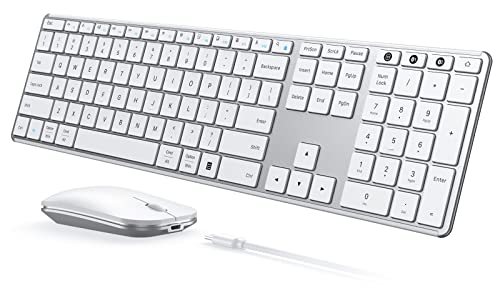
- Two Bluetooth channels plus Windows-only USB-A
- Dual-OS keyboard layout
- USB-C rechargeable with quiet keys and clicks
Best For: Switching between MacBook and Windows devices
Best Dark Apple Setup
seenda SKM64-2 Black and Gray Combo

- Three Bluetooth device channels
- Apple-style keyboard with number pad
- USB-C rechargeable, slim design
Best For: A dark-colored MacBook and iPad workspace
Best Light Apple Setup
seenda SKM64-2 White and Silver Combo

- Three Bluetooth device channels
- Apple-style layout in white and silver
- USB-C rechargeable with quiet inputs
Best For: A light-colored MacBook and iPad workspace
Best for Mixed-OS Desks
seenda SKM64-3 Rechargeable Combo

- Switches among three devices
- USB-C rechargeable keyboard and mouse
- Windows-only USB receiver mode
Best For: MacBook users who also work on Windows devices
Best Battery-Powered Pick
seenda COE202 Three-Device Combo
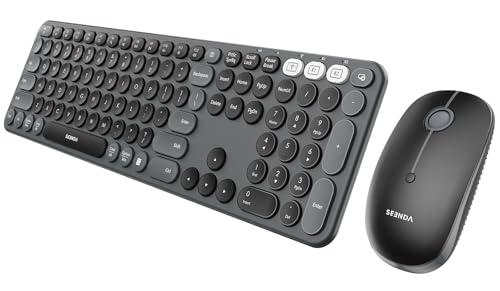
- Three-device switching
- Quiet keys and silent mouse clicks
- AA and AAA batteries not included
Best For: Quiet, multi-device desks that favor replaceable batteries
Best Mac-Native Layout

- Full-size Mac-style keyboard
- Switches among three Bluetooth devices
- USB-C rechargeable; no USB receiver
Best For: MacBook and iPad users seeking familiar Apple shortcuts
Best Cross-Platform Pick – Macally Premium Bluetooth Combo
If you want a macbook wireless mouse and keyboard combo that can also work with non-Apple devices, this Macally set offers Bluetooth pairing for up to three devices. Its full-size, 110-key keyboard includes 20 shortcuts, while the quiet mouse offers three cursor-sensitivity settings.
Best For: MacBook users who switch between a computer, phone, or tablet and want a numeric keypad.
Pros:
- Pairs with up to three devices and supports Mac, iOS, PC, and Android.
- Rechargeable keyboard and mouse; charging cable included.
- Scissor-switch keys and a quiet mouse suit everyday desk work.
Cons:
- The full-size keyboard is less compact than a travel-focused option.
- Bluetooth pairing is needed; the notes do not list a USB receiver.
Choose this set if broad device compatibility matters more than a compact footprint. Its shortcuts, number pad, and adjustable mouse make it a practical everyday desktop setup.
Best Backlit Pick – ProtoArc KM100-A
For a macbook wireless mouse and keyboard combo used in dim rooms, the ProtoArc KM100-A adds white key backlighting with three brightness levels. The full-size Mac-layout keyboard includes a numeric keypad and pairs over Bluetooth with up to three devices.
Best For: Mac users who want illuminated keys, quiet typing, and a full-size desk setup.
Pros:
- Three adjustable backlight levels improve key visibility in low light.
- Three Bluetooth channels make switching between supported devices straightforward.
- Rechargeable keyboard and mouse; the mouse offers 1000, 1600, and 2400 DPI settings.
Cons:
- Not compatible with Windows, Linux, or Macs made before 2013, according to the product notes.
- No USB dongle is included; connection is Bluetooth-only.
- The full-size layout takes more desk space than a compact keyboard.
The backlight is the clearest reason to pick this model, especially if you work after dark. Check your Mac and OS version before ordering, and note that the backlight must be turned on again after sleep.
Best Slim Apple-Focused Pick – seenda SKM64-2
The seenda SKM64-2 is a slim macbook wireless mouse and keyboard combo for people working across Apple devices. Its Apple-style keyboard has a number pad, and three Bluetooth channels let you switch among supported Macs, iPads, and iPhones.
Best For: Apple-device users who want a thin, quiet, rechargeable set for shared desks or travel.
Pros:
- Three Bluetooth channels support switching between Apple devices.
- Type-C rechargeability, auto-sleep, and power switches help manage battery use.
- Slim keyboard and low-noise keys suit portable or shared workspaces.
Cons:
- Bluetooth-only: no USB connection or receiver is included.
- Not fully compatible with Windows.
This is a good fit if portability and quiet operation outweigh cross-platform flexibility. Confirm your device supports Bluetooth 4.0 or later and meets the listed macOS, iPadOS, or iOS requirements.
Best for Mixed Devices – seenda SKM64-3 Wireless Keyboard and Mouse
If you need a macbook wireless mouse and keyboard combo that can also serve a Windows PC, the seenda SKM64-3 offers two Bluetooth channels and a Windows-only 2.4 GHz USB-A channel. Its dual-OS keyboard layout makes switching between systems more straightforward.
Best For: People who alternate between a MacBook, a Windows PC, and another Bluetooth device.
Pros:
- Switches among three device channels: USB-A, BT1, and BT2.
- Rechargeable via USB-C, with a stated 200 hours of use.
- Quiet scissor-switch keys and mouse clicks suit shared workspaces.
Cons:
- The 2.4 GHz USB connection works with Windows only; MacBook users must connect through Bluetooth.
- Bluetooth 4.0 or newer is required.
Choose this model for its cross-platform flexibility rather than for a USB receiver you can use with a MacBook. Its slim metal build also makes it practical to carry between workspaces.
Best Dark Apple Setup – seenda SKM64-2 Black and Gray Combo
For an Apple-focused macbook wireless mouse and keyboard combo, this black-and-gray seenda SKM64-2 pairs an Apple-style keyboard with a mouse and connects through three Bluetooth channels. It is intended for MacBook, Mac, iPad, and iPhone users rather than a mixed Windows setup.
Best For: Apple-device users who want a dark-colored, rechargeable set that can switch among three Bluetooth devices.
Pros:
- BT1, BT2, and BT3 channels support multi-device switching.
- Apple-style layout and a number pad suit Mac-based desk work.
- USB-C charging and a slim metal design make it convenient to move between workspaces.
Cons:
- Bluetooth only: no USB receiver or wired connection is included.
- Not fully compatible with Windows; Bluetooth 4.0 or newer is required.
This is a practical pick if your devices stay within the Apple ecosystem and you value a quieter keyboard and mouse. Check your device’s Bluetooth support before buying.
Best Light Apple Setup – seenda SKM64-2 White and Silver Combo
If you want a white-and-silver macbook wireless mouse and keyboard combo, this seenda SKM64-2 offers an Apple-style layout and three Bluetooth channels. It is designed to work across compatible MacBooks, Macs, iPads, and iPhones without a USB receiver.
Best For: Apple-device users seeking a slim, light-colored keyboard and mouse for a shared desk or travel bag.
Pros:
- Switches among three paired devices using BT1, BT2, and BT3.
- USB-C rechargeable design avoids disposable batteries.
- Low-noise keys and quiet mouse clicks are useful in shared spaces.
Cons:
- No USB connection or receiver; both devices rely on Bluetooth.
- Not fully compatible with Windows and requires Bluetooth 4.0 or newer.
Pick this version for its white-and-silver finish and Apple-oriented layout, not for cross-platform versatility. Its thin keyboard and mouse should be easy to pack when moving between workspaces.
Best for Mixed-OS Desks – seenda SKM64-3 Rechargeable Combo
If your macbook wireless mouse and keyboard combo also needs to serve a Windows PC, the seenda SKM64-3 offers dual Bluetooth channels and a USB-A receiver for switching among three devices. Its full-size keyboard includes both Apple and Windows layouts.
Best For: People who alternate between a MacBook, Windows PC, and tablet.
Pros:
- Bluetooth supports macOS 10.12+, iPadOS/iOS 13+, Android 4.3+, and Windows.
- Rechargeable by USB-C, with a stated 200 hours of use per charge.
- Quiet scissor-switch keys and a silent-click mouse with three DPI settings.
Cons:
- The 2.4 GHz USB receiver mode works with Windows only.
- Bluetooth 4.0 or newer is required.
Choose this set for flexibility across operating systems, but plan to pair over Bluetooth when using a MacBook.
Best Battery-Powered Pick – seenda COE202 Three-Device Combo
The seenda COE202 is a macbook wireless mouse and keyboard combo for buyers who prefer replaceable batteries to recharging. It pairs over Bluetooth with a MacBook and can switch among three devices; its USB receiver mode is reserved for Windows.
Best For: Shared workspaces and multi-device desks where quiet operation and replaceable batteries are priorities.
Pros:
- Dual Bluetooth channels and a 2.4 GHz receiver support three-device switching.
- Quiet keys, silent mouse clicks, and three adjustable DPI levels.
- Full-size keyboard with a fixed tilt; a keyboard cover is included.
Cons:
- Requires one AAA battery for the keyboard and one AA for the mouse; neither is included.
- Mac users must use Bluetooth 5.0 or newer because the receiver mode is Windows-only.
The stated battery life is up to 300 days of standby, not continuous use. Pick it if the quiet, full-size layout appeals and you do not mind supplying batteries.
Best Mac-Native Layout – SABLUTE KMA2 Bluetooth Combo
For a macbook wireless mouse and keyboard combo focused on Apple devices, the SABLUTE KMA2 provides a full-size Mac-style layout with familiar shortcuts and a numeric keypad. Three Bluetooth channels let you switch among a MacBook, iPad, and another compatible Apple device.
Best For: Apple-device users who want a familiar keyboard layout and a matching quiet mouse.
Pros:
- Mac-style keys and shortcuts require less adjustment for Apple users.
- Three Bluetooth channels support multi-device switching.
- Rechargeable keyboard and mouse include a USB-C-to-USB-C charging cable.
- Quiet scissor-switch typing and silent mouse clicks suit shared spaces.
Cons:
- Bluetooth-only connection; there is no USB receiver option.
- First-time desktop pairing may require another working input device.
- The mouse has a fixed 1200 DPI setting rather than adjustable sensitivity.
This is the most Apple-focused choice of the three, especially if you value Mac shortcuts over Windows compatibility. Check that your desktop is operable before its first Bluetooth pairing.
How We Picked the Best Macbook Wireless Mouse and Keyboard Combo
We focused on practical differences that matter when pairing a keyboard and mouse with a MacBook: stated platform compatibility, Bluetooth connectivity, layout, device-switching options, and desk-friendly features such as backlighting. This roundup contains nine selected listings, not nine distinct models. In particular, the seenda SKM64-2 and SKM64-3 appear more than once; treat repeated entries as opportunities to compare the exact listing, seller, color, and current price rather than as separate designs.
Quick Comparison
Start with the devices on your desk. The Macally, ProtoArc KM100-A, seenda SKM64-2, and SABLUTE listings are positioned toward Mac users. The seenda SKM64-3 is listed for both Windows and Mac, while the seenda COE202 is listed for Mac, iPad, and PC and describes three-device Bluetooth support. If you work across operating systems, verify that the shortcut labels and function keys suit the computer you use most. If your setup is MacBook-only, prioritize the keyboard layout and mouse comfort over a longer compatibility list.
Key Buying Factors for a Macbook Wireless Mouse and Keyboard Combo
Compatibility and Shortcuts
Check the listing for your MacBook’s macOS version and confirm how Command, Option, media controls, and function keys are labeled or mapped. A keyboard can connect yet still feel awkward if its shortcuts are arranged for Windows. For an iPad or PC in the same workspace, check compatibility for each device separately.
Layout, Size, and Comfort
A full-size keyboard gives you a number pad but takes more desk space and places the mouse farther from your typing position. A smaller layout is easier to pack and can improve mouse placement. Consider key feel, keyboard angle, mouse shape, and whether the mouse is comfortable for your preferred hand; photos alone cannot establish ergonomics.
Connections and Power
If you switch devices regularly, confirm whether both the keyboard and mouse support the number of connections you need and whether switching is straightforward. Also check whether each item uses replaceable batteries or rechargeable power, what charging cables are included, and whether the mouse can be used while charging. Bluetooth performance can vary by computer and workspace, so a clear return policy is useful.
Who Should Buy Which Macbook Wireless Mouse and Keyboard Combo?
For a Mac-focused home desk, begin with the Macally, ProtoArc, seenda SKM64-2, or SABLUTE listings and choose by layout and features rather than appearance alone. If you type in dim lighting, investigate the ProtoArc KM100-A’s backlit keyboard. For a Mac-and-Windows workspace, look closely at the seenda SKM64-3; for a desk shared with an iPad or PC, compare the COE202’s stated three-device support with your switching needs. Before checkout, match the model number, operating-system compatibility, keyboard size, power requirements, and seller details to the specific listing you are buying.