When it comes to securing your home network, choosing the right mesh WiFi system with parental controls is vital. You want reliable connectivity while ensuring your family’s online safety. With several options available, each offering unique features, it’s essential to find one that meets your needs. From easy setup to advanced monitoring capabilities, the right system can make a significant difference in managing your family’s internet usage. Let’s explore the top contenders.
TP-Link Deco S4 Whole Home Mesh WiFi System (2-Pack)

If you’re a parent looking to guarantee a safe online experience for your kids, the TP-Link Deco S4 Whole Home Mesh WiFi System (2-Pack) is an excellent choice. With up to 3,800 sq. ft. of coverage and AC1900 speeds, it replaces traditional routers, providing seamless WiFi throughout your home. Its advanced mesh technology supports up to 75 devices, ensuring fast connections. The robust parental controls let you manage online time and block inappropriate content for each family member, enhancing safety. Plus, setup is a breeze with the Deco app, and it’s compatible with all major internet service providers.
Best For: Families seeking a reliable and safe WiFi solution for a large home with multiple devices.
Pros:
- Robust parental controls allow for management of online time and content restrictions.
- Seamless coverage of up to 3,800 sq. ft. ensures strong WiFi signals throughout the home.
- User-friendly setup via the Deco app makes installation easy for all users.
Cons:
- May require a modem for compatibility with certain internet service providers.
- Limited to AC1900 speeds, which may not be sufficient for ultra-high-speed internet plans.
- Some users may find the lack of advanced features compared to higher-end models limiting.
TP-Link Deco X55 AX3000 WiFi 6 Mesh System (3-Pack)

The TP-Link Deco X55 AX3000 WiFi 6 Mesh System (3-Pack) is an excellent choice for families seeking robust parental controls alongside high-performance Wi-Fi coverage. With a reach of up to 6,500 sq. ft., it eliminates dead zones and guarantees seamless streaming across your devices. You can connect up to 150 devices while enjoying speeds of up to 2402 Mbps on 5 GHz. The easy-to-use Deco app simplifies setup and management, plus you get TP-Link’s HomeShield security service, which includes parental controls at no extra cost. Enjoy 24/7 support and a 2-year warranty for added peace of mind.
Best For: Families seeking robust parental controls and high-performance Wi-Fi coverage throughout their home.
Pros:
- Seamless coverage up to 6,500 sq. ft., eliminating dead zones.
- High-speed connectivity with up to 2402 Mbps on 5 GHz for smooth streaming.
- Easy setup and management through the user-friendly Deco app.
Cons:
- Requires a modem for internet connection, which is not included.
- May be overkill for smaller homes or fewer connected devices.
- Some users may find the parental control features limited compared to standalone solutions.
TP-Link Deco XE75 Tri-Band WiFi 6E Mesh System (3-Pack)

For families seeking robust internet coverage without sacrificing security, the TP-Link Deco XE75 Tri-Band WiFi 6E Mesh System is an excellent choice. With a coverage area of up to 7,200 sq. ft. and speeds reaching 5,400 Mbps, this system guarantees fast and reliable connections. The AI-driven mesh adapts to your network needs, while the Deco app makes setup a breeze. Plus, with TP-Link HomeShield, you get premium security features, including parental controls to keep your kids safe online. Its smart home compatibility with Alexa adds convenience, making it a top pick for today’s connected households.
Best For: Families and smart homes seeking extensive WiFi coverage and enhanced security features.
Pros:
- Wide Coverage: Up to 7,200 sq. ft., ideal for larger homes.
- High Speed: Delivers total speeds of up to 5,400 Mbps for seamless streaming and gaming.
- Advanced Security: TP-Link HomeShield offers premium features including parental controls and network security scans.
Cons:
- Modem Required: Needs a separate modem for most internet service providers.
- Price Point: May be more expensive compared to basic WiFi systems.
- Setup Complexity: While the Deco app simplifies setup, some users may still find the initial configuration challenging.
TP-Link Deco WiFi 6 Mesh WiFi System (Deco X20) – 2-Pack

Looking for a robust mesh Wi-Fi system with strong parental controls? The TP-Link Deco WiFi 6 Mesh WiFi System (Deco X20) – 2-Pack is perfect for you. Covering up to 4,000 square feet, it eliminates dead zones and buffering. With OFDMA and MU-MIMO technology, you can connect multiple devices simultaneously without a hitch. The easy setup via the Deco app makes getting started a breeze. Plus, customizable parental controls allow you to manage internet access for everyone in your home. Enjoy enhanced security features with TP-Link HomeShield, ensuring a safer online experience for your family.
Best For: Families seeking a reliable mesh Wi-Fi system with strong parental controls and extensive coverage.
Pros:
- Covers up to 4,000 square feet, effectively eliminating dead zones and buffering.
- Supports simultaneous connections for multiple devices with OFDMA and MU-MIMO technology.
- Easy setup through the Deco app, allowing for quick and hassle-free installation.
Cons:
- Limited advanced features without a premium subscription to TP-Link HomeShield.
- May require additional Deco units for larger homes beyond 4,000 square feet.
- Some users may find the parental control options basic compared to other systems.
Gryphon Guardian Mesh WiFi Router with Parental Control System

Designed with families in mind, the Gryphon Guardian Mesh WiFi Router offers robust parental controls that empower you to manage your children’s online activities effectively. You can easily schedule screen time, monitor searches, and control smart devices all from the Gryphon Connect app. With up to 1,500 sq. ft. of coverage per unit and dual-band AC1200 technology, it guarantees reliable connectivity throughout your home. Plus, the next-gen firewall safeguards your network against malware and phishing threats. Whether you use it as a stand-alone router or an extension to your existing setup, Gryphon Guardian enhances both connectivity and security for your family.
Best For: Families looking for a reliable mesh WiFi solution with robust parental controls to manage their children’s online activities.
Pros:
- Comprehensive parental controls for managing screen time and monitoring online activities.
- Excellent coverage of up to 1,500 sq. ft. per unit with dual-band AC1200 technology.
- Advanced cybersecurity features including a next-gen firewall and intrusion detection.
Cons:
- Only compatible with other Gryphon Guardian units, limiting expansion options.
- Performance may vary based on home construction, potentially leading to dead zones in certain areas.
- Requires the Gryphon Connect app for full functionality, which may not appeal to all users.
Tenda Nova Mesh WiFi System MW6 (3-Pack)
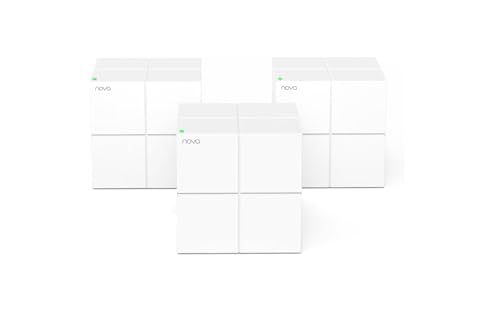
The Tenda Nova Mesh WiFi System MW6 (3-Pack) stands out as an ideal solution for families needing robust internet coverage throughout their homes. With a reach of up to 6,000 sq.ft., it effectively eliminates dead zones, ensuring everyone stays connected. Supporting up to 90 devices, this AC1200 dual-band system delivers a lag-free experience. Powered by MU-MIMO and Beamforming technology, it automatically connects your devices to the strongest access point. Plus, its built-in WPA2-PSK encryption keeps your network secure. Setting it up is a breeze with the Tenda Wi-Fi APP, allowing you to manage your network effortlessly.
Best For: Families needing reliable and extensive internet coverage throughout their homes.
Pros:
- Seamless coverage of up to 6,000 sq.ft., eliminating Wi-Fi dead zones.
- Supports up to 90 devices, making it ideal for smart homes and multiple users.
- Easy setup and management through the Tenda Wi-Fi APP for hassle-free operation.
Cons:
- Limited advanced features compared to higher-end mesh systems.
- May require additional nodes for larger homes beyond 6,000 sq.ft.
- Performance may vary based on the layout and materials of the home.
Google WiFi Mesh Router System Bundle (3-Pack)

For families seeking reliable internet coverage throughout their home, the Google WiFi AC1200 Mesh WiFi Router System Bundle (3-Pack) stands out as an excellent choice. With coverage up to 4,500 sq. ft., it effectively eliminates dead zones and buffering. Enjoy fast data transfer rates of up to 1200 Mbps, perfect for 4K streaming and online gaming. The easy setup via the Google Home app lets you manage devices, set parental controls, and monitor performance in minutes. Plus, with enhanced security through WPA3, you can rest assured that your network is safe and compatible with various smart home devices.
Best For: Families and individuals looking for reliable, high-speed internet coverage in larger homes.
Pros:
- Easy installation using the Google Home app, allowing for quick setup within minutes.
- Wide coverage of up to 4,500 sq. ft., effectively eliminating dead zones and buffering.
- High-speed performance with data transfer rates of up to 1200 Mbps, ideal for streaming and gaming.
Cons:
- Requires the Google Home app for setup and management, which may not appeal to all users.
- Limited to 3-pack configuration, which may not be sufficient for very large homes or specific layouts.
- Potential compatibility issues with some older devices that do not support 802.11ac.
TP-Link Deco WiFi 6 Mesh System (Deco X20)

If you’re looking for a mesh WiFi system that can handle a busy household, the TP-Link Deco WiFi 6 Mesh System (Deco X20) is an excellent choice. It covers up to 4,000 sq. ft. and supports over 150 devices at once. With combined speeds reaching up to 1,800 Mbps, you’ll enjoy seamless streaming and gaming. Its AI-driven technology optimizes your network, eliminating dead zones throughout your home. Plus, enhanced security features like WPA3 encryption and parental controls guarantee a safer online experience. Setting it up is easy with the Deco app, allowing you to manage your network from anywhere.
Best For: Families or individuals with multiple devices looking for a reliable, high-speed mesh WiFi solution to eliminate dead zones in their home.
Pros:
- Covers a large area of up to 4,000 sq. ft., ideal for bigger homes.
- Supports over 150 devices simultaneously, perfect for device-dense households.
- Easy setup and management through the intuitive Deco app.
Cons:
- Performance may vary based on home layout and construction materials.
- The 2-Pack may not be sufficient for extremely large homes or complex layouts.
- Limited advanced features compared to some higher-end mesh systems.
Tenda Nova Mesh WiFi System (3-Pack)

Designed for families seeking reliable internet throughout their home, the Tenda Nova Mesh WiFi System (3-Pack) guarantees seamless connectivity across up to 3,500 sq.ft. With AC1200 dual-band technology, it supports up to 40 devices, ensuring everyone stays connected without lag. You’ll enjoy features like MU-MIMO and Beamforming for enhanced performance. Security is a priority, with WPA2-PSK encryption and a guest network option for privacy. Setting it up is a breeze using the Tenda Wi-Fi app, making it compatible with your 802.11ac devices. Plus, you get a 3-year warranty for peace of mind.
Best For: Families seeking reliable, high-speed internet coverage throughout their home.
Pros:
- Easy setup via the Tenda Wi-Fi app, making it user-friendly.
- Supports up to 40 devices simultaneously, perfect for large households.
- Enhanced performance with MU-MIMO and Beamforming technology.
Cons:
- Not compatible with modem devices, requiring a separate modem for internet access.
- Basic firewall security may not be sufficient for advanced users.
- Coverage is effective up to 3,500 sq.ft, which may not suit larger homes.
TP-Link Deco X15 Dual-Band AX1500 WiFi 6 Mesh System

The TP-Link Deco X15 Dual-Band AX1500 WiFi 6 Mesh System stands out for families seeking robust parental controls alongside high-speed internet. It covers up to 2,100 sq. ft., delivering speeds of 1,201 Mbps on the 5 GHz band and 300 Mbps on the 2.4 GHz band. With support for up to 120 devices, it guarantees everyone stays connected. The TP-Link HomeShield offers advanced security features, including device identification and quality of service. Managed easily through the Deco app, setup is quick and compatible with all WiFi generations. Enjoy seamless connectivity and peace of mind for your family with the Deco X15.
Best For: Families seeking robust parental controls and high-speed internet coverage throughout their home.
Pros:
- High-speed performance with up to 1,201 Mbps on the 5 GHz band and 300 Mbps on the 2.4 GHz band.
- Supports up to 120 devices, making it ideal for homes with multiple users and smart devices.
- Easy setup and management through the Deco app, ensuring a user-friendly experience.
Cons:
- Coverage limited to 2,100 sq. ft., which may not be sufficient for larger homes.
- Requires a modem for most ISPs, which could add to setup complexity.
- Parental controls may require additional configuration to fully utilize all features.
Factors to Consider When Choosing Mesh Wifi With Parental Controls
When choosing a mesh WiFi system with parental controls, you need to evaluate several important factors. Think about your coverage area requirements, how many devices you’ll connect, and the ease of setup. Don’t forget to check the security features and the specific parental control options available to keep your family safe online.
Coverage Area Requirements
Choosing the right mesh WiFi system starts with understanding your coverage area needs. Consider how large your home is, as mesh systems cover areas from 1,500 sq. ft. to over 7,200 sq. ft. Make certain the system you choose can effectively cover your entire living space, factoring in the number of floors and walls that might block signals. Look for systems that provide seamless roaming and eliminate dead zones, especially if you have a larger home where signal strength can fluctuate. If your layout is complex, opt for a system that includes multiple units to enhance coverage. By addressing these coverage requirements, you’ll guarantee a strong and reliable connection throughout your home.
Device Connectivity Capacity
Determining how many devices your mesh WiFi system can handle is vital, especially in a tech-savvy household. Look for systems that support 75 to 150 devices simultaneously to guarantee smooth performance. Technologies like MU-MIMO and OFDMA are fundamental, as they let multiple devices communicate with the router at once, effectively increasing capacity. Speed capabilities also matter; higher maximum speeds can manage more devices without lag, particularly during heavy usage like gaming or streaming. Consider systems with Wired Ethernet Backhaul to improve connectivity for hardwired devices, reducing wireless congestion. Finally, evaluate whether the system uses dual-band or tri-band technology, which helps distribute traffic efficiently across different frequencies, enhancing overall performance.
Ease of Setup
Setting up a mesh WiFi system shouldn’t feel like an intimidating task, especially with the right features in place. Look for systems that offer a user-friendly setup process, often facilitated by mobile apps providing step-by-step visual guidance. Many options allow for seamless integration into your existing network, enhancing coverage without complicated installations. You’ll appreciate the ability to manage settings remotely, making it easy to configure parental controls or monitor internet usage. Systems with plug-and-play functionality can greatly reduce setup time and frustration. Additionally, automated features like AI-driven optimizations adapt to your needs and network environment, simplifying ongoing management. Choosing a system with these characteristics guarantees a smoother setup experience for you and your family.
Security Features Offered
Once you’ve navigated the setup process, focusing on security features becomes important for safeguarding your home network. Look for mesh Wi-Fi systems that offer robust security protocols like WPA3, which enhances protection against unauthorized access. Advanced services like network security scans and intrusion detection can help shield against cyber threats. It’s also wise to guarantee your system allows for guest networks, enabling visitors to connect safely without jeopardizing your primary network’s security. Additionally, ongoing security updates and support are essential for keeping your network protected against emerging vulnerabilities. By prioritizing these features, you can create a safer online environment for everyone in your household.
Parental Control Options
When choosing a mesh Wi-Fi system with parental controls, you want features that empower you to manage your family’s online experience effectively. Look for systems that offer customizable parental control profiles, allowing you to tailor internet access for each family member. It’s also vital to have options for scheduling screen time and limiting access during specific hours, helping you better regulate your children’s usage. Website blocking capabilities are essential for protecting your kids from inappropriate content, while monitoring features let you track online activity, search history, and usage patterns. Additionally, consider systems that provide guest network features so visitors can connect without compromising your home network’s security. These tools together create a safer online environment for your family.
Brand Reliability and Support
Choosing a mesh Wi-Fi system with robust parental controls is just the start; evaluating brand reliability and support is equally important. Established brands in mesh Wi-Fi technology usually have a proven track record, ensuring that you get reliable and stable products. Check user reviews and ratings, as higher ratings often indicate better performance and support experiences. A strong customer support system is essential for assistance with setup, troubleshooting, and any technical issues that may arise. Additionally, reputable brands typically offer warranties, reflecting their confidence in product quality. Look for brands that provide regular firmware updates, as these enhance security features and overall performance, ensuring your network remains safe and efficient over time.