As a PC creator, your workspace deserves the best tools to enhance productivity and creativity. Mini LED monitors offer impressive resolutions, vibrant colors, and ergonomic designs tailored for your needs. Whether you’re into design, editing, or gaming, these monitors can transform your setup. Curious about which models stand out in 2025? Let’s explore the top contenders that can elevate your workspace to new heights.
UPERFECT Mini LED Portable Monitor 14″ 2.5K

If you’re a PC creator seeking a portable display that delivers stunning visuals without compromising on performance, the UPERFECT Mini LED Portable Monitor is an excellent choice. This 14-inch monitor boasts a remarkable 2560 x 1600 resolution, providing crisp images and vibrant colors. Weighing just 1.16 lbs and measuring only 0.2 inches thick, it’s perfect for travel. With a peak brightness of 1500 nits and a contrast ratio of 10000:1, your visuals will pop. Plus, its 1ms response time and FreeSync support guarantee smooth gameplay. The built-in kickstand and VESA compatibility make setup a breeze, enhancing your creative experience.
Best For: Creators and gamers looking for a lightweight, high-resolution portable monitor that offers exceptional visual performance.
Pros:
- Impressive 2560 x 1600 resolution for sharp and vibrant images.
- Ultra-slim and lightweight design makes it highly portable for travel.
- Fast 1ms response time and FreeSync support enhance gaming experience with smooth visuals.
Cons:
- Limited connectivity options with only 2 USB ports.
- Peak brightness may not be suitable for all lighting conditions.
- Higher price point compared to standard portable monitors.
KOORUI 27” Mini-LED IPS Gaming Monitor (S2721PM)

The KOORUI 27” Mini-LED IPS Gaming Monitor (S2721PM) stands out for its impressive refresh rate of up to 200Hz, making it an ideal choice for gamers and creators seeking smooth visuals and quick response times. With a QHD resolution of 2560×1440, you’ll enjoy vivid colors and sharp text thanks to its 97% DCI-P3 and 99% Adobe RGB coverage. The 1ms response time guarantees tear-free gameplay, while its ergonomic design lets you adjust height, tilt, and swivel for comfort. Plus, VESA compatibility allows for easy mounting. With a solid warranty and customer support, it’s a reliable addition to your setup.
Best For: Gamers and creative professionals looking for high-performance visuals and quick response times.
Pros:
- High Refresh Rate: Up to 200Hz for smooth gameplay and enhanced visual performance.
- Vivid Color Accuracy: 97% DCI-P3 and 99% Adobe RGB coverage ensures stunning color reproduction.
- Ergonomic Design: Adjustable height, tilt, and swivel for personalized comfort during use.
Cons:
- Weight: At 19.56 pounds, it may be cumbersome for some users to move or mount.
- Limited Brightness: While decent at 350 Candela, it may not be sufficient for extremely bright environments.
- Price Point: Higher-end features may come at a premium price compared to standard monitors.
Upgraded 8.8 Inch Touchscreen Monitor for PC and Raspberry Pi

Designed for both PC creators and Raspberry Pi enthusiasts, the upgraded 8.8-inch touchscreen monitor stands out with its impressive high-resolution display of 1920 × 480. You’ll appreciate the fast response time of just 30 seconds and a refresh rate of 60Hz. This multi-functional display not only shows CPU, GPU, and RAM usage but also features customizable layouts and built-in themes for a personalized touch. Compatible with various operating systems, including Windows and macOS, it’s perfect for monitoring your system’s performance. Plus, with attentive customer support, you can easily resolve any issues or request customizations. Elevate your workspace today!
Best For: PC creators and Raspberry Pi enthusiasts looking for a high-resolution, customizable touchscreen monitor to enhance their system monitoring experience.
Pros:
- High-resolution display (1920 × 480) for clear visuals.
- Customizable screen layouts and built-in themes for personalization.
- Compatible with multiple operating systems, including Windows and macOS.
Cons:
- Requires specific configuration for optimal display resolution.
- Limited to a response time of 30 seconds, which may not be suitable for all applications.
- Screen size may be too small for users needing extensive data display.
KTC 27 Inch Mini LED Gaming Monitor

For gamers seeking high-quality performance and stunning visuals, the KTC 27 Inch Mini LED Gaming Monitor stands out with its impressive 180Hz refresh rate and 1ms response time. This 27-inch QHD display boasts a resolution of 2560 x 1440 and Mini LED backlight technology, featuring 1152 independent dimming zones for unparalleled image quality. With Adaptive Sync support for FreeSync and G-Sync, you’ll enjoy tear-free gameplay. Additionally, its ergonomic adjustments guarantee comfortable viewing angles. Connectivity options like HDMI 2.0 and DisplayPort 1.4 make it versatile for all your devices. Plus, you get a three-year warranty and responsive customer support.
Best For: Gamers looking for high-performance displays with stunning visuals and minimal input lag.
Pros:
- High refresh rate of 180Hz and 1ms response time for smooth gameplay.
- Mini LED technology with 1152 independent dimming zones for exceptional image quality.
- Ergonomic adjustments and versatile connectivity options enhance user experience.
Cons:
- Higher price point compared to standard monitors.
- May require a compatible graphics card to fully utilize Adaptive Sync features.
- Limited to a specific resolution and refresh rate for optimal performance.
7 Inch Mini HDMI Monitor with Built-in Speakers

Looking for a compact solution that doesn’t compromise on sound? The 7 Inch Mini HDMI Monitor with built-in speakers is perfect for your workspace. With a 1024×600 resolution and a 178° IPS viewing angle, it delivers crisp visuals. It supports various inputs like HDMI, VGA, AV, and BNC, making it versatile for different projects. The sturdy aluminum shell guarantees durability, while its lightweight design makes it portable. Whether you’re monitoring security systems, using it with a Raspberry Pi, or live streaming, this monitor’s adjustable brightness and built-in speakers are ideal for enhancing your experience without extra equipment.
Best For: Those seeking a compact and portable monitor solution for various applications such as security monitoring, Raspberry Pi projects, and live streaming.
Pros:
- Supports multiple input options (HDMI, VGA, AV, BNC) for versatile usage.
- Lightweight and portable design with a sturdy aluminum shell for durability.
- Built-in speakers provide sound without the need for additional audio equipment.
Cons:
- Limited resolution of 1024×600 may not meet high-definition needs.
- BNC input is only compatible with CVBS cameras, requiring an adapter for AHD/TVI/CVI.
- No external audio output options for enhanced sound systems.
Hagibis 3.5inch IPS USB Mini Screen with USB C Hub

The Hagibis 3.5-inch IPS USB Mini Screen with USB C Hub is perfect for on-the-go PC creators who need a compact yet powerful display. Weighing just 8.8 ounces and measuring 3.9 x 2.8 x 3.7 inches, it fits seamlessly into any workspace. Its 2-in-1 design combines a USB-C docking station with a clear 960×640 IPS screen, providing vibrant images and wide viewing angles up to 178°. With multiple connectivity options, including dual USB 3.0 ports, SD card slots, and seamless one-cable connection, you can easily expand your setup and enjoy dynamic displays, making your workflow more efficient.
Best For: On-the-go PC creators looking for a compact and versatile display solution.
Pros:
- 2-in-1 Design: Combines a USB-C docking station and a mini screen for added functionality.
- Wide Viewing Angles: IPS technology offers up to 178° viewing angles for accurate color representation.
- Multiple Display Options: Capable of displaying time, weather, video playback, and more for enhanced productivity.
Cons:
- Limited Resolution: Native resolution of 960×640 may not satisfy users needing ultra-high-definition visuals.
- Compatibility Requirements: Requires specific USB-C protocols (Thunderbolt 3/4 or USB4) for optimal performance.
- Average Customer Ratings: Rated 3.9 out of 5 stars, indicating mixed reviews from users.
7.84 Inch Mini Monitor LCD Display for Windows 10/11
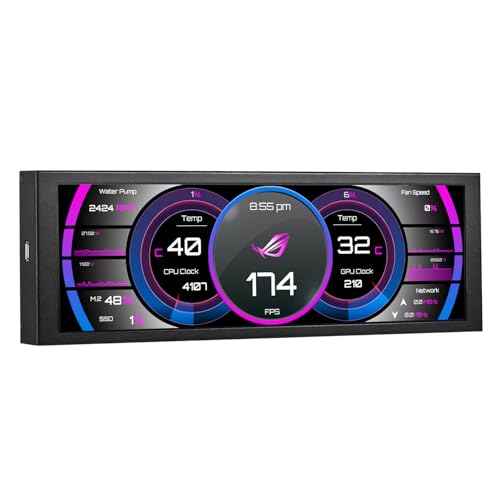
Compact and versatile, the 4 Inch Mini Monitor LCD Display is perfect for PC creators who need an additional screen without sacrificing desk space. With an HD IPS resolution of 1280×400 pixels, it delivers clear visuals. This sleek monitor connects easily via a single USB A to USB C cable, eliminating the need for HDMI. It’s compatible with Windows 10 and 11, supporting multiple display modes like extend and duplicate. Weighing just 11.3 ounces, it’s lightweight and portable. Plus, with a 30-day money-back guarantee and a 12-month warranty, you can invest with confidence. Elevate your workspace effortlessly!
Best For: This mini monitor is best for PC creators and professionals who require a compact additional display to enhance their workspace without taking up much room.
Pros:
- Easy one-cable connection (USB A to USB C) eliminates the need for HDMI.
- Supports multiple display modes for versatility in usage.
- Lightweight and portable design makes it convenient for on-the-go setups.
Cons:
- Limited to compatibility with Windows 10 and 11 only.
- Lower resolution (1280×400) compared to standard monitors may not suit all users.
- Requires additional software for certain functionalities, such as sensor panel display.
KTC 27 Inch 4K Mini LED Gaming Monitor

For gamers seeking an immersive experience, the KTC 27 Inch 4K Mini LED Gaming Monitor stands out with its impressive 160Hz refresh rate and 1ms response time. You’ll enjoy stunning visuals thanks to its 4K UHD resolution and HDR1000 brightness. With 100% sRGB and 98% DCI-P3 color coverage, colors pop, and shadows deepen, enhancing your gameplay. Its ergonomic design allows for adjustable height and tilt, ensuring comfort during long sessions. Plus, with versatile connectivity options like USB Type-C and DisplayPort, switching devices is seamless. Rated 4.4 stars, this monitor is a top choice for serious gamers.
Best For: Gamers looking for a high-performance monitor with exceptional visual quality and ergonomic comfort during extended gaming sessions.
Pros:
- Stunning Visuals: 4K UHD resolution with HDR1000 brightness enhances colors and contrast for an immersive experience.
- Fast Refresh Rate: With a 160Hz refresh rate and 1ms response time, gameplay is smooth and responsive.
- Versatile Connectivity: Multiple ports including USB Type-C and DisplayPort allow for easy device switching.
Cons:
- Weight: At 16.28 pounds, it may be cumbersome for some users to mount or move.
- Price Point: High-end features may come at a premium price, which could be a consideration for budget-conscious gamers.
- Limited HDMI Version: Only HDMI 2.0 ports are available, which may limit performance with some higher-end devices.
Cooler Master Tempest GP2711 27” 2K 165Hz Mini LED PC Monitor

Designed with creators in mind, the Cooler Master Tempest GP2711 boasts a stunning 27” Mini LED display that delivers a 2K resolution at a smooth 165Hz refresh rate. Its VA panel combines Mini LED technology and Quantum Dot for vibrant colors and excellent contrast, achieving over 3,000,000:1 dynamic contrast ratio. With a rapid response time of 1ms (MPRT) and HDR1000 support, your visuals will be truly immersive. Plus, innovative cooling designs enhance durability, extending lifespan by up to 30%. With multiple connectivity options, including USB-C, this monitor is perfect for elevating your creative workspace.
Best For: Creative professionals and gamers looking for high-performance displays with vibrant colors and advanced features.
Pros:
- High Refresh Rate: 165Hz refresh rate ensures smooth motion for gaming and video editing.
- Excellent Color Accuracy: Covers 93.5% Adobe RGB and 95% DCI-P3, ideal for professional-grade color work.
- Innovative Cooling Design: Extends the monitor’s lifespan by up to 30%, ensuring long-term reliability.
Cons:
- Weight: At 18.36 pounds, it may be heavy for some setups and require sturdy mounting.
- Mixed Customer Ratings: With a rating of 3.6 out of 5 stars, some users have expressed dissatisfaction.
- Limited Return Policy: 30-day return policy may not be ideal for all customers, especially if issues arise after usage.
KOORUI 27″ 4K LED Gaming Monitor (S2741LM)

The KOORUI 27″ 4K LED Gaming Monitor (S2741LM) stands out with its impressive 1152-zone Mini LED panel, making it an ideal choice for creators who demand exceptional visual performance. With a stunning 3840 x 2160 resolution and 550 nits brightness, your work will come alive in vibrant detail. You’ll appreciate its 300,000:1 contrast ratio and HDR certification, ensuring color accuracy across various formats. Plus, the dual-mode refresh rates of up to 320Hz and a 1ms response time enhance your gaming experience. Ergonomically designed, you can easily adjust its height and tilt for maximum comfort during long sessions.
Best For: The KOORUI 27″ 4K LED Gaming Monitor (S2741LM) is best for gamers and creative professionals seeking high-performance visual fidelity and versatility in gaming and design tasks.
Pros:
- Exceptional Visual Quality: With a 1152-zone Mini LED panel and 98% DCI-P3 color accuracy, it delivers vibrant and precise colors for both gaming and content creation.
- High Refresh Rates: The monitor supports dual-mode refresh rates of up to 320Hz, providing smooth gameplay and reducing motion blur during fast-paced action.
- Ergonomic Adjustability: Features like height adjustment, tilt, and swivel capabilities enhance comfort during extended use.
Cons:
- Weight: At 15 pounds, it may be heavier than some competitors, making it less portable.
- Best Sellers Rank: While it ranks decently, it may not be as popular as other monitor options on the market.
- Price Point: Higher-end features might come with a premium price, which could be a consideration for budget-conscious buyers.
Factors to Consider When Choosing Mini Led Monitors for PC Creators
When picking a mini LED monitor, you’ll want to take into account factors like screen size and resolution to match your creative needs. Color accuracy is essential for guaranteeing your work looks as intended, while a higher refresh rate can enhance your experience, especially for dynamic content. Don’t forget to check the connectivity options available to verify compatibility with your setup.
Screen Size Considerations
Choosing the right screen size for your Mini LED monitor can greatly impact your creative workflow. Larger monitors, 27 inches or more, offer more screen real estate, which is vital for multitasking and intricate design work. If you’re often on the go, a 14-inch portable monitor might suffice for quick tasks. However, for immersive experiences in gaming and design, a larger screen is ideal. Pay attention to the aspect ratio; wider screens (like 16:9 or 16:10) enhance your ability to view multiple applications simultaneously. Also, make sure that the resolution matches the screen size; higher resolutions on larger displays provide sharper images. Finally, ergonomic features, such as adjustable stands, are essential for comfort during extended use, helping maintain productivity and reduce strain.
Resolution and Clarity
Screen size plays a significant role in your creative workflow, but resolution and clarity are equally important factors to contemplate. Higher resolutions like 4K (3840 x 2160) or QHD (2560 x 1440) deliver sharper, more detailed images, essential for precise design and editing tasks. Mini LED technology takes clarity up a notch, offering increased brightness and improved contrast ratios for vivid colors and deeper blacks. Also, consider the aspect ratio; options like 16:9 or 16:10 influence how much content you can view simultaneously. If you work with fast-moving visuals, look for monitors with a 1ms response time to minimize motion blur, ensuring clarity during rapid shifts. Investing in these features will enhance your creative experience.
Color Accuracy Importance
Color accuracy is essential for any PC creator aiming to produce work that resonates with authenticity and consistency. When selecting a mini LED monitor, prioritize models with high color accuracy ratings, such as those covering 98% DCI-P3 or 100% sRGB. This wider color gamut lets you see a more extensive range of colors in your projects. Look for monitors with a factory-calibrated ΔE value under 2, ensuring minimal color deviation. High dynamic range (HDR) capabilities, particularly HDR1000 certification, enhance color depth and brightness, making images pop. Additionally, advanced panel technologies like Mini LED improve local dimming and contrast ratios, resulting in better color representation and detail. Investing in these features will elevate your creative work greatly.
Refresh Rate Needs
While you might focus on color accuracy and resolution when selecting a mini LED monitor, refresh rate is just as essential for PC creators. A higher refresh rate, like 165Hz or 200Hz, delivers smoother visuals, which is particularly beneficial when you’re gaming or working with high-motion content. Standard 60Hz rates can lead to motion blur in fast-paced scenarios, so a minimum of 120Hz is often recommended for competitive gaming. Monitors with 144Hz or more greatly reduce input lag and ghosting, enhancing your overall experience during graphic-intensive tasks. Additionally, adaptive sync technologies like FreeSync or G-Sync, paired with higher refresh rates, eliminate screen tearing and stuttering, ensuring a seamless and enjoyable workflow as you create.
Connectivity Options Available
When choosing a mini LED monitor for your creative setup, connectivity options play an essential role in ensuring versatility and efficiency. Look for HDMI and DisplayPort inputs, as they allow you to connect various devices like PCs and gaming consoles. Having multiple HDMI ports can enhance your multitasking, letting you switch between devices effortlessly. USB-C ports are increasingly popular, providing data transfer, video output, and charging through one cable, reducing clutter. If you often work with multiple devices, monitors with KVM functionality let you control them seamlessly. Additionally, USB 3.0 interfaces enable quick data transfers and connections to peripherals, greatly improving your workflow. Prioritize these features to elevate your creative experience.
Ergonomic Design Features
Choosing a mini LED monitor with ergonomic design features can considerably enhance your comfort and productivity during long creative sessions. Look for height adjustment capabilities that let you customize the screen’s position, reducing neck strain. Models with tilt and swivel adjustments are beneficial for finding the perfect viewing angle, especially in collaborative or multi-monitor setups. Pivot functionality allows for vertical orientation, which can boost productivity when working with documents or coding. Additionally, VESA compatibility makes it easy to mount your monitor on adjustable arms or stands, optimizing your workspace. Integrated technologies like flicker-free displays and blue light filters further reduce eye strain, ensuring you stay comfortable and focused throughout your creative endeavors.