When it comes to setting up pfSense, choosing the right mini PC can make all the difference. With so many options available, it’s important to find a model that meets your specific needs. From fanless designs to multiple LAN ports, these devices offer a range of features for peak performance. Curious about which mini PCs stand out from the crowd? Let’s explore the top picks that promise a smooth networking experience for both home and office setups.
Fanless Firewall Appliance Mini PC with Intel J3710

If you’re looking for a reliable and silent solution to manage your network security, the Fanless Firewall Appliance Mini PC with Intel J3710 is an excellent choice. With its 4-core Intel J3710 CPU, it delivers impressive performance while maintaining a low power consumption of just 6W. You’ll appreciate the four Intel I226 LAN ports for seamless connectivity, along with USB and HDMI options. Its fanless design guarantees silent operation, making it perfect for 24/7 usage. Plus, with 8GB of RAM and a 128GB SSD, you can easily expand your storage. Enjoy peace of mind with a 12-month warranty and dedicated customer support.
Best For: Those seeking a compact and efficient firewall solution for network security in a quiet environment.
Pros:
- Fanless design: Ensures silent operation, ideal for noise-sensitive locations.
- Low power consumption: Operates at just 6W, making it energy-efficient.
- Expandable storage: Comes with 128GB SSD and allows for further upgrades up to 512GB.
Cons:
- Limited RAM expansion: Maximum RAM capacity is 8GB, which may not suffice for more demanding applications.
- No HDD support: Users cannot utilize traditional hard drives for additional storage.
- Temperature limitations: While it can withstand up to 60°C, extreme environments may still pose a risk.
Beelink Mini PC S12 N95 Intel Alder Lake (12GB RAM, 500GB SSD)
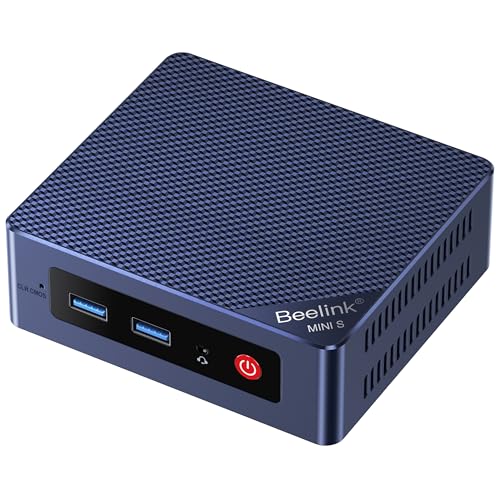
The Beelink Mini PC S12 N95 is an excellent choice for users seeking a compact yet powerful solution for running Pfsense. With its Intel Alder Lake-N95 processor, boasting 4 cores and speeds up to 3.4GHz, you’ll experience a noticeable performance boost—20% faster than its predecessor. The 12GB LPDDR5 RAM and 500GB SSD guarantee smooth multitasking and ample storage. Connectivity is robust, featuring dual HDMI for 4K output, a 2.5Gbps LAN port, and multiple USB3.2 ports. Its compact dimensions make it ideal for any workspace, while the fan cooling keeps it running efficiently during demanding tasks.
Best For: Users looking for a compact and powerful mini PC that excels in multitasking and connectivity for various applications such as business, education, and light gaming.
Pros:
- High Performance: Features an Intel Alder Lake-N95 processor that is 20% faster than the previous generation.
- Ample Connectivity: Dual HDMI outputs support 4K displays, along with multiple USB3.2 ports and a 2.5Gbps LAN port for fast data transfer.
- Compact Design: Its small dimensions make it suitable for any workspace without taking up too much room.
Cons:
- Limited RAM Expandability: The memory is fixed at 12GB, which may not be sufficient for more demanding applications.
- Fan Cooling: The fan may produce noise during heavy usage, which could be distracting in quiet environments.
- Warranty Period: The 1-year warranty may be shorter compared to competitors offering extended support options.
Firewall Industrial Mini PC (Celeron N2840)

Looking for a reliable solution to manage your network security? The Firewall Industrial Mini PC (Celeron N2840) delivers efficient performance with its fanless design, making it perfect for both home and business use. Powered by an Intel Celeron N2840 processor, it features dual 1000M LAN connectivity and supports dual displays. With up to 8 GB of DDR3L RAM and ample USB ports, it’s well-equipped for everyday tasks. Plus, its dual-band WiFi guarantees seamless internet access. This compact device is an excellent choice for robust home servers or educational tools, backed by a one-year warranty and a customer-friendly return policy.
Best For: The Firewall Industrial Mini PC (Celeron N2840) is best for users seeking a compact, fanless solution for network security management and everyday computing tasks in both home and business environments.
Pros:
- Fanless design ensures quiet operation, making it suitable for noise-sensitive environments.
- Dual 1000M LAN connectivity provides high-speed network capabilities for efficient data transfer.
- Supports dual displays via HDMI and VGA, enhancing multitasking and productivity.
Cons:
- No RAM or storage included, requiring additional purchases for full functionality.
- Limited to a maximum of 8 GB RAM, which may not be sufficient for more demanding applications.
- Average customer rating of 4.0 out of 5 stars, indicating mixed user experiences.
Protectli Vault FW4B Firewall Micro Appliance
For users seeking a compact yet powerful solution for network security, the Protectli Vault FW4B Firewall Micro Appliance stands out with its fanless and silent design. Powered by an Intel Quad Core Celeron J3160 processor and equipped with 8GB of RAM and a 120GB mSATA SSD, it delivers solid performance. With four Intel Gigabit Ethernet ports, you’ll enjoy seamless connectivity. The AES-NI hardware support enhances security, making it compatible with popular open-source software like pfSense and OPNsense. Plus, you get US-based support and a 30-day money-back guarantee, ensuring peace of mind with your investment.
Best For: Users looking for a compact and silent firewall solution that supports open-source software for enhanced network security.
Pros:
- Compact, fanless design ensures quiet operation and saves space.
- Powerful performance with Intel Quad Core Celeron J3160 and 8GB RAM for efficient multitasking.
- AES-NI hardware support enhances security, making it suitable for various open-source firewall solutions.
Cons:
- No operating system pre-installed, requiring additional setup time.
- Limited storage capacity of 120GB may not be sufficient for all users’ needs.
- Newer model available (Protectli Vault V1410) may make this model feel outdated for some buyers.
Fanless Firewall Appliance Mini PC with Intel N3710

Ideal for small businesses or home networks, the Fanless Firewall Appliance Mini PC with Intel N3710 offers a compact and efficient solution for running Pfsense. With its 4-core processor, 8GB of RAM, and 128GB mSATA SSD, you’ll enjoy smooth performance. The fanless design guarantees silent operation, while the aluminum casing withstands high temperatures. You’ll appreciate the six 2.5GbE network ports, two USB 3.0 ports, and support for dual HDMI outputs. Plus, mounting it behind your monitor is a breeze with the included VESA bracket. With a solid warranty and customer support, it’s a reliable choice for your networking needs.
Best For: Small businesses or home networks seeking a compact and efficient firewall solution.
Pros:
- Silent Operation: The fanless design ensures quiet performance, making it ideal for home and office environments.
- High Connectivity: Features six 2.5GbE network ports and multiple USB ports for versatile connectivity options.
- Durable Design: The aluminum casing allows it to withstand high temperatures, ensuring reliability in various conditions.
Cons:
- Limited RAM: Maximum supported RAM of 8GB may not be sufficient for resource-intensive applications.
- Storage Constraints: The 128GB mSATA SSD may require upgrades for users with larger data needs.
- Compatibility Issues: Not compatible with some popular firewall operating systems like IPCop and Sophos.
Fanless Mini PC, Industrial Computer (Dual Core N2840)

The UDPTCP Fanless Mini PC, powered by the Intel Celeron N2840, is an excellent choice for those seeking a reliable and quiet networking solution for Pfsense. With its dual-core processor, it offers efficient performance while consuming just 7.5W. You’ll appreciate the fanless design, ensuring noiseless operation even under heavy loads. It supports up to 8GB of RAM and features dual Gigabit Ethernet ports for solid connectivity. Plus, the robust construction withstands a wide temperature range, making it perfect for industrial applications. With multiple I/O options, including USB and HDMI, this mini PC is versatile and ready for your networking needs.
Best For: Those seeking a reliable, noiseless networking solution for industrial applications and Pfsense deployment.
Pros:
- Fanless design ensures quiet operation, making it ideal for environments where noise is a concern.
- Dual Gigabit Ethernet ports provide robust connectivity for networking tasks.
- Wide operating temperature range allows for use in various industrial settings.
Cons:
- Limited to 8GB of RAM, which may not be sufficient for more demanding applications.
- No built-in storage; requires separate RAM and SSD for operation.
- Performance may lag with heavy multitasking due to the dual-core processor.
Protectli Vault Pro VP2420 Mini PC

Offering robust security features and impressive performance, the Protectli Vault Pro VP2420 Mini PC stands out as a top choice for those looking to run pfSense or similar firewall software. Powered by an Intel Celeron J6412 processor, it delivers reliable speed with a burst capability of up to 2.6 GHz. You’ll appreciate the 8GB DDR4 RAM and 120GB SSD that provide ample storage. With four 2.5 Gigabit Ethernet ports, it guarantees efficient networking. Its compact, fanless design promotes silent operation, making it perfect for any environment. Plus, US-based support and a 30-day money-back guarantee add peace of mind.
Best For: The Protectli Vault Pro VP2420 Mini PC is best for users seeking a reliable firewall solution with robust performance for home or small business networking.
Pros:
- Compact and Silent: The fanless design ensures quiet operation, making it suitable for any environment.
- High-Speed Networking: Equipped with four 2.5 Gigabit Ethernet ports for efficient and fast networking capabilities.
- Versatile Compatibility: OS agnostic and tested with popular firewall software like pfSense, OPNsense, and Untangle.
Cons:
- Limited Storage Capacity: The 120GB SSD may not be sufficient for users requiring extensive storage for logs or data.
- Integrated Graphics: The reliance on integrated Intel UHD Graphics may not meet the needs of users requiring advanced graphical performance.
- No HDMI 2.0 Support: The maximum display resolution is limited to 1920×1080, which may not be ideal for high-resolution displays.
ACEMAGIC K1 Mini PC with AMD Ryzen 4300U

For those seeking a compact yet powerful solution for Pfsense, the ACEMAGIC K1 Mini PC stands out with its AMD Ryzen 4300U processor, delivering impressive speed and efficiency. With a turbo boost of up to 3.7GHz, it’s 30% faster than previous generations. You get 8GB DDR4 RAM, expandable to 64GB, and a 256GB M.2 SSD that can grow to 4TB. Its compact size (5.04 x 5.04 x 1.61 inches) and lightweight design (1.2 pounds) make it easy to fit anywhere. Plus, with gigabit Ethernet and multiple ports, connectivity is seamless for all your networking needs.
Best For: Users seeking a compact and efficient Mini PC for networking tasks, multimedia, and productivity applications.
Pros:
- High Performance: The AMD Ryzen 4300U processor offers up to 3.7GHz turbo boost, making it 30% faster than previous models.
- Expandable Storage and Memory: With up to 64GB RAM and 4TB SSD storage, it can accommodate growing needs.
- Multiple Connectivity Options: Equipped with gigabit Ethernet and a variety of ports for seamless connectivity.
Cons:
- Limited Pre-installed Storage: The base model comes with only 256GB SSD, which may not be sufficient for all users without expansion.
- Noisy Under Heavy Load: The cooling system, while effective, may produce noticeable noise when operating at high performance.
- Weight Limitations: At 1.2 pounds, it may not be as portable as other ultra-light mini PCs on the market.
Fanless Micro Firewall Appliance Mini PC with Intel J3710 Quad Core
If you’re looking for a compact and efficient solution for managing your network security, the Fanless Micro Firewall Appliance Mini PC with Intel J3710 Quad Core is an excellent choice. With its 4 Intel 2.5GbE Ethernet ports, it guarantees a stable and high-speed network. The fanless design keeps it cool while consuming only 6W of power. You’ll appreciate the 8GB RAM and 128GB mSATA SSD, providing ample storage for firewall applications. Plus, it’s compatible with pfSense and OPNsense, making it ideal for your networking needs. With a 12-month warranty and professional support, you can invest with confidence.
Best For: Home users and small businesses seeking a compact and efficient network security solution.
Pros:
- Fanless design ensures quiet operation and efficient heat dissipation.
- Multiple Ethernet ports provide stable and high-speed networking capabilities.
- Ample memory and storage with 8GB RAM and a 128GB SSD for various firewall applications.
Cons:
- Limited compatibility with certain software such as IPCop and Sophos.
- Maximum RAM support is capped at 8GB, which may not be sufficient for all use cases.
- Only supports up to 512GB mSATA SSD, which can be limiting for extensive storage needs.
Protectli Vault FW2B Firewall Micro Appliance

The Protectli Vault FW2B Firewall Micro Appliance stands out as the ideal choice for those seeking a compact and efficient solution for running pfSense or other open-source firewall software. This mini PC features an Intel Celeron J3060 dual-core processor, ensuring smooth performance while consuming just 16 watts of power. Its fanless design means it operates silently, making it perfect for any environment. With two Intel Gigabit NICs, multiple USB ports, and HDMI connections, you’ll have plenty of options for connectivity. Plus, it supports up to 8 GB of RAM and mSATA SSD storage, giving you flexibility for your networking needs.
Best For: Individuals or small businesses looking for a compact, efficient firewall solution that supports open-source software like pfSense.
Pros:
- Fanless design ensures silent operation, making it suitable for any workspace.
- Low power consumption at just 16 watts, reducing energy costs.
- Flexible connectivity options with multiple USB ports and dual Gigabit NICs for enhanced networking capabilities.
Cons:
- Requires additional RAM and storage to be fully functional, as these components are not included.
- No pre-installed operating system, which may require technical knowledge to set up.
- Limited to 8 GB RAM, which might not be sufficient for more demanding applications.
Factors to Consider When Choosing Mini PCs for pfSense
When choosing a mini PC for pfSense, you need to contemplate several key factors. Processor performance and efficiency, memory and storage capacity, and network connectivity options all play an essential role in how well your system functions. Additionally, thermal management design and operating system compatibility can greatly impact your setup’s reliability and longevity.
Processor Performance and Efficiency
Choosing the right mini PC for pfSense means paying close attention to processor performance and efficiency, as these factors directly impact your network’s reliability and speed. Look for quad-core processors, which generally outperform dual-core models, especially during multitasking and routing tasks. Turbo boost features can temporarily elevate clock speeds, helping you manage heavy network traffic more efficiently. Pay attention to the Thermal Design Power (TDP) rating; lower TDP values (under 10W) mean less heat and quieter operation, perfect for fanless designs. Additionally, support for hardware acceleration like AES-NI enhances encryption speeds, essential for secure connections. Finally, consider newer processor architectures, which often provide better instructions per cycle (IPC) and overall energy efficiency compared to older models.
Memory and Storage Capacity
Evaluating memory and storage capacity is essential for running pfSense smoothly, as insufficient resources can hinder performance. For basic installations, a minimum of 4GB RAM is recommended, but if you plan to use advanced features or multiple services, aim for 8GB or more. When it comes to storage, opt for at least a 16GB SSD to handle logs, packages, and updates, though 120GB or more is better for larger setups.
Faster read/write speeds from SSDs enhance overall system responsiveness compared to traditional HDDs. Consider expandability options too, as your network demands may grow over time. Choose a system that supports mSATA or SATA III interfaces for compatibility with modern storage solutions, ensuring optimized performance.
Network Connectivity Options
Having established the importance of memory and storage capacity, it’s time to focus on another vital aspect: network connectivity options. When choosing a mini PC for pfSense, consider the number and type of network ports. Look for at least two LAN ports to enable LAN/WAN configurations, which boost network segmentation and security. Make sure the device supports standards like VLAN tagging and link aggregation for improved performance. Advanced features like Wake-on-LAN (WOL) and AES-NI enhance security and remote management. Finally, check compatibility with essential network protocols such as DHCP, VPN, and firewall rules, as these are essential for a smooth pfSense setup. Your choice here can greatly impact your networking experience.
Thermal Management Design
Effective thermal management design is essential when selecting a mini PC for pfSense, as it guarantees stable operation and prevents overheating during extended use. You should look for fanless designs that provide silent operation and require less maintenance, utilizing materials like aluminum alloy for efficient heat dissipation. Since mini PCs are compact, they often rely on integrated thermal solutions that handle low power consumption—typically around 6-25W—while still ensuring adequate cooling. Consider using passive cooling methods like heat sinks and thermal pads to enhance reliability and reduce mechanical failure risks. Finally, keep an eye on temperature and airflow within the casing to maintain peak performance, especially when running resource-intensive applications like pfSense.
Operating System Compatibility
When choosing a mini PC for pfSense, it’s essential to guarantee compatibility with open-source operating systems since pfSense is built on FreeBSD. Look for hardware that supports features like AES-NI, as this boosts encryption performance, important for firewall applications. It’s also wise to check if the mini PC explicitly mentions compatibility with pfSense or similar firewall solutions to sidestep integration headaches. Confirm the device meets memory and storage requirements, typically needing at least 1GB RAM and dedicated storage. Finally, verify that the mini PC has enough network interfaces, such as multiple Ethernet ports, to efficiently manage and route network traffic, ensuring peak performance for your pfSense deployment.
Dimensions and Form Factor
While selecting a mini PC for pfSense, dimensions and form factor play an essential role in guaranteeing a seamless installation, especially in tight spaces. You’ll find typical sizes ranging from 4.25 x 4.56 x 1.69 inches to 5.27 x 4.98 x 1.43 inches. A compact form factor offers versatile mounting solutions, like VESA brackets, allowing you to install the mini PC behind monitors or in cramped areas. Most models weigh between 500g and 1.66 kg, making them lightweight and easy to handle during setup. Additionally, many mini PCs feature a fanless design that reduces noise and promotes efficient thermal management. This combination not only enhances portability but also guarantees reliable performance in various environments, whether at home or in business settings.
Warranty and Support Services
Choosing a mini PC for pfSense isn’t just about size and performance; warranty and support services are equally important for guaranteeing long-term satisfaction. A longer warranty period can give you peace of mind regarding reliability. Look for options that provide thorough customer support, including access to a dedicated team for troubleshooting. It’s essential to check for a money-back guarantee or return policy, which can be a lifesaver if the product doesn’t meet your expectations. Confirm the warranty covers both parts and labor to avoid unexpected costs later. Finally, research customer reviews to assess the effectiveness and responsiveness of the manufacturer’s warranty and support services. This diligence will help you make an informed decision.