If you spend long hours at a desk, better monitor lighting can make a noticeable difference in comfort and focus. The right light bar reduces glare, softens harsh contrast, and keeps your workspace usable without washing out the screen.
This roundup of the best monitor light bars for PC setup in 2026 highlights practical options for office work, gaming, and ambient desk lighting, so you can choose the right fit for your monitor and your budget.
Best 10 Monitor Light Bars for PC Setup Picks for 2026
Best for Eye Comfort

- Glare-free asymmetrical beam for screen use
- Auto-dimming with 3000K–6500K tuning
- Space-saving clip-on design with high CRI light
Best For: People who want a comfortable, low-glare monitor lamp for long work or study sessions.
Best Smart Control

- RGBICWW segmented color effects
- Alexa, Google Assistant, and app control
- Music-sync mode for gaming and entertainment
Best For: PC users who want a customizable light-bar setup with smart home control.
Best for Curved Monitors

- Remote control with stepless brightness and color tuning
- Stable clip design fits curved, flat, and ultrawide monitors
- Anti-glare asymmetrical lighting plus auto-dimming features
Best For: Curved, ultrawide, or irregular monitors needing stable mounting and easy desktop control.
Best for Smart Color Control

- RGBICWW color plus tunable white lighting
- Music sync and scene modes for immersive setups
- Matter, Alexa, and Google Home compatible
Best For: PC users who want customizable ambient lighting with smart-home control.
Best for Ultrawide Coverage
15.7'' Ultrawide LED Screen Bar

- Wide 35"×25" lighting coverage for larger setups
- 45° asymmetric beam helps reduce glare and eye strain
- Stepless dimming with 3 color temperatures
Best For: Ultrawide monitors and users who want easy, clutter-free desk lighting.
Best for Easy Color Control
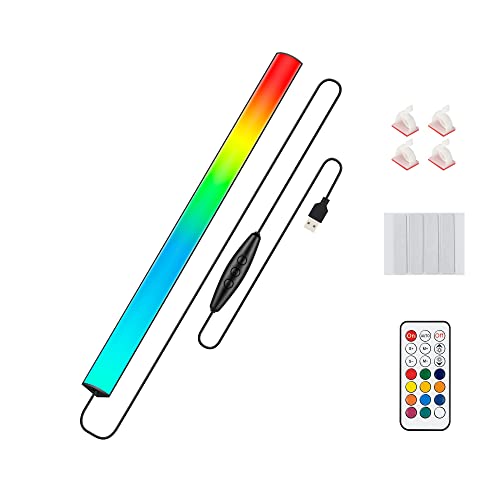
- 353 dynamic modes and 12 static colors
- Wireless remote for fast brightness and mode changes
- USB powered with memory function and simple install
Best For: Gamers and desk setup builders who want customizable ambient RGB lighting with easy controls.
Best for Bright Coverage

- Up to 800 lux with wide, even desktop coverage
- 45° lighting helps cut glare and eye strain
- USB-powered clip-on design saves desk space
Best For: People who want a bright, space-saving light bar for work, reading, or gaming.
Best for Music Sync
Ledagic RGBW Light Bar with App Control

- Music-reactive lighting for games, movies, and music
- USB-powered setup works with PC, monitor, TV, or power bank
- App, remote, and timer control add convenience
Best For: Gamers and PC users who want an easy-install light bar with RGB effects and music syncing.
Best for Ultra-Wide Coverage
Quntis 30.7'' Double Head Desk Lamp

- 30.7-inch double-head span covers wide desks well
- High-CRI, flicker-free light for long sessions
- Clamp-on arm with flexible positioning and 25 modes
Best For: Large workstations and multi-monitor users who want broad, adjustable eye-care lighting.
Best Simple Pick

- Three music sync modes for sound-reactive lighting
- Eight RGB dynamic modes for a more animated desk
- USB-powered with remote and button controls
Best For: Users who want an easy, colorful monitor accent light with music-reactive effects.
Best for Eye Comfort – Quntis Monitor Light Bar
If you want one of the more practical monitor light bars for pc setup, the Quntis light bar is built around eye comfort first. It uses a glare-free asymmetrical beam, auto-dimming, and adjustable color temperature to make long work or study sessions easier on the eyes without taking up desk space.
Best For: Students, office workers, and gamers who want a space-saving monitor lamp with automatic brightness control and low-glare lighting.
Pros:
- Flicker-free, low-blue-light design helps reduce eye strain
- Auto-dimming and stepless brightness/color temperature control
- Weighted top-mount clip saves desk space and avoids screen glare
- High CRI lighting gives a more natural look for work and reading
Cons:
- Not as feature-rich as premium smart desk lighting systems
- Best suited to monitors with enough top bezel space for the clip
- Manual tweaking may still be needed to find your preferred setting
For buyers comparing monitor light bars for pc setup, the Quntis stands out as a straightforward, eye-friendly choice that balances automatic lighting with easy manual control. It’s especially appealing if you want a cleaner desk and a more comfortable view during long screen sessions.
Best Smart Control – Govee Smart LED Light Bars
If you want monitor light bars for pc setup that do more than just add glow, these Govee bars are a strong pick. They bring RGBICWW color effects, app-based customization, music sync, and voice control, making them easy to tailor for gaming, streaming, or everyday desk lighting.
Best For: PC users who want a customizable light-bar setup with smart home control and animated effects.
Pros:
- RGBICWW lighting creates segmented, multi-color effects instead of a single wash
- Works with Alexa, Google Assistant, and the Govee app for easy control
- Built-in mic syncs lighting to music, movies, and games
- Flexible mounting options make it simple to position behind a monitor or TV
Cons:
- Recommended for monitors under 45 inches
- More of a feature-rich pick than a minimal desk-light solution
For buyers comparing monitor light bars for pc setup, this model stands out if you want atmosphere and automation as much as screen-edge lighting. It’s especially appealing for gaming desks where dynamic color and hands-free control matter.
Best for Curved Monitors – Quntis Monitor Light Bar PRO+
If you’re comparing monitor light bars for pc setup, the Quntis Monitor Light Bar PRO+ stands out for curved and ultrawide displays thanks to its weighted clip, adjustable fit, and desk-focused asymmetrical lighting. The remote makes it easy to tune brightness and color temperature without reaching behind your screen.
Best For: Curved, ultrawide, or irregular monitors where stable mounting and glare-free task lighting matter most.
Pros:
- Remote control offers stepless dimming and 3000K-6500K color tuning
- Asymmetrical light design helps reduce screen glare and eye strain
- Weighted, adjustable clip fits a wide range of monitor thicknesses
- Auto-dimming and a 2-hour rest timer add convenience
Cons:
- More specialized than basic light bars if you only need simple lighting
- Setup can take a little adjustment to get the hinges tightened just right
For monitor light bars for pc setup, this is a strong pick if your screen shape makes standard bars feel unstable or uneven. It combines flexible mounting with practical eye-care features, making it a smart fit for long work sessions and gaming desks.
Best for Smart Color Control – Govee Smart LED Light Bar
If you want monitor light bars for pc setup that do more than just add backlight, this Govee pair brings RGBICWW color, tunable white tones, and app-based effects into one compact package. It’s a practical pick for gaming desks, movie setups, and smart-home users who want flexible lighting without a separate hub.
Best For: PC users who want customizable ambient lighting with Matter, Alexa, and music sync support.
Pros:
- RGBICWW lighting offers both vivid color effects and adjustable white light
- Music sync mode reacts to sound for more immersive gaming and viewing
- Works with Matter, Alexa, and Google Home for easy smart control
- Mounts behind a monitor, stands vertically, or lays flat for flexible placement
Cons:
- Recommended for monitors under 45 inches, so larger setups may need a different option
- Feature-rich app controls may be more than casual users need
For monitor light bars for pc setup, this model stands out if you value color customization and smart integrations over simple task lighting. It’s a strong fit when you want your desk lighting to feel part of the whole setup, not just an add-on.
Best for Ultrawide Coverage – 15.7'' Ultrawide LED Screen Bar
If you want monitor light bars for pc setup that cover a wide screen without adding desk clutter, this 15.7-inch screen bar is a strong practical pick. Its asymmetric beam is designed to light your desk and keyboard instead of your eyes, while the stepless dimming and three color temperatures make it easy to tune for work, reading, or gaming.
Best For: Ultrawide monitors, compact desks, and users who want simple, glare-reducing task lighting for long PC sessions.
Pros:
- Wide 35"×25" coverage helps eliminate dark spots on larger setups.
- 45° asymmetric lighting reduces screen reflections and eye strain.
- Stepless brightness plus 3000K-6500K color tuning fits different tasks.
- USB power and counterweight clip make setup fast and desk-friendly.
Cons:
- May be more light than needed for small single-monitor desks.
- No remote control, so adjustments are made on the built-in switch.
- Clip-on fit is versatile, but some extra-deep monitor backs may need checking.
For shoppers comparing monitor light bars for pc setup, this model stands out for wide coverage, easy mounting, and simple everyday control. It is especially appealing if you want a cleaner desk and a more comfortable lighting setup for work or gaming.
Best for Easy Color Control – Under Monitor RGB Light Bar
If you want monitor light bars for pc setup that are more about mood and customization than simple task lighting, this RGB bar is an easy fit. It offers a huge range of color modes, remote control, and USB power, so it can add ambient glow behind or under your display without a complicated install.
Best For: Gamers and desk setup builders who want a colorful, low-effort light bar with lots of scene options and simple remote control.
Pros:
- 353 dynamic modes plus 12 static colors for plenty of lighting variety
- Wireless remote makes brightness, speed, and mode changes quick
- USB powered with memory function for easy everyday use
- Simple adhesive install for behind-monitor or under-monitor placement
Cons:
- More focused on ambient RGB effects than neutral white task lighting
- Adhesive mounting may not suit every monitor or desk surface
This is a strong pick for monitor light bars for pc setup if you care most about personalization and atmosphere. It’s especially appealing for gaming rigs, colorful desk builds, and users who want fast control without extra setup steps.
Best for Bright Coverage – 11.8" USB Monitor Light Bar
If you want one of the more practical monitor light bars for pc setup, this 11.8-inch USB light bar is built for strong, even coverage without taking up desk space. It pushes bright illumination across a wide area, offers three color temperatures, and uses a screen-focused angle to reduce glare and eye strain during work, reading, or gaming.
Best For: Users who want a bright, space-saving light bar for a clean home office or gaming desk.
Pros:
- Wide, even lighting with up to 800 lux coverage for larger desks
- 45° downlighting helps reduce screen glare and reflections
- 3 color temperatures plus stepless dimming with memory function
- USB power and clip-on mount make setup quick and desk-friendly
Cons:
- Shorter 11.8-inch bar may feel small on very wide monitors
- Manual controls are simple but less convenient than remote-based options
For buyers comparing monitor light bars for pc setup, this model stands out for its bright output, easy installation, and flexible lighting modes. It is a strong pick if you care more about clean desk integration and reliable eye-friendly illumination than extra premium features.
Best for Music Sync – Ledagic RGBW Light Bar with App Control
If you want monitor light bars for pc setup that do more than just add bias lighting, the Ledagic light bar is built for color effects, app control, and music-reactive modes. It’s a flexible pick for gaming desks, TV backlights, and workspaces that need both ambient glow and usable white light.
Best For: Gamers and PC users who want an easy-to-install light bar with music sync, RGB effects, and simple USB power.
Pros:
- Music sync mode creates a more immersive gaming or entertainment setup
- USB-powered design makes it easy to use with a monitor, PC, TV, or power bank
- App and remote control offer quick access to colors, scenes, timers, and brightness
- RGBW lighting gives you both vivid effects and a brighter white mode for task lighting
Cons:
- More of an accent light than a true precision desk lamp
- Feature-rich controls may be more than casual users need
- Designed for atmosphere first, not maximum screen-edge coverage
For monitor light bars for pc setup, this model stands out if you want one bar that can switch from practical white lighting to animated RGB effects without extra hardware. It’s especially appealing for users who want a simple USB install with lots of customization.
Best for Ultra-Wide Coverage – Quntis 30.7'' Double Head Desk Lamp
If you’re comparing monitor light bars for pc setup and need broader coverage than a standard single-bar light, the Quntis double-head desk lamp is built for large desks, multi-monitor rigs, and curved screens. Its 30.7-inch span and adjustable heads make it a practical pick when you want even, glare-free lighting across your workspace.
Best For: Large workstations, dual-monitor setups, and users who want flexible, eye-comfort lighting from a clamp-on design.
Pros:
- Ultra-wide double-head design helps reduce shadows across wide desks and multi-monitor setups.
- High-CRI, flicker-free lighting aims to be easier on the eyes for long work sessions.
- Flexible gooseneck and rotating base make angle adjustments simple without re-clamping.
Cons:
- Bulkier than a slim monitor light bar, so it takes up more visual space.
- Clamp-and-arm design may be overkill for small desks or minimal setups.
For buyers comparing monitor light bars for pc setup, this is a strong alternative when screen-top lighting is too narrow and you need more coverage for a bigger desk area. It works especially well if your priority is uniform task lighting rather than a pure monitor-mounted solution.
Best Simple Pick – velted RGB Light Bar
If you want one of the more lively monitor light bars for pc setup, the velted RGB Light Bar stands out with built-in music sync, multiple dynamic effects, and simple USB power. It’s aimed at adding atmosphere to a desk, gaming monitor, TV, or console area without complicated software or Wi-Fi pairing.
Best For: Gamers and casual desktop users who want an easy, sound-reactive RGB accent light for a monitor or desk setup.
Pros:
- Three music sync modes help the lighting react to nearby sound for a more immersive feel.
- Eight dynamic RGB modes add variety and keep a desk setup from looking plain.
- USB power and removable bases make it flexible for PCs, monitors, TVs, and consoles.
- Remote control plus onboard buttons make it easy to adjust without extra setup.
Cons:
- No white light option, so it’s better for ambient color than task lighting.
- Focused on effects and mood, not on delivering bright desk illumination.
As a pick for monitor light bars for pc setup, this model makes the most sense if you care more about colorful ambiance and easy controls than neutral lighting. It’s a simple plug-and-play option for adding motion and music-reactive flair to a gaming or streaming desk.
How We Picked the Best Monitor Light Bars for PC Setup
We focused on Monitor Light Bars for PC Setup that balance screen-friendly illumination, easy installation, and useful controls. Priority went to models that offer stable mounting, adjustable brightness, multiple color temperatures, USB power, and features that make everyday use simpler, such as auto-dimming, remote control, or smart app support.
We also considered whether each option is better suited to focused work or to RGB-heavy gaming setups. That matters because a good desk light should improve visibility without creating reflections or unnecessary visual clutter.
Quick Comparison
For a clean productivity setup, a neutral white or adjustable white light bar is usually the best choice. For gaming rooms or hybrid desks, RGB and music-sync models add atmosphere, but they are less about task lighting and more about style. If you use a curved or ultrawide monitor, check compatibility carefully before buying.
Key Buying Factors for Monitor Light Bars for PC Setup
Light Quality
Look for flicker-free output, smooth dimming, and color temperature control. Warmer light can be easier on the eyes at night, while cooler light may feel better for daytime work.
Mounting and Monitor Fit
A light bar should sit securely without blocking the screen or pressing awkwardly against the panel. Curved monitors, thick bezels, and ultrawide displays may need a more flexible design or a model with better balance.
Controls and Power
USB power is common and convenient, but the control method matters too. Touch controls are simple, remotes are convenient, and app-based smart lights are ideal if you already use a connected desk setup.
Task Lighting Vs. Ambient Lighting
Some light bars are built for reading, writing, and spreadsheet work. Others are mostly ambient accent lights for gaming. Choose the category that matches your primary use so you do not overpay for features you will not use.
Who Should Buy Which Monitor Light Bars for PC Setup?
If you want the most practical upgrade for work, choose a neutral, adjustable light bar with good glare control. If you game at night or want your desk to look more dynamic, an RGB model with scene effects may be the better fit. If you use multiple screens or a curved monitor, prioritize fit and beam coverage first, then compare extras.
In short, the best Monitor Light Bars for PC Setup are the ones that match your screen, your lighting needs, and how you actually use your desk every day.