Choosing the right motherboard can make or break an Intel Core Ultra workstation build. The best options balance stability, expansion, fast storage, and the connectivity professionals actually use.
Below, we focus on boards and combos that suit high-core-count workloads, modern DDR5 platforms, and practical upgrade paths without wasting budget on features you may never need.
Best 9 Motherboard for Intel Core Ultra Workstation Picks for 2026
Best for workstation expansion
Supermicro X14SAE LGA-1851 Workstation Board
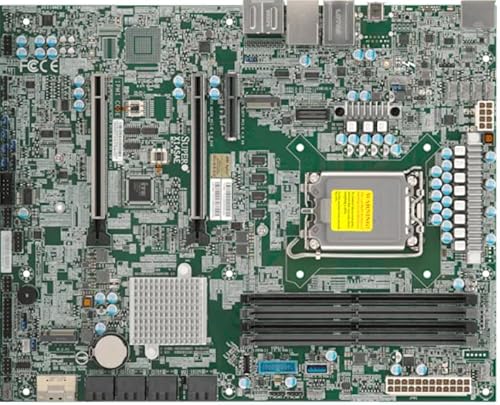
- Core Ultra 9/7/5 support on LGA-1851
- Up to 256GB DDR5-5600 ECC/non-ECC memory
- PCIe 5.0 x16, dual M.2, and 2.5G LAN
Best For: Workstation builders who want a highly expandable Intel Core Ultra motherboard with business-focused networking and management support.
Best Combo Pick
Intel Ultra 7 265K + Gigabyte Z890 WIFI 7
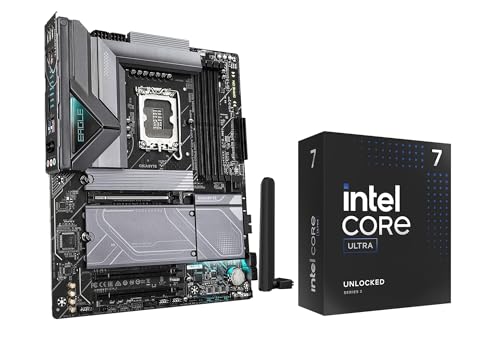
- CPU and motherboard combo saves setup time
- DDR5, PCIe 5.0, and 4x M.2 support
- Wi-Fi 7, 2.5 GbE, and builder-friendly features
Best For: Builders who want a convenient CPU-and-motherboard bundle for a high-performance Intel Core Ultra workstation.
Best Bundle Value
MSI Z890 Gaming Plus WiFi + 16GB DDR5

- Includes 16GB DDR5-6000 RAM for an easier first build
- WiFi 7, 5Gbps LAN, USB-C, and Thunderbolt 4 support
- PCIe 5.0 and M.2 keep the platform upgrade-friendly
Best For: Builders who want a Core Ultra-ready Z890 board with included memory and modern I/O.
Best Intel Core Ultra Combo
Core Ultra 7 265KF + MSI Z890 WiFi

- Includes CPU and motherboard in one compatible bundle
- Wi-Fi 7, 5G LAN, and Thunderbolt 4 add modern connectivity
- DDR5 support and strong power delivery suit demanding builds
Best For: Builders who want a ready-to-go Intel Core Ultra workstation platform with minimal compatibility hassle.
Best for Feature-Packed Builds
GIGABYTE B860 Eagle WIFI6E LGA 1851 Motherboard

- PCIe 5.0 plus three M.2 slots for expansion
- Wi‑Fi 6E and 2.5GbE LAN for flexible networking
- EZ-Latch and ATX layout simplify the build process
Best For: Mainstream Intel Core Ultra workstation builders who want a modern, well-equipped ATX motherboard.
Best for Intel Core Ultra Bundles
Core Ultra 7 265K + MSI Z890 Tomahawk

- CPU + motherboard combo saves setup time
- 20-core Core Ultra 7 265K for heavy multitasking
- Z890 Tomahawk adds DDR5, WiFi, and strong cooling
Best For: Creators and power users building a modern Intel Core Ultra workstation with minimal compatibility guesswork.
Best for Connectivity
GIGABYTE Z890 AORUS Elite WIFI7

- Intel Core Ultra Series 2 and DDR5 support
- 4x M.2 slots with PCIe 5.0 expansion
- Thunderbolt 4, WiFi 7, and 2.5GbE LAN
Best For: Builders who want a well-connected Intel Core Ultra workstation motherboard with easy upgrade headroom.
Best Combo Value
Intel Core Ultra 7 265K + ASUS TUF Z890

- 20-core unlocked Core Ultra CPU included
- Wi-Fi 7, Thunderbolt 4, and 2.5 Gb Ethernet
- Strong VRMs and PCIe 5.0 M.2 support
Best For: Builders who want a powerful, ready-to-go Intel workstation platform with modern connectivity.
Best Combo for Performance
Intel Core Ultra 7 265K + MSI PRO Z890-P WiFi

- 20-core unlocked Core Ultra 7 265K processor
- MSI PRO Z890-P WiFi with Wi-Fi 7 and LGA 1851
- Workstation-friendly bundle for modern Intel builds
Best For: Buyers who want a high-performance CPU and a solid Z890 motherboard in one bundle.
Best for workstation expansion – Supermicro X14SAE LGA-1851 Workstation Board
If you want a motherboard for intel core ultra workstation builds with serious expandability, the Supermicro X14SAE is built around Intel Core Ultra 9/7/5 support, DDR5 capacity up to 256GB, and a mix of PCIe 5.0 and 4.0 slots for graphics, storage, and add-in cards. It is a practical choice for users who need a stable, business-friendly platform rather than flashy enthusiast features.
Best For: Workstation buyers who need lots of memory support, modern PCIe connectivity, and remote-management-friendly features in an LGA-1851 platform.
Pros:
- Supports Intel Core Ultra 9/7/5 CPUs on the LGA-1851 socket
- Up to 256GB DDR5-5600 ECC or non-ECC UDIMM memory
- Two PCIe 5.0 x16 slots plus one PCIe 4.0 x4 slot
- Dual M.2 storage support, including a CPU-connected PCIe 5.0 slot
Cons:
- Bulk board packaging may not suit first-time builders expecting retail extras
- No onboard graphics-focused features or consumer-style frills
- High-end workstation parts can make the overall build cost rise quickly
This is a strong motherboard for intel core ultra workstation setups when stability, upgrade headroom, and storage/PCIe flexibility matter more than gamer-oriented extras. If your build needs a dependable base for productivity or IT-managed deployments, the X14SAE is an easy board to shortlist.
Best Combo Pick – Intel Ultra 7 265K + Gigabyte Z890 WIFI 7
This combo is a smart starting point if you want a motherboard for intel core ultra workstation builds without piecing together every part separately. The Intel Core Ultra 7 265K brings strong multi-core headroom, while the Gigabyte Z890 Eagle WIFI 7 adds modern expansion, fast storage support, and a builder-friendly layout for a clean workstation setup.
Best For: Builders who want a convenient CPU-and-motherboard bundle for a high-performance Intel Core Ultra workstation.
Pros:
- Includes Intel Ultra 7 265K CPU and Z890 motherboard in one package
- Supports DDR5, PCIe 5.0, and four M.2 slots for future-ready expansion
- Built-in Wi-Fi 7, 2.5 GbE LAN, and plenty of rear/front USB connectivity
- DIY-friendly features like EZ-Latch, Q-Flash, and debug tools simplify building
Cons:
- Combo pricing may be less flexible than buying parts separately
- 125W-class processor means you’ll want solid cooling and airflow
- Not ideal if you only need a motherboard and already own a compatible CPU
For a motherboard for intel core ultra workstation users who value convenience and strong platform features, this bundle covers the essentials well. It pairs next-gen connectivity with enough CPU power for demanding productivity, making it an easy recommendation for a balanced workstation build.
Best Bundle Value – MSI Z890 Gaming Plus WiFi + 16GB DDR5
If you want a motherboard for intel core ultra workstation builds that can get you up and running quickly, this MSI Z890 bundle is a practical pick. It combines an ATX Z890 board for Core Ultra Series 2 with 16GB of DDR5-6000 memory, giving you a solid starting point for productivity, content work, and everyday performance.
Best For: Builders who want a Core Ultra-ready Z890 board with included DDR5 memory and modern connectivity.
Pros:
- Includes 16GB DDR5-6000 RAM, so you can start building right away
- Strong connectivity for a workstation-style setup: WiFi 7, 5Gbps LAN, USB-C, and Thunderbolt 4 support
- PCIe 5.0, M.2, and LGA 1851 make it a future-ready Core Ultra platform
Cons:
- Single-stick 16GB memory is fine for starters, but many workstation users will want more
- ATX layout may be larger than needed for compact builds
Overall, this bundle is appealing if you want a motherboard for intel core ultra workstation use without having to source memory separately. The included RAM makes it easier to assemble a capable system fast, while the Z890 feature set leaves room to upgrade as your workload grows.
Best Intel Core Ultra Combo – Core Ultra 7 265KF + MSI Z890 WiFi
If you want a motherboard for intel core ultra workstation builds that also leans hard into gaming and overclocking potential, this Micro Center combo is a strong all-in-one pick. You get Intel’s Core Ultra 7 265KF paired with MSI’s Z890 Gaming Plus WiFi, giving you a ready-made platform with modern connectivity, DDR5 support, and plenty of headroom for demanding workloads.
Best For: Builders who want a high-performance Intel Core Ultra platform with a strong feature set and no guesswork on CPU and board compatibility.
Pros:
- Includes both the Core Ultra 7 265KF and MSI Z890 board for easier parts matching
- Strong workstation-ready feature set with Thunderbolt 4, PCIe 5.0, Wi-Fi 7, and 5G LAN
- Robust power design and DDR5 support suit fast, sustained workloads
- EZ DIY features make the build and upgrade process more convenient
Cons:
- Requires a discrete graphics card
- Combo pricing may be less flexible than buying parts separately
- Best value depends on whether you need both components
This is a smart shortcut if you need a motherboard for intel core ultra workstation use and want a proven Z890 platform that can handle heavy multitasking, fast storage, and modern expansion without a lot of compatibility hunting.
Best for Feature-Packed Builds – GIGABYTE B860 Eagle WIFI6E LGA 1851 Motherboard
If you want a motherboard for intel core ultra workstation builds that balances modern connectivity with straightforward ATX compatibility, the GIGABYTE B860 Eagle WIFI6E is a practical fit. It brings DDR5 support, PCIe 5.0, three M.2 slots, and built-in Wi‑Fi 6E for a well-rounded platform without pushing into overkill territory.
Best For: Users building a mainstream Intel Core Ultra workstation who want strong storage, networking, and expansion features in one board.
Pros:
- PCIe 5.0 support and three M.2 slots give you strong upgrade headroom.
- Wi‑Fi 6E and 2.5GbE LAN cover both wireless and wired workstation networking.
- ATX layout and EZ-Latch design make installation and component access easier.
- DDR5 support keeps it aligned with current Intel Core Ultra platform needs.
Cons:
- B860 is more midrange than enthusiast, so it may not suit extreme tuning goals.
- Workstation-focused users may want to confirm the rear I/O and expansion mix matches their peripherals.
For a motherboard for intel core ultra workstation use, this board stands out as a sensible all-rounder: plenty of fast storage options, modern networking, and a clean feature set that should satisfy most productivity builds.
Best for Intel Core Ultra Bundles – Core Ultra 7 265K + MSI Z890 Tomahawk
If you want a motherboard for intel core ultra workstation builds that also gives you a strong CPU starting point, this combo is an easy way to get there. The Intel Core Ultra 7 265K pairs with MSI’s MAG Z890 Tomahawk WiFi, bringing modern LGA 1851 support, DDR5 capacity, and a thermal design meant to stay composed under heavy productivity loads.
Best For: Creators, power users, and builders who want a ready-to-go Intel Core Ultra platform with a capable Z890 board.
Pros:
- Includes both a Core Ultra 7 265K CPU and MSI Z890 motherboard
- 20 cores / 20 threads with up to 5.5 GHz boost for demanding multitasking
- Supports Intel Core Ultra Series 2, DDR5 up to 256GB, and WiFi
- Extended heatsink design helps keep high-end components running steadily
Cons:
- Combo is more expensive than buying a board alone
- ATX size may be too large for compact workstation cases
For builders who want a straightforward path into Intel’s newer platform, this bundle makes the motherboard for intel core ultra workstation search simpler by pairing the processor and board in one shot. It’s a practical match if you value performance, stability, and fewer compatibility headaches.
Best for Connectivity – GIGABYTE Z890 AORUS Elite WIFI7
If you want a feature-packed motherboard for intel core ultra workstation builds, the GIGABYTE Z890 AORUS Elite WIFI7 is an easy board to shortlist. It combines Intel Core Ultra Series 2 support, DDR5 compatibility, PCIe 5.0, four M.2 slots, and modern I/O like Thunderbolt 4 and WiFi 7 in a practical ATX layout.
Best For: Builders who want a well-rounded Intel Core Ultra workstation board with strong connectivity, fast storage expansion, and easy installation features.
Pros:
- Supports Intel Core Ultra Series 2 with DDR5 and XMP memory support
- Four M.2 slots plus PCIe 5.0 for high-speed storage and expansion
- Thunderbolt 4, front USB-C, WiFi 7, and 2.5GbE LAN for modern connectivity
- DIY-friendly EZ-Latch features make GPU and SSD installs simpler
Cons:
- ATX size may be more board than compact cases can comfortably fit
- Feature-rich design can be overkill for basic productivity builds
- Premium connectivity may push the price above entry-level options
As a motherboard for intel core ultra workstation use, this board stands out for balancing workstation-ready bandwidth, wireless speed, and convenient build features without sacrificing expansion. It is a strong fit if you want a modern platform that feels prepared for both heavy multitasking and future upgrades.
Best Combo Value – Intel Core Ultra 7 265K + ASUS TUF Z890
If you want a balanced motherboard for intel core ultra workstation builds, this CPU-and-board bundle is an easy way to get a modern LGA 1851 platform with strong power delivery, fast storage support, and the latest connectivity in one purchase.
Best For: Builders who want a ready-made Intel Core Ultra 7 265K + Z890 pairing for a high-performance workstation or creator PC.
Pros:
- Includes the unlocked Core Ultra 7 265K, so you get 20 cores and plenty of multitasking headroom.
- ASUS TUF Z890-Plus WiFi adds Wi-Fi 7, Thunderbolt 4, and Intel 2.5 Gb Ethernet.
- Strong VRM design and cooling features help keep demanding workloads stable.
- One PCIe 5.0 M.2 slot plus three PCIe 4.0 slots offers flexible, fast storage expansion.
Cons:
- Bundle buyers may pay more upfront than sourcing parts separately.
- ATX size may be too large for compact workstation cases.
- Overkill if you only need a basic office PC.
As a motherboard for intel core ultra workstation use, this combo stands out because it pairs a strong CPU with a durable, feature-rich Z890 board that already covers the essentials for performance, connectivity, and future-proof storage.
Best Combo for Performance – Intel Core Ultra 7 265K + MSI PRO Z890-P WiFi
If you want a motherboard for intel core ultra workstation builds that also simplifies the CPU choice, this combo pairs Intel’s unlocked Core Ultra 7 265K with MSI’s PRO Z890-P WiFi board. It’s a practical buy for creators, multitaskers, and power users who want strong responsiveness, modern connectivity, and a platform ready for Intel LGA 1851.
Best For: Buyers who want a high-performance CPU and a solid Z890 motherboard in one workstation-ready bundle.
Pros:
- 20-core Core Ultra 7 265K delivers strong multitasking and productivity performance.
- MSI PRO Z890-P WiFi adds Wi-Fi 7, pre-installed I/O shielding, and workstation-friendly features.
- Unlocked CPU and 125W base power give you room for a responsive, high-end build.
- Frozr AI Cooling helps automate fan control for quieter operation under load.
Cons:
- Combo pricing may be more than builders need if they already own a compatible CPU.
- Not the right choice for budget-focused builds.
- Requires an LGA 1851 setup, so it won’t fit older Intel systems.
This bundle makes sense if you want a workstation-ready motherboard for intel core ultra workstation use without piecing together every part separately. It’s especially appealing for productivity-first users who value modern wireless, easy installation, and a balanced performance platform.
How We Picked the Best Motherboard for Intel Core Ultra Workstation
For a Motherboard for Intel Core Ultra Workstation use, we prioritized platform support, power delivery, memory capacity, PCIe 5.0 availability, and storage expansion. We also weighed network options, USB-C and Thunderbolt support, BIOS maturity, and whether a board makes sense for creator, engineering, or mixed productivity workloads.
Because workstation users often run long sessions under load, we favored boards with stronger cooling, dependable VRM designs, and enough M.2 slots and rear I/O to avoid adding extra cards too early.
Quick Comparison
The lineup naturally splits into three groups. Flagship Z890 boards are best for users who want maximum expansion, stronger connectivity, and more headroom for high-end CPUs. Midrange B860 options make sense for more practical builds where stability and core workstation features matter more than overclocking. CPU-and-motherboard bundles are ideal if you want better overall value and a simpler buying decision.
Key Buying Factors for a Motherboard for Intel Core Ultra Workstation
Chipset and CPU Support
Make sure the board supports LGA 1851 and the Intel Core Ultra series you plan to use. Z890 boards generally offer the most features and flexibility, while B860 boards can be a smarter fit if you do not need every premium connectivity option.
Memory and Expansion
Workstations benefit from DDR5 support, high capacity limits, and at least two fast M.2 slots. If you regularly handle large project files, 3D assets, video caches, or code repositories, extra NVMe storage is more valuable than cosmetic extras.
Connectivity and Networking
Look for 2.5GbE or better, plus Wi-Fi 6E or Wi-Fi 7 if wireless matters in your setup. USB-C, Thunderbolt 4, and additional rear I/O are useful for docks, fast external storage, and modern peripherals.
Power Delivery and Cooling
A strong VRM and good heatsinks matter more on a Motherboard for Intel Core Ultra Workstation tasks than flashy branding. These features help keep performance consistent during long renders, compiles, and multitasking sessions.
Who Should Buy Which Motherboard for Intel Core Ultra Workstation?
Choose a flagship Z890 board if you want the most expandability, multiple storage devices, and premium I/O for demanding professional work. Pick a midrange B860 board if your priority is dependable performance with a lower total build cost. Go with a CPU-and-motherboard combo if you are building from scratch and want the easiest path to a balanced, compatible system.
If your workload leans toward heavy multitasking, large data projects, or content creation, the safest choice is usually the board with the strongest networking, the best storage layout, and the most robust power delivery within your budget.