As we look toward 2026, the demand for high-performance graphics is reshaping the landscape of multi-GPU expansion enclosures. These enclosures are tailored for gamers and creative professionals, offering advanced features like Thunderbolt 5 and cutting-edge cooling systems. With so many options available, it’s essential to find the right fit for your needs. Let’s explore the top contenders that promise to elevate your graphics experience to new heights.
Razer Core X V2 External Graphics Enclosure (eGPU) for Windows Laptops

If you’re a Windows laptop user looking to elevate your gaming or creative experience, the Razer Core X V2 External Graphics Enclosure (eGPU) is an excellent choice. Compatible with Windows 11 Thunderbolt 4/5 and USB 4 devices, this enclosure supports PCIe desktop graphics cards up to four slots wide, whether from NVIDIA or AMD. With a Thunderbolt 5 connection offering up to 80 Gbps bandwidth, you’ll enjoy seamless performance in demanding applications. The 120 mm adjustable fan guarantees peak cooling, while the tool-free installation makes swapping GPUs a breeze. Experience enhanced graphics power without hassle—this enclosure’s got you covered!
Best For: Windows laptop users seeking to enhance their gaming and creative capabilities with an external graphics solution.
Pros:
- Ultra-fast Thunderbolt 5 connection provides up to 80 Gbps bandwidth for seamless performance in demanding applications.
- Tool-free installation allows for easy swapping of GPUs and ATX power supplies, making upgrades hassle-free.
- Adjustable cooling system with a 120 mm fan ensures optimal performance by adjusting speed based on load.
Cons:
- Limited to Windows 11 and compatible Thunderbolt 4/5 and USB 4 devices, restricting use with other operating systems.
- Weight of 5.06 kg may make it less portable for users who want to move their setup frequently.
- Only one USB port may limit connectivity options for additional peripherals while in use.
StarTech.com Thunderbolt 3 PCIe Expansion Chassis (2TBT3-PCIE-ENCLOSURE)

For professionals and enthusiasts seeking to expand their system’s capabilities, the StarTech.com Thunderbolt 3 PCIe Expansion Chassis (2TBT3-PCIE-ENCLOSURE) stands out with its dual external PCIe 3.0 x16 slots, offering an impressive combined bandwidth of 32Gbps. You can integrate various devices like video capture cards and NVMe drives, all while enjoying driverless operation on macOS and Windows. With support for 8K video output and solid power delivery—25W per slot—you won’t have to worry about overheating thanks to its built-in fan. Plus, it includes a 2-year warranty and lifetime tech support, ensuring peace of mind.
Best For: Professionals and enthusiasts looking to enhance their systems with additional PCIe capabilities for high-performance tasks.
Pros:
- Dual external PCIe 3.0 x16 slots provide up to 32Gbps combined bandwidth for high-speed data transfer.
- Driverless operation makes it easy to use on both macOS and Windows without additional software installation.
- Active cooling system with a built-in fan prevents overheating, ensuring optimal performance during intense workloads.
Cons:
- Limited to single-width PCIe cards, which excludes larger graphics cards from being used.
- Requires a Thunderbolt 3/4 compatible device for connectivity, limiting its use to specific systems.
- Power delivery may not be sufficient for power-hungry PCIe devices, as it delivers only 25W per slot.
Mini eGPU Enclosure Compatible with Thunderbolt 3/4

The Mini eGPU Enclosure compatible with Thunderbolt 3/4 is ideal for gamers and creative professionals looking to enhance their system’s graphics performance without the hassle of a full desktop build. This compact enclosure supports NVIDIA and AMD PCIe graphics cards and offers 85W power delivery. You can daisy chain additional devices with its USB A and second TB3 ports. Before purchasing, verify your hardware supports USB4 or Thunderbolt. The package includes the eGPU dock and a TB3/USB4 cable, but you’ll need a compatible power supply and some DIY knowledge for setup. Enjoy a one-year warranty and customer support for assistance.
Best For: Gamers and creative professionals seeking to enhance their graphics performance without the need for a full desktop setup.
Pros:
- Supports a wide range of NVIDIA and AMD PCIe graphics cards, enhancing graphics capabilities.
- Includes 85W power delivery for charging while using the eGPU, allowing for efficient power management.
- Daisy chaining capabilities with additional USB A and Thunderbolt ports for expanded connectivity.
Cons:
- Requires additional compatible power supply and some DIY knowledge for setup, which may be challenging for less tech-savvy users.
- Graphics card, power supply, and laptop not included, necessitating extra purchases.
- Compatibility is limited to systems that support USB4 or Thunderbolt, potentially excluding some older hardware.
StarTech.com PCI Express to PCI & PCIe Expansion Enclosure System

Designed with industrial and server environments in mind, the StarTech.com PCI Express to PCI & PCIe Expansion Enclosure System offers a reliable solution for those needing to enhance their systems’ I/O capabilities. With 2 PCI ports and 2 PCIe single-lane ports, it supports both 5V and 3.3V add-in cards, providing a total bandwidth of 250MBps. The self-powered system features an on/off button for convenience. Ideal for quickly swapping cards between setups, it maximizes your system’s potential. Plus, you’ll benefit from a 2-year warranty and lifetime technical support, ensuring peace of mind with your investment.
Best For: Users in industrial and server environments looking to expand their I/O capabilities with a reliable and cost-effective solution.
Pros:
- Supports both 5V and 3.3V add-in PCI cards, increasing compatibility with various hardware.
- Self-powered design with an on/off button provides convenience and easy management of connected devices.
- Backed by a 2-year warranty and free lifetime technical support for added peace of mind.
Cons:
- The customer review rating of 3.6 out of 5 stars indicates mixed feedback from users.
- Limited to 2 PCI and 2 PCIe ports, which may not suffice for users needing extensive expansion.
- Return policy includes conditions for restocking fees, which could deter some customers from purchasing.
StarTech Thunderbolt 3 PCIe Expansion Chassis

If you’re looking to boost your laptop or desktop’s performance, the StarTech Thunderbolt 3 PCIe Expansion Chassis is an excellent choice. This external enclosure supports a single-width PCI Express card up to 8 inches long, delivering impressive bandwidth of up to 40Gbps. Its toolless design makes integrating video capture cards or NVMe drives a breeze. With built-in active cooling and compatibility with macOS and Windows, it enhances multitasking by allowing external displays. Plus, you’ll appreciate the 2-year warranty and free lifetime technical support. Weighing just 3.57 pounds, it’s a powerful yet portable solution for your graphics needs.
Best For: Creative professionals and gamers seeking to enhance their laptop or desktop performance with external PCIe expansion capabilities.
Pros:
- High bandwidth of up to 40Gbps, enabling fast data transfer and improved performance.
- Toolless design for easy integration of various PCI Express cards, making it user-friendly.
- Active cooling with a built-in fan to maintain optimal performance during intensive tasks.
Cons:
- Limited to single-width PCI Express cards, which may restrict upgrade options.
- The weight of 3.57 pounds may be less portable for some users compared to lighter alternatives.
- Driverless operation may not support all specific cards or configurations, potentially causing compatibility issues.
TREBLEET eGPU Enclosure Compatible with Thunderbolt 5 & USB4 v2

For gamers and creative professionals seeking top-tier performance, the TREBLEET eGPU Enclosure stands out with its compatibility for Thunderbolt 5 and USB4 v2, delivering an impressive 80Gbps speed. With a built-in 600W power supply, it dedicates up to 450W to your GPU, eliminating the need for extra power bricks. Its compact 5.5L aluminum chassis enhances durability while accommodating high-end graphics cards. You’ll appreciate the dual high-speed ports for daisy chaining monitors and peripherals. Fully compatible with Windows and Intel-based Macs, this enclosure optimizes your setup for gaming, 3D rendering, and video editing with minimal latency.
Best For: Gamers and creative professionals seeking high-performance graphics capabilities and efficient workspace organization.
Pros:
- High-speed performance with 80Gbps compatibility for minimal latency during gaming and rendering.
- Integrated power supply eliminates the need for extra power bricks while providing ample power to the GPU.
- Compact and durable design made from premium aluminum, accommodating high-end graphics cards.
Cons:
- Limited compatibility with NVIDIA GPUs and certain macOS configurations, restricting user options.
- Requires Thunderbolt 5 or USB4 v2 for optimal performance, which may not be available on all devices.
- Potentially high cost associated with premium features and components, which may not fit every budget.
Silverstone Technology FS305-12G Hot-Swap Hard Drive Cage
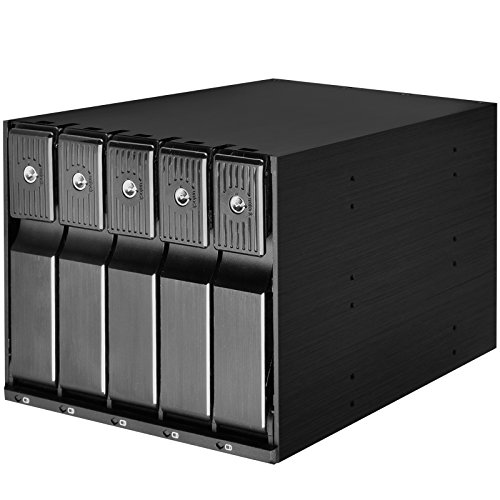
The Silverstone Technology FS305-12G Hot-Swap Hard Drive Cage is an excellent choice for PC enthusiasts who crave storage flexibility and efficiency. This sleek aluminum enclosure accommodates five 3.5″ SAS or SATA drives, supporting transfer rates of up to 12 Gbit/s. You’ll appreciate the trayless design, which makes swapping drives a breeze with its handy release handle. Individual LED indicators keep you informed about drive status, while the built-in cooling fan guarantees peak performance. With added security from metal key locks and a 1-year warranty, this hot-swap solution is perfect for upgrading your PC’s storage capacity efficiently.
Best For: PC enthusiasts and users who require flexible and efficient storage solutions.
Pros:
- Trayless design allows for quick and easy drive swapping without the need for screws.
- Individual metal key locks provide enhanced security for each drive.
- Built-in cooling fan ensures efficient heat dissipation for optimal drive performance.
Cons:
- Limited to 5 drives, which may not be sufficient for users with larger storage needs.
- The aluminum construction may be less durable compared to other materials like steel.
- Weight of 1.42 kg might be considered heavy for some users looking for lightweight options.
StarTech.com 4-Slot PCIe Expansion Chassis

Designed for professionals and enthusiasts who need to expand their system’s capabilities, the StarTech.com 4-Slot PCIe Expansion Chassis offers four PCIe x1 slots, making it an ideal choice for maximizing I/O options. This external enclosure supports various cards, including USB, Ethernet, and SFP, all while maintaining a compact design. With its passive cooling system, it operates quietly in environments up to 140°F. You’ll appreciate the versatility of power options, including USB-C. Plus, it’s OS-independent, so it works with Windows, macOS, and Linux. Enjoy peace of mind with a 2-year warranty and lifetime technical support.
Best For: Professionals and enthusiasts looking to expand their system’s I/O capabilities with versatile card support.
Pros:
- Supports a variety of PCIe cards, including USB, Ethernet, and SFP for diverse applications.
- Passive cooling design ensures quiet operation, making it suitable for noise-sensitive environments.
- OS-independent compatibility allows seamless use with Windows, macOS, and Linux systems.
Cons:
- Limited to PCIe x1 slots, which may not support high-bandwidth cards effectively.
- Requires potential driver installation for certain cards, which may complicate setup.
- Customer reviews indicate mixed satisfaction, with an average rating of 3.6 out of 5 stars.
Thunderbolt 3 to PCIe Card Dock with PCIe 3.0 x16 Slot

If you’re looking to expand your system’s capabilities without the hassle of installation, the ANQUORA Thunderbolt 3 to PCIe Card Dock is an excellent choice. This external enclosure features a PCIe 3.0 x16 slot, supporting various PCIe cards while offering up to 40Gbps bandwidth. It’s compatible with laptops and desktops equipped with Thunderbolt 3/4 or USB4. The dock’s all-aluminum design guarantees durability, while its passive cooling method keeps operations silent. Weighing just 605 grams, it’s portable and driverless, working seamlessly with Windows, Linux, and macOS. With a 1-year warranty, you can invest confidently in enhancing your setup.
Best For: Users looking to enhance their system’s capabilities with PCIe cards in a portable, driverless solution.
Pros:
- High bandwidth of up to 40Gbps allows for fast data transfer and performance.
- Driverless compatibility with Windows, Linux, and macOS simplifies setup and use.
- Silent operation due to passive cooling ensures a noise-free working environment.
Cons:
- Does not support GPU cards, limiting the types of PCIe cards that can be used.
- Requires a Thunderbolt 3/4 or USB4 connection, which may not be available on all systems.
- The size limitation of supported PCIe cards (up to 163mm x 28mm x 121mm) may restrict options for users.
ORARA eGPU Enclosure Compatible with Thunderbolt 3/4/USB4

For users seeking a reliable and high-performance solution for their graphics needs, the ORARA eGPU Enclosure stands out with its compatibility for Thunderbolt 3/4/USB4 devices. It supports NVIDIA and AMD PCIe graphics cards, ensuring you can harness powerful graphics performance. With a built-in JHL7440 controller, you’ll enjoy stable expansion and data transfer speeds of up to 32Gbps with PCIe 3.0 x4. The enclosure accommodates dual-width cards up to 2.3 inches wide and features a robust 750W power supply. Plus, with a one-year warranty and 30-day return policy, you can purchase with confidence.
Best For: Users with Thunderbolt 3/4/USB4 devices looking to enhance their graphics performance with NVIDIA or AMD PCIe graphics cards.
Pros:
- High Compatibility: Supports a wide range of NVIDIA and AMD PCIe graphics cards.
- Fast Data Transfer: Equipped with a JHL7440 controller for up to 32Gbps data transfer speeds.
- Robust Power Supply: Comes with a 750W power supply, ensuring adequate power for high-performance graphics cards.
Cons:
- Limited Compatibility: Not compatible with Thunderbolt 1/2 or USB-C devices, as well as MacBook models with M1/M2/M3/M4 chips.
- Size Restriction: Only accommodates graphics cards up to 2.3 inches wide; three-slot cards are not supported.
- Mixed Customer Feedback: Average rating of 3.6 out of 5 stars from 7 reviews may indicate varying user experiences.
Factors to Consider When Choosing Multi GPU Expansion Enclosures
When you’re choosing a multi GPU expansion enclosure, several key factors come into play. You’ll want to take into account compatibility with your devices, power delivery capacity, and cooling mechanisms to guarantee peak performance. Don’t forget to reflect on size, form factor, and how easy it is to install, as these can greatly impact your setup.
Compatibility With Devices
Choosing the right multi GPU expansion enclosure requires careful attention to compatibility with your devices. First, verify the enclosure’s connection interface matches your laptop or desktop, like Thunderbolt 3, Thunderbolt 4, or USB4, as this impacts performance and connectivity. Next, check the specific PCIe slot support; some enclosures only accommodate single-width or certain sizes of PCIe cards, which can limit your GPU options. Confirm the operating system compatibility, since some enclosures may need specific drivers or work only with certain versions of macOS, Windows, or Linux. Finally, investigate the maximum data transfer rates supported by the enclosure, as this can greatly affect performance during intensive tasks like gaming or rendering.
Power Delivery Capacity
Power delivery capacity is essential in selecting a multi-GPU expansion enclosure, as it directly affects your system’s performance. You should verify the power delivery matches or exceeds your GPUs’ requirements, typically ranging from 75W to 450W per card. Look for enclosures with high wattage power supply units (PSUs) of 600W or more to support high-end graphics cards without issues. Additionally, check for USB Power Delivery (PD) ratings around 140W or higher to provide enough power for both GPU operation and laptop charging. It’s important that the power supply includes multiple connectors, such as dual 8-pin (6+2) connectors, to accommodate various GPU configurations, guaranteeing compatibility with your system’s needs and preventing throttling or instability.
Cooling Mechanisms Employed
Selecting a multi-GPU expansion enclosure isn’t just about power delivery; cooling mechanisms play an essential role in maintaining performance and longevity. Effective cooling prevents overheating, which can lead to reduced performance and even hardware damage during intensive workloads. Many enclosures feature active cooling systems, like built-in fans that adjust their speed based on temperature and load. Some rely on passive cooling methods, utilizing the enclosure material for heat dissipation, which can be quieter but less effective under heavy use. Look for high-performance enclosures with airflow optimization strategies, including vented designs that promote air circulation around the GPUs. Remember, the size and orientation of the GPUs can greatly impact cooling efficiency, so consider the layout for ideal performance.
Size and Form Factor
When it comes to multi-GPU expansion enclosures, size and form factor are critical considerations that can greatly impact your setup. First, check the dimensions to guarantee the enclosure can accommodate your graphics cards, as some support lengths up to 13.7 inches. Also, consider whether you need a dual-slot or single-slot design based on your GPU type. Weight matters too; heavier enclosures, often over 5 kg, may pose portability issues in limited spaces. Finally, don’t overlook the cooling system—adequate airflow is essential for keeping multiple GPUs running efficiently. Look for enclosures with built-in fans or passive cooling to prevent overheating, ensuring your powerful setup remains stable and effective.
Installation Ease
How easy is the installation process for multi-GPU expansion enclosures? Look for models that offer tool-free installation, which lets you swap GPUs quickly without needing extra tools. It’s also vital to have clear instructions and included necessary cables; many enclosures come with a dedicated Thunderbolt cable for straightforward connections. Consider options that support driverless operation, allowing you to use them immediately after connection without software hassles. Check compatibility with your existing hardware to avoid installation complications, as some enclosures have specific PCIe card size requirements. Finally, evaluate the enclosure’s dimensions and weight to guarantee it fits comfortably in your workspace and can be moved easily if needed.
Performance Bandwidth
Performance bandwidth plays a pivotal role in your multi-GPU expansion enclosure‘s effectiveness, directly influencing the data transfer rate between your GPU and host system. Enclosures with Thunderbolt 3 or 4 offer bandwidths of up to 40Gbps, while Thunderbolt 5 can reach 80Gbps, which is essential for demanding applications. The PCIe interface version and lane configuration—like x1, x4, or x16—also matter, as a PCIe 3.0 x16 slot can deliver up to 32Gbps. Keep in mind that bandwidth limitations can create bottlenecks, particularly with high-end graphics cards that need more data throughput. So, when choosing an expansion enclosure, consider both maximum bandwidth and compatibility with your graphics card and other devices for peak performance.
Warranty and Support Options
Choosing the right warranty and support options for your multi-GPU expansion enclosure can greatly impact your overall experience and peace of mind. Most warranties range from one to two years, with some manufacturers offering extended warranties if you ask. Look for enclosures with a solid return policy—many allow returns within 30 days for defective or damaged products, ensuring you’re protected. Technical support varies; some brands provide free lifetime assistance, while others limit support to the warranty period. Customer feedback and ratings can reveal how reliable a brand’s warranty and support services are. Always review the fine print of warranties, as they might include specific eligibility requirements and conditions related to customer misuse.