One outlet can charge a phone, laptop, earbuds, and more—but only if the charger has the right ports and enough power when they’re all in use.
These 10 picks range from compact travel plugs to high-output desktop stations. The best fit depends less on the largest advertised wattage and more on what you need to charge at the same time.
Best 10 Multi Port USB C Charger Picks for 2026
Best Two-Pack
Auorld 60W Five-Port Wall Chargers

- Two chargers, five ports each
- 60W shared output per charger
- Up to 30W per USB-C port
Best For: Phones and small devices in two locations
Most Ports
245W Ten-Port Charging Station

- Six USB-C and four USB-A ports
- 245W stated total output
- Four USB-C cables included
Best For: Shared charging for up to ten devices
Best Six-Port Wall Plug

- Three USB-C and three USB-A ports
- 65W total, up to 30W USB-C
- 100–240V input
Best For: Mixed phone, tablet, and accessory charging
Best Desk Organizer
Anker 112W Six-Port Desktop Charger

- Three USB-C and three USB-A ports
- 112W total across six ports
- Silicone cable organizer included
Best For: An organized desk with several devices
Best for a Shared Desk
Anker Prime 200W 6-Port Charging Station

- Six-device, 200W total output
- Two USB-C ports support up to 100W each together
- Sturdy desktop design; not for travel
Best For: A shared desk with multiple devices and USB-C laptops
Best Compact Pick
Anker 735 Nano II 65W 3-Port Charger

- Up to 65W for one device
- Three ports in a compact body
- Foldable plug for carrying
Best For: A phone, tablet, and USB-C notebook on the go
Best for Mixed USB Devices
60W 5-Port USB-C Charger Block

- Three USB-C and two USB-A ports
- Up to 60W shared total output
- USB-C port supports up to 30W
Best For: Multiple phones, tablets, and mixed USB accessories
Best Compact Two-Port Pick

- Two USB-C ports: 27W + 20W
- Up to 45W from one port
- Compact, foldable design
Best For: Travelers charging a phone and tablet
Best Six-Device Station

- Three USB-C and three USB-A ports
- Up to 100W total output
- Includes a 5-foot AC cord
Best For: Charging multiple mobile devices at one station
Best Laptop-Ready Three-Port Pick
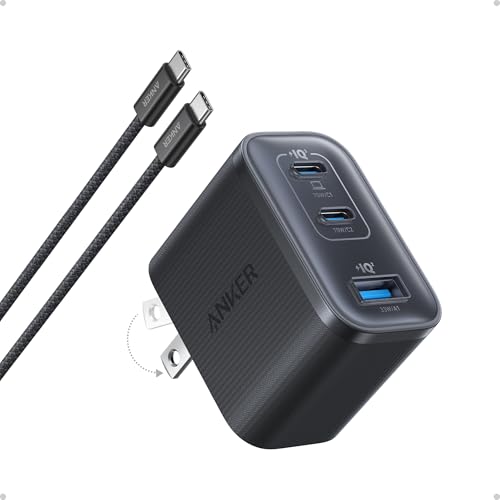
- Up to 70W from one USB-C port
- Three-port compact design
- USB-C cable included
Best For: Travelers needing laptop-capable USB-C charging
Best Two-Pack – Auorld 60W Five-Port Wall Chargers
If you need a multi port usb c charger in two locations, this Auorld two-pack gives you five ports per wall plug: three USB-C and two USB-A. Each charger is rated for 60W total, with up to 30W from an individual USB-C port.
Best For: Charging several phones and small devices at home and on the go.
Pros:
- Two five-port chargers are included.
- USB-C ports support Power Delivery; USB-A ports support Quick Charge 3.0.
- Compact GaN design helps save outlet space.
Cons:
- The 60W total is shared when multiple devices are connected.
- Charging cables are not included.
This is a practical pick when port count and having a second charger matter more than high-power laptop charging.
Most Ports – 245W Ten-Port Charging Station
For a household with many devices, this multi port usb c charger puts six USB-C and four USB-A ports in one charging station. Its stated 245W total output includes one USB-C port rated up to 65W for a laptop.
Best For: A shared charging spot for phones, tablets, accessories, and one laptop.
Pros:
- Charges up to ten devices at once.
- Includes four USB-C-to-USB-C cables and a detachable 5-foot power cord.
- One 65W USB-C port accommodates a laptop.
Cons:
- Only the first USB-C port supports laptop charging.
- The other five USB-C ports are rated up to 20W each.
Choose this station for a central charging area, but check which port you use for your laptop before plugging everything in.
Best Six-Port Wall Plug – 65W USB-C and USB-A Charger
This multi port usb c charger offers a balanced mix of three USB-C and three USB-A ports in a compact wall-plug format. It is rated for 65W total output, with USB-C charging rated up to 30W.
Best For: Charging several phones, tablets, and accessories from one outlet.
Pros:
- Six ports accommodate USB-C and USB-A cables.
- Supports Power Delivery and Quick Charge 3.0.
- GaN design and 100–240V input suit travel.
Cons:
- The 65W rating is a total shared across ports.
- A 30W USB-C port is not ideal for higher-power laptops.
Its appeal is straightforward: more mixed ports in a small wall adapter, rather than maximum power from one connection.
Best Desk Organizer – Anker 112W Six-Port Desktop Charger
If your multi port usb c charger will live on a desk, this Anker model pairs three USB-C and three USB-A ports with a silicone cable organizer. It provides 112W total across six ports; its highest-rated single USB-C port delivers up to 30W.
Best For: Keeping a workstation tidy while charging a laptop, phone, and accessories.
Pros:
- Six ports share a stated 112W total output.
- Included silicone organizer helps manage cables.
- Compact tabletop unit measures 3.0 × 3.2 × 1.3 inches.
Cons:
- Only USB-C1 provides the stated 30W MacBook Air charging.
- USB-C charging cables are not included.
This is a good fit for an orderly desktop setup, provided 30W is enough for the laptop you intend to charge.
Best for a Shared Desk – Anker Prime 200W 6-Port Charging Station
If your desk collects laptops, phones, and tablets, this multi port usb c charger gives six devices one charging spot. Its 200W total output and up-to-100W output from each of two USB-C ports used together make it a strong fit for power-hungry setups.
Best For: A stationary desk setup charging multiple devices, including two USB-C laptops.
Pros:
- Charges up to six devices at once with 200W total output.
- Two USB-C ports can each deliver up to 100W when used simultaneously.
- Compact, sturdy desktop body and included 5 ft AC cord.
Cons:
- At about 1.2 lb with a separate power cord, it is not intended for travel.
- 200W is the shared total, not the output available to every port at once.
Choose this one when keeping a busy desk organized matters more than portability. Its standout advantage is the ability to give two demanding USB-C devices substantial power at the same time.
Best Compact Pick – Anker 735 Nano II 65W 3-Port Charger
The Anker 735 is a multi port usb c charger for anyone who wants one small plug for a phone, tablet, and USB-C notebook. It offers up to 65W with one device connected, then distributes power across its three ports when you plug in more.
Best For: Carrying a compact charger for up to three everyday devices.
Pros:
- Up to 65W output when charging a single device.
- Three ports in a body described as roughly the size of an AirPods Pro case.
- Foldable plug and an 18-month warranty.
Cons:
- The 65W maximum is for one connected device; power is shared when charging multiple devices.
- Three ports may be too few for a larger desk setup.
This is the more portable choice if you only need three connections. For a laptop, use a single port when you want the charger’s full 65W output.
Best for Mixed USB Devices – 60W 5-Port USB-C Charger Block
This multi port usb c charger is a practical way to consolidate devices with both newer USB-C and older USB-A cables. Its five ports include three USB-C and two USB-A connections, with up to 60W total output.
Best For: Charging several phones, tablets, and USB accessories that use a mix of USB-C and USB-A cables.
Pros:
- Five ports: three USB-C and two USB-A.
- Supports Power Delivery and Quick Charge 3.0, with up to 30W from a USB-C port.
- Listed safety features include temperature control, short-circuit protection, and current regulation.
Cons:
- The 60W total is shared across connected devices.
- A USB-C port tops out at 30W, making it a less suitable choice for higher-power laptops.
Pick this block for port variety rather than maximum power to one device. Its mix of USB-C and USB-A is useful when your cables have not all moved to USB-C.
Best Compact Two-Port Pick – Anker Nano 47W GaN Charger
If you want a multi port usb c charger for a phone and tablet without carrying a bulky adapter, the Anker Nano 47W is a practical choice. Its two USB-C ports deliver 27W and 20W when used together.
Best For: Travelers who charge two USB-C devices at once and occasionally need to charge a USB-C notebook.
Pros:
- Charges two devices simultaneously at up to 27W and 20W.
- Either port can deliver up to 45W when used alone.
- Compact, foldable design and ActiveShield 2.0 temperature monitoring.
Cons:
- Only two ports, both USB-C.
- Charging cable is not included.
The 45W single-port output adds flexibility for a MacBook Air, but using both ports splits the available power. Pick it when portability matters more than charging several devices at once.
Best Six-Device Station – BREEKET 100W Six-Port Charger
The BREEKET charging station is a multi port usb c charger for a desk or nightstand crowded with mobile devices. It combines three USB-C ports and three USB-A ports, with up to 100W total output.
Best For: Households or workspaces charging several phones, tablets, and small accessories from one outlet.
Pros:
- Six ports let you connect up to six devices at once.
- USB-C ports support up to 20W each; USB-A ports support up to 18W each.
- Includes a detachable 5-foot AC extension cord for flexible placement.
Cons:
- Not intended for laptops.
- No individual USB-C port delivers the full 100W total rating.
This is better suited to consolidating mobile-device charging than powering a high-wattage notebook. Check each device’s power needs against the per-port limits, not just the 100W total.
Best Laptop-Ready Three-Port Pick – Anker Nano 70W Charger
For buyers who need a multi port usb c charger that can also handle a compatible laptop, the Anker Nano 70W offers three ports in a compact plug-in design. Each USB-C port supports up to 70W when used alone.
Best For: Travelers who want laptop-capable single-port charging alongside ports for other USB-C devices.
Pros:
- Up to 70W from an individual USB-C port for compatible laptops.
- Three ports in a 2.09 × 1.68 × 1.24-inch charger.
- Includes a 4.9-foot USB-C to USB-C cable and ActiveShield 4.0 thermal monitoring.
Cons:
- The stated 70W is a single-port maximum, not a promise of 70W from every port simultaneously.
- No USB-A port is listed.
Its stronger single-port output makes it the laptop-focused option of these three. If you plan to connect several devices at once, do not assume each will receive the full 70W.
How We Picked the Best Multi Port USB C Charger
We focused on the differences that matter when charging several devices: total rated output, port count, USB-C versus USB-A availability, and whether the charger is designed for a wall outlet or a desk. The selection spans compact two- and three-port plugs, midrange five- and six-port options, and higher-output desktop stations. Advertised maximum wattage is a starting point, not a promise that every port delivers its maximum simultaneously. Check each model’s port-specific ratings and power-sharing rules before buying.
Quick Comparison: Match the Charger to the Job
Travel and Everyday Carry
A two- or three-port charger in the 47W–70W range makes sense if you usually charge a phone and one or two smaller devices. For a laptop, confirm that a single USB-C port can deliver the wattage it requires, especially while another port is occupied.
Desk and Family Charging
Five- and six-port chargers reduce outlet clutter for a regular mix of phones, tablets, and accessories. A 100W–112W station offers more headroom than a 60W–65W block, but its usefulness depends on how that power is allocated. If multiple laptops are part of the plan, compare the 200W and 245W desktop options and verify their simultaneous output limits.
Key Buying Factors for a Multi Port USB C Charger
Power Per Port, Not Just Total Watts
Add up the needs of devices you expect to charge together, then inspect the charger’s output table for that exact port combination. A charger labeled 100W may reserve its highest output for one USB-C port used alone. Plugging in more devices can lower the power available to each one.
Port Layout and Charging Standards
Count the USB-C ports you need before counting total ports; a six-port unit may include USB-A connections that do not suit your newer devices. For laptops and fast-charging phones, check USB Power Delivery support and the supported power levels. Some devices need a particular charging standard or cable to reach their fastest advertised speed.
Size, Cables, and Placement
A foldable wall plug is easier to pack, while a desktop station keeps several cables accessible. Check whether a power cord or charging cables are included, and use cables rated for the power your devices require. If the charger will sit in a shared space, consider cord reach and whether occupied ports will leave room for bulkier connectors.
Who Should Buy Which Multi Port USB C Charger?
Choose a compact two- or three-port model for a bag or bedside table, provided its single-port output covers your largest device. Pick a five- or six-port charger for a desk with mostly phones, tablets, and accessories. Go for a higher-output desktop station when several people share one charging spot or you regularly charge laptops alongside smaller devices. The best Multi Port USB C Charger is the one whose simultaneous port ratings match your real charging routine—not simply the one with the most ports or highest number on the box.