If you want a NAS that feels quicker under load, M.2 cache support can make a real difference. It helps speed up frequent file access, improve responsiveness, and keep your shared storage more usable as your library grows.
Below, we focus on practical options for home labs, media servers, small offices, and power users who want the best balance of performance, expandability, and value.
Best 10 Nas with M 2 Cache Slots Picks for 2026
Best for High-Speed NVMe Caching

- 4x M.2 NVMe slots for caching or full flash storage
- Dual 2.5GbE ports for faster transfers and aggregation
- Intel N5105 CPU with 4GB DDR4 RAM, expandable to 16GB
Best For: Home and small-office buyers who want a fast, compact NAS with strong NVMe caching and media features.
Best for High-Capacity DIY Storage

- Three M.2 SSD slots for fast NVMe storage builds
- Two SATA drive bays for high-capacity expansion
- Dual LAN and Wi-Fi 6 for flexible home networking
Best For: Home users who want a compact, expandable NAS with mixed SSD and hard-drive storage.
Best for 10GbE Workflows

- 10GbE networking for fast transfers and backups
- Dual M.2 NVMe slots for cache or SSD expansion
- Docker, VMs, and Home Assistant support
Best For: Creators and smart-home users who want a fast, expandable two-bay NAS.
Best for 2.5GbE Performance

- Dual M.2 NVMe slots for cache or SSD pools
- Dual 2.5GbE ports for faster sharing
- Quad-core Celeron with 8GB RAM included
Best For: Home labs and small offices that want fast networking with NVMe cache expansion.
Best All-Flash Creator NAS
UGREEN DXP480T Plus 4-Bay SSD NAS

- Four M.2 NVMe slots for all-flash storage
- 10GbE, Wi‑Fi 6, and dual Thunderbolt 4
- Intel Core i5 for demanding creator workloads
Best For: Video editors and power users who want a fast SSD-only NAS with advanced connectivity.
Best for Expandable Storage
ACEMAGIC NAS N3A 4-Bay Desktop NAS

- 4-bay chassis scales up to 136TB total capacity.
- Dual M.2 NVMe slots support cache or fast SSD storage.
- Dual 2.5G + 1G LAN suits backups, streaming, and file sharing.
Best For: Home users and small offices that want a customizable NAS with fast expansion options.
Best for M.2 Cache Expansion
Asustor Lockerstor 2 Gen2 AS6702T
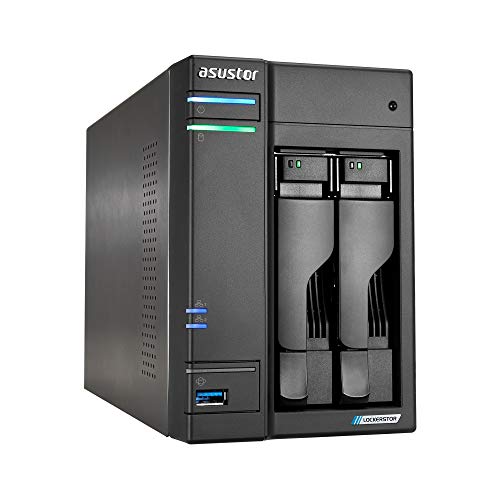
- 4x M.2 NVMe slots for cache or storage pools
- Dual 2.5GbE for faster transfers
- Intel N5105 with expandable DDR4 RAM
Best For: Power users and small teams who want fast NAS performance with flexible SSD cache expansion.
Best for High-Speed Workflows
UGREEN NAS DXP4800 Pro 4-Bay NAS

- Dual M.2 NVMe slots for cache or storage
- 6-core Intel Core i3 with DDR5 RAM
- 10GbE + 2.5GbE for fast file transfers
Best For: Power users and small teams that want fast networking, NVMe cache, and VM-ready performance.
Best for High-Speed Cache
Asustor Lockerstor 2 Gen2+ AS6702T v2
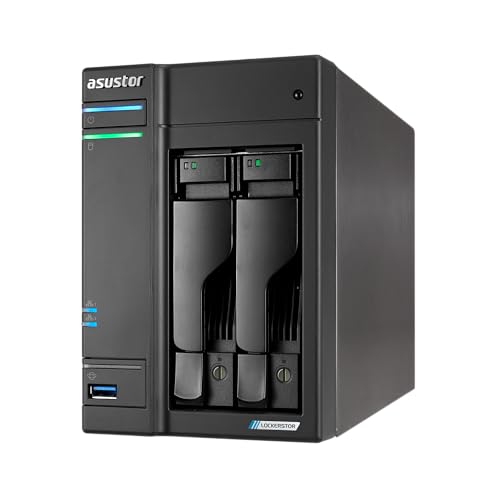
- Four M.2 NVMe slots for cache or all-flash storage
- Dual 5GbE ports for faster transfers and collaboration
- Expandable DDR4 plus Plex-ready hardware transcoding
Best For: Creators and small businesses needing fast caching, strong networking, and flexible media storage.
Best for DIY Power Users

- Dual M.2 NVMe slots for cache or fast storage
- Intel N100 plus 8GB RAM suits home lab tasks
- Dual 2.5GbE and 4K HDMI boost versatility
Best For: DIY buyers who want a customizable NAS with cache slots and strong connectivity.
Best for High-Speed NVMe Caching – Asustor AS5402T 2-Bay NAS
If you want a responsive nas with m 2 cache slots for demanding home or small-office tasks, the Asustor AS5402T stands out with four M.2 NVMe bays, dual 2.5GbE ports, and an Intel N5105 processor. It is a strong fit for faster file access, media streaming, backups, and light virtualization without moving to a much larger chassis.
Best For: Users who want a compact 2-bay NAS with unusually strong NVMe caching and fast networking for gaming, streaming, and shared storage.
Pros:
- Four M.2 NVMe slots give it excellent flexibility for caching or full flash storage.
- Dual 2.5GbE ports help unlock faster transfers and link aggregation.
- Intel N5105 CPU and expandable RAM handle multitasking better than basic NAS units.
- HDMI output and hardware transcoding make it useful for media-focused setups.
Cons:
- Diskless design means you must buy your own drives and SSDs.
- Only two main drive bays may feel limiting for large-capacity storage builds.
- Full value depends on pairing it with fast networking and NVMe SSDs.
Overall, the AS5402T is a smart pick if you specifically want a nas with m 2 cache slots that emphasizes speed, responsiveness, and flexible expansion over raw bay count.
Best for High-Capacity DIY Storage – Beelink ME Pro NAS Mini PC
The Beelink ME Pro is a practical pick if you want a nas with m 2 cache slots and room to scale beyond a basic home server. With 3 M.2 SSD slots, dual LAN, and two drive bays, it gives you a flexible layout for storage, caching, and network sharing without moving up to a full rack setup.
Best For: Home users and tinkerers who want a compact NAS with fast NVMe storage options, dual Ethernet, and the ability to mix SSDs and hard drives.
Pros:
- Three M.2 2280 PCIe 3.0 slots make it easy to build a fast SSD-based NAS setup
- Two additional drive bays add plenty of room for larger SATA storage
- Dual LAN, Wi-Fi 6, and Bluetooth 5.4 support flexible networking
- Intel N95 and preinstalled SSD make it usable as a small media or file server
Cons:
- Storage is DIY, so total cost rises once you add your own SSDs and drives
- Intel N95 is fine for home NAS duties, but not ideal for heavier virtualization workloads
- More of a niche modular NAS mini PC than a mainstream plug-and-play appliance
This is a strong option if you want a nas with m 2 cache slots and the flexibility to mix SSD performance with hard-drive capacity. It stands out more for expandability and layout than raw server power, which makes it a smart fit for compact home storage builds.
Best for 10GbE Workflows – UGREEN DXP2800 GT 2-Bay NAS
If you want a nas with m 2 cache slots that also delivers serious speed for creator workloads, the UGREEN DXP2800 GT is an easy shortlist pick. Its 10GbE networking, Ryzen Embedded CPU, and dual M.2 NVMe slots make it a strong fit for fast backups, large media libraries, and responsive file access at home or in a small office.
Best For: Creators, freelancers, and smart-home users who want fast 2-bay storage with room to grow and local app support.
Pros:
- 10GbE and Ryzen Embedded hardware suit demanding file transfers and multi-device access
- Dual M.2 NVMe slots add SSD expansion for cache or high-speed storage use cases
- UGOS Pro supports Docker, VMs, Plex, Home Assistant, and backup tools
- Built-in surveillance and local privacy features are useful for home security setups
Cons:
- Diskless model means you’ll need to buy your own drives separately
- More advanced than a basic home NAS, so setup may be overkill for simple file sharing
Overall, the DXP2800 GT is a compelling nas with m 2 cache slots if you care about speed, app flexibility, and local control more than the lowest possible price. It makes the most sense for buyers who want one box to handle storage, media, backups, and smart-home services.
Best for 2.5GbE Performance – QNAP TS-464 4-Bay NAS
If you want a fast, expandable nas with m 2 cache slots, the QNAP TS-464 is a smart fit for home power users, creatives, and small teams that need better transfer speeds without jumping to a full enterprise system. Its Intel Celeron processor, dual 2.5GbE ports, and dual NVMe slots make it a practical choice for speeding up shared storage and everyday access.
Best For: Home labs, media libraries, and small offices that want fast networking plus NVMe cache expansion.
Pros:
- Dual M.2 PCIe NVMe slots for cache acceleration or SSD storage pools
- Dual 2.5GbE ports help improve file transfers and multi-user access
- Quad-core Intel Celeron with 8GB RAM gives solid everyday NAS performance
- Multiple USB 3.2 Gen 2 ports support fast external drives and backups
Cons:
- Diskless model means you’ll need to buy drives separately
- Best value depends on using NVMe cache and faster networking to its full potential
Overall, the TS-464 stands out as a versatile nas with m 2 cache slots because it balances upgrade flexibility, fast networking, and easy expansion in a compact desktop design.
Best All-Flash Creator NAS – UGREEN DXP480T Plus 4-Bay SSD NAS
If you want a fast, modern nas with m 2 cache slots that can handle creative work and everyday storage without relying on spinning drives, the UGREEN DXP480T Plus is built for that job. Its all-flash design, 10GbE port, and Wi‑Fi 6 make it a strong fit for users who care more about speed and responsiveness than raw drive count alone.
Best For: Video editors, creators, and power users who want an SSD-only NAS with high-speed networking and flexible NVMe storage.
Pros:
- Four M.2 NVMe slots for an all-flash layout with fast access times
- 10GbE plus Wi‑Fi 6 for strong wired and wireless connectivity
- Intel Core i5 performance is well suited to multitasking and heavier workloads
- Includes 8K HDMI and dual Thunderbolt 4 for flexible direct connections
Cons:
- Diskless design means you must buy your own SSDs
- All-flash builds can get expensive compared with HDD-based NAS systems
- Maximum capacity depends on using compatible M.2 drives in RAID configurations
This is one of the more specialized choices if you need a nas with m 2 cache slots and care about speed first. It makes the most sense for users who will actually benefit from SSD responsiveness, 10GbE bandwidth, and creator-friendly connectivity.
Best for Expandable Storage – ACEMAGIC NAS N3A 4-Bay Desktop NAS
If you want a nas with m 2 cache slots that can grow with your storage needs, the ACEMAGIC NAS N3A is a practical pick. Its 4-bay layout plus dual M.2 NVMe slots gives you room for large media libraries, backups, and faster SSD-based caching, while the dual 2.5G + 1G LAN setup helps keep transfers moving smoothly.
Best For: Home users, creators, and small offices that need a roomy, flexible NAS for backups, media, and custom OS setups.
Pros:
- 4-bay design supports up to 136TB total storage for serious expansion.
- Dual M.2 PCIe 3.0 slots add fast cache or SSD storage options.
- Dual 2.5G + 1G LAN improves transfer speed and network flexibility.
- Includes 8GB DDR4 and a pre-installed 128GB PCIe 3.0 SSD for the base system.
Cons:
- Drives are not included, so the full setup cost can rise quickly.
- More of a DIY platform than a turnkey, beginner-friendly appliance.
- May be overkill if you only need a simple two-bay backup box.
Overall, the N3A stands out as a flexible nas with m 2 cache slots for buyers who care more about expandability and network speed than a locked-down ecosystem. It makes the most sense if you want a custom storage hub that can handle backups today and grow into a media or home server later.
Best for M.2 Cache Expansion – Asustor Lockerstor 2 Gen2 AS6702T
If you want a nas with m 2 cache slots that can push harder than a basic home file server, the Asustor Lockerstor 2 Gen2 is a strong fit. Its dual 2.5GbE ports, Intel Celeron N5105 processor, and four M.2 NVMe slots give it the speed headroom for backups, shared media, and light virtualization.
Best For: Power users, small offices, and Plex setups that need fast network storage with flexible SSD cache expansion.
Pros:
- 4x M.2 NVMe slots for cache acceleration or high-speed storage pools
- Dual 2.5GbE ports for faster transfers and better multi-user access
- Intel quad-core N5105 handles backups, streaming, and everyday NAS tasks well
- Expandable DDR4 memory supports heavier multitasking and virtualization
Cons:
- Diskless model means you still need to buy drives separately
- Only two main drive bays if you want large-capacity storage first and cache second
- Not the cheapest option if you only need basic home file storage
For buyers comparing a nas with m 2 cache slots, this model stands out because it balances SSD acceleration, fast networking, and usable multimedia performance without moving into rackmount pricing. It is especially appealing if you want room to grow into faster workflows later.
Best for High-Speed Workflows – UGREEN NAS DXP4800 Pro 4-Bay NAS
If you want a nas with m 2 cache slots that can also handle heavier business workloads, the UGREEN NAS DXP4800 Pro is a strong fit. It combines a 6-core Intel Core i3-1315U, dual 10GbE/2.5GbE networking, and two M.2 NVMe slots for cache or storage, giving it the kind of responsiveness that suits editing, VM use, and fast team file sharing.
Best For: Power users, small offices, and creators who need fast file transfers, Docker support, and room to grow.
Pros:
- Dual M.2 NVMe slots can be used as cache or storage for better HDD performance.
- Intel Core i3-1315U and DDR5 RAM make it well-suited for Docker and virtual machines.
- 10GbE plus 2.5GbE networking supports very fast transfers for shared workspaces.
- 4-bay design offers flexible RAID options and plenty of expansion headroom.
Cons:
- Diskless model means you still need to buy drives separately.
- Its performance and feature set may be more than casual home users need.
Overall, this is a compelling nas with m 2 cache slots if you care about speed, multitasking, and workstation-style flexibility. The combination of NVMe cache support, strong CPU performance, and fast networking makes it easier to keep large libraries and shared projects moving smoothly.
Best for High-Speed Cache – Asustor Lockerstor 2 Gen2+ AS6702T v2
If you want a nas with m 2 cache slots that leans hard into performance, the Asustor Lockerstor 2 Gen2+ is built for creators and small teams who need faster transfers, smoother multitasking, and responsive app performance. Its dual 5GbE ports, Intel Celeron N5105 CPU, and four M.2 NVMe slots make it a strong fit for cache-heavy workflows, media libraries, and active file sharing.
Best For: Creators, power users, and small businesses that want high-speed caching, strong networking, and room to grow.
Pros:
- Four M.2 NVMe slots for cache acceleration or fast all-flash storage
- Dual 5GbE ports for much faster network throughput than standard Gigabit NAS units
- Intel quad-core CPU and expandable DDR4 memory support 24/7 multitasking
- HDMI and Plex-ready hardware transcoding suit media and creator setups
Cons:
- Diskless design means you must buy your own drives and SSDs
- 2-bay capacity is limiting if you need lots of HDD storage
As a nas with m 2 cache slots, this model stands out when responsiveness matters more than raw bay count. It’s a practical choice if you want faster cache performance, solid networking, and a NAS that can handle both storage and media workloads well.
Best for DIY Power Users – Yxk Zero1 Pro 4-Bay NAS
If you want a flexible nas with m 2 cache slots for home or office use, the Yxk Zero1 Pro stands out with its Intel N100 CPU, 8GB RAM, and dual NVMe bays for caching or fast storage. The 4-bay design plus dual 2.5GbE networking gives it enough headroom for backups, streaming, and light virtualization without feeling overbuilt for a smaller setup.
Best For: Enthusiasts who want a customizable NAS platform with strong connectivity, M.2 cache support, and room to grow.
Pros:
- Dual M.2 NVMe slots make it a practical nas with m 2 cache slots for faster responsiveness.
- Intel N100 and 8GB RAM are solid for Docker, media, and everyday file sharing.
- Dual 2.5GbE ports and 4K HDMI add useful networking and media-center flexibility.
- Supports third-party OS options like TrueNAS, Unraid, and OMV for deeper customization.
Cons:
- Drives are not included, so the total setup cost can rise quickly.
- Manual OS setup may be too involved for buyers who want plug-and-play simplicity.
This is a strong pick if you want a compact but expandable nas with m 2 cache slots and the freedom to tune storage, apps, and networking to your workflow. It’s especially appealing for DIY users who value flexibility over turnkey convenience.
How We Picked the Best Nas with M 2 Cache Slots
We prioritized systems that combine useful M.2 support with strong everyday NAS fundamentals: dependable CPU performance, enough RAM for multitasking, solid network speeds, and sensible bay counts for future growth. We also favored models that make caching or SSD expansion easy to use without forcing an all-flash setup.
Because buyers use a Nas with M 2 Cache Slots differently, we looked for a mix of compact 2-bay units, flexible 4-bay systems, and faster desktop models for larger media libraries, backups, and shared workspaces.
Quick Comparison
In general, 2-bay models are best for smaller households and lighter storage needs, while 4-bay units offer more room for RAID flexibility and long-term capacity. If you care about faster multitasking, look for stronger CPUs, more memory, and 2.5GbE or 10GbE networking to keep SSD cache from becoming the bottleneck.
What M.2 Cache Actually Helps with
M.2 cache is most useful when your NAS handles repeated file access, multiple users, metadata-heavy tasks, or app/container workloads. It is less important if you mostly store large, rarely accessed files and do not expect many simultaneous connections.
Key Buying Factors for NAS with M.2 Cache Slots
1. Cache Versus Storage Use
Some systems use M.2 slots only for cache, while others can use them as fast storage volumes. Check whether the NAS supports cache, storage pools, or both, since that changes how much real-world benefit you will get.
2. Network Speed
A fast cache setup is only as useful as the network behind it. For most buyers, 2.5GbE is a strong baseline. If you move large media files, edit directly from the NAS, or serve multiple users, 10GbE can be a better match.
3. CPU and RAM
More powerful processors and higher memory help with encryption, media services, backups, and virtualization. This matters a lot if your Nas with M 2 Cache Slots will also run Docker, Plex, or office workloads.
4. Bay Count and RAID Options
More drive bays usually mean better flexibility for redundancy, growth, and performance tuning. A 4-bay model often gives you more breathing room than a 2-bay unit, especially if you expect your storage needs to expand.
Who Should Buy Which Nas with M 2 Cache Slots?
Choose a 2-bay NAS if you want simple backup storage, a home media library, or a compact shared drive with modest expansion needs.
Choose a 4-bay NAS if you want stronger RAID options, larger capacity, or a better long-term fit for multiple users and heavier workloads.
Choose an all-flash or high-speed model if you care most about responsiveness, virtual machines, large project files, or fast multi-user access. In that case, M.2 support is more than a bonus—it is part of the core value.
For most buyers, the best choice is the system that balances cache support, networking, and capacity rather than the one with the most M.2 slots on paper.