When setting up your PC rack, choosing the right network patch panel is essential for peak performance and organization. With so many options available, it can be tough to determine which panel suits your specific needs. From high-speed capabilities to tool-free installations, the right choice can make all the difference. Let’s explore the top ten network patch panels and see how each one can enhance your setup.
Cable Matters 24 Port Cat6 Network Patch Panel
![Cable Matters [UL Listed] 24 Port 10Gbps Cat6 Patch Panel, 1U](https://m.media-amazon.com/images/I/41Yp82HtJdL._SL500_.jpg)
If you’re looking for a reliable solution for your high-performance networking needs, the Cable Matters 24-Port Cat6 Network Patch Panel is an excellent choice. This UL-listed panel supports 10 Gigabit Ethernet and is compatible with both Cat6 and older Cat5e/Cat5 cabling. Its future-proof design accommodates PoE devices, while the gold-plated contacts guarantee stable connections. You’ll appreciate the easy installation with numbered ports and color-coded diagrams. Measuring 1U high, it fits seamlessly into standard racks. Plus, with a strong customer rating of 4.7 stars, it’s recognized for its build quality and effective cable management, making it ideal for any setup.
Best For: Those seeking a high-performance networking solution for home or enterprise setups that require reliable connectivity and easy installation.
Pros:
- Supports 10 Gigabit Ethernet and is backward compatible with Cat5e and Cat5 cabling.
- Easy installation with numbered ports and color-coded wiring diagrams.
- Strong customer satisfaction with a 4.7-star rating for build quality and cable management.
Cons:
- Limited to 24 ports, which may not be sufficient for larger network setups.
- Requires compatible impact tools (110 or Krone) for installation, which may be an additional cost for some users.
- Physical dimensions may not fit in non-standard rack setups without modification.
TRENDnet 24-Port Blank Keystone Patch Panel (1U Rackmount)
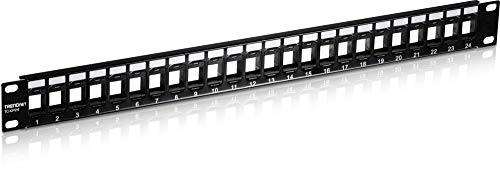
The TRENDnet 24-Port Blank Keystone Patch Panel (1U Rackmount) is an ideal choice for network professionals and home users who need a versatile solution for organizing their cabling. It supports standard-sized Cat6 keystone jacks for audio, video, and data, making it perfect for various applications. Crafted from durable SPCC steel, its 19” 1U design guarantees it can handle gigabit and 10G Copper Ethernet networks. Plus, with pre-numbered ports and labels, identifying cables is a breeze. This NDAA-compliant patch panel also comes with a two-year manufacturer protection guarantee, assuring you’ll receive a high-quality product backed by reliable tech support.
Best For: Network professionals and home users looking for a reliable and organized solution for cabling in audio, video, and data applications.
Pros:
- Supports standard-sized Cat6 keystone jacks for versatile use.
- Durable SPCC steel construction ensures long-lasting performance.
- Pre-numbered ports and labels facilitate easy cable identification.
Cons:
- Keystone jacks must be purchased separately, which may increase overall cost.
- Limited to 24 ports, which may not be sufficient for larger networks.
- Requires rackmount installation, which may not suit all setups.
Jadaol 24 Port Patch Panel Network Panel
![Jadaol [UL Listed] 24 Port Patch Panel Rackmount or Wall Mount 19-Inch 1U](https://m.media-amazon.com/images/I/51fV8h2+KRL._SL500_.jpg)
Designed for efficiency, the Jadaol 24 Port Patch Panel is a top choice for both home and office setups. It features a 1U rackmount design, preloaded with 24 Cat6 RJ45 couplers, supporting 10Gbps Ethernet. You’ll appreciate the tool-free installation that saves you time, along with included mounting hardware for easy setup. The rugged metal housing adds durability, while gold-plated contacts guarantee reliable data transfer. It’s compatible with Cat6, Cat5e, and Cat5 cables, making it ideal for gaming and streaming. However, keep in mind that some users noted performance issues with specific couplers.
Best For: The Jadaol 24 Port Patch Panel is best for home and office users seeking an efficient and high-speed networking solution.
Pros:
- Tool-free installation saves time and simplifies setup.
- Rugged metal housing ensures durability and cable management.
- Gold-plated contacts provide reliable, high-speed data transfer.
Cons:
- Some users reported performance issues with specific couplers achieving only 5Gbps speeds.
- Lack of rear port number labeling may hinder quick identification.
- Compatibility concerns with certain keystone couplers may affect overall performance.
GeeekPi 12 Port CAT6 Network Patch Panel

For those seeking a compact and efficient solution for their networking needs, the GeeekPi 12 Port CAT6 Network Patch Panel stands out with its 0.5U design. It’s compatible with DeskPi RackMate T1/T0/T2 and 10-inch server racks. With pre-numbered sequential ports, you’ll easily identify cables. The straight-through design simplifies connections without needing to drill. Weighing just 5.9 ounces and measuring 10.47 x 2.28 x 1.06 inches, it fits snugly into tight spaces. Customer reviews give it a solid 4.6 out of 5 stars, praising its build quality. However, some users noted installation challenges with certain keystone jacks.
Best For: Those looking for a compact and efficient networking solution compatible with small server racks and cabinets.
Pros:
- Easy cable identification with pre-numbered sequential ports.
- Straight-through design allows for simple installation without drilling.
- Lightweight and compact dimensions make it suitable for tight spaces.
Cons:
- Some users report installation difficulties with certain keystone jacks.
- Compatibility issues with certain keystone jacks, limited to RJ11/RJ45.
- Clearance concerns when installed in the top 0.5U of the rack.
TRENDnet 48-Port Blank Keystone Patch Panel (TC-KP48)

With its 48-port capacity and compatibility with standard-sized keystone jacks, the TRENDnet 48-Port Blank Keystone Patch Panel (TC-KP48) is an ideal solution for those looking to optimize their PC rack setups. This 2U metal rackmount panel supports high-speed gigabit applications and features pre-numbered ports with writable labels for easy cable management. Weighing just 1.01 pounds, it’s durable yet lightweight, made from SPCC steel. While it’s NDAA compliant for government use, remember to pair it with TRENDnet’s Cat6 keystone jacks for the best performance. Enjoy reliable tech support and a solid two-year warranty with your purchase.
Best For: Those seeking a reliable and efficient solution for organizing and managing network connections in a 19” rack setup.
Pros:
- Durable construction: Made from SPCC steel, ensuring longevity and stability.
- Easy cable management: Features pre-numbered ports and writable labels for convenient organization.
- NDAA compliant: Suitable for government network solutions in the U.S. and Canada.
Cons:
- Fitment issues: Some users reported difficulties when using non-TRENDnet keystone jacks due to spacing limitations.
- Requires specific jacks: Optimal performance is best achieved with TRENDnet’s own Cat6 keystone jacks, which are sold separately.
- Limited tech support hours: Reliable support is only available during business hours, which may be inconvenient for some users.
Rapink 24 Port Cat6 Patch Panel

The Rapink 24 Port Cat6 Patch Panel stands out as an excellent choice for both home and professional setups, especially if you need a reliable and efficient way to manage multiple connections. Supporting 10G Ethernet, it easily accommodates Cat6, Cat5e, and Cat5 cabling. With toolless termination, installation takes just about 10 minutes, saving you precious time. Its detachable back bar enhances stability while reducing cable deformation. Plus, the gold-plated RJ45 jacks guarantee peak network speeds. The panel’s design allows for future expansion with various couplers, making it a versatile option for any growing network infrastructure.
Best For: The Rapink 24 Port Cat6 Patch Panel is best for home and professional users looking for an efficient and reliable solution for managing multiple network connections.
Pros:
- Toolless termination allows for quick and easy installation in approximately 10 minutes.
- Gold-plated RJ45 jacks ensure high-performance network speeds up to 10G.
- Future expansion capabilities enable users to replace couplers with various types for versatile connectivity options.
Cons:
- Limited to 24 ports, which may not suffice for larger network setups.
- Requires a 19-inch rack for installation, potentially limiting placement options.
- Detachable back bar may need regular checking to ensure stability over time.
Cable Matters 24-Port 10Gbps Cat6A Ethernet Patch Panel

Engineered for high-speed connectivity, the Cable Matters 24-Port 10Gbps Cat6A Ethernet Patch Panel is an excellent choice for professionals and enthusiasts looking to optimize their advanced network setups. With data transfer rates up to 10Gbps, you’ll experience superior performance with built-in shielding against interference. Its advanced cable management bar and included ties help keep your setup organized and tidy. You can easily customize connections with standard keystone sockets, and the complete installation accessories guarantee a secure mount. Rated 4.8 out of 5 stars by customers, this patch panel proves to be a reliable and efficient networking solution.
Best For: Professionals and enthusiasts looking to optimize high-speed network setups with reliable performance.
Pros:
- Superior data transfer rates of up to 10Gbps for advanced networking needs.
- Enhanced EMI/RFI protection ensures uninterrupted network performance.
- Organized cable management features, including ties and sequential port labels, simplify installation.
Cons:
- The metal case may add some weight compared to plastic alternatives.
- Standard keystone sockets limit customization options to compatible jacks.
- Installation may require additional tools not included in the package.
Cable Matters 1U 24 Port Keystone Patch Panel

Ideal for both home and office setups, the Cable Matters 1U 24 Port Keystone Patch Panel offers unmatched versatility by accommodating a variety of keystone jacks, including RJ45 and HDMI. This patch panel fits universally in 19-inch racks or wall mounts, providing flexibility for any installation. You’ll appreciate its ability to consolidate coax, Ethernet, and fiber cables into one neat solution, making upgrades a breeze. The included cable management bar keeps everything organized, while the heavy-duty, flame-retardant steel construction guarantees durability. With stamped port numbers and writable label spaces, you can easily maintain a professional and tidy appearance.
Best For: Home and office users looking for a versatile and organized solution for managing multiple types of cables in their structured cabling setups.
Pros:
- Accommodates a wide range of keystone jacks, including RJ45, HDMI, and fiber, providing flexibility for various applications.
- Easy installation in 19-inch racks or wall mounts, making it a versatile choice for different environments.
- Durable construction from flame-retardant steel ensures long-lasting performance and safety.
Cons:
- Limited to 24 ports, which may not be sufficient for larger setups requiring more connections.
- Installation may require additional tools or hardware that are not included in the package.
- The patch panel’s size and weight may not be ideal for all wall mount applications.
Patch Panel 24 Port Cat6 Network Patch Panel

For anyone looking to streamline their network setup, the 24 Port Cat6 Network Patch Panel stands out with its no-punch-down design. This panel lets you connect RJ45 terminated cables easily, saving you time and hassle. With support for up to 10G performance, it’s perfect for high-speed data transmission. Its sturdy metal construction guarantees durability, while the removable back bar helps with cable organization. Users appreciate the clean, professional look it brings to network cabinets, and the ability to replace various keystones adds flexibility. Overall, it’s a cost-effective choice that enhances both performance and aesthetics in your network.
Best For: Those looking for an efficient and flexible solution to manage and connect network cables in home or small business environments.
Pros:
- No-punch-down design simplifies installation and saves time.
- Supports up to 10G performance for high-speed data transmission.
- Sturdy metal construction with cable management features enhances durability and organization.
Cons:
- Some users reported missing rack screws or zip ties in their orders.
- Limited to RJ45 terminated cables, which may restrict some users.
- May require additional purchasing of keystones for full compatibility.
Cable Matters 24-Port 10Gbps Cat6 Ethernet Patch Panel
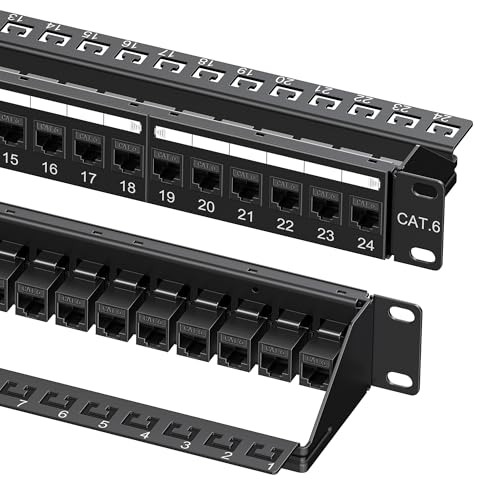
Designed specifically for high-demand environments like data centers and enterprise networks, the Cable Matters 24-Port 10Gbps Cat6 Ethernet Patch Panel delivers exceptional performance and reliable connectivity. With data transfer rates of up to 10Gbps, this patch panel guarantees efficient network operation. Its sturdy metal construction and dimensions of 20 x 4.25 x 2.25 inches make it a robust choice. You’ll appreciate the integrated cable management bar and sequential port labels, which simplify organization. Installation is a breeze with the included kit, featuring cable ties and mounting accessories. Experience seamless compatibility with your equipment and enjoy hassle-free setup today!
Best For: The Cable Matters 24-Port 10Gbps Cat6 Ethernet Patch Panel is best for data centers and enterprise networks requiring high-speed connectivity and effective cable management.
Pros:
- High-speed performance with data transfer rates of up to 10Gbps for efficient network operations.
- Integrated cable management features, including a cable management bar and sequential port labels, for easy organization.
- Comprehensive installation kit that includes cable ties and mounting accessories for hassle-free setup.
Cons:
- Some users noted that the metal gauge could be thicker for added durability.
- Concerns about keystone orientation in certain rack setups may affect installation flexibility.
- Limited maximum length of 180 feet at 10Gbps due to Cat6 limitations may not meet all user requirements.
Factors to Consider When Choosing Network Patch Panels for PC Racks
When you’re selecting a network patch panel for your PC rack, several key factors come into play. You’ll want to take into account the port count options, cable management features, and how easy it is to install. Additionally, think about compatibility with standards and the overall durability and build quality to guarantee a reliable setup.
Port Count Options
Choosing the right port count for your network patch panel is vital, especially since it can greatly impact your network’s efficiency and organization. Patch panels typically range from 12 to 48 ports, giving you flexibility based on your network size and needs. For small to medium-sized networks, a 24-port patch panel is often the standard choice, offering ample connectivity without taking up too much space. If you’re managing a larger enterprise environment, a 48-port option is ideal for connecting numerous devices efficiently. It’s also important to take into account future expansion needs; investing in a higher port count can save you time and resources down the line, ensuring your network remains organized and manageable as it grows.
Cable Management Features
After settling on the right port count for your network patch panel, it’s time to focus on cable management features that can enhance your setup. Effective features, like D-rings and detachable management bars, help reduce clutter and keep your installation organized. Look for sequential port labeling and writable labels to easily identify cables, making troubleshooting a breeze. Integrated features, such as C-shaped keyholes for zip ties, guarantee cables are neatly arranged and minimize strain on connections. Sturdy construction materials, like heavy-duty metal, are essential for supporting the weight of your cables while maintaining system integrity. Finally, consider tool-free installation options, which allow for quick changes without the hassle of specialized tools, improving overall efficiency.
Installation Ease
Selecting a network patch panel that simplifies installation can greatly enhance your setup experience. Look for models featuring tool-free installation options, which can save you up to 70% of your time by eliminating the need for punch-down tools. Consider panels with preloaded keystones or couplers, making cable setups quick and easy, especially in tight spaces. It’s crucial to ascertain your patch panel includes thorough mounting hardware like screws and cage nuts for a hassle-free installation. Opt for panels with numbered ports and color-coded wiring diagrams to streamline the process and minimize errors. Finally, choose designs with removable cable management bars for improved organization and easier access when connecting or disconnecting cables.
Compatibility With Standards
When it comes to network patch panels, ensuring compatibility with established standards is essential for achieving ideal performance and reliability. Look for panels that support Ethernet standards like Cat6 and Cat6A to guarantee optimal data transfer rates—Cat6 can handle up to 10Gbps, while Cat6A excels over longer distances. It’s also important to check compatibility with keystone jacks, as many panels allow you to customize your setup for various audio, video, and data applications. Don’t overlook rackmount sizes; standard patch panels fit in 19-inch racks, ensuring proper installation. Finally, compliance with safety standards, such as UL or NDAA, is crucial, especially in government or commercial environments where regulatory adherence is non-negotiable.
Durability and Build Quality
While you may focus on features and compatibility when choosing a network patch panel, durability and build quality shouldn’t be overlooked. Look for metal constructions, as they typically offer better resistance to wear and tear than plastic options. A thickness of 1.5 mm steel or more is ideal for guaranteeing your patch panel can handle physical stress and maintain its integrity over time. Features like detachable back bars can also help reduce cable strain, enhancing durability and long-term performance. Additionally, verify your patch panel complies with industry safety standards, like UL fire safety certifications, for reliable operation. Finally, gold-plated contacts are essential for stable connections, as they resist corrosion and improve conductivity.
Performance Specifications
To guarantee your network operates efficiently, it’s crucial to understand the performance specifications of patch panels. First, check the maximum data transfer rate; look for options supporting up to 10Gbps, especially in high-demand settings. Confirm compatibility with cabling standards like Cat6, Cat5e, and Cat5 to keep your network running smoothly. Consider panels with gold-plated contacts or shielding, as these features enhance signal integrity and minimize interference. Evaluate the number of ports available; larger panels offer room for more connections, which is important for scaling your network. Finally, assess the construction materials and design—durable metal housing and effective cable management will contribute to long-term performance and keep your setup organized.