When it comes to building a high-performance custom water cooling loop, choosing the right PC case is essential. You’ll want a case that not only supports efficient airflow but also enhances the overall look of your setup. The right selection can make a significant difference in cooling efficiency and aesthetics. Let’s explore some top contenders that can elevate your build’s performance and style.
FOIFKIN F600 ATX Mid-Tower Gaming PC Case

If you’re a gamer looking to build a powerful rig that stays cool under pressure, the FOIFKIN F600 ATX Mid-Tower Gaming PC Case is an ideal choice. With its dual-chamber design, this case optimizes thermal performance and cable management, ensuring your components look as good as they perform. Pre-installed with seven 120mm ARGB PWM fans, it guarantees excellent airflow while supporting up to three 360mm radiators for serious cooling. Its fully transparent tempered glass showcases your hardware beautifully, and compatibility with ATX, M-ATX, and ITX motherboards means you can customize your build just the way you want.
Best For: Gamers looking for a high-performance case that combines superior cooling and aesthetic appeal for their custom builds.
Pros:
- Pre-installed with 7x 120mm ARGB PWM fans for optimal airflow and customizable lighting.
- Dual-chamber design enhances thermal performance and simplifies cable management.
- Supports a variety of motherboard sizes (ATX, M-ATX, ITX) and offers compatibility with large GPUs and multiple cooling radiators.
Cons:
- Limited storage options with only 1x HDD and 2x SSDs supported.
- The case may be bulky for users with limited space due to its dimensions.
- The fully transparent glass may require regular cleaning to maintain a clear view of internal components.
JONSBO X400 Gray ATX PC Case

The JONSBO X400 Gray ATX PC Case stands out as an ideal choice for gamers and PC enthusiasts seeking robust water cooling capabilities. With its sleek design and 3D skeletal framework, it supports ATX and Micro-ATX motherboards, accommodating GPUs up to 427 mm. You’ll appreciate the ample cooling options, featuring 13 fan positions and support for various AIO setups, ensuring excellent airflow. The tool-free panel design simplifies access, while ARGB lighting enhances the aesthetic. Weighing just 10.2 kg, this mid-tower case combines functionality with style, making it a top contender for your next custom water cooling build.
Best For: Gamers and PC enthusiasts looking for a stylish mid-tower case with advanced cooling options for custom builds.
Pros:
- Supports a wide range of cooling configurations with 13 fan positions and AIO compatibility.
- Tool-free panel design allows for quick and easy access to components.
- Sleek 3D skeletal framework with ARGB lighting enhances the visual appeal.
Cons:
- Requires additional brackets and cables for vertical GPU installation.
- Limited to one 2.5″ SSD and two 3.5″ HDD drive bays, which may not be sufficient for extensive storage needs.
- Weighs 10.2 kg, which may be heavier compared to some other mid-tower cases.
darkFlash ATX Mid-Tower PC Case (DS900)

Designed for enthusiasts who crave both aesthetics and performance, the darkFlash ATX Mid-Tower PC Case (DS900) offers a stunning 270° panoramic view through its tempered glass panels. Weighing just 15 pounds, this sleek black case features magnetic dust filters to keep your components clean and an anti-slip structure for stability. With four pre-installed PWM ARGB fans and the capacity for up to ten, cooling isn’t a concern. The user-friendly design simplifies installation and cable management, while the high-speed IO panel includes USB 3.0 and Type-C ports for quick connections. It’s a solid choice for your custom water cooling needs.
Best For: Enthusiasts seeking a stylish and functional PC case that offers excellent cooling capabilities and ease of installation.
Pros:
- Spacious 270° panoramic tempered glass design for an attractive display of hardware.
- Excellent cooling support with 4 pre-installed PWM ARGB fans and compatibility for up to 10 total fans.
- User-friendly installation features and effective cable management for a clean build.
Cons:
- Limited to 2 USB ports, which may not suffice for users with multiple peripherals.
- Weight of 15 pounds may make it less portable for frequent movers.
- No included RGB controller if additional ARGB fans are added.
Hyte Y70 Touch Infinite Dual Chamber ATX Mid Tower Case
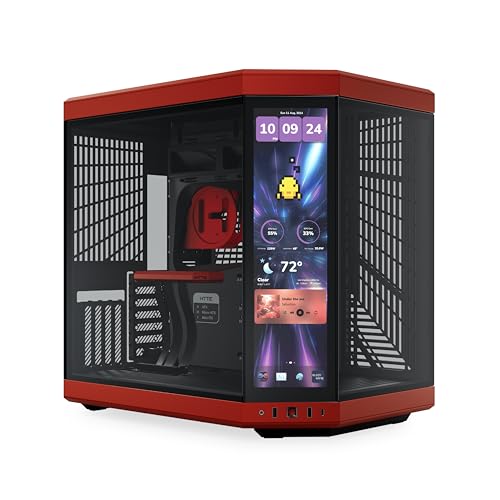
For water cooling enthusiasts seeking a stylish and functional solution, the Hyte Y70 Touch Infinite Dual Chamber ATX Mid Tower Case stands out with its impressive integrated 14.9” LCD touchscreen. With support for massive cooling configurations, you can easily fit a 360mm radiator on the side and another on top. The spacious dual chamber design simplifies cable management, while the luxury PCIe riser guarantees seamless GPU installation. Available in four colors, this case showcases your hardware beautifully behind its panoramic glass. Plus, with a 3-year warranty and excellent reviews, you can rely on its quality for your custom build.
Best For: Water cooling enthusiasts and gamers looking for a stylish case with advanced cooling options and a modern aesthetic.
Pros:
- Impressive 14.9” integrated LCD touchscreen enhances user interaction and customization.
- Ample cooling configurations support up to two 360mm radiators, ensuring optimal thermal performance.
- Dual chamber design simplifies cable management and improves airflow, leading to a cleaner build.
Cons:
- Heavier weight at 24.4 pounds may be cumbersome for some users when moving or setting up.
- Potentially higher price point compared to traditional cases due to advanced features and design.
- Limited availability of colors may not suit all aesthetic preferences.
H1 HYXN ATX PC Case with 7 PWM ARGB Fans

With its impressive seven PWM ARGB fans, the H1 HYXN ATX PC Case is an ideal choice for gamers and PC enthusiasts who prioritize cooling efficiency and stunning visuals. This dual cavity mid-tower case boasts a panoramic 270° view, showcasing its sleek black design with tempered glass panels. You’ll benefit from excellent airflow, supporting up to three 360mm radiators for peak cooling. Plus, it accommodates a variety of motherboard sizes and long GPUs. With ample connectivity options and a customer rating of 4.6 stars, the H1 HYXN guarantees both performance and style for your custom water cooling setup.
Best For: Gamers and PC enthusiasts seeking a high-performance case with exceptional cooling and aesthetic appeal.
Pros:
- Excellent cooling capabilities with support for three 360mm radiators and seven pre-installed ARGB PWM fans.
- Versatile compatibility with various motherboard sizes (ATX, M-ATX, ITX) and long GPUs up to 400mm.
- Stylish design featuring a panoramic view and durable tempered glass panels for a visually striking setup.
Cons:
- Limited storage options with only one HDD bay compared to other cases offering more flexibility.
- Weight may be a consideration, as the case weighs 11 pounds, making it less portable.
- Fan customization may require additional software, which could be a barrier for some users.
darkFlash Full-Tower ATX Gaming PC Case (DY470)

The darkFlash Full-Tower ATX Gaming PC Case (DY470) stands out as an ideal choice for gamers and content creators who demand high-quality cooling performance. With its spacious interior, you can easily fit dual 360mm radiators and large GPUs up to 410mm. The unique angled glass design not only enhances visibility but also adds a touch of style. You’ll appreciate the thoughtful features like dust filters and cable management solutions. Plus, with four PWM ARGB fans, you’ll enjoy both superior cooling and striking aesthetics. Backed by a one-year warranty and impressive customer reviews, this case is a solid investment for your setup.
Best For: Gamers and content creators seeking a high-performance, stylish full-tower case with excellent cooling capabilities.
Pros:
- Spacious interior accommodates large GPUs and dual 360mm radiators for optimal cooling.
- Unique angled glass design enhances visibility of internal components while adding aesthetic appeal.
- Thoughtful features like dust filters and cable management provide practicality alongside style.
Cons:
- Weighty construction at 22 pounds may make it less portable for some users.
- Limited color options available, as it only comes in black.
- Potential compatibility issues with extremely long GPUs or specific cooling systems may arise.
darkFlash ATX Mid-Tower PC Case (DS900)
Designed for gamers and PC enthusiasts who demand both aesthetics and performance, the darkFlash ATX Mid-Tower PC Case (DS900) stands out with its stunning 270° panoramic tempered glass panel. Weighing 15 pounds and measuring 8.6D x 17.8W x 17H inches, it offers a sleek black metal design. Pre-installed with four PWM ARGB fans, it supports up to ten fans and a 360mm radiator, ensuring excellent cooling. With a high-speed IO panel featuring USB 3.0 and Type-C ports, along with user-friendly cable management, this case makes installation a breeze. Enjoy peace of mind with a one-year warranty too!
Best For: Gamers and PC enthusiasts seeking a stylish and performance-oriented mid-tower case for their builds.
Pros:
- Stunning design with a 270° panoramic tempered glass panel for showcasing hardware.
- Excellent cooling capabilities with pre-installed PWM ARGB fans and support for up to 10 fans and a 360mm radiator.
- User-friendly installation with hassle-free cable management and quick component access.
Cons:
- Weight of 15 pounds may be cumbersome for some users during setup.
- Limited USB ports with only one USB 2.0 and one USB 3.0, which may not be sufficient for all users.
- Glass panels may require regular cleaning to maintain visibility and aesthetics.
Cooler Master MasterBox Q300L Micro-ATX PC Case

If you’re looking for a versatile and compact case for your Micro-ATX build, the Cooler Master MasterBox Q300L stands out with its exceptional cooling potential. This black case supports both Micro-ATX and Mini-ITX motherboards, and its edge-to-edge transparent panel showcases your components beautifully. You can fit a 240mm liquid cooler and up to five fans, ensuring ideal airflow thanks to its perforated design. With a modular I/O panel and unique magnetic dust filters, it balances aesthetics and functionality. Plus, it accommodates various component sizes, making it a fantastic choice for custom water cooling setups.
Best For: Those seeking a compact and stylish Micro-ATX case with excellent cooling capabilities and customizable features.
Pros:
- Supports both Micro-ATX and Mini-ITX motherboards, offering versatility for builds.
- Ample cooling options with room for up to five fans and a 240mm liquid cooler.
- Modular I/O panel allows for flexible positioning to suit different setups.
Cons:
- Limited internal storage options with only one 3.5-inch hard disk bay.
- Maximum PSU length of 160mm may restrict certain high-performance power supplies.
- The case is primarily made of plastic, which may not appeal to users preferring a more premium material feel.
H2 HYXN ATX PC Case with 8 No ARGB Fans

For gamers and PC enthusiasts seeking ideal cooling solutions, the H2 HYXN ATX PC Case stands out with its impressive setup of eight ARGB fans. This mid-tower case features six 140mm reverse and two 120mm forward fans, ensuring excellent airflow. Its dual-chamber design enhances thermal performance and simplifies cable management. With support for up to 420mm radiators, you can easily set up a powerful water cooling loop. Plus, it accommodates various motherboard sizes and offers ample storage options. Weighing just 11 pounds, it’s stylishly designed with tempered glass and metal, making it both functional and visually appealing for your build.
Best For: Gamers and PC enthusiasts looking for effective cooling solutions and stylish design in their builds.
Pros:
- Pre-installed 8 ARGB fans provide excellent airflow and customizable lighting options.
- Dual-chamber design enhances thermal performance and simplifies cable management.
- Supports multiple radiator configurations, allowing for powerful water cooling setups.
Cons:
- Weight of 11 pounds may be considered heavy for some users, making it less portable.
- Limited storage bays with only two HDD and three SSD slots may not meet the needs of users with extensive storage requirements.
- Customer rating of 3.8 out of 5 stars indicates mixed reviews, suggesting potential quality concerns.
darkFlash AIR NOVA Full Tower E-ATX PC Case
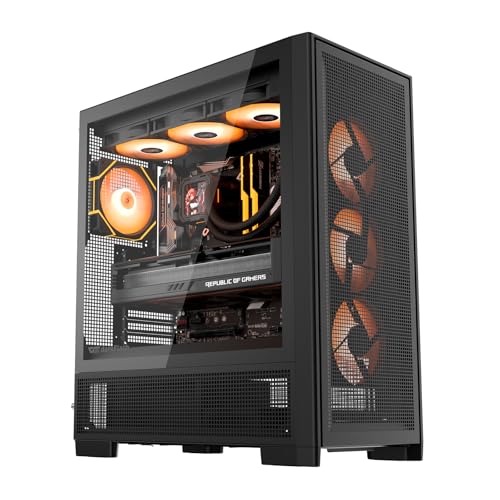
The darkFlash AIR NOVA Full Tower E-ATX PC Case stands out as an ideal choice for gamers and PC enthusiasts who demand exceptional cooling performance and airflow. Its six-sided ventilation design supports dual 360 mm radiators, ensuring your components stay cool during intense gaming sessions. With seven PWM ARGB fans, you’ll enjoy impressive airflow and stunning aesthetics. The case accommodates E-ATX, ATX, and M-ATX motherboards, while the vertical GPU mount prevents sagging. Plus, the built-in dust filter and adjustable HDD cage provide convenience and flexibility. You’ll appreciate the bottom-mounted PSU design for optimized space utilization, making your build even more efficient.
Best For: Gamers and PC enthusiasts seeking superior cooling performance and customizable airflow options in their builds.
Pros:
- Exceptional airflow with a six-sided ventilation design and seven PWM ARGB fans for optimal cooling.
- Versatile compatibility with E-ATX, ATX, and M-ATX motherboards, allowing for various build configurations.
- Innovative features like a vertical GPU mount and adjustable HDD cage enhance both aesthetics and functionality.
Cons:
- Full tower size may not fit in smaller spaces or cases where compact designs are preferred.
- Weight of 11.6 pounds might be cumbersome during transport or installation.
- Limited color options as it is only available in black, which may not suit all personal styles.
Factors to Consider When Choosing PC Cases for Custom Water Cooling Loops
When you’re choosing a PC case for custom water cooling loops, several key factors come into play. You’ll want to evaluate radiator compatibility, airflow, and how much space you have for components. Additionally, good cable management and build quality can make a significant difference in your overall setup.
Radiator Compatibility Requirements
Choosing the right PC case for custom water cooling loops hinges on radiator compatibility requirements. First, verify your case supports the sizes and thicknesses of the radiators you want to use, like 240mm, 360mm, or even 420mm models. Check how many mounting positions are available—top, front, bottom, or side—as this impacts your cooling performance. Additionally, confirm the maximum thickness your case can accommodate since some may only fit slimmer radiators due to space constraints from fans or GPUs. Look for adequate airflow support through fan placements and features like dust filters. Finally, consider the internal layout to make tubing routing and installation easier, ensuring a clean and efficient setup for your custom water cooling loop.
Airflow and Cooling Efficiency
Effective airflow is essential for ensuring your custom water cooling loop performs at its best. It helps dissipate heat generated by your components and keeps operating temperatures ideal. When choosing a case, look for options that support multiple fan configurations and accommodate large radiators, ideally up to 360mm or more. A dual-chamber design can also enhance airflow by separating heat-producing components from cooler areas, boosting thermal performance. Prioritize cases with ample ventilation and mesh panels to facilitate efficient air intake and exhaust. Additionally, pay attention to cable management features like routing channels and grommets, which can minimize airflow obstructions, allowing your water-cooled system to maintain low temperatures effectively.
Space for Components
As you immerse yourself in the world of custom water cooling, ensuring your PC case has enough space for all your components is essential. Look for cases that accommodate large motherboards like ATX or E-ATX, GPUs up to 400mm, and power supplies up to 200mm in length. Also, consider the number and size of drive bays for your SSDs and HDDs, allowing for multiple drives without overcrowding. Opt for dual-chamber designs to improve airflow and cable management. Check the maximum radiator support, which should fit your desired cooling solution, and assess fan positions to maximize cooling efficiency. A well-designed case will make your water cooling setup cleaner and more effective.
Cable Management Solutions
How can you guarantee that your custom water cooling loop remains efficient and visually appealing? Effective cable management is key. Look for PC cases with dedicated features like Velcro straps, routing channels, and rubber grommets to keep your cables organized and out of the airflow path. A dual-chamber design can also enhance cable management by isolating the power supply and excess cables from the main compartment, ensuring critical components stay cool. Ample space for routing prevents stress on connectors and allows installation of water cooling components without interference. A well-organized cable layout not only boosts aesthetics but also simplifies future upgrades and maintenance, making it easier to access components without disturbing your carefully arranged cooling loop.
Build Quality and Materials
When selecting a PC case for custom water cooling, build quality and materials play an essential role in the overall performance and longevity of your setup. Opt for cases made from high-quality materials like SPCC or SECC steel, as they resist bending and damage. Tempered glass panels not only enhance visibility but also protect your components. Look for reinforced areas designed to support the weight of water cooling components, preventing sagging or misalignment. Effective cable management features help maintain airflow and reduce clutter, vital for tight spaces. Additionally, make certain your case includes dust filters and ventilation made from durable materials to keep your system cool and protected from dust, ultimately extending the lifespan of your components.
Aesthetic Considerations
Choosing a PC case for custom water cooling isn’t just about functionality; it also greatly impacts the overall aesthetic of your build. Cases with panoramic tempered glass panels let you showcase your custom loops and components beautifully. Integrating ARGB lighting can create stunning visual effects, especially when coordinated with your coolant and tubing colors. Opt for a dual-chamber design to enhance cable management and maintain a clean look by separating cooling components from the main hardware. The overall shape and design matter too; unique geometric designs or mesh panels can add a modern touch while improving airflow. Finally, look for customization options, like modular I/O panels and adjustable RGB settings, to personalize your build’s aesthetic.