Choosing a PC for Blender and animation is really about balancing CPU speed, GPU acceleration, memory capacity, and fast storage. The right setup can shorten renders, improve viewport performance, and keep your workflow responsive.
Below, we’ve focused on machines that make sense for artists, animators, and 3D creators who want practical performance without guesswork.
Best 9 PC for Blender and Animation Picks for 2026
Best AI Performance
GEEKOM A9 Max Ryzen AI Mini PC

- Ryzen AI 9 HX 370 for strong creator performance
- 32GB DDR5 + 1TB SSD for smooth multitasking
- USB4, HDMI 2.1, and WiFi 7 for modern connectivity
Best For: Blender users and animators who want a compact, high-performance mini PC.
Best for Plug-and-Play Blender Work
Ryzen 7 8700F RTX 4060 Ti Gaming PC
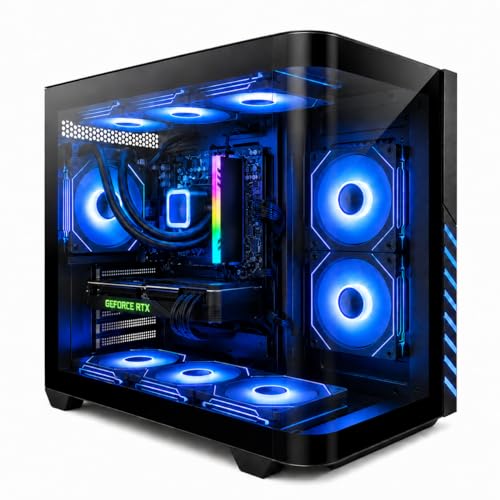
- Ryzen 7 8700F + RTX 4060 Ti for Blender and multitasking
- 1TB NVMe SSD and DDR5 for quick, responsive performance
- Prebuilt with WiFi 6, Windows 11 Pro, keyboard, and mouse
Best For: Creators who want a ready-to-use desktop for Blender, animation, and mixed gaming use.
Best RTX Value
CyberPowerPC Gamer Master Ryzen 7 RTX 5060 Ti

- Ryzen 7 8700F is a solid fit for Blender and animation workloads
- RTX 5060 Ti helps with GPU rendering and viewport performance
- 1TB PCIe 4.0 SSD and modern wireless connectivity make it easy to live with
Best For: 3D creators who want a capable prebuilt for Blender, animation, and general creative work.
Best for Multitasking
suevery Ryzen 7 RTX 3050 Gaming PC

- Ryzen 7 5700X handles multitasking and creative apps well
- RTX 3050 adds useful GPU support for Blender workflows
- 16GB RAM and NVMe SSD help with quick load times
Best For: Creators who want a ready-to-use desktop for Blender, animation, and everyday work.
Best Midrange Creator Pick
Skytech Crystal Gaming PC, Ryzen 7, RTX 5060

- RTX 5060 helps with Blender GPU acceleration
- 32GB RAM and 1TB NVMe SSD support smooth multitasking
- Good all-around value for creators who also game
Best For: Blender users and animation students who want a balanced, ready-to-use desktop.
Best Value Entry
NOVATECH Phantom 2 RTX 3050 Gaming PC

- 16GB RAM and a 512GB M.2 SSD for responsive everyday use
- RTX 3050 supports entry-level Blender and animation tasks
- Prebuilt with Windows 11 Pro, Wi-Fi/Bluetooth, and RGB case
Best For: Beginners and budget-focused creators who want an easy-to-set-up desktop for Blender and animation.
Best High-Core Pick

- 24-core Core i9 for multitasking and rendering
- RTX 5060 Ti supports GPU-accelerated creative work
- 1TB SSD and DDR5 keep projects loading fast
Best For: Creators who want a ready-to-run Blender and animation workstation that can also game.
Best for Mid-Range 3D Work
Ryzen 7 8700F RTX 4060 Gaming PC

- Balanced CPU/GPU performance for Blender and gaming
- 32GB DDR5 RAM supports multitasking and larger projects
- 1TB NVMe SSD keeps loads and launches fast
Best For: Creators and gamers who want a ready-to-use desktop for Blender, animation, and 1080p-to-1440p play.
Best AI Performance – GEEKOM A9 Max Ryzen AI Mini PC
If you need a compact pc for blender and animation, the GEEKOM A9 Max is built around the Ryzen AI 9 HX 370 with 32GB DDR5 memory and a 1TB SSD for fast scene handling, smoother multitasking, and quick project loading. It’s a strong fit for creators who want a small desktop that can also handle 3D rendering, 8K editing, and everyday productivity without taking up much space.
Best For: Blender users, animation artists, and creators who want a high-performance mini PC for demanding 3D workflows.
Pros:
- Ryzen AI 9 HX 370 offers excellent modern CPU performance for creative workloads
- 32GB DDR5 RAM and 1TB SSD help with larger Blender files and faster responsiveness
- USB4, HDMI 2.1, and WiFi 7 add flexible, future-ready connectivity
- Compact mini PC design saves desk space while still targeting serious work
Cons:
- Integrated graphics may not match a desktop with a dedicated GPU for heavy rendering
- Premium specs can put it above entry-level creator budgets
For buyers shopping for a pc for blender and animation, this GEEKOM model stands out as a balanced small-form-factor option with strong CPU headroom and plenty of memory. It’s best for users who prioritize portability, fast everyday performance, and a capable all-in-one mini desktop over maximum GPU power.
Best for Plug-and-Play Blender Work – Ryzen 7 8700F RTX 4060 Ti Gaming PC
If you want a pc for blender and animation that can also handle gaming and streaming, this prebuilt tower is a practical middle-ground. The Ryzen 7 8700F, RTX 4060 Ti, and 16GB DDR5 give it enough speed for modeling, viewport work, and lighter renders without requiring a custom build.
Best For: Creators who want a ready-to-use desktop for Blender, animation, and everyday multitasking with strong 1080p/1440p gaming support.
Pros:
- Ryzen 7 8700F and RTX 4060 Ti are a solid combo for Blender workflows and creative multitasking
- 1TB NVMe SSD and DDR5 memory help with fast loading, boot times, and responsive day-to-day use
- Liquid cooling plus 9 ARGB fans should help keep thermals in check during long sessions
- Includes WiFi 6, Bluetooth 5.4, Windows 11 Pro, keyboard, and mouse for an easy setup
Cons:
- 16GB RAM may feel tight for larger Blender scenes and heavier animation projects
- RTX 4060 Ti is capable, but serious GPU rendering workloads may want more headroom
- RGB-focused design may matter less if you prefer a more minimal workstation look
Overall, this is a convenient choice for a pc for blender and animation if you want strong everyday performance and decent creative horsepower in a prebuilt package. It makes more sense for hobbyists, students, and mixed-use creators than for high-end production rendering.
Best for High-Load Creative Work – KAMRUI H2 Mini PC i5-14450HX, 32GB/1TB
If you need a compact pc for blender and animation, the KAMRUI H2 stands out for its HX-class Intel Core i5-14450HX, 32GB of RAM, and fast 1TB PCIe 4.0 SSD. It’s built to handle heavier multitasking, timeline work, and scene management without taking up much desk space.
Best For: Creators, students, and small studios that want mini-PC convenience with enough headroom for Blender projects, editing, and everyday productivity.
Pros:
- HX-class i5-14450HX offers strong multi-core performance for rendering and multitasking
- 32GB RAM and 1TB NVMe SSD provide a solid baseline for creative workloads
- Triple 4K display support is useful for animation, editing, and reference-heavy workflows
- Compact size helps keep a small workspace clean and organized
Cons:
- Integrated graphics may limit demanding GPU-accelerated Blender rendering
- Mini-PC cooling is good for its class, but sustained heavy workloads can still be noisier than larger towers
As a pc for blender and animation, this KAMRUI model is strongest for modeling, compositing, and general creative multitasking rather than high-end GPU rendering. If your workflow values speed, space savings, and a ready-to-work memory/storage setup, it’s an easy mini desktop to consider.
Best RTX Value – CyberPowerPC Gamer Master Ryzen 7 RTX 5060 Ti
If you want a practical pc for blender and animation that balances rendering power with everyday usability, this CyberPowerPC Gamer Master is a strong midrange option. The Ryzen 7 8700F and GeForce RTX 5060 Ti give you a capable CPU/GPU combo for modeling, viewport work, and GPU-accelerated tasks without jumping into a much pricier workstation.
Best For: 3D artists and animators who want a ready-to-use desktop with solid Blender performance, fast storage, and modern connectivity.
Pros:
- Ryzen 7 8700F pairs well with Blender workflows that need strong multicore performance
- RTX 5060 Ti supports GPU-accelerated rendering and smoother scene previews
- 1TB PCIe 4.0 SSD helps with fast project loading and responsive day-to-day use
- WiFi 6, Bluetooth 5.3, and plenty of USB ports make setup easy
Cons:
- 16GB of RAM is workable, but heavier scenes will likely benefit from an upgrade
- 8GB VRAM may be limiting for larger textures or more complex animation projects
- Included keyboard and mouse are basic accessories, not creator-focused peripherals
Overall, this is a sensible pc for blender and animation if you want strong mainstream performance and modern features in a single prebuilt system. It is especially appealing for creators who plan to upgrade memory later rather than paying for a higher-end workstation up front.
Best for Multitasking – suevery Ryzen 7 RTX 3050 Gaming PC
If you want a practical pc for blender and animation, this prebuilt tower is a solid midrange starting point. The Ryzen 7 5700X gives you strong 8-core, 16-thread performance for modeling, scene prep, and general multitasking, while the RTX 3050 helps with GPU-accelerated creative work and everyday gaming.
Best For: Students, hobbyists, and creators who need a ready-to-run desktop for Blender, animation, editing, and light-to-moderate gaming.
Pros:
- Ryzen 7 5700X offers dependable multi-core performance for creative workloads
- RTX 3050 supports faster GPU-accelerated tasks and creative drivers
- 16GB RAM and 512GB NVMe SSD keep apps and projects moving smoothly
- WiFi 6 and Bluetooth make it easy to set up and connect peripherals
Cons:
- RTX 3050 is not ideal for heavy, high-poly scenes or advanced rendering
- 512GB storage may fill up quickly with large project files and caches
Overall, this is a balanced choice if you need a ready-made pc for blender and animation without stepping up to a much pricier workstation. It’s better suited to learning, content creation, and moderate projects than to demanding professional pipelines.
Best Midrange Creator Pick – Skytech Crystal Gaming PC, Ryzen 7, RTX 5060
If you want a practical pc for blender and animation without jumping into workstation pricing, this Skytech build is a smart middle-ground. The Ryzen 7 5700, RTX 5060, 32GB of RAM, and 1TB NVMe SSD give you a balanced mix of CPU speed, GPU acceleration, and fast storage for modeling, viewport work, and moderate scene rendering.
Best For: Blender users, animation students, and creators who need a capable all-around desktop for 3D work, editing, and gaming on the side.
Pros:
- RTX 5060 graphics should help with GPU-accelerated Blender tasks and smooth viewport performance.
- 32GB RAM and a 1TB NVMe SSD make multitasking and project loading feel responsive.
- Ryzen 7 5700 offers solid 8-core headroom for general creation workloads.
- Includes Wi-Fi, Windows 11, and a 650W Gold PSU in a clean ready-to-use tower.
Cons:
- DDR4 platform is less future-focused than newer DDR5-based systems.
- 8GB VRAM may feel limiting for very heavy scenes, simulations, or large texture sets.
- Included brand-specific components can vary slightly by batch.
Overall, this is a well-rounded pc for blender and animation if you want strong everyday creation performance with enough gaming power to double as a fun all-purpose desktop. It is not a high-end rendering workstation, but it hits a useful sweet spot for most beginners and intermediate creators.
Best Value Entry – NOVATECH Phantom 2 RTX 3050 Gaming PC
If you need a budget-conscious pc for blender and animation that can also handle everyday gaming, the NOVATECH Phantom 2 is worth a look. Its Xeon-class CPU, 16GB of RAM, and 512GB M.2 SSD give it the basic responsiveness you want for lighter Blender scenes, scene previews, and multitasking without a long setup process.
Best For: Beginners and casual creators who want an affordable prebuilt desktop for Blender, animation work, and general productivity.
Pros:
- 16GB DDR4 RAM and a 512GB M.2 SSD help with quick boot times and smoother multitasking.
- RTX 3050 graphics are useful for entry-level 3D work, viewport performance, and creative apps.
- Prebuilt design with Windows 11 Pro, Wi-Fi/Bluetooth, and RGB styling makes setup simple.
- 1-year warranty adds some peace of mind for first-time buyers.
Cons:
- Not ideal for complex Blender projects, heavy simulations, or large animation scenes.
- 512GB of storage may fill up quickly if you keep many assets, caches, and project files.
For a pc for blender and animation on a tighter budget, this NOVATECH build makes more sense as a starter machine than a high-end workstation. It’s a practical pick if you value convenience and can live with modest rendering headroom.
Best High-Core Pick – Core i9 RTX 5060 Ti Gaming PC
If you need a pc for blender and animation that can also handle gaming and editing, this prebuilt tower leans hard into CPU-heavy performance. The Core i9-14900HX brings 24 cores and 32 threads, while the RTX 5060 Ti adds modern ray tracing and DLSS support for viewport work, rendering, and smooth playback.
Best For: Creators who want a fast, ready-to-run workstation for Blender scenes, animation tasks, and mixed creative workloads.
Pros:
- 24-core, 32-thread Intel Core i9-14900HX is strong for multitasking and CPU rendering
- RTX 5060 Ti 8GB supports GPU acceleration, ray tracing, and AI upscaling
- 1TB NVMe SSD and 16GB DDR5 help projects open and load quickly
- Prebuilt setup with WiFi 6 and multiple display outputs for a clean workstation build
Cons:
- 16GB RAM may feel tight for larger Blender scenes or heavy compositing
- 8GB of VRAM is usable, but power users may want more for complex 3D projects
- Uses a mobile-derived HX processor, so it is not the same as a full desktop i9 tower CPU
This is a practical pc for blender and animation if you want strong CPU thread count, modern Nvidia graphics, and a prebuilt machine that is ready to work right away. It is especially appealing for creators who also game or stream, though serious 3D users may eventually want a RAM upgrade.
Best for Mid-Range 3D Work – Ryzen 7 8700F RTX 4060 Gaming PC
If you want a pc for blender and animation that can also handle modern gaming, this prebuilt tower is a strong middle-ground option. The Ryzen 7 8700F and GeForce RTX 4060 give you solid CPU/GPU balance for modeling, viewport work, rendering, streaming, and everyday multitasking, while 32GB of DDR5 RAM and a 1TB NVMe SSD help keep projects and apps moving quickly.
Best For: Creators, students, and gamers who need a ready-to-use desktop for Blender, light-to-moderate animation work, and 1080p-to-1440p gaming.
Pros:
- Ryzen 7 8700F and RTX 4060 deliver dependable performance for creative apps and AAA games
- 32GB DDR5 RAM is ideal for multitasking, larger scene files, and smoother workflow responsiveness
- 1TB NVMe SSD speeds up boot times, software launches, and project loading
- Prebuilt and ready out of the box, so setup is simple
Cons:
- RTX 4060 is good for Blender, but heavier 3D scenes may benefit from a stronger GPU
- Storage may fill up quickly if you keep large animation assets and raw footage locally
- Not as future-proof for high-end rendering as more expensive creator-focused systems
Overall, this is a practical choice if you need a pc for blender and animation without jumping to a much pricier workstation. It offers enough memory, fast storage, and a capable Nvidia GPU to cover beginner-to-intermediate creative work while still doubling as a reliable gaming desktop.
How We Picked the Best PC for Blender and Animation
We prioritized components that matter most for 3D creation: modern multi-core CPUs, NVIDIA GPUs with solid CUDA performance, at least 16GB of RAM, and PCIe SSD storage for quick project loading. We also considered upgradeability, cooling, and overall value for a PC for Blender and Animation.
Quick Comparison: What Matters Most
If your workflow is mostly modeling, sculpting, and timeline work, CPU responsiveness and memory are key. If you do heavier rendering, simulations, or GPU-accelerated effects, the graphics card becomes more important. For most buyers, 32GB of RAM and a 1TB SSD are the sweet spot.
Key Buying Factors for a PC for Blender and Animation
CPU Performance
Blender benefits from strong single-core speed for general interface use and multi-core power for rendering. Recent Ryzen and Intel high-performance chips are a better fit than older entry-level processors.
GPU Capability
For GPU rendering, NVIDIA RTX cards are especially attractive because of broad software support. More VRAM helps with larger scenes, higher-resolution textures, and complex animation projects.
Memory and Storage
16GB is workable for simpler projects, but 32GB is a better long-term target for a PC for Blender and Animation. A 1TB SSD helps keep assets, cache files, and project folders accessible without constant cleanup.
Cooling and Power
Rendering puts sustained load on a system. Good airflow, a reliable power supply, and stable thermals help maintain performance during long sessions and reduce throttling.
Who Should Buy Which PC for Blender and Animation?
Choose a higher-end CPU and GPU combination if you render often, work with dense scenes, or use animation as part of paid client work. Midrange systems are a smart choice for students, hobbyists, and creators who need dependable editing and scene-building performance. If portability or a smaller desk footprint matters, compact mini PCs can still work well for lighter Blender tasks, but they are usually less ideal for demanding rendering workloads.
In short, match the machine to your scene complexity and output needs. The best PC for Blender and Animation is the one that keeps your workflow smooth today while leaving room to grow tomorrow.