When it comes to optimizing your PC’s cooling and performance, upgrading the front panel airflow is essential. You’ll find that the right case can greatly enhance airflow and aesthetics. From the sleek designs of the CORSAIR 4000D RS to the innovative Lian Li Front Mesh Kit, each option offers unique benefits. Let’s explore the top choices and what factors you should consider to guarantee you make the best upgrade for your setup.
CORSAIR 4000D RS Frame Mid-Tower PC Case

If you’re a PC builder seeking best airflow and cooling efficiency, the CORSAIR 4000D RS Frame Mid-Tower PC Case is your ideal choice. With its FRAME Modular Case System, you can customize your setup, adding features like an aluminum motherboard tray and extra USB ports. The InfiniRail Fan Mounting System allows for fan configurations up to 200mm, ensuring targeted airflow. Plus, the 3D Y-Pattern Airflow Panel optimizes airflow with minimal obstruction. Equipped with three CORSAIR RS PWM fans, this case supports impressive cooling capabilities, making it a top contender for any high-performance build. Enjoy efficient cooling and sleek design all in one.
Best For: PC builders looking for a customizable case that prioritizes airflow and cooling efficiency.
Pros:
- FRAME Modular Case System allows for customizable upgrades and enhancements.
- InfiniRail Fan Mounting System supports versatile fan configurations for optimal airflow.
- 3D Y-Pattern Airflow Panel ensures high airflow with minimal obstruction for better cooling performance.
Cons:
- The case may be heavier compared to other mid-tower options, weighing 18.04 pounds.
- Limited color options, only available in black.
- Some users may find the initial setup and customization process complex.
CORSAIR 4000D RS ARGB Mid-Tower ATX PC Case

The CORSAIR 4000D RS ARGB Mid-Tower ATX PC Case is perfect for gamers and PC builders who prioritize high airflow and customization. With three pre-installed RS ARGB PWM fans, your system stays cool while adding a stylish glow. Its modular design allows you to upgrade components easily, like swapping the front I/O panel for extra USB ports. Thanks to the CORSAIR InfiniRail Fan Mounting System, you can configure fans flexibly, ensuring ideal airflow. The steel front panel’s Y-pattern enhances airflow, making it an excellent choice for those looking to boost cooling performance without sacrificing aesthetics.
Best For: Gamers and PC builders seeking a high airflow case with extensive customization options.
Pros:
- High airflow design with three pre-installed ARGB PWM fans for optimal cooling and visual appeal.
- Modular customization options, allowing easy upgrades and modifications to fit evolving needs.
- Flexible fan configuration with the CORSAIR InfiniRail Fan Mounting System for enhanced airflow management.
Cons:
- Limited color options, as it is only available in black.
- May require additional purchases for further upgrades, such as extra USB ports or fan mounts.
- Some users may find the size of the mid-tower case restrictive for larger components.
CORSAIR 7000D Airflow Full-Tower ATX PC Case

For serious PC builders seeking peak cooling and airflow, the CORSAIR 7000D Airflow Full-Tower ATX PC Case stands out. Its high-airflow front panel guarantees superior cooling, while the spacious interior accommodates ambitious setups. You can support up to three simultaneous 360mm radiators or two 420mm radiators, plus install up to 12x 120mm or 7x 140mm fans. Three included CORSAIR 140mm AirGuide fans utilize anti-vortex vanes to concentrate airflow effectively. With the CORSAIR RapidRoute cable management system, you’ll find routing cables a breeze. The easy-access hinged door provides convenient access to your components, making upgrades and maintenance hassle-free.
Best For: Serious PC builders seeking peak cooling and airflow for ambitious setups.
Pros:
- High airflow design with a steel front panel and included fans for optimal cooling performance.
- Spacious interior allows for easy installation and support for multiple radiators and cooling fans.
- Efficient cable management with the CORSAIR RapidRoute system for a clean and organized build.
Cons:
- Full-tower size may be too large for users with limited space.
- Price point might be higher compared to standard cases, making it less accessible for budget-conscious builders.
- Weight of the case could make it difficult to move or transport.
Lian Li Front Mesh Kit for O11D EVO RGB

Upgrade your cooling setup with the Lian Li Front Mesh Kit for O11D EVO RGB, designed specifically for enthusiasts looking to boost airflow in their gaming rigs. This aluminum fine mesh panel replaces the front glass, greatly enhancing airflow. It’s compatible with the O11D EVO RGB case, but keep in mind that you can’t use it alongside the upright GPU kit. With support for up to three 120mm or two 140mm and 160mm fans, you’ll enjoy adjustable mounting options for peak cooling efficiency. Plus, it’s available in white, adding a sleek aesthetic to your setup.
Best For: Enthusiasts looking to significantly improve airflow and cooling efficiency in their O11D EVO RGB gaming rigs.
Pros:
- Enhances airflow by replacing the front glass panel with a fine mesh design.
- Supports multiple fan configurations for optimal cooling performance.
- Sleek white finish adds a stylish touch to any setup.
Cons:
- Cannot be used simultaneously with the upright GPU kit.
- Installation may require additional tools and effort.
- Limited to compatibility with the O11D EVO RGB case only.
Montech X3 Mesh ATX Mid-Tower PC Gaming Case

If you’re a gamer looking to enhance your PC’s cooling system without breaking the bank, the Montech X3 Mesh ATX Mid-Tower Gaming Case is a standout option. It comes equipped with six fans—three 140mm and three 120mm—providing exceptional airflow. The triple front fans guarantee massive air intake, while the pre-mounted top and rear ventilation optimizes cooling efficiency. Its striking full panoramic tempered glass panels let you show off your RGB lighting, which you can easily toggle on or off. Plus, the zero drill-hole design improves panel strength, making it a convenient and stylish choice for any gaming setup.
Best For: Gamers seeking an affordable and effective cooling solution for their PC builds.
Pros:
- Exceptional airflow with six pre-installed fans for optimal cooling performance.
- Stylish design featuring full panoramic tempered glass panels to showcase RGB lighting.
- User-friendly zero drill-hole design enhances panel strength and makes side panel access easier.
Cons:
- Fixed RGB lighting may not appeal to users wanting customizable lighting options.
- Limited expansion options due to mid-tower size compared to larger cases.
- Potential noise from multiple fans, which could be bothersome in quiet environments.
Montech AIR 903 MAX E-ATX Mid Tower Case

The Montech AIR 903 MAX E-ATX Mid Tower Case stands out as an excellent choice for gamers and PC builders who prioritize superior airflow and cooling performance. Its innovative metal front panel boasts a 51% ventilation rate, ensuring ideal airflow. With three pre-installed 140mm ARGB PWM fans, you’ll enjoy both cooling and stunning lighting effects. The case supports graphics cards up to 400mm and accommodates large 360mm AIO coolers, giving you flexibility in your build. Plus, the tempered glass side panel showcases your components beautifully, while the dust-filtering mesh front panel makes maintenance a breeze.
Best For: Gamers and PC builders seeking superior airflow, cooling performance, and an aesthetically pleasing setup.
Pros:
- Innovative cooling design with a 51% ventilation rate for optimal airflow.
- Pre-installed ARGB PWM fans provide both effective cooling and customizable lighting effects.
- Accommodates large components, supporting graphics cards up to 400mm and 360mm AIO coolers.
Cons:
- Relatively heavy at nearly 20 pounds, which may affect portability.
- Limited USB ports with only 2x USB 2.0 and 2x USB 3.0, potentially insufficient for some users.
- Dust accumulation may occur despite the mesh front panel, requiring regular maintenance.
CORSAIR Frame 5000D RS ARGB Mid-Tower PC Case

For gamers and PC enthusiasts seeking peak airflow, the CORSAIR Frame 5000D RS ARGB Mid-Tower PC Case stands out as an ideal choice. With its InfiniRail™ mounting system, you can install up to 14 fans, ensuring exceptional cooling. It comes pre-installed with four RS ARGB fans, enhancing aesthetics while improving airflow through its 3D Y-Pattern panel design. The case supports various motherboard sizes and offers ample expansion slots for your components. Plus, customizable features let you tailor it to your needs. With a sleek black finish and tempered glass, it’s not just functional; it’s a stylish addition to your setup.
Best For: Gamers and PC enthusiasts looking for a high-airflow, customizable mid-tower case for their builds.
Pros:
- Supports installation of up to 14 fans for optimal cooling and airflow.
- Modular customization options allow for tailored aesthetics and functionality.
- Ample storage and expansion capabilities with compatibility for various motherboard sizes.
Cons:
- Some users may find the weight of 27.9 pounds cumbersome for transport.
- The sleek design may attract fingerprints and dust, requiring regular cleaning.
- Price point may be higher compared to basic PC cases without advanced features.
LIAN LI High Airflow Micro ATX PC Case (LANCOOL 205M MESH)
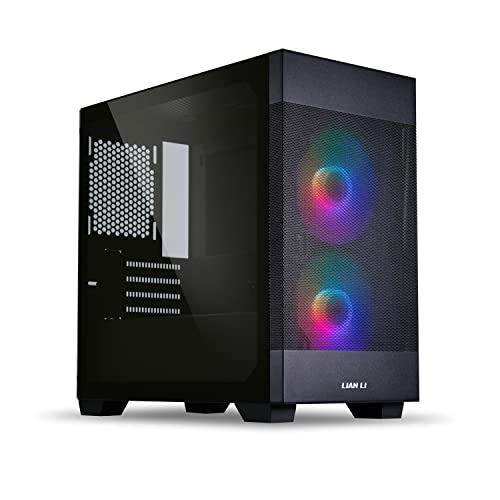
Gamers and PC enthusiasts seeking perfect cooling solutions will find the LIAN LI High Airflow Micro ATX PC Case (LANCOOL 205M MESH) an excellent choice. With its upgraded mesh front panel, this case guarantees ideal airflow, keeping your components cool. It comes equipped with two 140mm ARGB PWM fans for synchronized lighting, enhancing both performance and aesthetics. Designed for Micro ATX and Mini-ITX motherboards, it features a sturdy steel front and a tempered glass side panel for showcasing your RGB setup. Plus, cable management‘s a breeze with extra space behind the motherboard tray, making installation simple and tidy.
Best For: Gamers and PC enthusiasts looking for a high airflow case that offers both cooling efficiency and aesthetic appeal.
Pros:
- Optimized airflow with an upgraded mesh front panel and pre-installed 140mm ARGB PWM fans for excellent ventilation.
- Sturdy construction featuring a steel front panel and tempered glass side panel to showcase RGB components.
- User-friendly installation with removable SSD mounting brackets and ample space for cable management behind the motherboard tray.
Cons:
- Limited compatibility as it only supports Micro ATX and Mini-ITX motherboards.
- No included fans for rear or top mounting, which may require additional purchases for optimal cooling.
- Tempered glass panel may be prone to fingerprints and smudges, requiring regular cleaning for a clear view of components.
GAMDIAS ATX Mid Tower Gaming PC Case with Tempered Glass

Looking for a gaming PC case that combines style with functionality? The GAMDIAS ATX Mid Tower is your answer. Its sleek stealth black design and full-sized tempered glass cover let you showcase your system’s inner beauty. With a mesh front panel and four built-in 120mm ARGB fans, it guarantees superior airflow for maximum cooling. You can expand easily, supporting ATX, Micro-ATX, and Mini-ITX motherboards, while offering seven PCIe slots and ample storage options. Plus, modern connectivity features like USB 3.0 and HD audio enhance your experience. This case is perfect for any gamer looking to upgrade their setup!
Best For: Gamers seeking a stylish and functional PC case that offers excellent airflow and expandability options.
Pros:
- Sleek design with tempered glass cover allows for showcasing your gaming components.
- Superior airflow provided by the mesh front panel and built-in ARGB fans ensures optimal cooling.
- Versatile compatibility with various motherboard sizes and multiple storage options makes it easy to customize.
Cons:
- Limited GPU/VGA space of 340mm may restrict options for high-end graphics cards.
- Cooling support for CPU coolers is capped at 160mm, which may not accommodate larger models.
- Tool-free installation might not appeal to users who prefer more traditional assembly methods.
Lian Li LANCOOL 217 INF Infinity Mirror Computer Case

The Lian Li LANCOOL 217 INF Infinity Mirror Computer Case stands out for those who crave not just performance but also stunning aesthetics in their builds. Its infinity mirror front panel creates mesmerizing visual effects while precision-cut intake openings guarantee peak airflow. With three pre-installed fans—two 170mm ARGB fans in front and a 140mm rear fan—your system stays cool and eye-catching. Effortless lighting control lets you sync effects via motherboard software or wirelessly. Plus, the relocatable I/O module adds convenience. Supporting various PSU orientations, this case combines functionality and beauty, elevating your gaming experience to new heights.
Best For: Gamers and PC builders who prioritize both performance and aesthetic appeal in their computer setups.
Pros:
- Stunning Visuals: The infinity mirror front panel offers a unique and captivating look that enhances any build.
- Optimized Cooling: The precision-cut intake openings and three pre-installed fans ensure effective airflow and temperature management.
- Flexible PSU Options: Supports various power supply orientations, accommodating different sizes and cable management preferences.
Cons:
- Limited Space for Large Components: Depending on the build, the case may not accommodate larger GPUs or cooling systems comfortably.
- Potential Cable Management Challenges: The intricate design may complicate cable management for some users.
- Price Point: Higher cost compared to basic cases, which might not suit budget-conscious builders.
Factors to Consider When Choosing a PC Front Panel Airflow Upgrade
When you’re choosing a front panel airflow upgrade for your PC, several key factors come into play. You’ll want to contemplate the efficiency of the airflow design, how well it fits with your existing components, and the overall build quality. Don’t forget to think about installation ease and the aesthetic appeal, especially if you like to customize your setup with lighting.
Airflow Design Efficiency
While choosing a PC front panel airflow upgrade, understanding airflow design efficiency is essential to guarantee peak cooling performance. A high airflow design features perforated panels or mesh, allowing cool air to flow freely while expelling warm air. Solid or glass panels may hinder this process, so opt for options that enhance air movement. Additionally, consider the orientation and size of fan mounts; larger fans or multiple configurations can greatly boost air intake and exhaust. Look for designs incorporating features like anti-vortex vanes and strategically placed vents to streamline airflow and reduce turbulence. Effective airflow not only reduces component temperatures but also prolongs their lifespan, ultimately improving performance during demanding tasks.
Compatibility With Existing Components
Choosing the right front panel airflow upgrade for your PC requires careful consideration of compatibility with your existing components. First, verify the upgrade fits your specific case model, as different cases have unique front panel designs and mounting options. Check that it supports the same or larger fan sizes to maintain or enhance airflow efficiency. Make certain the new panel doesn’t obstruct important components like cooling radiators or graphics cards. Additionally, assess if it includes extra fan mounting options to boost cooling potential while fitting seamlessly within your case layout. By keeping these factors in mind, you’ll maximize your PC’s performance and cooling capabilities.
Material and Build Quality
Ensuring your PC’s front panel airflow upgrade is compatible with your components is just the start; the material and build quality play a significant role in performance. Materials like aluminum or mesh can greatly influence airflow efficiency, with mesh often delivering superior ventilation. High-quality build materials resist wear and tear, ensuring your upgrade lasts longer while maintaining structural integrity. Look for precision-cut openings that optimize airflow and minimize dust accumulation, enhancing cooling effectiveness. Additionally, consider the weight of the material, as it can impact your PC’s portability and ease of installation. Finally, don’t underestimate aesthetics; a well-designed front panel can elevate your build’s visual appeal while complementing its cooling functionality.
Installation Ease and Features
When upgrading your PC’s front panel for better airflow, installation ease and unique features can make a significant difference in your overall experience. Consider the availability of brackets and mounting options for fan installation; these features simplify setup and enhance airflow efficiency. Look for front panel designs with adjustable mounting options, allowing you to customize airflow based on your cooling needs. Evaluate how easily you can access and remove front panels for cleaning and maintenance, as this impacts the longevity of your cooling system. Additionally, check for compatibility with various fan sizes, like 120mm or 140mm, guaranteeing it fits your existing setup. Finally, confirm the installation process requires minimal tools and effort for a smoother experience.
Aesthetic Appeal and Lighting
Upgrading your PC’s front panel not only boosts airflow but also enhances its aesthetic charm. Choosing a front panel with fine mesh can give your setup a sleek, modern look while improving airflow. Many options feature customizable lighting, like ARGB fans, allowing you to sync colors with other components for a cohesive design. Tempered glass front panels showcase your internal components and RGB lighting, adding an elegant touch. Unique designs, such as Y-pattern airflow panels, not only enhance airflow but also serve as a striking visual statement. By focusing on both functionality and aesthetics, you can achieve better thermal management while elevating your PC’s overall appearance with high-quality materials and thoughtful design.