When it comes to troubleshooting motherboard issues, having the right tools can make all the difference. You’ll want a PC post diagnostic analyzer that’s reliable and easy to use. With so many options out there, it can be tough to know which ones truly stand out. Let’s explore the top 10 analyzers that can elevate your diagnostic game and guarantee you’re prepared for any motherboard challenge that comes your way.
PC Computer PSU and Motherboard Tester Tool Kit

If you’re a tech enthusiast or a professional looking to troubleshoot old desktop PCs and laptops, the PC Computer PSU and Motherboard Tester Tool Kit is an essential addition to your toolkit. This kit includes a large PCI test board, a small laptop test board, a BIOS speaker, and an ATX PSU tester. It effectively diagnoses issues like no power or boot failures, making it a must-have for quick checks. With dimensions of 5.5 x 4 x 1.5 inches and a lightweight design, it’s portable and easy to store. Plus, you’ll benefit from lifetime customer support for any questions.
Best For: Tech enthusiasts and professionals seeking to diagnose issues in old desktop PCs and laptops efficiently.
Pros:
- Comprehensive Tool Kit: Includes multiple diagnostic tools for both desktop and laptop systems.
- Portable Design: Compact size and lightweight for easy storage and transport.
- Lifetime Support: Free customer service available for troubleshooting and assistance.
Cons:
- Compatibility Limitations: Requires correct PCI slot compatibility, which may not suit all models.
- Learning Curve: Users may need time to familiarize themselves with the diagnostic features and instructions.
- Limited to Specific Issues: Primarily addresses power and boot-related failures, not comprehensive for all hardware troubleshooting.
PC Diagnostic 4-Digit Card for Motherboard Testing
The PC Diagnostic 4-Digit Card is an essential tool for DIY PC builders and technicians who need a reliable way to troubleshoot motherboard issues. This handy POST card connects easily to PCI or ISA interfaces, displaying BIOS self-test codes via a clear 4-digit readout. You’ll appreciate its dual dot matrix display that shows current and previous error codes, making it simple to identify problems. Even without a CPU, it can diagnose faulty motherboards or incorrect card fittings. With a lightweight design and compatibility across various operating systems, it’s a must-have for effective motherboard testing.
Best For: DIY PC builders and technicians looking for an efficient tool to diagnose motherboard issues quickly.
Pros:
- Easy to use with PCI and ISA interfaces, making it compatible with a wide range of motherboards.
- Displays both current and previous error codes for straightforward troubleshooting.
- Can diagnose motherboard issues without needing a CPU or other components.
Cons:
- Customer rating is moderate at 3.5 out of 5 stars, indicating mixed reviews from users.
- Limited functionality for diagnosing issues beyond the motherboard itself.
- Requires familiarity with BIOS codes for effective diagnosis, which may be challenging for beginners.
4 Digit PCI and ISA PC Computer Motherboard Power Diagnostic Analyzer Post Tester Card

For DIY enthusiasts and tech-savvy users, the 4 Digit PCI and ISA PC Computer Motherboard Power Diagnostic Analyzer Post Tester Card is an essential tool that simplifies the troubleshooting process. This handy device connects easily to your motherboard via standard PCI and ISA interfaces. It features a 4-digit display, where the first two digits show the current error code, while the last two reveal previous codes. With an included error code table and search function, you can quickly diagnose issues. Plus, it’s compatible with all mainstream motherboards and even supports bus speed testing for enhanced diagnostics.
Best For: DIY enthusiasts and tech-savvy users looking for a reliable diagnostic tool for troubleshooting motherboard issues.
Pros:
- Easy connection to motherboards via standard PCI and ISA interfaces.
- Quick error code display with a user-friendly error code table for efficient troubleshooting.
- Compatible with all mainstream motherboards and supports bus speed testing for enhanced diagnostics.
Cons:
- May not be necessary for average users who do not engage in DIY computer repairs.
- Limited functionality if the motherboard does not support PCI or ISA interfaces.
- Requires some technical knowledge to interpret error codes effectively.
FOXWELL NT604 Elite OBD2 Scanner for Cars and Trucks

Designed specifically for car owners, the FOXWELL NT604 Elite OBD2 Scanner stands out with its user-friendly, out-of-the-box functionality. You can quickly diagnose common systems like ABS, SRS, engine, and transmission without any software downloads. Its 5-in-1 diagnostic capability includes live data streaming and a built-in DTC library. You’ll appreciate the AUTOVIN feature, which retrieves vehicle information effortlessly, supporting over 60 car makes globally. With a durable protective case, it’s built to last. However, keep in mind it doesn’t support certain service functions, so check compatibility with your vehicle before purchasing to ascertain the best results.
Best For: The FOXWELL NT604 Elite OBD2 Scanner is best for car owners seeking an easy-to-use diagnostic tool for common automotive systems.
Pros:
- User-friendly interface that requires no software downloads and is ready to use out of the box.
- Comprehensive diagnostic capabilities including ABS, SRS, engine, and transmission checks with live data streaming.
- Durable construction with a protective case, ensuring long-lasting use.
Cons:
- Limited to diagnostic functions only; does not support service functions like oil reset or battery registration.
- Compatibility concerns may arise as it varies by make, model, and year of the vehicle.
- Manual VIN entry required if the AUTOVIN feature fails, which may be inconvenient for some users.
New V8 PCIe USB Post Test Card Motherboard Diagnostic Tester Kit
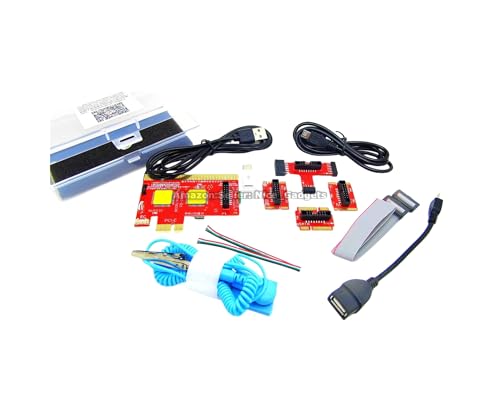
Offering a unique USB diagnosis feature, the New V8 PCIe USB Post Test Card Motherboard Diagnostic Tester Kit stands out as an essential tool for PC technicians and DIY enthusiasts alike. This kit supports standard USB, micro USB, and Type C connections, making it versatile for various devices, including PCs, laptops, and even Android tablets. With no traditional display for POST codes, you’ll use a tested Android app to view results. It efficiently identifies faulty motherboard components, saving you time and money. Just remember to unplug the USB cable between tests to clear cached data for accurate diagnostics.
Best For: The New V8 PCIe USB Post Test Card Motherboard Diagnostic Tester Kit is best for PC technicians, computer owners, students, DIY enthusiasts, and hardware traders.
Pros:
- Versatile Compatibility: Supports standard USB, micro USB, and Type C connections for a wide range of devices.
- Cost-Effective Diagnostics: Quickly identifies faulty components, reducing diagnostic costs and saving time.
- Comprehensive Resources: Includes user guides, videos, and pictorial manuals for easy understanding and operation.
Cons:
- No Traditional Display: Relies on a tested Android app for results, which may not be convenient for all users.
- Requires Preparation: Users must study guides beforehand to ensure correct operation, which may be time-consuming.
- Cached Data Issue: Requires unplugging the USB cable between tests to clear cached data, which may be inconvenient when testing multiple devices.
Motherboard Test Card Kit for Laptop PC Diagnostic

If you’re a technician or DIY enthusiast working on laptop motherboards, the Motherboard Test Card Kit is your go-to diagnostic tool. Weighing just 2.29 ounces, this compact kit includes a diagnostic card, connecting wire, terminal, adapter card, and two flat cables. It’s compatible with PCI E, mini PCI E, and LPC slots, making it suitable for brands like ASUS and Gigabyte. With its high recognition rate, you can easily detect issues with power supply, memory, and more. Plus, Amazon’s 30-day return policy guarantees you can purchase with confidence. Troubleshooting laptops has never been easier!
Best For: Technicians and DIY enthusiasts who need an efficient tool for diagnosing laptop motherboard issues.
Pros:
- Compact and lightweight design makes it easy to handle and store.
- Wide compatibility with various PCI slots and popular brands like ASUS and Gigabyte.
- High recognition rate allows for quick detection of multiple hardware issues.
Cons:
- Limited customer reviews may affect confidence in product reliability.
- Best Sellers Rank suggests it’s not a top choice in its category.
- Warranty details are vague and require further inquiry for assurance.
POCREATION Tablet PCI Motherboard Analyzer Diagnostic Tester Post Test
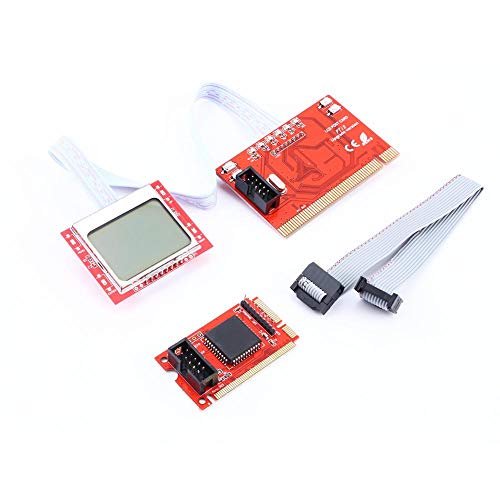
The POCREATION Tablet PCI Motherboard Analyzer Diagnostic Tester Post Test PTI8 stands out as an essential tool for technicians and DIY enthusiasts who need reliable motherboard diagnostics. With real-time voltage monitoring and hundreds of diagnostic codes, you’ll find it easy to troubleshoot issues. Its MultiPost technology enhances diagnostic capabilities, ensuring you get accurate results every time. Plus, the PTI8 is compatible with most popular motherboards, making it versatile for various repair tasks. Released in 2011, this upgraded version builds on the strengths of the Accurate PTI6, reflecting the latest advancements in computer diagnostics that you can trust.
Best For: Technicians and DIY enthusiasts seeking a reliable tool for motherboard diagnostics and troubleshooting.
Pros:
- Real-time voltage monitoring allows for immediate assessment of motherboard performance.
- Wide compatibility with most popular motherboards enhances its versatility for various repair tasks.
- MultiPost technology provides enhanced diagnostic capabilities for accurate troubleshooting.
Cons:
- As a professional tool, it may have a steeper learning curve for beginners.
- Limited to diagnostic functions, lacking repair capabilities.
- Released in 2011, it may not support the latest motherboard technologies.
TL611 Pro Mainboard Debug Card for PC Motherboard Testing

For tech enthusiasts and IT professionals, the TL611 Pro Mainboard Debug Card stands out as an essential tool for diagnosing motherboard issues. This versatile diagnostic kit simplifies your troubleshooting efforts with its 4-digit POST card and LED indicators. It automatically identifies power modules, ensuring a high recognition rate for efficient diagnostics. The card supports various channels, covering power supply, CPU, memory, and more, making it compatible with PCIe, Mini PCIe, and LPC. With its clear LED lights, you’ll easily track the status of your components, providing precise information that enhances your overall diagnostic experience.
Best For: Tech enthusiasts and IT professionals looking for an efficient tool to diagnose motherboard issues.
Pros:
- High recognition rate for automatic identification of power modules simplifies troubleshooting.
- Compatible with multiple channels including PCIe, Mini PCIe, and LPC, increasing versatility.
- Clear LED indicators provide real-time status updates on various components for easier diagnostics.
Cons:
- May require some technical knowledge to fully utilize all features.
- Limited to computer systems; not designed for non-PC devices.
- Potentially overkill for casual users who need basic troubleshooting tools.
Notebook Memory SO-DIMM Analyzer Diagnostic Tester Card for PC and Laptop

Designed specifically for technicians and DIY enthusiasts, the Notebook Memory SO-DIMM Analyzer Diagnostic Tester Card stands out as a reliable tool for diagnosing and repairing memory issues in laptops and desktops. This dual-purpose test card is compatible with DDR234 (DDR4) memory, ensuring versatile use. Its innovative design prevents hand injuries with patch components, while safety features eliminate risks from reversed or misinserted connections. You won’t have to worry about burning parts upon power-on. Perfect for effective computer maintenance, this tool simplifies the testing and analysis of memory modules, making it a must-have for troubleshooting professionals and hobbyists alike.
Best For: Technicians and DIY enthusiasts looking for a reliable tool to diagnose and repair memory issues in laptops and desktops.
Pros:
- Versatile Compatibility: Works with DDR234 (DDR4) memory for multiple devices.
- Safety Features: Prevents damage from reversed or misinserted connections, reducing the risk of burning parts.
- User-Friendly Design: Incorporates patch components to ensure hand safety during use.
Cons:
- Limited to DDR4: Not compatible with older memory types, which may limit its use for some users.
- Targeted Audience: Primarily designed for technicians and enthusiasts, making it less suitable for casual users.
- Specialized Tool: May not be necessary for users who do not frequently troubleshoot or repair computer memory issues.
PC Computer Motherboard Diagnostic Analyzer Card

Offering quick and accurate error detection, the PC Computer Motherboard Diagnostic Analyzer Card is perfect for DIY enthusiasts and technicians who want to troubleshoot motherboard issues efficiently. This handy tool identifies errors reliably, displaying specific codes like 0000 or FFFF for easy interpretation. You can use it without a CPU or extra cards, making diagnostics straightforward. Compatible with both ISA and PCI buses, it caters to a wide range of motherboards, including those from AMD. Plus, its four-digit display and bell error report function provide clear notifications, ensuring you stay informed about any motherboard problems.
Best For: DIY enthusiasts and technicians looking for an efficient tool to troubleshoot motherboard issues.
Pros:
- Quickly and accurately identifies motherboard errors with specific error codes.
- Compatible with ISA and PCI buses, ensuring broad compatibility with various motherboards.
- Easy to use without needing a CPU or extra cards, simplifying the diagnostic process.
Cons:
- Limited functionality for diagnosing issues beyond the motherboard.
- Requires familiarity with interpreting error codes for effective use.
- May not be suitable for advanced diagnostics on newer motherboards with complex architectures.
Factors to Consider When Choosing a PC Post Diagnostic Analyzer
When choosing a PC post diagnostic analyzer, you need to evaluate several key factors. Think about compatibility with your motherboard, the diagnostic features it offers, and how easy it is to use. Don’t forget to check the display type and clarity, as well as the supported interfaces and protocols.
Compatibility With Motherboards
Choosing a PC post diagnostic analyzer requires careful consideration of its compatibility with your motherboard, as this determines the tool’s effectiveness in troubleshooting. Confirm the analyzer supports specific bus interfaces like PCI, ISA, or PCIe, which are vital for proper function. It’s important to verify the tool can interface with your motherboard’s architecture, including various chipsets and manufacturers, to accurately read POST codes. Additionally, check if the analyzer is compatible with the operating system installed on your motherboard. Opt for tools that support a range of motherboard types, including desktop and laptop configurations. Look for analyzers that can identify issues without needing a CPU or extra components, enhancing your diagnostic capabilities for various motherboard problems.
Diagnostic Features and Functions
After guaranteeing compatibility with your motherboard, it’s time to focus on the diagnostic features and functions that can make troubleshooting more efficient. Look for analyzers that display error codes clearly, as these codes pinpoint specific motherboard issues. A 4-digit display is ideal for monitoring both current and previous errors during the Power On Self Test (POST) process. Advanced tools may include self-checking functions, allowing you to verify the motherboard and connected components without needing a CPU. Confirm the analyzer supports various interfaces like PCI and ISA to work across different systems. Additionally, a built-in database of error codes can help you quickly interpret results and understand the underlying problems affecting your system.
Display Type and Clarity
While evaluating a PC POST diagnostic analyzer, the display type and clarity should be top priorities. You’ll find a range of options, from simple LED indicators to advanced multi-digit LCD screens. Higher-resolution displays make it easier to read error codes and status messages, boosting your troubleshooting efficiency. Some analyzers even feature dual read-out systems, showing both current and previous error codes for quick assessments. Look for self-checking features that help verify the analyzer’s operational status, ensuring reliable diagnostics. An intuitive display design with clear symbols and codes will reduce the learning curve, making it easier for you to get started. Prioritizing display type and clarity can considerably enhance your diagnostic experience.
Ease of Use
When selecting a PC POST diagnostic analyzer, ease of use is a significant factor that can greatly influence your troubleshooting experience. Look for tools that come with clear user manuals or guides to help you understand their operation and features. An intuitive interface can reduce the learning curve, making your troubleshooting more efficient. Visual indicators like LED lights or displays can communicate error codes and operational statuses at a glance. Additionally, compatibility with multiple motherboard types, such as PCI and ISA, enhances usability across various systems. Finally, choose a tool that requires minimal setup time and is ready to use out of the box, allowing you to streamline the diagnostic process for quicker results.
Supported Interfaces and Protocols
Choosing the right PC POST diagnostic analyzer hinges on supported interfaces and protocols, which can make or break your troubleshooting efficiency. Confirm your analyzer supports commonly used interfaces like PCI and ISA for compatibility with various motherboards. Look for USB connectivity to work seamlessly with modern PCs and laptops, giving you versatile diagnostic capabilities. It’s vital that the tool effectively reads and interprets POST codes, as this is essential for pinpointing hardware issues during boot. Additionally, consider devices that support multiple protocols to enhance diagnostic capabilities across different architectures. Finally, verify that the analyzer can function without needing extra components like a CPU, streamlining your troubleshooting process and saving you time.
Build Quality and Durability
The build quality and durability of a PC POST diagnostic analyzer greatly impact its effectiveness and lifespan. When choosing one, look for models made from high-quality materials that resist wear and tear during regular use. It’s wise to opt for products that come with protective cases, safeguarding against accidental drops or impacts. Additionally, consider the weight and dimensions; a compact, lightweight design enhances portability without sacrificing durability. Don’t forget to review customer feedback to gauge performance over time, as this gives insight into real-world reliability. Finally, check for warranties or guarantees from the manufacturer—they often indicate confidence in the product’s build quality and durability, ensuring you make a smart investment.