If you’re looking to enhance your computing experience, PC remote power control modules might just be what you need. These devices offer you the flexibility to power your system on or off from a distance, adding a layer of convenience to your daily tasks. But with so many options available, how do you choose the right one? Let’s explore the top contenders that could transform the way you interact with your PC.
SilverStone Technology Wireless Remote Computer Power/Reset Switch (SST-ES02-USB)

If you’re looking for a convenient way to control your computer from a distance, the SilverStone Technology Wireless Remote Computer Power/Reset Switch (SST-ES02-USB) is an excellent choice. With a robust 2.4GHz RF remote, you can effortlessly power on or reset your computer from up to 20 meters away. This model connects through a universal USB 9-pin male connector, ensuring compatibility with various systems. It even includes a power/reset switch Y cable and two angled USB adapters, making installation a breeze. Experience the ultimate convenience and control over your PC with this reliable remote switch, perfect for any setup.
Best For: Those who want to control their computer remotely and conveniently, particularly in setups where access to the power button is limited.
Pros:
- Convenient remote operation: Control your computer from up to 20 meters away using the 2.4GHz RF remote.
- Easy installation: Universal USB 9-pin connector and included Y cable and angled adapters simplify setup.
- Versatile compatibility: Works with a variety of computer systems, making it a flexible addition to any setup.
Cons:
- Limited range: Effective only within a 20-meter distance in free space, which may not be suitable for larger areas.
- Requires USB port: Needs a free USB port for connection, which might be a constraint for some users.
- Potential interference: The 2.4GHz frequency may experience interference from other wireless devices, affecting performance.
Wireless Remote Desktop PC Power Switch

The Wireless Remote Desktop PC Power Switch is ideal for tech enthusiasts and busy professionals who need the convenience of controlling their desktop PCs from a distance. This device lets you power your PC on or off from up to 80 feet away. Installation is a breeze; just plug it into your motherboard and PCIe slot. Plus, its large emergency-style button adds both functionality and style to your desk. With a stable 2.4GHz wireless connection, you’ll enjoy fast and reliable response times, ensuring you can manage your PC instantly. The all-in-one package includes everything you need for quick assembly.
Best For: Tech enthusiasts and busy professionals seeking convenient remote control of their desktop PCs.
Pros:
- Easy Installation: Quick setup by simply plugging into the motherboard and PCIe slot.
- Strong Wireless Connectivity: Reliable 2.4GHz signal ensures fast response times for power control.
- Stylish Design: Large emergency-style button enhances desk aesthetics and visibility.
Cons:
- Limited Range: Effective only up to 80 feet, which may not be sufficient for larger spaces.
- Compatibility Issues: May not be compatible with all motherboard models.
- Potential Signal Interference: Other wireless devices could affect the 2.4GHz signal reliability.
External PC Power Button Wireless Remote Switch

For tech enthusiasts and busy professionals who want seamless control over their desktop computers, the External PC Power Button Wireless Remote Switch stands out as an excellent solution. This handy device connects to any standard desktop motherboard via the POWER SW header, making setup effortless—no software or drivers required. You can power your PC on or off from up to 50 feet away with a simple button press. For peak performance, just disable the ErP/EUP Ready option in your BIOS if needed. With reliable operation in busy environments, this remote switch is perfect for home offices or studios.
Best For: Tech enthusiasts and busy professionals seeking effortless control over their desktop computers.
Pros:
- Universal compatibility with any standard desktop motherboard for easy installation.
- Wireless functionality allows you to power your PC on or off from up to 50 feet away.
- No software required for setup, ensuring a quick and hassle-free experience.
Cons:
- Requires disabling the ErP/EUP Ready option in BIOS for optimal performance, which may not be straightforward for all users.
- Limited to standard desktop motherboards, so may not work with specialized systems.
- Wireless operation may be subject to interference in crowded environments, potentially affecting reliability.
Auto Power On Module for Desktop PC
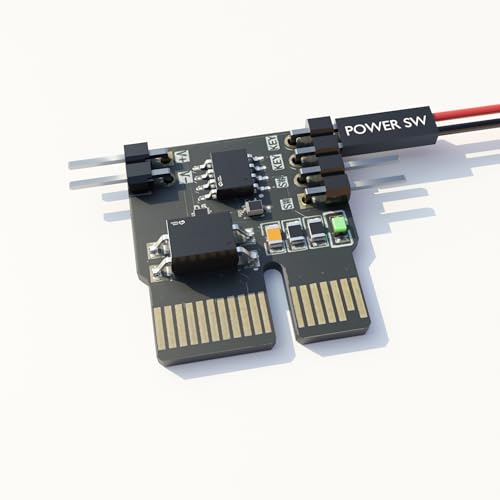
Looking for a hassle-free way to power on your desktop PC after outages? The Auto Power On Module is just what you need. It automatically boots your computer when power’s restored, eliminating the need to press the power button manually. This module is perfect for remote workstations, servers, and mining rigs that require automatic startup. It’s compatible with smart plugs and WiFi power strips, making remote activation a breeze. Simply connect it to your ATX motherboard’s power switch header, and you’re set—no software or drivers needed. Enjoy a compact, durable design that fits seamlessly into any setup.
Best For: This product is best for users with remote workstations, servers, or mining rigs that need automatic power restoration after outages.
Pros:
- Automatic booting eliminates the need for manual power button pressing after power loss.
- Compatibility with smart plugs and WiFi power strips allows for convenient remote activation.
- Easy installation with no required software or drivers makes setup quick and straightforward.
Cons:
- Limited to ATX motherboards, which may not suit all desktop PC configurations.
- Dependency on power restoration means it won’t function if there’s a persistent power issue.
- Potential compatibility issues with certain power strips or smart plugs that may not activate properly.
Ewelink WiFi Wireless Smart Relay Module (2pcs, 1ch)

Ewelink WiFi Wireless Smart Relay Module stands out as an ideal choice for tech-savvy homeowners seeking seamless remote control of their appliances. With the eWelink app, you can easily manage your devices and even utilize voice control through Amazon Alexa or Google Home. This module supports low voltage inputs, making setup a breeze. You’ll appreciate features like timer functions, scene linkage, and the ability to switch between self-locking and inching modes. Just verify you’re connected to 2.4G WiFi, and you’re ready to enjoy ultimate convenience and control over your home environment.
Best For: Tech-savvy homeowners who want to control their appliances remotely with ease and convenience.
Pros:
- Supports voice control with Amazon Alexa and Google Home for hands-free operation.
- Flexible power input options with low voltage support (USB 5V or DC 7-48V) for easy installation.
- Customizable modes such as self-locking and inching mode to suit various appliance control needs.
Cons:
- Limited to 2.4G WiFi, which may not be compatible with all home networks.
- Requires eWelink app for setup and control, which adds an extra step for users.
- Passive output only, meaning it may not be suitable for all types of devices or applications.
SilverStone Tek 2.4G Wireless Power Remote with Audio Feedback (ES02-PCIE)

The SilverStone Tek 2.4G Wireless Power Remote (ES02-PCIE) is an ideal choice for tech enthusiasts who appreciate the convenience of controlling their computers from a distance. With a range of up to 20 meters (65 feet), you can easily manage your system without being tethered to it. The package includes a PCIe receiver card, power/reset switch Y cable, and an optional low-profile slot cover. You’ll love the auditory feedback from the integrated PC speaker, enhancing your experience. Just remember, it requires a motherboard that supports the Resume by PCI-E Device function, and you’ll need a CR2032 battery to power the remote.
Best For: Tech enthusiasts who value the convenience of remote control over their computers from a distance.
Pros:
- Convenient wireless control with a range of up to 20 meters (65 feet).
- Auditory feedback provided by the integrated PC speaker enhances user experience.
- Includes essential components such as a PCIe receiver card and a power/reset switch Y cable.
Cons:
- Requires a compatible motherboard with the Resume by PCI-E Device function enabled for full functionality.
- Battery not included, necessitating an additional purchase of a CR2032 battery.
- Limited to specific PC configurations, which may restrict usability for some users.
Ewelink WiFi Wireless Smart Relay Module for Remote Power Control

For those seeking seamless control over home appliances, the Ewelink WiFi Wireless Smart Relay Module stands out with its ability to operate via the ewelink app. You can manage devices using voice commands through Amazon Alexa, Google Assistant, and IFTTT. With features like timer on/off, scene linkage, and inching mode, it adapts to your needs effortlessly. The module accepts USB 5V or DC 7-48V power inputs and is designed for easy setup. Just make certain you’re on a 2.4G WiFi network, and you’re ready to enjoy remote power control at your fingertips. Experience ultimate convenience with this smart relay module!
Best For: Those looking for an efficient and user-friendly solution to control home appliances remotely through a smartphone app and voice commands.
Pros:
- Voice Control Compatibility: Works seamlessly with Amazon Alexa, Google Assistant, and IFTTT for hands-free operation.
- Versatile Power Input Options: Accepts both USB 5V and DC 7-48V power inputs, making it adaptable for various setups.
- Flexible Functionality: Offers timer settings, scene linkage, and inching mode for customizable appliance management.
Cons:
- Limited WiFi Support: Only compatible with 2.4G WiFi networks, which may exclude some modern routers.
- Setup Requirement: Requires initial setup through the ewelink app, which may be challenging for non-tech-savvy users.
- Single Relay Channel: Designed for controlling one device at a time, which may not meet the needs of users wanting to control multiple appliances simultaneously.
Wireless PC Power Button with Remote Switch

Looking for a hassle-free way to power your PC on and off? The Wireless PC Power Button with Remote Switch is your solution. This sleek UFO-designed remote lets you control your computer from up to 10 meters away, so you won’t have to crawl under your desk anymore. It’s universally compatible with any standard desktop motherboard, and installation is a breeze—just plug it into the F_PANEL’s POWER SW header with no software needed. The dedicated PCIe receiver guarantees reliable signal strength, making it perfect for busy setups. Enjoy the ultimate convenience of powering your PC effortlessly!
Best For: Users seeking a convenient way to power their PC on and off without the hassle of reaching under their desks.
Pros:
- Easy Installation: Plug & play setup with no software or drivers required.
- Universal Compatibility: Works with any standard desktop motherboard.
- Reliable Signal Strength: Dedicated PCIe receiver ensures stable performance in busy environments.
Cons:
- Limited Range: Effective only within a 10-meter distance.
- Potential Interference: Although designed to resist it, some environments may still cause signal issues.
- Single Functionality: Primarily designed for power control; lacks additional features.
Wireless PC Power Button with USB Receiver

Need a simple way to power your desktop without the hassle of reaching behind your computer? The Wireless PC Power Button with USB Receiver is your solution. It connects effortlessly via a USB 2.0 (9-pin) port, making it compatible with any desktop. Just remove the battery insulating strip, and you’re ready to go! With a single button, you can easily turn your PC ON or OFF from up to 10 meters away—no crawling under your desk required. The installation kit includes everything you need, from a signal receiver to adhesive pads, ensuring a seamless setup for ultimate convenience.
Best For: Those seeking a convenient way to power their desktop computers without the hassle of reaching behind the unit.
Pros:
- Intuitive one-button operation allows for easy ON/OFF control.
- Wireless remote functionality enables operation from up to 10 meters away.
- Comprehensive installation kit ensures a straightforward setup process.
Cons:
- Requires BIOS setup adjustments for optimal functionality.
- Limited to desktop computers with a USB 2.0 (9-pin) connection.
- May not be compatible with all motherboard configurations without additional setup.
Remote PC Power Switch for Computer Motherboard

The Remote PC Power Switch for Computer Motherboard is perfect for tech enthusiasts who demand convenience and accessibility in their setups. This device allows you to control your PC’s power button remotely, making it ideal for hard-to-reach locations like under desks or inside cabinets. Made from full-aluminum, it offers both durability and aesthetic appeal, ensuring heat dissipation and signal stability. Compatible with various PCIe slots, it features a USB-C rechargeable design, providing up to 30 days of use on a single charge. With its included components, setting up is quick and straightforward, enhancing your overall computing experience.
Best For: Tech enthusiasts seeking convenience and accessibility for remote PC power control in hard-to-reach locations.
Pros:
- Durable Construction: Made from full-aluminum for enhanced durability and heat dissipation.
- Long Battery Life: USB-C rechargeable design offers up to 30 days of use on a full charge.
- Easy Setup: Quick and straightforward installation with included components.
Cons:
- Limited Compatibility: Only works with PCIe slots and not legacy PCI slots.
- Requires Charging: Needs to be recharged periodically, which may be inconvenient for some users.
- Potential Signal Interference: Wireless operation may be susceptible to interference in certain environments.
Factors to Consider When Choosing a PC Remote Power Control Module
When you’re choosing a PC remote power control module, there are several key factors to keep in mind. You’ll want to evaluate the range of operation, compatibility with your motherboard, and how easy it is to install. Additionally, think about wireless connectivity stability and the overall design to guarantee it fits well with your setup.
Range of Operation
While selecting a PC remote power control module, it’s essential to evaluate the range of operation since it directly affects your convenience and usability. The effective distance can vary greatly; some models allow control from as short as 10 meters, while others can function up to 80 feet (approximately 24 meters). A longer range is especially beneficial if your PC’s setup is out of reach, like under a desk or in a cabinet. Most wireless modules use 2.4GHz RF signals for reliable communication, but environmental factors, such as walls or interference from other devices, can impact this range. Be sure to take into account the maximum distance you might need to operate the device to guarantee it fits your specific usage requirements.
Compatibility With Motherboards
Choosing a PC remote power control module requires careful consideration of its compatibility with your motherboard to guarantee seamless integration. First, make certain the module works with standard motherboard power switch headers, like the POWER SW header, for easy setup. Check if specific BIOS settings, such as enabling Always-On USB Power or disabling ErP/EUP Ready, are needed for proper functionality. Verify that the module’s connectivity type, whether USB 2.0 or PCIe, matches the available ports on your motherboard. Additionally, look for modules that specify compatibility with various motherboard types, such as ATX or microATX, to ascertain a proper fit. Finally, consider the wireless connectivity range, as some motherboards may limit effective distance based on design and placement.
Installation Ease
Installation ease is an essential factor to take into account when selecting a PC remote power control module. Look for modules that offer a plug-and-play setup, as this greatly reduces installation time and complexity. Confirm compatibility with standard motherboard connections, like the POWER SW header or USB 2.0 9-pin, to facilitate straightforward integration. Consider devices that come with extensive installation kits, including all necessary cables and adapters, to simplify the process. It’s best to select modules that don’t require BIOS configuration changes unless absolutely necessary, as these can complicate installation. Finally, check for clear user manuals or installation guides that provide step-by-step instructions, guaranteeing a smoother setup experience and minimizing potential frustrations.
Wireless Connectivity Stability
When selecting a PC remote power control module, ensuring wireless connectivity stability is essential for reliable operation. A strong 2.4GHz RF signal is commonly used, offering a stable connection up to 20 meters or more in free space. Remember, interference from other electronic devices can disrupt this connection, so you should choose a module designed to resist such interference. Modules with dedicated receivers, like PCIe or USB connections, generally provide better signal strength and reliability than those relying solely on RF transmission. Additionally, consider the operating range, as some modules can function effectively from distances of up to 80 feet, making them suitable for various setups. Prioritizing these factors will enhance your remote control experience.
Design and Aesthetics
A reliable PC remote power control module not only needs to perform well but should also look good in your workspace. Choose a design that features an intuitive, user-friendly interface, making operation effortless. A sleek, modern aesthetic can enhance your setup, allowing the module to blend seamlessly with your computer components. Durability is key, so opt for materials like full-aluminum, which provide a premium appearance and improved heat dissipation. Pay attention to size and form factor to guarantee it fits neatly without cluttering your space. Features like LED indicators or audio feedback can boost functionality, giving you visual or auditory confirmation of your actions. Ultimately, the right design enhances both style and usability in your workspace.
Button Functionality
Button functionality plays an essential role in your selection of a PC remote power control module. You’ll want to take into account how the button operates—does it require a short press to power on or off, or a long press for a safe shutdown? If you prefer simplicity, look for modules offering intuitive one-button operation. Additionally, check for button designs that include large emergency-style buttons for better visibility and aesthetics on your desk. Wireless functionality is another key factor; verify the button operates effectively from distances between 10 meters to 80 feet. Finally, confirm that the button is compatible with your motherboard’s power switch header, allowing for easy plug-and-play setup without the hassle of extra software or drivers.
Additional Features
Selecting the right PC remote power control module involves more than just button functionality; you should also consider several additional features that can enhance your overall experience. Look for modules with intuitive one-button operation to simplify use. A reliable wireless range is essential, so aim for at least 20 meters for better accessibility. Audio feedback features can provide auditory cues during operation, making it easier to confirm your actions. Make sure the module is compatible with various motherboard configurations, allowing for easy connections without extra software or drivers. Additionally, evaluate the design for durability and aesthetics; a well-constructed module can enhance both functionality and the overall look of your setup.
Power Source Requirements
When choosing a PC remote power control module, understanding the power source requirements is crucial for seamless operation. Many modules need a specific power source, like USB 5V or DC 7-48V, to work correctly. You might also need to enable certain BIOS settings, such as “Always-On USB Power,” to guarantee consistent power delivery. The power source can affect the module’s range and responsiveness, with some devices reaching over 20 meters under ideal conditions. Additionally, some models use battery-operated remotes, which will require periodic battery replacements to keep functioning. Finally, verify compatibility with your motherboard’s power switch header for proper installation and power access during use.