If your desk speakers sound thin, a pc soundbar with subwoofer can make a huge difference. You get fuller bass, clearer dialogue, and a cleaner all-in-one setup for gaming, work, and streaming.
Below, we’ve narrowed the field to 10 options that balance sound quality, size, connectivity, and value so you can choose the right fit fast.
Best 10 PC Soundbar with Subwoofer Picks for 2026
Best for Compact 2.1 Bass
Saiyin 17-inch Soundbar with Subwoofer

- Dedicated subwoofer for deeper bass
- Compact size works well on desks
- Bluetooth, AUX, and optical inputs
Best For: Desk setups and small rooms that need more bass from a compact soundbar system.
Best for RGB Desk Setups
Redragon GS560 RGB Desktop Soundbar

- Compact 16-inch footprint fits under most monitors
- USB powered with simple 3.5mm plug-and-play audio
- RGB light sync adds gaming-friendly desk flair
Best For: Gamers and desk users who want a compact, colorful soundbar with easy setup.
Best for Small Desks
Saiyin 14.2-inch Soundbar with 4-inch Subwoofer

- Compact 2.1 design with separate 4-inch subwoofer
- Bluetooth 5.3 plus optical and AUX inputs
- 10-level bass control for desktop-friendly tuning
Best For: Small desks and PC setups that need compact sound with stronger bass.
Best for RGB Gaming Setups
Razer Leviathan V2 PC Gaming Soundbar

- Compact soundbar design with a separate subwoofer
- THX Spatial Audio for more immersive gaming and media
- Bluetooth 5.2 plus Razer app controls and RGB customization
Best For: Gamers who want a space-saving soundbar setup with strong bass and customizable lighting.
Best for Dialogue Clarity
ULTIMEA Poseidon M30 2.1 Soundbar

- VoiceMX keeps speech and vocals clear
- Wireless subwoofer adds flexible, deeper bass
- App EQ and Bluetooth 6.0 make setup and tuning easy
Best For: PC users who want clearer dialogue, adjustable bass, and a wireless subwoofer for media and gaming.
Best for RGB Gaming

- 160W peak output with 5-inch wired subwoofer
- RGB lighting syncs with audio for gaming setups
- USB, HDMI ARC, optical, AUX, and Bluetooth 5.3
Best For: Gamers and desktop users who want bass, lighting effects, and flexible connectivity.
Best for Flexible Placement
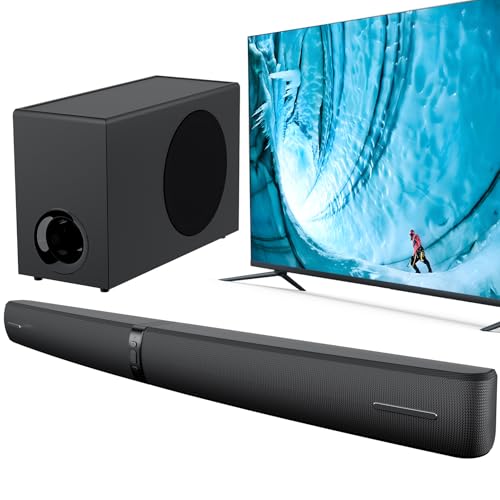
- 110W output with adjustable deep bass
- Bluetooth 5.3, ARC, optical, and AUX inputs
- Horizontal, vertical, or wall-mounted setup
Best For: PC users and gamers who want a flexible soundbar/subwoofer combo with strong bass and multiple placement options.
Best for Dolby Atmos on a Budget
ULTIMEA Poseidon M60 5.1CH Sound Bar

- 5.1-channel Dolby Atmos for a broader, more cinematic soundstage.
- Wired wooden subwoofer delivers stronger bass for movies and games.
- App EQ and surround controls make tuning simple for your room.
Best For: Immersive TV or desktop-style setups that need strong bass and easy sound tuning.
Best for Easy TV/PC Setup

- 110W output with adjustable bass and subwoofer support
- Bluetooth, ARC, optical, and AUX for flexible connections
- Three EQ modes for movies, music, and dialogue
Best For: People who want a simple, flexible soundbar for PC, TV, or gaming with stronger bass.
Best for Compact 2.1 Bass – Saiyin 17-inch Soundbar with Subwoofer
If you want a pc soundbar with subwoofer that adds real low-end impact without taking over your desk, the Saiyin 2.1 setup is a practical pick. Its compact 17-inch soundbar, dedicated subwoofer, and multiple connection options make it easy to use for gaming, streaming, and everyday computer audio.
Best For: Desk setups, small rooms, and buyers who want fuller bass from a compact PC or TV speaker system.
Pros:
- Dedicated subwoofer delivers noticeably deeper bass than a basic soundbar.
- Compact 17-inch design fits well under monitors and smaller TVs.
- Bluetooth, AUX, and optical inputs give you flexible hookup options.
- Three EQ modes help tune sound for movies, music, or gaming.
Cons:
- The included remote is not universal and won’t work with every TV remote.
- Best suited to small-to-medium spaces rather than large home theaters.
This pc soundbar with subwoofer is a strong value choice if your priority is fuller sound in a compact footprint. It won’t match a larger AV system, but for desktop use it offers an appealing mix of bass, convenience, and easy connectivity.
Best for RGB Desk Setups – Redragon GS560 RGB Desktop Soundbar
If you want a pc soundbar with subwoofer-style presence without adding a separate bass box, the Redragon GS560 is a compact 2.0-channel option that brings clearer sound, decent low-end punch, and a strong RGB look. It’s an easy fit for a desk, monitor stand, or small entertainment setup when you want simple USB power and a single 3.5mm connection.
Best For: Gamers and desk users who want a compact soundbar with eye-catching lighting and straightforward plug-and-play setup.
Pros:
- Compact 16-inch design fits neatly under monitors and small TVs
- USB powered with 3.5mm audio for quick setup on PC, laptop, and more
- Dynamic RGB lighting syncs with music for a more immersive desk look
- Touch controls and volume knob make daily adjustments easy
Cons:
- 2.0-channel design is not a true subwoofer-equipped system
- Bass is improved, but not ideal for deep, room-shaking lows
- Lighting effects may be unnecessary if you prefer a clean setup
Overall, the GS560 is a strong pick if you’re shopping for a pc soundbar with subwoofer-like impact in a compact all-in-one design, especially if RGB style matters as much as sound. It’s more about convenience, visual flair, and fuller desktop audio than maximum bass depth.
Best for Small Desks – Saiyin 14.2-inch Soundbar with 4-inch Subwoofer
If you want a pc soundbar with subwoofer that adds real low-end punch without taking over your desk, the Saiyin DS6341S is built for compact setups. Its 14.2-inch soundbar, separate 4-inch subwoofer, and Bluetooth 5.3 connectivity make it a practical option for gaming, streaming, and everyday PC audio.
Best For: Small desks, bedroom TVs, and PC users who want stronger bass and simple wired or wireless connectivity.
Pros:
- Compact soundbar and separate subwoofer keep the footprint manageable.
- 10-level bass control and 32-step volume adjustment help fine-tune the sound.
- Bluetooth, optical, and AUX inputs make it easy to connect to PCs and TVs.
- Three EQ modes can improve dialogue, music, or movie playback.
Cons:
- ARC is not supported, so setup depends on optical, AUX, or Bluetooth.
- EQ tuning is described as subtle rather than dramatic.
- You need the correct PCM/stereo output settings to avoid cracking or silence.
As a pc soundbar with subwoofer, this Saiyin model focuses on space-saving bass and easy source switching rather than cinematic volume. It is a strong fit if you want fuller desktop audio and prefer a straightforward 2.1 setup over a larger speaker system.
Best for Small Spaces – BESTISAN 2.1ch Sound Bar with Subwoofer
If you want a pc soundbar with subwoofer that adds real low-end without taking over your desk, the BESTISAN 2.1ch is an easy fit. Its all-in-one 16.5-inch design keeps the footprint compact, while HDMI ARC, optical, AUX, USB, and Bluetooth make it flexible for PCs, TVs, and casual gaming setups.
Best For: Compact desks, bedroom PCs, and users who want fuller sound without a separate subwoofer box.
Pros:
- Built-in subwoofer adds more bass than typical slim soundbars
- Three EQ modes help tailor sound for movies, music, or dialogue
- Multiple inputs plus Bluetooth 5.3 keep setup options flexible
- Small 16.5-inch body is easier to place under a monitor or TV
Cons:
- Built-in bass will not match the depth of a separate powered subwoofer
- Best suited for small to medium rooms rather than large home theaters
For a pc soundbar with subwoofer in a tidy all-in-one format, this BESTISAN model is a practical value pick. It focuses on space-saving design, simple connectivity, and stronger low-end presence than standard stereo bars, making it a solid upgrade for everyday listening.
Best for RGB Gaming Setups – Razer Leviathan V2 PC Gaming Soundbar
If you want a pc soundbar with subwoofer that keeps your desk clean while adding real bass and surround-style imaging, the Razer Leviathan V2 is an easy fit. Its compact soundbar slides under a monitor, while the separate subwoofer gives games, movies, and music more impact than a typical desktop speaker bar.
Best For: Gamers and desktop users who want a compact, bass-rich audio upgrade with RGB lighting and wireless convenience.
Pros:
- Two full-range drivers plus a down-firing subwoofer deliver fuller, more immersive sound.
- THX Spatial Audio helps create clearer positional effects for games and media.
- Compact design fits neatly beneath most monitors and helps reduce desktop clutter.
- Bluetooth 5.2 and Razer app support make switching devices and tuning settings simple.
Cons:
- The separate subwoofer takes up extra floor space.
- RGB lighting is a plus for some users, but unnecessary for minimalist setups.
- Not the best choice if you only want a simple, low-cost speaker upgrade.
The Leviathan V2 stands out if you want a pc soundbar with subwoofer that balances desk-friendly size with genuinely engaging sound. It’s especially appealing for gaming-focused setups where bass, clarity, and visual flair all matter.
Best for Dialogue Clarity – ULTIMEA Poseidon M30 2.1 Soundbar
If you want a pc soundbar with subwoofer that keeps voices clear while still adding real low-end weight, the ULTIMEA Poseidon M30 is a strong all-around pick. Its 2.1-channel layout, wireless subwoofer, and app-based EQ make it easy to tune for gaming, streaming, or desk-to-room listening without a complicated setup.
Best For: PC users who want clearer dialogue, adjustable bass, and a wireless subwoofer for movies, games, and everyday media.
Pros:
- VoiceMX processing helps keep speech and on-screen dialogue easy to hear
- Wireless subwoofer adds flexible placement and stronger bass impact
- App control with 10-band EQ and preset sound modes makes tuning simple
- HDMI, optical, and Bluetooth 6.0 provide broad connectivity
Cons:
- Peak power is more about punch than true high-end room-filling output
- App features may be more than casual users need for a basic desk setup
For shoppers comparing a pc soundbar with subwoofer, this model stands out most for its dialogue clarity and easy bass control rather than trying to be the most compact or the most powerful. It’s a smart fit if you want a simple upgrade that makes movies, games, and streaming sound fuller and cleaner.
Best for RGB Gaming – MEREDO G38 3.1CH Soundbar
If you want a pc soundbar with subwoofer that adds both punchy bass and a bit of visual flair, the MEREDO G38 is built for desktops, gaming setups, and small home theater spaces. Its 3.1-channel layout, wired 5-inch subwoofer, and multiple wired/wireless inputs make it flexible for PCs, TVs, consoles, and projectors.
Best For: Gamers and desktop users who want strong bass, RGB lighting, and simple USB-connected setup for a compact audio upgrade.
Pros:
- 160W peak output with a dedicated 5-inch wired subwoofer for fuller low end
- RGB lighting with audio sync and multiple rhythm modes for gaming and media
- Broad connectivity, including Bluetooth 5.3, HDMI ARC, optical, AUX, and USB
- Detachable bases and wall-mount option make placement more flexible
Cons:
- Wired subwoofer limits placement freedom compared with fully wireless systems
- RGB effects may not appeal to buyers wanting a plain, minimal look
- Designed more for compact entertainment setups than large rooms
This is a strong pc soundbar with subwoofer if your priority is easy connectivity, gaming-friendly features, and richer bass in a desktop-sized package. It stands out most when you want an all-in-one upgrade that is as much about atmosphere as it is about sound.
Best for Flexible Placement – 2.1 Sound Bar with Subwoofer
If you want a pc soundbar with subwoofer that can adapt to different rooms and setups, this 2.1 model is built for versatility. It offers Bluetooth plus ARC, optical, and AUX inputs, along with three EQ modes and adjustable bass, so you can tune it for gaming, movies, or everyday desktop listening without much fuss.
Best For: PC users, gamers, and TV owners who want a flexible soundbar/subwoofer combo with multiple placement and connection options.
Pros:
- 2.1-channel design with adjustable deep bass for fuller low-end sound
- 110W output and volume boost make it easier to fill a room
- Multiple setup options: horizontal, vertical, or wall-mounted
- Bluetooth 5.3 plus ARC, optical, and AUX support
Cons:
- Best results may require manual TV audio settings
- Not as compact as a simple all-in-one desktop speaker
This is a practical pc soundbar with subwoofer choice if you care more about flexibility and stronger bass than ultra-minimal desktop styling. The multiple connection paths and placement modes make it easy to adapt to a gaming desk, living room TV, or projector setup.
Best for Dolby Atmos on a Budget – ULTIMEA Poseidon M60 5.1CH Sound Bar
If you want a pc soundbar with subwoofer that feels more like a compact home theater than a basic desktop speaker, the ULTIMEA Poseidon M60 is a strong pick. It combines Dolby Atmos, a wired wooden subwoofer, and app-based tuning, so you can shape the sound for movies, games, and everyday PC audio without a complicated setup.
Best For: Buyers who want immersive surround sound, strong bass, and easy tuning for a TV or desktop-style entertainment setup.
Pros:
- 5.1-channel Dolby Atmos layout creates a wider, more cinematic soundstage.
- Wired subwoofer with BassMX support adds punchy low-end for games and action scenes.
- VoiceMX and HDMI eARC help keep dialogue clear and setup straightforward.
- App control with EQ and surround presets makes sound customization easy.
Cons:
- Wired subwoofer placement is less flexible than a fully wireless design.
- Feature-rich tuning may feel like overkill if you just want a simple plug-and-play bar.
- Primarily aimed at TV/home theater use, so desk setups may need extra space.
For shoppers comparing a pc soundbar with subwoofer, the M60 stands out if you care more about immersive sound and bass depth than minimalism. It’s a better fit for a media-focused desk or small living room than for a cramped work monitor setup.
Best for Easy TV/PC Setup – 110W Sound Bar with Subwoofer
If you want a pc soundbar with subwoofer that adds fuller bass without a complicated install, this 110W model is built for straightforward everyday use. It supports Bluetooth, ARC, optical, and AUX, so it can work with a TV, desktop, projector, or gaming setup while giving you several sound modes to fine-tune dialogue, music, and movies.
Best For: Users who want an easy-to-connect soundbar for PC or TV use with adjustable bass and simple switching between movie, music, and voice-focused listening.
Pros:
- Includes a subwoofer and adjustable bass for stronger low-end impact
- Multiple inputs make it flexible for TV, PC, and gaming setups
- Three EQ modes help tailor sound for movies, music, or dialogue
- Detachable design offers more placement options for different rooms
Cons:
- Not a compact one-piece bar, so it may take more space than slimmer models
- Best bass results will still depend on room layout and placement
This is a practical pc soundbar with subwoofer choice if you care more about easy setup, flexible connections, and customizable sound than about premium extras. It looks especially appealing for buyers who want a simple upgrade that can handle everyday streaming, gaming, and desktop audio.
How We Picked the Best PC Soundbar with Subwoofer
We focused on the features that matter most for desk and near-field listening: bass output, clarity at low volumes, footprint, input variety, and setup simplicity. Since a PC Soundbar with Subwoofer is often used for gaming and mixed media, we also favored models with useful EQ controls, Bluetooth, HDMI ARC, optical, AUX, and app-based tuning where available.
Quick Comparison
In general, smaller 2.1 systems are best for compact desks and straightforward plug-and-play use. More powerful or feature-rich models are better if you want room-filling sound, stronger sub-bass, or broader home-theater flexibility. RGB lighting, spatial audio, and multi-driver layouts are nice extras, but they should come after sound quality and connectivity on your priority list.
Key Buying Factors for a PC Soundbar with Subwoofer
Size and Desk Fit
Measure the space under your monitor and around your subwoofer placement before buying. Compact soundbars are ideal if you want to keep your desk clear, while larger systems may sound bigger but need more room.
Connection Types
For the easiest setup, look for HDMI ARC, optical, or AUX. Bluetooth is convenient for phones and tablets, but wired connections usually deliver more consistent performance for a desktop PC.
Bass Control
A subwoofer should add depth without overwhelming voices or game effects. Adjustable bass, volume boost, or EQ presets help you tune the system for different content.
Power and Channel Layout
2.1 systems are the sweet spot for most buyers: simple, compact, and bass-enhanced. If you want more immersive sound, a 3.1 or 5.1 setup can improve center-channel clarity and surround effects, though it may be less desk-friendly.
Extra Features
RGB lighting, app control, and spatial audio can be appealing, especially for gaming setups. Treat them as secondary features unless they directly improve how you’ll use the speaker every day.
Who Should Buy Which PC Soundbar with Subwoofer?
If you want a clean budget upgrade for everyday PC use, choose a compact 2.1 model with simple inputs. If gaming and bass are your main priorities, look for stronger output, adjustable low-end tuning, and a smaller footprint that fits close to your monitor. If you want one system for a PC and a TV, pick a more versatile PC Soundbar with Subwoofer with HDMI ARC and optical support. For buyers who care most about immersive movie playback, a higher-channel model with broader soundstage features is the better long-term choice.