When you’re on the move with your PC case, having the right transport handle makes all the difference. It’s not just about carrying your setup; it’s about doing it comfortably and securely. With so many options available, you might wonder which handles truly stand out. Let’s explore the top choices that can enhance your experience and keep your equipment safe during transit.
Trunab PC Tower Carrying Strap with Rubber Handle
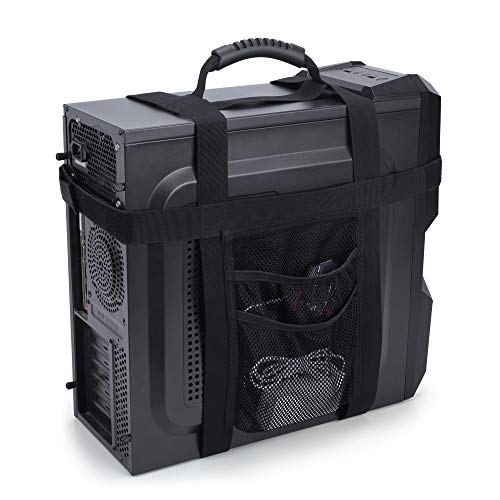
If you’re frequently on the move and need a reliable way to transport your PC tower, the Trunab PC Tower Carrying Strap with Rubber Handle is your best bet. This patented design fits towers with a girth of 37 to 53.5 inches and heights between 11.5” to 18”. The ventilated straps guarantee heat dissipation isn’t compromised while you carry it. With adjustable top straps and side magic straps, your tower remains secure during transport. Plus, the mesh pocket conveniently holds accessories like power supplies and adapters. The rubber handle makes one-handed carrying a breeze, simplifying your travels with your PC.
Best For: Individuals who frequently transport their PC towers and need a secure, convenient carrying solution.
Pros:
- Ventilated straps allow for heat dissipation during transport.
- Adjustable design fits a wide range of PC tower sizes for versatility.
- Mesh pocket provides convenient storage for accessories like power supplies and adapters.
Cons:
- May not fit very large or unconventional PC tower sizes.
- Limited padding could be a concern for those looking for extra protection.
- Requires checking dimensions before purchase to ensure compatibility.
Trunab Computer Desktop Tower Carrying Case for ATX/M-ATX Mainframe

The Trunab Computer Desktop Tower Carrying Case is perfect for gamers and professionals who need to transport their ATX or M-ATX mainframe chassis securely. With dimensions of 20.1*8.66*18.5 inches, it fits your gear snugly. It features multiple pockets for accessories like keyboards and hard drives, plus side pockets with buckles for added security. The internal foam padding and thickened pearl cotton cushions protect your equipment from damage, while the no-slip feet pads minimize friction with the ground. You can carry it comfortably using the adjustable shoulder strap or top handle, ensuring convenience on the go.
Best For: Gamers and professionals looking for a secure and convenient way to transport their ATX or M-ATX computer tower and accessories.
Pros:
- Multiple pockets for organized storage of accessories such as keyboards and hard drives.
- Internal foam padding and thickened pearl cotton cushions provide excellent protection against damage.
- Adjustable ergonomic padded shoulder strap and top handle allow for comfortable carrying options.
Cons:
- May not fit larger custom-built PC towers due to specific size limitations.
- The water-resistant material may not be completely waterproof in heavy rain.
- Some users may find the case bulkier than expected for everyday transport.
Trunab PC Tower Carrying Strap with Handle
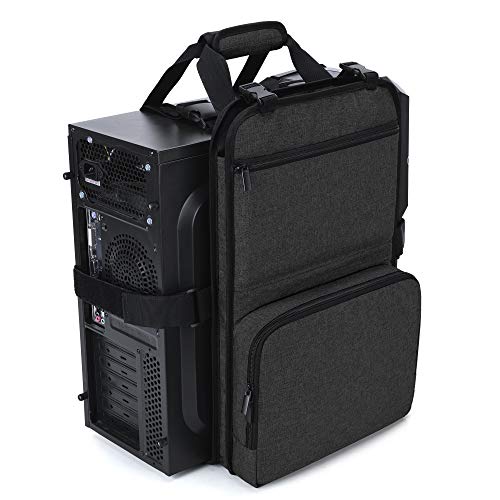
Designed for those who frequently transport their desktop computers, the Trunab PC Tower Carrying Strap with Handle stands out for its convenient storage options. This adjustable strap fits mini and smaller mid towers, ensuring a snug fit while you’re on the move. Its padded handle allows for easy single-handed carrying, and the multiple pockets keep your keyboard, cables, and accessories organized. The bottom pad protects your PC from dust and debris, extending its lifespan. With secure adjustable straps, you can rest easy knowing your setup stays stable during transport, making it perfect for travel, business trips, or school use.
Best For: Individuals who frequently transport their desktop computers, such as students, business professionals, and gamers on the go.
Pros:
- Convenient storage options with multiple pockets for organizing keyboards, cables, and accessories.
- Protective bottom pad that prevents dust and debris accumulation, extending the lifespan of your PC tower.
- Secure adjustable straps ensure stability during transport, giving peace of mind while carrying.
Cons:
- Limited compatibility as it only fits mini and smaller mid towers within specific dimensions.
- May not accommodate larger setups, restricting use for those with bigger PC towers.
- Potential wear on straps over time with frequent use, affecting durability.
Computer Desktop Tower Carrying Straps

For anyone frequently moving their desktop PC, Computer Desktop Tower Carrying Straps are an essential tool that simplifies the process. These adjustable straps fit one to two PC chassis, ensuring a snug and secure hold. Made from strong cotton webbing, they’re durable yet lightweight, making transport effortless. The thickened Velcro allows for easy one-handed carrying, while the dual strap system enhances stability. Plus, with a quick-attach design, you won’t need any tools for installation. Ideal for moving between rooms or offices, these straps won’t take up much space when stored, making them a must-have for PC users on the go.
Best For: Individuals who frequently transport their desktop PCs between different locations, such as home and office.
Pros:
- Durable Construction: Made from strong cotton webbing and industrial-grade buckles for reliable support.
- Easy to Use: Quick-attach design allows for effortless installation without the need for tools.
- Compact Storage: Lightweight and space-saving, these straps are easy to store when not in use.
Cons:
- Limited Size Compatibility: Designed specifically for 1 to 2 PC chassis, may not fit larger setups.
- Color Options: Available only in gray and orange, which may not suit all personal preferences.
- Weight Limitations: While durable, the straps may have a limit on the maximum weight they can support effectively.
Computer Desktop Tower Carrying Case for ATX/M-ATX Chassis

If you’re a gamer or a professional needing to transport your ATX or M-ATX computer chassis, this Computer Desktop Tower Carrying Case is your ideal companion. Its robust design features high-density EPE lining and wear-resistant Oxford cloth, ensuring your gear stays safe from bumps and drops. The spacious main compartment fits your desktop and accessories like GPU cards, while multiple zippered pockets keep your cables and peripherals organized. With a soft padded handle, shoulder straps, and a chest buckle to ease pressure, moving your setup has never been easier. It’s perfect for business trips or relocating your entire gaming rig.
Best For: Gamers and professionals needing a reliable and protective solution for transporting their ATX or M-ATX computer chassis.
Pros:
- High-density EPE lining and durable Oxford cloth provide excellent protection against bumps and drops.
- Spacious main compartment with multiple pockets keeps components and accessories organized.
- Comfortable carrying options, including padded handles and shoulder straps, make transportation easy.
Cons:
- May be too large for smaller computer cases or setups.
- Limited color options available for personal preference.
- Price point may be higher compared to basic carrying cases.
Trunab PC Tower Carrying Strap with Handle and Pockets for Accessories

The Trunab PC Tower Carrying Strap is perfect for gamers and professionals who need a reliable way to transport their PC towers. Weighing just 1.74 pounds, it accommodates towers between 18” to 25” in height and features multiple pockets for your accessories. Its anti-slide design guarantees stability with adjustable straps and a bottom pad that protects your PC from dust. The padded handle allows for easy one-handed transport, making it ideal for travel or office use. With a customer rating of 4.4 out of 5 stars, this strap offers both convenience and practicality for your computing needs.
Best For: Gamers and professionals seeking a convenient and reliable solution for transporting their PC towers.
Pros:
- Lightweight design at 1.74 pounds, making it easy to carry.
- Multiple pockets for organized storage of accessories like keyboards and hard drives.
- Anti-slide design with adjustable straps ensures stability during transport.
Cons:
- May not fit towers outside the specified dimensions (18” to 25” height).
- Limited padding for extra protection against heavy impacts.
- Some users may find the adjustable straps cumbersome to manage.
Slappa Desktop Computer Tower Carrier Harness for Medium to Large PCs
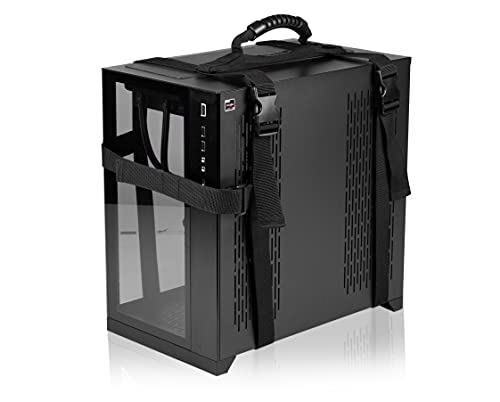
Transporting a medium to large PC tower has never been easier with the Slappa Desktop Computer Tower Carrier Harness. Designed for mid to full-size towers, this harness features durable 1.5” straps with adjustable buckles and a secure front strap with hook-and-loop closure. You can keep it attached during use, making it super convenient. Its reinforced, ergonomic soft-grip handle guarantees safe and easy transport, supporting up to 70 lbs. Whether you’re heading to the office, school, or on vacation, this carrier harness is perfect for your needs. Enjoy the comfort and ease it brings to your PC transport experience!
Best For: Individuals who frequently transport medium to large PC towers for work, school, or travel.
Pros:
- Durable construction with 1.5” wide straps and adjustable buckles for secure carrying.
- Convenient design allows the harness to remain attached during use for effortless accessibility.
- Ergonomic soft-grip handle provides comfort and safety during transport.
Cons:
- Limited weight capacity of 70 lbs may not accommodate heavier or larger gaming towers.
- May require adjustment each time for a perfect fit depending on the tower size.
- Not suitable for small form factor PCs, limiting its versatility for all users.
Computer Desktop Tower Carrying Case Backpack

For gamers and professionals on the go, the Computer Desktop Tower Carrying Case Backpack stands out as an essential choice. Designed for ATX mid-tower desktops, it offers a protective shell while functioning as a portable workstation. You’ll love the dedicated compartments for your keyboard, mouse, and headset, plus expandable side pockets for accessories. Its reinforced base and thick padding guarantee your gear stays safe from impacts. Made from durable, rain-resistant Oxford fabric, it minimizes dust buildup too. With adjustable straps and an anti-tip buckle, this backpack makes transporting your rig a breeze, perfect for gaming events or business trips.
Best For: Gamers and professionals seeking a portable and protective solution for transporting their ATX mid-tower desktops.
Pros:
- Dedicated compartments for organizing keyboard, mouse, headset, and cables.
- Durable, rain-resistant Oxford fabric protects against dust and environmental elements.
- Ergonomic design with adjustable straps and anti-tip buckle for comfortable transport.
Cons:
- Limited to ATX mid-tower desktops, may not accommodate larger models.
- May be bulky for some users when fully loaded.
- Higher price point compared to basic carrying cases.
Mechanic Master C34 Compact ATX Case

Looking for a PC case that’s both compact and portable? The Mechanic Master C34 Compact ATX Case is your perfect match. Its space-saving design supports standard ATX motherboards and graphics cards up to 335mm, ensuring top performance without bulk. With a built-in carry handle, transporting your rig to LAN events is a breeze. You’ll enjoy flexible cooling options, accommodating a 240mm liquid radiator and CPU coolers up to 162mm tall. Plus, the optimized interior makes installation easy, while the metal front I/O panel offers modern connectivity with USB 3.0 and Type-C. This case combines functionality and premium feel seamlessly.
Best For: Gamers and professionals looking for a compact and portable PC case that supports high-performance components.
Pros:
- Space-saving design allows for standard ATX motherboards and graphics cards up to 335mm, maximizing performance in a compact form.
- Built-in carry handle enhances portability, making it easy to transport for LAN events or workstations.
- Flexible cooling options support both liquid and air cooling setups, accommodating a 240mm radiator and CPU coolers up to 162mm tall.
Cons:
- Limited space may restrict options for larger components or additional cooling setups.
- Recommended use of SFX/L power supply might require additional investment for optimal cable management.
- Compact design could make it challenging for users who prefer extensive customization or modding.
Micro Computer Desktop Tower Carrying Case for Mini-ITX
If you’re seeking a reliable way to carry your Mini-ITX setup, the Micro Computer Desktop Tower Carrying Case is designed just for you. With dimensions of 18x14x8 inches, it’s perfect for transporting your PC, keyboard, mouse, and accessories. Its high-density nylon lining and thickened padding guarantee your gear stays protected from bumps and drops. The spacious 32L main compartment opens 180° for easy packing, while the front pocket and top zip-mesh pocket keep your items organized. Plus, with multiple carrying options and a customizable MOLLE system, you can easily personalize and transport your setup wherever you go.
Best For: Those who need a durable and organized carrying case for their Mini-ITX setup while traveling.
Pros:
- High-density nylon lining and thickened padding provide excellent protection against bumps and drops.
- Spacious 32L main compartment opens 180° for easy packing and organization.
- Customizable MOLLE system allows for attaching extra gear and personalizing with patches or stickers.
Cons:
- Limited to micro tower PCs no larger than 18 inches, which may not accommodate larger setups.
- The size may be too large for some users looking for a compact carrying solution.
- The design may not appeal to everyone, depending on personal style preferences.
Factors to Consider When Choosing a PC Transport Handle for a PC Case
When choosing a PC transport handle, you need to think about several key factors. Size compatibility, weight capacity, and ergonomic design all play an essential role in how well the handle will work for your setup. Additionally, consider storage options and stability features to guarantee your PC stays secure during transport.
Size Compatibility Requirements
Choosing the right PC transport handle hinges on understanding size compatibility requirements, as improper measurements can lead to instability during transport. Start by measuring your PC tower’s height, width, and girth to guarantee a proper fit. Most carrying straps and cases are adjustable, typically accommodating height ranges from 11.5 to 25 inches and girth between 37 to 72 inches. It’s essential to check that the transport handle fits your chassis type—be it ATX, M-ATX, or Mini-ITX—since this influences compatibility. Look for products that specify their maximum dimensions to guarantee they can support your specific model without compromising stability. Taking these factors into account will help you select a handle that enhances portability and convenience.
Weight Capacity Considerations
Understanding size compatibility is just one aspect of selecting the right PC transport handle; weight capacity is equally important. When you choose a handle, be certain it can support the combined weight of your PC case and any accessories, typically ranging from 30 to 70 pounds. Always check the manufacturer’s maximum weight limit—exceeding it can strain the handle and increase the risk of failure during transport. Look for handles with reinforced stitching and durable materials, as these features enhance weight-bearing capability. Additionally, evaluate how the weight distributes when carrying your PC; ergonomic designs can make heavier loads easier to manage. Finally, always test the handle with your fully loaded PC case to verify stability before any long-distance transport.
Carrying Comfort and Ergonomics
A comfortable transport handle can make all the difference when you’re moving your PC case. Prioritize ergonomic designs with padded grips to minimize strain during longer hauls. Adjustable straps are essential, as they accommodate different body types and guarantee proper weight distribution. This not only enhances your comfort but also makes carrying more manageable. Look for handles that allow for one-handed transport, making it easier to navigate tight spaces or load your case into a vehicle. Anti-slip features can provide a better grip, reducing the risk of dropping your PC. Finally, always check the weight capacity to verify the handle can safely support your PC and its contents without sacrificing comfort during transport.
Storage Options Availability
While you might focus on the handle’s comfort and durability, the availability of storage options is equally essential when selecting a transport handle for your PC case. Look for designs that include pockets for accessories like keyboards, cables, and external hard drives, enhancing your organization during transport. Dedicated compartments or mesh pockets can make accessing smaller items easier, reducing the risk of losing essential accessories. Also, consider whether the carrying strap or case has additional storage solutions, like side pockets or zippered compartments, to accommodate extra gear for business trips or gaming events. Evaluate the size and capacity of these storage options to verify they fit your specific equipment without compromising transportability. Easy access to these compartments while in use boosts your convenience notably.
Stability and Security Features
When transporting your PC, having a reliable handle isn’t just about comfort and storage; stability and security are equally important. Look for adjustable straps with buckles that guarantee a snug fit for various PC tower sizes, preventing any movement during transport. Many designs also include additional side or magic straps to further enhance stability, reducing the risk of your PC case shifting or falling. Anti-slide features help keep your computer tower securely in place and minimize friction, protecting the chassis. Some handles even come with a bottom pad to reduce friction and keep dust at bay. Finally, opt for ergonomically designed handles that distribute weight evenly, making it easier to carry heavier cases without straining your body.
Protection From Damage
Choosing the right PC transport handle is crucial for safeguarding your system from damage during transit. Look for handles that feature padding or cushioning to absorb impacts and vibrations, protecting your chassis. Designs with friction-reducing elements, such as bottom pads, help keep dust and debris at bay, ensuring your PC remains clean. Additionally, opt for handles that allow for secure attachment and stability; these can greatly reduce movement and potential damage. Reinforced materials and construction are also essential, offering enhanced durability during frequent use. Finally, consider carrying handles with adjustable straps to accommodate different PC sizes, ensuring a snug fit that minimizes shifting or falling while you’re on the go.
Material Durability and Quality
A secure transport handle is only as good as the materials used to make it. When choosing a PC transport handle, prioritize high-density nylon, Oxford cloth, or cotton webbing for their strength and durability. Look for industrial-grade buckles that can support the weight of standard desktop towers, ensuring reliability during transport. Water-resistant and tear-resistant materials offer protection against moisture and accidental damage, which is essential for safeguarding your PC. Padded handles and straps enhance comfort, reducing strain and providing a secure grip. Also, pay attention to the thickness of the padding and the quality of stitching, as these factors greatly impact the longevity and structural integrity of your transport handle.
Portability and Ease of Use
While evaluating transport handles for your PC case, portability and ease of use play an essential role in ensuring a smooth experience. Look for ergonomically designed handles or straps that minimize strain, making it easier to carry your PC for longer periods. Adjustable straps or harness systems are vital, as they accommodate various sizes and secure your case during transport. Lightweight materials enhance portability without sacrificing durability. Additionally, consider handles that allow for different carrying options, like single-handed transport or over-the-shoulder styles, for added convenience. Features like padded handles or chest straps can also help distribute weight evenly, providing comfort and stability, especially when you’re moving heavier cases. Prioritize these factors for an effortless transport experience.