A good phone camera grip can make a home-office setup feel far more controlled. It adds stability for video calls, product demos, tutorials, livestreams, and quick social content while making the phone easier to hold and operate.
This roundup compares 10 phone camera grips with different strengths, including MagSafe mounting, Bluetooth shutters, cold-shoe accessories, wrist straps, tripod compatibility, and native camera controls.
Best 10 Phone Camera Grips for Home Offices Picks for 2026
Best MagSafe Pick
JJC Magnetic Phone Camera Grip

- Strong MagSafe connection
- Built-in tabletop stand
- Rechargeable remote shutter
Best For: MagSafe iPhone desk setups and hands-free recording
Best Rig-Style Option
Zeadio Smartphone Handheld Stabilizer

- Triple cold-shoe mounts
- Multiple handle configurations
- Includes phone cage and shutter
Best For: Multi-accessory desk video rigs
Best Universal Choice

- Fits many phone sizes
- Cold shoe for light or mic
- Detachable Bluetooth remote
Best For: Multi-phone households and adaptable desk setups
Best Simple Handle

- Lightweight 1/4-inch handle
- Anti-slip support platform
- Includes wrist strap
Best For: Existing camera or phone-mount kits
Best Overall
TELESIN Fun Shot Magnetic Camera Grip
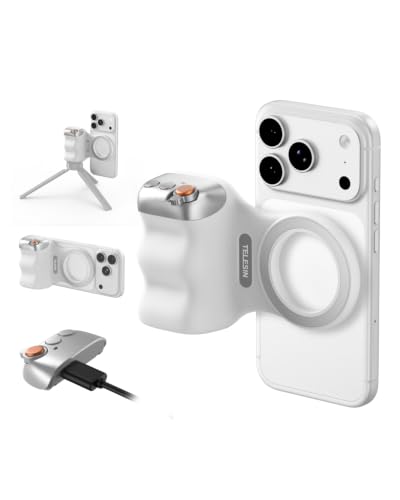
- Lightweight ergonomic 109g design
- Detachable 10m wireless remote
- 1/4-inch tripod thread for accessories
Best For: Flexible home-office shooting, streaming, and desk content
Best Budget Mount
ChromLives Universal Camera Handle Grip

- Universal 1/4-inch male screw
- Metal body with rubber anti-slip surface
- Handle-only design for existing mounts
Best For: Simple modular desk setups with a compatible phone mount
Best for iPhone Controls
COMITOK MOCA iPhone Camera Grip

- Remote controls native camera functions
- Built-in 1/4-inch tripod thread
- 116g silicone handle with keychain
Best For: iPhone desk creators who want remote exposure and focus controls
Best All-in-One Pick
AMAZEAR Multi-Function Camera Grip

- Detachable remote controls focus, modes, and camera switching
- Reaches 18.9 inches as a tabletop tripod
- Compact 180g design with included magnetic ring
Best For: Home-office creators needing a grip, remote, and tabletop tripod in one
Best Ergonomic iPhone Option

- Thumb rest and web support improve long-session comfort
- Remote controls native camera functions on supported iPhones
- 128g build with built-in 1/4-inch tripod thread
Best For: iPhone Pro Max users recording or taking calls at a desk
Best MagSafe Pick – JJC Magnetic Phone Camera Grip
For home offices using compatible iPhones or MagSafe cases, this JJC grip combines a camera-style handle with a strong magnetic connection. It is a practical choice among phone camera grips for home offices when you want steadier video calls, desk recordings, or hands-free viewing without adding a separate stand.
Best For: MagSafe iPhone users who want a grip, tabletop stand, and remote shutter in one accessory.
Pros:
- Magnetic connection rated for up to 5.1 pounds/2.3 kg.
- Rotates between portrait and landscape and works as a tabletop stand.
- Detachable rechargeable remote works from up to 32.8 feet without an app.
- Includes a 1/4-inch tripod socket and supports magnetic accessories.
Cons:
- MagSafe compatibility is centered on listed iPhones and compatible cases; other phones need the included metal ring.
- The remote does not support zoom.
- Accessories such as a magnetic light or tripod are sold separately.
The JJC is the most streamlined option here for a MagSafe-equipped desk setup. Its integrated stand and remote are especially useful for video meetings, livestreams, and recording from a fixed home-office position.
Best Rig-Style Option – Zeadio Smartphone Handheld Stabilizer
The Zeadio is a larger smartphone video rig for home-office creators who need mounting space more than compactness. Its cage, handles, removable handle, and triple cold-shoe layout make it one of the more expandable phone camera grips for home offices.
Best For: Desk creators who want to mount multiple lights, microphones, or other video accessories.
Pros:
- Includes a smartphone video rig with two side handles and a removable handle.
- Triple shoe mounts can hold lights, flashes, LEDs, or microphones.
- Compatible with cameras and camcorders using a standard 1/4-20 thread.
- Includes a removable wireless shutter for smartphones.
Cons:
- At 350 g, it is heavier than the compact grip-style alternatives.
- The listed image stabilization specification is false, so it is a support rig rather than an electronic stabilizer.
- Its broad design may take more desk space than a simple handheld grip.
Choose the Zeadio when your home-office workflow involves a microphone, LED light, and phone cage at the same time. It offers more mounting flexibility than a basic handle, though it is less convenient for quick, minimal setups.
Best Universal Choice – KIWIFOTOS Phone Camera Grip
The KIWIFOTOS grip is a flexible option for mixed-device home offices. Its adjustable holder accepts phones from 2.3 to 3.3 inches wide, while the cold shoe and tripod thread make it useful for desk videos, livestreams, and calls across iPhone, Samsung, and other Bluetooth-enabled phones.
Best For: Households or creators switching between different smartphone brands.
Pros:
- Adjustable holder fits phones 2.3 to 3.3 inches wide and up to 0.49 inches thick.
- Cold shoe supports an external LED light or microphone.
- 1/4-20 thread enables mounting on a mini tripod.
- Detachable Bluetooth remote reaches up to 32.8 feet and uses a replaceable CR2025 battery.
Cons:
- A large phone may require removing its case to fit.
- The mini tripod is not included.
- Depending on phone settings, the remote button may control volume instead of taking a picture.
For shoppers comparing phone camera grips for home offices, the KIWIFOTOS stands out for broad phone compatibility and useful accessory mounting. It is a practical middle ground between a simple selfie grip and a full video rig.
Best Simple Handle – ChromLives Camera Handle Grip
The ChromLives handle is a straightforward support accessory for cameras and phones that already have a compatible 1/4-inch mount or adapter. For home offices, it can make handheld recording more comfortable while keeping the design lightweight and uncomplicated.
Best For: Buyers who already own a phone clip, action-camera adapter, or other 1/4-inch accessory.
Pros:
- Universal 1/4-inch thread works with compatible cameras, lights, phones, and action cameras.
- Wide anti-slip platform helps support mounted equipment.
- Finger-shaped handle is designed for comfortable gripping.
- Includes a wrist strap and a bottom 1/4-inch thread for tripod or monopod mounting.
Cons:
- Does not include a smartphone clip, camera, or GoPro adapter.
- It has no built-in remote shutter or accessory shoe.
- Requires compatible equipment with a 1/4-inch thread for direct use.
The ChromLives is best viewed as a low-cost foundation rather than a complete phone solution. It makes sense for an existing home-office kit, but shoppers starting from scratch will need to budget for a separate phone mount.
Best Overall – TELESIN Fun Shot Magnetic Camera Grip
For shoppers comparing phone camera grips for home offices, the TELESIN Fun Shot is a well-rounded option for desk videos, live broadcasts, and quick smartphone photography. Its ergonomic finger-hook shape, magnetic mounting, detachable remote, and 1/4-inch tripod thread make it adaptable to a variety of home content setups.
Best For: Home-office creators who want a lightweight grip with remote shooting and accessory-mounting flexibility.
Pros:
- Lightweight 109-gram design with an ergonomic finger hook for improved stability.
- Detachable wireless remote works up to 10 meters and supports iOS and Android.
- 1/4-inch tripod connector supports compatible tripods, microphones, and other accessories.
- Double magnetic mounting system is rated to support up to 3 kg.
Cons:
- Direct magnetic use requires a MagSafe-compatible phone or case.
- It is not water resistant.
The TELESIN stands out when you need one grip for desk recording, streaming, selfies, and tripod-based shooting. Its broad phone compatibility and included remote make it especially practical for a flexible home-office workflow.
Best Budget Mount – ChromLives Universal Camera Handle Grip
The ChromLives Universal Handle Grip is a straightforward choice among phone camera grips for home offices when you already have a compatible phone mount or camera accessory. Its 1/4-inch male screw, metal construction, and rubberized surface provide a simple handheld extension for desk filming and other small-camera setups.
Best For: Buyers who need an affordable universal handle for an existing 1/4-inch phone or camera mount.
Pros:
- Compatible with devices and mounts using a 1/4-inch thread.
- Metal body and rubber surface provide a durable, anti-slip grip.
- Ergonomic shape is designed for comfortable handling.
- Works with phones, action cameras, camcorders, and LED video lights when paired with the proper mount.
Cons:
- The listing includes the handle only; a phone or smartphone mount is not included.
- It does not provide a built-in wireless shutter or phone-specific controls.
- Maximum recommended load is 360 grams.
This is best viewed as a modular accessory rather than a complete phone-grip kit. It makes sense for a home office with existing 1/4-inch mounts, but buyers starting from scratch will need to budget for a separate phone holder.
Best for iPhone Controls – COMITOK MOCA iPhone Camera Grip
The COMITOK MOCA is a specialized option for iPhone users seeking phone camera grips for home offices with more hands-on camera control. Its removable remote can launch the native camera, switch modes, adjust exposure and focus, and support portrait or landscape shooting, while the built-in 1/4-inch thread suits desktop tripod setups.
Best For: iPhone creators who want native-camera controls, remote operation, and a compact desk or travel setup.
Pros:
- Remote supports camera launching, mode switching, lens flipping, exposure adjustment, and focus control.
- Works without an additional app and is optimized for iOS 26, with compatibility listed for iOS 17 and iOS 18.
- Built-in 1/4-inch thread supports tripod mounting in portrait or landscape orientation.
- Lightweight 116-gram silicone handle includes a built-in keychain and magnetic plate for older iPhone models.
Cons:
- It is primarily designed for iPhone use; older iPhone models require the included magnetic plate.
- Initial accessibility and camera settings must be configured before use.
- It is not water resistant.
The MOCA is the strongest fit for an iPhone-centered home studio where remote camera controls matter more than broad Android compatibility. Its setup requirements are worth noting, but the native-camera functions can make desk recording more convenient.
Best All-in-One Pick – AMAZEAR Multi-Function Camera Grip
For shoppers comparing phone camera grips for home offices, the AMAZEAR stands out as a versatile setup for video calls, desktop streaming, and hands-free group shots. It combines a magnetic phone mount, detachable Bluetooth controller, adjustable head, selfie stick, and tabletop tripod in one compact design.
Best For: Home-office creators who want one grip for calls, live streaming, overhead angles, and occasional travel.
Pros:
- Includes a detachable Bluetooth remote with shutter, focus, camera-switching, and shooting-mode controls.
- Extends to 18.9 inches on a table and offers multiple angle adjustments for portrait, landscape, overhead, and low-angle shots.
- Compact 180g design folds to about 4.3 inches and includes a magnetic ring for non-MagSafe phones or thicker cases.
- Remote works up to 10 meters and recharges through USB-C.
Cons:
- Some iPhone functions require enabling Zoom and changing the Double-Click Side Button setting.
- The magnetic mount may require the included ring for non-magnetic phones or cases.
- Its maximum tabletop height is useful for desks but less substantial than a full-size tripod.
The AMAZEAR is the most complete option here for a home-office setup. Its built-in tripod and broad adjustment range make it especially practical when you want to switch between handheld recording and stable desktop positioning.
Best for Strong Magnetic Hold – Magnetic Phone Camera Grip
This magnetic grip is a practical choice among phone camera grips for home offices when secure mounting and easy orientation changes matter most. Its 17-magnet mount, ergonomic silicone-wrapped handle, wireless remote, and built-in stand function support video calls, recording, and hands-free viewing.
Best For: Desk users who prioritize a firm magnetic hold and want tripod-mount compatibility without buying a tripod in the package.
Pros:
- Uses 17 heavy-duty magnets with a stated 5.1-pound magnetic force for a secure hold.
- Rotates quickly between portrait and landscape while keeping side-button access available.
- Detachable remote supports photos and video recording from up to 32.8 feet away.
- Built-in 1/4-inch-20 thread enables mounting on a compatible stand or tripod, and the grip can spread into a phone stand.
Cons:
- The package does not include a tripod or phone mirror.
- Non-MagSafe phones and cases require the included 3M adhesive metal ring.
- Additional magnetic lights or tripods are sold separately.
Choose this model if a strong magnetic connection and comfortable handheld control are higher priorities than an all-in-one tripod package. It is well suited to a permanent desk setup where you already have, or plan to add, a stand.
Best Ergonomic iPhone Option – COMITOK MOCA ARCO Camera Grip
For iPhone users choosing phone camera grips for home offices, the COMITOK MOCA ARCO focuses on comfortable long-session handling and direct control of the native camera. Its thumb rest, extended holder, detachable remote, and tripod thread make it useful for video calls, desk recording, and content creation.
Best For: iPhone Pro Max users who want an ergonomic grip with native-camera controls and flexible desk mounting.
Pros:
- Thumb-rest and thumb-web support are designed to reduce fatigue during extended use.
- Detachable remote can launch the camera, wake the screen, switch lenses and modes, and adjust exposure and focus.
- Built-in 1/4-inch thread supports tripod mounting, while portrait and landscape positioning suit calls and streaming.
- Lightweight 128g construction includes a magnetic plate for iPhone 11 and earlier models.
Cons:
- It is designed primarily for iPhone use, with setup guidance specifically addressing iOS versions.
- Some users may need to enable Accessibility settings before using the grip.
- It is not water resistant.
The MOCA ARCO is the focused choice for iPhone owners who value hand comfort and native camera access. Its smaller 128g build and thumb support should appeal to users recording or taking calls at a desk for extended periods.
How We Picked the Best Phone Camera Grips for Home Offices
We focused on features that matter in a desk-based workspace rather than treating every grip like a handheld camera accessory. The selection includes compact magnetic grips, universal stabilizer handles, models with remotes, and options that can connect to tripods or other accessories.
Our criteria included phone compatibility, mounting security, control layout, connection method, comfort, accessory support, and flexibility for both stationary and handheld use. A grip should help you frame or capture content without making your setup unnecessarily bulky.
Quick Comparison
| Best For | Look For |
|---|---|
| Video calls and desk recording | Secure mount, comfortable handle, and simple shutter control |
| Content creation | Cold shoes, tripod threads, remote controls, and stable orientation |
| MagSafe iPhone users | Strong magnetic attachment and a compatible phone or case |
| Mixed-device households | Adjustable universal clamp or broad compatibility claims |
| Travel between office and studio | Compact design, wrist strap, and easy Bluetooth pairing |
Key Buying Factors for Phone Camera Grips for Home Offices
Phone Compatibility and Mounting
Check whether the grip uses MagSafe, a dedicated magnetic ring, or an adjustable clamp. Magnetic models are fast and convenient, but they may require a compatible iPhone or case. Universal mounts are more flexible, especially if several people use different phones.
Controls and Connectivity
A built-in or removable Bluetooth shutter can let you start recording, take photos, or capture a frame without touching the phone. Some grips are designed for native camera controls, while others provide only a basic remote shutter. Confirm whether the remote requires a separate battery or pairing step.
Stability and Expandability
For a home office, look for a secure handle, wrist strap, or tripod connection. Cold-shoe mounts are useful for adding a microphone or light, while a 1/4-inch thread can connect the phone to a small desk tripod. These features matter more if you record tutorials or livestreams than if you only take occasional photos.
Comfort and Desk Workflow
A grip that feels good for a few minutes may become tiring during longer recording sessions. Consider the handle shape, thumb-rest design, weight, and whether the grip interferes with charging or portrait orientation. Compact magnetic models suit quick calls; larger stabilizer handles may be better for repeated filming.
Who Should Buy Which Phone Camera Grips for Home Offices?
Choose a magnetic grip if you use a compatible iPhone and want the fastest setup for video calls or casual recording. Choose a universal stabilizer if you switch between phones, cameras, or action cameras. A model with cold shoes and a tripod thread is the better choice for creators building a more complete desk studio.
If remote shooting is your priority, favor a grip with a clearly described Bluetooth controller and straightforward camera compatibility. For longer handheld sessions, prioritize a wrist strap and shaped handle. Before buying, verify your phone model, case thickness, mounting method, and the accessories you already use.