A reliable charging stand can make a remote-work desk easier to use by keeping your phone visible, accessible, and powered without adding more cable clutter. The best options combine stable phone support with practical features such as pen storage, drawers, wireless charging, or multi-device compatibility.
We selected 10 phone charging stands for remote work across several desk setups, from compact phone docks to organizers with wireless chargers, USB-C connections, remote-control storage, and built-in speakers or displays.
Best 10 Phone Charging Stands for Remote Work Picks for 2026
Best All-in-One Organizer
Fast Wireless Charging Desk Caddy

- Wireless charger plus five storage compartments
- Works through phone cases up to 5mm thick
- Includes Type-C cable and broad device compatibility
Best For: Remote workers who want charging and desk organization in one unit
Best for Multiple Devices
Wooden Multi-Phone Docking Station

- Holds up to three phones or one tablet
- Adds a drawer, hooks, shelf, and pen slot
- Solid ash wood with silicone tabletop pads
Best For: Multi-device workspaces and shared home offices
Best Minimalist Dock
elago D Stand Charging Station

- Compact aluminum-and-silicone construction
- Supports Lightning and USB-C cables
- Designed for iPhone, AirPods, and Apple accessories
Best For: Apple users building a simple, uncluttered desk
Best Value Organizer
COSOOS Wireless Charging Desk Stand
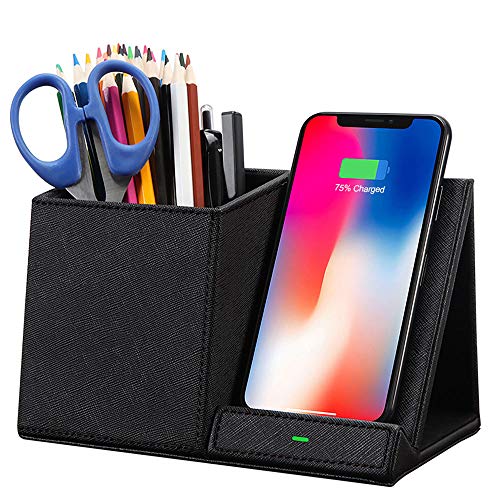
- Qi charger and pencil holder in one unit
- Supports case-friendly charging up to 5mm
- Includes USB-C cable but no AC adapter
Best For: Compact home offices needing simple charging and storage
Best USB-C Desk Stand
LED Power Display Charging Dock
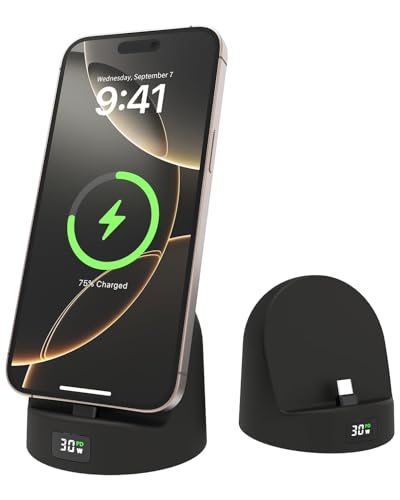
- 72-degree viewing angle for desk use
- LED shows charging power value
- Silicone body with USB-C charging
Best For: Remote workers using compatible USB-C phones
Best Multifunction Stand
Wireless Speaker Charger Alarm Clock

- Wireless charging with adjustable support
- Built-in Bluetooth 5.3 speaker and alarm
- Foldable for travel or flexible desk use
Best For: Remote workers wanting charging, audio, and clock functions
Best Organizer Stand
Adhesive Remote and Phone Holder

- Hollow slot supports phone charging
- Two compartments for small essentials
- Adhesive wall-mount ABS design
Best For: Clutter-prone home offices and nightstands
Best All-in-One Pick
Foldable 3-in-1 Charging Stand

- Charges a phone, watch, and earbuds together
- Foldable, lightweight, and case-friendly
- Includes an 18W power adapter and cable
Best For: Remote workers with multiple compatible devices
Best All-in-One Organizer – Fast Wireless Charging Desk Caddy
For shoppers comparing phone charging stands for remote work, this desk caddy combines wireless charging with practical storage. Its pen holder, valet tray, folder, card slots, and phone stand help keep everyday work items organized in one compact tabletop setup.
Best For: Remote workers who want wireless phone charging alongside storage for pens, cards, keys, and other desk essentials.
Pros:
- Combines a wireless charging stand with five organizing compartments.
- Charges compatible phones through cases up to 5mm thick.
- Includes a Type-C cable and supports many iPhone, Samsung Galaxy, Pixel, and AirPods models.
- PU leather construction with a soft velvet lining is easy to clean and designed for everyday use.
Cons:
- Metal attachments and credit cards can interfere with wireless charging.
- The included charger may not suit devices that lack wireless charging support.
This is a strong choice when desk organization matters as much as charging. It is especially useful for a remote-work station where a phone, writing tools, cards, and small accessories need a designated place.
Best for Multiple Devices – Wooden Multi-Phone Docking Station
Among phone charging stands for remote work, this wooden docking station stands out for households or workspaces with several devices. It provides front slots for up to three phones, space for a tablet or notebook, cable openings, and a drawer for valuables, though charging cables are not included.
Best For: Remote workers or families managing multiple phones, tablets, keys, glasses, and other everyday carry items.
Pros:
- Front section holds up to three phones or one tablet.
- Includes a drawer, key and ring hooks, sunglasses shelf, pen slot, and Apple Watch charger space.
- Made from solid ash wood with four silicone tabletop-protection pads.
- Its rear area can hold a tablet, notebook, or laptop.
Cons:
- Charging cables are not included.
- Its larger multi-device design may be more than needed for a single-phone setup.
This dock is best viewed as a charging-and-organization hub rather than a powered charger itself. It makes sense for a shared home office or a remote worker who regularly switches among multiple mobile devices.
Best Minimalist Dock – elago D Stand Charging Station
If you prefer a compact setup, the elago D Stand is one of the simpler phone charging stands for remote work. Its aluminum-and-silicone body provides a dedicated place for an iPhone, AirPods, Apple TV Remote, or Apple Mouse while keeping a Lightning or USB-C cable organized.
Best For: Apple-device users who want a small, minimalist charging dock with integrated cable management.
Pros:
- Compact design fits naturally on a desk or nightstand.
- Top opening supports Lightning and USB-C cables.
- Aluminum construction is paired with silicone protection for the device, cable, and tabletop.
- Designed for Apple devices and accessories including iPhone, AirPods, and Apple TV Remote.
Cons:
- It requires your own charging cable and does not include a power adapter.
- The listed output is 5 watts, so it is not aimed at high-speed charging.
- Its compatibility and design are more Apple-focused than universal.
This stand prioritizes a clean appearance and cable control over storage or multi-device capacity. It is a practical fit for a streamlined remote-work desk where one Apple device needs a stable charging location.
Best Value Organizer – COSOOS Wireless Charging Desk Stand
For remote workers seeking phone charging stands for remote work with added storage, the COSOOS organizer combines a Qi wireless charging pad and pencil holder. Its PU leather surface and anti-slip base keep the unit tidy and stable while leaving room for pens, rulers, glasses, and other small desk items.
Best For: Users who want an affordable two-in-one wireless charger and organizer for a compact home-office desk.
Pros:
- Combines a wireless phone charger and pencil holder in one stand.
- Supports case-friendly charging through cases up to 5mm thick.
- Offers up to 10W charging for select Samsung devices and 7.5W for listed iPhones.
- Includes a USB-C charging cable and has an anti-slip PU leather bottom.
Cons:
- No AC adapter is included.
- Metal attachments and credit cards may interfere with charging.
- Compatibility and charging speeds vary by device.
This COSOOS model is a straightforward option for a small workspace that needs both charging and basic supply storage. Check your phone model and power-adapter setup before buying, especially if faster charging is important.
Best USB-C Desk Stand – LED Power Display Charging Dock
For phone charging stands for remote work, this silicone USB-C dock combines a 72-degree viewing angle with a visible charging-power display. It keeps a compatible phone upright for calls, reading, or video while charging, though cases thicker than about 2 mm may not fit well.
Best For: Remote workers who want a straightforward, upright USB-C charging stand for an office desk or nightstand.
Pros:
- 72-degree tilt keeps the phone visible and usable while charging.
- LED display helps track the charging power value.
- Silicone construction is designed to protect the device and resist wear.
- Supports listed iPhone, Samsung, Android, and select iPad devices with USB-C charging.
Cons:
- Thick phone cases over approximately 2 mm may interfere with use.
- It has one USB-C charging connection and does not include a power plug.
This is a practical choice when visibility and charging feedback matter more than extra features. Its wired design and compact silicone build suit a desk setup, provided your device and case meet the compatibility requirements.
Best Multifunction Stand – Wireless Speaker Charger Alarm Clock
Among phone charging stands for remote work, this foldable model adds a Bluetooth speaker, wireless charging, digital clock, and alarm. Its adjustable height and angle can support video calls, media playback, or hands-free use, but wireless charging requires the clock to remain plugged in.
Best For: Remote workers who want one adjustable desk accessory for charging, audio, clock functions, and occasional travel.
Pros:
- Combines a wireless charger, Bluetooth 5.3 speaker, digital clock, and alarm.
- Foldable design with rotating axes and adjustable height and angle.
- Supports listed wireless-charging phones at 5W, 7.5W, 10W, or 15W.
- Can charge phones horizontally or vertically with the adjustable support plate.
Cons:
- Power adapter is not included.
- Wireless charging works only while the clock is plugged in.
- Its multifunction design may be more than needed for a basic charging stand.
This stand is better suited to buyers who value versatility over simplicity. It can consolidate several desk functions, while the foldable construction makes it useful for travel or a secondary workspace.
Best Organizer Stand – Adhesive Remote and Phone Holder
For phone charging stands for remote work, this wall-mounted organizer offers a simple way to keep a phone and small desk items together while charging. Its hollow bottom slot accommodates charging phones, while the two-compartment design helps organize remotes, pens, or office supplies.
Best For: Home-office users who need a compact organizer for a phone, remotes, and small essentials near a desk or nightstand.
Pros:
- Hollow bottom slot allows a phone to remain in place while charging.
- Two compartments organize remotes, pens, phones, or other small items.
- Adhesive wall-mount design helps keep essentials accessible and off the desk.
- Durable ABS construction includes a detachable bamboo divider.
Cons:
- It is an organizer rather than a powered charging dock, so no charger is included.
- Wall mounting limits placement flexibility after installation.
- Its compact dimensions may not suit larger devices or bulky accessories.
This is a useful space-saving option for a cluttered home office, especially where remotes and stationery compete with a phone for desk space. Choose it when organization and charging access matter more than charging speed or electronics.
Best All-in-One Pick – Foldable 3-in-1 Charging Stand
For anyone comparing phone charging stands for remote work, this foldable 3-in-1 station keeps a phone, smartwatch, and wireless earbuds charging in one compact footprint. Its case-friendly, non-slip design and included power adapter make it a practical choice for a home office, nightstand, or travel bag.
Best For: Remote workers who want one stand for a phone, Apple Watch, and compatible AirPods.
Pros:
- Charges up to three compatible devices at once.
- Foldable and lightweight for travel or moving between workspaces.
- Supports phone cases up to 4mm and includes charging-status LED indicators.
- Includes an 18W QC 3.0 power adapter and USB-A-to-USB-C cable.
Cons:
- Phone charging output is up to 7.5W, with 3W for earbuds and 2.5W for watches.
- The station is non-magnetic, so devices are positioned on the charging surface rather than held magnetically.
This is the most versatile option of the three for a device-heavy remote-work setup. Choose it if charging multiple Apple devices and portability matter more than maximum phone charging speed.
Best Desk Organization Pick – Vegan Leather Phone Stand Organizer
This organizer is a useful alternative for shoppers seeking phone charging stands for remote work that also reduce desk clutter. It combines a wireless charging pad, phone stand, and four storage compartments for pens, keys, art supplies, or other small essentials.
Best For: Remote workers who want a compact charging stand that also organizes everyday desk items.
Pros:
- Combines wireless phone charging with a tabletop phone stand.
- Four compartments hold pens, pencils, keys, and other supplies.
- Compact 9-by-3-by-4.8-inch footprint suits desks, nightstands, and end tables.
- Faux-leather construction offers a polished desktop appearance.
Cons:
- The supplied notes do not specify wireless charging output or included power accessories.
- It is designed for phone charging rather than simultaneous charging of a watch and earbuds.
This is a strong pick when workspace organization is just as important as keeping a phone powered. It offers more storage than a conventional charging stand, but the unspecified charging details may matter to speed-focused buyers.
Best Fast-Charging Organizer – 15W PU Leather Desk Station
For remote workers comparing phone charging stands for remote work, the GORESE combines a stated 15W wireless charging station with storage for pens, remotes, tools, and keys. Its larger organizer format keeps a phone visible and accessible while helping create a cleaner home-office setup.
Best For: Remote workers who want faster stated wireless charging alongside broad desktop storage.
Pros:
- Provides up to 15W wireless charging according to the supplied product notes.
- Storage compartments accommodate remotes, pens, tools, keys, and other essentials.
- PU-leather construction and polished finish suit modern office or bedside spaces.
- Measures 9 inches wide by 5.3 inches deep and 5.3 inches high.
Cons:
- The supplied notes do not identify phone compatibility or include a power adapter.
- Its deeper, taller organizer body takes more desk space than a simple charging stand.
The GORESE is the best fit when charging performance and organization need to coexist. Its 15W rating is appealing, while buyers with very limited desk space may prefer a smaller dedicated stand.
How We Picked the Best Phone Charging Stands for Remote Work
We focused on the features that matter during a typical workday: charging convenience, desk stability, organization, device compatibility, and ease of access. The selection includes wireless charging stands, USB-C charging docks, multi-device stations, and desktop organizers that help keep frequently used items in one place.
We also considered different workspaces and budgets. A compact stand may suit a minimalist desk, while a larger organizer can be more useful if you regularly handle pens, remotes, earbuds, or multiple phones. Compatibility is especially important, so check the listed phone models, charging standards, and whether a power adapter is included before buying.
Quick Comparison
| Best For | Look For | Standout Features |
|---|---|---|
| Minimalist desks | Compact footprint and cable management | Simple phone dock or wireless charger |
| Organized workstations | Integrated storage | Pen holders, drawers, and remote compartments |
| Multiple devices | Multi-device support and adequate power | 3-in-1 or multi-phone charging |
| Android and iPhone households | Broad compatibility and USB-C support | Adjustable or universal charging design |
| Video calls and notifications | Stable viewing angle | Upright dock that keeps the screen visible |
Key Buying Factors for Phone Charging Stands for Remote Work
Charging Method and Speed
Wireless charging is convenient for drop-and-go use, but wired USB-C charging may offer greater flexibility and faster charging with the right adapter. Confirm the supported wattage and remember that your phone, cable, and power brick all affect charging performance.
Compatibility
Check whether the stand supports your exact phone model, case thickness, and charging position. Some docks are designed primarily for Apple devices, while others support Samsung phones or a wider range of Qi-compatible devices.
Stability and Viewing Angle
A weighted base and non-slip feet help prevent movement when you tap the screen. An upright angle is useful for notifications, timers, video calls, and using your phone as a secondary display.
Desk Organization
If your workspace tends to collect small accessories, choose a model with a pen cup, drawer, remote holder, or dedicated space for earbuds. Larger organizers save space overall but require more room than a basic charging stand.
Power and Cable Management
Look for accessible cable routing and a design that does not block nearby ports. For multi-device stations, verify the total power output and whether the product includes the necessary charging cables or wall adapter.
Who Should Buy Which Phone Charging Stands for Remote Work?
Choose a compact wireless stand if you want quick charging and an uncluttered setup. Choose a desk organizer with charging if pens, remotes, and accessories frequently crowd your workspace. Choose a multi-device station for a shared office or anyone charging a phone, earbuds, and another device together. Choose a USB-C model if you prioritize cable flexibility or use phones from multiple brands. Finally, a stand with a speaker, alarm clock, or power display makes sense only if those extra features fit your routine rather than adding unnecessary desk equipment.