If you want a more natural way to sketch, edit, annotate, or design on the go, a portable pen display can make a laptop or desktop feel far more creative and precise.
This roundup focuses on options that balance display quality, pen responsiveness, portability, and setup convenience for artists, students, and professionals.
Best 10 Portable Pen Displays for Laptop and PC Picks for 2026
Touchscreen Hybrid Pick
cocopar 15.6" Portable Touch Monitor

- Native touch gestures on macOS and Windows
- 15.6-inch FHD IPS panel with 90% sRGB
- USB-C, HDMI, speakers, kickstand, and cables included
Best For: Touch-first portable second-screen use for laptops and PCs
Budget Pen Display
GAOMON PD1161 11.6" Drawing Tablet

- 11.6-inch Full HD IPS screen for drawing directly on display
- Battery-free pen with 8192 pressure levels and tilt
- 8 shortcut keys plus 2 pen buttons for workflow control
Best For: Beginners and students who want an affordable connected drawing display
Travel Productivity Pick
ASUS ZenScreen MB169CK 15.6" Portable Monitor

- 15.6-inch FHD IPS anti-glare display
- Single USB-C connection with auto-rotate software
- 0.78kg slim body with kickstand and tripod socket
Best For: Travelers and remote workers who want a compact plug-and-play monitor
Stand Accessory Pick
XP-PEN AC18 Metal Drawing Tablet Stand
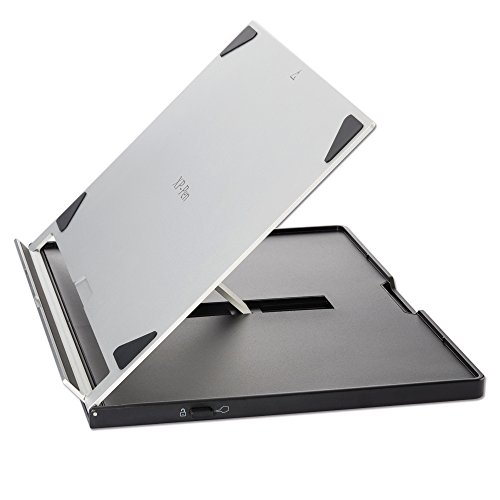
- 5052 aluminum alloy construction
- Adjusts from 0° to 65° in 1° steps
- Fully collapsible and portable
Best For: Compatible tablet and pen display users who need an adjustable stand
Portable Touchscreen Travel Pick
15.6" FHD Portable Monitor with Stylus

- 10-point touch for macOS and Windows
- Active stylus support for notes and sketches
- Includes HDMI, USB-C, and protective sleeve
Best For: travel-friendly laptop and PC users who want touch input and light pen work
Portable Stand Accessory

- Lightweight ABS and glass-fiber build
- 90-degree adjustable support angle
- Non-slip design for steadier drawing
Best For: owners of compatible XPPen display tablets who want a portable stand
Studio-Grade Portable Pen Display

- 16-inch 4K OLED with strong color depth
- Includes two battery-free pens and Quick Keys
- Slim design with USB-C and carry case
Best For: creative professionals who need a premium portable drawing display
Compact Starter Pick
XP-Pen Artist12 11.6" FHD Display

- 11.6-inch Full HD IPS screen
- Battery-free stylus with eraser
- 6 shortcut keys and touch bar
Best For: Beginners and students who want a compact connected drawing display
Creative Workhorse

- 13.3-inch fully-laminated FHD screen
- 16384 pressure stylus with tilt support
- 8 shortcut keys plus red dial
Best For: Artists and designers who want more workspace and stronger control
Desk Companion

- Fits many 10 to 15.6-inch tablets/displays
- Lightweight aluminum build with storage bag
- Anti-slip pads and better cooling
Best For: Users who want a portable adjustable stand for a small drawing setup
Touchscreen Hybrid Pick – cocopar 15.6" Portable Touch Monitor
If you’re shopping for portable pen displays for laptop and pc use, this cocopar model stands out as a touchscreen-friendly external display rather than a traditional pen display. It gives you native touch gestures on macOS and Windows, a 15.6-inch 1080p IPS panel, and simple one-cable USB-C operation when your device supports DP Alt Mode or Thunderbolt.
Best For: Users who want a portable touchscreen second monitor with pen-display-like interaction for everyday laptop and PC work.
Pros:
- Native touch gestures work on both macOS and Windows, including slide, pinch-to-zoom, drag, and drop.
- Tempered glass surface feels smoother than plastic-film screens and is easier to clean.
- 15.6-inch FHD IPS panel with 90% sRGB, 270 nits brightness, and 178° viewing angles.
- Includes dual USB-C, HDMI, speakers, kickstand, sleeve, and cables for a ready-to-use setup.
Cons:
- Single-cable mode requires a laptop or PC with Thunderbolt or USB-C DP Alt Mode.
- Not positioned as a true stylus-based drawing display.
- 60Hz refresh rate is geared more toward productivity than fast-paced gaming.
Overall, this is a strong fit if your priority is touch-based portability and a clean external-screen workflow. It makes more sense for general productivity than for artists who specifically need active pen support.
Budget Pen Display – GAOMON PD1161 11.6" Drawing Tablet
For shoppers comparing portable pen displays for laptop and pc, the GAOMON PD1161 is the most drawing-focused option in this roundup. It must be connected to a computer, but once set up it lets you sketch directly on the 11.6-inch full HD IPS screen with a battery-free pen and programmable shortcut keys.
Best For: Beginners, students, and creators who want an affordable connected pen display for drawing and editing.
Pros:
- Full HD 11.6-inch IPS screen supports direct-on-screen drawing.
- Matte film reduces glare and gives the surface a paper-like feel.
- Battery-free AP50 stylus offers 8192 pressure levels and tilt support.
- Eight shortcut keys plus two pen buttons help speed up creative workflows.
Cons:
- Not a standalone tablet; it must connect to a laptop or PC.
- May need extra adapters depending on your computer’s ports.
- Can require external power if the connected device cannot supply enough.
If your goal is actual pen-on-screen input, this is the clearest fit here. It focuses on drawing and editing utility, not on being a general-purpose portable monitor.
Travel Productivity Pick – ASUS ZenScreen MB169CK 15.6" Portable Monitor
If you’re looking at portable pen displays for laptop and pc setups but want a more travel-ready screen extender, the ASUS ZenScreen MB169CK is built for simple productivity. It offers a 15.6-inch FHD IPS anti-glare panel, single-cable USB-C connectivity, and a lightweight design that slips easily into a bag.
Best For: Remote workers and travelers who want a compact portable monitor for multitasking and reading, not stylus drawing.
Pros:
- 15.6-inch FHD IPS anti-glare screen helps reduce distracting reflections.
- Single USB-C connection keeps the setup clean and easy.
- Ultra-slim 11.8mm profile and 0.78kg weight make it highly portable.
- 360 kickstand, tripod socket, and auto-rotate software add flexible positioning.
Cons:
- Not a pen display and does not include stylus input features.
- 60Hz refresh rate is aimed at standard daily use.
- Mini HDMI support means some setups may rely on port compatibility.
This is a polished choice if you want a clean external screen for work on the go. It is more about portability and eye comfort than creative pen interaction.
Stand Accessory Pick – XP-PEN AC18 Metal Drawing Tablet Stand
When building portable pen displays for laptop and pc setups, a good stand can matter just as much as the screen itself. The XP-PEN AC18 is a collapsible aluminum stand designed to hold compatible drawing tablets and pen displays at adjustable angles, making long sessions more comfortable.
Best For: Artists and tablet users who need a compact, adjustable stand for a compatible pen display or tablet.
Pros:
- Made from 5052 aluminum alloy for a light but durable build.
- Adjusts from 0° to 65° in 1° increments for flexible positioning.
- Fully collapsible design makes it easy to store and carry.
- Compatible with select XPPen displays and many other tablets and devices.
Cons:
- It is a stand only, not a display.
- Compatibility is best confirmed against your specific tablet or monitor size.
- Listed support is strongest for XPPen models such as Artist12, Artist13.3, and Artist15.6.
This is a practical add-on if you already own a compatible pen display and want better ergonomics. It won’t replace a screen, but it can improve how comfortable that screen is to use.
Portable Touchscreen Travel Pick – 15.6" FHD Portable Monitor with Stylus
If you want portable pen displays for laptop and pc use that can double as a second screen and a note-taking surface, this 15.6-inch touchscreen monitor is built for flexible everyday work. It supports 10-point touch on macOS and Windows, includes active stylus compatibility, and ships with the cables and sleeve you need for quick travel-ready setup.
Best For: users who want a portable pen display-style touchscreen for meetings, travel, annotation, and light sketching.
Pros:
- 10-point touchscreen support on macOS and Windows for swipes, pinch-to-zoom, and drag-and-drop.
- Full-lamination tempered glass helps keep touch input smooth and stylus writing natural.
- Active stylus compatibility makes it useful for notes, document markup, and basic sketching.
- Includes HDMI and USB-C connectivity plus a protective sleeve for easier transport.
Cons:
- Touch functionality is not supported on several devices, including some game consoles and mobile devices.
- Android users need to confirm USB-C video and touch support on their phone.
Overall, this is a practical pick if you need a slim external display that also handles touch and pen input without a complicated setup. It leans more toward productivity and light creative work than professional illustration, but its portability and bundled accessories make it convenient for laptop and PC users on the move.
Portable Stand Accessory – AC41 Drawing Tablet Holder
For portable pen displays for laptop and pc setups, a good stand can matter as much as the screen itself. The XPPen AC41 is a lightweight, portable holder made for select XPPen Artist tablets up to 15.6 inches, and it gives you a more stable viewing angle for drawing, work, or long sessions at a desk.
Best For: XPPen display tablet users who want a lightweight stand to improve comfort and stability.
Pros:
- Lightweight ABS and glass-fiber construction makes it easy to carry.
- Adjusts to 90 degrees for a stable drawing and viewing position.
- Non-slip top and bottom help reduce shaking and sliding during use.
- Designed to ease neck, shoulder, and eye strain during longer sessions.
Cons:
- Compatibility is limited to specific XPPen Artist models and tablet sizes.
- It is a stand only, so it does not add display or pen functionality.
This is a simple add-on rather than a full pen display, but it can make a real difference in comfort if you already own a compatible XPPen screen tablet. If you need a portable support solution instead of a new display, the AC41 is a sensible, low-friction upgrade.
Studio-Grade Portable Pen Display – Pen Display 16 OLED Bundle
If your priority is a true portable pen display for laptop and pc creative work, the Xencelabs Pen Display 16 Bundle is the most studio-focused option here. It combines a 16-inch 4K OLED panel, battery-free pens, and Quick Keys in a slim, portable package with single USB-C connectivity and a carrying case for working away from the desk.
Best For: digital artists, designers, and 3D creators who want a high-end portable drawing display.
Pros:
- 16-inch 4K OLED display with 1.07 billion colors and broad color gamut coverage.
- Battery-free pen setup includes two pen sizes for different hand preferences.
- Quick Keys add customizable shortcut control with an OLED screen and dial modes.
- Thin, lightweight design with single USB-C cable connectivity and included protective case.
Cons:
- Higher-end feature set is geared more toward creative professionals than casual users.
- Bundle focus may be more than some buyers need if they only want basic pen input.
This bundle stands out for users who want display quality, pen precision, and shortcut control in one portable setup. It is the most complete pen-display-style option in the group, especially for artists who move between a laptop, desktop, and different workspaces.
Compact Starter Pick – XP-Pen Artist12 11.6" FHD Display
If you want a portable pen display for laptop and pc work without jumping to a larger setup, the XP-Pen Artist12 keeps things compact and practical. Its 11.6-inch Full HD IPS screen, 72% NTSC color gamut, and included adjustable stand make it a manageable option for drawing, sketching, photo editing, and animation on a desktop or laptop.
Best For: Beginners, students, and artists who want a smaller connected display for everyday creative work.
Pros:
- 11.6-inch 1920×1080 IPS display with pre-installed anti-reflective screen protector.
- Battery-free stylus includes an eraser and comes with 8 replacement nibs.
- 6 customizable shortcut keys plus a programmable touch bar for quicker workflow control.
- Compatible with Windows, macOS, and Linux, with support for major creative apps.
Cons:
- Must be connected to a computer to work.
- Smaller screen size may feel limited for users who want more workspace.
- Color gamut is solid, but not as wide as higher-end models in the lineup.
This is a strong entry-level choice if your priority is a compact display that is easy to fit beside a laptop or PC monitor. It delivers the core drawing-display features most buyers need, while staying relatively simple and portable.
Creative Workhorse – XP-Pen Artist 13.3 Pro
The XP-Pen Artist 13.3 Pro is a more capable portable pen display for laptop and pc users who want extra screen space and stronger workflow tools. Its fully-laminated 13.3-inch FHD panel, high color gamut, tilt support, and 8 shortcut keys make it well suited for digital drawing, animation, photo work, and even video editing.
Best For: Artists and designers who want a larger portable display with more control and better color.
Pros:
- 13.3-inch fully-laminated FHD display with wide viewing angle and 123% sRGB coverage.
- Stylus supports 60-degree tilt and 16384 pressure levels for a more natural feel.
- Red dial plus 8 customizable shortcut keys help streamline zooming, brush size changes, and canvas control.
- Compatible with Windows, Mac, Chrome OS, and Linux, with support for major creative software.
Cons:
- Needs to be connected to a computer or laptop to operate.
- More feature-rich setup may be more than casual users need.
- Size is still portable, but less compact than the 11.6-inch alternative.
For buyers who want a portable drawing monitor that feels more refined than a basic entry model, this one stands out. The laminated screen and strong shortcut controls give it a more polished creative workflow without losing its travel-friendly appeal.
Desk Companion – XP-Pen Portable Tablet Stand
If you already own one of the portable pen displays for laptop and pc setups, the XP-Pen tablet stand is the accessory that helps make that workspace more comfortable. This aluminum riser supports a wide range of laptops and 10 to 15.6-inch drawing tablets or displays, and it adds stability, better airflow, and a more ergonomic viewing angle.
Best For: Artists and laptop users who want a lightweight adjustable stand for a compact drawing setup.
Pros:
- Compatible with many laptops and 10 to 15.6-inch drawing tablets and pen displays.
- Lightweight 0.8 lb aluminum build with included storage bag for portability.
- Anti-slip silicone pads help keep devices steady on the desk.
- Metal construction can improve cooling compared with flat placement.
Cons:
- It is a stand only, not a display or drawing tablet.
- Best suited to smaller portable devices rather than larger displays.
- Adjustability is useful, but it is still a simple desk accessory.
This is a practical add-on if your pen display sits flat for long sessions and you want a cleaner, more ergonomic angle. It is especially appealing for users who move between home, office, and on-the-go setups.
How We Picked the Best Portable Pen Displays for Laptop and PC
We prioritized Portable Pen Displays for Laptop and PC that offer a practical mix of image quality, responsive stylus input, and real-world usability. The list includes compact pen displays, touchscreen travel monitors, and useful accessories where they improve stability and comfort.
We looked closely at resolution, screen size, pen technology, stand quality, connection options, and whether the product makes sense for travel, desk use, or long creative sessions.
Quick Comparison
Smaller displays are usually easier to carry and better for tight desks, while 15.6-inch models give you more working room for drawing and detailed editing. If you want color-critical work, look for strong panel specs and full lamination. If portability matters most, focus on lighter builds, USB-C connectivity, and included stands or sleeves.
Key Buying Factors for Portable Pen Displays for Laptop and PC
Screen Size and Resolution
A 11.6-inch display is highly portable, but a 13.3-inch or 15.6-inch screen is often the sweet spot for most users. Higher resolution improves clarity for line work, UI space, and text handling.
Pen Performance
Battery-free pens are generally more convenient and lighter to use. Tilt support, pressure sensitivity, and low lag matter most if you draw often or need precise edits.
Connectivity and Compatibility
Check for USB-C, HDMI, and driver support for your laptop or desktop. Some setups are plug and play, while others need more careful cable planning or software installation.
Portability and Build
Travel-friendly models should be easy to pack, stable on a desk, and durable enough for daily movement. Extras like a protective sleeve, kickstand, or rigid stand can make a big difference.
Stand and Ergonomics
A good stand helps reduce neck and wrist strain. If the product does not include one, confirm that an adjustable stand or holder is available and compatible.
Who Should Buy Which Portable Pen Displays for Laptop and PC?
Choose a compact model if you need maximum portability for note-taking, light illustration, or a secondary screen. Go with a larger laminated pen display if you want a more traditional drawing feel for art, design, or animation work. If you already own a compatible monitor or tablet, a dedicated stand can improve comfort and stability without replacing your gear.
For most buyers, the best choice is the model that matches how you actually work: travel-first, studio-first, or a balanced hybrid setup.