The right photo booth printer can turn a fun event feature into a reliable guest experience—and a profitable rental service. The best models combine fast output, polished image quality, simple operation, and media costs that make sense for your volume.
We selected 10 premium photo booth printers spanning complete touchscreen booths, compact instant-print setups, and professional dye-sublimation printers. Use the comparisons below to match your venue, workflow, and budget.
Best 10 Premium Photo Booth Printers Picks for 2026
Premium Booth System

- 15.6-inch touchscreen with Intel i5 mini PC
- Includes printer, paper, props, cases, and red carpet
- Five-year warranty with remote support
Best For: Complete event booth setups and rental businesses
Professional Workhorse
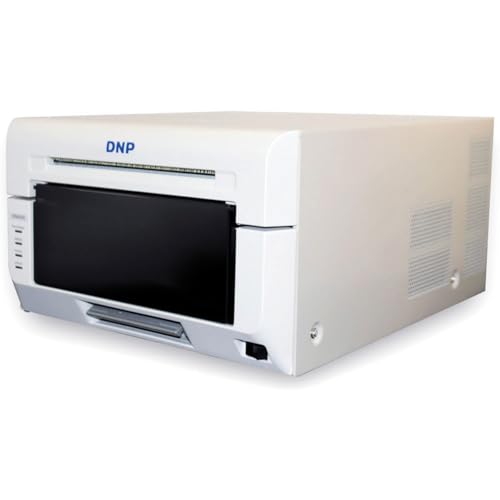
- Fast 4x6-inch prints in 8.3 seconds
- Supports 2x6 through 6x8-inch formats
- Glossy and matte finish options
Best For: High-volume booths and event photography
Interactive Mirror Setup
Magic Mirror Booth with Printer
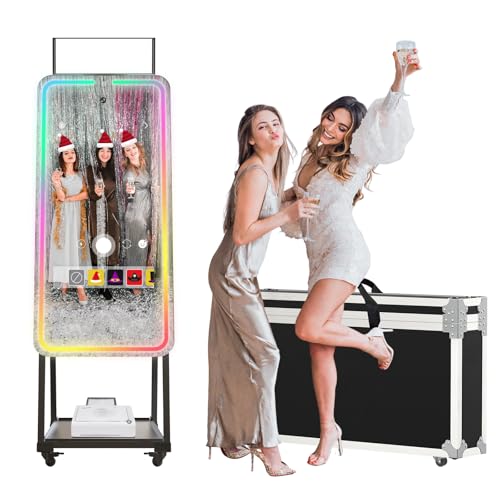
- 32-inch touchscreen and 12MP wide-angle camera
- RGB lighting with more than 20 modes
- Creative effects, instant printing, and sharing
Best For: Interactive parties, creators, and selfie-focused events
Mobile Event Printer

- 4x6-inch prints in 12.8 seconds
- Includes media, ribbons, cables, and padded case
- Supports glossy or matte 300 dpi output
Best For: Mobile booths and on-location event photography
Immersive Event Pick

- 4K camera and approximately 20-second printing
- RGB lighting with music synchronization
- Six months of ChackTok VIP software
Best For: Weddings, parties, and interactive event installations
Portable ZINK Choice

- Includes 100 sheets of 3x4 ZINK paper
- Ink-free, waterproof sticker prints
- 10.1-inch touchscreen and QR sharing
Best For: Portable parties and casual home events
Transportable Booth Pick
MWE Portable Tripod Photo Booth

- 4K camera with 4x6-inch printing
- Includes 240 sheets and two printer ribbons
- Tripod and pull-handle flight case included
Best For: Mobile event operators and larger-format keepsakes
Best Overall
HP Sprocket Photo Booth Machine

- 10.1-inch touchscreen with live photo previews
- 250+ frames, filters, and guest controls
- 3x4 adhesive Zink prints plus QR sharing
Best For: Event planners wanting flexible customization and sharing
Best Starter Bundle
HP Sprocket Photo Booth With Carrying Case

- Includes padded carrying case
- Includes roughly 100–110 sheets of Zink paper
- Built-in touchscreen, lighting, and creative tools
Best For: First-time buyers preparing for portable events
Best Event Presentation

- Red-carpet-themed event bundle
- Ink-free, adhesive-backed Zink photo printing
- QR sharing and 250+ creative options
Best For: Themed parties and red-carpet-style celebrations
Premium Booth System – DSLR Photo Booth with Printer
For event planners and rental businesses seeking premium photo booth printers in an all-in-one setup, this Enwozp system combines a 15.6-inch touchscreen, Intel i5 mini PC, printer, and DSLR-ready booth hardware. It is designed for interactive captures, on-site printing, and instant digital sharing.
Best For: Weddings, parties, exhibitions, and photo booth rental operations that want a complete touchscreen package.
Pros:
- Includes a printer, 108 sheets of paper, two ink cartridges, props, masks, a flight case, and red carpet.
- Intel i5 processor, 8GB RAM, 256GB SSD, and Windows 10 support responsive operation.
- Touchscreen tools allow layouts, styles, backgrounds, stickers, and social sharing.
- Includes a stated five-year warranty and remote engineer support.
Cons:
- The listed configuration does not include a camera.
- The complete system may be less convenient to transport than a standalone printer.
This is a feature-rich choice when you need more than a printer alone. Its included accessories and protective cases add value for mobile event work, while the camera requirement should be confirmed before purchase.
Professional Workhorse – DNP DS620A Dye Sub Printer
The DNP DS620A is a practical pick among premium photo booth printers for operators who prioritize fast, consistent dye-sublimation output. It supports formats from 2×6-inch strips through 6×8-inch prints and offers glossy or matte finishing options.
Best For: High-volume photo booths, event photographers, and businesses needing flexible print sizes.
Pros:
- Prints 4×6-inch photos in 8.3 seconds, with stated speeds for 5×7 and 6×8 formats.
- Supports print sizes from 2×6 to 6×8 inches for strips and standard photos.
- Large roll capacities can reduce media changes during events.
- Offers glossy and matte finishes plus Windows and Mac compatibility.
Cons:
- Connectivity is listed through a USB 2.0/USB Type-B interface.
- It is a printer-only unit, so a separate booth, camera, and software setup are required.
- The listed warranty is one year.
With fast output, flexible sizing, and high roll capacity, the DS620A is well suited to demanding event workflows. It makes the most sense when you already have compatible booth equipment and want a dedicated professional printer.
Interactive Mirror Setup – Magic Mirror Booth with Printer
This MWE magic mirror combines a 32-inch touchscreen with a built-in high-definition camera, RGB lighting, creative software, and printer support. For shoppers comparing premium photo booth printers as part of a complete attraction, it emphasizes interactive effects, instant printing, and social sharing.
Best For: Selfie-focused events, creators, parties, and venues wanting a visually engaging mirror booth.
Pros:
- Includes a listed 12MP camera with a 76.3-degree wide-angle view.
- RGB lighting provides more than 20 modes with adjustable brightness.
- Software offers frames, digital props, stickers, music, effects, and one-click sharing.
- Supports the included printer option as well as compatible USB printers.
Cons:
- The printer is model-dependent, so buyers should confirm that the selected version includes one.
- The software’s VIP access is listed as six months.
- Windows 10 support requires connection to another Windows system player.
This is a strong choice when the booth experience and visual presentation matter as much as the print itself. Verify the selected configuration and printer compatibility before ordering, especially if immediate on-site printing is essential.
Mobile Event Printer – HiTi P525L Roll Photo Printer
The HiTi P525L is a portable-minded option among premium photo booth printers, pairing dye-diffusion thermal transfer output with roll media and a padded carrying case. Its 4×6-inch speed and included supplies make it particularly practical for on-location event photography and booth work.
Best For: Mobile photo booth operators and event photographers who need a bundled 4×6-inch printing setup.
Pros:
- Produces 4×6-inch photos in 12.8 seconds, with a stated capacity of 280 prints per hour.
- Includes two paper rolls, two ribbon rolls, cables, adapters, and a padded carrying case.
- Supports glossy or matte 300 dpi prints and roll sizes including 4×6, 5×7, and 6×8 inches.
- Works with Windows, Mac OS X, Android, and iOS through USB connectivity.
Cons:
- The listed maximum media size is 6×4 inches, so larger formats should be confirmed.
- It uses simplex printing rather than automatic duplex output.
- At the listed weight, transport may still require planning despite the carrying case.
The P525L bundle is compelling for mobile operators who want supplies and protection included from the start. Its strongest fit is fast 4×6-inch event printing, while buyers needing broader formats should check the exact media configuration.
Immersive Event Pick – MWE Magic Mirror Photo Booth
For buyers seeking premium photo booth printers with an immersive event setup, this MWE magic mirror combines a 4K camera, built-in printer connectivity, RGB surround lighting, and touchscreen-style booth software. It prints photos in about 20 seconds and supports Android 13, with Windows 10 compatibility when paired with another Windows-system player.
Best For: Weddings, parties, creators, and event hosts who want a feature-rich mirror booth with dramatic lighting and social-sharing tools.
Pros:
- 4K camera with a 76.3° wide-angle view and fast focusing.
- RGB surround lighting offers more than 20 lighting changes, adjustable brightness, and music synchronization.
- ChackTok software includes six months of VIP access, frames, digital props, stickers, music, and one-click social sharing.
- Five-year replacement coverage for quality issues, plus listed U.S. on-site repair support in eligible areas.
Cons:
- The booth is a larger, more involved setup than a compact portable printer.
- Windows support requires connecting to another Windows-system player.
- The supplied notes do not specify the printer’s paper capacity or print resolution.
This is a strong premium photo booth printers option when the atmosphere and interactive experience matter as much as the print itself. Its lighting, software, and mirror format make it especially suitable for polished event installations.
Portable ZINK Choice – HP Sprocket Photo Booth
For shoppers comparing premium photo booth printers for small events or home use, the HP Sprocket Photo Booth offers a compact all-in-one design with a 10.1-inch touchscreen, LED ring light, built-in flash, and ink-free ZINK printing. It includes 100 sheets of 3×4 paper and weighs 7.3 pounds for easier transport.
Best For: Portable parties, home events, and users who want sticker-style prints with simple digital sharing.
Pros:
- Ink-free ZINK prints are waterproof, tear-resistant, smudge-proof, and adhesive-backed.
- Includes 100 sheets of 3×4 ZINK paper to begin printing immediately.
- Offers 250-plus built-in frames, filters, guest controls, print limits, and access settings.
- Guests can receive digital copies through QR-code sharing when connected to Wi-Fi.
Cons:
- It is compatible only with HP 3×4 ZINK Paper.
- Listed print speed is one color page per minute.
- Prints are limited to the 3×4-inch format.
The HP stands out for convenience rather than large-format output. Its included paper, lightweight body, touchscreen controls, and adhesive ZINK prints make it a practical choice for casual events and mobile setups.
Transportable Booth Pick – MWE Portable Tripod Photo Booth
This MWE model is a practical option among premium photo booth printers for mobile event operators who need a larger 4×6-inch print format and easier transport. It combines a 4K camera, 15.6-inch screen, built-in fill light, USB printer connection, and a pull-handle flight case with an extendable tripod.
Best For: Mobile event businesses, parties, and operators who need a transportable booth with included paper and ribbons.
Pros:
- 4K video capture and a 1200-pixel camera with a 76.3° wide-angle view.
- Includes 240 sheets of 4×6-inch paper, two printer ribbons, and one printer.
- Extendable tripod and pull-handle flight case help with assembly, storage, and transport.
- Includes six months of ChackTok VIP software and a five-year replacement warranty for quality issues.
Cons:
- Printing is listed at up to 50 seconds per photo, slower than the other MWE model described here.
- The built-in fill light provides three lighting changes, fewer than the mirror model’s RGB modes.
- The unit is not water resistant.
With its included consumables and transport case, this booth is designed around practical event deployment. Choose it when 4×6 prints and portability are more important than extensive lighting effects or the smallest possible footprint.
Best Overall – HP Sprocket Photo Booth Machine
For shoppers comparing premium photo booth printers, the HP Sprocket Photo Booth Machine is a versatile standalone option with a 10.1-inch touchscreen, LED ring light, customizable layouts, and wireless sharing. It prints 3×4-inch adhesive-backed Zink photos without ink or toner.
Best For: Event planners and hosts who want customizable photo sessions, instant prints, and QR-code sharing in a relatively portable package.
Pros:
- 10.1-inch touchscreen provides live previews for layouts, frames, and filters.
- Built-in flash and LED ring light support better-looking event photos.
- Offers more than 250 frames and stickers, plus guest-access controls.
- Zink prints are adhesive-backed and resistant to water, smudges, and tears.
Cons:
- Compatible only with HP 3×4 Zink paper.
- Print and output capacities are limited to about 20 sheets at a time.
- At 7.3 pounds, it is portable but not pocket-sized.
This is the most feature-complete choice of the three for users who want built-in controls, creative customization, and both physical and digital photo sharing. Its proprietary paper requirement is the main ongoing consideration.
Best Starter Bundle – HP Sprocket Photo Booth With Carrying Case
This premium photo booth printer bundle adds practical event-day accessories to the HP Sprocket system: Zink paper and a padded carrying case. The booth includes a 10.1-inch touchscreen, LED ring light, customizable templates, and wireless photo sharing.
Best For: First-time buyers and mobile event hosts who want paper and protective storage included with the photo booth.
Pros:
- Includes a padded carrying case for easier transport and storage.
- Bundle includes approximately 110 sheets of Zink paper.
- Touchscreen preview, LED lighting, and more than 250 creative options simplify event setup.
- Ink-free prints are adhesive-backed and resistant to smudges, water, and tears.
Cons:
- Uses only HP 3×4 Zink paper.
- Paper capacity is listed at 20 sheets.
- The 7.3-pound unit is portable, but the full bundle will take more room to carry.
Compared with the standalone machine, this bundle is better suited to buyers preparing for their first event because it combines consumables and a padded case. Confirm the included paper quantity when ordering, since the supplied listing references both 100 and 110 sheets.
Best Event Presentation – HP Sprocket Red Carpet Bundle
The Red Carpet Bundle gives premium photo booth printers a more event-focused presentation while retaining the HP Sprocket’s touchscreen workflow, LED ring light, Zink printing, and digital sharing. It is designed for quick photo creation and easy guest participation.
Best For: Parties, celebrations, and red-carpet-style events where themed presentation and instant keepsake photos matter.
Pros:
- Includes a red-carpet-themed bundle for a more event-ready setup.
- Prints vivid adhesive-backed photos without ink, toner, or cartridges.
- Supports multiple copies and QR-code downloads when connected to Wi-Fi.
- Provides more than 250 frames and stickers for themed customization.
Cons:
- Requires HP 3×4 Zink-compatible media.
- The listing describes a 20-sheet maximum media capacity.
- Its approximately 7.3-pound body is portable but not especially compact.
This bundle is a strong fit when the event theme is as important as the printer itself. Choose it over the standard machine if the red-carpet presentation adds value; otherwise, the core printing and sharing features are broadly similar.
How We Picked the Best Premium Photo Booth Printers
We evaluated these Premium Photo Booth Printers by looking at the complete event workflow, not just the printer specification. Key considerations included print technology, supported sizes, expected output speed, portability, touchscreen and camera integration, included accessories, media availability, and suitability for repeated event use.
Complete booth systems can simplify setup by combining a camera, display, lighting, software, and printer. Standalone printers may be a better choice for operators who already own a booth or want flexibility across different capture systems.
Quick Comparison
| Setup type | Best for | Main advantage | Potential trade-off |
|---|---|---|---|
| Complete touchscreen booth | Event hosts and rental businesses | All-in-one operation | Heavier and less modular |
| Professional dye-sublimation printer | High-volume events | Fast, durable prints | Requires separate booth equipment |
| Compact instant printer | Parties and casual gatherings | Simple, portable setup | Smaller print formats or lower capacity |
| Bundle with case and media | Mobile operators | Convenient transport and startup value | Included supplies may not last long |
Key Buying Factors for Premium Photo Booth Printers
Print Technology and Finish
Dye-sublimation printers are typically the strongest choice for professional events because they produce consistent, smudge-resistant prints with a polished finish. Zink-based systems can be convenient and cartridge-free, but confirm whether their print size and image finish meet your expectations.
Print Size, Speed, and Capacity
Check whether you need classic 2×6-inch photo strips, 4×6-inch prints, larger 6×8-inch images, or multiple formats. For weddings, corporate activations, and rental work, prioritize fast cycle times and media capacity so guests are not waiting between sessions.
Booth Integration and Usability
A built-in touchscreen, camera, ring light, mini PC, and booth software can reduce compatibility issues. If you are assembling a custom system, verify operating-system support, connection options, drivers, and whether the printer works with your preferred booth application.
Portability and Operating Costs
Weight, carrying cases, setup time, replacement media, and power requirements matter when equipment travels between venues. Compare the cost per print—not only the purchase price—and check how easily paper or rolls can be replaced during an event.
Who Should Buy Which Premium Photo Booth Printers?
Choose a complete touchscreen or mirror-style booth if you want an attractive, guest-friendly system with fewer separate components. These setups are especially practical for weddings, parties, and new rental operators.
Choose a professional standalone dye-sub printer if you already have a DSLR booth, computer, or event software and need dependable high-volume output. Compact instant-print bundles are better suited to smaller gatherings, occasional use, and users who value quick setup over maximum throughput.
Before buying, confirm the included media, warranty, connectivity, dimensions, and return policy. A printer that matches your event volume and workflow will usually deliver better long-term value than the cheapest all-in-one option.