Choosing between premium tablet computers is easier when you know what matters most: performance, display quality, battery life, and whether you need a tablet that can also replace a laptop.
This roundup focuses on well-equipped models for productivity, streaming, note-taking, and everyday portability, so you can match the right tablet to your budget and workflow.
Best 10 Premium Tablet Computers Picks for 2026
Premium Everyday iPad
Apple iPad 11-inch, A16, 256GB Wi-Fi

- A16 chip for smooth everyday performance
- 11-inch Liquid Retina display for media and drawing
- 12MP front/back cameras with Touch ID and USB-C
Best For: Users who want a fast, versatile iPad for work and entertainment
Portable Windows Workhorse
Microsoft Surface Pro 9 i7, 16GB, 512GB

- Core i7, 16GB RAM, and 512GB SSD for productivity
- 13-inch PixelSense display in a 1.94 lb body
- Windows 11 Pro for desktop-style workflows
Best For: Professionals and students needing a lightweight Windows tablet
Large-Display Android Value
Samsung Galaxy Tab A11+, 8GB/256GB
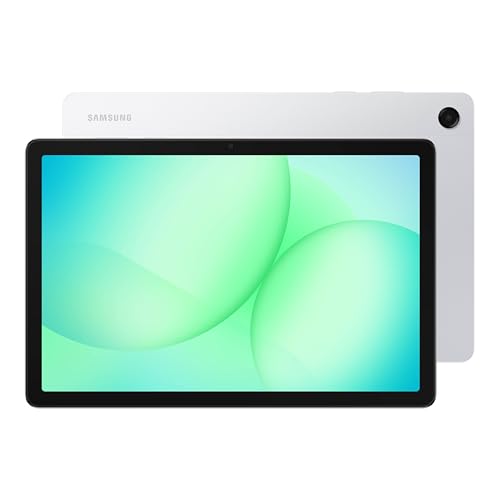
- 8GB RAM with 256GB storage for everyday use
- Large display and Dolby Atmos speakers for media
- Slim, light design with expandable storage
Best For: People wanting a roomy, portable tablet for entertainment
Desktop-Class Windows Tablet
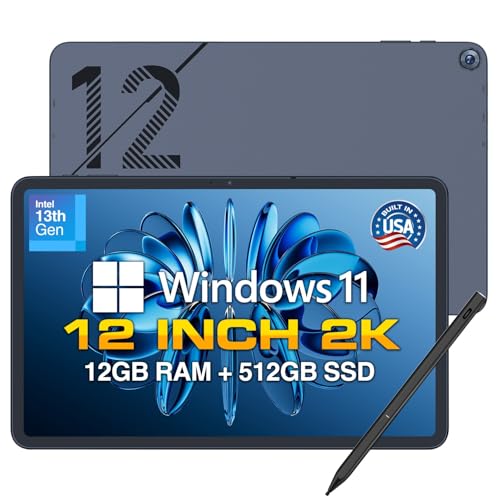
- 12-inch 2K display with stylus included
- 12GB DDR5 RAM and 512GB SSD for multitasking
- Built-in cooling fan and full connectivity options
Best For: Users needing a Windows tablet for work, study, and multitasking
Student Power Pick
Lenovo Idea Tab Pro 12.7” with Pen and Folio

- 12.7-inch 3K LCD with quad JBL Dolby Atmos speakers
- Includes pen and folio case for note-taking and study use
- Dimensity 8300, Wi-Fi 6E, and 11-hour battery life
Best For: Students who want a large Android tablet with bundled accessories
Windows Value Workhorse
Fusion5 10.1” Full HD Windows 11 Tablet PC

- 12GB RAM and 256GB SSD for fast multitasking
- Windows 11 Home with Intel N100 and multiple ports
- 2-year warranty includes accidental damage cover
Best For: Work or school users who want a compact Windows tablet
Campus Creator Choice
Lenovo Idea Tab 11” with Pen and Folio

- 11-inch 2.5K IPS display with 90Hz refresh rate
- Includes Tab Pen and folio case for studying
- 8 GB RAM, 256 GB storage, and up to 12 hours battery
Best For: Students wanting a lightweight Android tablet with stylus support
Rugged Power Pick
Fusion5 10.1” Windows 11 Pro Rugged Tablet

- 12GB RAM and 512GB SSD
- Rugged, shockproof, and dustproof design
- 2-year warranty with accidental damage cover
Best For: Professionals who need a rugged Windows tablet for work
Lightweight Study Choice
Lenovo Idea Tab Plus 12.1” 2.5K Tablet

- 12.1-inch 2.5K display with 90Hz refresh
- Includes Tab Pen and folio case
- Light 1.2-pound design with up to 13-hour streaming
Best For: Students who want a portable Android tablet for notes and media
Big-Screen Value Pick
Samsung Galaxy Tab A11+ 11” Android Tablet

- 11-inch 90Hz WUXGA display
- 7040mAh battery with 4 speakers
- Android 16 with up to 7 major upgrades
Best For: Users who want a Wi-Fi Samsung tablet for media and everyday use
Premium Everyday iPad – Apple iPad 11-inch, A16, 256GB Wi-Fi
For shoppers comparing premium tablet computers, this 11-inch iPad stands out as a polished everyday option with the A16 chip, Liquid Retina display, and strong app support. It is built to handle browsing, streaming, note-taking, photo edits, and light creative work while staying easy to carry.
Best For: Anyone who wants a fast, versatile iPad for work, media, and everyday productivity.
Pros:
- A16 chip delivers responsive performance for games, editing, and multitasking.
- 11-inch Liquid Retina display is well suited to movies, drawing, and reading.
- 12MP front and rear cameras support video calls, selfies, scanning, and 4K video capture.
- Wi-Fi 6, USB-C, Touch ID, and all-day battery life make it practical for daily use.
Cons:
- No included keyboard or stylus, so accessories add to the total cost.
- Wi-Fi only model is less flexible than cellular tablets for use away from networks.
- Best suited to Apple’s ecosystem if you rely on iPadOS apps and accessories.
This iPad is a strong pick if you want a premium tablet computer that balances speed, portability, and a mature app ecosystem. It is especially appealing if you value a familiar, refined tablet experience over laptop-like flexibility.
Portable Windows Workhorse – Microsoft Surface Pro 9 i7, 16GB, 512GB
If you want premium tablet computers with a more PC-like feel, the Surface Pro 9 is built for productivity on the move. Its 13-inch PixelSense display, Core i7 processor, 16GB RAM, and 512GB SSD make it a capable choice for work tasks, media, and multi-app use.
Best For: Professionals and students who want a lightweight Windows tablet for productivity.
Pros:
- Core i7 processor and 16GB RAM support efficient multitasking and demanding apps.
- 13-inch PixelSense display offers a larger viewing area while remaining portable.
- 1.94 lb weight makes it easier to carry than many traditional laptops.
- Windows 11 Pro adds compatibility with routine work applications and desktop workflows.
Cons:
- Key keyboard accessory is not mentioned, so the tablet form may need extras for full laptop-style use.
- Higher-performance hardware is excellent for productivity, but it may be more than casual users need.
- Battery life is listed, but real-world runtime will vary with workload and settings.
The Surface Pro 9 makes sense if your buying list favors a premium tablet computer that can double as a portable Windows work device. It is best when productivity, storage, and lightweight design matter more than simple media consumption.
Large-Display Android Value – Samsung Galaxy Tab A11+, 8GB/256GB
For buyers comparing premium tablet computers with a focus on everyday value, the Galaxy Tab A11+ emphasizes a large display, roomy storage, and practical features. The 8GB RAM and 256GB storage combination is aimed at smooth day-to-day use, while the slim, light design makes it easier to carry.
Best For: Users who want a roomy, portable tablet for entertainment and everyday tasks.
Pros:
- 8GB RAM and 256GB storage provide a solid foundation for everyday performance.
- Large display is well suited to streaming, reading, and browsing.
- Dolby Atmos speakers improve the media experience.
- Expandable storage, long-lasting battery, and 2-year warranty add practical value.
Cons:
- No processor or display resolution details are provided in the supplied notes.
- Feature set appears more value-focused than flagship-level.
- Android tablets can vary more in accessory support than premium iPad or Windows models.
This tablet is appealing if you want a larger, lighter device with useful extras rather than a high-end workstation tablet. It looks like a balanced choice for media, casual productivity, and everyday portability.
Desktop-Class Windows Tablet – Fusion5 Helios 12, 12GB/512GB
Among premium tablet computers, the Fusion5 Helios 12 is designed for buyers who want a Windows tablet with stronger desktop-style hardware and a clear productivity focus. Its 12-inch 2K display, 12GB DDR5 RAM, 512GB SSD, and built-in cooling fan make it better suited to multitasking and longer sessions than a basic slate.
Best For: Users who need a Windows tablet for work, study, and multitasking.
Pros:
- 12-inch 2K touchscreen provides sharper detail and extra workspace.
- 12GB DDR5 RAM and 512GB SSD support smoother multitasking and fast storage access.
- Built-in cooling fan helps maintain performance during heavier workloads.
- Includes stylus pen, fast charging, and multiple ports for flexible use.
Cons:
- Windows tablet design may be less streamlined than simpler media-first tablets.
- The integrated fan adds complexity compared with fanless tablets.
- Battery size is modest for a device positioned around performance and multitasking.
The Helios 12 is a strong fit if you want a premium tablet computer that leans into Windows compatibility and practical power. It is especially attractive for users who value ports, pen input, and a more workstation-like experience in a tablet body.
Student Power Pick – Lenovo Idea Tab Pro 12.7” with Pen and Folio
If you want premium tablet computers that balance big-screen comfort with real student utility, the Lenovo Idea Tab Pro is built for exactly that mix. Its 12.7-inch 3K LCD, MediaTek Dimensity 8300 chip, Wi-Fi 6E, and included pen and folio case make it a practical option for studying, streaming, and everyday productivity.
Best For: Students and multitaskers who want a large Android tablet with pen support and bundled accessories.
Pros:
- 12.7-inch 3K LCD display with quad JBL Dolby Atmos speakers for sharp, immersive media.
- Includes Lenovo Tab Plus Pen and folio case right in the box.
- MediaTek Dimensity 8300, 8 GB memory, and Wi-Fi 6E support smooth multitasking.
- 11-hour battery life and 45W quick charge help it keep up with long days.
Cons:
- Android-based design may not suit buyers who need Windows desktop software.
- At 1.4 pounds, it is less compact than smaller tablets.
The Idea Tab Pro stands out if you want a large, well-equipped Android tablet that feels ready for class and entertainment from day one. The included stylus and case add value, while the display and battery make it easy to rely on all day.
Windows Value Workhorse – Fusion5 10.1” Full HD Windows 11 Tablet PC
For shoppers comparing premium tablet computers with a more PC-like setup, the Fusion5 Windows 11 tablet focuses on speed, ports, and protection. It pairs 12GB RAM, a 256GB SSD, a 13th Gen Intel N100 CPU, and a 10.1-inch Full HD IPS touchscreen with practical extras like USB-C, USB-A, micro HDMI, and accidental damage coverage.
Best For: Buyers who want a portable Windows tablet for work, school, and media with strong warranty coverage.
Pros:
- 12GB RAM and 256GB SSD support fast multitasking and storage.
- Windows 11 Home with Intel 13th Gen N100 processing for productivity tasks.
- Full HD 10.1-inch IPS touchscreen with 500 nits brightness.
- 2-year full warranty includes accidental damage cover.
Cons:
- Docking keyboard is sold separately if you want a laptop-style setup.
- 10.1-inch screen is smaller than many larger premium tablets.
This Fusion5 model makes sense if your priority is a compact Windows tablet with generous memory, broad port selection, and warranty protection. It is especially appealing for buyers who want tablet portability without giving up familiar PC tools.
Campus Creator Choice – Lenovo Idea Tab 11” with Pen and Folio
If you want premium tablet computers that are easy to carry but still feel complete for school and downtime, the Lenovo Idea Tab is a strong middle ground. It combines an 11-inch 2.5K IPS 90Hz display, MediaTek Dimensity 6300, 8 GB memory, 256 GB storage, and included pen and folio case for a polished everyday setup.
Best For: Students who want a lightweight Android tablet with stylus support and a sharper 11-inch display.
Pros:
- 11-inch 2.5K IPS touchscreen with 90Hz refresh rate for smooth visuals.
- Includes Lenovo Tab Pen and folio case in the box.
- 8 GB memory and 256 GB storage offer a solid everyday configuration.
- Up to 12 hours of battery life helps it last through classes and streaming.
Cons:
- Designed for students, so it is not the best fit for Windows desktop software needs.
- 20W charging is useful, but not as fast as higher-wattage tablet chargers.
The Idea Tab is the more compact pick here, but it still feels well equipped thanks to its display quality, included accessories, and strong storage spec. For note-taking, reading, and light multitasking, it delivers a balanced tablet experience.
Rugged Power Pick – Fusion5 10.1” Windows 11 Pro Rugged Tablet
If you want premium tablet computers that lean more toward durability and desktop-style productivity, this Fusion5 model is built for demanding use. It pairs Windows 11 Professional with 12GB RAM, a 512GB SSD, and an Intel 13th Gen N100 processor, while adding rugged protection, accidental damage coverage, and a Full HD 10.1-inch display.
Best For: Professionals, field workers, and anyone who needs a rugged Windows tablet with strong storage and warranty coverage.
Pros:
- 12GB RAM and 512GB SSD provide generous multitasking and storage capacity.
- Windows 11 Pro and Intel 13th Gen N100 are suited to serious work tasks.
- Rugged, shockproof, and dustproof design adds confidence in tougher environments.
- 2-year full warranty includes accidental damage coverage for added peace of mind.
Cons:
- 10.1-inch screen is smaller than many productivity-focused tablets.
- Heavier-duty build is less travel-friendly than slim consumer tablets.
- Best suited to work use rather than lightweight entertainment-first use.
This Fusion5 stands out for buyers who value protection, Windows compatibility, and a work-ready spec sheet over a sleek, minimal design. It is a practical option when reliability matters more than thinness.
Lightweight Study Choice – Lenovo Idea Tab Plus 12.1” 2.5K Tablet
For shoppers comparing premium tablet computers for school, note-taking, and everyday media, the Lenovo Idea Tab Plus focuses on portability and a sharper display. It combines a 12.1-inch 2.5K screen, 90Hz refresh rate, Dimensity 6400 performance, quad speakers, and includes both a Tab Pen and folio case.
Best For: Students and light productivity users who want a large, sharp Android tablet with pen support included.
Pros:
- 12.1-inch 2.5K display offers crisp detail and strong brightness up to 800 nits.
- Includes Lenovo Tab Pen and folio case in the box.
- Lightweight 1.2-pound build makes it easy to carry.
- Up to 13 hours of YouTube streaming supports long study or entertainment sessions.
Cons:
- 128GB storage may feel limited for users with large app or media libraries.
- 8GB memory is solid, but not aimed at heavy workstation-style use.
- Best suited to Android learning and entertainment rather than desktop replacement tasks.
The Idea Tab Plus is a strong all-around pick if you want a bright, big-screen tablet that stays portable. Its included stylus and folio add practical value for note-taking and everyday organization.
Big-Screen Value Pick – Samsung Galaxy Tab A11+ 11” Android Tablet
If your version of premium tablet computers is a smooth Android slate with a current feature set, the Samsung Galaxy Tab A11+ Plus delivers a balanced package. It offers 128GB storage, 6GB RAM, a 90Hz 11-inch display, octa-core Dimensity 7300 performance, four speakers, and a large 7040mAh battery for all-day use.
Best For: Buyers who want a modern Wi-Fi Android tablet with a strong display, good battery life, and Samsung software support.
Pros:
- 90Hz 11-inch WUXGA display should feel smooth for everyday scrolling and video.
- 7040mAh battery is sized for long viewing and on-the-go use.
- 4-speaker Dolby Atmos setup is a plus for media playback.
- Android 16 with up to 7 major upgrades offers strong long-term software support.
Cons:
- International model means no warranty is included.
- Wi-Fi only design has no SIM card slot or mobile network support.
- The included 20W charger is a generic accessory, not Samsung-branded.
This Tab A11+ is appealing if you want a mainstream Samsung tablet with current software and a good entertainment mix. Just be aware that the international configuration changes the value equation because warranty coverage is not included.
How We Picked These Premium Tablet Computers
We focused on Premium Tablet Computers that offer a strong mix of real-world speed, display quality, battery endurance, and useful features such as keyboard or stylus support, modern connectivity, and enough storage for long-term use. We also favored models that make sense for different buyers, from students to professionals.
Specs matter, but so does balance. A fast chip is helpful, but a great screen, solid battery life, and enough RAM or storage often have a bigger impact on day-to-day satisfaction.
Quick Comparison: What Separates the Best Options
Some tablets are best for lightweight mobility, while others are closer to compact laptops. Windows tablets usually win on desktop-style multitasking and app compatibility, while Android and iPadOS options often shine in touch-first ease, battery efficiency, and app polish. Screen size also changes the experience: smaller models are easier to carry, while larger displays are better for split-screen work, reading, and creative tasks.
Key Buying Factors for Premium Tablet Computers
Performance and Memory
Look at the processor and RAM together. For smooth multitasking, Premium Tablet Computers should have enough memory to handle browser tabs, productivity apps, and media without slowing down. If you plan to keep the device for several years, prioritize higher RAM and a faster chip over bare-minimum specs.
Display Quality and Size
Resolution, refresh rate, and panel quality all affect comfort. A sharper screen improves reading and photo viewing, while a higher refresh rate can make scrolling feel smoother. Choose a larger display if you want better split-screen productivity; choose a smaller one if portability matters more.
Storage and Expandability
Storage fills faster than many buyers expect. If you save large files, offline videos, or school materials, 128GB may be tight. Premium Tablet Computers with 256GB or more are usually the safer long-term choice, especially if cloud storage is not your only option.
Operating System and Ecosystem
Think about where the tablet fits in your current setup. iPad-style tablets are strong for app quality and accessory support, Windows tablets are better for laptop-like workflows, and Android tablets often offer the best value and flexibility.
Who Should Buy Which Premium Tablet Computers?
Buy a high-end iPad-style tablet if you want a polished all-around experience, strong app support, and reliable performance. Choose a Windows tablet if you need desktop software, file management, or a more traditional productivity setup. Pick an Android tablet if you want a versatile, user-friendly device for entertainment, notes, and everyday use at a more accessible price.
If you are shopping Premium Tablet Computers for work, school, or travel, the best choice is the one that matches your software needs first, then your preferred screen size, battery life, and accessory ecosystem.