When you’re building a high-performance PC, choosing the right power supply unit (PSU) is essential for efficiency and control. The latest models with OLED power monitoring can provide real-time insights into your system’s power usage, enhancing both performance and reliability. In this guide, we’ll explore the nine best PSUs that feature this advanced technology. You’ll want to take into account their unique benefits before making your decision.
ASUS ROG Thor 1200W Platinum III PSU
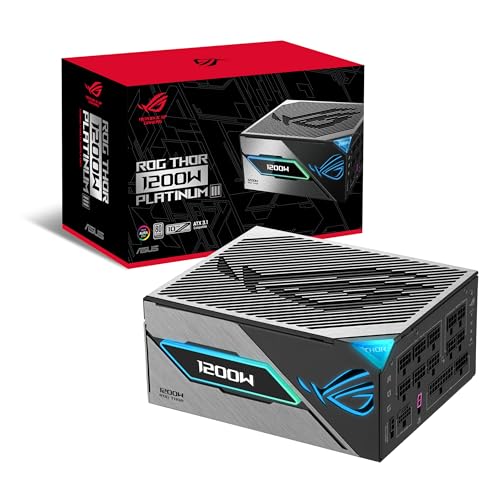
The ASUS ROG Thor 1200W Platinum III PSU is the ideal choice for gamers and PC builders who demand exceptional performance and efficiency. With its 80 PLUS Platinum certification, you’ll enjoy top-tier power efficiency thanks to low-ESR capacitors and GaN MOSFET technology. The GPU-First Voltage Stabilizer boosts voltage delivery by up to 45%, ensuring smoother gameplay. Its robust cooling features include dual-ball fan bearings and ROG heatsinks, enhancing longevity and performance. Plus, the magnetic OLED display lets you monitor real-time power draw easily. With a 10-year warranty, this PSU combines reliability and cutting-edge technology to elevate your gaming experience.
Best For: Gamers and PC builders who seek high-performance, efficient power solutions for their systems.
Pros:
- 80 PLUS Platinum certification ensures excellent power efficiency, reducing electricity costs.
- GPU-First Voltage Stabilizer enhances voltage delivery to graphics cards for smoother gaming and improved performance.
- Magnetic OLED display provides real-time monitoring of power draw for better management of system resources.
Cons:
- Higher price point compared to standard power supplies may not fit all budgets.
- Weight may be a consideration for small form-factor builds due to its 5.3 pounds.
- Limited to ATX system compatibility, which may not suit all setups.
Redragon RGPS-850W 80+ Gold Power Supply
For gamers and PC builders seeking top-tier performance without sacrificing efficiency, the Redragon RGPS-850W 80+ Gold Power Supply stands out. With 850 watts of power and 80 Plus Gold certification, it guarantees cooler temperatures and reduced noise. Its compact 160mm design fits well in most chassis, while compatibility with ATX 3.1 and PCIe 5.1 makes it perfect for modern GPUs like Nvidia RTX 40/50 Super and AMD. The smart ECO RGB fan activates only at higher temperatures, providing efficient cooling. Plus, you’ll appreciate the reliability from Japanese capacitors and a solid warranty for peace of mind.
Best For: Gamers and PC builders looking for a high-performance power supply that offers efficiency and modern compatibility.
Pros:
- 80 Plus Gold certification ensures energy efficiency, leading to cooler temperatures and reduced noise.
- Compact size (160mm) allows for better compatibility with various chassis designs.
- Smart ECO RGB fan operates quietly, activating only at higher temperatures for optimal cooling.
Cons:
- Limited 1-year warranty may not provide enough coverage for some users.
- Weight (5.7 pounds) might be considered heavy compared to other power supplies in the market.
- RGB features may not appeal to users who prefer a more minimalist aesthetic.
ASUS ROG Thor 1000W Platinum II Power Supply
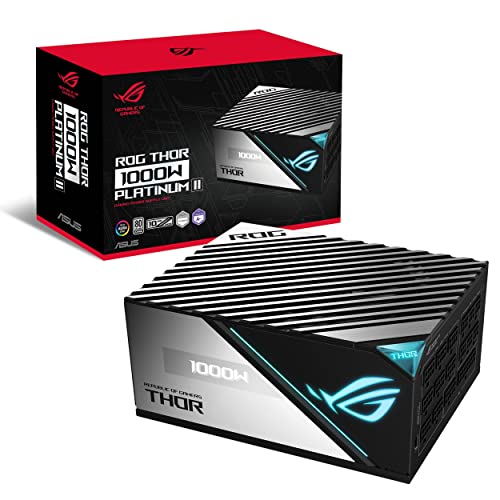
When seeking a power supply that combines high performance with cutting-edge features, the ASUS ROG Thor 1000W Platinum II stands out, especially for gamers and PC enthusiasts. This fully modular PSU boasts an 80+ Platinum certification, ensuring excellent efficiency. With its 135mm Axial-tech fan and ROG heatsinks, it keeps temperatures down while operating quietly, even in 0dB Mode. The OLED display allows you to monitor real-time power draw, enhancing your control. Weighing just 5.2 pounds, it’s designed for high-end systems and pairs perfectly with ROG motherboards and graphics cards. Plus, it comes with a generous 10-year warranty.
Best For: The ASUS ROG Thor 1000W Platinum II is best for high-end gaming PC builders and enthusiasts seeking a reliable and efficient power supply.
Pros:
- High efficiency with 80+ Platinum certification, reducing energy costs.
- Quiet operation thanks to the 135mm Axial-tech fan and 0dB Mode for low loads.
- Real-time monitoring of power draw via the OLED display, enhancing control over performance.
Cons:
- Higher price point compared to standard power supplies, which may not fit all budgets.
- Weight of 5.2 pounds may be a consideration for those looking for lighter components.
- Limited warranty on the OLED panel and RGB LED compared to the core product warranty.
Redragon RGPS-850W 80+ Gold Power Supply
Looking for a power supply that combines high efficiency with cutting-edge technology? The Redragon RGPS-850W 80+ Gold Power Supply delivers just that! With its compact 160mm design, it features upgraded ATX 3.1 and PCIe 5.1 compatibility, making it perfect for modern GPUs like Nvidia RTX 40/50 Super and AMD options. You’ll appreciate the fully modular setup and 100% Japanese capacitors for reliability. Plus, the smart ECO low noise RGB fan operates silently until temperatures rise. With a solid 5-year warranty and stellar customer reviews, this PSU stands out in performance and aesthetics, keeping your system cool and stylish.
Best For: Gamers and PC builders who seek high efficiency, modern compatibility, and customizable aesthetics in their power supply.
Pros:
- Fully modular design for easy cable management and improved airflow.
- 80 Plus Gold certification ensures high energy efficiency and cooler operation.
- Features a low noise RGB fan that operates quietly until needed, enhancing both performance and aesthetics.
Cons:
- The compact size may limit compatibility with certain larger cases.
- RGB customization options may not appeal to users who prefer a more minimalistic look.
- Slightly higher price point compared to non-modular power supplies.
ASUS ROG Thor 1600W Titanium Power Supply

The ASUS ROG Thor 1600W Titanium Power Supply stands out as an ideal choice for gamers and PC enthusiasts seeking high performance and efficiency. With its 80 Plus Titanium certification, you’ll enjoy top-tier power delivery while minimizing energy loss. The fully modular design makes cable management a breeze, and the GaN MOSFETs enhance efficiency further. You’ll appreciate the silent operation thanks to the 135mm PWM fan with a 0dB mode. Plus, the OLED display lets you monitor real-time power draw effortlessly. Backed by a 10-year warranty, this PSU guarantees reliability for your demanding systems.
Best For: Gamers and PC enthusiasts who demand high performance and efficiency in their power supply.
Pros:
- 80 Plus Titanium certification ensures superior energy efficiency and minimal energy loss.
- Fully modular design simplifies cable management for a cleaner build.
- Real-time power monitoring via an OLED display allows for easy tracking of power draw.
Cons:
- Higher price point compared to standard power supplies may not fit all budgets.
- Limited customer reviews (only 38) may raise concerns about reliability and performance.
- Weight and size may be cumbersome for smaller cases or builds.
Apevia Premier 650W Gaming Power Supply

For gamers seeking reliable power with style, the Apevia Premier 650W Gaming Power Supply stands out thanks to its semi-modular design, which enhances cable management. With an 80+ Gold certification, it delivers 650 watts of stable power, ensuring your system runs efficiently. The 135mm RGB fan adds a touch of flair with 366 lighting modes, keeping your setup cool and visually appealing. This PSU supports various connectors, including dual 8-pin PCI-E and multiple SATA ports, making it compatible with a range of builds. Plus, heavy-duty protections keep your components safe, giving you peace of mind while you game.
Best For: Gamers looking for a reliable and stylish power supply with efficient performance and customizable RGB lighting.
Pros:
- Semi-modular design enhances cable management for a cleaner build.
- 80+ Gold certification ensures high power efficiency and stability.
- RGB fan with 366 lighting modes adds aesthetic appeal while keeping components cool.
Cons:
- Limited wattage may not support very high-end builds or extreme overclocking.
- Warranty information is not readily available without a request.
- RGB fan may not appeal to users who prefer a more minimalist look.
Redragon RGMS-850W PRO 80+ Gold 850 Watt Power Supply
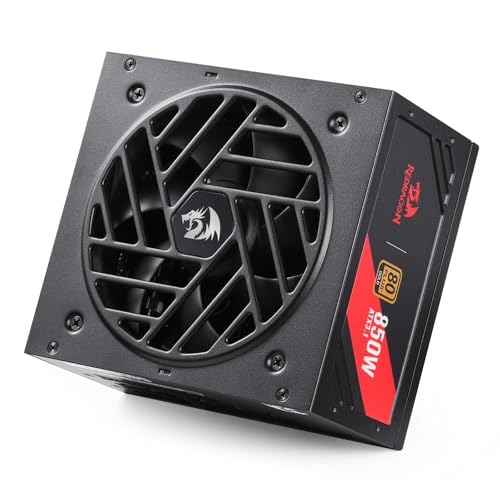
If you’re seeking a reliable and efficient power supply, the Redragon RGMS-850W PRO 80+ Gold 850 Watt Power Supply is a standout option. With its 80 Plus Gold certification, it delivers impressive performance while keeping energy consumption low. This ATX12V PSU is compatible with the latest Nvidia RTX and AMD GPUs, ensuring it meets your gaming needs. The Zero RPM Mode fan runs quietly, while the compact design and flat modular cables enhance airflow. Built with 100% Japanese capacitors, you can trust its durability. Plus, it comes with essential safety features, ensuring your system’s protection.
Best For: Gamers and PC builders seeking a reliable, efficient, and high-performance power supply for their systems.
Pros:
- 80 Plus Gold certification ensures high energy efficiency and lower electricity costs.
- Compatible with the latest Nvidia and AMD GPUs for optimal gaming performance.
- Compact design with flat modular cables enhances airflow and reduces clutter in the case.
Cons:
- Only a 1-year warranty may not be sufficient for long-term users.
- The 2000 RPM fan can still produce noticeable noise under heavy load despite the Zero RPM Mode.
- Some users may find the weight of 2.96 kilograms slightly heavier compared to other models.
Bitaxes Gamma 601 Bitcoin Miner BM1370

Designed for cryptocurrency enthusiasts, the Bitaxes Gamma 601 Bitcoin Miner BM1370 stands out with its ultra-low power draw of just 18W, making it an energy-efficient option for solo mining. With a hashrate of 1.2 TH/s using the SHA-256 algorithm, it delivers impressive performance while remaining comparable to standard LED light bulbs. The built-in 2.4G Wi-Fi and open-source firmware (AxeOS) allow you to control and monitor real-time stats through a web dashboard and OLED screen. Plus, its low-noise design guarantees a quiet operation, making it a perfect fit for any mining setup at home.
Best For: The Bitaxes Gamma 601 Bitcoin Miner is best for cryptocurrency enthusiasts looking for an energy-efficient and quiet mining solution suitable for home use.
Pros:
- Ultra-low power consumption of just 18W, comparable to an LED light bulb.
- Open-source firmware with a web dashboard for easy control and monitoring.
- Low-noise operation, making it ideal for home environments.
Cons:
- Limited hashrate of 1.2 TH/s may not be competitive for larger mining operations.
- Optimized primarily for solo mining, which may not suit users preferring pool mining.
- Requires a stable internet connection for optimal performance due to built-in Wi-Fi.
Bitaxes Gamma 601 Bitcoins Miner BM1370
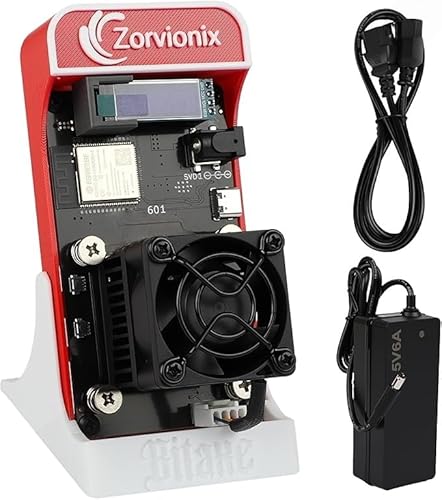
The Bitaxes Gamma 601 Bitcoin Miner BM1370 stands out with its compact design and efficient performance, making it the ideal choice for home miners seeking a quiet and unobtrusive operation. With a hashrate of 1.2 TH/s and a power draw of only 18W, it offers impressive efficiency at around 15 J/TH. The low-noise level, under 35 dB, guarantees minimal disruption. You’ll appreciate the built-in 2.4G Wi-Fi for easy monitoring and control via the open-source AxeOS. Plus, it’s optimized for solo mining, allowing you to plunge into the crypto world with confidence. A 1-year warranty adds peace of mind.
Best For: Home miners looking for a compact, efficient, and quiet Bitcoin mining solution.
Pros:
- Efficient performance with a hashrate of 1.2 TH/s and only 18W power draw.
- Low noise level (<35 dB) suitable for residential environments.
- Open-source firmware allows for easy monitoring and community-driven support.
Cons:
- Limited to solo mining, which may not be ideal for all users.
- Compact size may limit heat dissipation compared to larger mining rigs.
- Only a 1-year warranty, which may be shorter than some competitors.
Factors to Consider When Choosing a PSU with OLED Power Monitoring
When you’re selecting a PSU with OLED power monitoring, several key factors come into play. You’ll want to take into account display quality and size for easy readability, as well as power efficiency ratings to guarantee peak performance. Additionally, don’t overlook build quality, cable management features, and cooling solutions, as these can greatly influence your overall experience.
Display Quality and Size
Choosing a PSU with OLED power monitoring means you should pay close attention to display quality and size. OLED screens offer vibrant colors and high contrast, making it easy to read power data in any lighting. You’ll appreciate the faster refresh rates and response times, ensuring you get real-time updates on your system’s power consumption. When it comes to size, larger displays provide more information at a glance, but consider the space available in your computer case. Many OLED options also let you customize layouts, so you can prioritize what matters most, like voltage or wattage. Plus, superior viewing angles let you see the data clearly from different positions without sacrificing image quality.
Power Efficiency Ratings
Power efficiency ratings play an essential role in selecting a PSU with OLED power monitoring, as they directly impact your system’s performance and operational costs. Look for power supplies with 80 PLUS certifications, as these indicate how effectively the unit uses electricity. Higher ratings, like Platinum or Titanium, mean less energy waste and lower heat generation. For instance, a Platinum-rated PSU must achieve at least 90% efficiency at both 20% and 100% loads. By choosing a higher efficiency PSU, you can lower your electricity bills and reduce your carbon footprint. Plus, advanced components like GaN MOSFETs can enhance efficiency by up to 30%. The OLED display helps you monitor real-time power draw, optimizing usage and performance.
Build Quality and Reliability
While evaluating PSUs with OLED power monitoring, build quality and reliability should be high on your list of priorities. Look for units that utilize 100% Japanese capacitors, as they enhance durability under load. A fully modular design not only aids in cable management but also improves airflow, keeping your system cooler. Additionally, consider models incorporating GaN MOSFETs, which greatly cut switching losses and boost energy efficiency. Effective cooling solutions, like dual-ball fan bearings and optimized fan curves, guarantee lower operating temperatures and promote longevity. Finally, check for thorough safety features such as Over Voltage Protection (OVP) and Short-Circuit Protection (SCP) to safeguard your components from electrical faults. Prioritizing these factors will lead to a reliable PSU investment.
Cable Management Features
When it comes to assembling a high-performance PC, effective cable management features in a PSU can greatly enhance your system’s airflow and thermal performance. Opting for a fully modular PSU lets you connect only the necessary cables, reducing clutter and improving the aesthetics of your build. Flat, pliable cables optimize space and airflow, making it easier to navigate tight areas within your case. High-quality, etched cables offer durability and flexibility, allowing you to manage connections without risking damage. Additionally, proper cable management simplifies upgrades and troubleshooting, as it makes identifying and accessing specific components much easier. Prioritizing these features guarantees that your system runs efficiently and looks great while doing so.
Cooling Solutions Provided
Choosing the right cooling solutions for your PSU is essential to maintain ideal performance and longevity. Effective cooling prevents overheating, so look for power supplies with advanced designs that include efficient heatsinks. High-quality fans, like dual-ball bearing types, last longer and provide superior airflow compared to traditional sleeve fans. Consider models with a 0dB or Zero RPM mode, which keeps the fan off during low load conditions, reducing noise and enhancing tranquility. Additionally, PSUs utilizing GaN MOSFET technology improve power efficiency and minimize heat generation, leading to better thermal management. Intelligent fan curves that adjust speeds based on temperature readings guarantee peak cooling while balancing noise levels, making your system run smoothly and quietly under various workloads.
Compatibility With Components
Effective cooling solutions set the stage for a reliable power supply unit (PSU), but compatibility with your components is just as important. First, verify the PSU matches your motherboard’s form factor, like ATX, for a proper fit. Next, check the wattage output; it should meet or exceed the total power needs of your CPU, GPU, and peripherals. Also, confirm that the PSU has the right connectors, such as PCIe for graphics cards and SATA for storage devices. Don’t overlook the efficiency rating, like 80 PLUS certification, which impacts power consumption and heat. Finally, make certain the OLED power monitoring feature works with your specific components to provide accurate real-time power readings.
Warranty and Support Options
Often overlooked, warranty and support options play an essential role in selecting a PSU with OLED power monitoring. When you’re evaluating a PSU, check the warranty length—longer warranties often indicate better durability and reliability. Many quality PSUs come with warranties ranging from 1 to 10 years, sometimes covering additional components like OLED panels or RGB LEDs. Don’t forget to take into account the return policy; a solid policy allows for refunds or exchanges within a 30-day period if defects arise. Customer support accessibility is also vital—make sure the manufacturer offers responsive service for troubleshooting and warranty claims. Finally, reviews and ratings can provide valuable insights into warranty fulfillment and overall customer satisfaction with support services.