When it comes to selecting the right storage solution, QNAP’s DAS systems stand out for their performance and versatility. Whether you’re a professional needing high-capacity storage or someone who requires reliable backup, these systems can meet your demands. With features like USB Type-C connectivity and various RAID configurations, you’ll find options that suit your specific needs. Curious about which models top the list and why they might be the perfect fit for you?
QNAP TR-004 4 Bay USB Type-C Direct Attached Storage (DAS)

If you’re looking for a reliable and efficient storage solution, the QNAP TR-004 4 Bay USB Type-C Direct Attached Storage (DAS) is an excellent choice for professionals and home users alike. With four SATA 3.5-inch drive bays, it offers flexible RAID configurations, including RAID 0, 1, and 5. You’ll benefit from fast data transfer rates of up to 6 Gbps and impressive read speeds. The TR-004 is compatible with Windows, macOS, and Linux, ensuring versatility for your system. Just remember, it can only function as an individual storage pool on NAS and isn’t compatible with certain QNAP models.
Best For: The QNAP TR-004 is best for professionals and home users seeking a reliable and efficient direct attached storage solution with flexible RAID options.
Pros:
- Fast data transfer rates of up to 6 Gbps for quick access to files.
- Compatible with multiple operating systems including Windows, macOS, and Linux.
- Flexible RAID configurations (RAID 0, 1, 5) for optimized storage management.
Cons:
- Not compatible with specific QNAP NAS models, limiting its use.
- Can only function as an individual storage pool on NAS, restricting integration with NAS storage.
- Drives are only migratable between TR-004 units, complicating data transfer to other devices.
QNAP TS-464-8G-US 4 Bay High-Performance Desktop NAS

The QNAP TS-464-8G-US 4 Bay High-Performance Desktop NAS is an ideal choice for small businesses and home users looking to enhance their data management capabilities. With its quad-core Intel Celeron processor and 8GB DDR4 RAM, you’ll experience swift performance, particularly when transferring large files. Dual 2.5GbE ports guarantee seamless connectivity, while the dual M.2 NVMe SSD slots offer cache acceleration for even faster data access. You’ll love the multiple USB 3.2 Gen 2 ports, allowing quick connections to modern devices. This NAS makes it easy to centrally store and organize your personal photos, music, and videos, keeping everything at your fingertips.
Best For: Small businesses and home users looking to enhance their data management and storage capabilities.
Pros:
- High performance with a quad-core Intel Celeron processor and 8GB DDR4 RAM, ideal for large file transfers.
- Seamless connectivity with dual 2.5GbE ports, providing faster data access across teams and devices.
- Flexible storage options with dual M.2 NVMe SSD slots for cache acceleration or SSD storage pools.
Cons:
- Limited expandability with only 4 bays for hard drives, which may not suffice for larger storage needs.
- Potentially higher cost compared to standard NAS devices with less advanced features.
- Requires technical knowledge for optimal setup and management, which may not be suitable for all users.
QNAP TS-664-8G-US 6 Bay Desktop NAS

For home users and small businesses looking for a reliable and high-performance storage solution, the QNAP TS-664-8G-US 6 Bay Desktop NAS stands out with its robust Intel Celeron N5105/N5095 processor, which delivers impressive speeds of up to 2.9GHz. With 8GB of DDR4 RAM, you’ll experience smooth multitasking. The dual 2.5GbE ports accelerate file sharing and large transfers, while the six bays provide ample storage options. You can also leverage dual M.2 PCIe Gen3x2 NVMe SSD slots for cache acceleration. Plus, multiple USB 3.2 Gen 2 ports guarantee compatibility with faster drives, making media organization a breeze.
Best For: Home users and small businesses seeking a reliable and high-performance storage solution with ample connectivity options.
Pros:
- High-performance processor with speeds up to 2.9GHz for seamless multitasking.
- Dual 2.5GbE ports enhance file sharing and large file transfers.
- Flexible storage options with six bays and dual M.2 SSD slots for cache acceleration.
Cons:
- Non-expandable RAM may limit future upgrades.
- Diskless design requires additional investment in hard drives for complete setup.
- Requires some technical knowledge for optimal configuration and setup.
QNAP TS-216G-US 2-Bay Desktop NAS

Ideal for budget-conscious users seeking a reliable storage solution, the QNAP TS-216G-US 2-Bay Desktop NAS combines powerful performance with affordability. It features an ARM Cortex-A55 quad-core 2.0GHz processor and 4GB DDR4 RAM, ensuring smooth multimedia streaming and efficient file management. With its built-in NPU for AI acceleration, you’ll enjoy quick face and object recognition. The 2.5GbE ports facilitate rapid file sharing across devices, perfect for families or small teams. Whether you’re organizing photos, music, or videos, this NAS offers an excellent balance of performance and connectivity to meet your home storage needs.
Best For: Budget-conscious users seeking a reliable and efficient home storage solution for multimedia and file management.
Pros:
- Affordable pricing makes it accessible for users looking for cost-effective storage options.
- Powerful performance with an ARM Cortex-A55 quad-core processor and 4GB DDR4 RAM, ensuring smooth streaming and file management.
- Enhanced connectivity through 2.5GbE ports for faster file sharing and large file transfers across devices.
Cons:
- Limited to 2-bay capacity, which may not be sufficient for users with extensive storage needs.
- The ARM processor may not provide the same level of performance as higher-end NAS options for intensive tasks.
- Lacks advanced features found in more expensive models, such as additional RAID configurations or extensive app support.
QNAP TS-433-4G-US 4 Bay NAS (Diskless)

Looking for a budget-friendly storage solution that meets your family’s multimedia needs? The QNAP TS-433-4G-US 4 Bay NAS is perfect for you. With its diskless design, you can customize your storage by adding your preferred drives. Powered by an ARM Cortex-A55 quad-core processor and 4 GB DDR4 RAM, it guarantees smooth multimedia streaming and file organization. The dual network ports, including a 2.5GbE option, provide future-proof connectivity. Plus, effortless backup for Windows and Mac via QNAP’s software makes data protection easy. This NAS is designed for home users wanting efficient, centralized storage for photos, music, and videos.
Best For: Families and home users seeking a customizable, budget-friendly storage solution for organizing and streaming multimedia content.
Pros:
- Diskless design allows for personalized storage options by adding preferred drives.
- Powerful ARM Cortex-A55 quad-core processor and 4 GB DDR4 RAM enable smooth multimedia streaming and efficient file organization.
- Dual network ports, including a 2.5GbE option, provide future-proof high-speed connectivity.
Cons:
- Diskless design means additional costs for purchasing drives separately.
- Limited built-in RAM may not be sufficient for heavy multitasking or demanding applications.
- Lack of built-in drives may result in longer initial setup time before full functionality is achieved.
QNAP QDA-A2AR DAS Storage System

The QNAP QDA-A2AR DAS Storage System stands out for users who need versatile storage solutions, thanks to its dual support for HDDs and SSDs. You can connect up to two 3.5-inch SATA drives and two 2.5-inch SATA drives, accommodating a storage capacity of up to 6 GB. With data transfer rates reaching 6 Gbps via Serial ATA/600, performance is impressive. It offers various RAID configurations, including JBOD, RAID 0, and RAID 1, making it flexible for your data needs. Weighing just 0.2 kg, it’s lightweight yet durable, featuring a metal and plastic enclosure. Enjoy a 1-year warranty for added peace of mind.
Best For: Users looking for a versatile and flexible storage solution that supports both HDDs and SSDs with various RAID configurations.
Pros:
- Supports dual 2.5-inch SSDs and 3.5-inch HDDs for enhanced storage flexibility.
- High data transfer rate of up to 6 Gbps ensures fast performance.
- Lightweight design (0.2 kg) makes it easy to transport and set up.
Cons:
- Limited to a maximum storage capacity of 6 GB, which may not be sufficient for some users.
- Warranty is only 1 year, which may be shorter than competitors.
- Higher restocking fees for returns may deter buyers if they need to return the product.
QNAP Turbo NAS TS-453Be Storage System

For small businesses and home offices seeking reliable storage solutions, the QNAP Turbo NAS TS-453Be stands out with its powerful Intel Celeron J3455 Quad-Core CPU and flexible RAID configurations. With a total storage capacity of 16TB, you can easily manage your data using various RAID levels, including RAID 0, RAID 1, and RAID 5. The device runs on QNAP QTS 4.3.4, providing features like HD Station, QSync, and Hybrid Backup. Plus, the sealed box installation guarantees you get a pristine unit. Just note that hard drives and memory upgrades are sold separately, requiring some setup on your part.
Best For: Small businesses and home offices looking for reliable and flexible storage solutions.
Pros:
- High Performance: Powered by an Intel Celeron J3455 Quad-Core CPU for efficient multitasking.
- Flexible Storage Options: Supports various RAID configurations for data protection and performance.
- Rich Features: Offers a wide range of applications, including backup solutions and media management.
Cons:
- Separate Purchases Required: Hard drives and memory upgrades are sold separately, requiring additional investment.
- Installation Needed: Setup involves installation, which may not be ideal for users seeking a plug-and-play solution.
- Limited Native RAM: Comes with 8GB DDR3L RAM, which might not be sufficient for more demanding applications without upgrades.
QNAP QSW-2104-2S-A-US Network Switch

Ideal for small businesses or home offices seeking to boost their network performance, the QNAP QSW-2104-2S-A-US Network Switch offers a straightforward plug-and-play solution with its 2.5GbE and 10G SFP+ ports. You can quickly set up a wired network using its four ports, ensuring high-speed data transfer over twisted pair cables up to 100 meters. This unmanaged Layer 2 switch features IGMP snooping, port mirroring, and spanning tree functionalities for enhanced performance. Best of all, it provides a cost-effective way to improve your connectivity without the hassle of complex configurations, making it incredibly user-friendly.
Best For: Small businesses or home offices looking for an easy-to-use and efficient network switch to enhance their connectivity.
Pros:
- Simple plug-and-play setup with no complex configurations required.
- Supports high-speed data transfer with 2.5GbE and 10G SFP+ ports.
- Cost-effective solution for expanding wired networking capabilities.
Cons:
- Limited to four networking ports, which may not suffice for larger setups.
- Unmanaged switch lacks advanced features available in managed switches.
- No built-in power redundancy options for enhanced reliability.
QNAP TS-673A-8G 6 Bay High-Performance NAS

Designed for professionals and power users who demand high-speed data access, the QNAP TS-673A-8G 6 Bay High-Performance NAS stands out with its dual 2.5GbE ports. These ports are backwards compatible, ensuring seamless connectivity with existing networks. You can boost transfer speeds up to 5 Gbps using port trunking, ideal for heavy data tasks. With two PCIe Gen3 slots, you can expand functionality with 10GbE ports or SSD caching. Plus, the two M.2 NVMe slots support Qtier Technology for optimized storage. With 8GB DDR4 RAM (expandable to 64GB), it’s ready to handle your growing data needs efficiently.
Best For: Professionals and power users seeking high-speed data access and advanced storage optimization.
Pros:
- High-speed networking with dual 2.5GbE ports and port trunking capabilities for transfer speeds up to 5 Gbps.
- Expansion options with two PCIe Gen3 slots for 10GbE ports, SSD caching, and additional USB ports.
- Storage optimization through M.2 PCIe NVMe SSD slots supporting Qtier Technology for enhanced performance.
Cons:
- Initial cost may be higher compared to entry-level NAS devices.
- Complex setup might be challenging for casual users unfamiliar with advanced networking.
- Limited native support for certain graphics cards may restrict some GPU-enhanced functionalities.
QNAP TS-673A-8G High-Performance NAS
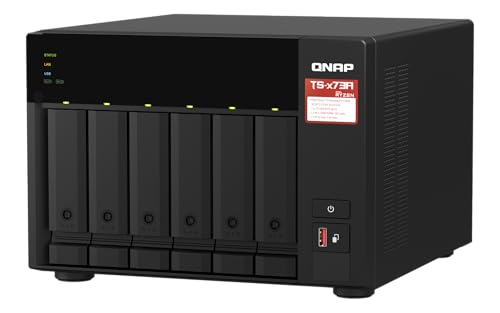
The QNAP TS-673A-8G is an exceptional choice for professionals and enthusiasts seeking high-speed data transfer and robust performance in a 6-bay NAS system. With dual 2.5GbE ports, you can enjoy backwards compatibility with 1GbE and 100MbE networks, achieving transfer speeds up to 5 Gbps through port trunking. The two PCIe Gen3 slots allow for expansion with 10GbE ports, SSD caching, and even entry-level NVIDIA graphics cards for video processing. Plus, the two M.2 PCIe NVMe SSD slots optimize storage with Qtier Technology, ensuring your data remains fast and accessible whenever you need it.
Best For: The QNAP TS-673A-8G is best for professionals and tech enthusiasts who require high-speed data transfer and extensive expandability in a NAS system.
Pros:
- High-speed data transfer with dual 2.5GbE ports that support up to 5 Gbps through port trunking.
- Expandable functionality with PCIe Gen3 slots for 10GbE, SSD caching, and GPU support.
- Optimized storage performance with dual M.2 PCIe NVMe SSD slots and Qtier Technology.
Cons:
- Higher initial investment compared to entry-level NAS solutions.
- May require additional configuration and setup for optimal performance.
- Limited native support for advanced graphics processing without compatible NVIDIA cards.
Factors to Consider When Choosing Qnap Das Systems
When you’re choosing a QNAP DAS system, think about your storage capacity needs and how much data you’ll be handling. Consider the RAID configuration options that suit your requirements and the connectivity types available for your setup. Don’t forget to check the performance specifications and guarantee compatibility with your devices for a seamless experience.
Storage Capacity Requirements
Choosing the right QNAP DAS system hinges on understanding your storage capacity requirements, especially since your needs may evolve over time. Start by determining your total storage needs, considering the number and sizes of your files alongside anticipated future growth. Assess the number of drive bays available; a system with more bays typically allows for greater overall capacity. Remember that supported RAID levels can impact usable space; for example, RAID 1 mirrors data, effectively halving your storage. Additionally, consider scalability options, as some models let you expand by adding drives or connecting to NAS units. Finally, evaluate the types of drives supported, since different capacities can greatly influence your total achievable storage.
RAID Configuration Options
Understanding RAID configuration options is essential for maximizing the performance and reliability of your QNAP DAS system. You’ll want to choose a RAID level that aligns with your needs for speed, data protection, and storage capacity. RAID 0 offers the fastest read and write speeds but lacks redundancy, putting your data at risk if a drive fails. On the other hand, RAID 1 provides data mirroring, safeguarding your information but cutting your overall storage in half. If you’re looking for a balanced solution, consider RAID 5, which requires at least three disks and offers fault tolerance through distributed parity. Alternatively, JBOD lets you use multiple disks independently, while single-disk configurations are available for straightforward setups. Choose wisely!
Connectivity Types Available
As you explore QNAP DAS systems, the type of connectivity you select can markedly impact performance and compatibility. Most QNAP DAS models utilize USB Type-C, offering data transfer rates up to 6 Gigabits per second, perfect for high-speed data access. You’ll also find backward compatibility with USB Type-A, which broadens your options for connecting various devices. Depending on the connectivity setup, you can achieve read and write speeds of up to 375 MB/s, enhancing your media access experience. Some systems even support RAID configurations like RAID 0, RAID 1, and RAID 5, improving data redundancy and performance. Additionally, QNAP DAS devices are compatible with Windows, macOS, and Linux, ensuring you can connect seamlessly across different operating systems.
Performance Specifications Needed
When selecting a QNAP DAS system, several key performance specifications can greatly influence your experience. First, aim for data transfer rates of at least 6 Gigabits per second to guarantee efficient data handling. For peak performance during data retrieval, look for read speeds around 6 Gigabytes per second. Don’t overlook cache memory; higher cache can considerably enhance speed and responsiveness. Additionally, assess the supported RAID levels like RAID 0, 1, 5, and JBOD to tailor data redundancy and performance based on your needs. Finally, verify the system’s compatibility with multiple operating systems—Windows, macOS, and Linux—so you can seamlessly use it across various devices and environments. Prioritize these specs for the best experience.
Compatibility With Devices
Choosing the right QNAP DAS system hinges on its compatibility with your devices. First, confirm it works seamlessly with your operating system—whether that’s Windows, macOS, or Linux. Check the compatibility requirements with your existing NAS systems, as some DAS units may operate independently rather than integrate into your NAS. Look for models featuring USB Type-C connectivity to boost data transfer speeds, typically up to 6 Gbps. Additionally, verify that the DAS supports various RAID configurations like RAID 0, 1, or JBOD to suit your data redundancy and performance needs. Finally, keep in mind that not all DAS units are compatible with every NAS model; limitations may arise based on firmware versions or hardware configurations.
Form Factor Considerations
Understanding the form factor of a QNAP DAS system plays an essential role in optimizing your storage solutions. First, consider the drive sizes your setup supports, like 3.5-inch or 2.5-inch SATA drives, as compatibility can vary. If you’re tight on space, a compact form factor might be best, while larger enclosures provide more drive bays for expansion. Weight and design are also important; lighter units are easier to transport if you need mobile storage. Additionally, think about cooling requirements, especially if you plan to house multiple drives to prevent overheating. Finally, confirm the DAS system is compatible with your operating system and connection types, like USB Type-C or SATA, to maximize functionality.
Additional Features Offered
While evaluating QNAP DAS systems, considering additional features can greatly enhance your storage experience. Look for models that support various RAID configurations like RAID 0, 1, or 5, which help you optimize data redundancy and performance. Many units offer USB Type-C connectivity with impressive transfer rates of up to 6 Gbps, making data access quick and efficient. Some models include cache memory to boost read and write speeds, perfect for data-intensive tasks. Additionally, QNAP DAS systems can expand seamlessly with QNAP NAS, allowing for increased storage capacity while keeping separate pools. Finally, extensive backup solutions are often included, ensuring you can easily back up data from different operating systems, including Windows and macOS.