When it comes to creating an efficient workstation, choosing the right fans can make all the difference. You want quiet operation without sacrificing cooling performance. The market offers various options, each with unique features to enhance your setup. From customizable RGB lighting to impressive airflow, there’s something for everyone. Let’s explore the ten best quiet 140mm PWM fans that can elevate your workspace while keeping the noise at bay.
Corsair iCUE Link QX140 RGB 140mm Magnetic Dome RGB Single Fan – Black

If you’re looking to enhance your workstation’s cooling without the distracting noise, the Corsair iCUE Link QX140 RGB fan is an excellent choice. This 140mm fan operates at PWM-controlled speeds from 400 to 2,000 RPM, delivering an impressive airflow of up to 82.5 CFM. Thanks to its Magnetic Dome bearing, you’ll experience reduced friction and a near-silent operation, especially in Zero RPM Mode. With 34 RGB LEDs across two light zones, you can customize your setup’s aesthetics. Plus, the fan’s sleek black design complements any build, while bridge connectors allow you to chain multiple fans easily for ideal performance.
Best For: Users seeking a high-performance, quiet cooling solution with customizable RGB lighting for their PC builds.
Pros:
- Excellent airflow of up to 82.5 CFM while maintaining low noise levels.
- Customizable RGB lighting with 34 LEDs across two zones for enhanced aesthetics.
- Easy connectivity with bridge connectors for chaining multiple fans.
Cons:
- Requires the iCUE LINK System Hub (sold separately) for full lighting features and control.
- Higher RPM may lead to increased noise during intensive tasks, despite the Zero RPM Mode.
- Limited to a black color option, which may not suit all design preferences.
Montech AX 140 ARGB Fan (1600PWM, 140mm, Black)

The Montech AX 140 ARGB Fan is an ideal choice for workstation builders seeking a perfect blend of aesthetics and performance. Its modern hexagonal RGB ring, featuring 24 vibrant LEDs, enhances your setup’s visual appeal. With advanced PWM controls, you can adjust the fan speed from 600RPM to 1600RPM based on your system’s temperature, ensuring excellent cooling when you need it. Plus, it operates quietly, with noise levels under 27.9 dB(A). The HDB bearing provides impressive durability, lasting up to 40,000 hours, while integrated anti-vibration pads minimize resonance, ensuring your workstation remains serene and productive.
Best For: Workstation builders looking for a stylish and efficient cooling solution for their PCs.
Pros:
- Modern design with a hexagonal RGB ring and 24 LEDs adds visual appeal to any setup.
- Advanced PWM controls allow for dynamic fan speed adjustment, enhancing cooling performance based on system temperature.
- Near-silent operation with noise levels under 27.9 dB(A) ensures a quiet working environment.
Cons:
- Limited fan speed range may not be sufficient for users with high-performance cooling needs.
- RGB customization options may be limited compared to other premium models.
- Installation might require additional space or adjustments in some PC cases due to its size.
ASUS ROG Strix XF120 Whisper-Quiet PWM Fan (120mm)

Designed specifically for those who demand silent yet effective cooling solutions, the ASUS ROG Strix XF120 Whisper-Quiet PWM Fan (120mm) stands out with its remarkable acoustic profile of just 22.5 dB(A). With a lifespan of up to 400,000 hours and a maximum speed of 1800 RPM, this fan delivers up to 62.5 CFM of airflow and 3.07 mm H2O of static pressure. Its innovative MagLev bearing reduces friction and noise, while the aerodynamic blade design enhances efficiency. Whether you need case cooling or radiator support, the XF120 is a versatile choice that keeps your workstation cool and quiet.
Best For: Those seeking a quiet and efficient cooling solution for their PC builds, including case cooling and radiator setups.
Pros:
- Whisper-quiet operation at just 22.5 dB(A) for minimal noise disruption.
- Long lifespan of up to 400,000 hours, ensuring reliable performance over time.
- Versatile application suitable for various cooling needs, including CPUs and radiators.
Cons:
- Maximum speed of 1800 RPM may not be sufficient for high-performance, overclocked systems.
- Higher price point compared to standard fans in the market.
- Requires a PWM-enabled motherboard for optimal performance adjustments.
InWin DN140PRO PWM 140mm Premium Quiet Fan

For those who prioritize a silent workstation without sacrificing performance, the InWin DN140PRO PWM 140mm Premium Quiet Fan stands out as an exceptional choice. Its turbine blade design enhances airflow while minimizing turbulence, ensuring efficient cooling. You’ll appreciate the advanced technology that keeps noise levels at just 24 dB, perfect for quiet PC builds. The three-phase motor and IC PWM control allows precise RPM adjustments, offering a zero RPM mode for energy savings. Installation is a breeze with metallic precision frame threading, and its durable copper and metal construction guarantees long-lasting performance. Upgrade your setup with this premium fan today!
Best For: Those seeking a high-performance, ultra-quiet fan for silent PC builds and efficient cooling.
Pros:
- Advanced turbine blade design enhances airflow while reducing noise and turbulence.
- Three-phase motor with IC PWM control offers precise RPM adjustments and energy-saving zero RPM mode.
- Durable construction with copper and metal materials ensures long-lasting performance.
Cons:
- Rated only 3.4 out of 5 stars based on limited customer feedback.
- Maximum speed of 1800 RPM may be lower than some high-performance fans.
- Slightly heavier than some competitors, which could be a consideration in weight-sensitive builds.
Thermaltake CT140 EX ARGB Reverse PC Cooling Fan (3-Fan Pack)

Looking for reliable cooling that doesn’t disrupt your workflow? The Thermaltake CT140 EX ARGB Reverse PC Cooling Fan pack offers just that. With a fan speed ranging from 500 to 1800 RPM and airflow reaching 94.95 CFM, these fans keep your system cool while maintaining a low noise level of 32.8 dBA. The unique reversed blades design enhances RGB visibility, allowing you to customize lighting with 9 addressable LEDs. Plus, with MagForce 2.0 technology, installation is efficient and hassle-free. Each fan has a lifespan of 40,000 hours, ensuring long-lasting performance for your workstation.
Best For: PC enthusiasts and gamers seeking efficient cooling solutions with customizable RGB lighting.
Pros:
- Quiet Operation: Maintains a low noise level of 32.8 dBA, ensuring a distraction-free environment.
- Customizable Lighting: Features 9 addressable LEDs for personalized lighting effects compatible with major motherboard sync software.
- Easy Installation: MagForce 2.0 technology allows for quick and reliable magnetic connections.
Cons:
- Limited Lifespan: Although rated for 40,000 hours, some users may prefer fans with longer lifespans.
- Power Consumption: Each fan consumes a total of 4.6 W, which may be a consideration for energy-conscious users.
- Size Compatibility: At 140mm, these fans may not fit in smaller cases or setups that require 120mm fans.
F140RGB – 140mm RGB Fans – Twin + RGB Lighting Controller – Black

The F140RGB – 140mm RGB Fans with a twin-pack and RGB lighting controller is the ideal choice for gamers and workstation users who want to enhance their setups without sacrificing performance. With 18 individually customizable RGB LEDs, you can create stunning lighting effects tailored to your style using the NZXT CAM software. These fans deliver exceptional airflow and static pressure while maintaining whisper-quiet operation, ensuring your focus remains uninterrupted. Plus, you can seamlessly sync them with other compatible lighting accessories, elevating your aesthetic further. Upgrade your cooling solution without the noise, and enjoy a visually striking workspace or gaming environment.
Best For: Gamers and workstation users looking to enhance their setups with customizable RGB lighting and efficient cooling performance.
Pros:
- Customizable RGB lighting with 18 individually controllable LEDs for personalized aesthetics.
- Whisper-quiet operation ensures minimal noise during gaming or work sessions.
- Seamless synchronization with compatible lighting accessories for a cohesive look.
Cons:
- Requires NZXT CAM software for full customization, which may not appeal to all users.
- Limited to 140mm size, which may not fit all cases or cooling needs.
- RGB features may not be utilized by users who prefer a simpler, non-RGB setup.
Corsair LL140 RGB PWM Fan 2 Pack
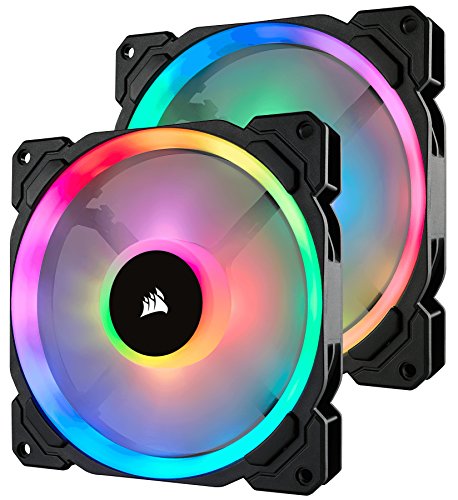
Featuring 16 independent RGB LEDs, the Corsair LL140 RGB PWM Fan 2 Pack is perfect for PC builders who prioritize both aesthetics and performance. With two light loops per fan, you can create stunning lighting effects tailored to your setup. The optimized 140mm blades guarantee a low-noise operation, running at just 25.0 dBA, making them ideal for quiet workstations. You’ll enjoy impressive airflow of 51.5 CFM while customizing fan speed between 600 to 1,300 RPM using the Corsair Lighting Node Pro. This combination of vibrant lighting and effective cooling makes the LL140 a fantastic choice for your next build.
Best For: Users seeking excellent airflow, quiet operation, and vibrant lighting effects in their PC builds.
Pros:
- 16 independent RGB LEDs per fan for customizable lighting effects.
- Low noise operation at just 25.0 dBA, ideal for quiet environments.
- Adjustable fan speed ranging from 600 to 1,300 RPM for optimized performance.
Cons:
- Requires Corsair Lighting Node Pro for full RGB control.
- Slightly higher price point compared to non-RGB fans.
- Limited to 140mm size, which may not fit all cases or setups.
ARCTIC P14 Pro PST Premium PWM Fan (140 mm)
Designed for professionals who demand both performance and silence, the ARCTIC P14 Pro PST Premium PWM Fan (140 mm) stands out with its impressive speed range of 400 to 2500 RPM. This fan features a Y-Cable splitter, allowing for easy connectivity. Its high static pressure guarantees effective airflow, even through dense radiators and mesh structures. With progressive speed adjustments via a 4-pin PWM connection, it can stop completely below 5% PWM, preserving peace in your workspace. The smooth-running fluid dynamic bearing minimizes noise, while the optimized rotor blades enhance cooling efficiency, making it a perfect addition to your workstation.
Best For: Professionals seeking high-performance cooling solutions while maintaining a quiet environment.
Pros:
- High static pressure ensures effective airflow through dense radiators and mesh structures.
- PWM control allows for progressive speed adjustments, stopping completely below 5% PWM for minimal noise.
- Smooth-running fluid dynamic bearing technology provides long service life and quiet operation.
Cons:
- Operating at higher RPMs may produce noticeable noise levels during peak performance.
- Limited color options, as it is only available in black.
- Requires a 4-pin PWM connection, which may not be compatible with all setups.
ARCTIC P14 Pro PST Premium 140 mm PWM Fan (White)
If you’re seeking a fan that balances performance and tranquility for your workstation, the ARCTIC P14 Pro PST Premium 140 mm PWM Fan (White) stands out with its impressive speed range of 400-2500 RPM. This fan features a fluid dynamic bearing for quiet operation and longevity, ensuring minimal vibrations. Its optimized rotor blade design enhances airflow while reducing noise, making it perfect for maintaining efficient cooling. With a Y-cable splitter included, you can easily connect multiple fans. Plus, it’s designed to stop completely below 5% PWM, offering you total control over your workstation’s climate without the distracting noise.
Best For: Users looking for a high-performance and quiet cooling solution for their computer systems.
Pros:
- High Speed Range: Adjustable speed from 400 to 2500 RPM allows for versatile cooling options.
- Quiet Operation: Fluid dynamic bearing minimizes noise, making it ideal for quiet environments.
- Optimized Design: Enhanced rotor blade design improves airflow and reduces noise, especially at lower speeds.
Cons:
- Weight: At 8.5 ounces, it may be heavier compared to some other fan options.
- Limited Color Options: Only available in white, which may not match all builds.
- Best Sellers Rank: Ranked #494 in computer case fans, indicating it may not be the most popular choice among consumers.
Thermaltake SWAFAN EX 14 ARGB PC Cooling Fan (3-Pack)

For those seeking a blend of performance and aesthetics in their workstation setup, the Thermaltake SWAFAN EX 14 ARGB PC Cooling Fan (3-Pack) stands out with its customizable ARGB lighting effects and impressive airflow capabilities. Operating at a speed range of 500 to 2000 RPM, these fans deliver a maximum airflow of 81 CFM, keeping your system cool without excessive noise. The swappable and reversible fan blades enhance versatility, while the neodymium magnetic connection simplifies installation. Plus, you can easily sync the lighting with your motherboard software. With this 3-pack, you’ll elevate both the cooling efficiency and visual appeal of your workspace.
Best For: Enthusiasts looking for high-performance cooling solutions with customizable lighting effects in their PC builds.
Pros:
- High airflow performance with a maximum of 81 CFM to effectively cool your system.
- Customizable ARGB lighting that can be synchronized with motherboard software for a cohesive look.
- Swappable and reversible fan blades provide versatility for different cooling configurations.
Cons:
- Limited to 140mm size, which may not fit all case configurations.
- Requires motherboard support for ARGB lighting control, potentially limiting usability.
- Higher RPM range may lead to increased noise at maximum speeds, which may not be ideal for quiet environments.
Factors to Consider When Choosing Quiet 140MM PWM Fans for Workstations
When choosing quiet 140mm PWM fans for your workstation, it’s essential to take into account several factors that impact performance and noise levels. You’ll want to pay attention to specifications like noise levels, airflow, and bearing types to guarantee you get the right fit for your setup. Don’t forget about durability and PWM speed control, as these can greatly affect your fan’s efficiency and lifespan.
Noise Level Specifications
Choosing the right noise level is essential for creating a quiet workstation, especially since lower decibel ratings can greatly enhance your working environment. Look for 140mm PWM fans that operate below 27.9 dBA for ideal silence; some can even reach whisper-quiet levels around 22.5 dBA. Advanced designs, like optimized blade shapes and anti-vibration pads, help minimize turbulence and vibration, further reducing noise. Features such as Zero RPM Mode allow fans to run silently at low loads, making them perfect for quiet conditions. Additionally, consider a fan’s RPM range, as models with broader speed ranges can adjust their noise output based on cooling needs, with some capable of running as low as 400 RPM for quieter operation.
Airflow and Static Pressure
Airflow and static pressure play an essential role in the performance of your workstation’s cooling system. When choosing a quiet 140mm PWM fan, consider airflow measured in cubic feet per minute (CFM). Higher CFM ratings are ideal for larger spaces or components, while static pressure, measured in mm-H2O, indicates the fan’s ability to push air through restrictive areas like radiators or dust filters. Aim for a balance between airflow and static pressure to guarantee effective cooling, especially in high-heat environments. Look for fans with at least 80 CFM and 3 mm-H2O static pressure. Many fans offer adjustable RPMs, letting you tailor airflow and noise levels to meet your specific needs while assuring peak cooling performance.
Durability and Lifespan
Durability is a critical factor in selecting quiet 140mm PWM fans for your workstation. Look for models with bearings designed for up to 400,000 hours of operation, ensuring long-term reliability. High-end options like fluid dynamic bearings or hybrid designs often outperform standard sleeve bearings in both durability and noise reduction. Additionally, many modern fans feature zero RPM modes, which minimize wear during low-load conditions, helping to extend their lifespan. Pay attention to construction materials; fans with copper and metal components typically offer better durability and thermal management. Finally, checking user reviews and product ratings can provide valuable insights into the reliability of fans, guiding your choice for a long-lasting solution.
Bearing Types Explained
When considering quiet 140mm PWM fans for your workstation, understanding the different bearing types is vital. Fluid dynamic bearings (FDB) offer smoother operation and reduced friction, leading to quieter performance and longevity, typically over 40,000 hours. They self-lubricate, minimizing wear and tear. On the other hand, magnetic bearings excel in low noise and friction, making them ideal for quiet operation, especially at lower RPMs. If performance is a priority, fans with three-phase motors can provide efficient cooling and quieter performance by evenly distributing power. Remember, the bearing type you choose can also influence the fan’s static pressure and airflow, which are essential for effective cooling in compact systems. Choose wisely for best performance.
PWM Speed Control
To guarantee your workstation remains both cool and quiet, it’s essential to take into account PWM (Pulse Width Modulation) speed control in your 140mm fan selection. PWM technology allows fans to adjust their speed dynamically based on system temperature, ensuring efficient cooling while minimizing noise. Look for fans that can operate between 400 RPM and 2,500 RPM, as this range provides peak performance under various thermal conditions. Many PWM-controlled fans maintain noise levels below 27.9 dB(A) at lower speeds, offering near-silent operation. Additionally, advanced PWM technology enables precise RPM adjustments, reducing speed variations to just 1-20 RPM. Some models can even stop completely below a certain PWM percentage, eliminating noise during low load periods for a quieter workspace.
Installation and Compatibility
Choosing the right 140mm PWM fan for your workstation involves several key factors to guarantee ideal installation and compatibility. First, confirm the fan has a 4-pin connector, which allows for PWM speed control with most motherboard headers. Next, consider the physical dimensions and mounting options to fit the fan snugly within your workstation case. Don’t forget to check if you need any additional components, like a fan hub or controller, for effective installation and lighting synchronization. Additionally, verify the fan’s RPM range and airflow specifications to match your cooling needs. Finally, assess the noise levels at various RPMs to confirm a quiet working environment that meets your productivity requirements.
Aesthetic Design Features
After ensuring your 140mm PWM fans are compatible and installed correctly, the aesthetic design features can elevate your workstation’s overall look. Many fans come with RGB lighting effects that let you customize color schemes and enjoy dynamic lighting modes. Modern design elements, like hexagonal RGB rings and magnetic dome shapes, not only look sleek but also enhance airflow efficiency. Unique blade designs, such as turbine or optimized rotors, contribute to aesthetics while minimizing turbulence for quieter operation. Additionally, anti-vibration pads and rubber mounts prevent resonance noise, creating a visually appealing and peaceful environment. Finally, premium materials like copper bearings and durable plastic frames enhance both longevity and the overall aesthetic quality of your setup.
Lighting Customization Options
When it comes to enhancing your workstation, the lighting customization options of 140mm PWM fans play an essential role in creating a personalized atmosphere. Many fans come with RGB lighting features, letting you customize colors and effects to match your style. You’ll find models with multiple light zones and individually addressable LEDs, providing dynamic displays that catch the eye. Some fans even sync seamlessly with software, allowing you to coordinate lighting effects with other components in your setup. Advanced modes, like “Time Warp,” offer unique visual experiences tailored to your preferences. With a wide range of dynamic effects and transitions, you can create a more immersive and engaging workspace that reflects your personality.