If you’re a PC enthusiast looking to enhance your setup in 2025, choosing the right RAID storage solution is vital for both performance and security. With numerous options available, each offering unique features and configurations, it’s important to find one that suits your specific needs. From portable drives to high-capacity enclosures, the choices can be overwhelming. Let’s explore the top contenders that stand out in this competitive market.
LaCie Rugged Raid Shuttle 8TB External Hard Drive
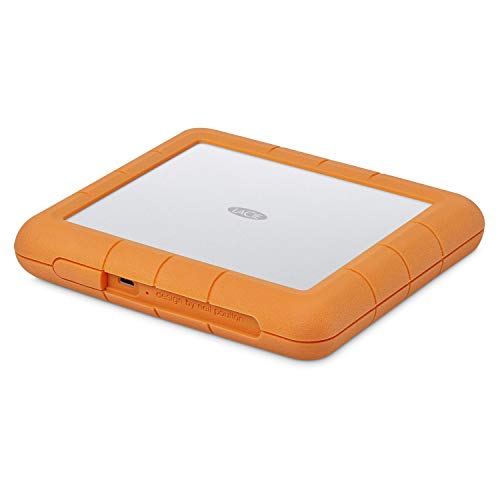
If you’re a creative professional or a PC enthusiast in need of robust storage, the LaCie Rugged Raid Shuttle 8TB External Hard Drive is an excellent choice. Its compact design, measuring just 3.9 x 2.6 x 0.7 inches and weighing 2.12 pounds, makes it highly portable. You can easily configure its RAID 0/1 setup for either performance or redundancy using the included wizard. Plus, it’s durable, being resistant to drops, shocks, dust, and water. With an 8TB capacity and self-encrypting features, your projects remain secure. Enjoy a complimentary month of Adobe Creative Cloud to enhance your creative workflow.
Best For: Creative professionals and PC enthusiasts seeking portable and durable storage solutions for large files.
Pros:
- High capacity: Offers 8TB of storage, ideal for heavy content storage.
- Durable design: Resistant to drops, shocks, dust, and water, making it suitable for on-the-go use.
- Configurable RAID setup: Easily switch between RAID 0/1 for enhanced performance or data redundancy.
Cons:
- Connection stability issues: Some users have reported inconsistent transfer speeds and connection problems.
- Customer service challenges: Mixed reviews regarding the responsiveness and effectiveness of customer support.
- Data recovery costs: Data recovery is not covered under warranty and can incur substantial fees.
TERRAMASTER D2-320 2Bay USB 3.2 Gen 2 RAID Storage

The TERRAMASTER D2-320 2-Bay USB 3.2 Gen 2 RAID Storage is an ideal choice for PC enthusiasts seeking high-speed data transfer and robust data security. With a data transfer rate of up to 10Gbps, it supports RAID 0, RAID 1, JBOD, and SINGLE configurations, ensuring versatility. You can install up to two 3.5″ or 2.5″ SATA HDDs or SSDs, reaching a total capacity of 44TB. Its tool-free installation makes setup a breeze, while the intelligent fan keeps temperatures in check. Plus, its durable design and automatic locking trays help safeguard your data effectively. Enjoy seamless performance and reliability!
Best For: PC enthusiasts seeking high-speed data transfer and robust data security solutions.
Pros:
- High-speed data transfer with rates up to 10Gbps for efficient data handling.
- Versatile RAID configurations including RAID 0, RAID 1, JBOD, and SINGLE for tailored data management.
- Tool-free installation and a push-lock design for easy setup and secure drive insertion.
Cons:
- Limited to two bays, which may not be sufficient for users needing greater storage expansion.
- Plastic material may not be as durable as other materials, potentially affecting longevity.
- Weight of 4.5 pounds may make it less portable compared to lighter alternatives.
WD 16TB My Book Duo Desktop RAID External Hard Drive

For those who demand high-capacity storage with robust data protection, the WD 16TB My Book Duo Desktop RAID External Hard Drive is an excellent choice. With its USB 3.1 interface, you’ll enjoy speeds up to 360 MB/s, making file transfers quick and efficient. The RAID-0 configuration out of the box guarantees peak performance, while two USB 3.0 hub ports allow for additional accessories. Security features like 256-bit AES hardware encryption and password protection keep your data safe. Weighing 6.9 pounds and compact in design, this hard drive combines reliability and functionality, earning a solid 4.4-star rating from users.
Best For: Those seeking a high-capacity external hard drive with advanced data protection features for reliable storage and backup needs.
Pros:
- High-speed data transfer with up to 360 MB/s read speeds.
- Robust security features including 256-bit AES hardware encryption and password protection.
- Versatile with additional USB 3.0 hub ports for connecting extra accessories.
Cons:
- Weighs 6.9 pounds, making it less portable than smaller alternatives.
- RAID-0 configuration may pose a risk of data loss if one drive fails.
- Limited warranty details may require additional inquiry for coverage specifics.
QNAP TR-004 4 Bay USB Type-C Direct Attached Storage (DAS)

Designed for PC enthusiasts seeking reliable storage solutions, the QNAP TR-004 4 Bay USB Type-C Direct Attached Storage (DAS) offers a versatile diskless design that accommodates up to four 3.5-inch SATA drives. With hardware RAID support for configurations like RAID 0, 1, and 5, you can easily customize your data protection and performance. Connecting via USB Type-C, it’s compatible with Windows, macOS, and Linux, making it a flexible choice for various systems. Keep in mind that while you can expand your QNAP NAS capacity, it can only serve as an individual storage pool or volume.
Best For: PC enthusiasts seeking a reliable and customizable storage solution for data protection and performance.
Pros:
- Hardware RAID support allows for various configurations (RAID 0, 1, 5) to suit different storage needs.
- Diskless design accommodates up to four 3.5-inch SATA drives, providing flexibility in storage capacity.
- Compatible with multiple operating systems (Windows, macOS, Linux), making it versatile for different users.
Cons:
- Limited compatibility with certain QNAP NAS models and requires QTS 4.3.6 or later for proper functionality.
- Can only serve as an individual storage pool or volume, restricting integration with NAS applications.
- Drive migration restrictions mean files and data may not be recognized when moving drives between different devices.
ORICO RAID 5 Bay HDD Enclosures (USB 3.0, Max 110TB)
With a maximum storage capacity of 110TB, the ORICO RAID 5 Bay HDD Enclosure 9858RU3 is ideal for PC enthusiasts who need extensive data management solutions. It supports five 3.5-inch SATA disks, offering versatile RAID configurations, including RAID 5 for enhanced data security. Thanks to its USB 3.0 interface, you’ll experience data transfer rates up to 5 Gbps. The tool-less design simplifies installation, while the compact aluminum chassis guarantees durability. Although user reviews praise its performance, be mindful of potential noise and accidental RAID mode switches. Overall, it’s a reliable choice for efficient file management and backup.
Best For: PC enthusiasts and professionals seeking extensive data management solutions with high storage capacity and versatile RAID configurations.
Pros:
- Supports up to 110TB of storage capacity across five 3.5-inch SATA disks.
- Fast data transfer rates of up to 5 Gbps facilitate efficient file management.
- Tool-less installation design allows for easy assembly and disassembly of drives.
Cons:
- Potential for accidental RAID mode switches during operation.
- Reports of intermittent drive disconnections can affect reliability.
- Users noted noise from drives and cooling fan, which may be distracting.
OWC 32TB Mercury Elite Pro Dual USB-C/Thunderbolt 3 External Raid Storage Enclosure
The OWC 32TB Mercury Elite Pro Dual USB-C/Thunderbolt 3 External RAID Storage Enclosure is a game-changer for creative professionals who demand high-speed performance and flexibility in their storage solutions. With speeds up to 974MB/s, you’ll experience seamless data transfer. It supports multiple RAID configurations—RAID 0, 1, Span, or JBOD—allowing you to tailor storage to your needs. The enclosure connects effortlessly to USB-C and Thunderbolt 3 devices, featuring a 3-port hub for added connectivity. Its whisper-quiet operation and efficient cooling make it perfect for studio environments, ensuring your workflow remains uninterrupted while managing two drives effectively.
Best For: Creative professionals and high-demand production studios that require fast, reliable, and flexible external storage solutions.
Pros:
- High-speed performance with data transfer rates up to 974MB/s, enhancing productivity.
- Versatile RAID configurations (RAID 0, 1, Span, JBOD) allow customization based on storage needs.
- Whisper-quiet operation with efficient cooling, making it suitable for studio environments.
Cons:
- Higher price point compared to standard external drives, which may not be suitable for casual users.
- Limited to two drives, which may not meet the needs of users requiring larger storage capacities.
- Requires external power source, adding to the complexity of setup and portability.
BUFFALO LinkStation 720 16TB Network Attached Storage
For PC enthusiasts seeking a reliable and efficient storage solution, the BUFFALO LinkStation 720 16TB Network Attached Storage stands out with its impressive cloud capabilities. With two drive bays, it ships in RAID 1, providing 8TB of usable space, or you can switch to RAID 0 for the full 16TB. Its easy setup and intuitive web interface make managing your files a breeze. Plus, you’ll enjoy subscription-free personal cloud storage and automated backups across devices. While it’s generally quiet and easy to use, some users have experienced reliability concerns, so keep that in mind before diving in.
Best For: PC enthusiasts and home users looking for a robust and user-friendly network storage solution with cloud capabilities.
Pros:
- Easy setup and intuitive web interface make file management simple.
- Offers subscription-free personal cloud storage for videos, music, and photos.
- Automated backup options across multiple devices enhance data security.
Cons:
- Some users report reliability issues and concerns with data recovery costs not covered by the warranty.
- Performance can vary, with file transfer rates lower than expected for some users.
- Mixed customer feedback regarding support quality and outdated technology features.
8 Bay Hard Drive RAID Enclosure with Cooling Fan

Designed for both personal and enterprise users, the 8 Bay Hard Drive RAID Enclosure with Cooling Fan is a game-changer for anyone looking to maximize their storage potential. It supports up to 160TB, accommodating both 2.5 and 3.5 SATA HDDs/SSDs. With eight RAID modes available, you can customize your setup for peak performance. The enclosure features two cooling fans to manage heat, though it may produce noise levels of 40-50 decibels. Make sure to connect at least one hard drive per group for proper operation, and always back up your data before configuring RAID settings to avoid loss.
Best For: This product is best for personal and enterprise users who need high-capacity storage solutions with customizable RAID configurations.
Pros:
- Supports a massive storage capacity of up to 160TB, accommodating both 2.5 and 3.5 SATA HDDs/SSDs.
- Offers eight RAID modes, allowing for tailored performance based on user needs.
- Equipped with dual cooling fans to effectively manage heat during operation.
Cons:
- Produces noise levels of 40-50 decibels, which may not be suitable for noise-sensitive environments.
- Requires power disconnection and manual adjustment for RAID mode switching, which can be inconvenient.
- Data loss is possible during RAID setup, necessitating careful backup procedures before configuration.
Dual Bay Hard Drive RAID Enclosure with Cooling Fan
Ideal for both personal and enterprise users, the Dual Bay Hard Drive RAID Enclosure with Cooling Fan offers exceptional flexibility and performance. It supports 2.5/3.5-inch HDDs and SSDs, accommodating up to 40TB total. With four RAID modes—RAID 0, RAID 1, Normal, and JBOD—you can easily choose the best setup for your needs. The aluminum-alloy design and built-in 2-inch fan help prevent overheating, though the fan operates at 40-50 decibels, which some might find noisy. You’ll appreciate the USB 3.0 interface for rapid data transfer, and the plug-and-play functionality guarantees hassle-free setup across multiple platforms.
Best For: Individuals and businesses looking for a reliable and high-capacity storage solution that supports multiple RAID configurations.
Pros:
- Supports up to 40TB of storage capacity with compatibility for both 2.5/3.5-inch HDDs and SSDs.
- Offers multiple RAID modes (RAID 0, RAID 1, Normal, and JBOD) for flexible data management and redundancy options.
- Plug-and-play functionality ensures easy setup and compatibility with various operating systems, including Windows, Mac, and Linux.
Cons:
- Fan noise levels range from 40-50 decibels, which may be bothersome for noise-sensitive users.
- RAID configuration may result in data loss if not managed carefully, particularly on MAC OS where RAID software is lacking.
- Requires a reset button to change RAID settings, which may be inconvenient for some users.
OWC Express 4M2 Four-Slot USB4 External Storage Enclosure for NVMe SSDs

The OWC Express 4M2 Four-Slot USB4 External Storage Enclosure stands out as a robust solution for PC enthusiasts seeking high-speed storage with advanced RAID capabilities. Supporting NVMe M.2 SSDs and offering real-world speeds up to 3200MB/s, it’s compatible with various systems, including USB4 and Thunderbolt devices. Its durable aircraft-grade aluminum design guarantees effective heat management, while smart fans activate only under load. Installation is a breeze, thanks to the included screwdriver. However, mixed reviews highlight concerns over performance versus price and fan noise. If you’re after high-speed RAID solutions, weigh your options carefully before diving in.
Best For: The OWC Express 4M2 is best for PC enthusiasts and professionals seeking high-speed storage solutions with advanced RAID capabilities.
Pros:
- High real-world performance of up to 3200MB/s for efficient data transfer.
- Durable construction from aircraft-grade aluminum enhances heat dissipation and longevity.
- Easy installation process with included tools, making it accessible for DIY users.
Cons:
- Mixed performance reviews with some users finding it underwhelming for the price.
- Potential fan noise can be disruptive during operation, especially under heavy load.
- Performance issues reported under Thunderbolt 4, with some users achieving better results on USB 3.2.
Factors to Consider When Choosing RAID Storage for PC
When choosing RAID storage for your PC, you’ll want to take into account several key factors. Think about your storage capacity needs, the RAID configuration that best suits your setup, and how compatible it is with your operating system. Don’t forget to evaluate performance, speed, durability, and reliability to guarantee you get the best solution for your requirements.
Storage Capacity Requirements
As you consider RAID storage for your PC, determining your storage capacity requirements is essential to guarantee you meet both current and future needs. Start by evaluating how much data you currently store, factoring in file sizes like large videos or high-resolution images. Calculate the total storage necessary, including some room for future growth. The number of drives in your RAID setup also influences capacity; for instance, RAID 0 maximizes space, while RAID 1 offers redundancy at the cost of half your total capacity. Be mindful of potential expansion needs, as some RAID configurations allow for easy drive additions, while others may require a complete reconfiguration. Finally, remember that certain setups reserve space for parity or mirroring, impacting usable storage.
RAID Configuration Options
Choosing the right RAID configuration for your PC involves understanding how each option aligns with your performance and redundancy needs. RAID 0 offers maximum speed by striping data across multiple drives but leaves you vulnerable, as a single drive failure means total data loss. If redundancy’s a priority, RAID 1 mirrors your data, ensuring access even if one drive fails, though it halves your usable capacity. RAID 5 balances performance and redundancy with striping and parity, allowing recovery from a single drive failure with efficient storage use. For those seeking both speed and redundancy, RAID 10 combines mirroring and striping, but requires at least four drives. Alternatively, JBOD lets you use drives independently, maximizing storage without redundancy.
Compatibility With OS
Understanding the compatibility of your RAID storage with your operating system is essential for maximizing performance and functionality. First, make sure the RAID system supports your OS, as some may only work with Windows, macOS, or Linux. This can limit usability considerably. Next, check if the RAID configuration software is compatible with your OS version; outdated systems might not support certain features. Additionally, verify that the RAID storage supports the necessary file systems like NTFS, HFS+, or EXT4 for ideal data management. Don’t forget to take into account whether specific drivers or firmware updates are needed, as these can impact compatibility. Finally, be aware that some RAID configurations have limitations based on the OS you’re using, which could restrict functionality.
Performance and Speed
When considering RAID storage for your PC, performance and speed are essential factors that can make or break your experience. RAID configurations directly affect read and write speeds; for example, RAID 0 boosts performance by striping data across multiple drives, achieving speeds up to 1075MB/s with SSDs. While RAID 1 offers redundancy, it may slow down write speeds compared to RAID 0. Utilizing high-speed interfaces like USB 3.2 Gen 2 can also enhance performance, supporting transfer speeds of up to 10Gbps. Additionally, the number of drives in your RAID setup matters—using a 4-bay configuration can markedly increase throughput, especially in RAID 5 or RAID 10. Remember, SSDs outperform traditional HDDs, delivering maximum read speeds over 1000MB/s.
Durability and Reliability
While you’re setting up your RAID storage, it’s essential to prioritize durability and reliability to safeguard your data. RAID systems must withstand physical shocks, drops, and environmental factors like dust and moisture. Choosing a robust RAID configuration, such as RAID 1, can enhance reliability by mirroring data—ensuring your information remains intact even if one drive fails. The materials used in RAID enclosures, like aluminum, contribute to heat dissipation and overall durability, impacting long-term performance. Regular monitoring and maintenance are vital; select a solution with strong health monitoring features to avoid potential data loss. Finally, customer feedback often highlights reliability, so it’s wise to take into account warranty support and data recovery options when making your choice.